
mcp-server-data-exploration
# MCP Server for Data Exploration
MCP Server is a versatile tool designed for interactive data exploration.
Your personal Data Scientist assistant, turning complex datasets into clear, actionable insights.
<a href="https://glama.ai/mcp/servers/hwm8j9c422"><img width="380" height="200" src="https://glama.ai/mcp/servers/hwm8j9c422/badge" alt="mcp-server-data-exploration MCP server" /></a>
## 🚀 Try it Out
1. **Download Claude Desktop**
- Get it [here](https://claude.ai/download)
2. **Install and Set Up**
- On macOS, run the following command in your terminal:
```bash
python setup.py
```
3. **Load Templates and Tools**
- Once the server is running, wait for the prompt template and tools to load in Claude Desktop.
4. **Start Exploring**
- Select the explore-data prompt template from MCP
- Begin your conversation by providing the required inputs:
- `csv_path`: Local path to the CSV file
- `topic`: The topic of exploration (e.g., "Weather patterns in New York" or "Housing prices in California")
## Examples
These are examples of how you can use MCP Server to explore data without any human intervention.
### Case 1: California Real Estate Listing Prices
- Kaggle Dataset: [USA Real Estate Dataset](https://www.kaggle.com/datasets/ahmedshahriarsakib/usa-real-estate-dataset)
- Size: 2,226,382 entries (178.9 MB)
- Topic: Housing price trends in California
[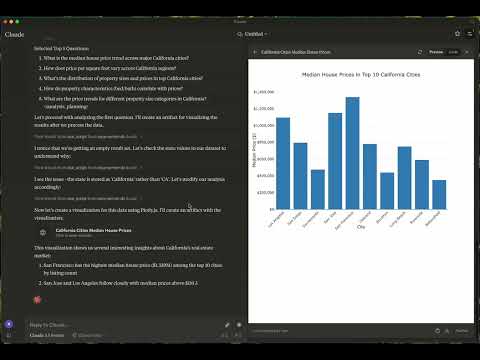](https://www.youtube.com/watch?v=RQZbeuaH9Ys)
- [Data Exploration Summary](https://claude.site/artifacts/058a1593-7a14-40df-bf09-28b8c4531137)
### Case 2: Weather in London
- Kaggle Dataset: [2M+ Daily Weather History UK](https://www.kaggle.com/datasets/jakewright/2m-daily-weather-history-uk/data)
- Size: 2,836,186 entries (169.3 MB)
- Topic: Weather in London
- Report: [View Report](https://claude.site/artifacts/601ea9c1-a00e-472e-9271-3efafb8edede)
- Graphs:
- [London Temperature Trends](https://claude.site/artifacts/9a25bc1e-d0cf-498a-833c-5179547ee268)
<img width="1622" alt="Screenshot 2024-12-09 at 12 48 56 AM" src="https://github.com/user-attachments/assets/9e70fe97-8af7-4221-b1e7-00197c88bb47">
- [Temperature-Humidity Relationship by Season](https://claude.site/artifacts/32a3371c-698d-48e3-b94e-f7e88ce8093d)
<img width="1623" alt="Screenshot 2024-12-09 at 12 47 54 AM" src="https://github.com/user-attachments/assets/f4ac60a8-30e3-4b10-b296-ba412c2922fa">
- [Wind Direction Pattern by Season](https://claude.site/artifacts/32a3371c-698d-48e3-b94e-f7e88ce8093d)
<img width="1622" alt="Screenshot 2024-12-09 at 12 47 00 AM" src="https://github.com/user-attachments/assets/2db01054-f948-4d2e-ba39-8de8fa59f83d">
## 📦 Components
### Prompts
- **explore-data**: Tailored for data exploration tasks
### Tools
1. **load-csv**
- Function: Loads a CSV file into a DataFrame
- Arguments:
- `csv_path` (string, required): Path to the CSV file
- `df_name` (string, optional): Name for the DataFrame. Defaults to df_1, df_2, etc., if not provided
2. **run-script**
- Function: Executes a Python script
- Arguments:
- `script` (string, required): The script to execute
## ⚙️ Modifying the Server
### Claude Desktop Configurations
- macOS: `~/Library/Application\ Support/Claude/claude_desktop_config.json`
- Windows: `%APPDATA%/Claude/claude_desktop_config.json`
### Development (Unpublished Servers)
```json
"mcpServers": {
"mcp-server-ds": {
"command": "uv",
"args": [
"--directory",
"/Users/username/src/mcp-server-ds",
"run",
"mcp-server-ds"
]
}
}
```
### Published Servers
```json
"mcpServers": {
"mcp-server-ds": {
"command": "uvx",
"args": [
"mcp-server-ds"
]
}
}
```
## 🛠️ Development
### Building and Publishing
1. **Sync Dependencies**
```bash
uv sync
```
2. **Build Distributions**
```bash
uv build
```
Generates source and wheel distributions in the dist/ directory.
3. **Publish to PyPI**
```bash
uv publish
```
## 🤝 Contributing
Contributions are welcome! Whether you're fixing bugs, adding features, or improving documentation, your help makes this project better.
### Reporting Issues
If you encounter bugs or have suggestions, open an issue in the issues section. Include:
- Steps to reproduce (if applicable)
- Expected vs. actual behavior
- Screenshots or error logs (if relevant)
## 📜 License
This project is licensed under the MIT License.
See the LICENSE file for details.
## 💬 Get in Touch
Questions? Feedback? Open an issue or reach out to the maintainers. Let's make this project awesome together!
## About
This is an open source project run by [ReadingPlus.AI LLC](https://readingplus.ai). and open to contributions from the entire community.
TDQS
Scored across 2 tools
The two tools have clearly distinct purposes: load_csv is for loading CSV files into DataFrames, while run_script is for executing Python scripts for data analytics tasks. There is no overlap in functionality, and an agent would easily distinguish between them.
Both tools use snake_case naming, which is consistent, but they follow different patterns: load_csv uses a verb_noun format, while run_script uses verb_noun as well but with a more generic noun. This minor deviation keeps it mostly consistent but not perfectly aligned.
With only two tools, the server feels severely under-scoped for data exploration. Key operations like data transformation, filtering, aggregation, or visualization are missing, making it incomplete for typical data analysis workflows.
The tool set is highly incomplete for data exploration. It covers only loading data and running scripts, with no tools for common tasks like data cleaning, analysis, or exporting results. This will likely cause agent failures when trying to perform comprehensive data exploration.