

F
licenseNot graded
qualityD
maintenanceEnables users to preprocess, analyze, and visualize CSV data through comprehensive tools for data manipulation, statistical analysis, and graph generation.
3
-

MCP 서버는 대화형 데이터 탐색을 위해 설계된 다목적 도구입니다.
복잡한 데이터 세트를 명확하고 실행 가능한 통찰력으로 전환하는 개인 데이터 과학자 보조원입니다.
Claude Desktop 다운로드
여기서 구매하세요
설치 및 설정
macOS에서는 터미널에서 다음 명령을 실행하세요: GXP1
템플릿 및 도구 로드
서버가 실행되면 Claude Desktop에 프롬프트 템플릿과 도구가 로드될 때까지 기다리세요.
탐색을 시작하세요
MCP에서 탐색 데이터 프롬프트 템플릿을 선택하세요
필요한 입력 내용을 제공하여 대화를 시작하세요.
csv_path : CSV 파일의 로컬 경로
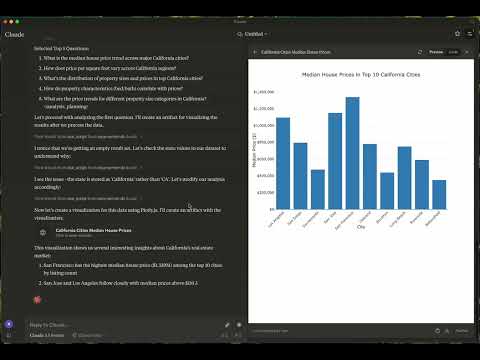
topic : 탐색 주제(예: "뉴욕의 날씨 패턴" 또는 "캘리포니아의 주택 가격")
Related MCP server: MCP Tabular Data Analysis Server
이는 MCP 서버를 사용하여 인간의 개입 없이 데이터를 탐색하는 방법의 예입니다.
Kaggle 데이터셋: 미국 부동산 데이터셋
크기: 2,226,382개 항목(178.9MB)
주제: 캘리포니아 주택 가격 동향
Kaggle 데이터 세트: 200만 건 이상의 영국 일일 날씨 기록
크기: 2,836,186개 항목(169.3MB)
주제: 런던의 날씨
보고서: 보고서 보기
그래프:
explore-data : 데이터 탐색 작업에 맞춤화됨
로드-csv
기능: CSV 파일을 DataFrame으로 로드합니다.
인수:
csv_path (문자열, 필수): CSV 파일 경로
df_name (문자열, 선택 사항): DataFrame의 이름입니다. 지정하지 않으면 df_1, df_2 등으로 기본 설정됩니다.
실행 스크립트
기능: Python 스크립트를 실행합니다.
인수:
script (문자열, 필수): 실행할 스크립트
macOS: ~/Library/Application\ Support/Claude/claude_desktop_config.json
윈도우: %APPDATA%/Claude/claude_desktop_config.json
"mcpServers": {
  "mcp-server-ds": {
    "command": "uv",
    "args": [
      "--directory",
      "/Users/username/src/mcp-server-ds",
      "run",
      "mcp-server-ds"
    ]
  }
}"mcpServers": {
"mcp-server-ds": {
"command": "uvx",
"args": [
"mcp-server-ds"
]
}
}동기화 종속성
uv sync빌드 배포
uv builddist/ 디렉토리에 소스 및 휠 배포판을 생성합니다.
PyPI에 게시
uv publish기여를 환영합니다! 버그 수정, 기능 추가, 문서 개선 등 여러분의 도움은 이 프로젝트를 더욱 발전시키는 데 큰 도움이 됩니다.
버그가 발견되거나 제안 사항이 있으시면 문제 섹션에 문제를 제기해 주세요. 다음 내용을 포함해 주세요.
재현 단계(해당되는 경우)
예상된 동작과 실제 동작
스크린샷 또는 오류 로그(해당되는 경우)
이 프로젝트는 MIT 라이선스에 따라 라이선스가 부여됩니다. 자세한 내용은 라이선스 파일을 참조하세요.
질문이나 의견이 있으신가요? 이슈를 등록하거나 관리자에게 문의해 주세요. 함께 이 프로젝트를 멋지게 만들어 갑시다!
이는 ReadingPlus.AI LLC 가 운영하는 오픈 소스 프로젝트이며, 커뮤니티 전체의 기여를 환영합니다.
Load CSV File Tool
Purpose: Load a local CSV file into a DataFrame.
Usage Notes: • If a df_name is not provided, the tool will automatically assign names sequentially as df_1, df_2, and so on.
| Name | Required | Description | Default |
|---|---|---|---|
| csv_path | Yes | ||
| df_name | No |
Does the description disclose side effects, auth requirements, rate limits, or destructive behavior?
With no annotations provided, the description carries full burden for behavioral disclosure. It mentions the automatic naming behavior when df_name is omitted, which is helpful. However, it doesn't address critical behavioral aspects like error handling, file format requirements, memory implications, or what happens if the CSV path is invalid.
Agents need to know what a tool does to the world before calling it. Descriptions should go beyond structured annotations to explain consequences.
Is the description appropriately sized, front-loaded, and free of redundancy?
The description is well-structured with clear sections (Purpose, Usage Notes) and uses bullet points efficiently. Both sentences earn their place by providing essential information without unnecessary elaboration.
Shorter descriptions cost fewer tokens and are easier for agents to parse. Every sentence should earn its place.
Given the tool's complexity, does the description cover enough for an agent to succeed on first attempt?
For a data loading tool with no annotations, no output schema, and 0% schema description coverage, the description is insufficient. It doesn't explain what a DataFrame is in this context, what the tool returns, error conditions, or file format requirements. The description should provide more complete operational context.
Complex tools with many parameters or behaviors need more documentation. Simple tools need less. This dimension scales expectations accordingly.
Does the description clarify parameter syntax, constraints, interactions, or defaults beyond what the schema provides?
With 0% schema description coverage, the schema provides no parameter documentation. The description partially compensates by explaining the df_name parameter's behavior when omitted, but doesn't clarify csv_path requirements or format. It adds some value but doesn't fully compensate for the complete lack of schema documentation.
Input schemas describe structure but not intent. Descriptions should explain non-obvious parameter relationships and valid value ranges.
Does the description clearly state what the tool does and how it differs from similar tools?
The description clearly states the tool's purpose as 'Load a local CSV file into a DataFrame' with specific verb ('Load') and resource ('CSV file'), making it immediately understandable. However, it doesn't differentiate from the sibling tool 'run_script', which appears unrelated but could potentially handle similar data operations.
Agents choose between tools based on descriptions. A clear purpose with a specific verb and resource helps agents select the right tool.
Does the description explain when to use this tool, when not to, or what alternatives exist?
The description provides implied usage guidance through the 'Usage Notes' section about automatic naming when df_name isn't provided. However, it lacks explicit guidance on when to use this tool versus alternatives or any prerequisites for successful operation.
Agents often have multiple tools that could apply. Explicit usage guidance like "use X instead of Y when Z" prevents misuse.
Python Script Execution Tool
Purpose: Execute Python scripts for specific data analytics tasks.
Allowed Actions 1. Print Results: Output will be displayed as the script’s stdout. 2. [Optional] Save DataFrames: Store DataFrames in memory for future use by specifying a save_to_memory name.
Prohibited Actions 1. Overwriting Original DataFrames: Do not modify existing DataFrames to preserve their integrity for future tasks. 2. Creating Charts: Chart generation is not permitted.
| Name | Required | Description | Default |
|---|---|---|---|
| script | Yes | ||
| save_to_memory | No |
Does the description disclose side effects, auth requirements, rate limits, or destructive behavior?
With no annotations provided, the description carries the full burden of behavioral disclosure. It effectively describes key behavioral traits: output is displayed as stdout, optional saving of DataFrames in memory, and prohibitions on overwriting original DataFrames and creating charts. This covers execution behavior, memory handling, and constraints, though it doesn't address error handling, performance limits, or security aspects.
Agents need to know what a tool does to the world before calling it. Descriptions should go beyond structured annotations to explain consequences.
Is the description appropriately sized, front-loaded, and free of redundancy?
The description is well-structured with clear sections ('Purpose', 'Allowed Actions', 'Prohibited Actions'), making it easy to scan. It's appropriately sized without unnecessary fluff, though the 'Purpose' section could be more concise. Every sentence adds value, such as clarifying output behavior and constraints.
Shorter descriptions cost fewer tokens and are easier for agents to parse. Every sentence should earn its place.
Given the tool's complexity, does the description cover enough for an agent to succeed on first attempt?
Given the complexity of a script execution tool with no annotations and no output schema, the description is moderately complete. It covers execution purpose, allowed/prohibited actions, and some parameter context, but lacks details on error handling, return values, or integration with the sibling tool. For a tool with 2 parameters and significant behavioral implications, more completeness is needed.
Complex tools with many parameters or behaviors need more documentation. Simple tools need less. This dimension scales expectations accordingly.
Does the description clarify parameter syntax, constraints, interactions, or defaults beyond what the schema provides?
The schema description coverage is 0%, so the description must compensate for undocumented parameters. It mentions 'save_to_memory' in the 'Allowed Actions' section, adding some meaning beyond the schema. However, it doesn't explain the 'script' parameter's content or format, leaving a key parameter undocumented. With 2 parameters and low coverage, the description only partially compensates.
Input schemas describe structure but not intent. Descriptions should explain non-obvious parameter relationships and valid value ranges.
Does the description clearly state what the tool does and how it differs from similar tools?
The description clearly states the tool's purpose as 'Execute Python scripts for specific data analytics tasks,' providing a specific verb ('Execute') and resource ('Python scripts'). It distinguishes from the sibling tool 'load_csv' by focusing on script execution rather than data loading. However, it doesn't specify what 'specific data analytics tasks' entail, keeping it slightly vague.
Agents choose between tools based on descriptions. A clear purpose with a specific verb and resource helps agents select the right tool.
Does the description explain when to use this tool, when not to, or what alternatives exist?
The description provides implied usage guidance through 'Allowed Actions' and 'Prohibited Actions' sections, suggesting when to use certain features like saving DataFrames and when to avoid actions like chart generation. However, it lacks explicit guidance on when to use this tool versus the sibling 'load_csv' or other alternatives, and doesn't mention prerequisites or specific contexts for use.
Agents often have multiple tools that could apply. Explicit usage guidance like "use X instead of Y when Z" prevents misuse.
Recent tool additions, removals, and schema changes observed during successful MCP inspections.
v1.0.0load_csvrun_scriptScored across 2 tools
The two tools have clearly distinct purposes: load_csv is for loading CSV files into DataFrames, while run_script is for executing Python scripts for data analytics tasks. There is no overlap in functionality, and an agent would easily distinguish between them.
Both tools use snake_case naming, which is consistent, but they follow different patterns: load_csv uses a verb_noun format, while run_script uses verb_noun as well but with a more generic noun. This minor deviation keeps it mostly consistent but not perfectly aligned.
With only two tools, the server feels severely under-scoped for data exploration. Key operations like data transformation, filtering, aggregation, or visualization are missing, making it incomplete for typical data analysis workflows.
The tool set is highly incomplete for data exploration. It covers only loading data and running scripts, with no tools for common tasks like data cleaning, analysis, or exporting results. This will likely cause agent failures when trying to perform comprehensive data exploration.
Find novel, statistically validated patterns in tabular data — hypothesis-free.
AI data analyst: ask about your Excel, CSV, GA4 or database data and get charts and dashboards back
Ask data questions in natural language. Get SQL, insights, and charts from your databases.
Push CSV, JSON, JSONL or Parquet from your agent and get a link a human can explore.