
A
licenseB
qualityC
maintenanceA Model Context Protocol (MCP) server that lets you seamlessly use OpenAI's models right from Claude.
1
206 npm
76
MIT

将 Claude 与任何 OpenAI SDK 兼容的聊天完成 API 集成 - OpenAI、Perplexity、Groq、xAI、PyroPrompts 等。
这实现了模型上下文协议服务器。了解更多信息: https://modelcontextprotocol.io
这是一个基于 TypeScript 的 MCP 服务器,可实现任何 OpenAI SDK 兼容聊天完成 API。
它有一个工具, chat ,将问题转发给配置的 AI 聊天提供商。
安装依赖项:
npm install构建服务器:
npm run build对于使用自动重建的开发:
npm run watchRelated MCP server: Ultimate-MCP-Server
要将 OpenAI 添加到 Claude Desktop,请添加服务器配置:
在 MacOS 上: ~/Library/Application Support/Claude/claude_desktop_config.json
在 Windows 上: %APPDATA%/Claude/claude_desktop_config.json
您可以通过 Claude Desktop 配置中的npx使用它,如下所示:
{
  "mcpServers": {
    "chat-openai": {
      "command": "npx",
      "args": [
        "@pyroprompts/any-chat-completions-mcp"
      ],
      "env": {
        "AI_CHAT_KEY": "OPENAI_KEY",
        "AI_CHAT_NAME": "OpenAI",
        "AI_CHAT_MODEL": "gpt-4o",
        "AI_CHAT_BASE_URL": "https://api.openai.com/v1"
      }
    }
  }
}
或者,如果您克隆 repo,则可以像这样在 Claude Desktop 配置中构建和使用:
{
  "mcpServers": {
    "chat-openai": {
      "command": "node",
      "args": [
        "/path/to/any-chat-completions-mcp/build/index.js"
      ],
      "env": {
        "AI_CHAT_KEY": "OPENAI_KEY",
        "AI_CHAT_NAME": "OpenAI",
        "AI_CHAT_MODEL": "gpt-4o",
        "AI_CHAT_BASE_URL": "https://api.openai.com/v1"
      }
    }
  }
}
您可以通过多次引用同一个 MCP 服务器但使用不同的环境参数来添加多个提供程序:
{
  "mcpServers": {
    "chat-pyroprompts": {
      "command": "node",
      "args": [
        "/path/to/any-chat-completions-mcp/build/index.js"
      ],
      "env": {
        "AI_CHAT_KEY": "PYROPROMPTS_KEY",
        "AI_CHAT_NAME": "PyroPrompts",
        "AI_CHAT_MODEL": "ash",
        "AI_CHAT_BASE_URL": "https://api.pyroprompts.com/openaiv1"
      }
    },
    "chat-perplexity": {
      "command": "node",
      "args": [
        "/path/to/any-chat-completions-mcp/build/index.js"
      ],
      "env": {
        "AI_CHAT_KEY": "PERPLEXITY_KEY",
        "AI_CHAT_NAME": "Perplexity",
        "AI_CHAT_MODEL": "sonar",
        "AI_CHAT_BASE_URL": "https://api.perplexity.ai"
      }
    },
    "chat-openai": {
      "command": "node",
      "args": [
        "/path/to/any-chat-completions-mcp/build/index.js"
      ],
      "env": {
        "AI_CHAT_KEY": "OPENAI_KEY",
        "AI_CHAT_NAME": "OpenAI",
        "AI_CHAT_MODEL": "gpt-4o",
        "AI_CHAT_BASE_URL": "https://api.openai.com/v1"
      }
    }
  }
}
有了这三个,您将在 Claude Desktop Home 中看到每个工具的一个工具:
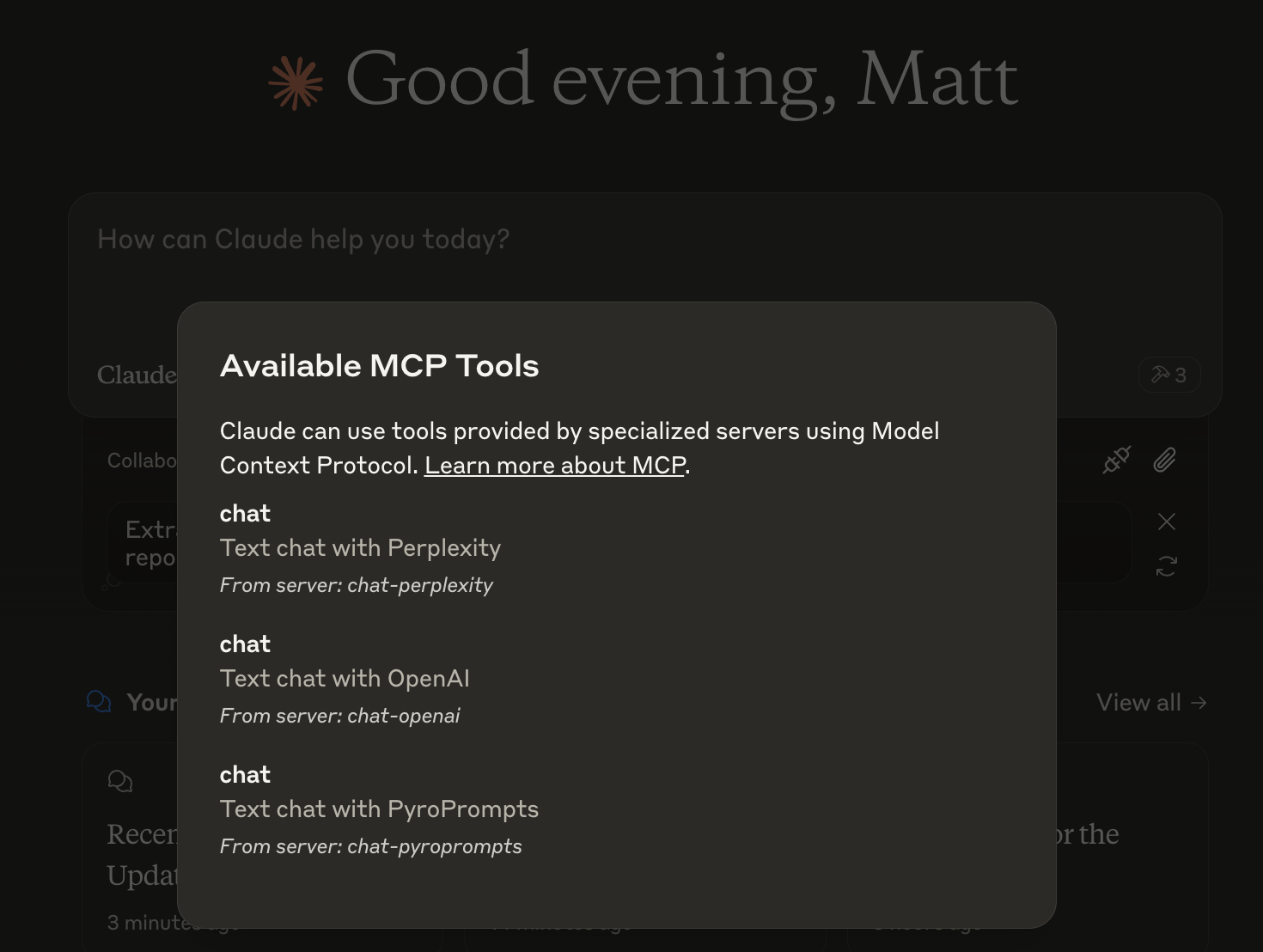
然后你就可以与其他 LLM 聊天,聊天中显示如下内容:

或者,在LibreChat中配置如下:
  chat-perplexity:
    type: stdio
    command: npx
    args:
      - -y
      - @pyroprompts/any-chat-completions-mcp
    env:
      AI_CHAT_KEY: "pplx-012345679"
      AI_CHAT_NAME: Perplexity
      AI_CHAT_MODEL: sonar
      AI_CHAT_BASE_URL: "https://api.perplexity.ai"
      PATH: '/usr/local/bin:/usr/bin:/bin'
它在 LibreChat 中显示:

要通过Smithery自动为 Claude Desktop 安装任何与 OpenAI 兼容的 API 集成:
npx -y @smithery/cli install any-chat-completions-mcp-server --client claude由于 MCP 服务器通过 stdio 进行通信,调试起来可能比较困难。我们推荐使用MCP Inspector ,它以包脚本的形式提供:
npm run inspector检查器将提供一个 URL 来访问浏览器中的调试工具。
显然,modelcontextprotocol 和 Anthropic 团队负责 MCP 规范并将其集成到 Claude Desktop。https ://modelcontextprotocol.io/introduction
感谢PyroPrompts赞助本项目。使用优惠码CLAUDEANYCHAT即可在 PyroPrompts 上免费获得 20 个自动化积分。
Text chat with OpenAI
| Name | Required | Description | Default |
|---|---|---|---|
| content | Yes | The content of the chat to send to OpenAI |
Does the description disclose side effects, auth requirements, rate limits, or destructive behavior?
No annotations are provided, and the description does not disclose any behavioral traits such as whether it is read-only, destructive, or requires authentication. The tool's side effects or limitations are unknown.
Agents need to know what a tool does to the world before calling it. Descriptions should go beyond structured annotations to explain consequences.
Is the description appropriately sized, front-loaded, and free of redundancy?
The description is a single, short sentence with no unnecessary words. It is concise, though it does not elaborate on details.
Shorter descriptions cost fewer tokens and are easier for agents to parse. Every sentence should earn its place.
Given the tool's complexity, does the description cover enough for an agent to succeed on first attempt?
Given the lack of annotations and output schema, the description fails to provide essential context such as expected output, potential side effects, or error conditions. A simple chat tool still benefits from minimal completeness.
Complex tools with many parameters or behaviors need more documentation. Simple tools need less. This dimension scales expectations accordingly.
Does the description clarify parameter syntax, constraints, interactions, or defaults beyond what the schema provides?
Schema coverage is 100%, so the schema already documents the lone parameter. The description adds no additional meaning beyond what the schema provides, meeting the baseline for high coverage.
Input schemas describe structure but not intent. Descriptions should explain non-obvious parameter relationships and valid value ranges.
Does the description clearly state what the tool does and how it differs from similar tools?
The description 'Text chat with OpenAI' clearly states the action (chat) and the resource (OpenAI). It is specific and distinct enough, though very brief.
Agents choose between tools based on descriptions. A clear purpose with a specific verb and resource helps agents select the right tool.
Does the description explain when to use this tool, when not to, or what alternatives exist?
The description provides no guidance on when to use this tool or any alternatives. No usage context or exclusions are given.
Agents often have multiple tools that could apply. Explicit usage guidance like "use X instead of Y when Z" prevents misuse.
Recent tool additions, removals, and schema changes observed during successful MCP inspections.
v1.0.0chat-with-openaiScored across 1 tool
Only one tool exists, so there is no possibility of confusion between tools.
With a single tool, naming inconsistency is not applicable; it follows a clear verb_noun pattern ('chat' + 'with-openai').
A chat completions server should typically offer multiple tools (e.g., streaming, model listing, conversation history). A single tool feels overly minimal for the domain.
The single tool only covers basic text chat, missing obvious needs like streaming, parameter customization, or model availability queries, making the surface severely incomplete.
One MCP endpoint for Claude, GPT & Gemini: 100+ tools + no-code connectors + agent workers.
AI routing, memory, guardrails, and governance. Routes across Claude, GPT, Gemini.
Agent personas for Claude. 16 tools, 13 personas, 3 workflows. Zero extra API cost. Free.
Real-time chat hub for AI agents — Claude Code, Cursor, Cline, Codex over MCP or REST.