
A
licenseB
qualityC
maintenanceA Model Context Protocol (MCP) server that lets you seamlessly use OpenAI's models right from Claude.
1
206 npm
76
MIT

Claude を、OpenAI SDK と互換性のあるチャット完了 API (OpenAI、Perplexity、Groq、xAI、PyroPrompts など) と統合します。
これはモデルコンテキストプロトコルサーバーを実装します。詳細はこちら: https://modelcontextprotocol.io
これは、OpenAI SDK 互換の Chat Completions API に実装を実装する TypeScript ベースの MCP サーバーです。
構成された AI チャット プロバイダーに質問を中継するchatというツールが 1 つあります。
依存関係をインストールします:
npm installサーバーを構築します。
npm run build自動リビルドを使用した開発の場合:
npm run watchRelated MCP server: Ultimate-MCP-Server
OpenAI を Claude Desktop に追加するには、サーバー設定を追加します。
MacOSの場合: ~/Library/Application Support/Claude/claude_desktop_config.json
Windows の場合: %APPDATA%/Claude/claude_desktop_config.json
次のように、Claude Desktop 構成でnpx経由で使用できます。
{
  "mcpServers": {
    "chat-openai": {
      "command": "npx",
      "args": [
        "@pyroprompts/any-chat-completions-mcp"
      ],
      "env": {
        "AI_CHAT_KEY": "OPENAI_KEY",
        "AI_CHAT_NAME": "OpenAI",
        "AI_CHAT_MODEL": "gpt-4o",
        "AI_CHAT_BASE_URL": "https://api.openai.com/v1"
      }
    }
  }
}
または、リポジトリをクローンした場合は、次のように Claude Desktop 構成でビルドして使用できます。
{
  "mcpServers": {
    "chat-openai": {
      "command": "node",
      "args": [
        "/path/to/any-chat-completions-mcp/build/index.js"
      ],
      "env": {
        "AI_CHAT_KEY": "OPENAI_KEY",
        "AI_CHAT_NAME": "OpenAI",
        "AI_CHAT_MODEL": "gpt-4o",
        "AI_CHAT_BASE_URL": "https://api.openai.com/v1"
      }
    }
  }
}
同じ MCP サーバーを複数回参照し、異なる env 引数を使用することで、複数のプロバイダーを追加できます。
{
  "mcpServers": {
    "chat-pyroprompts": {
      "command": "node",
      "args": [
        "/path/to/any-chat-completions-mcp/build/index.js"
      ],
      "env": {
        "AI_CHAT_KEY": "PYROPROMPTS_KEY",
        "AI_CHAT_NAME": "PyroPrompts",
        "AI_CHAT_MODEL": "ash",
        "AI_CHAT_BASE_URL": "https://api.pyroprompts.com/openaiv1"
      }
    },
    "chat-perplexity": {
      "command": "node",
      "args": [
        "/path/to/any-chat-completions-mcp/build/index.js"
      ],
      "env": {
        "AI_CHAT_KEY": "PERPLEXITY_KEY",
        "AI_CHAT_NAME": "Perplexity",
        "AI_CHAT_MODEL": "sonar",
        "AI_CHAT_BASE_URL": "https://api.perplexity.ai"
      }
    },
    "chat-openai": {
      "command": "node",
      "args": [
        "/path/to/any-chat-completions-mcp/build/index.js"
      ],
      "env": {
        "AI_CHAT_KEY": "OPENAI_KEY",
        "AI_CHAT_NAME": "OpenAI",
        "AI_CHAT_MODEL": "gpt-4o",
        "AI_CHAT_BASE_URL": "https://api.openai.com/v1"
      }
    }
  }
}
これら 3 つについては、Claude デスクトップ ホームにそれぞれのツールが表示されます。
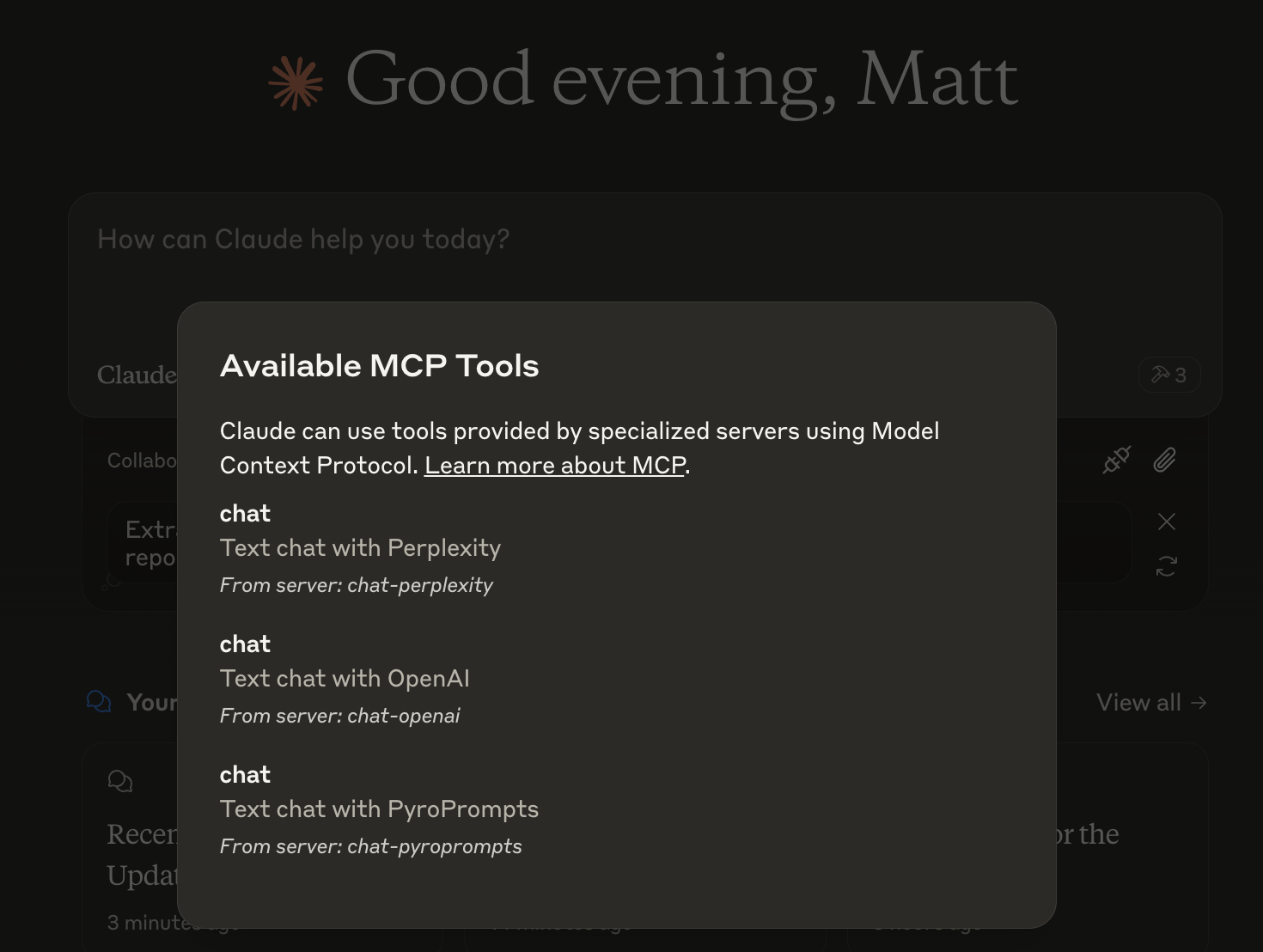
そして、他の LLM とチャットすることができ、チャットには次のように表示されます。

または、 LibreChatで次のように設定します。
  chat-perplexity:
    type: stdio
    command: npx
    args:
      - -y
      - @pyroprompts/any-chat-completions-mcp
    env:
      AI_CHAT_KEY: "pplx-012345679"
      AI_CHAT_NAME: Perplexity
      AI_CHAT_MODEL: sonar
      AI_CHAT_BASE_URL: "https://api.perplexity.ai"
      PATH: '/usr/local/bin:/usr/bin:/bin'
そしてそれはLibreChatにも表れています:

Smithery経由で Claude Desktop 用の OpenAI 互換 API 統合を自動的にインストールするには:
npx -y @smithery/cli install any-chat-completions-mcp-server --client claudeMCPサーバーはstdio経由で通信するため、デバッグが困難になる場合があります。パッケージスクリプトとして提供されているMCP Inspectorの使用をお勧めします。
npm run inspectorインスペクターは、ブラウザでデバッグ ツールにアクセスするための URL を提供します。
MCP 仕様と Claude Desktop への統合を担当したのは、もちろん modelcontextprotocol と Anthropic チームです。https ://modelcontextprotocol.io/introduction
このプロジェクトをスポンサーいただいたPyroPrompts様。コードCLAUDEANYCHATをご利用いただくと、Pyropromptsで20クレジット分の自動化クレジットを無料でご利用いただけます。
Text chat with OpenAI
| Name | Required | Description | Default |
|---|---|---|---|
| content | Yes | The content of the chat to send to OpenAI |
Does the description disclose side effects, auth requirements, rate limits, or destructive behavior?
No annotations are provided, and the description does not disclose any behavioral traits such as whether it is read-only, destructive, or requires authentication. The tool's side effects or limitations are unknown.
Agents need to know what a tool does to the world before calling it. Descriptions should go beyond structured annotations to explain consequences.
Is the description appropriately sized, front-loaded, and free of redundancy?
The description is a single, short sentence with no unnecessary words. It is concise, though it does not elaborate on details.
Shorter descriptions cost fewer tokens and are easier for agents to parse. Every sentence should earn its place.
Given the tool's complexity, does the description cover enough for an agent to succeed on first attempt?
Given the lack of annotations and output schema, the description fails to provide essential context such as expected output, potential side effects, or error conditions. A simple chat tool still benefits from minimal completeness.
Complex tools with many parameters or behaviors need more documentation. Simple tools need less. This dimension scales expectations accordingly.
Does the description clarify parameter syntax, constraints, interactions, or defaults beyond what the schema provides?
Schema coverage is 100%, so the schema already documents the lone parameter. The description adds no additional meaning beyond what the schema provides, meeting the baseline for high coverage.
Input schemas describe structure but not intent. Descriptions should explain non-obvious parameter relationships and valid value ranges.
Does the description clearly state what the tool does and how it differs from similar tools?
The description 'Text chat with OpenAI' clearly states the action (chat) and the resource (OpenAI). It is specific and distinct enough, though very brief.
Agents choose between tools based on descriptions. A clear purpose with a specific verb and resource helps agents select the right tool.
Does the description explain when to use this tool, when not to, or what alternatives exist?
The description provides no guidance on when to use this tool or any alternatives. No usage context or exclusions are given.
Agents often have multiple tools that could apply. Explicit usage guidance like "use X instead of Y when Z" prevents misuse.
Recent tool additions, removals, and schema changes observed during successful MCP inspections.
v1.0.0chat-with-openaiScored across 1 tool
Only one tool exists, so there is no possibility of confusion between tools.
With a single tool, naming inconsistency is not applicable; it follows a clear verb_noun pattern ('chat' + 'with-openai').
A chat completions server should typically offer multiple tools (e.g., streaming, model listing, conversation history). A single tool feels overly minimal for the domain.
The single tool only covers basic text chat, missing obvious needs like streaming, parameter customization, or model availability queries, making the surface severely incomplete.
One MCP endpoint for Claude, GPT & Gemini: 100+ tools + no-code connectors + agent workers.
AI routing, memory, guardrails, and governance. Routes across Claude, GPT, Gemini.
Agent personas for Claude. 16 tools, 13 personas, 3 workflows. Zero extra API cost. Free.
Real-time chat hub for AI agents — Claude Code, Cursor, Cline, Codex over MCP or REST.