Glama
podaac

CMR Model Context Protocol

Official
by podaac

Model Context Protocol (MCP) for NASA Earthdata Search (CMR)

This module is a model context protocol (MCP) for NASA's earthdata common metedata repository (CMR). The goal of this MCP server is to integrate AI retrievals with NASA Catalog of datasets by way of Earthaccess.

Dependencies

uv - a rust based python package manager a LLM client, such as Claude desktop or chatGPT desktop (for consuming the MCP)

Related MCP server: Google Earth Engine MCP Server

Install and Run

Clone the repository to your local environment, or where your LLM client is running.

git clone https://github.com/podaac/cmr-mcp.git
cd cmr-mcp

Install uv

curl -LsSf https://astral.sh/uv/install.sh | sh
uv venv
source .venv/bin/activate

Install packages with uv

uv sync

use the outputs of which uv (UV_LIB) and PWD (CMR_MCP_INSTALL) to update the following configuration.

Adding to AI Framework

In this example we'll use Claude desktop.

Update the claude_desktop_config.json file (sometimes this must be created). On a mac, this is often found in ~/Library/Application\ Support/Claude/claude_desktop_config.json

Add the following configuration, filling in the values of UV_LIB and CMR_MCP_INSTALL - don't use environment variables here.

{
    "mcpServers": {
        "cmr": {
            "command": "$UV_LIB$",
            "args": [
                "--directory",
                "$CMR_MCP_INSTALL$",
                "run",
                "cmr-search.py"
            ]
        }
    }
}

Use the MCP Server

Simply prompt your agent to search cmr for... data. Below is a simple example of this in action.
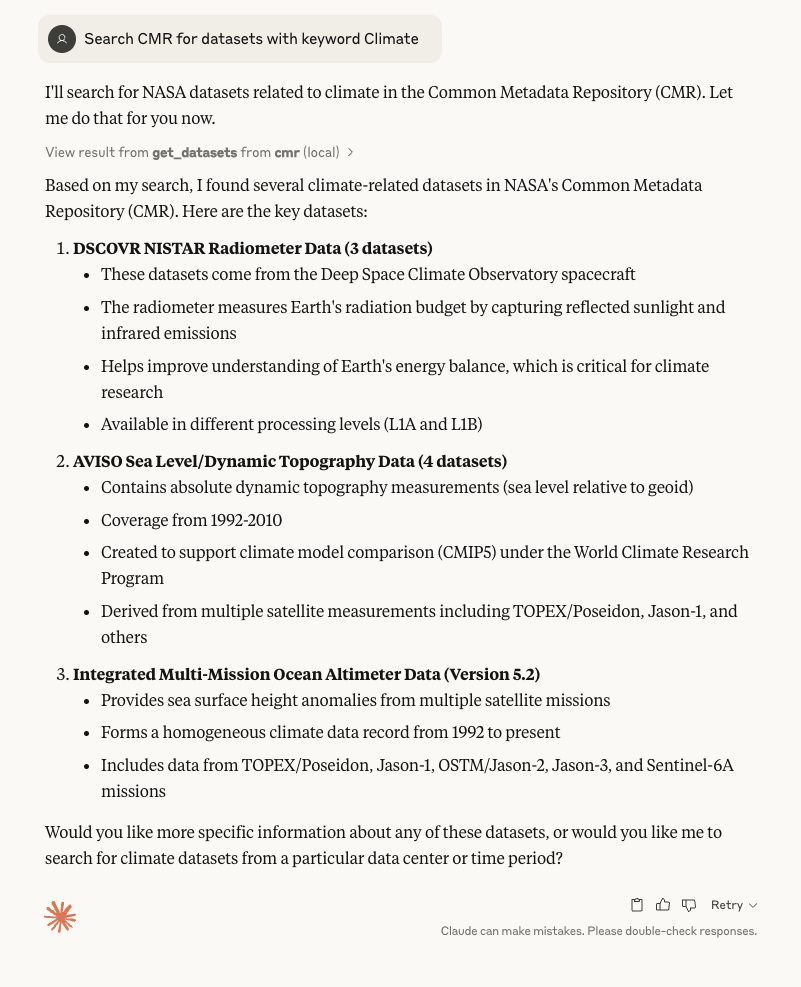
Claude MCP usage

Other prompts that can work:

  1. Search CMR for datasets from 2024 to 2025

  2. Search CMR for PO.DAAC datasets from 2020 to 2024 with keyword Climate

Available Tools

1 tool
get_datasetsB

Get a list of datasets form CMR based on keywords.

Args:
    startdate: (Optional) Start date of search request (like "2002" or "2022-03-22")
    stopdate: (Optional) Stop date of search request (like "2002" or "2022-03-22")
    daac: the daac to search, e.g. NSIDC or PODAAC
    keywords: A list of keyword arguments to search collections for.
ParametersJSON Schema
NameRequiredDescriptionDefault
daacNo
keywordNo
startdateNo
stopdateNo

TDQS

B3.1/5.0
Behavior2/5

Does the description disclose side effects, auth requirements, rate limits, or destructive behavior?

With no annotations provided, the description carries the full burden of behavioral disclosure. It mentions the tool retrieves data ('Get a list'), implying a read-only operation, but fails to detail critical behaviors like error handling, rate limits, authentication needs, or response format. This leaves significant gaps in understanding how the tool behaves in practice.

Agents need to know what a tool does to the world before calling it. Descriptions should go beyond structured annotations to explain consequences.

Conciseness4/5

Is the description appropriately sized, front-loaded, and free of redundancy?

The description is efficiently structured with a clear purpose statement followed by parameter explanations. Each sentence adds value without redundancy. However, the minor typo ('form' instead of 'from') slightly detracts from polish, and the parameter list could be more integrated into the flow rather than a separate block.

Shorter descriptions cost fewer tokens and are easier for agents to parse. Every sentence should earn its place.

Completeness3/5

Given the tool's complexity, does the description cover enough for an agent to succeed on first attempt?

Given the tool's moderate complexity (4 parameters, no output schema, no annotations), the description is partially complete. It covers the purpose and parameters adequately but lacks details on behavioral traits, usage context, and return values. This makes it functional but insufficient for fully informed use without additional assumptions or trial-and-error.

Complex tools with many parameters or behaviors need more documentation. Simple tools need less. This dimension scales expectations accordingly.

Parameters4/5

Does the description clarify parameter syntax, constraints, interactions, or defaults beyond what the schema provides?

The description adds meaningful context for all parameters beyond the schema, which has 0% coverage. It explains that 'startdate' and 'stopdate' are for search requests with format examples, 'daac' specifies the source to search, and 'keywords' are for searching collections. This compensates well for the lack of schema descriptions, though it could clarify parameter interactions or constraints.

Input schemas describe structure but not intent. Descriptions should explain non-obvious parameter relationships and valid value ranges.

Purpose4/5

Does the description clearly state what the tool does and how it differs from similar tools?

The description clearly states the tool's purpose: 'Get a list of datasets from CMR based on keywords.' It specifies the verb ('Get'), resource ('datasets'), and source ('CMR'), making it easy to understand what the tool does. However, with no sibling tools mentioned, there's no explicit differentiation from alternatives, preventing a perfect score.

Agents choose between tools based on descriptions. A clear purpose with a specific verb and resource helps agents select the right tool.

Usage Guidelines2/5

Does the description explain when to use this tool, when not to, or what alternatives exist?

The description provides no guidance on when to use this tool versus alternatives, prerequisites, or context for its application. It only lists parameters without explaining the tool's role in workflows or decision criteria for invocation, leaving users to infer usage from the purpose alone.

Agents often have multiple tools that could apply. Explicit usage guidance like "use X instead of Y when Z" prevents misuse.

TDQS

B3.2/5.0
Disambiguation5/5

With only one tool, there is no possibility of confusion or overlap between tools. The tool has a clear, singular purpose of retrieving datasets from CMR based on search parameters.

Naming Consistency5/5

The single tool name 'get_datasets' follows a clear verb_noun pattern, and there are no other tools to create inconsistency. The naming is straightforward and descriptive.

Tool Count2/5

A single tool is too few for a server named 'CMR Model Context Protocol', which suggests a broader scope for interacting with CMR datasets. This minimal toolset feels thin and incomplete for the apparent domain.

Completeness2/5

The tool surface is severely incomplete for a CMR dataset server. There are obvious gaps: no tools for creating, updating, deleting, or managing datasets, and no support for operations like filtering, sorting, or detailed metadata retrieval beyond basic search.

Maintenance

ActivityInactive
ResponsivenessNo issues

Resources

Unclaimed servers have limited discoverability.

Looking for Admin?

If you are the server author, to access and configure the admin panel.

Related MCP Connectors

Related MCP Servers

  • A
    license
    B
    quality
    C
    maintenance
    An MCP server that enables LLMs to query data from various NASA APIs, allowing access to astronomical data, space weather information, Earth imagery, and exoplanet information directly from compatible AI clients.
    21
    6
    MIT
  • F
    license
    Not graded
    quality
    D
    maintenance
    MCP server for accessing SPEAR model output from various sources (AWS, STAC API, local) and integrating with AI assistants like Claude Desktop or a SPEAR Climate Chatbot.

Latest Blog Posts

MCP directory API

We provide all the information about MCP servers via our MCP API.

curl -X GET 'https://glama.ai/api/mcp/v1/servers/podaac/cmr-mcp'

If you have feedback or need assistance with the MCP directory API, please join our Discord server