

A
licenseB
qualityD
maintenanceA simple template for creating custom tools for Cursor IDE using Model Context Protocol, deployable via Heroku, Docker, or directly within Cursor IDE.
2
5
MIT

一个使用模型上下文协议 (MCP) 为 Cursor IDE 创建自定义工具的简单模板。您可以使用此模板创建自己的代码库,修改工具并将其连接到您的 Cursor IDE。
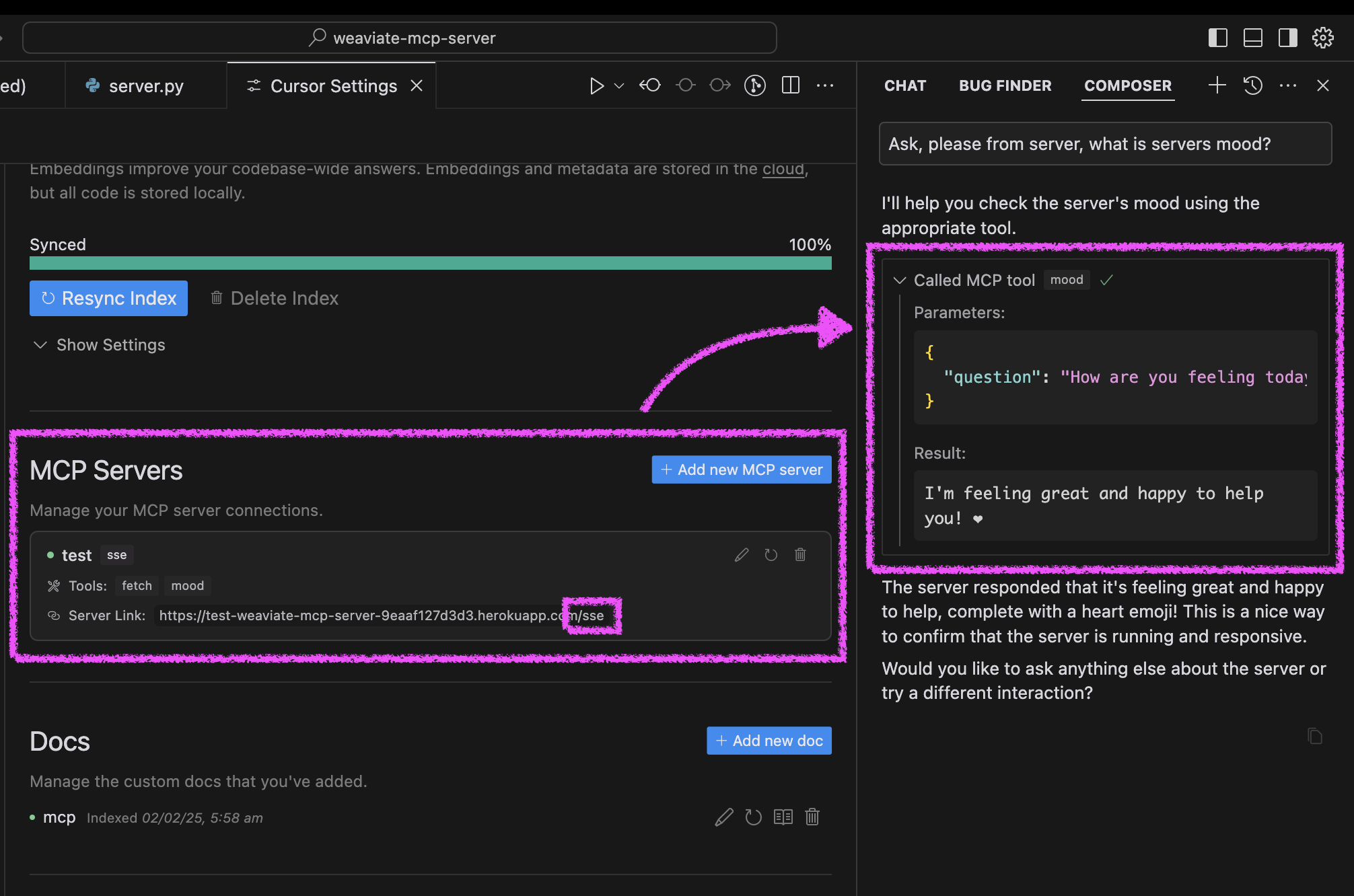
点击“部署到 Heroku”按钮

部署完成后,配置Cursor:
打开游标设置 → 功能
添加新的 MCP 服务器
使用带有/sse路径的 Heroku URL(例如https://<your-app-name>.herokuapp.com/sse )
在 Cursor 中测试您的代理的心情:
询问您的代理“请询问我们的服务器状况并让我知道情况如何。”
服务器将回复一条欢快的消息和一颗心❤️
Related MCP server: MCP Server Template for Cursor IDE
您可以通过三种方式运行服务器:使用 Docker、传统 Python 设置或直接在 Cursor IDE 中运行。
该项目包括 Docker 支持,可轻松部署:
初始设置:
# Clone the repository
git clone https://github.com/kirill-markin/weaviate-mcp-server.git
cd weaviate-mcp-server

# Create environment file
cp .env.example .env
使用 Docker Compose 构建并运行:
# Build and start the server
docker compose up --build -d

# View logs
docker compose logs -f

# Check server status
docker compose ps

# Stop the server
docker compose down
该服务器将在以下位置可用:
SSE 端点: http://localhost:8000/sse
快速测试:
# Test the server endpoint
curl -i http://localhost:8000/sse
连接到 Cursor IDE:
打开游标设置 → 功能
添加新的 MCP 服务器
类型:选择“sse”
网址:输入http://localhost:8000/sse
首先,安装 uv 包管理器:
# Install uv on macOS
brew install uv
# Or install via pip (any OS)
pip install uv
使用 stdio(默认)或 SSE 传输启动服务器:
# Install the package with development dependencies
uv pip install -e ".[dev]"

# Using stdio transport (default)
uv run mcp-hitchcode

# Using SSE transport on custom port
uv run mcp-hitchcode --transport sse --port 8000

# Run tests
uv run pytest -v
安装完成后,您可以将服务器直接连接到Cursor IDE:
在 Cursor 中右键单击cursor-run-mcp-server.sh文件
选择“复制路径”复制绝对路径
打开光标设置(齿轮图标)
导航至“功能”选项卡
向下滚动到“MCP 服务器”
点击“添加新的 MCP 服务器”
填写表格:
名称:选择任意名称(例如“my-mcp-server-1”)
类型:选择“stdio”(而不是“sse”,因为我们在本地运行服务器)
命令:粘贴您之前复制的cursor-run-mcp-server.sh的绝对路径。例如: /Users/kirillmarkin/weaviate-mcp-server/cursor-run-mcp-server.sh
可用的环境变量(可以在.env中设置):
MCP_SERVER_PORT (默认值:8000)- 运行服务器的端口
MCP_SERVER_HOST (默认值:0.0.0.0)- 绑定服务器的主机
DEBUG (默认值:false)-启用调试模式
MCP_USER_AGENT - 用于网站抓取的自定义用户代理
要通过Smithery自动安装用于 Claude Desktop 的 Cursor IDE 的 MCP 服务器模板:
npx -y @smithery/cli install @kirill-markin/example-mcp-server --client claudeProvides a prompt for systematically handling change requests
Inputs: change_request (required), specific_instructions, version.
Provides a prompt template for Docker container configurations and orchestration
Inputs: containerization_objective (required), specific_instructions, version.
Provides a prompt for performing root cause analysis and fixing issues
Inputs: issue (required), specific_instructions, version.
Provides a prompt for analyzing and fixing linter errors
Inputs: issue (required), specific_instructions, version.
Provides a prompt template for laying out system infrastructure and tool stack information
Inputs: infrastructure_info (required), specific_instructions, version.
Provides an initial prompt template for starting a new project
Inputs: objective (required), specific_instructions, version.
Provides a prompt template for proceeding with a task or project
Inputs: task (required), specific_instructions, version.
Provides a prompt for generating unit tests for code
Inputs: code_to_test (required), specific_instructions, version.
Fetches the most recent Railway CLI documentation. Optionally, provide a custom URL.
Inputs: url.
Fetches the most recent Railway CLI documentation. Optionally, provide a custom URL.
Inputs: url.
Fetches a website and returns its content
Inputs: url (required).
Ask the server about its mood - it's always happy!
Inputs: question (required).
Recent tool additions, removals, and schema changes observed during successful MCP inspections.
Loading tool schema changelog…
Scored across 12 tools
The tool set has significant ambiguity, particularly between the 'apply_prompt_*' tools which all provide prompt templates for different contexts but could easily be confused by an agent due to overlapping purposes (e.g., 'apply_prompt_fix' vs 'apply_prompt_fix_linter' for fixing issues). Additionally, 'fetch_railway_docs' and 'fetch_railway_docs_optimized' appear to do the same thing with unclear distinctions, leading to potential misselection.
Most tools follow a consistent snake_case pattern with clear verb_noun structures (e.g., 'apply_prompt_change', 'fetch_railway_docs'), which aids readability. However, there are minor deviations: 'mood' breaks the pattern by being a single noun without a verb, and the duplication in 'fetch_railway_docs' vs 'fetch_railway_docs_optimized' introduces inconsistency in naming for similar functions.
With 12 tools, the count is borderline but reasonable for a template server aimed at Cursor IDE, which might cover various development tasks. However, the set feels slightly heavy due to redundant tools like the two Railway docs fetchers and multiple similar prompt tools, suggesting some consolidation could improve coherence without losing functionality.
The server's domain appears to be development assistance with prompt templates and documentation fetching, but there are significant gaps. For example, it lacks tools for code generation, debugging, or version control integration, which are common in IDE contexts. The inclusion of a trivial 'mood' tool further detracts from covering essential workflows, making the surface incomplete for practical agent use in development tasks.
A comprehensive Model Context Protocol (MCP) server that enables AI assistants to interact with yo…
The Mercado Pago MCP Server implements the Model Context Protocol to provide AI agents and LLMs with access to Mercado Pago's APIs and tools within compatible development environments. It acts as an intermediary that translates Mercado Pago resources into executable functions (tools) that AI applications can invoke to perform actions and automate flows. The server simplifies integration, enables using documentation to implement or improve code, and optimizes operations through natural language interactions without manual implementations.
A Model Context Protocol server for Wix AI tools
The OpenRouter MCP server plugs OpenRouter into the AI tools you already use. Once connected, your assistant can pull live OpenRouter data (models, prices, your credits, rankings, and docs) and send quick test messages, all without leaving your editor.