Minecraft MCP Server
⚠️ CLAUDE DESKTOP DUAL LAUNCH WARNING: Claude Desktop may sometimes launch MCP servers twice (known issue), which can lead to incorrect behavior of this MCP server. If you experience issues, restart Claude Desktop application to fix the problem. Alternatively, consider using other MCP clients.
https://github.com/user-attachments/assets/6f17f329-3991-4bc7-badd-7cde9aacb92f
A Minecraft bot powered by large language models and Mineflayer API. This bot uses the Model Context Protocol (MCP) to enable Claude and other supported models to control a Minecraft character.
Prerequisites
Git
Node.js
A running Minecraft game (the setup below was tested with Minecraft 1.21.8 Java Edition included in Microsoft Game Pass)
An MCP-compatible client. Claude Desktop will be used as an example, but other MCP clients are also supported
Related MCP server: Maicraft
Getting started
This bot is designed to be used with Claude Desktop through the Model Context Protocol (MCP).
Run Minecraft
Create a singleplayer world and open it to LAN (ESC -> Open to LAN). Bot will try to connect using port 25565 and hostname localhost. These parameters could be configured in claude_desktop_config.json on a next step.
MCP Configuration
Make sure that Claude Desktop is installed. Open File -> Settings -> Developer -> Edit Config. It should open installation directory. Find file with a name claude_desktop_config.json and insert the following code:
{
  "mcpServers": {
    "minecraft": {
      "command": "npx",
      "args": [
        "-y",
        "github:yuniko-software/minecraft-mcp-server",
        "--host",
        "localhost",
        "--port",
        "25565",
        "--username",
        "ClaudeBot"
      ]
    }
  }
}
Double-check that right --port and --host parameters were used. Make sure to completely reboot the Claude Desktop application (should be closed in OS tray).
Running
Make sure Minecraft game is running and the world is opened to LAN. Then start Claude Desktop application and the bot should join the game.
It could take some time for Claude Desktop to boot the MCP server. The marker that the server has booted successfully:
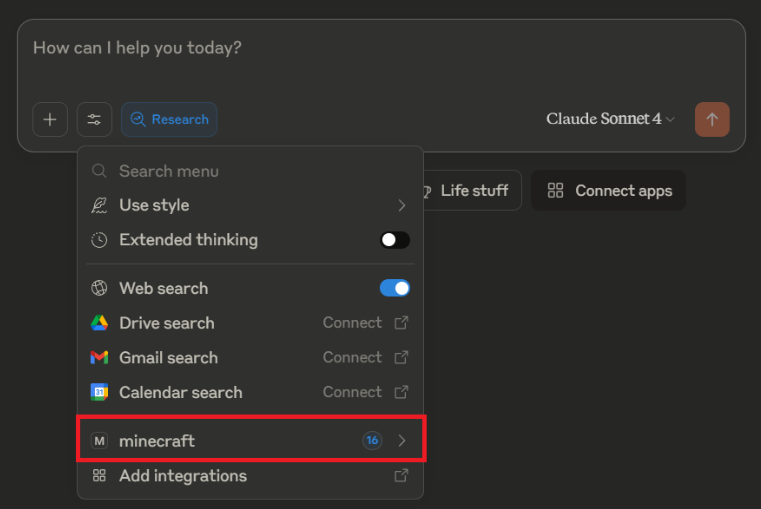
You can give bot any commands through any active Claude Desktop chat. You can also upload images of buildings and ask bot to build them 😁
Don't forget to mention that bot should do something in Minecraft in your prompt. Because saying this is a trigger to run MCP server. It will ask for your permissions.
Using Claude 4.0 Sonnet could give you some interesting results. The bot-agent would be really smart 🫡
Example usage: shared Claude chat
Available Commands
The authoritative tool list (names, descriptions, parameters) is whatever your MCP client shows after connecting; tools are registered in src/bot.ts (see the register*Tools functions). Rough map:
Observation: look-around (one-call snapshot: position, health, inventory, adjacent blocks, entities), show-adjacent-blocks, get-position, get-status, get-nearby-block-types, find-blocks-by-type, get-block-info/get-blocks-info
Movement: move-horizontally, stairs up/down (move-horizontally-and-up/down-using-steps), dig-directly-down, move-up-by-pillaring, swim-horizontally, jump-over-obstacle, center-in-block
Mining/building: dig-adjacent-blocks, place-block. Mining tools take an allowMiningOf tool-to-blocks map — an explicit allowlist so the bot never mines something you didn't intend
Crafting/smelting: craft-item, smelt-item (loads the furnace and returns; smelting continues in game time), furnace-check (progress + collect output)
Containers: chest-peek, chest-deposit, chest-withdraw
Inventory/items: list-inventory, find-item, equip-item, drop-item, eat-food, activate-item
Entities: find-entity, attack-entity, entity-interact, entity-mount/entity-dismount, villager-open/villager-trade
Communication: send-chat, read-chat, player-whisper
Misc: bed-sleep/bed-wake, fish, block-activate, sign-update, detect-gamemode
Viewing Logs
The bot writes detailed logs to logs/minecraft.log in JSON format. This includes bot state changes, game events, and debug information.
View all logs
Filter by log level
# View only errors
grep '"level":"error"' logs/minecraft.log

# View warnings (including bot state changes like oxygen/health drops)
grep '"level":"warn"' logs/minecraft.log

# View info messages
grep '"level":"info"' logs/minecraft.log
Filter by event type (using jq)
# Install jq if needed: brew install jq (macOS) or apt-get install jq (Linux)

# View game events (chat, deaths, spawns)
jq 'select(.type=="game_event")' logs/minecraft.log

# View bot state changes (oxygen, health, durability)
jq 'select(.type=="bot_state")' logs/minecraft.log

# View tool calls
jq 'select(.type=="tool_call")' logs/minecraft.log

# View only errors with full details
jq 'select(.level=="error")' logs/minecraft.log
Development Setup
git clone https://github.com/hibukki/minecraft-mcp-server.git
cd minecraft-mcp-server
pnpm install
pnpm run build
pnpm test
pnpm run lint
Contributing
This application was made in just two days, and the code is really simple and straightforward. All refactoring commits, functional and test contributions, issues and discussion are greatly appreciated!
Feel free to submit pull requests or open issues for improvements. Some areas that could use enhancement:
Additional documentation
More robust error handling
Tests for different components
New functionality and commands
To get started with contributing, please see CONTRIBUTING.md.

