Glama

Servidor MCP para Adobe Premiere Pro

English | 日本語 | Tiếng Việt | 简体中文 | 繁體中文 | 한국어 | Deutsch | Español | Français | Italiano | Dansk | Polski | Русский | Bosanski | العربية | Norsk | Português (Brasil) | ไทย | Türkçe | ភាសាខ្មែរ

Controla Adobe Premiere Pro a través de MCP usando Codex, Claude Code, Claude Desktop o cualquier otro cliente MCP.

¿Quieres algo construido desde cero para agentes de IA? Adobe sigue siendo potente, pero no es "AI-first". Ahora estoy creando Monet, un editor de vídeo diseñado desde el primer día para ser controlado totalmente por agentes de codificación.

Si buscas el camino nativo para IA, usa Monet. Si necesitas Adobe Premiere Pro hoy mismo, este proyecto sigue siendo para ti.

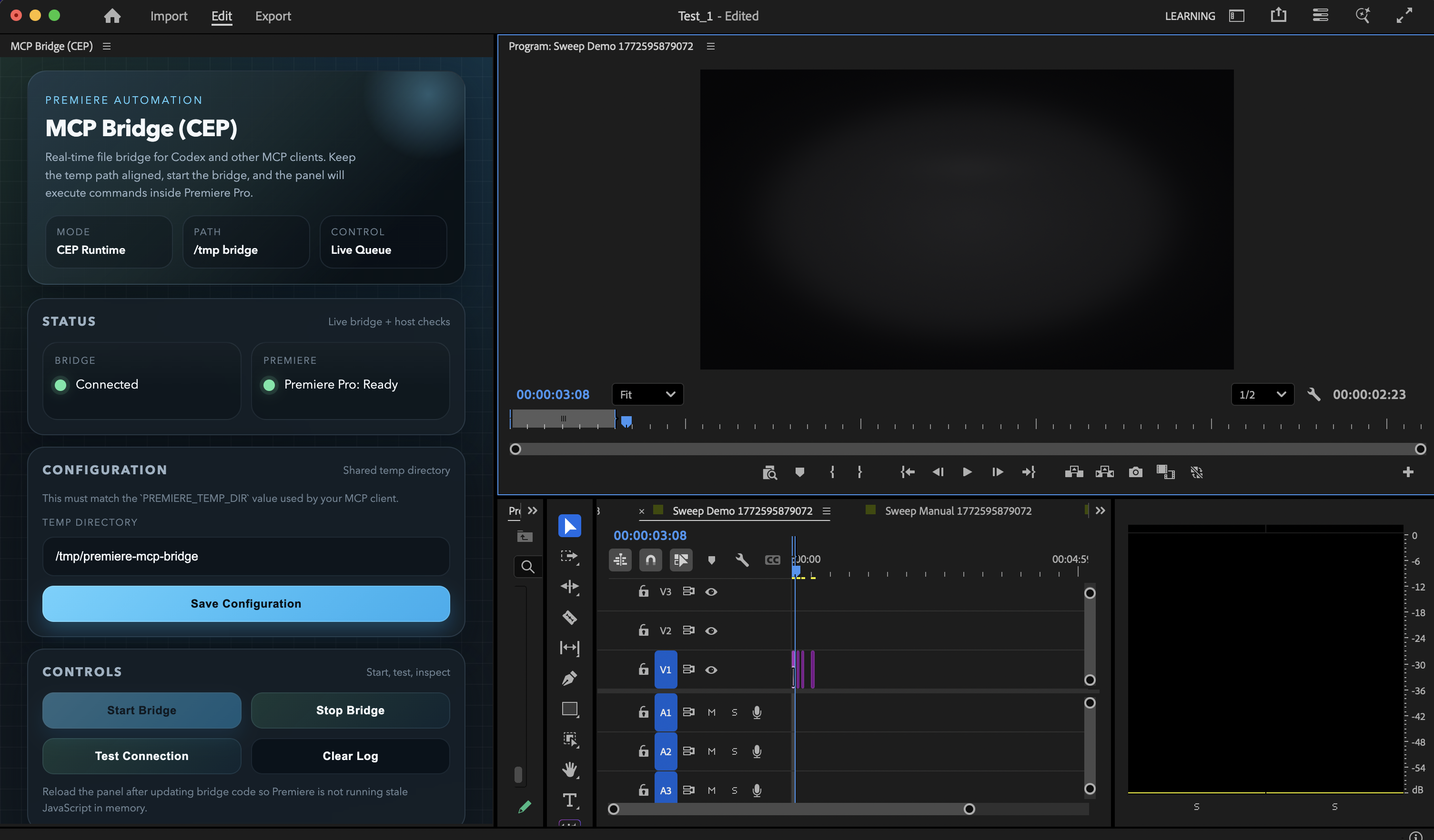
Panel actual del puente MCP (CEP)

Historial de estrellas

Interfaz de usuario del panel CEP actual dentro de Premiere Pro, utilizando los controles del puente renovados y el diseño de estado.

Related MCP server: Premiere-Pro-MCP

Estado actual

Este repositorio está validado actualmente para:

  • macOS

  • Adobe Premiere Pro 2020+ (usado y probado activamente en Premiere Pro 26.0)

  • Node.js 18+

  • la ruta del instalador de macOS incluida para Claude Desktop

  • registro manual de MCP para Codex, Claude Code y clientes MCP similares

Validación local actual a fecha de 4 de marzo de 2026:

  • 97 herramientas expuestas

  • 43 herramientas ejecutadas en vivo contra una sesión real de Premiere

  • 50 herramientas validadas por esquema en el mismo barrido

  • 3 herramientas destructivas sin argumentos fueron omitidas intencionalmente (save_project, undo, consolidate_duplicates)

  • 1 limitación de tiempo de ejecución en vivo permanece: get_render_queue_status requiere integración con Adobe Media Encoder

La salida completa del barrido en vivo se escribe en /tmp/premiere-mcp-bridge/live-tool-sweep.json cuando ejecutas el verificador.

Qué obtienes

El servidor cubre operaciones de proyecto, ingesta, creación de secuencias, edición de línea de tiempo, transiciones, efectos, fotogramas clave, metadatos, exportaciones y flujos de trabajo de ensamblaje de alto nivel.

Ejemplos de prompts:

  • "Enumera todas las secuencias y muéstrame cuál está activa."

  • "Importa estos tres planos y construye un spot de producto preliminar."

  • "Añade disolvencias cruzadas a cada corte en la pista de vídeo 1."

  • "Aplica Desenfoque Gaussiano al clip central."

  • "Aplica el efecto Black & White al clip de formato corto activo."

  • "Corta la secuencia de la entrevista en el segundo 12.5 en todas las pistas de audio y vídeo."

  • "Exporta la secuencia activa como FCP XML."

Para estilos monocromáticos, prefiere apply_effect con Black & White en lugar de intentar forzar el blanco y negro mediante ajustes genéricos de saturación.

Antes de editar, también puedes adjuntar el recurso premiere://config/get_instructions para dar al modelo una guía operativa específica de Premiere.

Herramientas de flujo de trabajo de alto nivel incluidas:

  • build_motion_graphics_demo

  • assemble_product_spot

  • build_brand_spot_from_mogrt_and_assets

assemble_product_spot y build_brand_spot_from_mogrt_and_assets ahora admiten un argumento opcional clipPlan para que un LLM pueda dirigir la temporización por clip, la colocación en pista, las transiciones, el movimiento, los recortes, los efectos y los ajustes de color en lugar de depender de valores predeterminados de plantilla fijos.

Instalación más rápida (macOS)

git clone https://github.com/hetpatel-11/Adobe_Premiere_Pro_MCP.git
cd Adobe_Premiere_Pro_MCP
npm run setup:mac

Ese instalador hará lo siguiente:

  • instalar dependencias

  • compilar dist/index.js

  • habilitar el modo de depuración de Adobe CEP

  • instalar la extensión MCP Bridge (CEP)

  • crear /tmp/premiere-mcp-bridge

  • añadir la entrada MCP premiere-pro a Claude Desktop

Importante:

  • el puente de interfaz de usuario compatible en este repositorio es la extensión MCP Bridge (CEP)

  • el instalador habilita automáticamente el modo de depuración de Adobe CEP

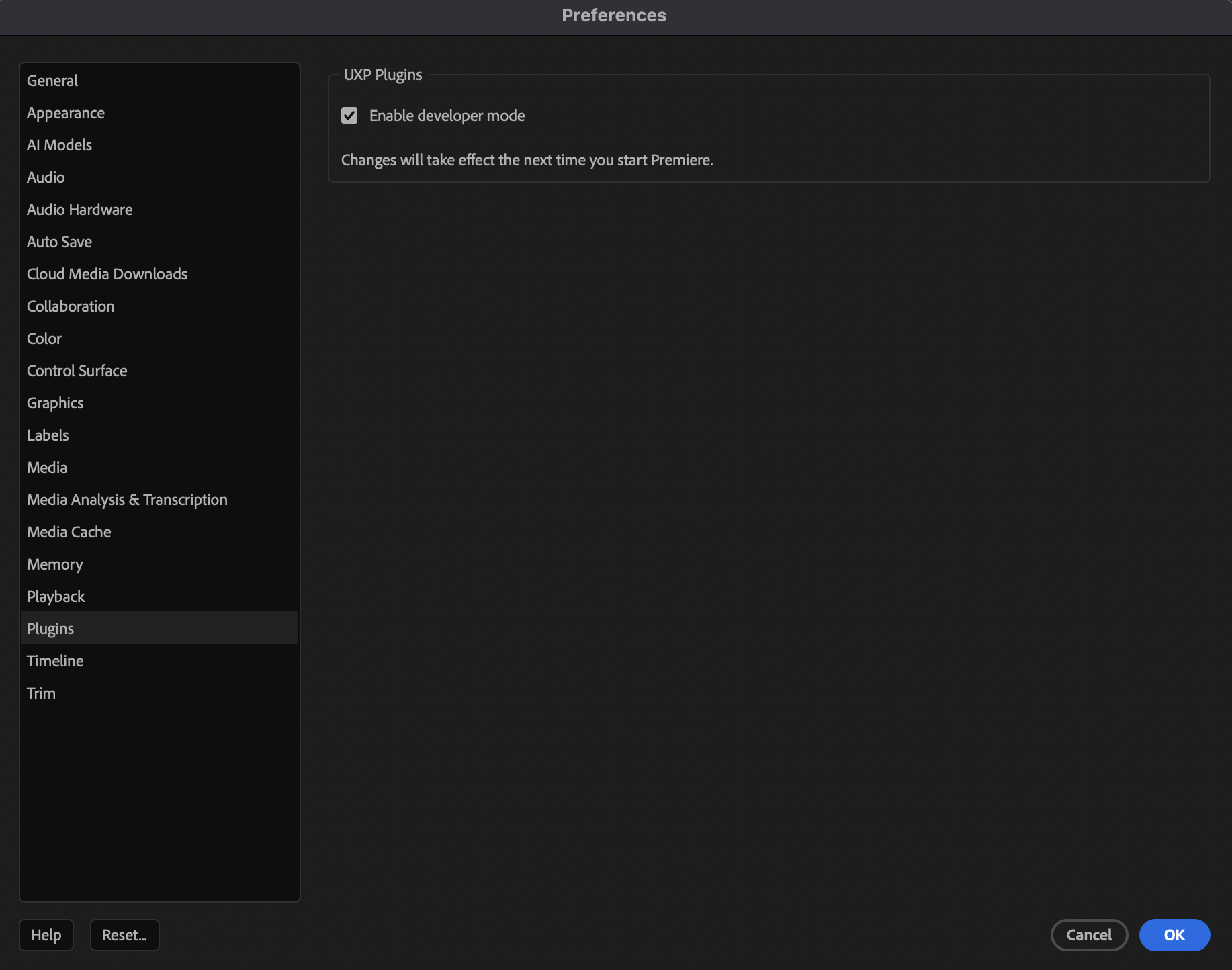
  • si Premiere no expone la extensión correctamente en tu máquina, habilita UXP Plugins > Enable developer mode en las preferencias de Premiere Pro antes de abrir el panel del puente

  • npm run setup:mac es la ruta más sencilla para Claude Desktop en macOS porque actualiza la configuración de Claude Desktop automáticamente

Después de que el instalador termine:

  1. Cierra y vuelve a abrir tu cliente MCP si lee la configuración al iniciarse. Si usaste el instalador, eso significa Claude Desktop.

  2. Cierra y vuelve a abrir Premiere Pro.

  3. En Premiere Pro en macOS, abre Premiere Pro > Preferences > Plugins y habilita UXP Plugins > Enable developer mode.

  4. Reinicia Premiere Pro si se cambió la configuración.

  5. Abre Window > Extensions > MCP Bridge (CEP).

  6. Establece Temp Directory en /tmp/premiere-mcp-bridge.

  7. Haz clic en Save Configuration.

  8. Haz clic en Start Bridge.

  9. Conéctate desde Codex, Claude Code, Claude Desktop u otro cliente MCP usando el mismo directorio temporal.

  10. Si los comandos fallan, haz clic en Run Diagnostics y envía /tmp/premiere-mcp-bridge/premiere-mcp-diagnostics-latest.json.

Si necesitas una referencia visual para el interruptor del modo de desarrollador, se ve así:

Habilitar el modo de desarrollador UXP en Premiere Pro

Si el panel informa que Premiere está listo después de Start Bridge, el puente está activo.

Instalación por cliente

Claude Desktop

En macOS, usa:

npm run setup:mac

Esa es la única ruta en este repositorio que escribe automáticamente la entrada MCP por ti.

Codex

Compila el servidor primero:

npm install
npm run build

Luego añade el servidor MCP en una sola línea:

codex mcp add premiere_pro --env PREMIERE_TEMP_DIR=/tmp/premiere-mcp-bridge -- node /absolute/path/to/Adobe_Premiere_Pro_MCP/dist/index.js

Claude Code

Compila el servidor de la misma manera:

npm install
npm run build

Luego registra el servidor MCP en Claude Code usando el mismo punto de entrada dist/index.js compilado y el mismo directorio temporal:

command: node /absolute/path/to/Adobe_Premiere_Pro_MCP/dist/index.js
env: PREMIERE_TEMP_DIR=/tmp/premiere-mcp-bridge

Si usas un archivo de configuración MCP local en lugar de un comando auxiliar, apúntalo al mismo dist/index.js y establece la misma variable de entorno.

Otros clientes MCP

Usa el mismo enfoque de registro manual que Claude Code:

command: node /absolute/path/to/Adobe_Premiere_Pro_MCP/dist/index.js
env: PREMIERE_TEMP_DIR=/tmp/premiere-mcp-bridge

Importante para todas las configuraciones manuales de cliente:

  • mantén el comando en una sola línea

  • usa la ruta absoluta real a dist/index.js

  • reinicia el cliente después de añadir o actualizar la entrada MCP

  • inicia el puente CEP dentro de Premiere y confirma que el directorio temporal es exactamente /tmp/premiere-mcp-bridge

Verificar la instalación

Ejecuta las comprobaciones integradas:

npm run setup:doctor

Esto valida:

  • la versión de Node.js

  • la salida del servidor compilado

  • la instalación de la extensión CEP

  • /tmp/premiere-mcp-bridge

  • el modo de depuración de Adobe CEP

  • la entrada de configuración de Claude Desktop cuando usas la ruta del instalador

  • los diagnósticos del panel CEP escritos en /tmp/premiere-mcp-bridge/premiere-mcp-diagnostics-latest.json

Para una comprobación integral más profunda, usa un proyecto de Premiere desechable y ejecuta:

node scripts/live-tool-sweep.mjs

Esto crea secuencias temporales Sweep ... en el proyecto abierto actualmente para que la cadena de herramientas se pruebe con datos reales.

Cómo funciona el puente

+-----------+        +-----------+        +-----------+
|  Client   |  MCP   | Node.js   | Files  | CEP Panel |
| (Codex+)  |<------>| MCP Server|<------>| (Premiere)|
+-----------+        +-----------+        +-----------+
                                                 |
                                                 v
                                          +-----------+
                                          | Premiere  |
                                          | DOM / QE  |
                                          +-----------+
  1. El cliente llama a una herramienta MCP.

  2. El servidor Node genera ExtendScript más ayudantes compartidos.

  3. El script se escribe en /tmp/premiere-mcp-bridge.

  4. El panel CEP sondea ese directorio y ejecuta el script a través de CSInterface.evalScript().

  5. El panel escribe el resultado de vuelta en el archivo de respuesta.

  6. El servidor devuelve JSON estructurado al cliente MCP.

Cobertura de herramientas

Las 97 herramientas expuestas se agrupan aproximadamente así:

  • Descubrimiento e inspección de proyectos

  • Gestión de proyectos y secuencias

  • Importación de medios y gestión de contenedores (bins)

  • Colocación en línea de tiempo y operaciones de clip

  • Efectos, transiciones, color y fotogramas clave

  • Marcadores, metadatos, etiquetas y control del área de trabajo

  • Ayudantes de exportación e intercambio

  • MOGRT, subtítulos, proxies y ayudantes de revinculación

  • Flujos de trabajo de ensamblaje de anuncios / promociones de alto nivel

Usa la introspección MCP en tu cliente para ver el catálogo completo de herramientas y los esquemas exactos.

Límites reales

Este proyecto es mucho más utilizable que el prototipo original, pero no es magia.

  • El scripting de Premiere todavía no expone todas las operaciones de la interfaz de usuario de forma limpia.

  • El diseño de títulos profesional todavía depende de activos MOGRT reales o flujos de trabajo gráficos externos.

  • get_render_queue_status solo es útil cuando la integración con Adobe Media Encoder está disponible.

  • Los mejores resultados provienen de metraje fuente real, audio real y activos de marca reales. La capa de automatización los ensambla y manipula; no reemplaza el criterio editorial.

Solución de problemas

Si las herramientas son visibles pero las llamadas fallan:

  1. Confirma que Premiere Pro está abierto con un proyecto cargado.

  2. Abre Window > Extensions > MCP Bridge (CEP).

  3. Confirma que el directorio temporal es exactamente /tmp/premiere-mcp-bridge.

  4. Haz clic en Start Bridge.

  5. Si actualizaste el código del puente, haz clic derecho en el panel y elige Reload.

  6. Reintenta el comando.

Si el cliente MCP no puede encontrar el servidor:

  1. Verifica la ruta absoluta a dist/index.js.

  2. Verifica PREMIERE_TEMP_DIR=/tmp/premiere-mcp-bridge.

  3. Reinicia el cliente MCP después de cambiar la configuración.

  4. Ejecuta npm run setup:doctor.

Notas para desarrolladores

Comandos útiles:

npm run build
npm test -- --runInBand
npm run setup:doctor
node scripts/live-tool-sweep.mjs

Ver:

  • QUICKSTART.md para la ruta de instalación más corta

  • KNOWN_ISSUES.md para los límites actuales

  • CONTRIBUTING.md para el flujo de trabajo de desarrollo

Available Tools

5 tools
get_tool_schemaA

Return the full JSON input schema for one Premiere tool name from search_tools. After reading it, call invoke_tool.

ParametersJSON Schema
NameRequiredDescriptionDefault
nameYesExact tool name, e.g. trim_clip

TDQS

A4.2/5.0
Behavior4/5

Does the description disclose side effects, auth requirements, rate limits, or destructive behavior?

There are no annotations, so the description carries the full burden of explaining behavior. It discloses that this tool only returns a schema and implies that it does not execute tools by instructing the agent to call invoke_tool afterward. It does not cover error cases, but for an introspection tool this is adequate.

Agents need to know what a tool does to the world before calling it. Descriptions should go beyond structured annotations to explain consequences.

Conciseness5/5

Is the description appropriately sized, front-loaded, and free of redundancy?

Two concise sentences provide the core behavior and the intended next action. There is no filler, repetition, or unnecessary detail.

Shorter descriptions cost fewer tokens and are easier for agents to parse. Every sentence should earn its place.

Completeness4/5

Given the tool's complexity, does the description cover enough for an agent to succeed on first attempt?

For a one-parameter tool with no output schema, the description explains what is returned and how to continue the workflow. It could mention behavior for an invalid or unknown tool name, but the essential information for correct invocation is present.

Complex tools with many parameters or behaviors need more documentation. Simple tools need less. This dimension scales expectations accordingly.

Parameters3/5

Does the description clarify parameter syntax, constraints, interactions, or defaults beyond what the schema provides?

The schema coverage is 100% and already documents the 'name' parameter with an example. The description adds only that the name should come from search_tools, which is helpful context but does not substantially enrich parameter understanding beyond the schema.

Input schemas describe structure but not intent. Descriptions should explain non-obvious parameter relationships and valid value ranges.

Purpose5/5

Does the description clearly state what the tool does and how it differs from similar tools?

The description clearly states the resource: 'full JSON input schema for one Premiere tool name.' It also distinguishes the tool from siblings by tying it to search_tools and instructing that invoke_tool should come next.

Agents choose between tools based on descriptions. A clear purpose with a specific verb and resource helps agents select the right tool.

Usage Guidelines4/5

Does the description explain when to use this tool, when not to, or what alternatives exist?

The description places the tool in a workflow: tool names come from search_tools, and after reading the schema the agent should call invoke_tool. It does not explicitly say when not to use this tool, but the sequential guidance is clear and actionable.

Agents often have multiple tools that could apply. Explicit usage guidance like "use X instead of Y when Z" prevents misuse.

invoke_toolA

Run a Premiere tool by exact name. Use after search_tools. Hosts that only advertise the small always-on set cannot call trim_clip etc. as top-level MCP tools.

ParametersJSON Schema
NameRequiredDescriptionDefault
nameYesExact tool name returned by search_tools
argumentsNoArguments for that tool

TDQS

A3.6/5.0
Behavior2/5

Does the description disclose side effects, auth requirements, rate limits, or destructive behavior?

No annotations are provided, so the description carries the full disclosure burden. It says 'Run a Premiere tool' but does not disclose that this is an arbitrary passthrough capable of side-effecting operations like trim_clip, nor does it mention error behavior when the tool name is invalid.

Agents need to know what a tool does to the world before calling it. Descriptions should go beyond structured annotations to explain consequences.

Conciseness4/5

Is the description appropriately sized, front-loaded, and free of redundancy?

Two sentences with the core purpose front-loaded. The host-limitation sentence is useful context but slightly jargon-heavy; still, every sentence earns its place and there is no filler.

Shorter descriptions cost fewer tokens and are easier for agents to parse. Every sentence should earn its place.

Completeness3/5

Given the tool's complexity, does the description cover enough for an agent to succeed on first attempt?

The description covers the key prerequisite ('Use after search_tools') and exact-name matching. However, it omits guidance on using get_tool_schema to fetch the target tool's argument schema, and gives no return/error expectations despite having no output schema or annotations.

Complex tools with many parameters or behaviors need more documentation. Simple tools need less. This dimension scales expectations accordingly.

Parameters3/5

Does the description clarify parameter syntax, constraints, interactions, or defaults beyond what the schema provides?

The input schema already documents both parameters: name is 'Exact tool name returned by search_tools' and arguments is 'Arguments for that tool'. The description reinforces exactness and ordering but does not add meaningful detail beyond the schema, such as how arguments should be structured per the target tool.

Input schemas describe structure but not intent. Descriptions should explain non-obvious parameter relationships and valid value ranges.

Purpose5/5

Does the description clearly state what the tool does and how it differs from similar tools?

The description uses a specific verb ('Run') with a specific resource ('a Premiere tool by exact name') and clarifies this is the generic execution entry point. Naming trim_clip and contrasting it with top-level MCP tools helps distinguish it from siblings like search_tools and get_tool_schema.

Agents choose between tools based on descriptions. A clear purpose with a specific verb and resource helps agents select the right tool.

Usage Guidelines4/5

Does the description explain when to use this tool, when not to, or what alternatives exist?

It explicitly says 'Use after search_tools', giving clear ordering guidance, and it explains the host limitation that makes invoke_tool necessary. However, it does not explicitly state when not to use this tool or mention alternatives like get_tool_schema for inspecting a tool's schema.

Agents often have multiple tools that could apply. Explicit usage guidance like "use X instead of Y when Z" prevents misuse.

list_sequencesB

Lists all sequences in the current Premiere Pro project with their IDs, names, and basic properties.

ParametersJSON Schema
NameRequiredDescriptionDefault

No parameters

TDQS

B3.3/5.0
Behavior2/5

Does the description disclose side effects, auth requirements, rate limits, or destructive behavior?

No annotations are provided, so the description carries the full burden of behavioral disclosure. It confirms the read-only, listing nature and names returned fields, but it's vague about 'basic properties' and omits edge-case behavior (empty project, no open document, performance on large projects).

Agents need to know what a tool does to the world before calling it. Descriptions should go beyond structured annotations to explain consequences.

Conciseness5/5

Is the description appropriately sized, front-loaded, and free of redundancy?

A single, front-loaded sentence with zero filler words. It states the action, scope, and result in one concise breath.

Shorter descriptions cost fewer tokens and are easier for agents to parse. Every sentence should earn its place.

Completeness4/5

Given the tool's complexity, does the description cover enough for an agent to succeed on first attempt?

For a simple 0-parameter listing tool, the description covers the essentials: scope ('all sequences in current project') and return shape (IDs, names, basic properties). The primary gap is the undefined 'basic properties' term, which matters more because there's no output schema to compensate.

Complex tools with many parameters or behaviors need more documentation. Simple tools need less. This dimension scales expectations accordingly.

Parameters4/5

Does the description clarify parameter syntax, constraints, interactions, or defaults beyond what the schema provides?

With zero parameters, the schema carries no semantics, so per the rubric the baseline is 4. The description appropriately spends its space explaining the return value instead, which is the only useful thing it could add.

Input schemas describe structure but not intent. Descriptions should explain non-obvious parameter relationships and valid value ranges.

Purpose4/5

Does the description clearly state what the tool does and how it differs from similar tools?

The description uses a specific verb-resource-scope structure ('Lists all sequences in the current Premiere Pro project') and specifies the return payload (IDs, names, basic properties). It distinguishes itself from list_project_items naturally, though 'basic properties' is undefined and it doesn't explicitly disambiguate from get_sequence_structure/get_full_sequence_info.

Agents choose between tools based on descriptions. A clear purpose with a specific verb and resource helps agents select the right tool.

Usage Guidelines2/5

Does the description explain when to use this tool, when not to, or what alternatives exist?

No guidance is given on when to use this tool vs. the many siblings such as list_sequence_tracks, get_full_sequence_info, or get_sequence_structure. There are no exclusions, prerequisites, or alternative suggestions — a missed opportunity given the crowded sibling space.

Agents often have multiple tools that could apply. Explicit usage guidance like "use X instead of Y when Z" prevents misuse.

search_toolsA

Search the Premiere tool catalog with a BM25 natural-language query or a regex pattern, then call invoke_tool. Use this instead of expecting 280 editing tools in the MCP tool list. Empty query lists categories. Default 5 matches.

ParametersJSON Schema
NameRequiredDescriptionDefault
limitNoMax matches, 1-25. Defaults to 5.
queryNoNatural language BM25 query, e.g. "trim clip duration" or "export sequence"
detailNoHow much of each match to return. schema includes the JSON input schema. Defaults to descriptions.
patternNoCase-insensitive regex over tool name, description, category, and argument names. e.g. "^list_" or "mogrt"

TDQS

A4.6/5.0
Behavior4/5

Does the description disclose side effects, auth requirements, rate limits, or destructive behavior?

Since no annotations are provided, the description carries the full burden of behavioral disclosure. It discloses several concrete behaviors: empty query lists categories, default 5 matches, and dual support for BM25 and regex searches. It does not explicitly state read-only status or output format, but for a search operation the disclosed behaviors provide meaningful transparency.

Agents need to know what a tool does to the world before calling it. Descriptions should go beyond structured annotations to explain consequences.

Conciseness5/5

Is the description appropriately sized, front-loaded, and free of redundancy?

The description is four short sentences with no filler: purpose, usage instruction, empty-query behavior, and default limit. The critical 'use this instead' guidance is front-loaded, and every sentence earns its place.

Shorter descriptions cost fewer tokens and are easier for agents to parse. Every sentence should earn its place.

Completeness4/5

Given the tool's complexity, does the description cover enough for an agent to succeed on first attempt?

Given no output schema and four optional parameters, the description covers tool selection rationale, query modes, the follow-up action, and important default/empty-query behavior. It does not specify the return shape, but the detail parameter schema fills that gap. This is sufficient for an agent to invoke the tool correctly in most cases.

Complex tools with many parameters or behaviors need more documentation. Simple tools need less. This dimension scales expectations accordingly.

Parameters4/5

Does the description clarify parameter syntax, constraints, interactions, or defaults beyond what the schema provides?

Schema coverage is 100%, so the baseline is 3. The description adds value by clarifying that query and regex are alternative search modes and by revealing that an empty query produces categories—information not present in the schema. It repeats the default limit, but the added empty-query behavior justifies a score above baseline.

Input schemas describe structure but not intent. Descriptions should explain non-obvious parameter relationships and valid value ranges.

Purpose5/5

Does the description clearly state what the tool does and how it differs from similar tools?

The description opens with a specific verb-resource pair ('Search the Premiere tool catalog') and names two concrete query mechanisms (BM25 natural-language or regex). It clearly differentiates this from siblings like invoke_tool and get_tool_schema, and the reference to the 280-tool MCP list explains its role as a discovery tool.

Agents choose between tools based on descriptions. A clear purpose with a specific verb and resource helps agents select the right tool.

Usage Guidelines5/5

Does the description explain when to use this tool, when not to, or what alternatives exist?

It explicitly instructs the agent to use this tool instead of expecting the full 280-tool MCP list, which is direct when-to-use guidance. It also tells the agent to follow up by calling invoke_tool, linking the search step to the execution step. While it doesn't enumerate exclusions in detail, the 'use this instead' phrasing is strong and actionable.

Agents often have multiple tools that could apply. Explicit usage guidance like "use X instead of Y when Z" prevents misuse.

verify_premiere_connectionA

Readiness check for Premiere Pro and the MCP Bridge. Call this before any editing tool. If Premiere is installed and not running, this launches it and waits for the CEP panel, which auto-starts the bridge. If it fails, tell the user the nextStep and do not retry other tools.

ParametersJSON Schema
NameRequiredDescriptionDefault
launchIfNeededNoWhen true (the default), launch Premiere if it is installed and the bridge heartbeat is missing. Set false for a check that never starts the app.

TDQS

A4.5/5.0
Behavior4/5

Does the description disclose side effects, auth requirements, rate limits, or destructive behavior?

With no annotations, the description carries the full burden of behavioral disclosure, and it does well: it reveals that the tool may launch Premiere as a side effect, waits for the CEP panel, auto-starts the bridge, and exposes nextStep on failure. It does not describe the exact return shape or success/failure indicators, which would make it fully transparent.

Agents need to know what a tool does to the world before calling it. Descriptions should go beyond structured annotations to explain consequences.

Conciseness5/5

Is the description appropriately sized, front-loaded, and free of redundancy?

Three sentences, each earning its place: purpose, behavior/wait semantics, and failure handling. The most important instruction ('call before any editing tool') is front-loaded, and there is zero filler or repetition.

Shorter descriptions cost fewer tokens and are easier for agents to parse. Every sentence should earn its place.

Completeness5/5

Given the tool's complexity, does the description cover enough for an agent to succeed on first attempt?

For a one-parameter check tool with no annotations and no output schema, the description is complete: what it does, when to call it, what side effects it may trigger, and how to handle failure. The 'nextStep' reference even hints at the failure return shape. An agent has everything needed to invoke it correctly.

Complex tools with many parameters or behaviors need more documentation. Simple tools need less. This dimension scales expectations accordingly.

Parameters3/5

Does the description clarify parameter syntax, constraints, interactions, or defaults beyond what the schema provides?

Schema description coverage is 100%; the schema already fully documents launchIfNeeded including its default behavior and false-case meaning. The description refers to launching behavior but does not add parameter-level meaning beyond the schema. Baseline 3 is appropriate.

Input schemas describe structure but not intent. Descriptions should explain non-obvious parameter relationships and valid value ranges.

Purpose5/5

Does the description clearly state what the tool does and how it differs from similar tools?

The description states a specific verb and resource: a 'readiness check' for Premiere Pro and the MCP Bridge. It also frames itself as a prerequisite ('Call this before any editing tool'), which distinguishes it from the editing tools it precedes. The purpose is unambiguous.

Agents choose between tools based on descriptions. A clear purpose with a specific verb and resource helps agents select the right tool.

Usage Guidelines5/5

Does the description explain when to use this tool, when not to, or what alternatives exist?

Provides explicit when-to-use guidance ('Call this before any editing tool') and when-not-to-continue guidance ('If it fails... do not retry other tools'). It names the class of alternatives (editing tools) and instructs the agent to surface nextStep to the user instead. This is unusually actionable usage guidance.

Agents often have multiple tools that could apply. Explicit usage guidance like "use X instead of Y when Z" prevents misuse.

Tool Schema Changelog

Recent tool additions, removals, and schema changes observed during successful MCP inspections.

  1. 285 tool updatesv1.2.7
    • Removedadd_adjustment_layer
    • Removedadd_audio_keyframes
    • Removedadd_custom_metadata_field
    • Removedadd_keyframe
    • Removedadd_marker
    • Removedadd_marker_to_project_item
    • Removedadd_text_overlay
    • Removedadd_to_render_queue
    • Removedadd_to_timeline
    • Removedadd_to_timeline_batch
    • Removedadd_track
    • Removedadd_tracks
    • Removedadd_transition
    • Removedadd_transition_to_clip
    • Removedadjust_audio_levels
    • Removedapply_audio_effect
    • Removedapply_audio_effect_to_all_clips
    • Removedapply_effect
    • Removedapply_lut
    • Removedassemble_product_spot
    • Removedattach_custom_property
    • Removedauto_reframe_sequence
    • Removedbatch_add_transitions
    • Removedbatch_apply_effect
    • Removedbatch_enable_disable
    • Removedbatch_rename_clips
    • Removedbuild_brand_spot_from_mogrt_and_assets
    • Removedbuild_motion_graphics_demo
    • Removedcapture_frame
    • Removedcheck_offline_media
    • Removedclear_item_in_out
    • Removedclear_sequence_in_out
    • Removedclose_all_source_clips
    • Removedclose_project
    • Removedclose_sequence
    • Removedclose_source_monitor
    • Removedcolor_correct
    • Removedconsolidate_and_transfer
    • Removedconsolidate_duplicates
    • Removedcopy_effect_values
    • Removedcopy_effects_between_clips
    • Removedcreate_bars_and_tone
    • Removedcreate_bin
    • Removedcreate_caption_track
    • Removedcreate_project
    • Removedcreate_sequence
    • Removedcreate_sequence_from_clips
    • Removedcreate_sequence_from_preset
    • Removedcreate_smart_bin
    • Removedcreate_subclip
    • Removedcreate_subsequence
    • Removedcrop_clip
    • Removeddelete_bin
    • Removeddelete_marker
    • Removeddelete_multiple_project_items
    • Removeddelete_preview_files
    • Removeddelete_project_item
    • Removeddelete_sequence
    • Removeddelete_track
    • Removeddeselect_all_clips
    • Removeddetach_proxy
    • Removeddetect_scene_edits
    • Removeddetect_silence
    • Removedduplicate_clip
    • Removedduplicate_sequence
    • Removedenable_disable_clip
    • Removedencode_file
    • Removedencode_project_item
    • Removedevaluate_expression
    • Removedexecute_extendscript
    • Removedexport_aaf
    • Removedexport_as_fcp_xml
    • Removedexport_as_project
    • Removedexport_frame
    • Removedexport_omf
    • Removedexport_sequence
    • Removedextract_selection
    • Removedfind_items_by_media_path
    • Removedfind_project_item_by_name
    • Removedfreeze_frame
    • Removedget_active_sequence
    • Removedget_all_project_paths
    • Removedget_bin_contents
    • Removedget_capabilities
    • Removedget_clip_adjustment_layer
    • Removedget_clip_at_playhead
    • Removedget_clip_at_position
    • Removedget_clip_links
    • Removedget_clip_markers
    • Removedget_clip_properties
    • Removedget_clip_speed
    • Removedget_color_label
    • Removedget_color_space
    • Removedget_duplicate_media
    • Removedget_effect_properties
    • Removedget_encoder_presets
    • Removedget_export_file_extension
    • Removedget_footage_interpretation
    • Removedget_full_clip_info
    • Removedget_full_project_overview
    • Removedget_full_sequence_info
    • Removedget_graphics_white_luminance
    • Removedget_insertion_bin
    • Removedget_item_info
    • Removedget_keyframes
    • Removedget_linked_items
    • Removedget_metadata
    • Removedget_mogrt_component
    • Removedget_next_edit_point
    • Removedget_offline_media
    • Removedget_playhead_position
    • Removedget_premiere_state
    • Removedget_project_info
    • Removedget_project_item_info
    • Removedget_project_panel_metadata
    • Removedget_project_scratch_disks
    • Removedget_qe_clip_info
    • Removedget_render_queue_status
    • Removedget_selected_clips
    • Removedget_sequence_count
    • Removedget_sequence_in_out_points
    • Removedget_sequence_markers_by_type
    • Removedget_sequence_settings
    • Removedget_sequence_structure
    • Removedget_source_monitor_info
    • Removedget_source_monitor_position
    • Removedget_target_tracks
    • Removedget_timeline_gaps
    • Removedget_timeline_summary
    • Addedget_tool_schema
    • Removedget_total_clip_count
    • Removedget_track_info
    • Removedget_unused_media
    • Removedget_used_media_report
    • Removedget_value_at_time
    • Removedget_version_info
    • Removedget_work_area
    • Removedget_workspaces
    • Removedget_xmp_metadata
    • Removedhas_proxy
    • Removedimport_edl
    • Removedimport_fcp_xml
    • Removedimport_folder
    • Removedimport_image_sequence
    • Removedimport_media
    • Removedimport_mogrt
    • Removedimport_mogrt_from_library
    • Removedimport_sequences
    • Removedimport_sequences_from_project
    • Removedinsert_from_source
    • Removedinspect_dom_object
    • Removedinvert_selection
    • Addedinvoke_tool
    • Removedis_work_area_enabled
    • Removedlift_selection
    • Removedlink_audio_video
    • Removedlink_selection
    • Removedlist_available_audio_effects
    • Removedlist_available_audio_transitions
    • Removedlist_available_effects
    • Removedlist_available_transitions
    • Removedlist_clip_effects
    • Removedlist_markers
    • Removedlist_project_items
    • Removedlist_sequence_tracks
    • Removedlock_track
    • Removedmanage_proxies
    • Removedmatch_frame
    • Removedmove_clip
    • Removedmove_clip_to_track
    • Removedmove_item_to_bin
    • Removedmove_items_to_bin
    • Removedmove_playhead_to_edit
    • Removedmultiple_undo
    • Removedmute_track
    • Removednest_clips
    • Removedopen_in_source
    • Removedopen_project
    • Removedoverwrite_clip
    • Removedoverwrite_from_source
    • Removedping
    • Removedplay_source_monitor
    • Removedplay_timeline
    • Removedrazor_all_tracks
    • Removedrazor_timeline_at_time
    • Removedread_sequence_captions
    • Removedredo
    • Removedrefresh_media
    • Removedrelink_media
    • Removedremove_all_effects
    • Removedremove_effect
    • Removedremove_effect_by_name
    • Removedremove_from_timeline
    • Removedremove_keyframe
    • Removedremove_keyframe_range
    • Removedremove_selected_clips
    • Removedrename_bin
    • Removedrename_clip
    • Removedrename_project_item
    • Removedrename_track
    • Removedreplace_clip
    • Removedreplace_clip_media
    • Removedreverse_clip
    • Removedripple_delete
    • Removedroll_edit
    • Removedsave_project
    • Removedsave_project_as
    • Removedscene_edit_detection
    • Removedsearch_project_items
    • Addedsearch_tools
    • Removedselect_all_clips
    • Removedselect_clips_by_color
    • Removedselect_clips_by_name
    • Removedselect_clips_in_range
    • Removedselect_disabled_clips
    • Removedselect_item
    • Removedset_active_sequence
    • Removedset_all_tracks_targeted
    • Removedset_anti_alias_quality
    • Removedset_blend_mode
    • Removedset_clip_anchor_point
    • Removedset_clip_opacity
    • Removedset_clip_pan
    • Removedset_clip_position
    • Removedset_clip_properties
    • Removedset_clip_properties_batch
    • Removedset_clip_rotation
    • Removedset_clip_scale
    • Removedset_clip_selection
    • Removedset_clip_speed_qe
    • Removedset_clip_start_time
    • Removedset_clip_volume
    • Removedset_color_label
    • Removedset_color_value
    • Removedset_effect_property
    • Removedset_footage_interpretation
    • Removedset_frame_blend
    • Removedset_graphics_white_luminance
    • Removedset_item_in_out
    • Removedset_keyframe_interpolation
    • Removedset_metadata
    • Removedset_offline
    • Removedset_override_frame_rate
    • Removedset_override_pixel_aspect_ratio
    • Removedset_playhead_position
    • Removedset_poster_frame
    • Removedset_project_panel_metadata
    • Removedset_project_scratch_disk
    • Removedset_scale_to_frame_size
    • Removedset_scale_width_height
    • Removedset_scratch_disk_path
    • Removedset_sequence_audio_settings
    • Removedset_sequence_display_format
    • Removedset_sequence_field_type
    • Removedset_sequence_frame_rate
    • Removedset_sequence_in_out_points
    • Removedset_sequence_pixel_aspect_ratio
    • Removedset_sequence_resolution
    • Removedset_sequence_settings
    • Removedset_source_in_out
    • Removedset_start_time
    • Removedset_target_track
    • Removedset_time_interpolation
    • Removedset_transcode_on_ingest
    • Removedset_uniform_scale
    • Removedset_work_area
    • Removedset_workspace
    • Removedset_xmp_metadata
    • Removedset_zero_point
    • Removedsetup_ducking
    • Removedslide_edit
    • Removedslip_edit
    • Removedspeed_change
    • Removedsplit_clip
    • Removedstabilize_clip
    • Removedstart_batch_encode
    • Removedstop_playback
    • Removedtoggle_track_visibility
    • Removedtrim_clip
    • Removedundo
    • Removedunlink_selection
    • Removedunnest_sequence
    • Removedupdate_marker
    • Removedvalidate_project_for_export
    • Changedverify_premiere_connection1 field changed
      • addedInput schema / properties / launchIfNeeded
        Added value: +{
        +  "description": "When true (the default), launch Premiere if it is installed and the bridge heartbeat is missing. Set false for a check that never starts the app.",
        +  "type": "boolean"
        +}
  2. 10 tool updatesv1.2.0
    • Changedadd_marker5 fields changed
      • addedInput schema / properties / color / anyOf
        Added value: +[
        +  {
        +    "enum": [
        +      "green",
        +      "red",
        +      "purple",
        +      "orange",
        +      "yellow",
        +      "white",
        +      "blue",
        +      "cyan"
        +    ],
        +    "type": "string"
        +  },
        +  {
        +    "maximum": 7,
        +    "minimum": 0,
        +    "type": "integer"
        +  },
        +  {
        +    "pattern": "^[0-7]$",
        +    "type": "string"
        +  }
        +]
      • changedInput schema / properties / color / description
        Previous value: -"Marker color (e.g., \"red\", \"green\", \"blue\")"New value: +"Marker colour — a name (green, red, purple, orange, yellow, white, blue, cyan) or an index 0-7. Defaults to green."
      • removedInput schema / properties / color / type
        Removed value: -"string"
      • changedInput schema / properties / sequenceId / description
        Previous value: -"The ID of the sequence to add the marker to"New value: +"The sequence ID (GUID) to add the marker to, as returned in the \"id\" field by list_sequences or get_active_sequence"
      • addedInput schema / properties / sequenceId / minLength
        Added value: +1
    • Changeddelete_marker3 fields changed
      • addedInput schema / properties / markerId / minLength
        Added value: +1
      • changedInput schema / properties / sequenceId / description
        Previous value: -"The ID of the sequence"New value: +"The sequence ID (GUID) as returned in the \"id\" field by list_sequences or get_active_sequence"
      • addedInput schema / properties / sequenceId / minLength
        Added value: +1
    • Changeddelete_track2 fields changed
      • changedInput schema / properties / sequenceId / description
        Previous value: -"The ID of the sequence"New value: +"The sequence ID (GUID) as returned in the \"id\" field by list_sequences or get_active_sequence"
      • addedInput schema / properties / sequenceId / minLength
        Added value: +1
    • Changedlist_markers2 fields changed
      • changedInput schema / properties / sequenceId / description
        Previous value: -"The ID of the sequence"New value: +"The sequence ID (GUID) as returned in the \"id\" field by list_sequences or get_active_sequence"
      • addedInput schema / properties / sequenceId / minLength
        Added value: +1
    • Changedlist_sequence_tracks2 fields changed
      • changedInput schema / properties / sequenceId / description
        Previous value: -"The ID of the sequence to list tracks for"New value: +"The sequence ID (GUID) to list tracks for, as returned in the \"id\" field by list_sequences or get_active_sequence"
      • addedInput schema / properties / sequenceId / minLength
        Added value: +1
    • Changedlock_track2 fields changed
      • changedInput schema / properties / sequenceId / description
        Previous value: -"The ID of the sequence"New value: +"The sequence ID (GUID) as returned in the \"id\" field by list_sequences or get_active_sequence"
      • addedInput schema / properties / sequenceId / minLength
        Added value: +1
    • Changedmove_clip1 field changed
      • removedInput schema / properties / newTrackIndex
        Removed value: -{
        -  "description": "The new track index (if moving to different track)",
        -  "type": "number"
        -}
    • Changedset_sequence_settings6 fields changed
      • changedInput schema / properties / settings / properties / frameRate / description
        Previous value: -"Frame rate"New value: +"Frames per second, e.g. 23.976, 25, 30"
      • changedInput schema / properties / settings / properties / height / description
        Previous value: -"Frame height"New value: +"Frame height in pixels"
      • addedInput schema / properties / settings / properties / pixelAspectRatio / anyOf
        Added value: +[
        +  {
        +    "type": "number"
        +  },
        +  {
        +    "type": "string"
        +  }
        +]
      • changedInput schema / properties / settings / properties / pixelAspectRatio / description
        Previous value: -"Pixel aspect ratio"New value: +"Pixel aspect ratio, either a number (1, 1.5, 2) or an \"N:M\" string (\"1:1\", \"4:3\", \"10:11\")"
      • removedInput schema / properties / settings / properties / pixelAspectRatio / type
        Removed value: -"number"
      • changedInput schema / properties / settings / properties / width / description
        Previous value: -"Frame width"New value: +"Frame width in pixels"
    • Changedtoggle_track_visibility2 fields changed
      • changedInput schema / properties / sequenceId / description
        Previous value: -"The ID of the sequence"New value: +"The sequence ID (GUID) as returned in the \"id\" field by list_sequences or get_active_sequence"
      • addedInput schema / properties / sequenceId / minLength
        Added value: +1
    • Changedupdate_marker6 fields changed
      • addedInput schema / properties / color / anyOf
        Added value: +[
        +  {
        +    "enum": [
        +      "green",
        +      "red",
        +      "purple",
        +      "orange",
        +      "yellow",
        +      "white",
        +      "blue",
        +      "cyan"
        +    ],
        +    "type": "string"
        +  },
        +  {
        +    "maximum": 7,
        +    "minimum": 0,
        +    "type": "integer"
        +  },
        +  {
        +    "pattern": "^[0-7]$",
        +    "type": "string"
        +  }
        +]
      • changedInput schema / properties / color / description
        Previous value: -"New color"New value: +"New colour. Marker colour — a name (green, red, purple, orange, yellow, white, blue, cyan) or an index 0-7. Defaults to green."
      • removedInput schema / properties / color / type
        Removed value: -"string"
      • addedInput schema / properties / markerId / minLength
        Added value: +1
      • changedInput schema / properties / sequenceId / description
        Previous value: -"The ID of the sequence"New value: +"The sequence ID (GUID) as returned in the \"id\" field by list_sequences or get_active_sequence"
      • addedInput schema / properties / sequenceId / minLength
        Added value: +1
  3. 287 tool updatesv1.1.6
    • Addedadd_adjustment_layer
    • Changedadd_audio_keyframes1 field changed
      • changedInput schema / $schema
        Previous value: -"http://json-schema.org/draft-07/schema#"New value: +"https://json-schema.org/draft/2020-12/schema"
    • Addedadd_custom_metadata_field
    • Addedadd_keyframe
    • Addedadd_marker
    • Addedadd_marker_to_project_item
    • Removedadd_shape
    • Changedadd_text_overlay15 fields changed
      • changedInput schema / $schema
        Previous value: -"http://json-schema.org/draft-07/schema#"New value: +"https://json-schema.org/draft/2020-12/schema"
      • removedInput schema / properties / alignment
        Removed value: -{
        -  "description": "Text alignment",
        -  "enum": [
        -    "left",
        -    "center",
        -    "right"
        -  ],
        -  "type": "string"
        -}
      • removedInput schema / properties / color
        Removed value: -{
        -  "description": "The hex color code for the text, e.g., \"#FFFFFF\"",
        -  "type": "string"
        -}
      • changedInput schema / properties / duration / description
        Previous value: -"How long the text should remain on screen in seconds"New value: +"How long the text should remain on screen in seconds (best-effort; the MOGRT's natural duration may take precedence)"
      • removedInput schema / properties / fontFamily
        Removed value: -{
        -  "description": "e.g., \"Arial\", \"Times New Roman\"",
        -  "type": "string"
        -}
      • removedInput schema / properties / fontSize
        Removed value: -{
        -  "description": "e.g., 48",
        -  "type": "number"
        -}
      • addedInput schema / properties / mogrtPath
        Added value: +{
        +  "description": "Absolute path to a .mogrt template file (required for text overlays)",
        +  "type": "string"
        +}
      • removedInput schema / properties / position
        Removed value: -{
        -  "additionalProperties": false,
        -  "description": "Text position on screen",
        -  "properties": {
        -    "x": {
        -      "description": "Horizontal position (0-100)",
        -      "type": "number"
        -    },
        -    "y": {
        -      "description": "Vertical position (0-100)",
        -      "type": "number"
        -    }
        -  },
        -  "type": "object"
        -}
      • addedInput schema / properties / rollbackOnTextFailure
        Added value: +{
        +  "description": "If true, remove the imported timeline Graphic when every requested text write fails. Defaults to false; the imported project item may remain in the Project panel.",
        +  "type": "boolean"
        +}
      • changedInput schema / properties / text / description
        Previous value: -"The text content to display"New value: +"Text for the first AE text component in the MOGRT (typically the main title)"
      • addedInput schema / properties / text2
        Added value: +{
        +  "description": "Text for the second AE text component (e.g., subtitle of a lower third)",
        +  "type": "string"
        +}
      • addedInput schema / properties / text3
        Added value: +{
        +  "description": "Text for the third AE text component (if present)",
        +  "type": "string"
        +}
      • addedInput schema / properties / text4
        Added value: +{
        +  "description": "Text for the fourth AE text component (if present)",
        +  "type": "string"
        +}
      • addedInput schema / properties / textPropertyName
        Added value: +{
        +  "description": "Override: explicit displayName of the property to write into. When set, only `text` is written (text2/text3/text4 are ignored) and the call fails if no property with that displayName exists. Use only when auto-detection picks the wrong field.",
        +  "type": "string"
        +}
      • changedInput schema / properties / trackIndex / description
        Previous value: -"The video track to place the text on"New value: +"The video track to place the text on (0-indexed; create the track first via add_track if needed)"
    • Addedadd_to_render_queue
    • Changedadd_to_timeline4 fields changed
      • changedInput schema / $schema
        Previous value: -"http://json-schema.org/draft-07/schema#"New value: +"https://json-schema.org/draft/2020-12/schema"
      • addedInput schema / properties / linkAudio
        Added value: +{
        +  "description": "When false, removes the auto-linked audio counterpart that Premiere places on audio tracks for video-track clips. Useful for video overlays whose source media (e.g. Remotion .mov outputs) carry silent PCM that would overwrite existing audio. Default true (preserves Premiere's native linking behavior).",
        +  "type": "boolean"
        +}
      • addedInput schema / properties / sourceInPoint
        Added value: +{
        +  "description": "Source IN point in seconds — the start of the sub-range to pull from the source (footage or sequence). Replicates marking an in point in the Source monitor. Requires sourceOutPoint. When omitted, the whole source (or its current marks) is placed.",
        +  "type": "number"
        +}
      • addedInput schema / properties / sourceOutPoint
        Added value: +{
        +  "description": "Source OUT point in seconds — the end of the sub-range to pull from the source. Replicates marking an out point in the Source monitor. Requires sourceInPoint.",
        +  "type": "number"
        +}
    • Addedadd_to_timeline_batch
    • Addedadd_track
    • Addedadd_tracks
    • Changedadd_transition1 field changed
      • changedInput schema / $schema
        Previous value: -"http://json-schema.org/draft-07/schema#"New value: +"https://json-schema.org/draft/2020-12/schema"
    • Changedadd_transition_to_clip1 field changed
      • changedInput schema / $schema
        Previous value: -"http://json-schema.org/draft-07/schema#"New value: +"https://json-schema.org/draft/2020-12/schema"
    • Changedadjust_audio_levels1 field changed
      • changedInput schema / $schema
        Previous value: -"http://json-schema.org/draft-07/schema#"New value: +"https://json-schema.org/draft/2020-12/schema"
    • Addedapply_audio_effect
    • Addedapply_audio_effect_to_all_clips
    • Changedapply_effect2 fields changed
      • changedInput schema / $schema
        Previous value: -"http://json-schema.org/draft-07/schema#"New value: +"https://json-schema.org/draft/2020-12/schema"
      • addedInput schema / properties / parameters / propertyNames
        Added value: +{
        +  "type": "string"
        +}
    • Changedapply_lut1 field changed
      • changedInput schema / $schema
        Previous value: -"http://json-schema.org/draft-07/schema#"New value: +"https://json-schema.org/draft/2020-12/schema"
    • Addedassemble_product_spot
    • Addedattach_custom_property
    • Removedauto_edit_to_music
    • Addedauto_reframe_sequence
    • Addedbatch_add_transitions
    • Addedbatch_apply_effect
    • Addedbatch_enable_disable
    • Addedbatch_rename_clips
    • Addedbuild_brand_spot_from_mogrt_and_assets
    • Addedbuild_motion_graphics_demo
    • Addedcapture_frame
    • Addedcheck_offline_media
    • Addedclear_item_in_out
    • Addedclear_sequence_in_out
    • Addedclose_all_source_clips
    • Addedclose_project
    • Addedclose_sequence
    • Addedclose_source_monitor
    • Changedcolor_correct1 field changed
      • changedInput schema / $schema
        Previous value: -"http://json-schema.org/draft-07/schema#"New value: +"https://json-schema.org/draft/2020-12/schema"
    • Addedconsolidate_and_transfer
    • Addedconsolidate_duplicates
    • Addedcopy_effect_values
    • Addedcopy_effects_between_clips
    • Addedcreate_bars_and_tone
    • Changedcreate_bin1 field changed
      • changedInput schema / $schema
        Previous value: -"http://json-schema.org/draft-07/schema#"New value: +"https://json-schema.org/draft/2020-12/schema"
    • Addedcreate_caption_track
    • Removedcreate_multicam_sequence
    • Changedcreate_project1 field changed
      • changedInput schema / $schema
        Previous value: -"http://json-schema.org/draft-07/schema#"New value: +"https://json-schema.org/draft/2020-12/schema"
    • Removedcreate_proxy_media
    • Changedcreate_sequence7 fields changed
      • changedInput schema / $schema
        Previous value: -"http://json-schema.org/draft-07/schema#"New value: +"https://json-schema.org/draft/2020-12/schema"
      • removedInput schema / properties / frameRate
        Removed value: -{
        -  "description": "Frame rate (e.g., 24, 25, 30, 60)",
        -  "type": "number"
        -}
      • removedInput schema / properties / height
        Removed value: -{
        -  "description": "Sequence height in pixels",
        -  "type": "number"
        -}
      • changedInput schema / properties / presetPath / description
        Previous value: -"Optional path to a sequence preset file for custom settings"New value: +"Absolute path to an installed Premiere .sqpreset sequence preset. Required so Premiere does not show the native New Sequence dialog."
      • removedInput schema / properties / sampleRate
        Removed value: -{
        -  "description": "Audio sample rate (e.g., 48000)",
        -  "type": "number"
        -}
      • removedInput schema / properties / width
        Removed value: -{
        -  "description": "Sequence width in pixels",
        -  "type": "number"
        -}
      • changedInput schema / required
        Previous value: -[
        -  "name"
        -]New value: +[
        +  "name",
        +  "presetPath"
        +]
    • Addedcreate_sequence_from_clips
    • Addedcreate_sequence_from_preset
    • Addedcreate_smart_bin
    • Addedcreate_subclip
    • Addedcreate_subsequence
    • Addedcrop_clip
    • Addeddelete_bin
    • Addeddelete_marker
    • Addeddelete_multiple_project_items
    • Addeddelete_preview_files
    • Addeddelete_project_item
    • Changeddelete_sequence1 field changed
      • changedInput schema / $schema
        Previous value: -"http://json-schema.org/draft-07/schema#"New value: +"https://json-schema.org/draft/2020-12/schema"
    • Addeddelete_track
    • Addeddeselect_all_clips
    • Addeddetach_proxy
    • Addeddetect_scene_edits
    • Addeddetect_silence
    • Addedduplicate_clip
    • Changedduplicate_sequence2 fields changed
      • changedInput schema / $schema
        Previous value: -"http://json-schema.org/draft-07/schema#"New value: +"https://json-schema.org/draft/2020-12/schema"
      • addedInput schema / properties / clearContents
        Added value: +{
        +  "description": "When true, remove all clips from the copy so it is empty but keeps the source's frame rate/resolution/track layout. Default false (full copy).",
        +  "type": "boolean"
        +}
    • Addedenable_disable_clip
    • Addedencode_file
    • Addedencode_project_item
    • Addedevaluate_expression
    • Addedexecute_extendscript
    • Addedexport_aaf
    • Addedexport_as_fcp_xml
    • Addedexport_as_project
    • Changedexport_frame1 field changed
      • changedInput schema / $schema
        Previous value: -"http://json-schema.org/draft-07/schema#"New value: +"https://json-schema.org/draft/2020-12/schema"
    • Addedexport_omf
    • Changedexport_sequence9 fields changed
      • changedInput schema / $schema
        Previous value: -"http://json-schema.org/draft-07/schema#"New value: +"https://json-schema.org/draft/2020-12/schema"
      • addedInput schema / properties / allowOverwrite
        Added value: +{
        +  "description": "Allow writing to an existing output file. Defaults to false.",
        +  "type": "boolean"
        +}
      • changedInput schema / properties / format / description
        Previous value: -"The export format or codec"New value: +"Deprecated hint only; the .epr preset controls codec/container."
      • addedInput schema / properties / presetName
        Added value: +{
        +  "description": "Exact user preset display name or filename stem. Must resolve to exactly one discovered .epr preset.",
        +  "type": "string"
        +}
      • changedInput schema / properties / presetPath / description
        Previous value: -"Optional path to an export preset file (.epr) for specific settings"New value: +"Absolute path to an export preset file (.epr). Required unless presetName uniquely resolves through get_encoder_presets."
      • changedInput schema / properties / quality / description
        Previous value: -"Export quality setting"New value: +"Deprecated hint only; the .epr preset controls quality."
      • addedInput schema / properties / removeOnCompletion
        Added value: +{
        +  "description": "Pass AME removeOnCompletion. Defaults to true to preserve existing queue behavior.",
        +  "type": "boolean"
        +}
      • changedInput schema / properties / resolution / description
        Previous value: -"Export resolution (e.g., \"1920x1080\", \"3840x2160\")"New value: +"Deprecated hint only; the .epr preset controls resolution."
      • addedInput schema / properties / sourceRange
        Added value: +{
        +  "description": "Export source range. Defaults to entire. Requested ranges are never silently substituted.",
        +  "enum": [
        +    "entire",
        +    "in_out",
        +    "work_area"
        +  ],
        +  "type": "string"
        +}
    • Addedextract_selection
    • Addedfind_items_by_media_path
    • Addedfind_project_item_by_name
    • Addedfreeze_frame
    • Addedget_active_sequence
    • Addedget_all_project_paths
    • Addedget_bin_contents
    • Addedget_capabilities
    • Addedget_clip_adjustment_layer
    • Addedget_clip_at_playhead
    • Addedget_clip_at_position
    • Addedget_clip_links
    • Addedget_clip_markers
    • Addedget_clip_properties
    • Addedget_clip_speed
    • Addedget_color_label
    • Addedget_color_space
    • Addedget_duplicate_media
    • Addedget_effect_properties
    • Addedget_encoder_presets
    • Addedget_export_file_extension
    • Addedget_footage_interpretation
    • Addedget_full_clip_info
    • Addedget_full_project_overview
    • Addedget_full_sequence_info
    • Addedget_graphics_white_luminance
    • Addedget_insertion_bin
    • Addedget_item_info
    • Addedget_keyframes
    • Addedget_linked_items
    • Addedget_metadata
    • Addedget_mogrt_component
    • Addedget_next_edit_point
    • Addedget_offline_media
    • Addedget_playhead_position
    • Addedget_premiere_state
    • Changedget_project_info1 field changed
      • changedInput schema / $schema
        Previous value: -"http://json-schema.org/draft-07/schema#"New value: +"https://json-schema.org/draft/2020-12/schema"
    • Addedget_project_item_info
    • Addedget_project_panel_metadata
    • Addedget_project_scratch_disks
    • Addedget_qe_clip_info
    • Addedget_render_queue_status
    • Addedget_selected_clips
    • Addedget_sequence_count
    • Addedget_sequence_in_out_points
    • Addedget_sequence_markers_by_type
    • Addedget_sequence_settings
    • Addedget_sequence_structure
    • Addedget_source_monitor_info
    • Addedget_source_monitor_position
    • Addedget_target_tracks
    • Addedget_timeline_gaps
    • Addedget_timeline_summary
    • Addedget_total_clip_count
    • Addedget_track_info
    • Addedget_unused_media
    • Addedget_used_media_report
    • Addedget_value_at_time
    • Addedget_version_info
    • Addedget_work_area
    • Addedget_workspaces
    • Addedget_xmp_metadata
    • Addedhas_proxy
    • Addedimport_edl
    • Addedimport_fcp_xml
    • Changedimport_folder1 field changed
      • changedInput schema / $schema
        Previous value: -"http://json-schema.org/draft-07/schema#"New value: +"https://json-schema.org/draft/2020-12/schema"
    • Addedimport_image_sequence
    • Changedimport_media1 field changed
      • changedInput schema / $schema
        Previous value: -"http://json-schema.org/draft-07/schema#"New value: +"https://json-schema.org/draft/2020-12/schema"
    • Addedimport_mogrt
    • Addedimport_mogrt_from_library
    • Addedimport_sequences
    • Addedimport_sequences_from_project
    • Addedinsert_from_source
    • Addedinspect_dom_object
    • Addedinvert_selection
    • Addedis_work_area_enabled
    • Addedlift_selection
    • Addedlink_audio_video
    • Addedlink_selection
    • Addedlist_available_audio_effects
    • Addedlist_available_audio_transitions
    • Addedlist_available_effects
    • Addedlist_available_transitions
    • Addedlist_clip_effects
    • Addedlist_markers
    • Changedlist_project_items1 field changed
      • changedInput schema / $schema
        Previous value: -"http://json-schema.org/draft-07/schema#"New value: +"https://json-schema.org/draft/2020-12/schema"
    • Changedlist_sequence_tracks1 field changed
      • changedInput schema / $schema
        Previous value: -"http://json-schema.org/draft-07/schema#"New value: +"https://json-schema.org/draft/2020-12/schema"
    • Changedlist_sequences1 field changed
      • changedInput schema / $schema
        Previous value: -"http://json-schema.org/draft-07/schema#"New value: +"https://json-schema.org/draft/2020-12/schema"
    • Addedlock_track
    • Addedmanage_proxies
    • Addedmatch_frame
    • Changedmove_clip1 field changed
      • changedInput schema / $schema
        Previous value: -"http://json-schema.org/draft-07/schema#"New value: +"https://json-schema.org/draft/2020-12/schema"
    • Addedmove_clip_to_track
    • Addedmove_item_to_bin
    • Addedmove_items_to_bin
    • Addedmove_playhead_to_edit
    • Addedmultiple_undo
    • Changedmute_track1 field changed
      • changedInput schema / $schema
        Previous value: -"http://json-schema.org/draft-07/schema#"New value: +"https://json-schema.org/draft/2020-12/schema"
    • Addednest_clips
    • Addedopen_in_source
    • Changedopen_project1 field changed
      • changedInput schema / $schema
        Previous value: -"http://json-schema.org/draft-07/schema#"New value: +"https://json-schema.org/draft/2020-12/schema"
    • Addedoverwrite_clip
    • Addedoverwrite_from_source
    • Addedping
    • Addedplay_source_monitor
    • Addedplay_timeline
    • Addedrazor_all_tracks
    • Addedrazor_timeline_at_time
    • Addedread_sequence_captions
    • Addedredo
    • Addedrefresh_media
    • Addedrelink_media
    • Addedremove_all_effects
    • Changedremove_effect5 fields changed
      • changedInput schema / $schema
        Previous value: -"http://json-schema.org/draft-07/schema#"New value: +"https://json-schema.org/draft/2020-12/schema"
      • changedInput schema / additionalProperties
        Previous value: -falseNew value: +{}
      • removedInput schema / properties
        Removed value: -{
        -  "clipId": {
        -    "description": "The ID of the clip",
        -    "type": "string"
        -  },
        -  "effectName": {
        -    "description": "The name of the effect to remove",
        -    "type": "string"
        -  }
        -}
      • addedInput schema / propertyNames
        Added value: +{
        +  "type": "string"
        +}
      • removedInput schema / required
        Removed value: -[
        -  "clipId",
        -  "effectName"
        -]
    • Addedremove_effect_by_name
    • Changedremove_from_timeline2 fields changed
      • changedInput schema / $schema
        Previous value: -"http://json-schema.org/draft-07/schema#"New value: +"https://json-schema.org/draft/2020-12/schema"
      • addedInput schema / properties / sequenceId
        Added value: +{
        +  "description": "Optional sequence ID to search. If omitted, searches the active sequence first, then all sequences.",
        +  "type": "string"
        +}
    • Addedremove_keyframe
    • Addedremove_keyframe_range
    • Addedremove_selected_clips
    • Addedrename_bin
    • Addedrename_clip
    • Addedrename_project_item
    • Addedrename_track
    • Addedreplace_clip
    • Addedreplace_clip_media
    • Addedreverse_clip
    • Addedripple_delete
    • Addedroll_edit
    • Changedsave_project1 field changed
      • changedInput schema / $schema
        Previous value: -"http://json-schema.org/draft-07/schema#"New value: +"https://json-schema.org/draft/2020-12/schema"
    • Changedsave_project_as1 field changed
      • changedInput schema / $schema
        Previous value: -"http://json-schema.org/draft-07/schema#"New value: +"https://json-schema.org/draft/2020-12/schema"
    • Addedscene_edit_detection
    • Addedsearch_project_items
    • Addedselect_all_clips
    • Addedselect_clips_by_color
    • Addedselect_clips_by_name
    • Addedselect_clips_in_range
    • Addedselect_disabled_clips
    • Addedselect_item
    • Addedset_active_sequence
    • Addedset_all_tracks_targeted
    • Addedset_anti_alias_quality
    • Addedset_blend_mode
    • Addedset_clip_anchor_point
    • Addedset_clip_opacity
    • Addedset_clip_pan
    • Addedset_clip_position
    • Addedset_clip_properties
    • Addedset_clip_properties_batch
    • Addedset_clip_rotation
    • Addedset_clip_scale
    • Addedset_clip_selection
    • Addedset_clip_speed_qe
    • Addedset_clip_start_time
    • Addedset_clip_volume
    • Addedset_color_label
    • Addedset_color_value
    • Addedset_effect_property
    • Addedset_footage_interpretation
    • Addedset_frame_blend
    • Addedset_graphics_white_luminance
    • Addedset_item_in_out
    • Addedset_keyframe_interpolation
    • Addedset_metadata
    • Addedset_offline
    • Addedset_override_frame_rate
    • Addedset_override_pixel_aspect_ratio
    • Addedset_playhead_position
    • Addedset_poster_frame
    • Addedset_project_panel_metadata
    • Addedset_project_scratch_disk
    • Addedset_scale_to_frame_size
    • Addedset_scale_width_height
    • Addedset_scratch_disk_path
    • Addedset_sequence_audio_settings
    • Addedset_sequence_display_format
    • Addedset_sequence_field_type
    • Addedset_sequence_frame_rate
    • Addedset_sequence_in_out_points
    • Addedset_sequence_pixel_aspect_ratio
    • Addedset_sequence_resolution
    • Addedset_sequence_settings
    • Addedset_source_in_out
    • Addedset_start_time
    • Addedset_target_track
    • Addedset_time_interpolation
    • Addedset_transcode_on_ingest
    • Addedset_uniform_scale
    • Addedset_work_area
    • Addedset_workspace
    • Addedset_xmp_metadata
    • Addedset_zero_point
    • Addedsetup_ducking
    • Addedslide_edit
    • Addedslip_edit
    • Changedspeed_change1 field changed
      • changedInput schema / $schema
        Previous value: -"http://json-schema.org/draft-07/schema#"New value: +"https://json-schema.org/draft/2020-12/schema"
    • Changedsplit_clip1 field changed
      • changedInput schema / $schema
        Previous value: -"http://json-schema.org/draft-07/schema#"New value: +"https://json-schema.org/draft/2020-12/schema"
    • Changedstabilize_clip1 field changed
      • changedInput schema / $schema
        Previous value: -"http://json-schema.org/draft-07/schema#"New value: +"https://json-schema.org/draft/2020-12/schema"
    • Addedstart_batch_encode
    • Addedstop_playback
    • Addedtoggle_track_visibility
    • Changedtrim_clip3 fields changed
      • changedInput schema / $schema
        Previous value: -"http://json-schema.org/draft-07/schema#"New value: +"https://json-schema.org/draft/2020-12/schema"
      • changedInput schema / properties / duration / description
        Previous value: -"Alternative: set the desired duration in seconds"New value: +"Alternative: set the desired timeline duration in seconds; cannot be combined with outPoint"
      • changedInput schema / properties / outPoint / description
        Previous value: -"The new out point in seconds from the start of the clip"New value: +"The new out point in seconds from the start of the clip; cannot be combined with duration"
    • Addedundo
    • Addedunlink_selection
    • Addedunnest_sequence
    • Addedupdate_marker
    • Addedvalidate_project_for_export
    • Addedverify_premiere_connection
  4. 37 tool updates
    • First observedadd_audio_keyframes
    • First observedadd_shape
    • First observedadd_text_overlay
    • First observedadd_to_timeline
    • First observedadd_transition
    • First observedadd_transition_to_clip
    • First observedadjust_audio_levels
    • First observedapply_effect
    • First observedapply_lut
    • First observedauto_edit_to_music
    • First observedcolor_correct
    • First observedcreate_bin
    • First observedcreate_multicam_sequence
    • First observedcreate_project
    • First observedcreate_proxy_media
    • First observedcreate_sequence
    • First observeddelete_sequence
    • First observedduplicate_sequence
    • First observedexport_frame
    • First observedexport_sequence
    • First observedget_project_info
    • First observedimport_folder
    • First observedimport_media
    • First observedlist_project_items
    • First observedlist_sequence_tracks
    • First observedlist_sequences
    • First observedmove_clip
    • First observedmute_track
    • First observedopen_project
    • First observedremove_effect
    • First observedremove_from_timeline
    • First observedsave_project
    • First observedsave_project_as
    • First observedspeed_change
    • First observedsplit_clip
    • First observedstabilize_clip
    • First observedtrim_clip

TDQS

A4.3/5.0

Scored across 5 tools

Disambiguation5/5

Each tool occupies a distinct role in the bridge workflow: connection readiness, catalog search, schema lookup, tool invocation, and sequence listing. The search/schema/invoke tools form a clear sequence with explicit handoffs, so an agent should not confuse them.

Naming Consistency5/5

All tool names follow lowercase snake_case with a verb_noun structure: verify_premiere_connection, search_tools, get_tool_schema, invoke_tool, list_sequences. There are no mixed conventions or vague overloaded verbs.

Tool Count5/5

Five tools is well-scoped for a server that intentionally exposes a 280-tool catalog through a compact bridge layer rather than flooding the MCP tool list. Each tool is necessary for the discovery-and-invocation lifecycle.

Completeness5/5

The surface covers the full interaction loop: verify connection, search available tools, get a schema, invoke any cataloged tool, and list sequences directly. Since invoke_tool can execute any Premiere tool, there are no obvious missing operations for the server's stated purpose.

Maintenance

ActivityMaintained
ResponsivenessResponsive

Related MCP Connectors

Related MCP Servers