Glama

MCP Bridge for Adobe Premiere Pro

Operate local Adobe Premiere Pro projects through MCP.

283 Premiere tools behind search_tools / invoke_tool, 13 context resources, and 10 guided prompts for Codex, Claude Code, Claude Desktop, and other MCP clients. CEP is the supported production bridge; UXP remains experimental.

License: MIT Node.js MCP npm CEP UXP

Website: premiere-mcp.com

Languages: English | 日本語 | Tiếng Việt | 简体中文 | 繁體中文 | 한국어 | Deutsch | Español | Français | Italiano | Dansk | Polski | Русский | Bosanski | العربية | Norsk | Português (Brasil) | ไทย | Türkçe | ភាសាខ្មែរ

Start here: install the local bridge, open it in Premiere, then run verify_premiere_connection before editing. MCP hosts see a small always-on set; call search_tools then invoke_tool for the rest.

Website | Install | Codex plugin | Claude Code plugin | Verify | Telemetry | Privacy Policy | Terms of Service | Security

Install

The supported bridge is the included CEP panel. Install the npm package on the same computer as Premiere Pro and your MCP client:

npm install -g adobe-premiere-pro-mcp
premiere-pro-mcp --install-cep
premiere-pro-mcp --doctor

--install-cep installs the CEP bridge, enables the required Adobe CEP debug setting, prepares the bridge directory, and configures supported local MCP clients. --doctor verifies the server build, CEP installation, bridge directory, debug setting, and client configuration.

Then restart Premiere Pro, open Window > Extensions > MCP Bridge (CEP), set the bridge directory shown by the installer, and start the bridge.

Requirements:

  • Node.js 20+

  • Adobe Premiere Pro 2020+

  • Premiere Pro, the MCP client, and this package on the same computer

The bundled uxp-plugin is an experimental preview. It is shipped for evaluation but is not a replacement for the validated CEP bridge and is not installed by the CLI.

Codex plugin

From a clone of this repository, install the Codex plugin that bundles the MCP configuration and Premiere editing skill:

codex plugin marketplace add .
codex plugin add premiere-pro-mcp@adobe-premiere-pro-mcp

The plugin still requires the local CEP bridge. Run premiere-pro-mcp --install-cep, restart Premiere, start Window > Extensions > MCP Bridge (CEP), then ask Codex to run get_capabilities followed by verify_premiere_connection.

Claude Code plugin

From a clone of this repository:

/plugin marketplace add .
/plugin install premiere-pro-mcp@adobe-premiere-pro-mcp

Install and start the CEP bridge with the same steps as above before using the plugin.

Claude Desktop one-click bundle

Each GitHub release includes an .mcpb bundle for Claude Desktop. Download the matching adobe-premiere-pro-mcp-<version>.mcpb asset and open it in Claude Desktop to install the local MCP server. Its first launch installs the bundled CEP bridge for the current user.

Restart Premiere Pro, open Window > Extensions > MCP Bridge (CEP), set the bridge directory, and start the bridge. Then ask Claude:

Run verify_premiere_connection. Make no changes.

The MCPB bundle is unsigned. Install it only from this repository's GitHub Releases. CEP release archives are labeled accurately as unsigned or self-signed; self-signed does not mean Adobe Marketplace trusted.

MCP client configuration

The installer configures Claude Desktop on macOS and Claude Desktop plus GitHub Copilot in VS Code on Windows. For another MCP client, configure it to run:

{
  "mcpServers": {
    "premiere-pro": {
      "command": "premiere-pro-mcp"
    }
  }
}

To opt out of anonymous usage telemetry, add "env": { "PREMIERE_MCP_TELEMETRY": "0" } to that server entry. See Telemetry.

Install from source

Use source setup when developing the MCP, modifying the CEP panel, or troubleshooting a package install:

git clone https://github.com/hetpatel-11/Adobe_Premiere_Pro_MCP.git
cd Adobe_Premiere_Pro_MCP
npm install
npm run build
npm run setup:mac # macOS

On Windows, use npm run setup:win from PowerShell after npm install and npm run build.
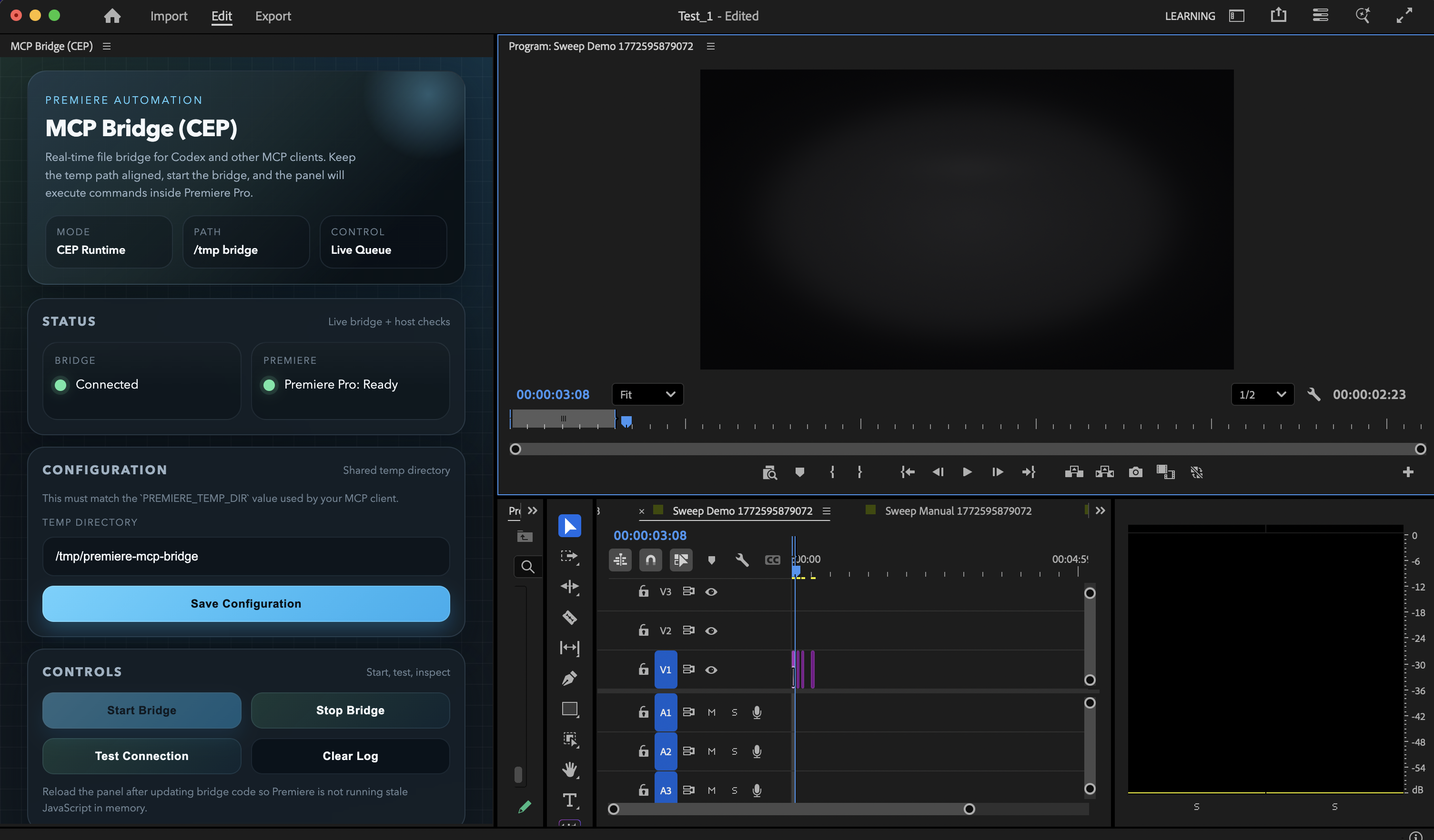

Current MCP Bridge (CEP) panel

Current CEP panel UI inside Premiere Pro, using the refreshed bridge controls and status layout.

Related MCP server: Premiere-Pro-MCP

Current Status

This repository is currently validated for:

  • macOS

  • Windows installer/config smoke checks through GitHub Actions

  • Adobe Premiere Pro 2020+ (actively used and tested on Premiere Pro 26.0)

  • Node.js 20+

  • MCP v2 server transport with modern stateless protocol discovery

  • the included macOS installer path for Claude Desktop

  • the included Windows installer path for GitHub Copilot in VS Code and Claude Desktop config

  • manual MCP registration for Codex, Claude Code, and similar MCP clients

Current catalog status as of August 31, 2026:

  • 283 catalog tools (search_tools, get_tool_schema, invoke_tool, plus 280 Premiere operations)

  • tools/list advertises the small always-on set by default (search_tools, get_tool_schema, invoke_tool, verify_premiere_connection, list_sequences). Set PREMIERE_MCP_TOOLSET=full to list every tool, which is what Claude Code native tool search indexes

  • coverage spans project setup, media ingest, bins, sequences, timeline editing, transitions, effects, keyframes, captions, markers, metadata, proxies, multicam, color, audio, exports, and higher-level assembly workflows

  • the catalog includes practical agent workflows such as product-spot assembly, motion-graphics demos, timeline razoring, caption reads, audio ducking, scene edit detection, EDL import, export readiness validation, and linked audio/video operations

Most recent completed local live validation:

  • 283 catalog tools; get_capabilities reports catalog.advertised vs catalog.tools, local installation, and optional live connection state. verify_premiere_connection is the canonical read-only bridge and host readiness check

  • 0 known parked or placeholder tools are advertised

  • import_ae_comps is intentionally not advertised because Premiere returned false for real .aep fixtures in this environment and a generic .aep import can wedge the CEP bridge

The full live sweep output is written to /tmp/premiere-mcp-bridge/live-tool-sweep.json when you run the verifier.

What You Get

The server covers project operations, ingest, sequence creation, timeline editing, transitions, effects, keyframes, metadata, exports, and higher-level assembly workflows.

Example prompts:

  • "List all sequences and show me which one is active."

  • "Import these three shots and build a rough product spot."

  • "Add cross dissolves to every cut on video track 1."

  • "Apply Gaussian Blur to the middle clip."

  • "Apply the Black & White effect to the active short-form clip."

  • "Razor the interview sequence at 12.5 seconds across all audio and video tracks."

  • "Export the active sequence as FCP XML."

For monochrome looks, prefer apply_effect with Black & White instead of trying to force black and white through generic saturation-only adjustments.

Before editing, you can also attach the premiere://config/get_instructions resource to give the model Premiere-specific operating guidance.

For a predictable start to every session, first run verify_premiere_connection. It confirms that the CEP bridge responded and returns the Premiere build, open project, and active sequence without modifying the project.

High-level workflow tools included:

  • build_motion_graphics_demo

  • assemble_product_spot

  • build_brand_spot_from_mogrt_and_assets

assemble_product_spot and build_brand_spot_from_mogrt_and_assets now support an optional clipPlan argument so an LLM can direct per-clip timing, track placement, transitions, motion, trims, effects, and color adjustments instead of relying on fixed template defaults.

Agent Skill

If you want Codex, Claude Code, or another agent to handle installation, verification, and day-to-day usage correctly, install the included Agent Skill:

npx skills add hetpatel-11/Adobe_Premiere_Pro_MCP --skill premiere-pro-mcp

Or install directly from the skill path:

npx skills add https://github.com/hetpatel-11/Adobe_Premiere_Pro_MCP/tree/main/skills/premiere-pro-mcp

The skill teaches agents how to install the MCP, start and verify the CEP bridge, use the Premiere tools safely, import real media before editing, prefer sequence-aware operations, and run diagnostics when something fails.

Advanced Setup and Verification

For source installs, client-specific MCP configuration, Windows installer flags, diagnostics, and the live tool sweep, use QUICKSTART.md. It is the canonical setup guide and keeps this page focused on choosing and using the product.

The short version:

  1. Install with npm install -g adobe-premiere-pro-mcp, then run premiere-pro-mcp --install-cep.

  2. Restart Premiere Pro and your MCP client, then start Window > Extensions > MCP Bridge (CEP).

  3. Run premiere-pro-mcp --doctor, then ask the client to call verify_premiere_connection without making changes.

For manual registration in any MCP client, use the global command after npm installation:

{
  "mcpServers": {
    "premiere-pro": {
      "command": "premiere-pro-mcp"
    }
  }
}

The supported UI bridge is CEP. If Premiere does not expose the extension, enable UXP Plugins > Enable developer mode in Premiere preferences, restart Premiere, and reopen the CEP panel. The bundled UXP panel remains experimental.

For a real-host sweep, use a disposable Premiere project and run node scripts/live-tool-sweep.mjs; it creates temporary Sweep ... sequences in the current project.

How the Bridge Works

+-----------+        +-----------+        +-----------+
|  Client   |  MCP   | Node.js   | Files  | CEP Panel |
| (Codex+)  |<------>| MCP Server|<------>| (Premiere)|
+-----------+        +-----------+        +-----------+
                                                 |
                                                 v
                                          +-----------+
                                          | Premiere  |
                                          | DOM / QE  |
                                          +-----------+
  1. The client calls an MCP tool.

  2. The Node server generates ExtendScript plus shared helpers.

  3. The script is written into /tmp/premiere-mcp-bridge.

  4. The CEP panel polls that directory and runs the script through CSInterface.evalScript().

  5. The panel writes the result back to the response file.

  6. The server returns structured JSON to the MCP client.

Tools

All 283 catalog tools have an implementation. tools/list advertises a small always-on set so hosts that dump every MCP schema do not spend the context window on unused Premiere operations (Anthropic tool-search / MCP progressive discovery). Call search_tools (BM25 query or regex pattern), optionally get_tool_schema, then invoke_tool. Set PREMIERE_MCP_TOOLSET=full to restore a flat 283-tool list. This catalog explains the editing surface in human terms. Start with verify_premiere_connection, then inspect the project before asking an agent to mutate it.

Discovery and project inspection

Tools

What they do

verify_premiere_connection / get_capabilities

Read-only host readiness and local runtime capability checks.

get_project_info / list_project_items / list_sequences

Inspect the current project, media/bin inventory, and sequences.

get_active_sequence / list_sequence_tracks / get_sequence_settings

Read the current timeline, its clips/tracks, and sequence settings.

get_full_project_overview / get_full_sequence_info / get_full_clip_info

Return deeper project, sequence, or clip snapshots for planning.

search_project_items / find_project_item_by_name / find_items_by_media_path

Locate project items by name or media path.

get_timeline_summary / get_timeline_gaps / get_used_media_report

Summarize the edit, detect gaps, and report media in use.

get_offline_media / check_offline_media / get_unused_media / get_duplicate_media

Find missing, unused, or duplicated media before an edit or export.

get_clip_properties / get_clip_speed / get_clip_at_position / get_clip_at_playhead

Inspect clip framing, speed, and timeline position.

get_premiere_state / get_version_info / ping

Read a broad host state, Premiere version, or bridge health.

Projects, media, and bins

Tools

What they do

create_project / open_project / save_project / save_project_as / close_project

Project lifecycle and file operations.

import_media / import_folder / import_image_sequence

Bring video, audio, stills, or image sequences into the project.

import_fcp_xml / import_sequences_from_project / import_sequences

Import supported timeline interchange or sequences from another project.

create_bin / rename_bin / delete_bin / create_smart_bin

Create and organize project-panel bins.

move_item_to_bin / move_items_to_bin / rename_project_item / rename_clip

Organize and rename existing project items.

delete_project_item / delete_multiple_project_items

Remove project items explicitly. These are destructive operations.

create_subclip / refresh_media / relink_media / replace_clip_media

Create source ranges, refresh media, relink missing files, or replace clip media.

get_metadata / set_metadata / get_xmp_metadata / set_xmp_metadata

Read and write project metadata and XMP fields.

get_footage_interpretation / set_footage_interpretation

Inspect or change footage frame-rate and pixel-aspect interpretation.

set_color_label / get_color_label / set_project_panel_metadata

Label and annotate project-panel items.

Sequences and tracks

Tools

What they do

create_sequence / create_sequence_from_preset

Make an empty sequence from an installed .sqpreset without triggering Premiere's New Sequence dialog.

create_sequence_from_clips

Derive a sequence from pre-imported media when the clip settings should define the sequence.

duplicate_sequence

Copy a sequence; clearContents: true makes an empty reusable template with the source settings.

delete_sequence / close_sequence / set_active_sequence

Manage which sequence is open or active.

get_sequence_structure / get_sequence_count

Inspect a sequence layout or count project sequences.

set_sequence_settings / set_sequence_frame_rate / set_sequence_resolution

Change supported sequence settings. Verify results because Premiere can quantize or reject changes.

set_sequence_audio_settings / set_sequence_pixel_aspect_ratio / set_sequence_field_type

Adjust supported audio, pixel-aspect, and field settings.

add_track / add_tracks / delete_track / rename_track

Create, remove, and name audio/video tracks. Caption-track deletion returns an explicit unsupported result.

lock_track / toggle_track_visibility / set_target_track / set_all_tracks_targeted

Control edit protection, visibility, and track targeting.

get_track_info / get_target_tracks / get_sequence_in_out_points

Inspect tracks, targeting, and sequence in/out ranges.

Timeline editing and trim operations

Tools

What they do

add_to_timeline / add_to_timeline_batch

Place one or many project clips with per-clip source ranges and link-audio control. Batch placement returns per-clip results.

insert_from_source / overwrite_from_source / overwrite_clip

Perform three-point insert or overwrite editing from the Source monitor.

remove_from_timeline / remove_selected_clips / ripple_delete

Remove timeline clips. Ripple deletion closes the gap when the host supports it.

move_clip / move_clip_to_track / set_clip_start_time

Reposition a clip in time or on another track.

split_clip / razor_timeline_at_time / razor_all_tracks

Cut one clip or multiple tracks at a requested timeline point.

trim_clip / roll_edit / slide_edit / slip_edit

Adjust edit points and clip content timing. Structural QE edits are read back rather than trusted blindly.

lift_selection / extract_selection / nest_clips / unnest_sequence

Lift/extract a selected range or create/remove nests.

duplicate_clip / replace_clip / enable_disable_clip / freeze_frame

Duplicate, replace, enable, or freeze timeline material.

link_audio_video / link_selection / unlink_selection / get_linked_items

Manage audio/video link relationships.

undo / redo / multiple_undo

Revert or reapply recent Premiere operations.

Effects, color, motion, and keyframes

Tools

What they do

list_available_effects / list_clip_effects / get_effect_properties

Discover installed effects, applied effects, and their properties.

apply_effect

Add a visual/audio effect component. Identifies and reads back the new component. Premiere 26 has no scripting API to remove effects.

batch_apply_effect / copy_effects_between_clips / copy_effect_values

Apply or copy effect treatments across clips.

set_effect_property / set_color_value / set_blend_mode

Change supported effect parameters, color values, and blend modes.

color_correct / apply_lut / stabilize_clip

Apply basic correction, LUTs, or Warp Stabilizer.

crop_clip / add_adjustment_layer / get_clip_adjustment_layer

Crop a clip or use an adjustment layer for shared treatment.

set_clip_properties / set_clip_properties_batch

Set opacity, scale, rotation, and position with verified per-property output.

set_clip_position / set_clip_scale / set_clip_rotation / set_clip_anchor_point

Address individual Motion transform values.

add_keyframe / get_keyframes / remove_keyframe / remove_keyframe_range

Create, inspect, and remove parameter keyframes.

set_keyframe_interpolation / get_value_at_time

Set interpolation or query a parameter value at a given time.

Audio, transitions, and captions

Tools

What they do

adjust_audio_levels / set_clip_volume / set_clip_pan

Set clip gain, volume, or pan.

add_audio_keyframes / setup_ducking

Build volume automation or a full ducking curve from supplied windows.

mute_track / apply_audio_effect / apply_audio_effect_to_all_clips

Mute a track or apply audio processing to one or many clips.

detect_silence

Analyze a local media file with ffmpeg and return silence ranges. It does not edit the timeline.

list_available_transitions / list_available_audio_transitions

Discover installed transition names.

add_transition / add_transition_to_clip / batch_add_transitions

Add one or many transitions. Results distinguish verified changes from accepted-but-unverified host responses.

create_caption_track

Create a caption track from an imported subtitle project item, such as an SRT.

read_sequence_captions

Reports scripting-visible caption data and explicitly flags that Premiere's DOM often cannot read existing caption text.

Markers, selection, navigation, and playback

Tools

What they do

add_marker / update_marker / delete_marker / list_markers

Create and manage timeline markers.

add_marker_to_project_item / get_clip_markers / get_sequence_markers_by_type

Work with markers on project items, clips, or sequences.

set_sequence_in_out_points / clear_sequence_in_out / set_work_area / get_work_area

Set or inspect sequence in/out points and work area.

get_playhead_position / set_playhead_position / get_next_edit_point / move_playhead_to_edit

Inspect and navigate the CTI/playhead.

get_selected_clips / select_clips_by_name / select_clips_in_range

Inspect or create targeted timeline selections.

select_all_clips / deselect_all_clips / select_disabled_clips / invert_selection

Broader selection controls.

open_in_source / close_source_monitor / set_source_in_out / clear_item_in_out

Control Source monitor media and source in/out points.

play_timeline / stop_playback / play_source_monitor

Start or stop timeline and source playback.

Delivery, interchange, and media management

Tools

What they do

validate_project_for_export / get_encoder_presets / get_export_file_extension

Validate a delivery, discover readable user .epr presets, and resolve output extensions.

export_sequence / add_to_render_queue

Queue a sequence through Adobe Media Encoder using a real preset path or exact preset name.

get_render_queue_status / start_batch_encode

Report queue-monitoring availability or start supported batch encoding.

export_frame / capture_frame

Write a still image from a sequence or capture a frame.

export_as_fcp_xml / export_aaf / export_omf

Export supported interchange formats.

encode_project_item / encode_file / export_as_project

Encode a source item/file or export a project representation.

manage_proxies / has_proxy / detach_proxy

Inspect, attach, or detach proxies.

set_offline / refresh_media / set_scale_to_frame_size

Change offline status, refresh media, or apply frame-size scaling.

consolidate_duplicates / consolidate_and_transfer

Consolidate duplicate items or prepare a transfer workflow.

Graphics, workflows, workspace, and advanced operations

Tools

What they do

add_text_overlay / import_mogrt / import_mogrt_from_library

Add a MOGRT and optionally populate supported text fields.

get_mogrt_component / get_graphics_white_luminance / set_graphics_white_luminance

Inspect Motion Graphics components and graphics white luminance.

build_motion_graphics_demo

Create a complete demo sequence with generated assets, dissolves, and subtle animation.

assemble_product_spot / build_brand_spot_from_mogrt_and_assets

Assemble real media into a directed product/brand edit with optional clip plans and MOGRT overlays.

auto_reframe_sequence / detect_scene_edits / scene_edit_detection

Use Premiere-assisted reframing or scene-change detection where the host supports it.

get_workspaces / set_workspace

Inspect and switch Premiere workspace layouts.

create_bars_and_tone / set_transcode_on_ingest / set_scratch_disk_path

Generate utility media or manage ingest and scratch-disk behavior.

execute_extendscript / evaluate_expression / inspect_dom_object

Advanced diagnostic and scripting operations. Use only with trusted inputs and explicit user intent.

Additional supported operations

The remaining catalog covers lower-level control of media properties, project settings, display formats, anti-aliasing, poster frames, color labels, selection, track targeting, project paths, and project counts. It includes set_override_frame_rate, set_override_pixel_aspect_ratio, set_frame_blend, set_time_interpolation, set_poster_frame, set_anti_alias_quality, set_uniform_scale, set_scale_width_height, set_sequence_display_format, set_project_scratch_disk, get_project_scratch_disks, get_all_project_paths, get_total_clip_count, get_insertion_bin, is_work_area_enabled, and match_frame.

Use MCP introspection in your client for each tool's exact input schema and return shape. An agent should inspect first, make a focused mutation, and read back the affected state before continuing a multi-step edit.

Real Limits

  • A self-signed CEP .zxp confirms archive integrity but is not Adobe Marketplace approval or a public trust guarantee. The reproducible signing workflow requires private certificate secrets and target-platform Premiere validation.

This project is much more usable than the original prototype, but it is not magic.

  • Premiere scripting still does not expose every UI operation cleanly.

  • Professional title design still depends on real MOGRT assets or external graphics workflows.

  • get_render_queue_status is only useful when Adobe Media Encoder integration is available.

  • The best results come from real source footage, real audio, and real brand assets. The automation layer assembles and manipulates them; it does not replace editorial judgment.

Telemetry

Anonymous usage telemetry is on by default so we can see how many people run the server, which tools they use, and which tools fail.

Each event is an install id, OS, and package version. server_started counts installs. Tool calls include the tool name and whether they succeeded. We keep every failure, and at most one successful call per tool per install per day. Failures also include duration, a short error code, the Zod field names that failed, and a path-stripped error template. Project names, media paths, arguments, and results are not sent. Details are in PRIVACY.md.

Opt out in any of these ways:

  • Uncheck Share anonymous usage data in Window > Extensions > MCP Bridge (CEP)

  • Set "telemetry": false in ~/.premiere-mcp-bridge/config.json

  • Set PREMIERE_MCP_TELEMETRY=0 in the MCP server environment

  • Set DO_NOT_TRACK=1

By default tools/list advertises search_tools, get_tool_schema, invoke_tool, verify_premiere_connection, and list_sequences. Call search_tools then invoke_tool for the rest of the catalog. Set PREMIERE_MCP_TOOLSET=full to advertise every tool (use this when the host natively defers MCP schemas, as Claude Code tool search does).

Updates

When a newer package is on npm, the MCP Bridge panel shows Update now and Later. Later snoozes the prompt for 7 days. Agents also see this on get_capabilities. Opt out with PREMIERE_MCP_UPDATE_CHECK=0 or "updateCheck": false in ~/.premiere-mcp-bridge/config.json.

Troubleshooting

If the tools are visible but calls fail:

  1. Confirm Premiere Pro is open with a project loaded.

  2. Open Window > Extensions > MCP Bridge (CEP).

  3. Confirm the temp directory is exactly /tmp/premiere-mcp-bridge.

  4. Click Start Bridge.

  5. If you updated the bridge code, right-click the panel and choose Reload.

  6. Retry the command.

If the MCP client cannot find the server:

  1. Verify the absolute path to dist/index.js.

  2. Verify PREMIERE_TEMP_DIR=/tmp/premiere-mcp-bridge.

  3. Restart the MCP client after changing config.

  4. Run npm run setup:doctor.

Developer Notes

Useful commands:

npm run build
npm test -- --runInBand
npm run setup:doctor
node scripts/live-tool-sweep.mjs

See:

  • QUICKSTART.md for the shortest install path

  • KNOWN_ISSUES.md for current limits

  • CONTRIBUTING.md for development workflow

Available Tools

5 tools
get_tool_schemaA

Return the full JSON input schema for one Premiere tool name from search_tools. After reading it, call invoke_tool.

ParametersJSON Schema
NameRequiredDescriptionDefault
nameYesExact tool name, e.g. trim_clip

TDQS

A4.2/5.0
Behavior4/5

Does the description disclose side effects, auth requirements, rate limits, or destructive behavior?

There are no annotations, so the description carries the full burden of explaining behavior. It discloses that this tool only returns a schema and implies that it does not execute tools by instructing the agent to call invoke_tool afterward. It does not cover error cases, but for an introspection tool this is adequate.

Agents need to know what a tool does to the world before calling it. Descriptions should go beyond structured annotations to explain consequences.

Conciseness5/5

Is the description appropriately sized, front-loaded, and free of redundancy?

Two concise sentences provide the core behavior and the intended next action. There is no filler, repetition, or unnecessary detail.

Shorter descriptions cost fewer tokens and are easier for agents to parse. Every sentence should earn its place.

Completeness4/5

Given the tool's complexity, does the description cover enough for an agent to succeed on first attempt?

For a one-parameter tool with no output schema, the description explains what is returned and how to continue the workflow. It could mention behavior for an invalid or unknown tool name, but the essential information for correct invocation is present.

Complex tools with many parameters or behaviors need more documentation. Simple tools need less. This dimension scales expectations accordingly.

Parameters3/5

Does the description clarify parameter syntax, constraints, interactions, or defaults beyond what the schema provides?

The schema coverage is 100% and already documents the 'name' parameter with an example. The description adds only that the name should come from search_tools, which is helpful context but does not substantially enrich parameter understanding beyond the schema.

Input schemas describe structure but not intent. Descriptions should explain non-obvious parameter relationships and valid value ranges.

Purpose5/5

Does the description clearly state what the tool does and how it differs from similar tools?

The description clearly states the resource: 'full JSON input schema for one Premiere tool name.' It also distinguishes the tool from siblings by tying it to search_tools and instructing that invoke_tool should come next.

Agents choose between tools based on descriptions. A clear purpose with a specific verb and resource helps agents select the right tool.

Usage Guidelines4/5

Does the description explain when to use this tool, when not to, or what alternatives exist?

The description places the tool in a workflow: tool names come from search_tools, and after reading the schema the agent should call invoke_tool. It does not explicitly say when not to use this tool, but the sequential guidance is clear and actionable.

Agents often have multiple tools that could apply. Explicit usage guidance like "use X instead of Y when Z" prevents misuse.

invoke_toolA

Run a Premiere tool by exact name. Use after search_tools. Hosts that only advertise the small always-on set cannot call trim_clip etc. as top-level MCP tools.

ParametersJSON Schema
NameRequiredDescriptionDefault
nameYesExact tool name returned by search_tools
argumentsNoArguments for that tool

TDQS

A3.6/5.0
Behavior2/5

Does the description disclose side effects, auth requirements, rate limits, or destructive behavior?

No annotations are provided, so the description carries the full disclosure burden. It says 'Run a Premiere tool' but does not disclose that this is an arbitrary passthrough capable of side-effecting operations like trim_clip, nor does it mention error behavior when the tool name is invalid.

Agents need to know what a tool does to the world before calling it. Descriptions should go beyond structured annotations to explain consequences.

Conciseness4/5

Is the description appropriately sized, front-loaded, and free of redundancy?

Two sentences with the core purpose front-loaded. The host-limitation sentence is useful context but slightly jargon-heavy; still, every sentence earns its place and there is no filler.

Shorter descriptions cost fewer tokens and are easier for agents to parse. Every sentence should earn its place.

Completeness3/5

Given the tool's complexity, does the description cover enough for an agent to succeed on first attempt?

The description covers the key prerequisite ('Use after search_tools') and exact-name matching. However, it omits guidance on using get_tool_schema to fetch the target tool's argument schema, and gives no return/error expectations despite having no output schema or annotations.

Complex tools with many parameters or behaviors need more documentation. Simple tools need less. This dimension scales expectations accordingly.

Parameters3/5

Does the description clarify parameter syntax, constraints, interactions, or defaults beyond what the schema provides?

The input schema already documents both parameters: name is 'Exact tool name returned by search_tools' and arguments is 'Arguments for that tool'. The description reinforces exactness and ordering but does not add meaningful detail beyond the schema, such as how arguments should be structured per the target tool.

Input schemas describe structure but not intent. Descriptions should explain non-obvious parameter relationships and valid value ranges.

Purpose5/5

Does the description clearly state what the tool does and how it differs from similar tools?

The description uses a specific verb ('Run') with a specific resource ('a Premiere tool by exact name') and clarifies this is the generic execution entry point. Naming trim_clip and contrasting it with top-level MCP tools helps distinguish it from siblings like search_tools and get_tool_schema.

Agents choose between tools based on descriptions. A clear purpose with a specific verb and resource helps agents select the right tool.

Usage Guidelines4/5

Does the description explain when to use this tool, when not to, or what alternatives exist?

It explicitly says 'Use after search_tools', giving clear ordering guidance, and it explains the host limitation that makes invoke_tool necessary. However, it does not explicitly state when not to use this tool or mention alternatives like get_tool_schema for inspecting a tool's schema.

Agents often have multiple tools that could apply. Explicit usage guidance like "use X instead of Y when Z" prevents misuse.

list_sequencesB

Lists all sequences in the current Premiere Pro project with their IDs, names, and basic properties.

ParametersJSON Schema
NameRequiredDescriptionDefault

No parameters

TDQS

B3.3/5.0
Behavior2/5

Does the description disclose side effects, auth requirements, rate limits, or destructive behavior?

No annotations are provided, so the description carries the full burden of behavioral disclosure. It confirms the read-only, listing nature and names returned fields, but it's vague about 'basic properties' and omits edge-case behavior (empty project, no open document, performance on large projects).

Agents need to know what a tool does to the world before calling it. Descriptions should go beyond structured annotations to explain consequences.

Conciseness5/5

Is the description appropriately sized, front-loaded, and free of redundancy?

A single, front-loaded sentence with zero filler words. It states the action, scope, and result in one concise breath.

Shorter descriptions cost fewer tokens and are easier for agents to parse. Every sentence should earn its place.

Completeness4/5

Given the tool's complexity, does the description cover enough for an agent to succeed on first attempt?

For a simple 0-parameter listing tool, the description covers the essentials: scope ('all sequences in current project') and return shape (IDs, names, basic properties). The primary gap is the undefined 'basic properties' term, which matters more because there's no output schema to compensate.

Complex tools with many parameters or behaviors need more documentation. Simple tools need less. This dimension scales expectations accordingly.

Parameters4/5

Does the description clarify parameter syntax, constraints, interactions, or defaults beyond what the schema provides?

With zero parameters, the schema carries no semantics, so per the rubric the baseline is 4. The description appropriately spends its space explaining the return value instead, which is the only useful thing it could add.

Input schemas describe structure but not intent. Descriptions should explain non-obvious parameter relationships and valid value ranges.

Purpose4/5

Does the description clearly state what the tool does and how it differs from similar tools?

The description uses a specific verb-resource-scope structure ('Lists all sequences in the current Premiere Pro project') and specifies the return payload (IDs, names, basic properties). It distinguishes itself from list_project_items naturally, though 'basic properties' is undefined and it doesn't explicitly disambiguate from get_sequence_structure/get_full_sequence_info.

Agents choose between tools based on descriptions. A clear purpose with a specific verb and resource helps agents select the right tool.

Usage Guidelines2/5

Does the description explain when to use this tool, when not to, or what alternatives exist?

No guidance is given on when to use this tool vs. the many siblings such as list_sequence_tracks, get_full_sequence_info, or get_sequence_structure. There are no exclusions, prerequisites, or alternative suggestions — a missed opportunity given the crowded sibling space.

Agents often have multiple tools that could apply. Explicit usage guidance like "use X instead of Y when Z" prevents misuse.

search_toolsA

Search the Premiere tool catalog with a BM25 natural-language query or a regex pattern, then call invoke_tool. Use this instead of expecting 280 editing tools in the MCP tool list. Empty query lists categories. Default 5 matches.

ParametersJSON Schema
NameRequiredDescriptionDefault
limitNoMax matches, 1-25. Defaults to 5.
queryNoNatural language BM25 query, e.g. "trim clip duration" or "export sequence"
detailNoHow much of each match to return. schema includes the JSON input schema. Defaults to descriptions.
patternNoCase-insensitive regex over tool name, description, category, and argument names. e.g. "^list_" or "mogrt"

TDQS

A4.6/5.0
Behavior4/5

Does the description disclose side effects, auth requirements, rate limits, or destructive behavior?

Since no annotations are provided, the description carries the full burden of behavioral disclosure. It discloses several concrete behaviors: empty query lists categories, default 5 matches, and dual support for BM25 and regex searches. It does not explicitly state read-only status or output format, but for a search operation the disclosed behaviors provide meaningful transparency.

Agents need to know what a tool does to the world before calling it. Descriptions should go beyond structured annotations to explain consequences.

Conciseness5/5

Is the description appropriately sized, front-loaded, and free of redundancy?

The description is four short sentences with no filler: purpose, usage instruction, empty-query behavior, and default limit. The critical 'use this instead' guidance is front-loaded, and every sentence earns its place.

Shorter descriptions cost fewer tokens and are easier for agents to parse. Every sentence should earn its place.

Completeness4/5

Given the tool's complexity, does the description cover enough for an agent to succeed on first attempt?

Given no output schema and four optional parameters, the description covers tool selection rationale, query modes, the follow-up action, and important default/empty-query behavior. It does not specify the return shape, but the detail parameter schema fills that gap. This is sufficient for an agent to invoke the tool correctly in most cases.

Complex tools with many parameters or behaviors need more documentation. Simple tools need less. This dimension scales expectations accordingly.

Parameters4/5

Does the description clarify parameter syntax, constraints, interactions, or defaults beyond what the schema provides?

Schema coverage is 100%, so the baseline is 3. The description adds value by clarifying that query and regex are alternative search modes and by revealing that an empty query produces categories—information not present in the schema. It repeats the default limit, but the added empty-query behavior justifies a score above baseline.

Input schemas describe structure but not intent. Descriptions should explain non-obvious parameter relationships and valid value ranges.

Purpose5/5

Does the description clearly state what the tool does and how it differs from similar tools?

The description opens with a specific verb-resource pair ('Search the Premiere tool catalog') and names two concrete query mechanisms (BM25 natural-language or regex). It clearly differentiates this from siblings like invoke_tool and get_tool_schema, and the reference to the 280-tool MCP list explains its role as a discovery tool.

Agents choose between tools based on descriptions. A clear purpose with a specific verb and resource helps agents select the right tool.

Usage Guidelines5/5

Does the description explain when to use this tool, when not to, or what alternatives exist?

It explicitly instructs the agent to use this tool instead of expecting the full 280-tool MCP list, which is direct when-to-use guidance. It also tells the agent to follow up by calling invoke_tool, linking the search step to the execution step. While it doesn't enumerate exclusions in detail, the 'use this instead' phrasing is strong and actionable.

Agents often have multiple tools that could apply. Explicit usage guidance like "use X instead of Y when Z" prevents misuse.

verify_premiere_connectionA

Readiness check for Premiere Pro and the MCP Bridge. Call this before any editing tool. If Premiere is installed and not running, this launches it and waits for the CEP panel, which auto-starts the bridge. If it fails, tell the user the nextStep and do not retry other tools.

ParametersJSON Schema
NameRequiredDescriptionDefault
launchIfNeededNoWhen true (the default), launch Premiere if it is installed and the bridge heartbeat is missing. Set false for a check that never starts the app.

TDQS

A4.5/5.0
Behavior4/5

Does the description disclose side effects, auth requirements, rate limits, or destructive behavior?

With no annotations, the description carries the full burden of behavioral disclosure, and it does well: it reveals that the tool may launch Premiere as a side effect, waits for the CEP panel, auto-starts the bridge, and exposes nextStep on failure. It does not describe the exact return shape or success/failure indicators, which would make it fully transparent.

Agents need to know what a tool does to the world before calling it. Descriptions should go beyond structured annotations to explain consequences.

Conciseness5/5

Is the description appropriately sized, front-loaded, and free of redundancy?

Three sentences, each earning its place: purpose, behavior/wait semantics, and failure handling. The most important instruction ('call before any editing tool') is front-loaded, and there is zero filler or repetition.

Shorter descriptions cost fewer tokens and are easier for agents to parse. Every sentence should earn its place.

Completeness5/5

Given the tool's complexity, does the description cover enough for an agent to succeed on first attempt?

For a one-parameter check tool with no annotations and no output schema, the description is complete: what it does, when to call it, what side effects it may trigger, and how to handle failure. The 'nextStep' reference even hints at the failure return shape. An agent has everything needed to invoke it correctly.

Complex tools with many parameters or behaviors need more documentation. Simple tools need less. This dimension scales expectations accordingly.

Parameters3/5

Does the description clarify parameter syntax, constraints, interactions, or defaults beyond what the schema provides?

Schema description coverage is 100%; the schema already fully documents launchIfNeeded including its default behavior and false-case meaning. The description refers to launching behavior but does not add parameter-level meaning beyond the schema. Baseline 3 is appropriate.

Input schemas describe structure but not intent. Descriptions should explain non-obvious parameter relationships and valid value ranges.

Purpose5/5

Does the description clearly state what the tool does and how it differs from similar tools?

The description states a specific verb and resource: a 'readiness check' for Premiere Pro and the MCP Bridge. It also frames itself as a prerequisite ('Call this before any editing tool'), which distinguishes it from the editing tools it precedes. The purpose is unambiguous.

Agents choose between tools based on descriptions. A clear purpose with a specific verb and resource helps agents select the right tool.

Usage Guidelines5/5

Does the description explain when to use this tool, when not to, or what alternatives exist?

Provides explicit when-to-use guidance ('Call this before any editing tool') and when-not-to-continue guidance ('If it fails... do not retry other tools'). It names the class of alternatives (editing tools) and instructs the agent to surface nextStep to the user instead. This is unusually actionable usage guidance.

Agents often have multiple tools that could apply. Explicit usage guidance like "use X instead of Y when Z" prevents misuse.

Tool Schema Changelog

Recent tool additions, removals, and schema changes observed during successful MCP inspections.

  1. 285 tool updatesv1.2.7
    • Removedadd_adjustment_layer
    • Removedadd_audio_keyframes
    • Removedadd_custom_metadata_field
    • Removedadd_keyframe
    • Removedadd_marker
    • Removedadd_marker_to_project_item
    • Removedadd_text_overlay
    • Removedadd_to_render_queue
    • Removedadd_to_timeline
    • Removedadd_to_timeline_batch
    • Removedadd_track
    • Removedadd_tracks
    • Removedadd_transition
    • Removedadd_transition_to_clip
    • Removedadjust_audio_levels
    • Removedapply_audio_effect
    • Removedapply_audio_effect_to_all_clips
    • Removedapply_effect
    • Removedapply_lut
    • Removedassemble_product_spot
    • Removedattach_custom_property
    • Removedauto_reframe_sequence
    • Removedbatch_add_transitions
    • Removedbatch_apply_effect
    • Removedbatch_enable_disable
    • Removedbatch_rename_clips
    • Removedbuild_brand_spot_from_mogrt_and_assets
    • Removedbuild_motion_graphics_demo
    • Removedcapture_frame
    • Removedcheck_offline_media
    • Removedclear_item_in_out
    • Removedclear_sequence_in_out
    • Removedclose_all_source_clips
    • Removedclose_project
    • Removedclose_sequence
    • Removedclose_source_monitor
    • Removedcolor_correct
    • Removedconsolidate_and_transfer
    • Removedconsolidate_duplicates
    • Removedcopy_effect_values
    • Removedcopy_effects_between_clips
    • Removedcreate_bars_and_tone
    • Removedcreate_bin
    • Removedcreate_caption_track
    • Removedcreate_project
    • Removedcreate_sequence
    • Removedcreate_sequence_from_clips
    • Removedcreate_sequence_from_preset
    • Removedcreate_smart_bin
    • Removedcreate_subclip
    • Removedcreate_subsequence
    • Removedcrop_clip
    • Removeddelete_bin
    • Removeddelete_marker
    • Removeddelete_multiple_project_items
    • Removeddelete_preview_files
    • Removeddelete_project_item
    • Removeddelete_sequence
    • Removeddelete_track
    • Removeddeselect_all_clips
    • Removeddetach_proxy
    • Removeddetect_scene_edits
    • Removeddetect_silence
    • Removedduplicate_clip
    • Removedduplicate_sequence
    • Removedenable_disable_clip
    • Removedencode_file
    • Removedencode_project_item
    • Removedevaluate_expression
    • Removedexecute_extendscript
    • Removedexport_aaf
    • Removedexport_as_fcp_xml
    • Removedexport_as_project
    • Removedexport_frame
    • Removedexport_omf
    • Removedexport_sequence
    • Removedextract_selection
    • Removedfind_items_by_media_path
    • Removedfind_project_item_by_name
    • Removedfreeze_frame
    • Removedget_active_sequence
    • Removedget_all_project_paths
    • Removedget_bin_contents
    • Removedget_capabilities
    • Removedget_clip_adjustment_layer
    • Removedget_clip_at_playhead
    • Removedget_clip_at_position
    • Removedget_clip_links
    • Removedget_clip_markers
    • Removedget_clip_properties
    • Removedget_clip_speed
    • Removedget_color_label
    • Removedget_color_space
    • Removedget_duplicate_media
    • Removedget_effect_properties
    • Removedget_encoder_presets
    • Removedget_export_file_extension
    • Removedget_footage_interpretation
    • Removedget_full_clip_info
    • Removedget_full_project_overview
    • Removedget_full_sequence_info
    • Removedget_graphics_white_luminance
    • Removedget_insertion_bin
    • Removedget_item_info
    • Removedget_keyframes
    • Removedget_linked_items
    • Removedget_metadata
    • Removedget_mogrt_component
    • Removedget_next_edit_point
    • Removedget_offline_media
    • Removedget_playhead_position
    • Removedget_premiere_state
    • Removedget_project_info
    • Removedget_project_item_info
    • Removedget_project_panel_metadata
    • Removedget_project_scratch_disks
    • Removedget_qe_clip_info
    • Removedget_render_queue_status
    • Removedget_selected_clips
    • Removedget_sequence_count
    • Removedget_sequence_in_out_points
    • Removedget_sequence_markers_by_type
    • Removedget_sequence_settings
    • Removedget_sequence_structure
    • Removedget_source_monitor_info
    • Removedget_source_monitor_position
    • Removedget_target_tracks
    • Removedget_timeline_gaps
    • Removedget_timeline_summary
    • Addedget_tool_schema
    • Removedget_total_clip_count
    • Removedget_track_info
    • Removedget_unused_media
    • Removedget_used_media_report
    • Removedget_value_at_time
    • Removedget_version_info
    • Removedget_work_area
    • Removedget_workspaces
    • Removedget_xmp_metadata
    • Removedhas_proxy
    • Removedimport_edl
    • Removedimport_fcp_xml
    • Removedimport_folder
    • Removedimport_image_sequence
    • Removedimport_media
    • Removedimport_mogrt
    • Removedimport_mogrt_from_library
    • Removedimport_sequences
    • Removedimport_sequences_from_project
    • Removedinsert_from_source
    • Removedinspect_dom_object
    • Removedinvert_selection
    • Addedinvoke_tool
    • Removedis_work_area_enabled
    • Removedlift_selection
    • Removedlink_audio_video
    • Removedlink_selection
    • Removedlist_available_audio_effects
    • Removedlist_available_audio_transitions
    • Removedlist_available_effects
    • Removedlist_available_transitions
    • Removedlist_clip_effects
    • Removedlist_markers
    • Removedlist_project_items
    • Removedlist_sequence_tracks
    • Removedlock_track
    • Removedmanage_proxies
    • Removedmatch_frame
    • Removedmove_clip
    • Removedmove_clip_to_track
    • Removedmove_item_to_bin
    • Removedmove_items_to_bin
    • Removedmove_playhead_to_edit
    • Removedmultiple_undo
    • Removedmute_track
    • Removednest_clips
    • Removedopen_in_source
    • Removedopen_project
    • Removedoverwrite_clip
    • Removedoverwrite_from_source
    • Removedping
    • Removedplay_source_monitor
    • Removedplay_timeline
    • Removedrazor_all_tracks
    • Removedrazor_timeline_at_time
    • Removedread_sequence_captions
    • Removedredo
    • Removedrefresh_media
    • Removedrelink_media
    • Removedremove_all_effects
    • Removedremove_effect
    • Removedremove_effect_by_name
    • Removedremove_from_timeline
    • Removedremove_keyframe
    • Removedremove_keyframe_range
    • Removedremove_selected_clips
    • Removedrename_bin
    • Removedrename_clip
    • Removedrename_project_item
    • Removedrename_track
    • Removedreplace_clip
    • Removedreplace_clip_media
    • Removedreverse_clip
    • Removedripple_delete
    • Removedroll_edit
    • Removedsave_project
    • Removedsave_project_as
    • Removedscene_edit_detection
    • Removedsearch_project_items
    • Addedsearch_tools
    • Removedselect_all_clips
    • Removedselect_clips_by_color
    • Removedselect_clips_by_name
    • Removedselect_clips_in_range
    • Removedselect_disabled_clips
    • Removedselect_item
    • Removedset_active_sequence
    • Removedset_all_tracks_targeted
    • Removedset_anti_alias_quality
    • Removedset_blend_mode
    • Removedset_clip_anchor_point
    • Removedset_clip_opacity
    • Removedset_clip_pan
    • Removedset_clip_position
    • Removedset_clip_properties
    • Removedset_clip_properties_batch
    • Removedset_clip_rotation
    • Removedset_clip_scale
    • Removedset_clip_selection
    • Removedset_clip_speed_qe
    • Removedset_clip_start_time
    • Removedset_clip_volume
    • Removedset_color_label
    • Removedset_color_value
    • Removedset_effect_property
    • Removedset_footage_interpretation
    • Removedset_frame_blend
    • Removedset_graphics_white_luminance
    • Removedset_item_in_out
    • Removedset_keyframe_interpolation
    • Removedset_metadata
    • Removedset_offline
    • Removedset_override_frame_rate
    • Removedset_override_pixel_aspect_ratio
    • Removedset_playhead_position
    • Removedset_poster_frame
    • Removedset_project_panel_metadata
    • Removedset_project_scratch_disk
    • Removedset_scale_to_frame_size
    • Removedset_scale_width_height
    • Removedset_scratch_disk_path
    • Removedset_sequence_audio_settings
    • Removedset_sequence_display_format
    • Removedset_sequence_field_type
    • Removedset_sequence_frame_rate
    • Removedset_sequence_in_out_points
    • Removedset_sequence_pixel_aspect_ratio
    • Removedset_sequence_resolution
    • Removedset_sequence_settings
    • Removedset_source_in_out
    • Removedset_start_time
    • Removedset_target_track
    • Removedset_time_interpolation
    • Removedset_transcode_on_ingest
    • Removedset_uniform_scale
    • Removedset_work_area
    • Removedset_workspace
    • Removedset_xmp_metadata
    • Removedset_zero_point
    • Removedsetup_ducking
    • Removedslide_edit
    • Removedslip_edit
    • Removedspeed_change
    • Removedsplit_clip
    • Removedstabilize_clip
    • Removedstart_batch_encode
    • Removedstop_playback
    • Removedtoggle_track_visibility
    • Removedtrim_clip
    • Removedundo
    • Removedunlink_selection
    • Removedunnest_sequence
    • Removedupdate_marker
    • Removedvalidate_project_for_export
    • Changedverify_premiere_connection1 field changed
      • addedInput schema / properties / launchIfNeeded
        Added value: +{
        +  "description": "When true (the default), launch Premiere if it is installed and the bridge heartbeat is missing. Set false for a check that never starts the app.",
        +  "type": "boolean"
        +}
  2. 10 tool updatesv1.2.0
    • Changedadd_marker5 fields changed
      • addedInput schema / properties / color / anyOf
        Added value: +[
        +  {
        +    "enum": [
        +      "green",
        +      "red",
        +      "purple",
        +      "orange",
        +      "yellow",
        +      "white",
        +      "blue",
        +      "cyan"
        +    ],
        +    "type": "string"
        +  },
        +  {
        +    "maximum": 7,
        +    "minimum": 0,
        +    "type": "integer"
        +  },
        +  {
        +    "pattern": "^[0-7]$",
        +    "type": "string"
        +  }
        +]
      • changedInput schema / properties / color / description
        Previous value: -"Marker color (e.g., \"red\", \"green\", \"blue\")"New value: +"Marker colour — a name (green, red, purple, orange, yellow, white, blue, cyan) or an index 0-7. Defaults to green."
      • removedInput schema / properties / color / type
        Removed value: -"string"
      • changedInput schema / properties / sequenceId / description
        Previous value: -"The ID of the sequence to add the marker to"New value: +"The sequence ID (GUID) to add the marker to, as returned in the \"id\" field by list_sequences or get_active_sequence"
      • addedInput schema / properties / sequenceId / minLength
        Added value: +1
    • Changeddelete_marker3 fields changed
      • addedInput schema / properties / markerId / minLength
        Added value: +1
      • changedInput schema / properties / sequenceId / description
        Previous value: -"The ID of the sequence"New value: +"The sequence ID (GUID) as returned in the \"id\" field by list_sequences or get_active_sequence"
      • addedInput schema / properties / sequenceId / minLength
        Added value: +1
    • Changeddelete_track2 fields changed
      • changedInput schema / properties / sequenceId / description
        Previous value: -"The ID of the sequence"New value: +"The sequence ID (GUID) as returned in the \"id\" field by list_sequences or get_active_sequence"
      • addedInput schema / properties / sequenceId / minLength
        Added value: +1
    • Changedlist_markers2 fields changed
      • changedInput schema / properties / sequenceId / description
        Previous value: -"The ID of the sequence"New value: +"The sequence ID (GUID) as returned in the \"id\" field by list_sequences or get_active_sequence"
      • addedInput schema / properties / sequenceId / minLength
        Added value: +1
    • Changedlist_sequence_tracks2 fields changed
      • changedInput schema / properties / sequenceId / description
        Previous value: -"The ID of the sequence to list tracks for"New value: +"The sequence ID (GUID) to list tracks for, as returned in the \"id\" field by list_sequences or get_active_sequence"
      • addedInput schema / properties / sequenceId / minLength
        Added value: +1
    • Changedlock_track2 fields changed
      • changedInput schema / properties / sequenceId / description
        Previous value: -"The ID of the sequence"New value: +"The sequence ID (GUID) as returned in the \"id\" field by list_sequences or get_active_sequence"
      • addedInput schema / properties / sequenceId / minLength
        Added value: +1
    • Changedmove_clip1 field changed
      • removedInput schema / properties / newTrackIndex
        Removed value: -{
        -  "description": "The new track index (if moving to different track)",
        -  "type": "number"
        -}
    • Changedset_sequence_settings6 fields changed
      • changedInput schema / properties / settings / properties / frameRate / description
        Previous value: -"Frame rate"New value: +"Frames per second, e.g. 23.976, 25, 30"
      • changedInput schema / properties / settings / properties / height / description
        Previous value: -"Frame height"New value: +"Frame height in pixels"
      • addedInput schema / properties / settings / properties / pixelAspectRatio / anyOf
        Added value: +[
        +  {
        +    "type": "number"
        +  },
        +  {
        +    "type": "string"
        +  }
        +]
      • changedInput schema / properties / settings / properties / pixelAspectRatio / description
        Previous value: -"Pixel aspect ratio"New value: +"Pixel aspect ratio, either a number (1, 1.5, 2) or an \"N:M\" string (\"1:1\", \"4:3\", \"10:11\")"
      • removedInput schema / properties / settings / properties / pixelAspectRatio / type
        Removed value: -"number"
      • changedInput schema / properties / settings / properties / width / description
        Previous value: -"Frame width"New value: +"Frame width in pixels"
    • Changedtoggle_track_visibility2 fields changed
      • changedInput schema / properties / sequenceId / description
        Previous value: -"The ID of the sequence"New value: +"The sequence ID (GUID) as returned in the \"id\" field by list_sequences or get_active_sequence"
      • addedInput schema / properties / sequenceId / minLength
        Added value: +1
    • Changedupdate_marker6 fields changed
      • addedInput schema / properties / color / anyOf
        Added value: +[
        +  {
        +    "enum": [
        +      "green",
        +      "red",
        +      "purple",
        +      "orange",
        +      "yellow",
        +      "white",
        +      "blue",
        +      "cyan"
        +    ],
        +    "type": "string"
        +  },
        +  {
        +    "maximum": 7,
        +    "minimum": 0,
        +    "type": "integer"
        +  },
        +  {
        +    "pattern": "^[0-7]$",
        +    "type": "string"
        +  }
        +]
      • changedInput schema / properties / color / description
        Previous value: -"New color"New value: +"New colour. Marker colour — a name (green, red, purple, orange, yellow, white, blue, cyan) or an index 0-7. Defaults to green."
      • removedInput schema / properties / color / type
        Removed value: -"string"
      • addedInput schema / properties / markerId / minLength
        Added value: +1
      • changedInput schema / properties / sequenceId / description
        Previous value: -"The ID of the sequence"New value: +"The sequence ID (GUID) as returned in the \"id\" field by list_sequences or get_active_sequence"
      • addedInput schema / properties / sequenceId / minLength
        Added value: +1
  3. 287 tool updatesv1.1.6
    • Addedadd_adjustment_layer
    • Changedadd_audio_keyframes1 field changed
      • changedInput schema / $schema
        Previous value: -"http://json-schema.org/draft-07/schema#"New value: +"https://json-schema.org/draft/2020-12/schema"
    • Addedadd_custom_metadata_field
    • Addedadd_keyframe
    • Addedadd_marker
    • Addedadd_marker_to_project_item
    • Removedadd_shape
    • Changedadd_text_overlay15 fields changed
      • changedInput schema / $schema
        Previous value: -"http://json-schema.org/draft-07/schema#"New value: +"https://json-schema.org/draft/2020-12/schema"
      • removedInput schema / properties / alignment
        Removed value: -{
        -  "description": "Text alignment",
        -  "enum": [
        -    "left",
        -    "center",
        -    "right"
        -  ],
        -  "type": "string"
        -}
      • removedInput schema / properties / color
        Removed value: -{
        -  "description": "The hex color code for the text, e.g., \"#FFFFFF\"",
        -  "type": "string"
        -}
      • changedInput schema / properties / duration / description
        Previous value: -"How long the text should remain on screen in seconds"New value: +"How long the text should remain on screen in seconds (best-effort; the MOGRT's natural duration may take precedence)"
      • removedInput schema / properties / fontFamily
        Removed value: -{
        -  "description": "e.g., \"Arial\", \"Times New Roman\"",
        -  "type": "string"
        -}
      • removedInput schema / properties / fontSize
        Removed value: -{
        -  "description": "e.g., 48",
        -  "type": "number"
        -}
      • addedInput schema / properties / mogrtPath
        Added value: +{
        +  "description": "Absolute path to a .mogrt template file (required for text overlays)",
        +  "type": "string"
        +}
      • removedInput schema / properties / position
        Removed value: -{
        -  "additionalProperties": false,
        -  "description": "Text position on screen",
        -  "properties": {
        -    "x": {
        -      "description": "Horizontal position (0-100)",
        -      "type": "number"
        -    },
        -    "y": {
        -      "description": "Vertical position (0-100)",
        -      "type": "number"
        -    }
        -  },
        -  "type": "object"
        -}
      • addedInput schema / properties / rollbackOnTextFailure
        Added value: +{
        +  "description": "If true, remove the imported timeline Graphic when every requested text write fails. Defaults to false; the imported project item may remain in the Project panel.",
        +  "type": "boolean"
        +}
      • changedInput schema / properties / text / description
        Previous value: -"The text content to display"New value: +"Text for the first AE text component in the MOGRT (typically the main title)"
      • addedInput schema / properties / text2
        Added value: +{
        +  "description": "Text for the second AE text component (e.g., subtitle of a lower third)",
        +  "type": "string"
        +}
      • addedInput schema / properties / text3
        Added value: +{
        +  "description": "Text for the third AE text component (if present)",
        +  "type": "string"
        +}
      • addedInput schema / properties / text4
        Added value: +{
        +  "description": "Text for the fourth AE text component (if present)",
        +  "type": "string"
        +}
      • addedInput schema / properties / textPropertyName
        Added value: +{
        +  "description": "Override: explicit displayName of the property to write into. When set, only `text` is written (text2/text3/text4 are ignored) and the call fails if no property with that displayName exists. Use only when auto-detection picks the wrong field.",
        +  "type": "string"
        +}
      • changedInput schema / properties / trackIndex / description
        Previous value: -"The video track to place the text on"New value: +"The video track to place the text on (0-indexed; create the track first via add_track if needed)"
    • Addedadd_to_render_queue
    • Changedadd_to_timeline4 fields changed
      • changedInput schema / $schema
        Previous value: -"http://json-schema.org/draft-07/schema#"New value: +"https://json-schema.org/draft/2020-12/schema"
      • addedInput schema / properties / linkAudio
        Added value: +{
        +  "description": "When false, removes the auto-linked audio counterpart that Premiere places on audio tracks for video-track clips. Useful for video overlays whose source media (e.g. Remotion .mov outputs) carry silent PCM that would overwrite existing audio. Default true (preserves Premiere's native linking behavior).",
        +  "type": "boolean"
        +}
      • addedInput schema / properties / sourceInPoint
        Added value: +{
        +  "description": "Source IN point in seconds — the start of the sub-range to pull from the source (footage or sequence). Replicates marking an in point in the Source monitor. Requires sourceOutPoint. When omitted, the whole source (or its current marks) is placed.",
        +  "type": "number"
        +}
      • addedInput schema / properties / sourceOutPoint
        Added value: +{
        +  "description": "Source OUT point in seconds — the end of the sub-range to pull from the source. Replicates marking an out point in the Source monitor. Requires sourceInPoint.",
        +  "type": "number"
        +}
    • Addedadd_to_timeline_batch
    • Addedadd_track
    • Addedadd_tracks
    • Changedadd_transition1 field changed
      • changedInput schema / $schema
        Previous value: -"http://json-schema.org/draft-07/schema#"New value: +"https://json-schema.org/draft/2020-12/schema"
    • Changedadd_transition_to_clip1 field changed
      • changedInput schema / $schema
        Previous value: -"http://json-schema.org/draft-07/schema#"New value: +"https://json-schema.org/draft/2020-12/schema"
    • Changedadjust_audio_levels1 field changed
      • changedInput schema / $schema
        Previous value: -"http://json-schema.org/draft-07/schema#"New value: +"https://json-schema.org/draft/2020-12/schema"
    • Addedapply_audio_effect
    • Addedapply_audio_effect_to_all_clips
    • Changedapply_effect2 fields changed
      • changedInput schema / $schema
        Previous value: -"http://json-schema.org/draft-07/schema#"New value: +"https://json-schema.org/draft/2020-12/schema"
      • addedInput schema / properties / parameters / propertyNames
        Added value: +{
        +  "type": "string"
        +}
    • Changedapply_lut1 field changed
      • changedInput schema / $schema
        Previous value: -"http://json-schema.org/draft-07/schema#"New value: +"https://json-schema.org/draft/2020-12/schema"
    • Addedassemble_product_spot
    • Addedattach_custom_property
    • Removedauto_edit_to_music
    • Addedauto_reframe_sequence
    • Addedbatch_add_transitions
    • Addedbatch_apply_effect
    • Addedbatch_enable_disable
    • Addedbatch_rename_clips
    • Addedbuild_brand_spot_from_mogrt_and_assets
    • Addedbuild_motion_graphics_demo
    • Addedcapture_frame
    • Addedcheck_offline_media
    • Addedclear_item_in_out
    • Addedclear_sequence_in_out
    • Addedclose_all_source_clips
    • Addedclose_project
    • Addedclose_sequence
    • Addedclose_source_monitor
    • Changedcolor_correct1 field changed
      • changedInput schema / $schema
        Previous value: -"http://json-schema.org/draft-07/schema#"New value: +"https://json-schema.org/draft/2020-12/schema"
    • Addedconsolidate_and_transfer
    • Addedconsolidate_duplicates
    • Addedcopy_effect_values
    • Addedcopy_effects_between_clips
    • Addedcreate_bars_and_tone
    • Changedcreate_bin1 field changed
      • changedInput schema / $schema
        Previous value: -"http://json-schema.org/draft-07/schema#"New value: +"https://json-schema.org/draft/2020-12/schema"
    • Addedcreate_caption_track
    • Removedcreate_multicam_sequence
    • Changedcreate_project1 field changed
      • changedInput schema / $schema
        Previous value: -"http://json-schema.org/draft-07/schema#"New value: +"https://json-schema.org/draft/2020-12/schema"
    • Removedcreate_proxy_media
    • Changedcreate_sequence7 fields changed
      • changedInput schema / $schema
        Previous value: -"http://json-schema.org/draft-07/schema#"New value: +"https://json-schema.org/draft/2020-12/schema"
      • removedInput schema / properties / frameRate
        Removed value: -{
        -  "description": "Frame rate (e.g., 24, 25, 30, 60)",
        -  "type": "number"
        -}
      • removedInput schema / properties / height
        Removed value: -{
        -  "description": "Sequence height in pixels",
        -  "type": "number"
        -}
      • changedInput schema / properties / presetPath / description
        Previous value: -"Optional path to a sequence preset file for custom settings"New value: +"Absolute path to an installed Premiere .sqpreset sequence preset. Required so Premiere does not show the native New Sequence dialog."
      • removedInput schema / properties / sampleRate
        Removed value: -{
        -  "description": "Audio sample rate (e.g., 48000)",
        -  "type": "number"
        -}
      • removedInput schema / properties / width
        Removed value: -{
        -  "description": "Sequence width in pixels",
        -  "type": "number"
        -}
      • changedInput schema / required
        Previous value: -[
        -  "name"
        -]New value: +[
        +  "name",
        +  "presetPath"
        +]
    • Addedcreate_sequence_from_clips
    • Addedcreate_sequence_from_preset
    • Addedcreate_smart_bin
    • Addedcreate_subclip
    • Addedcreate_subsequence
    • Addedcrop_clip
    • Addeddelete_bin
    • Addeddelete_marker
    • Addeddelete_multiple_project_items
    • Addeddelete_preview_files
    • Addeddelete_project_item
    • Changeddelete_sequence1 field changed
      • changedInput schema / $schema
        Previous value: -"http://json-schema.org/draft-07/schema#"New value: +"https://json-schema.org/draft/2020-12/schema"
    • Addeddelete_track
    • Addeddeselect_all_clips
    • Addeddetach_proxy
    • Addeddetect_scene_edits
    • Addeddetect_silence
    • Addedduplicate_clip
    • Changedduplicate_sequence2 fields changed
      • changedInput schema / $schema
        Previous value: -"http://json-schema.org/draft-07/schema#"New value: +"https://json-schema.org/draft/2020-12/schema"
      • addedInput schema / properties / clearContents
        Added value: +{
        +  "description": "When true, remove all clips from the copy so it is empty but keeps the source's frame rate/resolution/track layout. Default false (full copy).",
        +  "type": "boolean"
        +}
    • Addedenable_disable_clip
    • Addedencode_file
    • Addedencode_project_item
    • Addedevaluate_expression
    • Addedexecute_extendscript
    • Addedexport_aaf
    • Addedexport_as_fcp_xml
    • Addedexport_as_project
    • Changedexport_frame1 field changed
      • changedInput schema / $schema
        Previous value: -"http://json-schema.org/draft-07/schema#"New value: +"https://json-schema.org/draft/2020-12/schema"
    • Addedexport_omf
    • Changedexport_sequence9 fields changed
      • changedInput schema / $schema
        Previous value: -"http://json-schema.org/draft-07/schema#"New value: +"https://json-schema.org/draft/2020-12/schema"
      • addedInput schema / properties / allowOverwrite
        Added value: +{
        +  "description": "Allow writing to an existing output file. Defaults to false.",
        +  "type": "boolean"
        +}
      • changedInput schema / properties / format / description
        Previous value: -"The export format or codec"New value: +"Deprecated hint only; the .epr preset controls codec/container."
      • addedInput schema / properties / presetName
        Added value: +{
        +  "description": "Exact user preset display name or filename stem. Must resolve to exactly one discovered .epr preset.",
        +  "type": "string"
        +}
      • changedInput schema / properties / presetPath / description
        Previous value: -"Optional path to an export preset file (.epr) for specific settings"New value: +"Absolute path to an export preset file (.epr). Required unless presetName uniquely resolves through get_encoder_presets."
      • changedInput schema / properties / quality / description
        Previous value: -"Export quality setting"New value: +"Deprecated hint only; the .epr preset controls quality."
      • addedInput schema / properties / removeOnCompletion
        Added value: +{
        +  "description": "Pass AME removeOnCompletion. Defaults to true to preserve existing queue behavior.",
        +  "type": "boolean"
        +}
      • changedInput schema / properties / resolution / description
        Previous value: -"Export resolution (e.g., \"1920x1080\", \"3840x2160\")"New value: +"Deprecated hint only; the .epr preset controls resolution."
      • addedInput schema / properties / sourceRange
        Added value: +{
        +  "description": "Export source range. Defaults to entire. Requested ranges are never silently substituted.",
        +  "enum": [
        +    "entire",
        +    "in_out",
        +    "work_area"
        +  ],
        +  "type": "string"
        +}
    • Addedextract_selection
    • Addedfind_items_by_media_path
    • Addedfind_project_item_by_name
    • Addedfreeze_frame
    • Addedget_active_sequence
    • Addedget_all_project_paths
    • Addedget_bin_contents
    • Addedget_capabilities
    • Addedget_clip_adjustment_layer
    • Addedget_clip_at_playhead
    • Addedget_clip_at_position
    • Addedget_clip_links
    • Addedget_clip_markers
    • Addedget_clip_properties
    • Addedget_clip_speed
    • Addedget_color_label
    • Addedget_color_space
    • Addedget_duplicate_media
    • Addedget_effect_properties
    • Addedget_encoder_presets
    • Addedget_export_file_extension
    • Addedget_footage_interpretation
    • Addedget_full_clip_info
    • Addedget_full_project_overview
    • Addedget_full_sequence_info
    • Addedget_graphics_white_luminance
    • Addedget_insertion_bin
    • Addedget_item_info
    • Addedget_keyframes
    • Addedget_linked_items
    • Addedget_metadata
    • Addedget_mogrt_component
    • Addedget_next_edit_point
    • Addedget_offline_media
    • Addedget_playhead_position
    • Addedget_premiere_state
    • Changedget_project_info1 field changed
      • changedInput schema / $schema
        Previous value: -"http://json-schema.org/draft-07/schema#"New value: +"https://json-schema.org/draft/2020-12/schema"
    • Addedget_project_item_info
    • Addedget_project_panel_metadata
    • Addedget_project_scratch_disks
    • Addedget_qe_clip_info
    • Addedget_render_queue_status
    • Addedget_selected_clips
    • Addedget_sequence_count
    • Addedget_sequence_in_out_points
    • Addedget_sequence_markers_by_type
    • Addedget_sequence_settings
    • Addedget_sequence_structure
    • Addedget_source_monitor_info
    • Addedget_source_monitor_position
    • Addedget_target_tracks
    • Addedget_timeline_gaps
    • Addedget_timeline_summary
    • Addedget_total_clip_count
    • Addedget_track_info
    • Addedget_unused_media
    • Addedget_used_media_report
    • Addedget_value_at_time
    • Addedget_version_info
    • Addedget_work_area
    • Addedget_workspaces
    • Addedget_xmp_metadata
    • Addedhas_proxy
    • Addedimport_edl
    • Addedimport_fcp_xml
    • Changedimport_folder1 field changed
      • changedInput schema / $schema
        Previous value: -"http://json-schema.org/draft-07/schema#"New value: +"https://json-schema.org/draft/2020-12/schema"
    • Addedimport_image_sequence
    • Changedimport_media1 field changed
      • changedInput schema / $schema
        Previous value: -"http://json-schema.org/draft-07/schema#"New value: +"https://json-schema.org/draft/2020-12/schema"
    • Addedimport_mogrt
    • Addedimport_mogrt_from_library
    • Addedimport_sequences
    • Addedimport_sequences_from_project
    • Addedinsert_from_source
    • Addedinspect_dom_object
    • Addedinvert_selection
    • Addedis_work_area_enabled
    • Addedlift_selection
    • Addedlink_audio_video
    • Addedlink_selection
    • Addedlist_available_audio_effects
    • Addedlist_available_audio_transitions
    • Addedlist_available_effects
    • Addedlist_available_transitions
    • Addedlist_clip_effects
    • Addedlist_markers
    • Changedlist_project_items1 field changed
      • changedInput schema / $schema
        Previous value: -"http://json-schema.org/draft-07/schema#"New value: +"https://json-schema.org/draft/2020-12/schema"
    • Changedlist_sequence_tracks1 field changed
      • changedInput schema / $schema
        Previous value: -"http://json-schema.org/draft-07/schema#"New value: +"https://json-schema.org/draft/2020-12/schema"
    • Changedlist_sequences1 field changed
      • changedInput schema / $schema
        Previous value: -"http://json-schema.org/draft-07/schema#"New value: +"https://json-schema.org/draft/2020-12/schema"
    • Addedlock_track
    • Addedmanage_proxies
    • Addedmatch_frame
    • Changedmove_clip1 field changed
      • changedInput schema / $schema
        Previous value: -"http://json-schema.org/draft-07/schema#"New value: +"https://json-schema.org/draft/2020-12/schema"
    • Addedmove_clip_to_track
    • Addedmove_item_to_bin
    • Addedmove_items_to_bin
    • Addedmove_playhead_to_edit
    • Addedmultiple_undo
    • Changedmute_track1 field changed
      • changedInput schema / $schema
        Previous value: -"http://json-schema.org/draft-07/schema#"New value: +"https://json-schema.org/draft/2020-12/schema"
    • Addednest_clips
    • Addedopen_in_source
    • Changedopen_project1 field changed
      • changedInput schema / $schema
        Previous value: -"http://json-schema.org/draft-07/schema#"New value: +"https://json-schema.org/draft/2020-12/schema"
    • Addedoverwrite_clip
    • Addedoverwrite_from_source
    • Addedping
    • Addedplay_source_monitor
    • Addedplay_timeline
    • Addedrazor_all_tracks
    • Addedrazor_timeline_at_time
    • Addedread_sequence_captions
    • Addedredo
    • Addedrefresh_media
    • Addedrelink_media
    • Addedremove_all_effects
    • Changedremove_effect5 fields changed
      • changedInput schema / $schema
        Previous value: -"http://json-schema.org/draft-07/schema#"New value: +"https://json-schema.org/draft/2020-12/schema"
      • changedInput schema / additionalProperties
        Previous value: -falseNew value: +{}
      • removedInput schema / properties
        Removed value: -{
        -  "clipId": {
        -    "description": "The ID of the clip",
        -    "type": "string"
        -  },
        -  "effectName": {
        -    "description": "The name of the effect to remove",
        -    "type": "string"
        -  }
        -}
      • addedInput schema / propertyNames
        Added value: +{
        +  "type": "string"
        +}
      • removedInput schema / required
        Removed value: -[
        -  "clipId",
        -  "effectName"
        -]
    • Addedremove_effect_by_name
    • Changedremove_from_timeline2 fields changed
      • changedInput schema / $schema
        Previous value: -"http://json-schema.org/draft-07/schema#"New value: +"https://json-schema.org/draft/2020-12/schema"
      • addedInput schema / properties / sequenceId
        Added value: +{
        +  "description": "Optional sequence ID to search. If omitted, searches the active sequence first, then all sequences.",
        +  "type": "string"
        +}
    • Addedremove_keyframe
    • Addedremove_keyframe_range
    • Addedremove_selected_clips
    • Addedrename_bin
    • Addedrename_clip
    • Addedrename_project_item
    • Addedrename_track
    • Addedreplace_clip
    • Addedreplace_clip_media
    • Addedreverse_clip
    • Addedripple_delete
    • Addedroll_edit
    • Changedsave_project1 field changed
      • changedInput schema / $schema
        Previous value: -"http://json-schema.org/draft-07/schema#"New value: +"https://json-schema.org/draft/2020-12/schema"
    • Changedsave_project_as1 field changed
      • changedInput schema / $schema
        Previous value: -"http://json-schema.org/draft-07/schema#"New value: +"https://json-schema.org/draft/2020-12/schema"
    • Addedscene_edit_detection
    • Addedsearch_project_items
    • Addedselect_all_clips
    • Addedselect_clips_by_color
    • Addedselect_clips_by_name
    • Addedselect_clips_in_range
    • Addedselect_disabled_clips
    • Addedselect_item
    • Addedset_active_sequence
    • Addedset_all_tracks_targeted
    • Addedset_anti_alias_quality
    • Addedset_blend_mode
    • Addedset_clip_anchor_point
    • Addedset_clip_opacity
    • Addedset_clip_pan
    • Addedset_clip_position
    • Addedset_clip_properties
    • Addedset_clip_properties_batch
    • Addedset_clip_rotation
    • Addedset_clip_scale
    • Addedset_clip_selection
    • Addedset_clip_speed_qe
    • Addedset_clip_start_time
    • Addedset_clip_volume
    • Addedset_color_label
    • Addedset_color_value
    • Addedset_effect_property
    • Addedset_footage_interpretation
    • Addedset_frame_blend
    • Addedset_graphics_white_luminance
    • Addedset_item_in_out
    • Addedset_keyframe_interpolation
    • Addedset_metadata
    • Addedset_offline
    • Addedset_override_frame_rate
    • Addedset_override_pixel_aspect_ratio
    • Addedset_playhead_position
    • Addedset_poster_frame
    • Addedset_project_panel_metadata
    • Addedset_project_scratch_disk
    • Addedset_scale_to_frame_size
    • Addedset_scale_width_height
    • Addedset_scratch_disk_path
    • Addedset_sequence_audio_settings
    • Addedset_sequence_display_format
    • Addedset_sequence_field_type
    • Addedset_sequence_frame_rate
    • Addedset_sequence_in_out_points
    • Addedset_sequence_pixel_aspect_ratio
    • Addedset_sequence_resolution
    • Addedset_sequence_settings
    • Addedset_source_in_out
    • Addedset_start_time
    • Addedset_target_track
    • Addedset_time_interpolation
    • Addedset_transcode_on_ingest
    • Addedset_uniform_scale
    • Addedset_work_area
    • Addedset_workspace
    • Addedset_xmp_metadata
    • Addedset_zero_point
    • Addedsetup_ducking
    • Addedslide_edit
    • Addedslip_edit
    • Changedspeed_change1 field changed
      • changedInput schema / $schema
        Previous value: -"http://json-schema.org/draft-07/schema#"New value: +"https://json-schema.org/draft/2020-12/schema"
    • Changedsplit_clip1 field changed
      • changedInput schema / $schema
        Previous value: -"http://json-schema.org/draft-07/schema#"New value: +"https://json-schema.org/draft/2020-12/schema"
    • Changedstabilize_clip1 field changed
      • changedInput schema / $schema
        Previous value: -"http://json-schema.org/draft-07/schema#"New value: +"https://json-schema.org/draft/2020-12/schema"
    • Addedstart_batch_encode
    • Addedstop_playback
    • Addedtoggle_track_visibility
    • Changedtrim_clip3 fields changed
      • changedInput schema / $schema
        Previous value: -"http://json-schema.org/draft-07/schema#"New value: +"https://json-schema.org/draft/2020-12/schema"
      • changedInput schema / properties / duration / description
        Previous value: -"Alternative: set the desired duration in seconds"New value: +"Alternative: set the desired timeline duration in seconds; cannot be combined with outPoint"
      • changedInput schema / properties / outPoint / description
        Previous value: -"The new out point in seconds from the start of the clip"New value: +"The new out point in seconds from the start of the clip; cannot be combined with duration"
    • Addedundo
    • Addedunlink_selection
    • Addedunnest_sequence
    • Addedupdate_marker
    • Addedvalidate_project_for_export
    • Addedverify_premiere_connection
  4. 37 tool updates
    • First observedadd_audio_keyframes
    • First observedadd_shape
    • First observedadd_text_overlay
    • First observedadd_to_timeline
    • First observedadd_transition
    • First observedadd_transition_to_clip
    • First observedadjust_audio_levels
    • First observedapply_effect
    • First observedapply_lut
    • First observedauto_edit_to_music
    • First observedcolor_correct
    • First observedcreate_bin
    • First observedcreate_multicam_sequence
    • First observedcreate_project
    • First observedcreate_proxy_media
    • First observedcreate_sequence
    • First observeddelete_sequence
    • First observedduplicate_sequence
    • First observedexport_frame
    • First observedexport_sequence
    • First observedget_project_info
    • First observedimport_folder
    • First observedimport_media
    • First observedlist_project_items
    • First observedlist_sequence_tracks
    • First observedlist_sequences
    • First observedmove_clip
    • First observedmute_track
    • First observedopen_project
    • First observedremove_effect
    • First observedremove_from_timeline
    • First observedsave_project
    • First observedsave_project_as
    • First observedspeed_change
    • First observedsplit_clip
    • First observedstabilize_clip
    • First observedtrim_clip

TDQS

A4.3/5.0

Scored across 5 tools

Disambiguation5/5

Each tool occupies a distinct role in the bridge workflow: connection readiness, catalog search, schema lookup, tool invocation, and sequence listing. The search/schema/invoke tools form a clear sequence with explicit handoffs, so an agent should not confuse them.

Naming Consistency5/5

All tool names follow lowercase snake_case with a verb_noun structure: verify_premiere_connection, search_tools, get_tool_schema, invoke_tool, list_sequences. There are no mixed conventions or vague overloaded verbs.

Tool Count5/5

Five tools is well-scoped for a server that intentionally exposes a 280-tool catalog through a compact bridge layer rather than flooding the MCP tool list. Each tool is necessary for the discovery-and-invocation lifecycle.

Completeness5/5

The surface covers the full interaction loop: verify connection, search available tools, get a schema, invoke any cataloged tool, and list sequences directly. Since invoke_tool can execute any Premiere tool, there are no obvious missing operations for the server's stated purpose.

Maintenance

ActivityActive
ResponsivenessResponsive

Related MCP Connectors

Related MCP Servers