MCP Adobe Premiere Pro
Adobe Premiere Pro MCP Server
English | 日本語 | Tiếng Việt | 简体中文 | 繁體中文 | 한국어 | Deutsch | Español | Français | Italiano | Dansk | Polski | Русский | Bosanski | العربية | Norsk | Português (Brasil) | ไทย | Türkçe | ភាសាខ្មែរ
Steuern Sie Adobe Premiere Pro über MCP mit Codex, Claude Code, Claude Desktop oder einem beliebigen anderen MCP-Client.
Möchten Sie etwas, das von Grund auf für KI-Agenten entwickelt wurde? Adobe ist zwar leistungsstark, aber nicht KI-orientiert. Ich entwickle jetzt Monet, einen KI-nativen Videoeditor, der von Anfang an für die vollständige Steuerung durch Coding-Agenten konzipiert ist.
Wenn Sie den KI-nativen Weg gehen möchten, nutzen Sie Monet. Wenn Sie Adobe Premiere Pro heute benötigen, ist dieses Projekt weiterhin das Richtige für Sie.

Star History
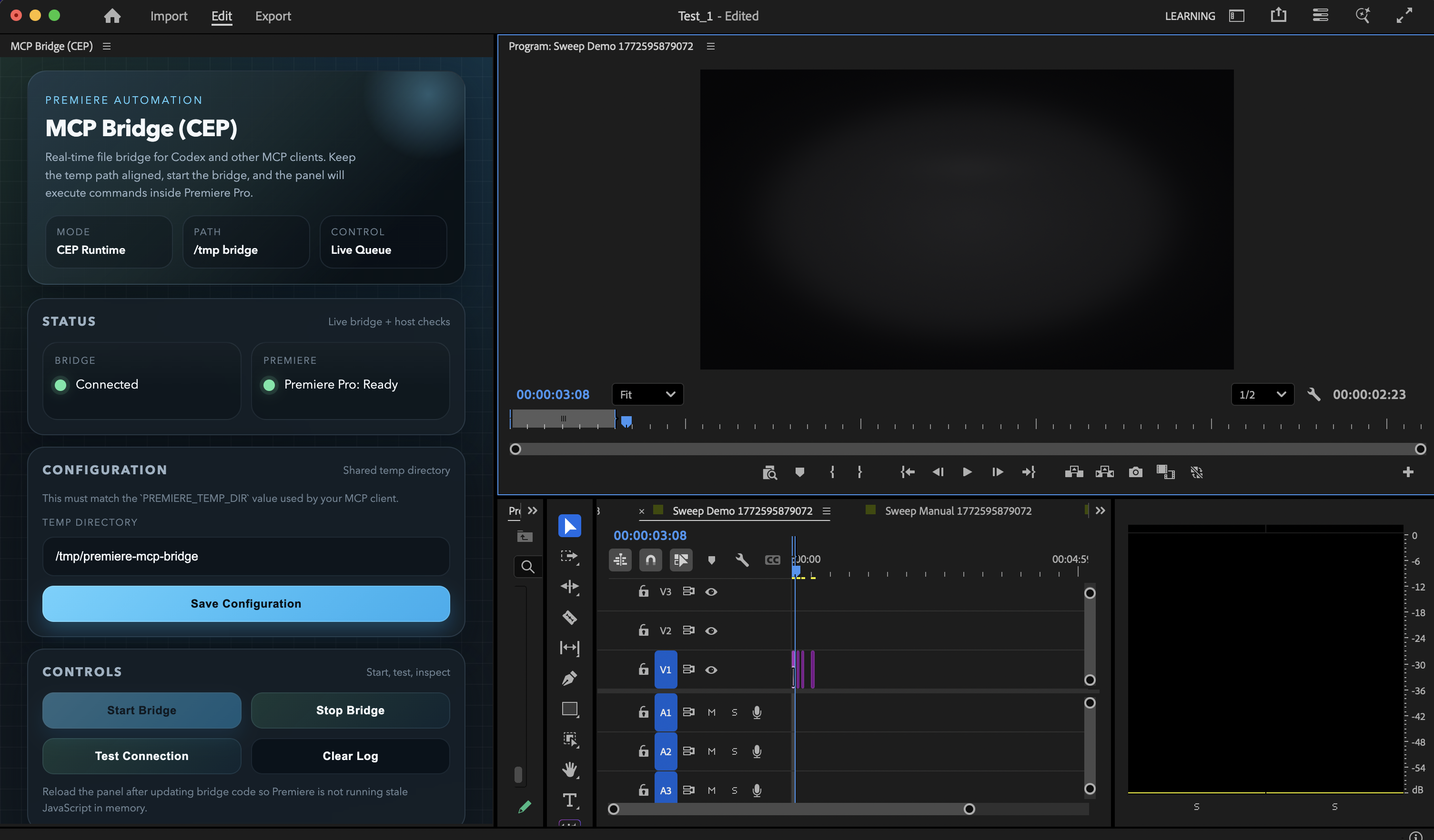
Aktuelle CEP-Panel-Benutzeroberfläche in Premiere Pro, unter Verwendung der aktualisierten Bridge-Steuerelemente und des Status-Layouts.
Related MCP server: Premiere-Pro-MCP
Aktueller Status
Dieses Repository ist derzeit validiert für:
macOS
Adobe Premiere Pro 2020+ (aktiv genutzt und getestet unter Premiere Pro 26.0)
Node.js 18+
den enthaltenen macOS-Installationspfad für Claude Desktop
manuelle MCP-Registrierung für Codex, Claude Code und ähnliche MCP-Clients
Aktuelle lokale Validierung vom 4. März 2026:
97Tools sind verfügbar43Tools wurden live gegen eine echte Premiere-Sitzung ausgeführt50Tools wurden im selben Durchlauf schema-validiert3destruktive Tools ohne Argumente wurden absichtlich übersprungen (save_project,undo,consolidate_duplicates)1Live-Laufzeitbeschränkung bleibt bestehen:get_render_queue_statuserfordert die Integration von Adobe Media Encoder
Die vollständige Ausgabe des Live-Durchlaufs wird nach /tmp/premiere-mcp-bridge/live-tool-sweep.json geschrieben, wenn Sie den Verifier ausführen.
Was Sie erhalten
Der Server deckt Projektoperationen, Ingest, Sequenzerstellung, Timeline-Bearbeitung, Übergänge, Effekte, Keyframes, Metadaten, Exporte und übergeordnete Montage-Workflows ab.
Beispiel-Prompts:
"List all sequences and show me which one is active."
"Import these three shots and build a rough product spot."
"Add cross dissolves to every cut on video track 1."
"Apply Gaussian Blur to the middle clip."
"Apply the
Black & Whiteeffect to the active short-form clip.""Razor the interview sequence at 12.5 seconds across all audio and video tracks."
"Export the active sequence as FCP XML."
Für Schwarz-Weiß-Looks bevorzugen Sie apply_effect mit Black & White, anstatt zu versuchen, Schwarz-Weiß durch allgemeine Sättigungsanpassungen zu erzwingen.
Vor der Bearbeitung können Sie auch die Ressource premiere://config/get_instructions anhängen, um dem Modell Premiere-spezifische Bedienungshinweise zu geben.
Enthaltene High-Level-Workflow-Tools:
build_motion_graphics_demoassemble_product_spotbuild_brand_spot_from_mogrt_and_assets
assemble_product_spot und build_brand_spot_from_mogrt_and_assets unterstützen jetzt ein optionales clipPlan-Argument, sodass ein LLM das Timing pro Clip, die Platzierung auf der Spur, Übergänge, Bewegungen, Schnitte, Effekte und Farbanpassungen steuern kann, anstatt sich auf feste Vorlagen-Standardeinstellungen zu verlassen.
Schnellste Installation (macOS)
git clone https://github.com/hetpatel-11/Adobe_Premiere_Pro_MCP.git
cd Adobe_Premiere_Pro_MCP
npm run setup:macDieser Installer führt folgende Schritte aus:
installiert Abhängigkeiten
erstellt
dist/index.jsaktiviert den Adobe CEP-Debug-Modus
installiert die
MCP Bridge (CEP)-Erweiterungerstellt
/tmp/premiere-mcp-bridgefügt den
premiere-proMCP-Eintrag zu Claude Desktop hinzu
Wichtig:
die unterstützte UI-Bridge in diesem Repository ist die
MCP Bridge (CEP)-Erweiterungder Installer aktiviert den Adobe CEP-Debug-Modus automatisch
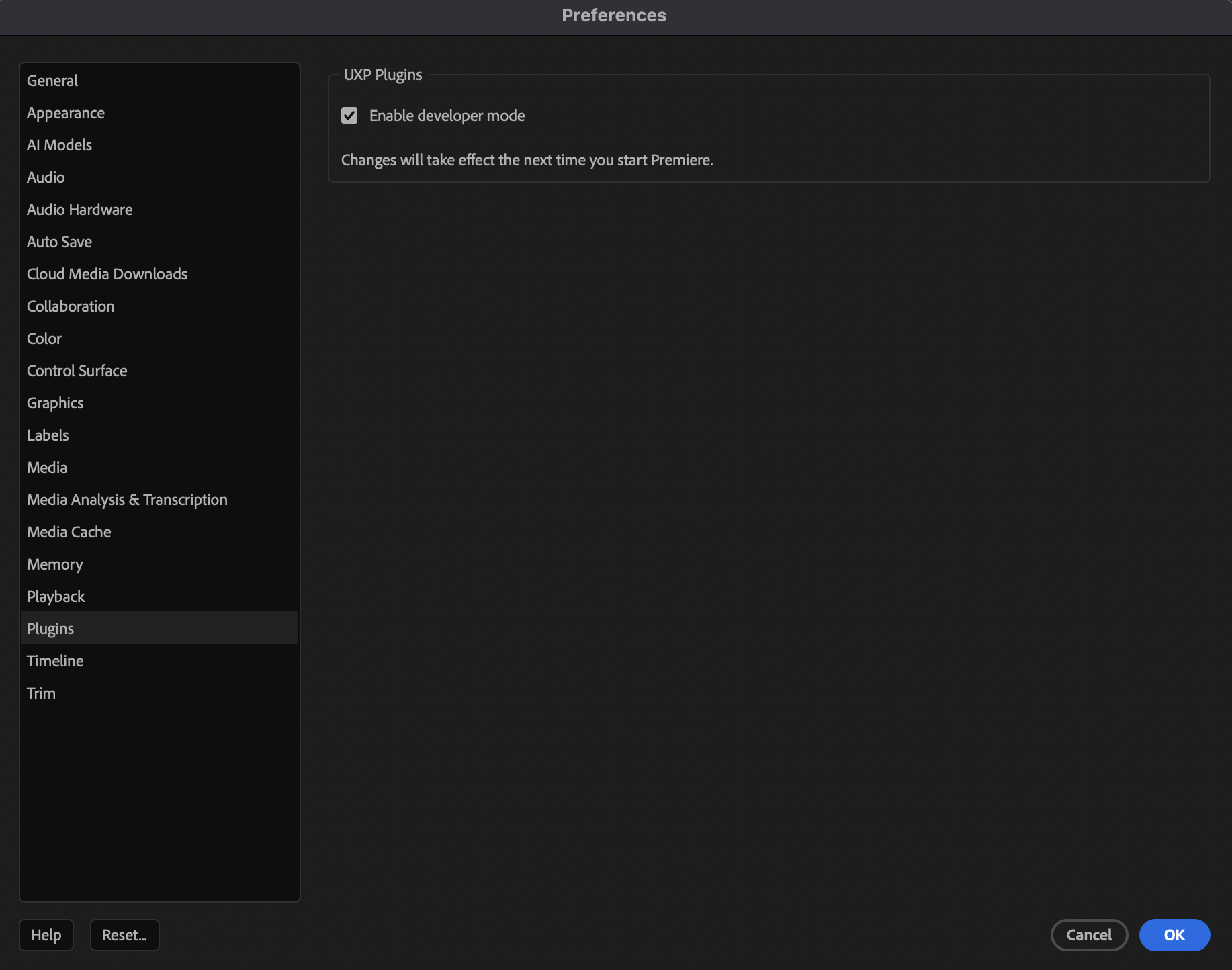
falls Premiere die Erweiterung auf Ihrem Rechner nicht sauber anzeigt, aktivieren Sie UXP Plugins > Enable developer mode in den Premiere Pro-Einstellungen, bevor Sie das Bridge-Panel öffnen
npm run setup:macist der einfachste Weg für Claude Desktop unter macOS, da die Konfiguration von Claude Desktop automatisch aktualisiert wird
Nach Abschluss der Installation:
Beenden Sie Ihren MCP-Client und starten Sie ihn neu, falls er die Konfiguration beim Start liest. Wenn Sie den Installer verwendet haben, betrifft dies Claude Desktop.
Beenden Sie Premiere Pro und starten Sie es neu.
Öffnen Sie in Premiere Pro unter macOS
Premiere Pro > Preferences > Pluginsund aktivieren Sie UXP Plugins > Enable developer mode.Starten Sie Premiere Pro neu, falls die Einstellung geändert wurde.
Öffnen Sie
Window > Extensions > MCP Bridge (CEP).Setzen Sie das
Temp Directoryauf/tmp/premiere-mcp-bridge.Klicken Sie auf
Save Configuration.Klicken Sie auf
Start Bridge.Verbinden Sie sich von Codex, Claude Code, Claude Desktop oder einem anderen MCP-Client aus unter Verwendung desselben temporären Verzeichnisses.
Falls Befehle fehlschlagen, klicken Sie auf
Run Diagnosticsund senden Sie/tmp/premiere-mcp-bridge/premiere-mcp-diagnostics-latest.jsonzurück.
Falls Sie eine visuelle Referenz für den Entwicklermodus-Schalter benötigen, sieht dieser so aus:

Wenn das Panel nach Start Bridge meldet, dass Premiere bereit ist, ist die Bridge aktiv.
Installation nach Client
Claude Desktop
Verwenden Sie unter macOS:
npm run setup:macDies ist der einzige Pfad in diesem Repository, der den MCP-Eintrag automatisch für Sie schreibt.
Codex
Erstellen Sie zuerst den Server:
npm install
npm run buildFügen Sie dann den MCP-Server in einer einzigen Zeile hinzu:
codex mcp add premiere_pro --env PREMIERE_TEMP_DIR=/tmp/premiere-mcp-bridge -- node /absolute/path/to/Adobe_Premiere_Pro_MCP/dist/index.jsClaude Code
Erstellen Sie den Server auf die gleiche Weise:
npm install
npm run buildRegistrieren Sie dann den MCP-Server in Claude Code unter Verwendung desselben erstellten dist/index.js-Einstiegspunkts und desselben temporären Verzeichnisses:
command: node /absolute/path/to/Adobe_Premiere_Pro_MCP/dist/index.js
env: PREMIERE_TEMP_DIR=/tmp/premiere-mcp-bridgeWenn Sie eine lokale MCP-Konfigurationsdatei anstelle eines Hilfsbefehls verwenden, verweisen Sie auf dieselbe dist/index.js und setzen Sie dieselbe Umgebungsvariable.
Andere MCP-Clients
Verwenden Sie denselben manuellen Registrierungsansatz wie bei Claude Code:
command: node /absolute/path/to/Adobe_Premiere_Pro_MCP/dist/index.js
env: PREMIERE_TEMP_DIR=/tmp/premiere-mcp-bridgeWichtig für alle manuellen Client-Setups:
halten Sie den Befehl in einer Zeile
verwenden Sie den echten absoluten Pfad zu
dist/index.jsstarten Sie den Client neu, nachdem Sie den MCP-Eintrag hinzugefügt oder aktualisiert haben
starten Sie die CEP-Bridge in Premiere und bestätigen Sie, dass das temporäre Verzeichnis exakt
/tmp/premiere-mcp-bridgelautet
Installation verifizieren
Führen Sie die integrierten Prüfungen aus:
npm run setup:doctorDies validiert:
Node.js-Version
erstellte Server-Ausgabe
CEP-Erweiterungsinstallation
/tmp/premiere-mcp-bridgeAdobe CEP-Debug-Modus
den Claude Desktop-Konfigurationseintrag bei Verwendung des Installer-Pfads
CEP-Panel-Diagnosen, die in
/tmp/premiere-mcp-bridge/premiere-mcp-diagnostics-latest.jsongeschrieben wurden
Für eine tiefergehende End-to-End-Prüfung verwenden Sie ein temporäres Premiere-Projekt und führen Sie Folgendes aus:
node scripts/live-tool-sweep.mjsDies erstellt temporäre Sweep ...-Sequenzen im aktuell geöffneten Projekt, sodass die Toolchain mit echten Daten getestet wird.
Funktionsweise der Bridge
+-----------+ +-----------+ +-----------+
| Client | MCP | Node.js | Files | CEP Panel |
| (Codex+) |<------>| MCP Server|<------>| (Premiere)|
+-----------+ +-----------+ +-----------+
|
v
+-----------+
| Premiere |
| DOM / QE |
+-----------+Der Client ruft ein MCP-Tool auf.
Der Node-Server generiert ExtendScript sowie gemeinsame Hilfsprogramme.
Das Skript wird in
/tmp/premiere-mcp-bridgegeschrieben.Das CEP-Panel überwacht dieses Verzeichnis und führt das Skript über
CSInterface.evalScript()aus.Das Panel schreibt das Ergebnis zurück in die Antwortdatei.
Der Server gibt strukturiertes JSON an den MCP-Client zurück.
Tool-Abdeckung
Die 97 verfügbaren Tools sind grob wie folgt gruppiert:
Erkennung und Projektinspektion
Projekt- und Sequenzverwaltung
Medienimport und Bin-Verwaltung
Timeline-Platzierung und Clip-Operationen
Effekte, Übergänge, Farbe und Keyframes
Marker, Metadaten, Labels und Arbeitsbereichssteuerung
Export- und Austausch-Hilfsprogramme
MOGRT, Untertitel, Proxys und Relink-Hilfsprogramme
High-Level-Werbe-/Promo-Montage-Workflows
Verwenden Sie die MCP-Introspektion in Ihrem Client, um den vollständigen Tool-Katalog und die genauen Schemata einzusehen.
Echte Grenzen
Dieses Projekt ist wesentlich besser nutzbar als der ursprüngliche Prototyp, aber es ist keine Magie.
Premiere-Skripting bietet immer noch nicht für jeden UI-Vorgang eine saubere Schnittstelle.
Professionelles Titeldesign hängt immer noch von echten MOGRT-Assets oder externen Grafik-Workflows ab.
get_render_queue_statusist nur nützlich, wenn die Adobe Media Encoder-Integration verfügbar ist.Die besten Ergebnisse erzielen Sie mit echtem Ausgangsmaterial, echtem Audio und echten Marken-Assets. Die Automatisierungsebene setzt diese zusammen und manipuliert sie; sie ersetzt nicht das redaktionelle Urteilsvermögen.
Fehlerbehebung
Wenn die Tools sichtbar sind, aber Aufrufe fehlschlagen:
Bestätigen Sie, dass Premiere Pro mit einem geladenen Projekt geöffnet ist.
Öffnen Sie
Window > Extensions > MCP Bridge (CEP).Bestätigen Sie, dass das temporäre Verzeichnis exakt
/tmp/premiere-mcp-bridgelautet.Klicken Sie auf
Start Bridge.Wenn Sie den Bridge-Code aktualisiert haben, klicken Sie mit der rechten Maustaste auf das Panel und wählen Sie
Reload.Wiederholen Sie den Befehl.
Wenn der MCP-Client den Server nicht finden kann:
Überprüfen Sie den absoluten Pfad zu
dist/index.js.Überprüfen Sie
PREMIERE_TEMP_DIR=/tmp/premiere-mcp-bridge.Starten Sie den MCP-Client nach dem Ändern der Konfiguration neu.
Führen Sie
npm run setup:doctoraus.
Entwicklerhinweise
Nützliche Befehle:
npm run build
npm test -- --runInBand
npm run setup:doctor
node scripts/live-tool-sweep.mjsSiehe:
QUICKSTART.mdfür den kürzesten InstallationspfadKNOWN_ISSUES.mdfür aktuelle EinschränkungenCONTRIBUTING.mdfür den Entwicklungs-Workflow
Available Tools
5 toolsget_tool_schemaA
Return the full JSON input schema for one Premiere tool name from search_tools. After reading it, call invoke_tool.
| Name | Required | Description | Default |
|---|---|---|---|
| name | Yes | Exact tool name, e.g. trim_clip |
TDQS
Does the description disclose side effects, auth requirements, rate limits, or destructive behavior?
There are no annotations, so the description carries the full burden of explaining behavior. It discloses that this tool only returns a schema and implies that it does not execute tools by instructing the agent to call invoke_tool afterward. It does not cover error cases, but for an introspection tool this is adequate.
Agents need to know what a tool does to the world before calling it. Descriptions should go beyond structured annotations to explain consequences.
Is the description appropriately sized, front-loaded, and free of redundancy?
Two concise sentences provide the core behavior and the intended next action. There is no filler, repetition, or unnecessary detail.
Shorter descriptions cost fewer tokens and are easier for agents to parse. Every sentence should earn its place.
Given the tool's complexity, does the description cover enough for an agent to succeed on first attempt?
For a one-parameter tool with no output schema, the description explains what is returned and how to continue the workflow. It could mention behavior for an invalid or unknown tool name, but the essential information for correct invocation is present.
Complex tools with many parameters or behaviors need more documentation. Simple tools need less. This dimension scales expectations accordingly.
Does the description clarify parameter syntax, constraints, interactions, or defaults beyond what the schema provides?
The schema coverage is 100% and already documents the 'name' parameter with an example. The description adds only that the name should come from search_tools, which is helpful context but does not substantially enrich parameter understanding beyond the schema.
Input schemas describe structure but not intent. Descriptions should explain non-obvious parameter relationships and valid value ranges.
Does the description clearly state what the tool does and how it differs from similar tools?
The description clearly states the resource: 'full JSON input schema for one Premiere tool name.' It also distinguishes the tool from siblings by tying it to search_tools and instructing that invoke_tool should come next.
Agents choose between tools based on descriptions. A clear purpose with a specific verb and resource helps agents select the right tool.
Does the description explain when to use this tool, when not to, or what alternatives exist?
The description places the tool in a workflow: tool names come from search_tools, and after reading the schema the agent should call invoke_tool. It does not explicitly say when not to use this tool, but the sequential guidance is clear and actionable.
Agents often have multiple tools that could apply. Explicit usage guidance like "use X instead of Y when Z" prevents misuse.
invoke_toolA
Run a Premiere tool by exact name. Use after search_tools. Hosts that only advertise the small always-on set cannot call trim_clip etc. as top-level MCP tools.
| Name | Required | Description | Default |
|---|---|---|---|
| name | Yes | Exact tool name returned by search_tools | |
| arguments | No | Arguments for that tool |
TDQS
Does the description disclose side effects, auth requirements, rate limits, or destructive behavior?
No annotations are provided, so the description carries the full disclosure burden. It says 'Run a Premiere tool' but does not disclose that this is an arbitrary passthrough capable of side-effecting operations like trim_clip, nor does it mention error behavior when the tool name is invalid.
Agents need to know what a tool does to the world before calling it. Descriptions should go beyond structured annotations to explain consequences.
Is the description appropriately sized, front-loaded, and free of redundancy?
Two sentences with the core purpose front-loaded. The host-limitation sentence is useful context but slightly jargon-heavy; still, every sentence earns its place and there is no filler.
Shorter descriptions cost fewer tokens and are easier for agents to parse. Every sentence should earn its place.
Given the tool's complexity, does the description cover enough for an agent to succeed on first attempt?
The description covers the key prerequisite ('Use after search_tools') and exact-name matching. However, it omits guidance on using get_tool_schema to fetch the target tool's argument schema, and gives no return/error expectations despite having no output schema or annotations.
Complex tools with many parameters or behaviors need more documentation. Simple tools need less. This dimension scales expectations accordingly.
Does the description clarify parameter syntax, constraints, interactions, or defaults beyond what the schema provides?
The input schema already documents both parameters: name is 'Exact tool name returned by search_tools' and arguments is 'Arguments for that tool'. The description reinforces exactness and ordering but does not add meaningful detail beyond the schema, such as how arguments should be structured per the target tool.
Input schemas describe structure but not intent. Descriptions should explain non-obvious parameter relationships and valid value ranges.
Does the description clearly state what the tool does and how it differs from similar tools?
The description uses a specific verb ('Run') with a specific resource ('a Premiere tool by exact name') and clarifies this is the generic execution entry point. Naming trim_clip and contrasting it with top-level MCP tools helps distinguish it from siblings like search_tools and get_tool_schema.
Agents choose between tools based on descriptions. A clear purpose with a specific verb and resource helps agents select the right tool.
Does the description explain when to use this tool, when not to, or what alternatives exist?
It explicitly says 'Use after search_tools', giving clear ordering guidance, and it explains the host limitation that makes invoke_tool necessary. However, it does not explicitly state when not to use this tool or mention alternatives like get_tool_schema for inspecting a tool's schema.
Agents often have multiple tools that could apply. Explicit usage guidance like "use X instead of Y when Z" prevents misuse.
list_sequencesB
Lists all sequences in the current Premiere Pro project with their IDs, names, and basic properties.
| Name | Required | Description | Default |
|---|---|---|---|
No parameters | |||
TDQS
Does the description disclose side effects, auth requirements, rate limits, or destructive behavior?
No annotations are provided, so the description carries the full burden of behavioral disclosure. It confirms the read-only, listing nature and names returned fields, but it's vague about 'basic properties' and omits edge-case behavior (empty project, no open document, performance on large projects).
Agents need to know what a tool does to the world before calling it. Descriptions should go beyond structured annotations to explain consequences.
Is the description appropriately sized, front-loaded, and free of redundancy?
A single, front-loaded sentence with zero filler words. It states the action, scope, and result in one concise breath.
Shorter descriptions cost fewer tokens and are easier for agents to parse. Every sentence should earn its place.
Given the tool's complexity, does the description cover enough for an agent to succeed on first attempt?
For a simple 0-parameter listing tool, the description covers the essentials: scope ('all sequences in current project') and return shape (IDs, names, basic properties). The primary gap is the undefined 'basic properties' term, which matters more because there's no output schema to compensate.
Complex tools with many parameters or behaviors need more documentation. Simple tools need less. This dimension scales expectations accordingly.
Does the description clarify parameter syntax, constraints, interactions, or defaults beyond what the schema provides?
With zero parameters, the schema carries no semantics, so per the rubric the baseline is 4. The description appropriately spends its space explaining the return value instead, which is the only useful thing it could add.
Input schemas describe structure but not intent. Descriptions should explain non-obvious parameter relationships and valid value ranges.
Does the description clearly state what the tool does and how it differs from similar tools?
The description uses a specific verb-resource-scope structure ('Lists all sequences in the current Premiere Pro project') and specifies the return payload (IDs, names, basic properties). It distinguishes itself from list_project_items naturally, though 'basic properties' is undefined and it doesn't explicitly disambiguate from get_sequence_structure/get_full_sequence_info.
Agents choose between tools based on descriptions. A clear purpose with a specific verb and resource helps agents select the right tool.
Does the description explain when to use this tool, when not to, or what alternatives exist?
No guidance is given on when to use this tool vs. the many siblings such as list_sequence_tracks, get_full_sequence_info, or get_sequence_structure. There are no exclusions, prerequisites, or alternative suggestions — a missed opportunity given the crowded sibling space.
Agents often have multiple tools that could apply. Explicit usage guidance like "use X instead of Y when Z" prevents misuse.
search_toolsA
Search the Premiere tool catalog with a BM25 natural-language query or a regex pattern, then call invoke_tool. Use this instead of expecting 280 editing tools in the MCP tool list. Empty query lists categories. Default 5 matches.
| Name | Required | Description | Default |
|---|---|---|---|
| limit | No | Max matches, 1-25. Defaults to 5. | |
| query | No | Natural language BM25 query, e.g. "trim clip duration" or "export sequence" | |
| detail | No | How much of each match to return. schema includes the JSON input schema. Defaults to descriptions. | |
| pattern | No | Case-insensitive regex over tool name, description, category, and argument names. e.g. "^list_" or "mogrt" |
TDQS
Does the description disclose side effects, auth requirements, rate limits, or destructive behavior?
Since no annotations are provided, the description carries the full burden of behavioral disclosure. It discloses several concrete behaviors: empty query lists categories, default 5 matches, and dual support for BM25 and regex searches. It does not explicitly state read-only status or output format, but for a search operation the disclosed behaviors provide meaningful transparency.
Agents need to know what a tool does to the world before calling it. Descriptions should go beyond structured annotations to explain consequences.
Is the description appropriately sized, front-loaded, and free of redundancy?
The description is four short sentences with no filler: purpose, usage instruction, empty-query behavior, and default limit. The critical 'use this instead' guidance is front-loaded, and every sentence earns its place.
Shorter descriptions cost fewer tokens and are easier for agents to parse. Every sentence should earn its place.
Given the tool's complexity, does the description cover enough for an agent to succeed on first attempt?
Given no output schema and four optional parameters, the description covers tool selection rationale, query modes, the follow-up action, and important default/empty-query behavior. It does not specify the return shape, but the detail parameter schema fills that gap. This is sufficient for an agent to invoke the tool correctly in most cases.
Complex tools with many parameters or behaviors need more documentation. Simple tools need less. This dimension scales expectations accordingly.
Does the description clarify parameter syntax, constraints, interactions, or defaults beyond what the schema provides?
Schema coverage is 100%, so the baseline is 3. The description adds value by clarifying that query and regex are alternative search modes and by revealing that an empty query produces categories—information not present in the schema. It repeats the default limit, but the added empty-query behavior justifies a score above baseline.
Input schemas describe structure but not intent. Descriptions should explain non-obvious parameter relationships and valid value ranges.
Does the description clearly state what the tool does and how it differs from similar tools?
The description opens with a specific verb-resource pair ('Search the Premiere tool catalog') and names two concrete query mechanisms (BM25 natural-language or regex). It clearly differentiates this from siblings like invoke_tool and get_tool_schema, and the reference to the 280-tool MCP list explains its role as a discovery tool.
Agents choose between tools based on descriptions. A clear purpose with a specific verb and resource helps agents select the right tool.
Does the description explain when to use this tool, when not to, or what alternatives exist?
It explicitly instructs the agent to use this tool instead of expecting the full 280-tool MCP list, which is direct when-to-use guidance. It also tells the agent to follow up by calling invoke_tool, linking the search step to the execution step. While it doesn't enumerate exclusions in detail, the 'use this instead' phrasing is strong and actionable.
Agents often have multiple tools that could apply. Explicit usage guidance like "use X instead of Y when Z" prevents misuse.
verify_premiere_connectionA
Readiness check for Premiere Pro and the MCP Bridge. Call this before any editing tool. If Premiere is installed and not running, this launches it and waits for the CEP panel, which auto-starts the bridge. If it fails, tell the user the nextStep and do not retry other tools.
| Name | Required | Description | Default |
|---|---|---|---|
| launchIfNeeded | No | When true (the default), launch Premiere if it is installed and the bridge heartbeat is missing. Set false for a check that never starts the app. |
TDQS
Does the description disclose side effects, auth requirements, rate limits, or destructive behavior?
With no annotations, the description carries the full burden of behavioral disclosure, and it does well: it reveals that the tool may launch Premiere as a side effect, waits for the CEP panel, auto-starts the bridge, and exposes nextStep on failure. It does not describe the exact return shape or success/failure indicators, which would make it fully transparent.
Agents need to know what a tool does to the world before calling it. Descriptions should go beyond structured annotations to explain consequences.
Is the description appropriately sized, front-loaded, and free of redundancy?
Three sentences, each earning its place: purpose, behavior/wait semantics, and failure handling. The most important instruction ('call before any editing tool') is front-loaded, and there is zero filler or repetition.
Shorter descriptions cost fewer tokens and are easier for agents to parse. Every sentence should earn its place.
Given the tool's complexity, does the description cover enough for an agent to succeed on first attempt?
For a one-parameter check tool with no annotations and no output schema, the description is complete: what it does, when to call it, what side effects it may trigger, and how to handle failure. The 'nextStep' reference even hints at the failure return shape. An agent has everything needed to invoke it correctly.
Complex tools with many parameters or behaviors need more documentation. Simple tools need less. This dimension scales expectations accordingly.
Does the description clarify parameter syntax, constraints, interactions, or defaults beyond what the schema provides?
Schema description coverage is 100%; the schema already fully documents launchIfNeeded including its default behavior and false-case meaning. The description refers to launching behavior but does not add parameter-level meaning beyond the schema. Baseline 3 is appropriate.
Input schemas describe structure but not intent. Descriptions should explain non-obvious parameter relationships and valid value ranges.
Does the description clearly state what the tool does and how it differs from similar tools?
The description states a specific verb and resource: a 'readiness check' for Premiere Pro and the MCP Bridge. It also frames itself as a prerequisite ('Call this before any editing tool'), which distinguishes it from the editing tools it precedes. The purpose is unambiguous.
Agents choose between tools based on descriptions. A clear purpose with a specific verb and resource helps agents select the right tool.
Does the description explain when to use this tool, when not to, or what alternatives exist?
Provides explicit when-to-use guidance ('Call this before any editing tool') and when-not-to-continue guidance ('If it fails... do not retry other tools'). It names the class of alternatives (editing tools) and instructs the agent to surface nextStep to the user instead. This is unusually actionable usage guidance.
Agents often have multiple tools that could apply. Explicit usage guidance like "use X instead of Y when Z" prevents misuse.
Tool Schema Changelog
Recent tool additions, removals, and schema changes observed during successful MCP inspections.
285 tool updates
v1.2.7- Removed
add_adjustment_layer - Removed
add_audio_keyframes - Removed
add_custom_metadata_field - Removed
add_keyframe - Removed
add_marker - Removed
add_marker_to_project_item - Removed
add_text_overlay - Removed
add_to_render_queue - Removed
add_to_timeline - Removed
add_to_timeline_batch - Removed
add_track - Removed
add_tracks - Removed
add_transition - Removed
add_transition_to_clip - Removed
adjust_audio_levels - Removed
apply_audio_effect - Removed
apply_audio_effect_to_all_clips - Removed
apply_effect - Removed
apply_lut - Removed
assemble_product_spot - Removed
attach_custom_property - Removed
auto_reframe_sequence - Removed
batch_add_transitions - Removed
batch_apply_effect - Removed
batch_enable_disable - Removed
batch_rename_clips - Removed
build_brand_spot_from_mogrt_and_assets - Removed
build_motion_graphics_demo - Removed
capture_frame - Removed
check_offline_media - Removed
clear_item_in_out - Removed
clear_sequence_in_out - Removed
close_all_source_clips - Removed
close_project - Removed
close_sequence - Removed
close_source_monitor - Removed
color_correct - Removed
consolidate_and_transfer - Removed
consolidate_duplicates - Removed
copy_effect_values - Removed
copy_effects_between_clips - Removed
create_bars_and_tone - Removed
create_bin - Removed
create_caption_track - Removed
create_project - Removed
create_sequence - Removed
create_sequence_from_clips - Removed
create_sequence_from_preset - Removed
create_smart_bin - Removed
create_subclip - Removed
create_subsequence - Removed
crop_clip - Removed
delete_bin - Removed
delete_marker - Removed
delete_multiple_project_items - Removed
delete_preview_files - Removed
delete_project_item - Removed
delete_sequence - Removed
delete_track - Removed
deselect_all_clips - Removed
detach_proxy - Removed
detect_scene_edits - Removed
detect_silence - Removed
duplicate_clip - Removed
duplicate_sequence - Removed
enable_disable_clip - Removed
encode_file - Removed
encode_project_item - Removed
evaluate_expression - Removed
execute_extendscript - Removed
export_aaf - Removed
export_as_fcp_xml - Removed
export_as_project - Removed
export_frame - Removed
export_omf - Removed
export_sequence - Removed
extract_selection - Removed
find_items_by_media_path - Removed
find_project_item_by_name - Removed
freeze_frame - Removed
get_active_sequence - Removed
get_all_project_paths - Removed
get_bin_contents - Removed
get_capabilities - Removed
get_clip_adjustment_layer - Removed
get_clip_at_playhead - Removed
get_clip_at_position - Removed
get_clip_links - Removed
get_clip_markers - Removed
get_clip_properties - Removed
get_clip_speed - Removed
get_color_label - Removed
get_color_space - Removed
get_duplicate_media - Removed
get_effect_properties - Removed
get_encoder_presets - Removed
get_export_file_extension - Removed
get_footage_interpretation - Removed
get_full_clip_info - Removed
get_full_project_overview - Removed
get_full_sequence_info - Removed
get_graphics_white_luminance - Removed
get_insertion_bin - Removed
get_item_info - Removed
get_keyframes - Removed
get_linked_items - Removed
get_metadata - Removed
get_mogrt_component - Removed
get_next_edit_point - Removed
get_offline_media - Removed
get_playhead_position - Removed
get_premiere_state - Removed
get_project_info - Removed
get_project_item_info - Removed
get_project_panel_metadata - Removed
get_project_scratch_disks - Removed
get_qe_clip_info - Removed
get_render_queue_status - Removed
get_selected_clips - Removed
get_sequence_count - Removed
get_sequence_in_out_points - Removed
get_sequence_markers_by_type - Removed
get_sequence_settings - Removed
get_sequence_structure - Removed
get_source_monitor_info - Removed
get_source_monitor_position - Removed
get_target_tracks - Removed
get_timeline_gaps - Removed
get_timeline_summary - Added
get_tool_schema - Removed
get_total_clip_count - Removed
get_track_info - Removed
get_unused_media - Removed
get_used_media_report - Removed
get_value_at_time - Removed
get_version_info - Removed
get_work_area - Removed
get_workspaces - Removed
get_xmp_metadata - Removed
has_proxy - Removed
import_edl - Removed
import_fcp_xml - Removed
import_folder - Removed
import_image_sequence - Removed
import_media - Removed
import_mogrt - Removed
import_mogrt_from_library - Removed
import_sequences - Removed
import_sequences_from_project - Removed
insert_from_source - Removed
inspect_dom_object - Removed
invert_selection - Added
invoke_tool - Removed
is_work_area_enabled - Removed
lift_selection - Removed
link_audio_video - Removed
link_selection - Removed
list_available_audio_effects - Removed
list_available_audio_transitions - Removed
list_available_effects - Removed
list_available_transitions - Removed
list_clip_effects - Removed
list_markers - Removed
list_project_items - Removed
list_sequence_tracks - Removed
lock_track - Removed
manage_proxies - Removed
match_frame - Removed
move_clip - Removed
move_clip_to_track - Removed
move_item_to_bin - Removed
move_items_to_bin - Removed
move_playhead_to_edit - Removed
multiple_undo - Removed
mute_track - Removed
nest_clips - Removed
open_in_source - Removed
open_project - Removed
overwrite_clip - Removed
overwrite_from_source - Removed
ping - Removed
play_source_monitor - Removed
play_timeline - Removed
razor_all_tracks - Removed
razor_timeline_at_time - Removed
read_sequence_captions - Removed
redo - Removed
refresh_media - Removed
relink_media - Removed
remove_all_effects - Removed
remove_effect - Removed
remove_effect_by_name - Removed
remove_from_timeline - Removed
remove_keyframe - Removed
remove_keyframe_range - Removed
remove_selected_clips - Removed
rename_bin - Removed
rename_clip - Removed
rename_project_item - Removed
rename_track - Removed
replace_clip - Removed
replace_clip_media - Removed
reverse_clip - Removed
ripple_delete - Removed
roll_edit - Removed
save_project - Removed
save_project_as - Removed
scene_edit_detection - Removed
search_project_items - Added
search_tools - Removed
select_all_clips - Removed
select_clips_by_color - Removed
select_clips_by_name - Removed
select_clips_in_range - Removed
select_disabled_clips - Removed
select_item - Removed
set_active_sequence - Removed
set_all_tracks_targeted - Removed
set_anti_alias_quality - Removed
set_blend_mode - Removed
set_clip_anchor_point - Removed
set_clip_opacity - Removed
set_clip_pan - Removed
set_clip_position - Removed
set_clip_properties - Removed
set_clip_properties_batch - Removed
set_clip_rotation - Removed
set_clip_scale - Removed
set_clip_selection - Removed
set_clip_speed_qe - Removed
set_clip_start_time - Removed
set_clip_volume - Removed
set_color_label - Removed
set_color_value - Removed
set_effect_property - Removed
set_footage_interpretation - Removed
set_frame_blend - Removed
set_graphics_white_luminance - Removed
set_item_in_out - Removed
set_keyframe_interpolation - Removed
set_metadata - Removed
set_offline - Removed
set_override_frame_rate - Removed
set_override_pixel_aspect_ratio - Removed
set_playhead_position - Removed
set_poster_frame - Removed
set_project_panel_metadata - Removed
set_project_scratch_disk - Removed
set_scale_to_frame_size - Removed
set_scale_width_height - Removed
set_scratch_disk_path - Removed
set_sequence_audio_settings - Removed
set_sequence_display_format - Removed
set_sequence_field_type - Removed
set_sequence_frame_rate - Removed
set_sequence_in_out_points - Removed
set_sequence_pixel_aspect_ratio - Removed
set_sequence_resolution - Removed
set_sequence_settings - Removed
set_source_in_out - Removed
set_start_time - Removed
set_target_track - Removed
set_time_interpolation - Removed
set_transcode_on_ingest - Removed
set_uniform_scale - Removed
set_work_area - Removed
set_workspace - Removed
set_xmp_metadata - Removed
set_zero_point - Removed
setup_ducking - Removed
slide_edit - Removed
slip_edit - Removed
speed_change - Removed
split_clip - Removed
stabilize_clip - Removed
start_batch_encode - Removed
stop_playback - Removed
toggle_track_visibility - Removed
trim_clip - Removed
undo - Removed
unlink_selection - Removed
unnest_sequence - Removed
update_marker - Removed
validate_project_for_export - Changed
verify_premiere_connection1 field changed- added
Input schema / properties / launchIfNeededAdded value: +{ + "description": "When true (the default), launch Premiere if it is installed and the bridge heartbeat is missing. Set false for a check that never starts the app.", + "type": "boolean" +}
10 tool updates
v1.2.0- Changed
add_marker5 fields changed- added
Input schema / properties / color / anyOfAdded value: +[ + { + "enum": [ + "green", + "red", + "purple", + "orange", + "yellow", + "white", + "blue", + "cyan" + ], + "type": "string" + }, + { + "maximum": 7, + "minimum": 0, + "type": "integer" + }, + { + "pattern": "^[0-7]$", + "type": "string" + } +] - changed
Input schema / properties / color / descriptionPrevious value: -"Marker color (e.g., \"red\", \"green\", \"blue\")"New value: +"Marker colour — a name (green, red, purple, orange, yellow, white, blue, cyan) or an index 0-7. Defaults to green." - removed
Input schema / properties / color / typeRemoved value: -"string" - changed
Input schema / properties / sequenceId / descriptionPrevious value: -"The ID of the sequence to add the marker to"New value: +"The sequence ID (GUID) to add the marker to, as returned in the \"id\" field by list_sequences or get_active_sequence" - added
Input schema / properties / sequenceId / minLengthAdded value: +1
- Changed
delete_marker3 fields changed- added
Input schema / properties / markerId / minLengthAdded value: +1 - changed
Input schema / properties / sequenceId / descriptionPrevious value: -"The ID of the sequence"New value: +"The sequence ID (GUID) as returned in the \"id\" field by list_sequences or get_active_sequence" - added
Input schema / properties / sequenceId / minLengthAdded value: +1
- Changed
delete_track2 fields changed- changed
Input schema / properties / sequenceId / descriptionPrevious value: -"The ID of the sequence"New value: +"The sequence ID (GUID) as returned in the \"id\" field by list_sequences or get_active_sequence" - added
Input schema / properties / sequenceId / minLengthAdded value: +1
- Changed
list_markers2 fields changed- changed
Input schema / properties / sequenceId / descriptionPrevious value: -"The ID of the sequence"New value: +"The sequence ID (GUID) as returned in the \"id\" field by list_sequences or get_active_sequence" - added
Input schema / properties / sequenceId / minLengthAdded value: +1
- Changed
list_sequence_tracks2 fields changed- changed
Input schema / properties / sequenceId / descriptionPrevious value: -"The ID of the sequence to list tracks for"New value: +"The sequence ID (GUID) to list tracks for, as returned in the \"id\" field by list_sequences or get_active_sequence" - added
Input schema / properties / sequenceId / minLengthAdded value: +1
- Changed
lock_track2 fields changed- changed
Input schema / properties / sequenceId / descriptionPrevious value: -"The ID of the sequence"New value: +"The sequence ID (GUID) as returned in the \"id\" field by list_sequences or get_active_sequence" - added
Input schema / properties / sequenceId / minLengthAdded value: +1
- Changed
move_clip1 field changed- removed
Input schema / properties / newTrackIndexRemoved value: -{ - "description": "The new track index (if moving to different track)", - "type": "number" -}
- Changed
set_sequence_settings6 fields changed- changed
Input schema / properties / settings / properties / frameRate / descriptionPrevious value: -"Frame rate"New value: +"Frames per second, e.g. 23.976, 25, 30" - changed
Input schema / properties / settings / properties / height / descriptionPrevious value: -"Frame height"New value: +"Frame height in pixels" - added
Input schema / properties / settings / properties / pixelAspectRatio / anyOfAdded value: +[ + { + "type": "number" + }, + { + "type": "string" + } +] - changed
Input schema / properties / settings / properties / pixelAspectRatio / descriptionPrevious value: -"Pixel aspect ratio"New value: +"Pixel aspect ratio, either a number (1, 1.5, 2) or an \"N:M\" string (\"1:1\", \"4:3\", \"10:11\")" - removed
Input schema / properties / settings / properties / pixelAspectRatio / typeRemoved value: -"number" - changed
Input schema / properties / settings / properties / width / descriptionPrevious value: -"Frame width"New value: +"Frame width in pixels"
- Changed
toggle_track_visibility2 fields changed- changed
Input schema / properties / sequenceId / descriptionPrevious value: -"The ID of the sequence"New value: +"The sequence ID (GUID) as returned in the \"id\" field by list_sequences or get_active_sequence" - added
Input schema / properties / sequenceId / minLengthAdded value: +1
- Changed
update_marker6 fields changed- added
Input schema / properties / color / anyOfAdded value: +[ + { + "enum": [ + "green", + "red", + "purple", + "orange", + "yellow", + "white", + "blue", + "cyan" + ], + "type": "string" + }, + { + "maximum": 7, + "minimum": 0, + "type": "integer" + }, + { + "pattern": "^[0-7]$", + "type": "string" + } +] - changed
Input schema / properties / color / descriptionPrevious value: -"New color"New value: +"New colour. Marker colour — a name (green, red, purple, orange, yellow, white, blue, cyan) or an index 0-7. Defaults to green." - removed
Input schema / properties / color / typeRemoved value: -"string" - added
Input schema / properties / markerId / minLengthAdded value: +1 - changed
Input schema / properties / sequenceId / descriptionPrevious value: -"The ID of the sequence"New value: +"The sequence ID (GUID) as returned in the \"id\" field by list_sequences or get_active_sequence" - added
Input schema / properties / sequenceId / minLengthAdded value: +1
287 tool updates
v1.1.6- Added
add_adjustment_layer - Changed
add_audio_keyframes1 field changed- changed
Input schema / $schemaPrevious value: -"http://json-schema.org/draft-07/schema#"New value: +"https://json-schema.org/draft/2020-12/schema"
- Added
add_custom_metadata_field - Added
add_keyframe - Added
add_marker - Added
add_marker_to_project_item - Removed
add_shape - Changed
add_text_overlay15 fields changed- changed
Input schema / $schemaPrevious value: -"http://json-schema.org/draft-07/schema#"New value: +"https://json-schema.org/draft/2020-12/schema" - removed
Input schema / properties / alignmentRemoved value: -{ - "description": "Text alignment", - "enum": [ - "left", - "center", - "right" - ], - "type": "string" -} - removed
Input schema / properties / colorRemoved value: -{ - "description": "The hex color code for the text, e.g., \"#FFFFFF\"", - "type": "string" -} - changed
Input schema / properties / duration / descriptionPrevious value: -"How long the text should remain on screen in seconds"New value: +"How long the text should remain on screen in seconds (best-effort; the MOGRT's natural duration may take precedence)" - removed
Input schema / properties / fontFamilyRemoved value: -{ - "description": "e.g., \"Arial\", \"Times New Roman\"", - "type": "string" -} - removed
Input schema / properties / fontSizeRemoved value: -{ - "description": "e.g., 48", - "type": "number" -} - added
Input schema / properties / mogrtPathAdded value: +{ + "description": "Absolute path to a .mogrt template file (required for text overlays)", + "type": "string" +} - removed
Input schema / properties / positionRemoved value: -{ - "additionalProperties": false, - "description": "Text position on screen", - "properties": { - "x": { - "description": "Horizontal position (0-100)", - "type": "number" - }, - "y": { - "description": "Vertical position (0-100)", - "type": "number" - } - }, - "type": "object" -} - added
Input schema / properties / rollbackOnTextFailureAdded value: +{ + "description": "If true, remove the imported timeline Graphic when every requested text write fails. Defaults to false; the imported project item may remain in the Project panel.", + "type": "boolean" +} - changed
Input schema / properties / text / descriptionPrevious value: -"The text content to display"New value: +"Text for the first AE text component in the MOGRT (typically the main title)" - added
Input schema / properties / text2Added value: +{ + "description": "Text for the second AE text component (e.g., subtitle of a lower third)", + "type": "string" +} - added
Input schema / properties / text3Added value: +{ + "description": "Text for the third AE text component (if present)", + "type": "string" +} - added
Input schema / properties / text4Added value: +{ + "description": "Text for the fourth AE text component (if present)", + "type": "string" +} - added
Input schema / properties / textPropertyNameAdded value: +{ + "description": "Override: explicit displayName of the property to write into. When set, only `text` is written (text2/text3/text4 are ignored) and the call fails if no property with that displayName exists. Use only when auto-detection picks the wrong field.", + "type": "string" +} - changed
Input schema / properties / trackIndex / descriptionPrevious value: -"The video track to place the text on"New value: +"The video track to place the text on (0-indexed; create the track first via add_track if needed)"
- Added
add_to_render_queue - Changed
add_to_timeline4 fields changed- changed
Input schema / $schemaPrevious value: -"http://json-schema.org/draft-07/schema#"New value: +"https://json-schema.org/draft/2020-12/schema" - added
Input schema / properties / linkAudioAdded value: +{ + "description": "When false, removes the auto-linked audio counterpart that Premiere places on audio tracks for video-track clips. Useful for video overlays whose source media (e.g. Remotion .mov outputs) carry silent PCM that would overwrite existing audio. Default true (preserves Premiere's native linking behavior).", + "type": "boolean" +} - added
Input schema / properties / sourceInPointAdded value: +{ + "description": "Source IN point in seconds — the start of the sub-range to pull from the source (footage or sequence). Replicates marking an in point in the Source monitor. Requires sourceOutPoint. When omitted, the whole source (or its current marks) is placed.", + "type": "number" +} - added
Input schema / properties / sourceOutPointAdded value: +{ + "description": "Source OUT point in seconds — the end of the sub-range to pull from the source. Replicates marking an out point in the Source monitor. Requires sourceInPoint.", + "type": "number" +}
- Added
add_to_timeline_batch - Added
add_track - Added
add_tracks - Changed
add_transition1 field changed- changed
Input schema / $schemaPrevious value: -"http://json-schema.org/draft-07/schema#"New value: +"https://json-schema.org/draft/2020-12/schema"
- Changed
add_transition_to_clip1 field changed- changed
Input schema / $schemaPrevious value: -"http://json-schema.org/draft-07/schema#"New value: +"https://json-schema.org/draft/2020-12/schema"
- Changed
adjust_audio_levels1 field changed- changed
Input schema / $schemaPrevious value: -"http://json-schema.org/draft-07/schema#"New value: +"https://json-schema.org/draft/2020-12/schema"
- Added
apply_audio_effect - Added
apply_audio_effect_to_all_clips - Changed
apply_effect2 fields changed- changed
Input schema / $schemaPrevious value: -"http://json-schema.org/draft-07/schema#"New value: +"https://json-schema.org/draft/2020-12/schema" - added
Input schema / properties / parameters / propertyNamesAdded value: +{ + "type": "string" +}
- Changed
apply_lut1 field changed- changed
Input schema / $schemaPrevious value: -"http://json-schema.org/draft-07/schema#"New value: +"https://json-schema.org/draft/2020-12/schema"
- Added
assemble_product_spot - Added
attach_custom_property - Removed
auto_edit_to_music - Added
auto_reframe_sequence - Added
batch_add_transitions - Added
batch_apply_effect - Added
batch_enable_disable - Added
batch_rename_clips - Added
build_brand_spot_from_mogrt_and_assets - Added
build_motion_graphics_demo - Added
capture_frame - Added
check_offline_media - Added
clear_item_in_out - Added
clear_sequence_in_out - Added
close_all_source_clips - Added
close_project - Added
close_sequence - Added
close_source_monitor - Changed
color_correct1 field changed- changed
Input schema / $schemaPrevious value: -"http://json-schema.org/draft-07/schema#"New value: +"https://json-schema.org/draft/2020-12/schema"
- Added
consolidate_and_transfer - Added
consolidate_duplicates - Added
copy_effect_values - Added
copy_effects_between_clips - Added
create_bars_and_tone - Changed
create_bin1 field changed- changed
Input schema / $schemaPrevious value: -"http://json-schema.org/draft-07/schema#"New value: +"https://json-schema.org/draft/2020-12/schema"
- Added
create_caption_track - Removed
create_multicam_sequence - Changed
create_project1 field changed- changed
Input schema / $schemaPrevious value: -"http://json-schema.org/draft-07/schema#"New value: +"https://json-schema.org/draft/2020-12/schema"
- Removed
create_proxy_media - Changed
create_sequence7 fields changed- changed
Input schema / $schemaPrevious value: -"http://json-schema.org/draft-07/schema#"New value: +"https://json-schema.org/draft/2020-12/schema" - removed
Input schema / properties / frameRateRemoved value: -{ - "description": "Frame rate (e.g., 24, 25, 30, 60)", - "type": "number" -} - removed
Input schema / properties / heightRemoved value: -{ - "description": "Sequence height in pixels", - "type": "number" -} - changed
Input schema / properties / presetPath / descriptionPrevious value: -"Optional path to a sequence preset file for custom settings"New value: +"Absolute path to an installed Premiere .sqpreset sequence preset. Required so Premiere does not show the native New Sequence dialog." - removed
Input schema / properties / sampleRateRemoved value: -{ - "description": "Audio sample rate (e.g., 48000)", - "type": "number" -} - removed
Input schema / properties / widthRemoved value: -{ - "description": "Sequence width in pixels", - "type": "number" -} - changed
Input schema / requiredPrevious value: -[ - "name" -]New value: +[ + "name", + "presetPath" +]
- Added
create_sequence_from_clips - Added
create_sequence_from_preset - Added
create_smart_bin - Added
create_subclip - Added
create_subsequence - Added
crop_clip - Added
delete_bin - Added
delete_marker - Added
delete_multiple_project_items - Added
delete_preview_files - Added
delete_project_item - Changed
delete_sequence1 field changed- changed
Input schema / $schemaPrevious value: -"http://json-schema.org/draft-07/schema#"New value: +"https://json-schema.org/draft/2020-12/schema"
- Added
delete_track - Added
deselect_all_clips - Added
detach_proxy - Added
detect_scene_edits - Added
detect_silence - Added
duplicate_clip - Changed
duplicate_sequence2 fields changed- changed
Input schema / $schemaPrevious value: -"http://json-schema.org/draft-07/schema#"New value: +"https://json-schema.org/draft/2020-12/schema" - added
Input schema / properties / clearContentsAdded value: +{ + "description": "When true, remove all clips from the copy so it is empty but keeps the source's frame rate/resolution/track layout. Default false (full copy).", + "type": "boolean" +}
- Added
enable_disable_clip - Added
encode_file - Added
encode_project_item - Added
evaluate_expression - Added
execute_extendscript - Added
export_aaf - Added
export_as_fcp_xml - Added
export_as_project - Changed
export_frame1 field changed- changed
Input schema / $schemaPrevious value: -"http://json-schema.org/draft-07/schema#"New value: +"https://json-schema.org/draft/2020-12/schema"
- Added
export_omf - Changed
export_sequence9 fields changed- changed
Input schema / $schemaPrevious value: -"http://json-schema.org/draft-07/schema#"New value: +"https://json-schema.org/draft/2020-12/schema" - added
Input schema / properties / allowOverwriteAdded value: +{ + "description": "Allow writing to an existing output file. Defaults to false.", + "type": "boolean" +} - changed
Input schema / properties / format / descriptionPrevious value: -"The export format or codec"New value: +"Deprecated hint only; the .epr preset controls codec/container." - added
Input schema / properties / presetNameAdded value: +{ + "description": "Exact user preset display name or filename stem. Must resolve to exactly one discovered .epr preset.", + "type": "string" +} - changed
Input schema / properties / presetPath / descriptionPrevious value: -"Optional path to an export preset file (.epr) for specific settings"New value: +"Absolute path to an export preset file (.epr). Required unless presetName uniquely resolves through get_encoder_presets." - changed
Input schema / properties / quality / descriptionPrevious value: -"Export quality setting"New value: +"Deprecated hint only; the .epr preset controls quality." - added
Input schema / properties / removeOnCompletionAdded value: +{ + "description": "Pass AME removeOnCompletion. Defaults to true to preserve existing queue behavior.", + "type": "boolean" +} - changed
Input schema / properties / resolution / descriptionPrevious value: -"Export resolution (e.g., \"1920x1080\", \"3840x2160\")"New value: +"Deprecated hint only; the .epr preset controls resolution." - added
Input schema / properties / sourceRangeAdded value: +{ + "description": "Export source range. Defaults to entire. Requested ranges are never silently substituted.", + "enum": [ + "entire", + "in_out", + "work_area" + ], + "type": "string" +}
- Added
extract_selection - Added
find_items_by_media_path - Added
find_project_item_by_name - Added
freeze_frame - Added
get_active_sequence - Added
get_all_project_paths - Added
get_bin_contents - Added
get_capabilities - Added
get_clip_adjustment_layer - Added
get_clip_at_playhead - Added
get_clip_at_position - Added
get_clip_links - Added
get_clip_markers - Added
get_clip_properties - Added
get_clip_speed - Added
get_color_label - Added
get_color_space - Added
get_duplicate_media - Added
get_effect_properties - Added
get_encoder_presets - Added
get_export_file_extension - Added
get_footage_interpretation - Added
get_full_clip_info - Added
get_full_project_overview - Added
get_full_sequence_info - Added
get_graphics_white_luminance - Added
get_insertion_bin - Added
get_item_info - Added
get_keyframes - Added
get_linked_items - Added
get_metadata - Added
get_mogrt_component - Added
get_next_edit_point - Added
get_offline_media - Added
get_playhead_position - Added
get_premiere_state - Changed
get_project_info1 field changed- changed
Input schema / $schemaPrevious value: -"http://json-schema.org/draft-07/schema#"New value: +"https://json-schema.org/draft/2020-12/schema"
- Added
get_project_item_info - Added
get_project_panel_metadata - Added
get_project_scratch_disks - Added
get_qe_clip_info - Added
get_render_queue_status - Added
get_selected_clips - Added
get_sequence_count - Added
get_sequence_in_out_points - Added
get_sequence_markers_by_type - Added
get_sequence_settings - Added
get_sequence_structure - Added
get_source_monitor_info - Added
get_source_monitor_position - Added
get_target_tracks - Added
get_timeline_gaps - Added
get_timeline_summary - Added
get_total_clip_count - Added
get_track_info - Added
get_unused_media - Added
get_used_media_report - Added
get_value_at_time - Added
get_version_info - Added
get_work_area - Added
get_workspaces - Added
get_xmp_metadata - Added
has_proxy - Added
import_edl - Added
import_fcp_xml - Changed
import_folder1 field changed- changed
Input schema / $schemaPrevious value: -"http://json-schema.org/draft-07/schema#"New value: +"https://json-schema.org/draft/2020-12/schema"
- Added
import_image_sequence - Changed
import_media1 field changed- changed
Input schema / $schemaPrevious value: -"http://json-schema.org/draft-07/schema#"New value: +"https://json-schema.org/draft/2020-12/schema"
- Added
import_mogrt - Added
import_mogrt_from_library - Added
import_sequences - Added
import_sequences_from_project - Added
insert_from_source - Added
inspect_dom_object - Added
invert_selection - Added
is_work_area_enabled - Added
lift_selection - Added
link_audio_video - Added
link_selection - Added
list_available_audio_effects - Added
list_available_audio_transitions - Added
list_available_effects - Added
list_available_transitions - Added
list_clip_effects - Added
list_markers - Changed
list_project_items1 field changed- changed
Input schema / $schemaPrevious value: -"http://json-schema.org/draft-07/schema#"New value: +"https://json-schema.org/draft/2020-12/schema"
- Changed
list_sequence_tracks1 field changed- changed
Input schema / $schemaPrevious value: -"http://json-schema.org/draft-07/schema#"New value: +"https://json-schema.org/draft/2020-12/schema"
- Changed
list_sequences1 field changed- changed
Input schema / $schemaPrevious value: -"http://json-schema.org/draft-07/schema#"New value: +"https://json-schema.org/draft/2020-12/schema"
- Added
lock_track - Added
manage_proxies - Added
match_frame - Changed
move_clip1 field changed- changed
Input schema / $schemaPrevious value: -"http://json-schema.org/draft-07/schema#"New value: +"https://json-schema.org/draft/2020-12/schema"
- Added
move_clip_to_track - Added
move_item_to_bin - Added
move_items_to_bin - Added
move_playhead_to_edit - Added
multiple_undo - Changed
mute_track1 field changed- changed
Input schema / $schemaPrevious value: -"http://json-schema.org/draft-07/schema#"New value: +"https://json-schema.org/draft/2020-12/schema"
- Added
nest_clips - Added
open_in_source - Changed
open_project1 field changed- changed
Input schema / $schemaPrevious value: -"http://json-schema.org/draft-07/schema#"New value: +"https://json-schema.org/draft/2020-12/schema"
- Added
overwrite_clip - Added
overwrite_from_source - Added
ping - Added
play_source_monitor - Added
play_timeline - Added
razor_all_tracks - Added
razor_timeline_at_time - Added
read_sequence_captions - Added
redo - Added
refresh_media - Added
relink_media - Added
remove_all_effects - Changed
remove_effect5 fields changed- changed
Input schema / $schemaPrevious value: -"http://json-schema.org/draft-07/schema#"New value: +"https://json-schema.org/draft/2020-12/schema" - changed
Input schema / additionalPropertiesPrevious value: -falseNew value: +{} - removed
Input schema / propertiesRemoved value: -{ - "clipId": { - "description": "The ID of the clip", - "type": "string" - }, - "effectName": { - "description": "The name of the effect to remove", - "type": "string" - } -} - added
Input schema / propertyNamesAdded value: +{ + "type": "string" +} - removed
Input schema / requiredRemoved value: -[ - "clipId", - "effectName" -]
- Added
remove_effect_by_name - Changed
remove_from_timeline2 fields changed- changed
Input schema / $schemaPrevious value: -"http://json-schema.org/draft-07/schema#"New value: +"https://json-schema.org/draft/2020-12/schema" - added
Input schema / properties / sequenceIdAdded value: +{ + "description": "Optional sequence ID to search. If omitted, searches the active sequence first, then all sequences.", + "type": "string" +}
- Added
remove_keyframe - Added
remove_keyframe_range - Added
remove_selected_clips - Added
rename_bin - Added
rename_clip - Added
rename_project_item - Added
rename_track - Added
replace_clip - Added
replace_clip_media - Added
reverse_clip - Added
ripple_delete - Added
roll_edit - Changed
save_project1 field changed- changed
Input schema / $schemaPrevious value: -"http://json-schema.org/draft-07/schema#"New value: +"https://json-schema.org/draft/2020-12/schema"
- Changed
save_project_as1 field changed- changed
Input schema / $schemaPrevious value: -"http://json-schema.org/draft-07/schema#"New value: +"https://json-schema.org/draft/2020-12/schema"
- Added
scene_edit_detection - Added
search_project_items - Added
select_all_clips - Added
select_clips_by_color - Added
select_clips_by_name - Added
select_clips_in_range - Added
select_disabled_clips - Added
select_item - Added
set_active_sequence - Added
set_all_tracks_targeted - Added
set_anti_alias_quality - Added
set_blend_mode - Added
set_clip_anchor_point - Added
set_clip_opacity - Added
set_clip_pan - Added
set_clip_position - Added
set_clip_properties - Added
set_clip_properties_batch - Added
set_clip_rotation - Added
set_clip_scale - Added
set_clip_selection - Added
set_clip_speed_qe - Added
set_clip_start_time - Added
set_clip_volume - Added
set_color_label - Added
set_color_value - Added
set_effect_property - Added
set_footage_interpretation - Added
set_frame_blend - Added
set_graphics_white_luminance - Added
set_item_in_out - Added
set_keyframe_interpolation - Added
set_metadata - Added
set_offline - Added
set_override_frame_rate - Added
set_override_pixel_aspect_ratio - Added
set_playhead_position - Added
set_poster_frame - Added
set_project_panel_metadata - Added
set_project_scratch_disk - Added
set_scale_to_frame_size - Added
set_scale_width_height - Added
set_scratch_disk_path - Added
set_sequence_audio_settings - Added
set_sequence_display_format - Added
set_sequence_field_type - Added
set_sequence_frame_rate - Added
set_sequence_in_out_points - Added
set_sequence_pixel_aspect_ratio - Added
set_sequence_resolution - Added
set_sequence_settings - Added
set_source_in_out - Added
set_start_time - Added
set_target_track - Added
set_time_interpolation - Added
set_transcode_on_ingest - Added
set_uniform_scale - Added
set_work_area - Added
set_workspace - Added
set_xmp_metadata - Added
set_zero_point - Added
setup_ducking - Added
slide_edit - Added
slip_edit - Changed
speed_change1 field changed- changed
Input schema / $schemaPrevious value: -"http://json-schema.org/draft-07/schema#"New value: +"https://json-schema.org/draft/2020-12/schema"
- Changed
split_clip1 field changed- changed
Input schema / $schemaPrevious value: -"http://json-schema.org/draft-07/schema#"New value: +"https://json-schema.org/draft/2020-12/schema"
- Changed
stabilize_clip1 field changed- changed
Input schema / $schemaPrevious value: -"http://json-schema.org/draft-07/schema#"New value: +"https://json-schema.org/draft/2020-12/schema"
- Added
start_batch_encode - Added
stop_playback - Added
toggle_track_visibility - Changed
trim_clip3 fields changed- changed
Input schema / $schemaPrevious value: -"http://json-schema.org/draft-07/schema#"New value: +"https://json-schema.org/draft/2020-12/schema" - changed
Input schema / properties / duration / descriptionPrevious value: -"Alternative: set the desired duration in seconds"New value: +"Alternative: set the desired timeline duration in seconds; cannot be combined with outPoint" - changed
Input schema / properties / outPoint / descriptionPrevious value: -"The new out point in seconds from the start of the clip"New value: +"The new out point in seconds from the start of the clip; cannot be combined with duration"
- Added
undo - Added
unlink_selection - Added
unnest_sequence - Added
update_marker - Added
validate_project_for_export - Added
verify_premiere_connection
37 tool updates
- First observed
add_audio_keyframes - First observed
add_shape - First observed
add_text_overlay - First observed
add_to_timeline - First observed
add_transition - First observed
add_transition_to_clip - First observed
adjust_audio_levels - First observed
apply_effect - First observed
apply_lut - First observed
auto_edit_to_music - First observed
color_correct - First observed
create_bin - First observed
create_multicam_sequence - First observed
create_project - First observed
create_proxy_media - First observed
create_sequence - First observed
delete_sequence - First observed
duplicate_sequence - First observed
export_frame - First observed
export_sequence - First observed
get_project_info - First observed
import_folder - First observed
import_media - First observed
list_project_items - First observed
list_sequence_tracks - First observed
list_sequences - First observed
move_clip - First observed
mute_track - First observed
open_project - First observed
remove_effect - First observed
remove_from_timeline - First observed
save_project - First observed
save_project_as - First observed
speed_change - First observed
split_clip - First observed
stabilize_clip - First observed
trim_clip
TDQS
Scored across 5 tools
Each tool occupies a distinct role in the bridge workflow: connection readiness, catalog search, schema lookup, tool invocation, and sequence listing. The search/schema/invoke tools form a clear sequence with explicit handoffs, so an agent should not confuse them.
All tool names follow lowercase snake_case with a verb_noun structure: verify_premiere_connection, search_tools, get_tool_schema, invoke_tool, list_sequences. There are no mixed conventions or vague overloaded verbs.
Five tools is well-scoped for a server that intentionally exposes a 280-tool catalog through a compact bridge layer rather than flooding the MCP tool list. Each tool is necessary for the discovery-and-invocation lifecycle.
The surface covers the full interaction loop: verify connection, search available tools, get a schema, invoke any cataloged tool, and list sequences directly. Since invoke_tool can execute any Premiere tool, there are no obvious missing operations for the server's stated purpose.
Maintenance
Related MCP Connectors
AI video editor for agents and humans: timeline, captions, color, audio and generation as MCP tools.
Edit video by talking to your AI — search footage, cut timelines, apply effects, add captions.
- VidmoatOAuthcom.vidmoat
AI video editor: create projects, edit timelines, add captions and effects, and render videos.
- tonpitOAuthcom.tonpit
Video production studio for AI agents: AI media, motion graphics as code, timeline and export.
Related MCP Servers
- AlicenseNot gradedqualityDmaintenanceEnables control of Adobe Premiere Pro through Claude using over 170 tools for editing, effects, and timeline management. It supports advanced project operations, automated captions, and AI-generated voiceovers via ElevenLabs integration.3,821 npm32MIT
- AlicenseNot gradedqualityBmaintenanceControls Adobe Premiere Pro via Claude, enabling automated beat-synced editing, timeline manipulation, and media analysis through two MCP servers (Node + Python).3,821 npmMIT
- AlicenseAqualityCmaintenanceEnables Claude to drive Adobe Premiere Pro directly through natural-language requests, supporting import, timeline editing, markers, effects, transitions, and export.233,821 npmMIT
- AlicenseNot gradedqualityCmaintenanceControl Adobe Premiere Pro from AI agents via ExtendScript, enabling media import, sequence creation, effect application, media export, and custom scripting.23 npmMIT