

A
licenseNot graded
qualityD
maintenanceBridges AI clients to Figma Desktop via Plugin API and WebSocket, enabling real-time design manipulation without rate limits.
1,711 npm
MIT


虽然已经存在其他出色的 Figma MCP 服务器,例如 Figma-Context-MCP,但一个问题是免费用户的 API 限制。
免费账户的限制是每月 6 次请求,没错,是每月。
Figma MCP Bridge 是解决此问题的方案。它是一个插件 + MCP 服务器,可以将实时 Figma 文档数据流式传输到 AI 工具,而不会触及 Figma API 的速率限制,因此它是属于我们普通人的 Figma MCP ✊
它支持同时连接多个 Figma 文件;在每个文件中打开插件,你的 AI 代理就可以通过 fileKey 查询其中任何一个。单文件设置的使用方式与之前完全相同,无需任何更改。
观看在 Cursor 中使用 Figma MCP Bridge 构建 UI 的演示
Related MCP server: Figma Bridge MCP
将以下内容添加到你的 AI 工具的 MCP 配置中(例如 Cursor、Windsurf、Claude Desktop):
{
  "figma-bridge": {
    "command": "npx",
    "args": ["-y", "@gethopp/figma-mcp-bridge"]
  }
}
就是这样——无需下载或安装任何二进制文件。
从 最新发布 页面下载插件,然后在 Figma 中转到 Plugins > Development > Import plugin from manifest,并选择 plugin/ 文件夹中的 manifest.json 文件。
打开一个 Figma 文件,运行插件,然后开始向你的 AI 工具提问。MCP 服务器将自动连接到插件。
要跨多个文件工作,只需在每个 Figma 文件中打开插件即可。该桥接器会保持所有连接处于活动状态,你的 AI 代理可以通过 fileKey 定位其中任何一个。
如果你想了解更多关于它的工作原理,请阅读 工作原理 部分。
工具 | 描述 |
| 列出所有已连接的 Figma 文件(支持多文件工作流) |
| 获取当前 Figma 页面文档树 |
| 获取 Figma 中当前选中的节点 |
| 通过 ID 获取特定的 Figma 节点(冒号格式,例如 |
| 获取所有本地填充、文本、效果和网格样式 |
| 获取文件名、页面和当前页面信息 |
| 获取一个深度受限的树,旨在优化对设计上下文的理解 |
| 获取所有变量集合、模式和值(设计令牌) |
| 将节点导出为 PNG/SVG/JPG/PDF(base64 编码) |
| 直接将截图导出并保存到本地文件系统 |
当连接了多个 Figma 文件时,所有工具都接受一个可选的 fileKey 参数。使用 list_files 来发现已连接的文件及其密钥。
git clone git@github.com:gethopp/figma-mcp-bridge.gitcd server && npm install && npm run buildcd plugin && bun install && bun run build对于本地开发,请将以下内容添加到你的 AI 工具的 MCP 配置中:
{
  "figma-bridge": {
    "command": "node",
    "args": ["/path/to/figma-mcp-bridge/server/dist/index.js"]
  }
}Figma-MCP-Bridge/
├── plugin/ # Figma plugin (TypeScript/React)
└── server/ # MCP server (TypeScript/Node.js)
└── src/
├── index.ts # Entry point
├── bridge.ts # WebSocket bridge to Figma plugin
├── leader.ts # Leader: HTTP server + bridge
├── follower.ts # Follower: proxies to leader via HTTP
├── node.ts # Dynamic leader/follower role switching
├── election.ts # Leader election & health monitoring
├── tools.ts # MCP tool definitions
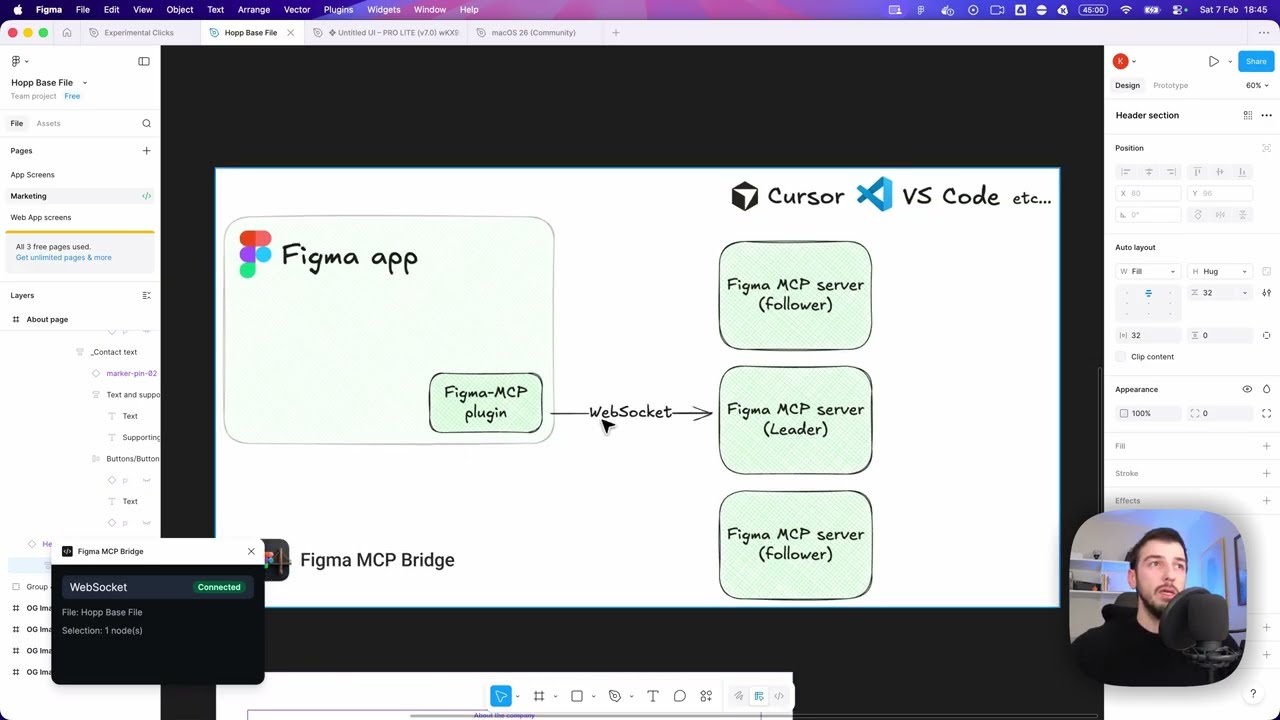
└── types.ts # Shared typesFigma MCP Bridge 有两个主要组件:
Figma 插件是 Figma MCP Bridge 的用户界面。你在想要使用 MCP 服务器的 Figma 文件中运行它,它负责为你获取所需的所有信息。
MCP 服务器是 Figma MCP Bridge 的核心。它维护一个以 fileKey 为键的 WebSocket 连接注册表,因此可以同时连接多个 Figma 文件。服务器负责:
处理来自一个或多个 Figma 插件实例的 WebSocket 连接
根据 fileKey 将工具调用路由到正确的文件
将响应转发回 AI 客户端
处理领导者选举(因为我们一次只能与一个 MCP 服务器建立一个 WS 连接)
┌─────────────────────────────────────────────────────────────────────────────┐
│                              FIGMA (Browser)                                │
│  ┌───────────────────────────────────────────────────────────────────────┐  │
│  │                         Figma Plugin                                  │  │
│  │                    (TypeScript/React)                                 │  │
│  └───────────────────────────────────────────────────────────────────────┘  │
└─────────────────────────────────────────────────────────────────────────────┘
                                      │
                                      │ WebSocket
                                      │ (ws://localhost:1994/ws)
                                      ▼
┌─────────────────────────────────────────────────────────────────────────────┐
│                          PRIMARY MCP SERVER                                 │
│                         (Leader on :1994)                                   │
│  ┌─────────────────────────────────────────────────────────────────────┐    │
│  │  Bridge                                    Endpoints:               │    │
│  │  • Manages WebSocket conn                  • /ws    (plugin)        │    │
│  │  • Forwards requests to plugin             • /ping  (health)        │    │
│  │  • Routes responses back                   • /rpc   (followers)     │    │
│  └─────────────────────────────────────────────────────────────────────┘    │
└─────────────────────────────────────────────────────────────────────────────┘
                           ▲                              ▲
                           │ HTTP /rpc                    │ HTTP /rpc
                           │ POST requests                │ POST requests
                           │                              │
         ┌─────────────────┴───────────┐    ┌─────────────┴───────────────┐
         │    FOLLOWER MCP SERVER 1    │    │    FOLLOWER MCP SERVER 2    │
         │                             │    │                             │
         │  • Pings leader /ping       │    │  • Pings leader /ping       │
         │  • Forwards tool calls      │    │  • Forwards tool calls      │
         │    via HTTP /rpc            │    │    via HTTP /rpc            │
         │  • If leader dies →         │    │  • If leader dies →         │
         │    attempts takeover        │    │    attempts takeover        │
         └─────────────────────────────┘    └─────────────────────────────┘
                    ▲                                      ▲
                    │                                      │
                    │ MCP Protocol                         │ MCP Protocol
                    │ (stdio)                              │ (stdio)
                    ▼                                      ▼
         ┌─────────────────────────────┐    ┌─────────────────────────────┐
         │      AI Tool / IDE 1        │    │      AI Tool / IDE 2        │
         │      (e.g., Cursor)         │    │      (e.g., Cursor)         │
└─────────────────────────────┘ └─────────────────────────────┘This server cannot be deployed
The Figma MCP server brings Figma design context directly into your AI workflow.
MCP server for secureFlows: token-free URL builders and integration-linting tools for AI agents.
Zero-setup MCP gateway securely connecting AI to your tools with authentication and workflows
Talk to your public-facing AI from any MCP client — Claude, ChatGPT, Cursor, Cline, Windsurf.