

A
licenseNot graded
qualityD
maintenanceBridges AI clients to Figma Desktop via Plugin API and WebSocket, enabling real-time design manipulation without rate limits.
1,213 npm
MIT


Figma-Context-MCPのような素晴らしいFigma MCPサーバーは他にも存在しますが、一つの課題として無料ユーザー向けのAPI制限があります。
無料アカウントの制限は月間6リクエスト、そう、月間です。
Figma MCP Bridgeはこの問題を解決します。これはプラグインとMCPサーバーの組み合わせで、Figma APIのレート制限に達することなくライブのFigmaドキュメントデータをAIツールにストリーミングします。つまり、私たち全員のためのFigma MCPです✊
複数のFigmaファイルを同時に接続することをサポートしています。各ファイルでプラグインを開けば、AIエージェントはfileKeyを指定してそれらのいずれにもクエリを実行できます。単一ファイルのセットアップは、これまで通り変更なしで動作します。
Figma MCP Bridgeを使用してCursorでUIを構築するデモを見る
Related MCP server: Figma Bridge MCP
AIツールのMCP設定(例:Cursor、Windsurf、Claude Desktop)に以下を追加します:
{
  "figma-bridge": {
    "command": "npx",
    "args": ["-y", "@gethopp/figma-mcp-bridge"]
  }
}
以上です。ダウンロードやインストールが必要なバイナリはありません。
最新リリースページからプラグインをダウンロードし、FigmaでPlugins > Development > Import plugin from manifestに移動して、plugin/フォルダー内のmanifest.jsonファイルを選択します。
Figmaファイルを開き、プラグインを実行して、AIツールへのプロンプトを開始します。MCPサーバーは自動的にプラグインに接続します。
複数のファイルで作業するには、各Figmaファイルでプラグインを開くだけです。ブリッジはすべての接続をアクティブに保ち、AIエージェントはfileKeyによってそれらのいずれかをターゲットにできます。
仕組みについて詳しく知りたい場合は、仕組みセクションをお読みください。
ツール | 説明 |
| 接続されているすべてのFigmaファイルを一覧表示(マルチファイルワークフローをサポート) |
| 現在のFigmaページのドキュメントツリーを取得 |
| Figmaで現在選択されているノードを取得 |
| ID(コロン形式、例: |
| すべてのローカルペイント、テキスト、エフェクト、グリッドスタイルを取得 |
| ファイル名、ページ、現在のページ情報を取得 |
| デザインコンテキストを理解するために最適化された、深さ制限付きのツリーを取得 |
| すべての変数コレクション、モード、値(デザイントークン)を取得 |
| ノードをPNG/SVG/JPG/PDFとしてエクスポート(base64エンコード) |
| スクリーンショットをエクスポートし、ローカルファイルシステムに直接保存 |
すべてのツールは、複数のFigmaファイルが接続されている場合にオプションのfileKeyパラメーターを受け入れます。list_filesを使用して、接続されているファイルとそのキーを確認してください。
git clone git@github.com:gethopp/figma-mcp-bridge.gitcd server && npm install && npm run buildcd plugin && bun install && bun run buildローカル開発の場合は、AIツールのMCP設定に以下を追加します:
{
  "figma-bridge": {
    "command": "node",
    "args": ["/path/to/figma-mcp-bridge/server/dist/index.js"]
  }
}Figma-MCP-Bridge/
├── plugin/ # Figma plugin (TypeScript/React)
└── server/ # MCP server (TypeScript/Node.js)
└── src/
├── index.ts # Entry point
├── bridge.ts # WebSocket bridge to Figma plugin
├── leader.ts # Leader: HTTP server + bridge
├── follower.ts # Follower: proxies to leader via HTTP
├── node.ts # Dynamic leader/follower role switching
├── election.ts # Leader election & health monitoring
├── tools.ts # MCP tool definitions
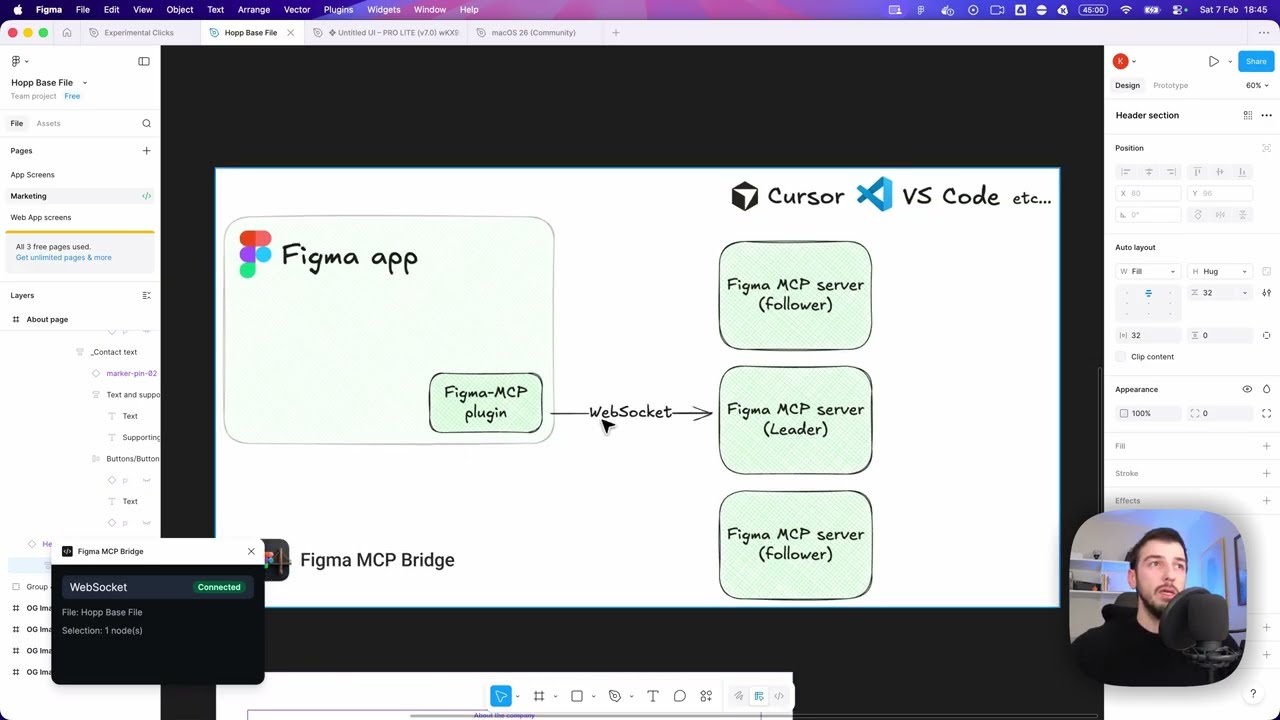
└── types.ts # Shared typesFigma MCP Bridgeには2つの主要なコンポーネントがあります:
Figmaプラグインは、Figma MCP Bridgeのユーザーインターフェースです。MCPサーバーを使用したいFigmaファイル内でこれを実行し、必要なすべての情報を取得する役割を担います。
MCPサーバーはFigma MCP Bridgeの中核です。fileKeyごとにキー付けされたWebSocket接続のレジストリを保持するため、複数のFigmaファイルを同時に接続できます。サーバーは以下の役割を担います:
1つ以上のFigmaプラグインインスタンスからのWebSocket接続の処理
fileKeyに基づいた正しいファイルへのツール呼び出しのルーティング
AIクライアントへの応答の転送
リーダー選出の処理(MCPサーバーへのWS接続は一度に1つしか持てないため)
┌─────────────────────────────────────────────────────────────────────────────┐
│                              FIGMA (Browser)                                │
│  ┌───────────────────────────────────────────────────────────────────────┐  │
│  │                         Figma Plugin                                  │  │
│  │                    (TypeScript/React)                                 │  │
│  └───────────────────────────────────────────────────────────────────────┘  │
└─────────────────────────────────────────────────────────────────────────────┘
                                      │
                                      │ WebSocket
                                      │ (ws://localhost:1994/ws)
                                      ▼
┌─────────────────────────────────────────────────────────────────────────────┐
│                          PRIMARY MCP SERVER                                 │
│                         (Leader on :1994)                                   │
│  ┌─────────────────────────────────────────────────────────────────────┐    │
│  │  Bridge                                    Endpoints:               │    │
│  │  • Manages WebSocket conn                  • /ws    (plugin)        │    │
│  │  • Forwards requests to plugin             • /ping  (health)        │    │
│  │  • Routes responses back                   • /rpc   (followers)     │    │
│  └─────────────────────────────────────────────────────────────────────┘    │
└─────────────────────────────────────────────────────────────────────────────┘
                           ▲                              ▲
                           │ HTTP /rpc                    │ HTTP /rpc
                           │ POST requests                │ POST requests
                           │                              │
         ┌─────────────────┴───────────┐    ┌─────────────┴───────────────┐
         │    FOLLOWER MCP SERVER 1    │    │    FOLLOWER MCP SERVER 2    │
         │                             │    │                             │
         │  • Pings leader /ping       │    │  • Pings leader /ping       │
         │  • Forwards tool calls      │    │  • Forwards tool calls      │
         │    via HTTP /rpc            │    │    via HTTP /rpc            │
         │  • If leader dies →         │    │  • If leader dies →         │
         │    attempts takeover        │    │    attempts takeover        │
         └─────────────────────────────┘    └─────────────────────────────┘
                    ▲                                      ▲
                    │                                      │
                    │ MCP Protocol                         │ MCP Protocol
                    │ (stdio)                              │ (stdio)
                    ▼                                      ▼
         ┌─────────────────────────────┐    ┌─────────────────────────────┐
         │      AI Tool / IDE 1        │    │      AI Tool / IDE 2        │
         │      (e.g., Cursor)         │    │      (e.g., Cursor)         │
└─────────────────────────────┘ └─────────────────────────────┘This server cannot be deployed
The Figma MCP server brings Figma design context directly into your AI workflow.
MCP server for secureFlows: token-free URL builders and integration-linting tools for AI agents.
Zero-setup MCP gateway securely connecting AI to your tools with authentication and workflows
Talk to your public-facing AI from any MCP client — Claude, ChatGPT, Cursor, Cline, Windsurf.