

A
licenseNot graded
qualityD
maintenanceBridges AI clients to Figma Desktop via Plugin API and WebSocket, enabling real-time design manipulation without rate limits.
1,213 npm
MIT


Figma-Context-MCP와 같은 훌륭한 Figma MCP 서버들이 존재하지만, 한 가지 문제는 무료 사용자에 대한 API 제한입니다.
무료 계정의 제한은 월 6회 요청이며, 네, 매달 그렇습니다.
Figma MCP Bridge는 이 문제를 해결하기 위한 솔루션입니다. 이 도구는 Figma API 사용량 제한에 걸리지 않고 실시간 Figma 문서 데이터를 AI 도구로 스트리밍하는 플러그인 + MCP 서버로, 우리 모두를 위한 Figma MCP입니다 ✊
여러 Figma 파일을 동시에 연결하는 기능을 지원합니다. 각 파일에서 플러그인을 열면 AI 에이전트가 fileKey를 통해 어떤 파일이든 쿼리할 수 있습니다. 단일 파일 설정은 변경 사항 없이 이전과 동일하게 작동합니다.
Figma MCP Bridge를 사용하여 Cursor에서 UI를 빌드하는 데모 보기
Related MCP server: Figma Bridge MCP
AI 도구의 MCP 구성(예: Cursor, Windsurf, Claude Desktop)에 다음을 추가하세요:
{
  "figma-bridge": {
    "command": "npx",
    "args": ["-y", "@gethopp/figma-mcp-bridge"]
  }
}
이것으로 끝입니다. 다운로드하거나 설치할 바이너리가 없습니다.
최신 릴리스 페이지에서 플러그인을 다운로드한 다음, Figma에서 Plugins > Development > Import plugin from manifest로 이동하여 plugin/ 폴더의 manifest.json 파일을 선택하세요.
Figma 파일을 열고 플러그인을 실행한 다음 AI 도구에 프롬프트를 입력하세요. MCP 서버가 자동으로 플러그인에 연결됩니다.
여러 파일에서 작업하려면 각 Figma 파일에서 플러그인을 열기만 하면 됩니다. 브릿지가 모든 연결을 활성 상태로 유지하므로 AI 에이전트가 fileKey를 통해 어떤 파일이든 타겟팅할 수 있습니다.
작동 원리에 대해 더 알고 싶다면 작동 원리 섹션을 읽어보세요.
도구 | 설명 |
| 연결된 모든 Figma 파일 나열 (다중 파일 워크플로우 지원) |
| 현재 Figma 페이지 문서 트리 가져오기 |
| Figma에서 현재 선택된 노드 가져오기 |
| ID로 특정 Figma 노드 가져오기 (콜론 형식, 예: |
| 모든 로컬 페인트, 텍스트, 효과 및 그리드 스타일 가져오기 |
| 파일 이름, 페이지 및 현재 페이지 정보 가져오기 |
| 디자인 컨텍스트 이해에 최적화된 깊이 제한 트리 가져오기 |
| 모든 변수 컬렉션, 모드 및 값(디자인 토큰) 가져오기 |
| 노드를 PNG/SVG/JPG/PDF로 내보내기 (base64 인코딩) |
| 스크린샷을 로컬 파일 시스템에 직접 내보내고 저장 |
모든 도구는 여러 Figma 파일이 연결된 경우 선택적 fileKey 매개변수를 허용합니다. list_files를 사용하여 연결된 파일과 해당 키를 확인하세요.
git clone git@github.com:gethopp/figma-mcp-bridge.gitcd server && npm install && npm run buildcd plugin && bun install && bun run build로컬 개발을 위해 AI 도구의 MCP 구성에 다음을 추가하세요:
{
  "figma-bridge": {
    "command": "node",
    "args": ["/path/to/figma-mcp-bridge/server/dist/index.js"]
  }
}Figma-MCP-Bridge/
├── plugin/ # Figma plugin (TypeScript/React)
└── server/ # MCP server (TypeScript/Node.js)
└── src/
├── index.ts # Entry point
├── bridge.ts # WebSocket bridge to Figma plugin
├── leader.ts # Leader: HTTP server + bridge
├── follower.ts # Follower: proxies to leader via HTTP
├── node.ts # Dynamic leader/follower role switching
├── election.ts # Leader election & health monitoring
├── tools.ts # MCP tool definitions
└── types.ts # Shared typesFigma MCP Bridge에는 두 가지 주요 구성 요소가 있습니다:
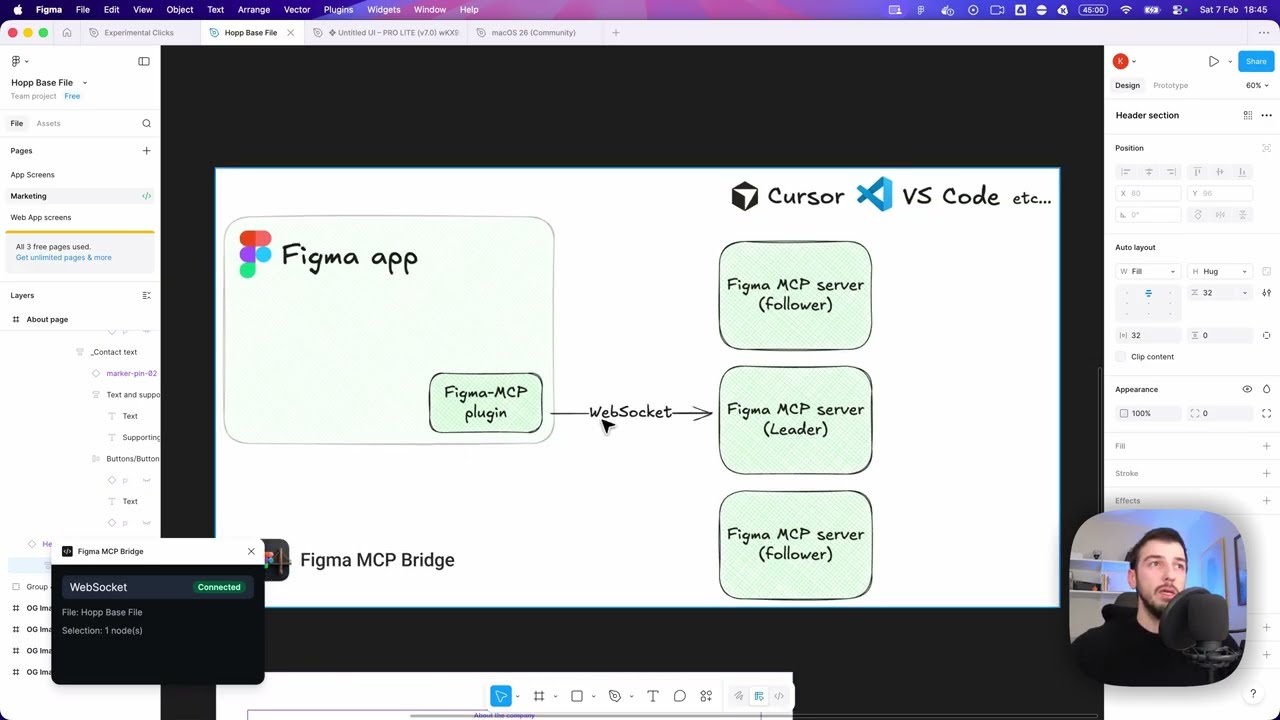
Figma 플러그인은 Figma MCP Bridge의 사용자 인터페이스입니다. MCP 서버를 사용하려는 Figma 파일 내에서 이 플러그인을 실행하며, 필요한 모든 정보를 가져오는 역할을 합니다.
MCP 서버는 Figma MCP Bridge의 핵심입니다. fileKey별로 키가 지정된 WebSocket 연결 레지스트리를 유지하므로 여러 Figma 파일을 동시에 연결할 수 있습니다. 서버는 다음을 담당합니다:
하나 이상의 Figma 플러그인 인스턴스에서 WebSocket 연결 처리
fileKey를 기반으로 올바른 파일에 도구 호출 라우팅
AI 클라이언트로 응답 전달
리더 선출 처리 (MCP 서버당 하나의 WS 연결만 가능하기 때문)
┌─────────────────────────────────────────────────────────────────────────────┐
│                              FIGMA (Browser)                                │
│  ┌───────────────────────────────────────────────────────────────────────┐  │
│  │                         Figma Plugin                                  │  │
│  │                    (TypeScript/React)                                 │  │
│  └───────────────────────────────────────────────────────────────────────┘  │
└─────────────────────────────────────────────────────────────────────────────┘
                                      │
                                      │ WebSocket
                                      │ (ws://localhost:1994/ws)
                                      ▼
┌─────────────────────────────────────────────────────────────────────────────┐
│                          PRIMARY MCP SERVER                                 │
│                         (Leader on :1994)                                   │
│  ┌─────────────────────────────────────────────────────────────────────┐    │
│  │  Bridge                                    Endpoints:               │    │
│  │  • Manages WebSocket conn                  • /ws    (plugin)        │    │
│  │  • Forwards requests to plugin             • /ping  (health)        │    │
│  │  • Routes responses back                   • /rpc   (followers)     │    │
│  └─────────────────────────────────────────────────────────────────────┘    │
└─────────────────────────────────────────────────────────────────────────────┘
                           ▲                              ▲
                           │ HTTP /rpc                    │ HTTP /rpc
                           │ POST requests                │ POST requests
                           │                              │
         ┌─────────────────┴───────────┐    ┌─────────────┴───────────────┐
         │    FOLLOWER MCP SERVER 1    │    │    FOLLOWER MCP SERVER 2    │
         │                             │    │                             │
         │  • Pings leader /ping       │    │  • Pings leader /ping       │
         │  • Forwards tool calls      │    │  • Forwards tool calls      │
         │    via HTTP /rpc            │    │    via HTTP /rpc            │
         │  • If leader dies →         │    │  • If leader dies →         │
         │    attempts takeover        │    │    attempts takeover        │
         └─────────────────────────────┘    └─────────────────────────────┘
                    ▲                                      ▲
                    │                                      │
                    │ MCP Protocol                         │ MCP Protocol
                    │ (stdio)                              │ (stdio)
                    ▼                                      ▼
         ┌─────────────────────────────┐    ┌─────────────────────────────┐
         │      AI Tool / IDE 1        │    │      AI Tool / IDE 2        │
         │      (e.g., Cursor)         │    │      (e.g., Cursor)         │
└─────────────────────────────┘ └─────────────────────────────┘This server cannot be deployed
The Figma MCP server brings Figma design context directly into your AI workflow.
MCP server for secureFlows: token-free URL builders and integration-linting tools for AI agents.
Zero-setup MCP gateway securely connecting AI to your tools with authentication and workflows
Talk to your public-facing AI from any MCP client — Claude, ChatGPT, Cursor, Cline, Windsurf.