Glama
Tmux MCP Server

Tmux MCP Server

by nickgnd

Tmux MCP Server

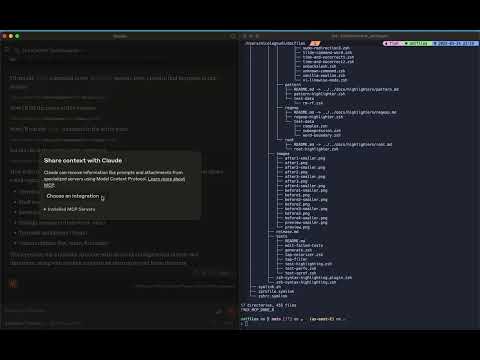
Model Context Protocol server that enables Claude Desktop to interact with and view tmux session content. This integration allows AI assistants to read from, control, and observe your terminal sessions.

Features

  • List and search tmux sessions

  • View and navigate tmux windows and panes

  • Capture and expose terminal content from any pane

  • Execute commands in tmux panes and retrieve results (use it at your own risk ⚠️)

  • Create new tmux sessions and windows

  • Split panes horizontally or vertically with customizable sizes

  • Kill tmux sessions, windows, and panes

Check out this short video to get excited!

youtube video

Related MCP server: TmuxControlLib MCP Server

Prerequisites

  • Node.js

  • tmux installed and running

Usage

Configure Claude Desktop

Add this MCP server to your Claude Desktop configuration:

"mcpServers": {
  "tmux": {
    "command": "npx",
    "args": ["-y", "tmux-mcp"]
  }
}

MCP server options

You can optionally specify the command line shell you are using, if unspecified it defaults to bash

"mcpServers": {
  "tmux": {
    "command": "npx",
    "args": ["-y", "tmux-mcp", "--shell-type=fish"]
  }
}

The MCP server needs to know the shell only when executing commands, to properly read its exit status.

Available Resources

  • tmux://sessions - List all tmux sessions

  • tmux://pane/{paneId} - View content of a specific tmux pane

  • tmux://command/{commandId}/result - Results from executed commands

Available Tools

  • list-sessions - List all active tmux sessions

  • find-session - Find a tmux session by name

  • list-windows - List windows in a tmux session

  • list-panes - List panes in a tmux window

  • capture-pane - Capture content from a tmux pane

  • create-session - Create a new tmux session

  • create-window - Create a new window in a tmux session

  • split-pane - Split a tmux pane horizontally or vertically with optional size

  • kill-session - Kill a tmux session by ID

  • kill-window - Kill a tmux window by ID

  • kill-pane - Kill a tmux pane by ID

  • execute-command - Execute a command in a tmux pane

  • get-command-result - Get the result of an executed command

Available Tools

13 tools
capture-paneC

Capture content from a tmux pane with configurable lines count and optional color preservation

Inputs: paneId (required), lines, colors.

create-sessionC

Create a new tmux session

Inputs: name (required).

create-windowC

Create a new window in a tmux session

Inputs: sessionId (required), name (required).

execute-commandA

Execute a command in a tmux pane and get results. For interactive applications (REPLs, editors), use rawMode=true. IMPORTANT: When rawMode=false (default), avoid heredoc syntax (cat << EOF) and other multi-line constructs as they conflict with command wrapping. For file writing, prefer: printf 'content\n' > file, echo statements, or write to temp files instead

Inputs: paneId (required), command (required), rawMode, noEnter.

find-sessionC

Find a tmux session by name

Inputs: name (required).

get-command-resultC

Get the result of an executed command

Inputs: commandId (required).

kill-paneC

Kill a tmux pane by ID

Inputs: paneId (required).

kill-sessionC

Kill a tmux session by ID

Inputs: sessionId (required).

kill-windowB

Kill a tmux window by ID

Inputs: windowId (required).

list-panesC

List panes in a tmux window

Inputs: windowId (required).

list-sessionsB

List all active tmux sessions

Inputs: no named parameters.

list-windowsC

List windows in a tmux session

Inputs: sessionId (required).

split-paneC

Split a tmux pane horizontally or vertically

Inputs: paneId (required), direction, size.

Tool Schema Changelog

Recent tool additions, removals, and schema changes observed during successful MCP inspections.

Loading tool schema changelog…

    TDQS

    A3.6/5.0

    Scored across 13 tools

    Disambiguation5/5

    Every tool has a clearly distinct purpose targeting specific tmux resources and actions. For example, create-session, create-window, and split-pane handle different creation tasks, while kill-session, kill-window, and kill-pane handle distinct termination operations. There is no overlap that would cause confusion in tool selection.

    Naming Consistency5/5

    All tool names follow a consistent verb-noun pattern with hyphen separation (e.g., create-session, list-panes, kill-window). This uniform naming convention makes the tool set predictable and easy to understand, with no deviations or mixed styles.

    Tool Count5/5

    With 13 tools, this server is well-scoped for managing tmux sessions, windows, panes, and commands. Each tool serves a specific function in the domain, such as listing, creating, killing, and executing, without being overly sparse or bloated.

    Completeness5/5

    The tool set provides complete CRUD/lifecycle coverage for tmux management, including creation (create-session, create-window, split-pane), reading (list-sessions, list-windows, list-panes, find-session, capture-pane), updating (execute-command for command execution), and deletion (kill-session, kill-window, kill-pane). There are no obvious gaps that would hinder agent workflows.

    Maintenance

    ActivityInactive
    ResponsivenessLimited data

    Related MCP Connectors

    Related MCP Servers