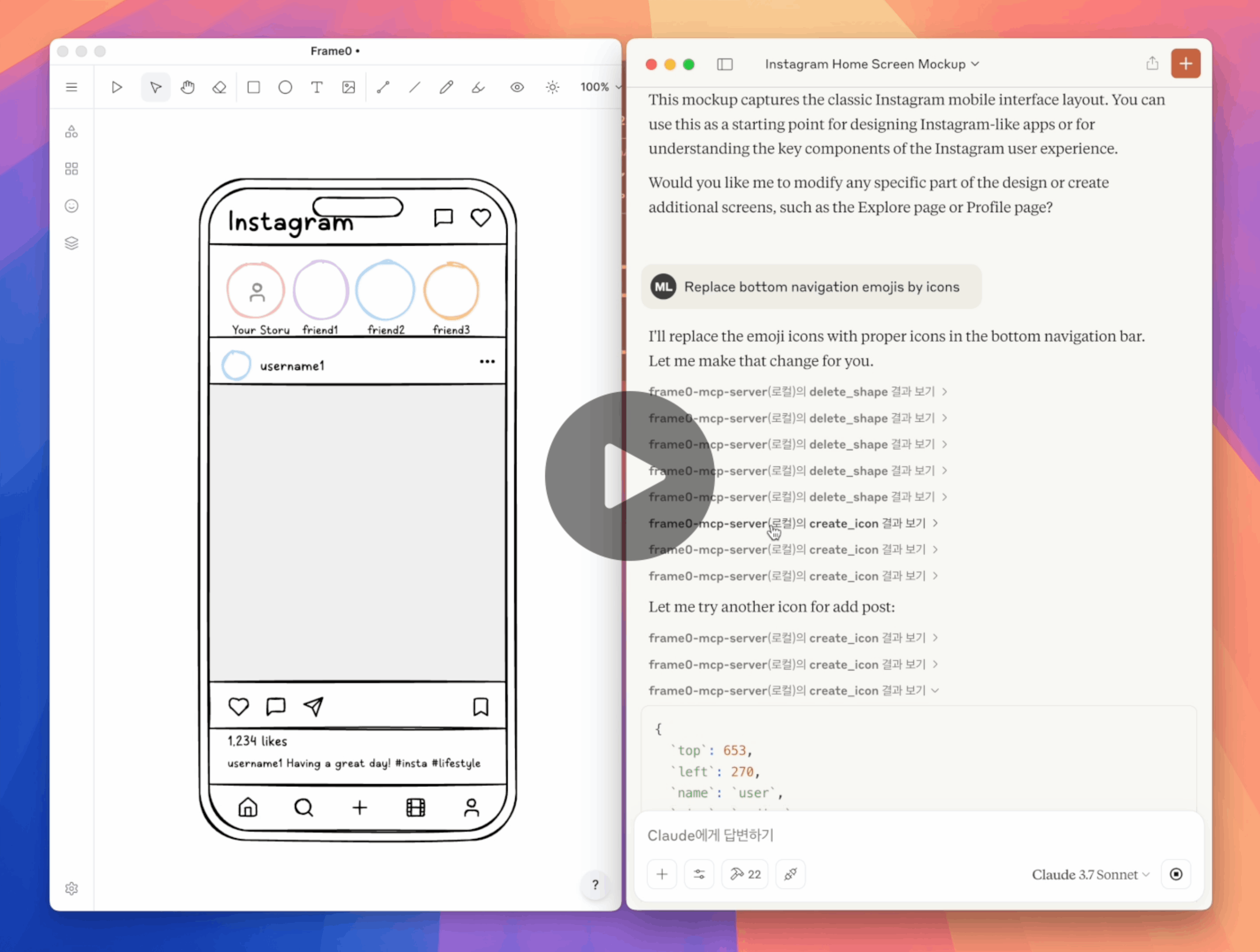
Frame0 MCP Server
Allows setting up links to Google services in wireframes, such as Google login buttons linked to the Google website
Enables creation of Instagram-style home screen wireframes in Frame0 through natural language prompts
Supports creation of Netflix-style home screen wireframes for TV interfaces in Frame0 through natural language prompts
Click on "Deploy Server".
Wait a few minutes for the server to deploy. Once ready, it will show a "Started" state.
In the chat, type
@followed by the MCP server name and your instructions, e.g., "@Frame0 MCP Servercreate a login screen for Phone in Frame0"
That's it! The server will respond to your query, and you can continue using it as needed.
Here is a step-by-step guide with screenshots.
![]()
Frame0 MCP Server
Frame0 is a Balsamiq-alternative wireframe tool for modern apps. Frame0 MCP Server allows you for creating and modifying wireframes in Frame0 by prompting.
Setup
Prerequisite:
Frame0
v1.7.0or higher. (Ensure that Run on start option is enabled in Settings > API Server).Node.js
v22or higher.
Setup for Claude Desktop in claude_desktop_config.json as below:
{
"mcpServers": {
"frame0-mcp-server": {
"command": "npx",
"args": ["-y", "frame0-mcp-server"]
}
}
}You can use --api-port=<port> optional parameter to use another port number for Frame0's API server.
Related MCP server: figma-pilot
Example Prompts
“Create a login screen for Phone in Frame0”
“Create a Instagram home screen for Phone in Frame0”
“Create a Netflix home screen for TV in Frame0”
“Change the color of the Login button”
“Remove the Twitter social login”
“Replace the emojis by icons”
“Set a link from the google login button to the Google website”
Tools
create_framecreate_rectanglecreate_ellipsecreate_textcreate_linecreate_polygoncreate_connectorcreate_iconcreate_imageupdate_shapeduplicate_shapedelete_shapesearch_iconsmove_shapealign_shapesgroupungroupset_linkexport_shape_as_imageadd_pageupdate_pageduplicate_pagedelete_pageget_current_page_idset_current_page_by_idget_pageget_all_pagesexport_page_as_image
Dev
Clone this repository.
Build with
npm run build.Update
claude_desktop_config.jsonin Claude Desktop as below.Restart Claude Desktop.
{
"mcpServers": {
"frame0-mcp-server": {
"command": "node",
"args": ["<full-path-to>/frame0-mcp-server/build/index.js"]
}
}
}This server cannot be deployed
Maintenance
Related MCP Connectors
Agent-Native design tool - create and edit visual designs with agent assistance
- FlowstepOAuthai.flowstep
Generate, inspect, and manage Flowstep UI designs directly from your AI assistant.
- MaketaOAuthpro.maketa
Build and edit app screen mockups and clickable prototypes from your AI assistant.
Turn your app idea into IA, wireframes, PRD, style guides, and dev specs for coding agents.
Related MCP Servers
- FlicenseAqualityDmaintenanceEnables AI agents to interact with Figma to create, read, and manage designs using the Figma REST API and a dedicated plugin. It supports advanced features like UI generation from text, webpage reconstruction in Figma, and design token synchronization with codebases.20-
- AlicenseNot gradedqualityDmaintenanceEnables AI agents to create, modify, and manage Figma designs through natural language commands via a specialized MCP server and plugin bridge. It supports a wide range of operations including element creation, property modification, component management, and accessibility checks.4 npm105MIT
- AlicenseNot gradedqualityDmaintenanceEnables designing, modifying, and bug reporting in web apps, sending changes to coding agents via MCP.5 npm46MIT
- FlicenseNot gradedqualityCmaintenanceEnables AI assistants to autonomously create, layout, and export interactive UI mockups as native .bmpr files or Wireframe JSON, integrating with Balsamiq Wireframes 4.x.-