Glama

Dev.to MCP Server

This repository contains a Model Context Protocol server implementation for Dev.to that allows AI assistants to access and interact with Dev.to content.

image

What is MCP?

The Model Context Protocol (MCP) is a standard for enabling AI assistants to interface with external services, tools, and data sources. This server implements the MCP specification to provide access to Dev.to content. To know more about MCP, Check this video

Related MCP server: devto-mvp-server

Features

  • Fetch latest and trending articles from Dev.to

  • Search for articles by various criteria

  • Get detailed information about specific articles

  • Get Detailed information about a User.

  • Access articles by tag or username

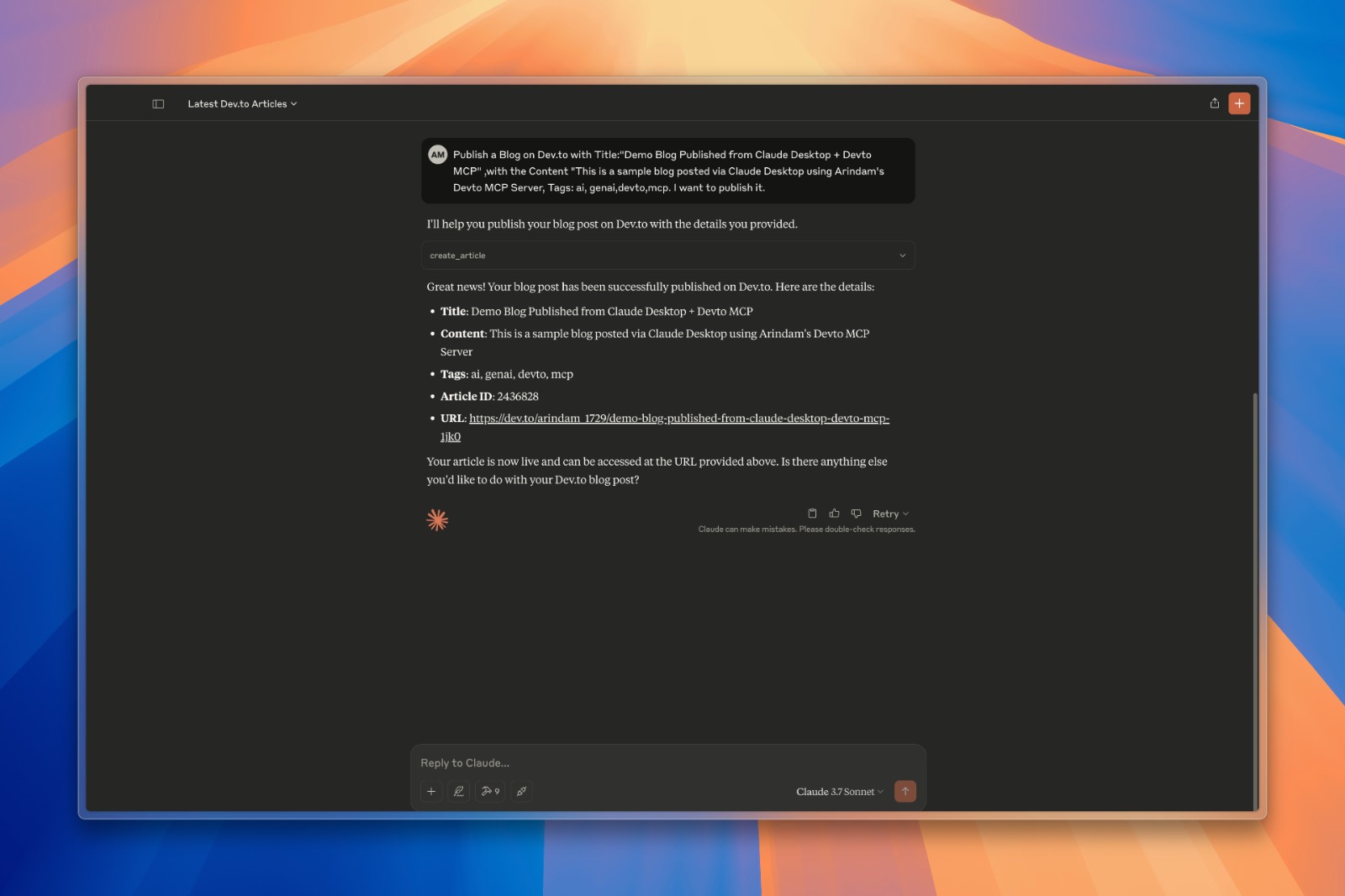
  • Create and publish new articles to Dev.to

  • Update existing articles

  • Caching mechanism to improve performance and reduce API calls

Installation

  1. Clone this repository

git clone https://github.com/Arindam200/devto-mcp.git
cd devto-mcp
  1. Connect to the MCP server

    Copy the below json with the appropriate {{PATH}} values:

    {
     "mcpServers": {
       "devto": {
         "command": "{{PATH_TO_UV}}", // Run `which uv` and place the output here
         "args": [
                   "--directory",
                   "{{PATH_TO_SRC}}",// cd into the repo, run `pwd` and enter the output here
                   "run",
                   "server.py"
         ],
         "env": {
           "DEV_TO_API_KEY":"Your Dev.to API Key" // Get it from https://dev.to/settings/extensions.
         }
       }
     }
    }

    You can obtain a Dev.to API key from your Dev.to settings page.

    For Claude, save this as claude_desktop_config.json in your Claude Desktop configuration directory at:

    ~/Library/Application Support/Claude/claude_desktop_config.json

    For Cursor, save this as mcp.json in your Cursor configuration directory at:

    ~/.cursor/mcp.json
  2. Restart Claude Desktop / Cursor

    Open Claude Desktop and you should now see Devto as an available integration.

    Or restart Cursor.

Available Tools

The server provides the following tools:

  • get_latest_articles() - Get the latest articles from Dev.to

  • get_top_articles() - Get the most popular articles from Dev.to

  • get_articles_by_tag(tag) - Get articles by tag

  • get_article_by_id(id) - Get a specific article by ID

  • search_articles(query, page=1) - Search for articles by keywords in title/description

  • get_article_details(article_id) - Get full content and metadata for a specific article

  • get_articles_by_username(username) - Get articles written by a specific author

  • create_article(title, body_markdown, tags, published) - Create and publish a new article

  • update_article(article_id, title, body_markdown, tags, published) - Update an existing article

Example Queries

Here are some examples of what you can ask an AI assistant connected to this server:

  • "Find articles about Python on Dev.to"

  • "Show me the latest Dev.to articles"

  • "Get details for article 1234"

  • "What articles has user 'ben' written?"

  • "Search for articles about machine learning"

  • "Create a new article titled 'Getting Started with Python'"

  • "Update my article with ID 5678 to fix a typo in the content"

Authentication

The server requires a Dev.to API key for certain operations, particularly for creating and updating articles. The API key should be set as an environment variable DEV_TO_API_KEY.

Contributing

Contributions are welcome! Please feel free to submit a Pull Request.

License

This project is licensed under the MIT License - see the LICENSE file for details.

Available Tools

10 tools
create_articleB
Create and publish a new article on Dev.to

Args:
    title: The title of the article
    body_markdown: The content of the article in markdown format
    tags: Comma-separated list of tags (e.g., "python,tutorial,webdev")
    published: Whether to publish immediately (True) or save as draft (False)

Inputs: title (required), body_markdown (required), tags, published.

get_article_by_idC

Get a specific article by ID from Dev.to

Inputs: id (required).

get_article_detailsC
Get detailed information about a specific article

Args:
    article_id: The ID of the article to retrieve

Inputs: article_id (required).

get_articles_by_tagC

Get articles by tag from Dev.to

Inputs: tag (required).

get_articles_by_usernameC
Get articles written by a specific user

Args:
    username: The username of the author

Inputs: username (required).

get_latest_articlesB

Get the latest articles from Dev.to

Inputs: no named parameters.

get_top_articlesB

Get the top articles from Dev.to

Inputs: no named parameters.

get_user_infoC
Get information about a Dev.to user

Args:
    username: The username of the user

Inputs: username (required).

search_articlesB
Search for articles on Dev.to

Args:
    query: Search term to find articles
    page: Page number for pagination (default: 1)

Inputs: query (required), page.

update_articleB
Update an existing article on Dev.to

Args:
    article_id: The ID of the article to update
    title: New title for the article (optional)
    body_markdown: New content in markdown format (optional)
    tags: New comma-separated list of tags (optional)
    published: Change publish status (optional)

Inputs: article_id (required), title, body_markdown, tags, +1 more.

Tool Schema Changelog

Recent tool additions, removals, and schema changes observed during successful MCP inspections.

Loading tool schema changelog…

    TDQS

    B3.4/5.0

    Scored across 10 tools

    Disambiguation4/5

    Most tools have distinct purposes targeting different operations (create, get, update, search), but there is some ambiguity between get_article_by_id and get_article_details which appear to serve similar retrieval functions. The other tools are clearly differentiated by their target data or action.

    Naming Consistency5/5

    All tools follow a consistent verb_noun pattern with snake_case throughout (e.g., create_article, get_articles_by_tag, update_article). The naming is predictable and follows a clear convention without any deviations in style or structure.

    Tool Count5/5

    With 10 tools, this server is well-scoped for managing Dev.to content, covering core operations like CRUD for articles, user info retrieval, and various query methods. Each tool serves a specific purpose without bloat, making the count appropriate for the domain.

    Completeness4/5

    The toolset provides comprehensive coverage for article management (create, read, update, search) and user information, but lacks delete functionality for articles, which is a minor gap. Core workflows are supported, and agents can likely work around the missing delete operation.

    Maintenance

    ActivityInactive
    ResponsivenessOutdated data

    Related MCP Connectors

    Related MCP Servers

    • A
      license
      Not graded
      quality
      Not graded
      maintenance
      An MCP server that enables AI assistants like Claude to interact with Substack newsletters, allowing for post retrieval, content searching, and author information access through a standardized interface.
      MIT
    • A
      license
      Not graded
      quality
      D
      maintenance
      This is a complete MCP (Model Context Protocol) server that implements a articles of dev.to with robust validation using TypeScript and Zod. The server integrates directly with Cursor, allowing you search articles on dev.to.
      8 npm
      MIT