Glama

Dev.to MCP サーバー

このリポジトリには、AI アシスタントが Dev.to コンテンツにアクセスして対話できるようにする、Dev.to のモデル コンテキスト プロトコル サーバー実装が含まれています。

画像

MCPとは何ですか?

モデルコンテキストプロトコル(MCP)は、AIアシスタントが外部のサービス、ツール、データソースと連携できるようにするための標準規格です。このサーバーはMCP仕様を実装し、Dev.toコンテンツへのアクセスを提供します。MCPの詳細については、こちらの動画をご覧ください。

Related MCP server: devto-mvp-server

特徴

  • Dev.to から最新のトレンド記事を取得します

  • さまざまな基準で記事を検索する

  • 特定の記事に関する詳細情報を取得する

  • ユーザーに関する詳細情報を取得します。

  • タグまたはユーザー名で記事にアクセスする

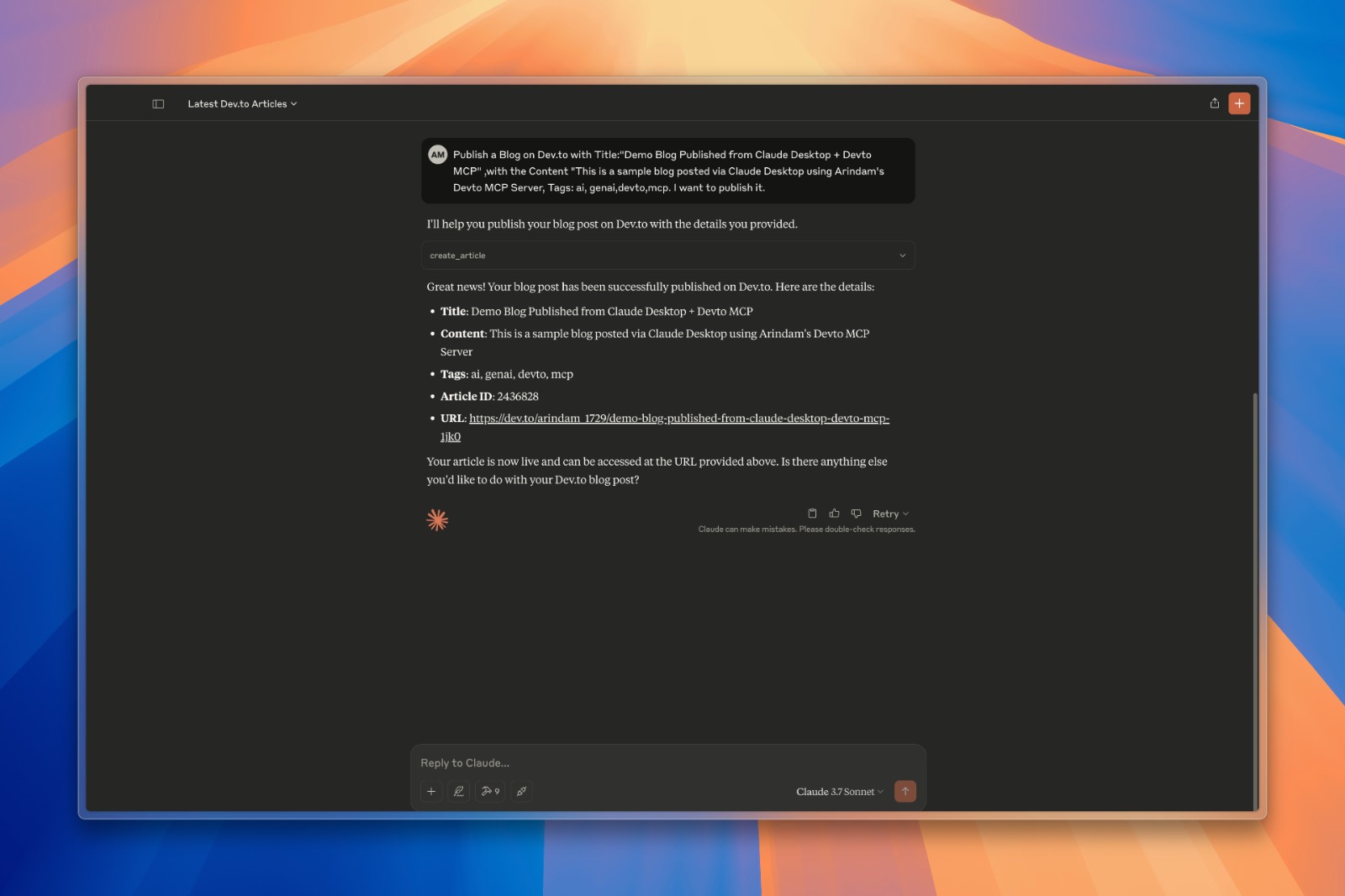
  • Dev.to に新しい記事を作成して公開する

  • 既存の記事を更新する

  • パフォーマンスを向上させ、API呼び出しを削減するキャッシュメカニズム

インストール

  1. このリポジトリをクローンする

git clone https://github.com/Arindam200/devto-mcp.git
cd devto-mcp
  1. MCPサーバーに接続する

    適切な {{PATH}} 値を含む以下の json をコピーします。

    {
     "mcpServers": {
       "devto": {
         "command": "{{PATH_TO_UV}}", // Run `which uv` and place the output here
         "args": [
                   "--directory",
                   "{{PATH_TO_SRC}}",// cd into the repo, run `pwd` and enter the output here
                   "run",
                   "server.py"
         ],
         "env": {
           "DEV_TO_API_KEY":"Your Dev.to API Key" // Get it from https://dev.to/settings/extensions.
         }
       }
     }
    }

    Dev.to 設定ページから Dev.to API キーを取得できます。

    Claudeの場合、これをclaude_desktop_config.jsonとして次の Claude Desktop 構成ディレクトリに保存します。

    ~/Library/Application Support/Claude/claude_desktop_config.json

    Cursorの場合、次の Cursor 構成ディレクトリにmcp.jsonとして保存します。

    ~/.cursor/mcp.json
  2. クロードデスクトップ/カーソルを再起動

    Claude Desktop を開くと、Devto が利用可能な統合として表示されます。

    またはカーソルを再起動します。

利用可能なツール

サーバーは次のツールを提供します。

  • get_latest_articles() - Dev.to から最新の記事を取得する

  • get_top_articles() - Dev.to から最も人気のある記事を取得します

  • get_articles_by_tag(tag) - タグで記事を取得する

  • get_article_by_id(id) - IDで特定の記事を取得する

  • search_articles(query, page=1) - タイトル/説明内のキーワードで記事を検索します

  • get_article_details(article_id) - 特定の記事の完全なコンテンツとメタデータを取得します

  • get_articles_by_username(username) - 特定の著者が書いた記事を取得する

  • create_article(title, body_markdown, tags, published) - 新しい記事を作成して公開する

  • update_article(article_id, title, body_markdown, tags, published) - 既存の記事を更新する

クエリの例

このサーバーに接続された AI アシスタントに尋ねることができる質問の例をいくつか示します。

  • 「Dev.to で Python に関する記事を探す」

  • 「最新のDev.to記事を表示」

  • 「記事1234の詳細を取得する」

  • 「ユーザー「ben」はどんな記事を書きましたか?」

  • 「機械学習に関する記事を検索する」

  • 「『Python入門』というタイトルの新しい記事を作成します」

  • 「ID 5678 の記事を更新して、コンテンツ内のタイプミスを修正してください」

高度な機能

カスタムプロンプト

サーバーは、AI アシスタントが使用できる事前定義されたプロンプトを提供します。

  • search_prompt - フォーマットされた検索プロンプトを作成する

  • analyze_article - 特定の記事を分析するためのプロンプトを作成する

認証

サーバーは、特に記事の作成と更新などの特定の操作を実行するためにDev.to APIキーを必要とします。APIキーは環境変数DEV_TO_API_KEYに設定する必要があります。

貢献

貢献を歓迎します!お気軽にプルリクエストを送信してください。

ライセンス

このプロジェクトは MIT ライセンスに基づいてライセンスされています - 詳細については LICENSE ファイルを参照してください。

Available Tools

10 tools
create_articleB
Create and publish a new article on Dev.to

Args:
    title: The title of the article
    body_markdown: The content of the article in markdown format
    tags: Comma-separated list of tags (e.g., "python,tutorial,webdev")
    published: Whether to publish immediately (True) or save as draft (False)

Inputs: title (required), body_markdown (required), tags, published.

get_article_by_idC

Get a specific article by ID from Dev.to

Inputs: id (required).

get_article_detailsC
Get detailed information about a specific article

Args:
    article_id: The ID of the article to retrieve

Inputs: article_id (required).

get_articles_by_tagC

Get articles by tag from Dev.to

Inputs: tag (required).

get_articles_by_usernameC
Get articles written by a specific user

Args:
    username: The username of the author

Inputs: username (required).

get_latest_articlesB

Get the latest articles from Dev.to

Inputs: no named parameters.

get_top_articlesB

Get the top articles from Dev.to

Inputs: no named parameters.

get_user_infoC
Get information about a Dev.to user

Args:
    username: The username of the user

Inputs: username (required).

search_articlesB
Search for articles on Dev.to

Args:
    query: Search term to find articles
    page: Page number for pagination (default: 1)

Inputs: query (required), page.

update_articleB
Update an existing article on Dev.to

Args:
    article_id: The ID of the article to update
    title: New title for the article (optional)
    body_markdown: New content in markdown format (optional)
    tags: New comma-separated list of tags (optional)
    published: Change publish status (optional)

Inputs: article_id (required), title, body_markdown, tags, +1 more.

Tool Schema Changelog

Recent tool additions, removals, and schema changes observed during successful MCP inspections.

Loading tool schema changelog…

    TDQS

    B3.4/5.0

    Scored across 10 tools

    Disambiguation4/5

    Most tools have distinct purposes targeting different operations (create, get, update, search), but there is some ambiguity between get_article_by_id and get_article_details which appear to serve similar retrieval functions. The other tools are clearly differentiated by their target data or action.

    Naming Consistency5/5

    All tools follow a consistent verb_noun pattern with snake_case throughout (e.g., create_article, get_articles_by_tag, update_article). The naming is predictable and follows a clear convention without any deviations in style or structure.

    Tool Count5/5

    With 10 tools, this server is well-scoped for managing Dev.to content, covering core operations like CRUD for articles, user info retrieval, and various query methods. Each tool serves a specific purpose without bloat, making the count appropriate for the domain.

    Completeness4/5

    The toolset provides comprehensive coverage for article management (create, read, update, search) and user information, but lacks delete functionality for articles, which is a minor gap. Core workflows are supported, and agents can likely work around the missing delete operation.

    Maintenance

    ActivityInactive
    ResponsivenessNo recent community issues

    Related MCP Connectors

    Related MCP Servers

    • A
      license
      Not graded
      quality
      Not graded
      maintenance
      An MCP server that enables AI assistants like Claude to interact with Substack newsletters, allowing for post retrieval, content searching, and author information access through a standardized interface.
      MIT
    • A
      license
      Not graded
      quality
      D
      maintenance
      This is a complete MCP (Model Context Protocol) server that implements a articles of dev.to with robust validation using TypeScript and Zod. The server integrates directly with Cursor, allowing you search articles on dev.to.
      MIT