Glama

Dev.to MCP-сервер

В этом репозитории содержится реализация сервера Model Context Protocol для Dev.to, которая позволяет помощникам на базе искусственного интеллекта получать доступ к контенту Dev.to и взаимодействовать с ним.
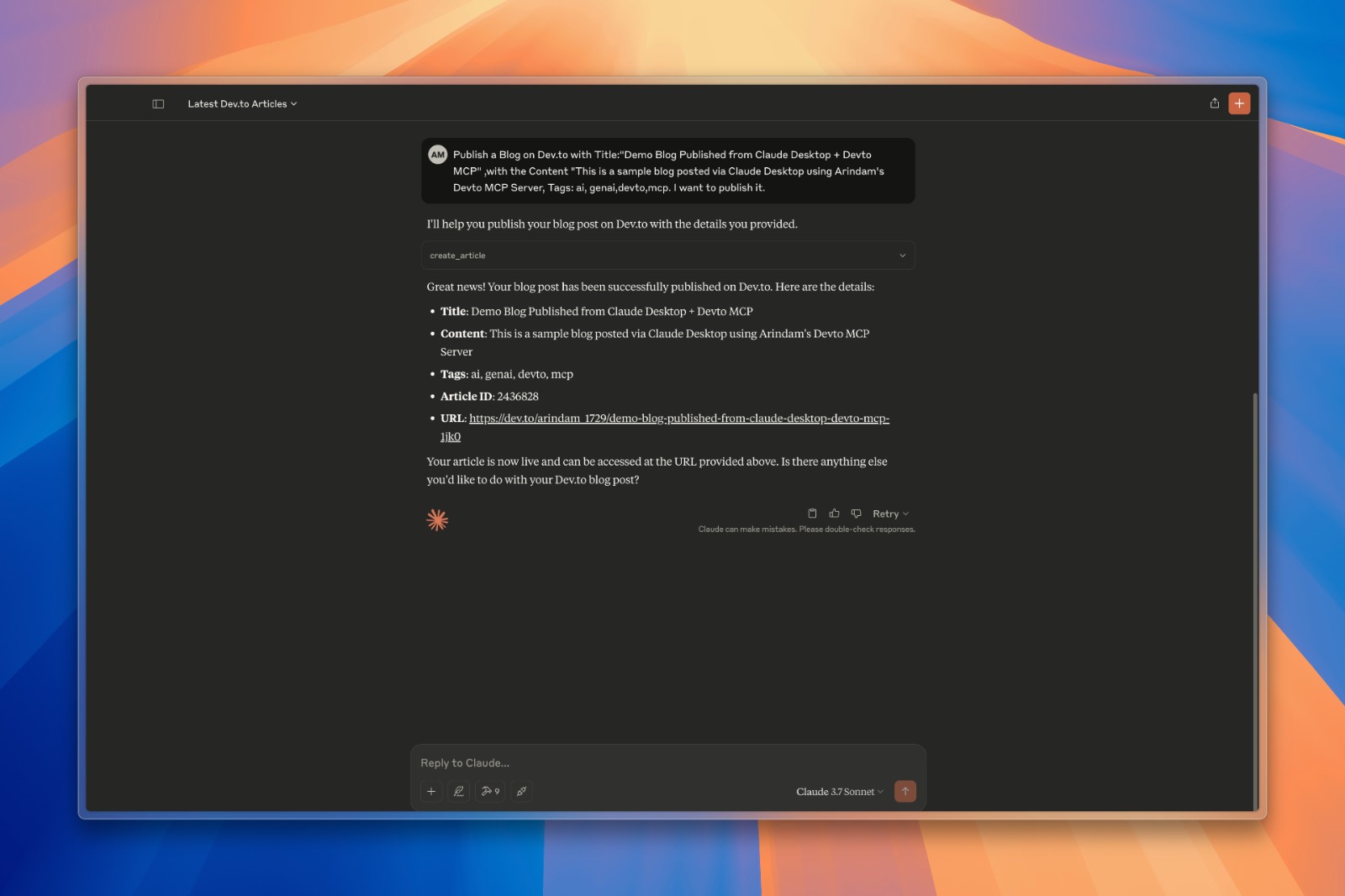
изображение

Что такое МКП?

Model Context Protocol (MCP) — это стандарт, позволяющий помощникам ИИ взаимодействовать с внешними службами, инструментами и источниками данных. Этот сервер реализует спецификацию MCP для предоставления доступа к контенту Dev.to. Чтобы узнать больше о MCP, посмотрите это видео

Related MCP server: devto-mvp-server

Функции

  • Получайте последние и популярные статьи с Dev.to

  • Поиск статей по различным критериям

  • Получите подробную информацию о конкретных статьях

  • Получить подробную информацию о пользователе.

  • Доступ к статьям по тегу или имени пользователя

  • Создавайте и публикуйте новые статьи на Dev.to

  • Обновить существующие статьи

  • Механизм кэширования для повышения производительности и сокращения вызовов API

Установка

  1. Клонировать этот репозиторий

git clone https://github.com/Arindam200/devto-mcp.git
cd devto-mcp
  1. Подключиться к серверу MCP

    Скопируйте приведенный ниже json-файл с соответствующими значениями {{PATH}}:

    {
     "mcpServers": {
       "devto": {
         "command": "{{PATH_TO_UV}}", // Run `which uv` and place the output here
         "args": [
                   "--directory",
                   "{{PATH_TO_SRC}}",// cd into the repo, run `pwd` and enter the output here
                   "run",
                   "server.py"
         ],
         "env": {
           "DEV_TO_API_KEY":"Your Dev.to API Key" // Get it from https://dev.to/settings/extensions.
         }
       }
     }
    }

    Вы можете получить ключ API Dev.to на странице настроек Dev.to.

    Для Claude сохраните это как claude_desktop_config.json в каталоге конфигурации Claude Desktop по адресу:

    ~/Library/Application Support/Claude/claude_desktop_config.json

    Для Cursor сохраните это как mcp.json в каталоге конфигурации Cursor по адресу:

    ~/.cursor/mcp.json
  2. Перезапустить рабочий стол Клода / Курсор

    Откройте Claude Desktop, и вы должны увидеть Devto как доступную интеграцию.

    Или перезапустите Курсор.

Доступные инструменты

Сервер предоставляет следующие инструменты:

  • get_latest_articles() — Получить последние статьи с Dev.to

  • get_top_articles() - Получите самые популярные статьи с Dev.to

  • get_articles_by_tag(tag) - Получить статьи по тегу

  • get_article_by_id(id) — Получить конкретную статью по ID

  • search_articles(query, page=1) - Поиск статей по ключевым словам в названии/описании

  • get_article_details(article_id) — получить полное содержание и метаданные для определенной статьи

  • get_articles_by_username(username) - Получить статьи, написанные определенным автором

  • create_article(title, body_markdown, tags, published) — создать и опубликовать новую статью

  • update_article(article_id, title, body_markdown, tags, published) — обновить существующую статью

Примеры запросов

Вот несколько примеров того, что вы можете спросить у помощника по искусственному интеллекту, подключенного к этому серверу:

  • «Найдите статьи о Python на Dev.to»

  • «Покажите мне последние статьи Dev.to»

  • "Получить подробности по статье 1234"

  • «Какие статьи написал пользователь 'ben'?»

  • «Поиск статей о машинном обучении»

  • «Создайте новую статью под названием «Начало работы с Python»»

  • «Обновите мою статью с идентификатором 5678, чтобы исправить опечатку в содержании»

Аутентификация

Серверу требуется ключ API Dev.to для определенных операций, в частности для создания и обновления статей. Ключ API должен быть установлен как переменная среды DEV_TO_API_KEY .

Внося вклад

Вклады приветствуются! Пожалуйста, не стесняйтесь отправлять запрос на включение.

Лицензия

Данный проект лицензирован по лицензии MIT — подробности см. в файле LICENSE.

Available Tools

10 tools
create_articleB
Create and publish a new article on Dev.to

Args:
    title: The title of the article
    body_markdown: The content of the article in markdown format
    tags: Comma-separated list of tags (e.g., "python,tutorial,webdev")
    published: Whether to publish immediately (True) or save as draft (False)

Inputs: title (required), body_markdown (required), tags, published.

get_article_by_idC

Get a specific article by ID from Dev.to

Inputs: id (required).

get_article_detailsC
Get detailed information about a specific article

Args:
    article_id: The ID of the article to retrieve

Inputs: article_id (required).

get_articles_by_tagC

Get articles by tag from Dev.to

Inputs: tag (required).

get_articles_by_usernameC
Get articles written by a specific user

Args:
    username: The username of the author

Inputs: username (required).

get_latest_articlesB

Get the latest articles from Dev.to

Inputs: no named parameters.

get_top_articlesB

Get the top articles from Dev.to

Inputs: no named parameters.

get_user_infoC
Get information about a Dev.to user

Args:
    username: The username of the user

Inputs: username (required).

search_articlesB
Search for articles on Dev.to

Args:
    query: Search term to find articles
    page: Page number for pagination (default: 1)

Inputs: query (required), page.

update_articleB
Update an existing article on Dev.to

Args:
    article_id: The ID of the article to update
    title: New title for the article (optional)
    body_markdown: New content in markdown format (optional)
    tags: New comma-separated list of tags (optional)
    published: Change publish status (optional)

Inputs: article_id (required), title, body_markdown, tags, +1 more.

Tool Schema Changelog

Recent tool additions, removals, and schema changes observed during successful MCP inspections.

Loading tool schema changelog…

    TDQS

    B3.4/5.0

    Scored across 10 tools

    Disambiguation4/5

    Most tools have distinct purposes targeting different operations (create, get, update, search), but there is some ambiguity between get_article_by_id and get_article_details which appear to serve similar retrieval functions. The other tools are clearly differentiated by their target data or action.

    Naming Consistency5/5

    All tools follow a consistent verb_noun pattern with snake_case throughout (e.g., create_article, get_articles_by_tag, update_article). The naming is predictable and follows a clear convention without any deviations in style or structure.

    Tool Count5/5

    With 10 tools, this server is well-scoped for managing Dev.to content, covering core operations like CRUD for articles, user info retrieval, and various query methods. Each tool serves a specific purpose without bloat, making the count appropriate for the domain.

    Completeness4/5

    The toolset provides comprehensive coverage for article management (create, read, update, search) and user information, but lacks delete functionality for articles, which is a minor gap. Core workflows are supported, and agents can likely work around the missing delete operation.

    Maintenance

    ActivityInactive
    ResponsivenessNo recent community issues

    Related MCP Connectors

    Related MCP Servers

    • A
      license
      Not graded
      quality
      Not graded
      maintenance
      An MCP server that enables AI assistants like Claude to interact with Substack newsletters, allowing for post retrieval, content searching, and author information access through a standardized interface.
      MIT
    • A
      license
      Not graded
      quality
      D
      maintenance
      This is a complete MCP (Model Context Protocol) server that implements a articles of dev.to with robust validation using TypeScript and Zod. The server integrates directly with Cursor, allowing you search articles on dev.to.
      8 npm
      MIT