

F
licenseA
qualityD
maintenanceA TypeScript-based MCP server that enables AI assistants to interact with CouchDB databases through a simple interface, providing tools for creating, reading, and querying databases and documents.
5
5
-

一个基于 TypeScript 的模型上下文协议 (MCP) 服务器,旨在通过 EdgeQL 查询简化 Gel 数据库操作。该项目为 LLM 代理(游标代理、Claude 代码等)提供工具,用于自动学习您的架构,以及编写、验证和执行数据库查询。通过自然语言轻松与您的 Gel 数据库交互。Vibe 程序员欢呼吧!
注意:由于法学硕士 (LLM) 可以编写更灵活的查询,因此查询生成功能未包含在内。我使用 Claude-3.7-sonnet-thinking 的 Cursor 代理进行了测试,并在提供 Gel 文档并链接相关网页后获得了良好的结果。

# 1. Install dependencies
yarn install

# 2. Copy your dbschema folder into the project if you have one already
# cp -r /path/to/your/dbschema ./
# or just copy and paste

# 3. Initialize a Gel project
npx gel project init
# Follow prompts to set up a new project
# Can point to an existing gel instance by providing the name of your instance
#   -Import migrations if it asks

# 4. Generate EdgeQL JavaScript query builder files
npx @gel/generate edgeql-js
# Note: Re-run this command after any schema changes

# 5. Update connection settings
# Edit src/index_gel.ts lines 19-25 with your database, host, port, user, password
# Edit src/index_gel.ts line 37 with your branch name

# 6. Build the project
yarn build

# 7. (optional) Test the server runs without errors
node build/index.js

# 7.1 (if you have errors) Test server with a UI that provides more clear error logs using:
npx @modelcontextprotocol/inspector node build/index.js

# 8. (Recommended) Include the gel_llm.txt documentation file
# Download the Gel documentation file and place it in your project root
# This allows both the search tool and direct file access for your LLM agent
# curl -o gel_llm.txt https://raw.githubusercontent.com/yourorg/gel-docs/main/gel_llm.txt
# Note: Replace the URL with the actual source of your gel_llm.txt file点击右上角的齿轮图标 > MCP > +添加新服务器
随便你叫什么名字
选择类型:命令
输入:node your/full/path/to/build/index.js
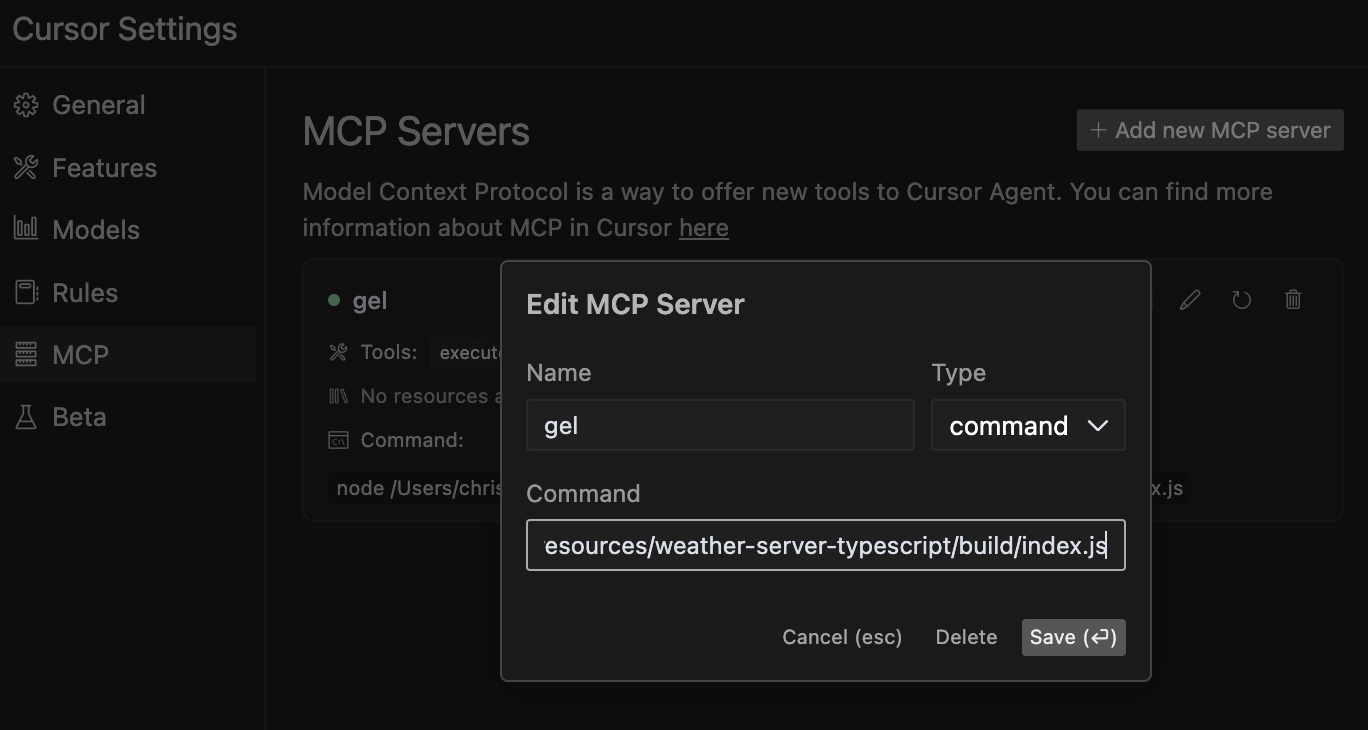
**注意:**虽然此服务器主要使用 Cursor 代理进行测试,但它应该可以与其他支持模型上下文协议 (MCP) 的代理和 LLM 兼容。如果您使用其他代理进行测试,请随时贡献您的发现!
Related MCP server: MCP Docs RAG Server
凝胶数据库 MCP 服务器提供以下工具:
这有助于您的 LLM 代理学习并理解您的数据库结构,而无需手动检查代码。代理可以发现可用的实体类型及其属性、关系和约束,从而生成更准确的查询。
**何时使用:**当您的代理需要在查询数据库实体之前了解其结构时。
这有助于您的 LLM 代理在不执行原始 EdgeQL 查询语法的情况下对其进行验证,从而允许在针对数据库运行生成的查询之前对其进行安全验证。
**何时使用:**在查询开发期间检查语法而不冒执行副作用的风险。
这有助于您的 LLM 代理通过运行原始 EdgeQL 查询、检索数据并根据您的指令执行操作,直接与数据库交互。您的 LLM 可以生成 EdgeQL 查询并自主执行。
例子:
SELECT Product { name, price } FILTER .price > 100;此工具允许您的 LLM 代理搜索 Gel 文档,查找有关 EdgeQL 语法、功能或示例的相关信息。它会返回包含上下文的全面结果,帮助代理更好地理解 Gel 数据库概念。
**何时使用:**当您的代理需要了解特定的 Gel/EdgeQL 功能、理解语法或查找实现数据库操作的示例时。
例子:
search_term: "for loop"
context_lines: 10  # Optional: Number of context lines to show (default: 5)
match_all_terms: true # Optional: Require all terms to match (default: false)**关于文档混合方法的说明:**为了获得最佳结果,我们建议同时采用以下方法:
将gel_llm.txt文件包含在项目根目录中(用于直接文件访问)
使用 search-gel-docs 工具进行有针对性的查询
这种混合方法使您的 LLM 代理可以灵活地搜索特定术语,同时还可以在需要更广泛的背景时访问完整的文档。
与execute-edgeql类似,但可以使用它来测试和运行使用查询构建器语法制作的Typescript Gel查询。
该工具中包含说明,但最好还是询问代理有哪些说明,以便它根据上下文加载这些说明。这样可以确保代理不会跳过这些说明。
注意:一般的 JavaScript 语法错误可能会导致服务器崩溃,因此如果连接显示为关闭,您将必须在 Cursor MCP 设置中刷新崩溃的服务器或重新启动服务器。
告诉法学硕士这些是最佳实践:
使用await gelClient.query()和 console.log 显示结果
使用 ORDER BY 与 THEN,而不是逗号(例如,ORDER BY .field1 THEN .field2)
保持代码简单并专注于单一操作
例子:
console.log(await gelClient.query(`
  SELECT Product {
    name,
    price
  }
  FILTER .price > 100
  ORDER BY .price DESC
  LIMIT 5;
`));**何时使用:**对于需要编程逻辑的复杂查询或需要使用 JavaScript 处理查询结果时。
有关模型上下文协议的更多信息,请访问modelcontextprotocol.io/quickstart 。
Get weather alerts for a state
| Name | Required | Description | Default |
|---|---|---|---|
| state | Yes | Two-letter state code (e.g. CA, NY) |
Does the description disclose side effects, auth requirements, rate limits, or destructive behavior?
With no annotations provided, the description carries the full burden of behavioral disclosure. It states what the tool does but doesn't describe traits like rate limits, authentication needs, error handling, or response format. For a tool with no annotation coverage, this leaves significant gaps in understanding its behavior.
Agents need to know what a tool does to the world before calling it. Descriptions should go beyond structured annotations to explain consequences.
Is the description appropriately sized, front-loaded, and free of redundancy?
The description is a single, clear sentence with no wasted words, making it highly concise and front-loaded. It efficiently communicates the core purpose without unnecessary elaboration.
Shorter descriptions cost fewer tokens and are easier for agents to parse. Every sentence should earn its place.
Given the tool's complexity, does the description cover enough for an agent to succeed on first attempt?
Given the lack of annotations and output schema, the description is incomplete for a tool that likely returns complex alert data. It doesn't explain what the alerts include, how they're formatted, or any limitations, leaving the agent with insufficient context for effective use.
Complex tools with many parameters or behaviors need more documentation. Simple tools need less. This dimension scales expectations accordingly.
Does the description clarify parameter syntax, constraints, interactions, or defaults beyond what the schema provides?
The description doesn't add any parameter-specific information beyond what's in the input schema, which has 100% coverage and fully documents the 'state' parameter. This meets the baseline score of 3, as the schema adequately handles parameter semantics without needing extra description.
Input schemas describe structure but not intent. Descriptions should explain non-obvious parameter relationships and valid value ranges.
Does the description clearly state what the tool does and how it differs from similar tools?
The description clearly states the verb ('Get') and resource ('weather alerts for a state'), making the purpose specific and understandable. However, it doesn't explicitly differentiate from its sibling tool 'get-forecast', which likely provides different weather data, so it doesn't reach the highest score.
Agents choose between tools based on descriptions. A clear purpose with a specific verb and resource helps agents select the right tool.
Does the description explain when to use this tool, when not to, or what alternatives exist?
The description provides no guidance on when to use this tool versus its sibling 'get-forecast' or any alternatives. It lacks context about usage scenarios, exclusions, or prerequisites, offering only a basic statement of function.
Agents often have multiple tools that could apply. Explicit usage guidance like "use X instead of Y when Z" prevents misuse.
Get weather forecast for a location
| Name | Required | Description | Default |
|---|---|---|---|
| latitude | Yes | Latitude of the location | |
| longitude | Yes | Longitude of the location |
Does the description disclose side effects, auth requirements, rate limits, or destructive behavior?
With no annotations provided, the description carries the full burden of behavioral disclosure. It states what the tool does but doesn't describe any behavioral traits such as whether this is a read-only operation, if it requires authentication, rate limits, or what the response format might be. This is inadequate for a tool with zero annotation coverage.
Agents need to know what a tool does to the world before calling it. Descriptions should go beyond structured annotations to explain consequences.
Is the description appropriately sized, front-loaded, and free of redundancy?
The description is a single, clear sentence that efficiently conveys the core purpose without any unnecessary words. It's appropriately sized and front-loaded, making it easy for an agent to parse quickly.
Shorter descriptions cost fewer tokens and are easier for agents to parse. Every sentence should earn its place.
Given the tool's complexity, does the description cover enough for an agent to succeed on first attempt?
Given that there are no annotations and no output schema, the description is incomplete. It doesn't provide enough context about behavioral aspects, response format, or how this tool differs from its sibling. For a tool with this level of complexity and lack of structured data, the description should do more to compensate.
Complex tools with many parameters or behaviors need more documentation. Simple tools need less. This dimension scales expectations accordingly.
Does the description clarify parameter syntax, constraints, interactions, or defaults beyond what the schema provides?
The schema description coverage is 100%, with both parameters (latitude and longitude) well-documented in the schema. The description doesn't add any meaningful parameter semantics beyond what's already in the schema, so it meets the baseline score of 3.
Input schemas describe structure but not intent. Descriptions should explain non-obvious parameter relationships and valid value ranges.
Does the description clearly state what the tool does and how it differs from similar tools?
The description clearly states the verb ('Get') and resource ('weather forecast for a location'), making the purpose immediately understandable. However, it doesn't distinguish this tool from its sibling 'get-alerts', which likely provides different weather-related information, so it doesn't achieve the highest score.
Agents choose between tools based on descriptions. A clear purpose with a specific verb and resource helps agents select the right tool.
Does the description explain when to use this tool, when not to, or what alternatives exist?
The description provides no guidance on when to use this tool versus alternatives. It doesn't mention the sibling 'get-alerts' or explain the difference between getting a forecast versus alerts, leaving the agent without context for tool selection.
Agents often have multiple tools that could apply. Explicit usage guidance like "use X instead of Y when Z" prevents misuse.
Recent tool additions, removals, and schema changes observed during successful MCP inspections.
v1.0.0get-alertsget-forecastScored across 2 tools
The two tools have clearly distinct purposes: one retrieves weather alerts for states, while the other retrieves forecasts for locations. There is no overlap in functionality, and an agent can easily differentiate between them based on their descriptions.
Both tools follow a consistent verb_noun naming pattern (get-alerts and get-forecast). The hyphenated style is uniform across all tools, making them predictable and easy to understand.
With only two tools, the server feels thin for a weather database domain. It lacks essential operations like updating data, searching historical records, or managing locations, which limits its utility for comprehensive weather-related tasks.
The tool surface is severely incomplete for a database server. It only provides read operations (get-alerts and get-forecast) with no create, update, delete, or search capabilities. This creates significant gaps that will hinder agents from performing full database workflows.
GibsonAI MCP server: manage your databases with natural language
MCP server for AI agents to plan, verify, and deploy Cloudflare-native apps.
Text-to-SQL MCP server: read-only queries on PostgreSQL, MySQL and SQL Server with your real schema
The Grafbase MCP server sits in front of a GraphQL API and exposes an MCP protocol-compliant interface that allows AI agents and LLMs to explore and query GraphQL APIs using natural language. It provides tools to search schemas, introspect types and fields, and execute GraphQL queries while minimizing context bloat by returning only relevant schema subsets, with built-in support for authentication, authorization, and configurable access control.