

F
licenseA
qualityD
maintenanceA TypeScript-based MCP server that enables AI assistants to interact with CouchDB databases through a simple interface, providing tools for creating, reading, and querying databases and documents.
5
5
-

TypeScriptベースのモデルコンテキストプロトコル(MCP)サーバーは、EdgeQLクエリによるGelデータベース操作を効率化するために設計されています。このプロジェクトは、LLMエージェント(Cursor Agent、Claude Codeなど)向けのツールを提供し、スキーマの学習、データベースクエリの作成、検証、実行を自動化します。自然言語でGelデータベースを簡単に操作できます。Vibeコーダーの皆様、お待たせしました!
注: LLMはより柔軟なクエリを記述できるため、クエリ生成は含まれていません。Claude-3.7-sonnet-thinkingを使用したカーソルエージェントでこれをテストし、関連ウェブページへのリンクを含むGelドキュメントを提供した後、良好な結果が得られました。

# 1. Install dependencies
yarn install

# 2. Copy your dbschema folder into the project if you have one already
# cp -r /path/to/your/dbschema ./
# or just copy and paste

# 3. Initialize a Gel project
npx gel project init
# Follow prompts to set up a new project
# Can point to an existing gel instance by providing the name of your instance
#   -Import migrations if it asks

# 4. Generate EdgeQL JavaScript query builder files
npx @gel/generate edgeql-js
# Note: Re-run this command after any schema changes

# 5. Update connection settings
# Edit src/index_gel.ts lines 19-25 with your database, host, port, user, password
# Edit src/index_gel.ts line 37 with your branch name

# 6. Build the project
yarn build

# 7. (optional) Test the server runs without errors
node build/index.js

# 7.1 (if you have errors) Test server with a UI that provides more clear error logs using:
npx @modelcontextprotocol/inspector node build/index.js

# 8. (Recommended) Include the gel_llm.txt documentation file
# Download the Gel documentation file and place it in your project root
# This allows both the search tool and direct file access for your LLM agent
# curl -o gel_llm.txt https://raw.githubusercontent.com/yourorg/gel-docs/main/gel_llm.txt
# Note: Replace the URL with the actual source of your gel_llm.txt file右上の歯車アイコンをクリック > MCP > +新しいサーバーを追加
好きな名前を付けてください
タイプを選択: コマンド
これを入力します: node your/full/path/to/build/index.js
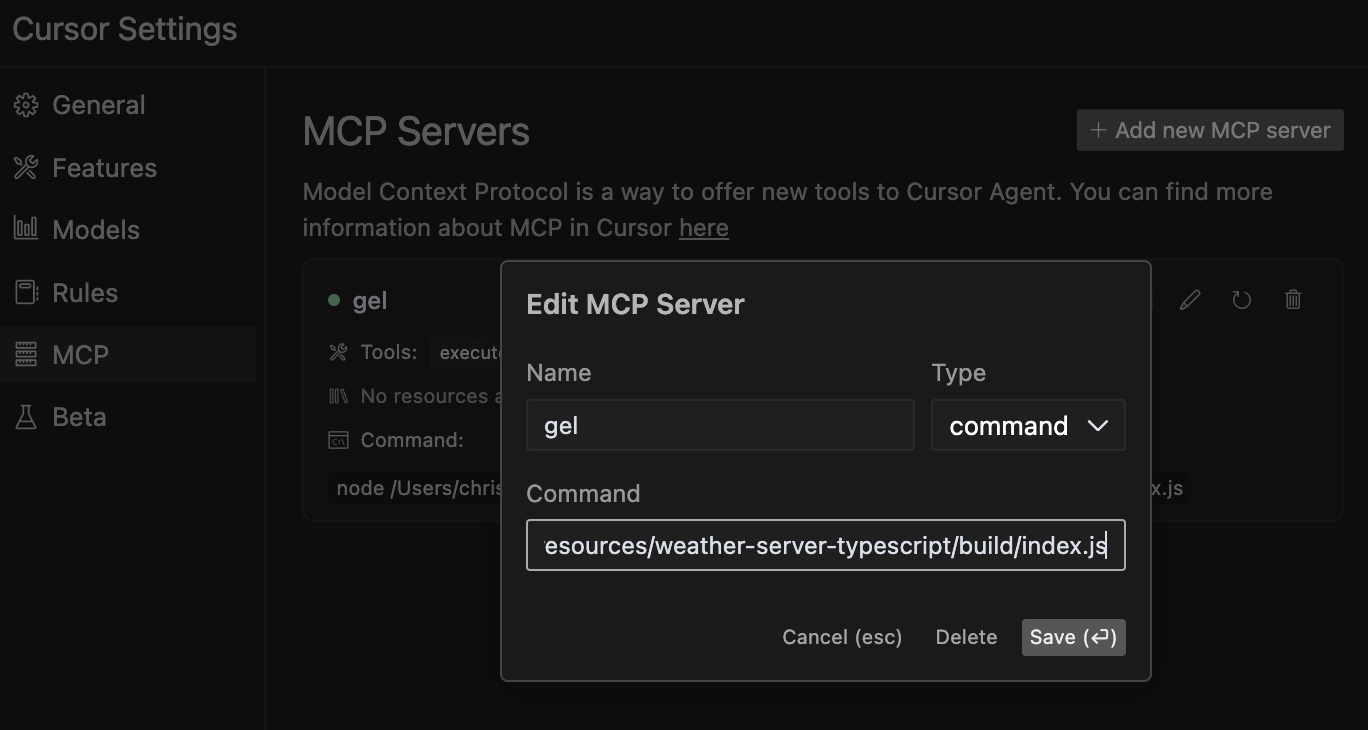
**注:**このサーバーは主にCursorのエージェントでテストされていますが、モデルコンテキストプロトコルをサポートする他のエージェントやLLMでも動作するはずです。他のエージェントでテストした場合は、ぜひ結果をお寄せください。
Related MCP server: MCP Docs RAG Server
Gel データベース MCP サーバーは次のツールを提供します。
これにより、LLMエージェントは手動でコードを検査することなく、データベース構造を学習・理解できるようになります。エージェントは利用可能なエンティティタイプ、そのプロパティ、リレーションシップ、制約を検出し、より正確なクエリを生成できます。
**使用する場合:**エージェントがクエリを実行する前にデータベース エンティティの構造を理解する必要があるとき。
これにより、LLM エージェントは生の EdgeQL クエリ構文を実行せずに検証できるため、生成されたクエリをデータベースに対して実行する前に安全に検証できます。
**使用する場合:**クエリの開発中に、実行による副作用のリスクなしに構文をチェックします。
これにより、LLMエージェントはEdgeQLクエリの実行、データの取得、そしてユーザーの指示に基づいた操作の実行を通じて、データベースと直接やり取りできるようになります。LLMはEdgeQLクエリを生成し、自律的に実行することができます。
例:
SELECT Product { name, price } FILTER .price > 100;このツールにより、LLMエージェントはGelドキュメントを検索し、EdgeQLの構文、機能、例などに関する関連情報を見つけることができます。また、Gelデータベースの概念をより深く理解できるよう、コンテキストを含む包括的な結果を返します。
**使用する場合:**エージェントが特定の Gel/EdgeQL 機能について学習したり、構文を理解したり、データベース操作を実装するための例を見つけたりする必要がある場合。
例:
search_term: "for loop"
context_lines: 10  # Optional: Number of context lines to show (default: 5)
match_all_terms: true # Optional: Require all terms to match (default: false)**ドキュメントのハイブリッド アプローチに関する注意:**最適な結果を得るには、次の両方をお勧めします。
gel_llm.txtファイルをプロジェクトルートに含める(直接ファイルにアクセスするために)
対象を絞ったクエリにsearch-gel-docsツールを使用する
このハイブリッド アプローチにより、LLM エージェントは特定の用語を柔軟に検索できると同時に、より広範なコンテキストが必要な場合には完全なドキュメントにアクセスできるようになります。
execute-edgeql に似ていますが、クエリ ビルダー構文で作成された Typescript Gel クエリのテストと実行に使用できます。
ツールには指示が含まれていますが、エージェントにどのような指示があるのかを尋ねて、状況に応じて読み込んでもらうことをお勧めします。こうすることで、指示が飛ばされることがなくなります。
注意: 一般的な JavaScript 構文エラーによってサーバーがクラッシュする可能性があるため、接続が閉じられているように見える場合は、カーソル MCP 設定でクラッシュしたサーバーを更新するか、サーバーを再起動する必要があります。
LLM に次のベストプラクティスを伝えます。
結果を表示するには、console.log でawait gelClient.query()を使用します。
ORDER BY はカンマではなく THEN と一緒に使用します (例: ORDER BY .field1 THEN .field2)
コードをシンプルに保ち、単一の操作に集中する
例:
console.log(await gelClient.query(`
  SELECT Product {
    name,
    price
  }
  FILTER .price > 100
  ORDER BY .price DESC
  LIMIT 5;
`));**使用する場合:**プログラムによるロジックを必要とする複雑なクエリの場合、または JavaScript を使用してクエリ結果を処理する必要がある場合。
モデル コンテキスト プロトコルの詳細については、 modelcontextprotocol.io/quickstartをご覧ください。
Get weather alerts for a state
| Name | Required | Description | Default |
|---|---|---|---|
| state | Yes | Two-letter state code (e.g. CA, NY) |
Does the description disclose side effects, auth requirements, rate limits, or destructive behavior?
With no annotations provided, the description carries the full burden of behavioral disclosure. It states what the tool does but doesn't describe traits like rate limits, authentication needs, error handling, or response format. For a tool with no annotation coverage, this leaves significant gaps in understanding its behavior.
Agents need to know what a tool does to the world before calling it. Descriptions should go beyond structured annotations to explain consequences.
Is the description appropriately sized, front-loaded, and free of redundancy?
The description is a single, clear sentence with no wasted words, making it highly concise and front-loaded. It efficiently communicates the core purpose without unnecessary elaboration.
Shorter descriptions cost fewer tokens and are easier for agents to parse. Every sentence should earn its place.
Given the tool's complexity, does the description cover enough for an agent to succeed on first attempt?
Given the lack of annotations and output schema, the description is incomplete for a tool that likely returns complex alert data. It doesn't explain what the alerts include, how they're formatted, or any limitations, leaving the agent with insufficient context for effective use.
Complex tools with many parameters or behaviors need more documentation. Simple tools need less. This dimension scales expectations accordingly.
Does the description clarify parameter syntax, constraints, interactions, or defaults beyond what the schema provides?
The description doesn't add any parameter-specific information beyond what's in the input schema, which has 100% coverage and fully documents the 'state' parameter. This meets the baseline score of 3, as the schema adequately handles parameter semantics without needing extra description.
Input schemas describe structure but not intent. Descriptions should explain non-obvious parameter relationships and valid value ranges.
Does the description clearly state what the tool does and how it differs from similar tools?
The description clearly states the verb ('Get') and resource ('weather alerts for a state'), making the purpose specific and understandable. However, it doesn't explicitly differentiate from its sibling tool 'get-forecast', which likely provides different weather data, so it doesn't reach the highest score.
Agents choose between tools based on descriptions. A clear purpose with a specific verb and resource helps agents select the right tool.
Does the description explain when to use this tool, when not to, or what alternatives exist?
The description provides no guidance on when to use this tool versus its sibling 'get-forecast' or any alternatives. It lacks context about usage scenarios, exclusions, or prerequisites, offering only a basic statement of function.
Agents often have multiple tools that could apply. Explicit usage guidance like "use X instead of Y when Z" prevents misuse.
Get weather forecast for a location
| Name | Required | Description | Default |
|---|---|---|---|
| latitude | Yes | Latitude of the location | |
| longitude | Yes | Longitude of the location |
Does the description disclose side effects, auth requirements, rate limits, or destructive behavior?
With no annotations provided, the description carries the full burden of behavioral disclosure. It states what the tool does but doesn't describe any behavioral traits such as whether this is a read-only operation, if it requires authentication, rate limits, or what the response format might be. This is inadequate for a tool with zero annotation coverage.
Agents need to know what a tool does to the world before calling it. Descriptions should go beyond structured annotations to explain consequences.
Is the description appropriately sized, front-loaded, and free of redundancy?
The description is a single, clear sentence that efficiently conveys the core purpose without any unnecessary words. It's appropriately sized and front-loaded, making it easy for an agent to parse quickly.
Shorter descriptions cost fewer tokens and are easier for agents to parse. Every sentence should earn its place.
Given the tool's complexity, does the description cover enough for an agent to succeed on first attempt?
Given that there are no annotations and no output schema, the description is incomplete. It doesn't provide enough context about behavioral aspects, response format, or how this tool differs from its sibling. For a tool with this level of complexity and lack of structured data, the description should do more to compensate.
Complex tools with many parameters or behaviors need more documentation. Simple tools need less. This dimension scales expectations accordingly.
Does the description clarify parameter syntax, constraints, interactions, or defaults beyond what the schema provides?
The schema description coverage is 100%, with both parameters (latitude and longitude) well-documented in the schema. The description doesn't add any meaningful parameter semantics beyond what's already in the schema, so it meets the baseline score of 3.
Input schemas describe structure but not intent. Descriptions should explain non-obvious parameter relationships and valid value ranges.
Does the description clearly state what the tool does and how it differs from similar tools?
The description clearly states the verb ('Get') and resource ('weather forecast for a location'), making the purpose immediately understandable. However, it doesn't distinguish this tool from its sibling 'get-alerts', which likely provides different weather-related information, so it doesn't achieve the highest score.
Agents choose between tools based on descriptions. A clear purpose with a specific verb and resource helps agents select the right tool.
Does the description explain when to use this tool, when not to, or what alternatives exist?
The description provides no guidance on when to use this tool versus alternatives. It doesn't mention the sibling 'get-alerts' or explain the difference between getting a forecast versus alerts, leaving the agent without context for tool selection.
Agents often have multiple tools that could apply. Explicit usage guidance like "use X instead of Y when Z" prevents misuse.
Recent tool additions, removals, and schema changes observed during successful MCP inspections.
v1.0.0get-alertsget-forecastScored across 2 tools
The two tools have clearly distinct purposes: one retrieves weather alerts for states, while the other retrieves forecasts for locations. There is no overlap in functionality, and an agent can easily differentiate between them based on their descriptions.
Both tools follow a consistent verb_noun naming pattern (get-alerts and get-forecast). The hyphenated style is uniform across all tools, making them predictable and easy to understand.
With only two tools, the server feels thin for a weather database domain. It lacks essential operations like updating data, searching historical records, or managing locations, which limits its utility for comprehensive weather-related tasks.
The tool surface is severely incomplete for a database server. It only provides read operations (get-alerts and get-forecast) with no create, update, delete, or search capabilities. This creates significant gaps that will hinder agents from performing full database workflows.
GibsonAI MCP server: manage your databases with natural language
MCP server for AI agents to plan, verify, and deploy Cloudflare-native apps.
Text-to-SQL MCP server: read-only queries on PostgreSQL, MySQL and SQL Server with your real schema
The Grafbase MCP server sits in front of a GraphQL API and exposes an MCP protocol-compliant interface that allows AI agents and LLMs to explore and query GraphQL APIs using natural language. It provides tools to search schemas, introspect types and fields, and execute GraphQL queries while minimizing context bloat by returning only relevant schema subsets, with built-in support for authentication, authorization, and configurable access control.