

F
licenseA
qualityD
maintenanceA TypeScript-based MCP server that enables AI assistants to interact with CouchDB databases through a simple interface, providing tools for creating, reading, and querying databases and documents.
5
5
-

This server provides tools for interacting with Gel databases through EdgeQL queries and TypeScript query builders, enabling LLM agents to understand database schemas, validate and execute queries, and search documentation.
Capabilities:
Describe Database Schema (describe-schema): Learn and understand database structure including entity types, properties, relationships, and constraints
Validate EdgeQL Queries (validate-query): Check raw EdgeQL query syntax safely before execution to prevent errors
Execute EdgeQL (execute-edgeql): Run raw EdgeQL queries directly against the database for data retrieval and operations
Execute TypeScript (execute-typescript): Run complex Gel queries using the TypeScript query builder syntax with programmatic logic and JavaScript processing capabilities
Search Gel Documentation (search-gel-docs): Search through Gel documentation (gel_llm.txt) to find relevant information about EdgeQL syntax, features, and examples
Provides support for executing TypeScript Gel queries made with query builder syntax to interact with Gel databases.
Click on "Deploy Server".
Wait a few minutes for the server to deploy. Once ready, it will show a "Started" state.
In the chat, type @ followed by the MCP server name and your instructions, e.g., "@Gel Database MCP Server show me the schema for the users table"
That's it! The server will respond to your query, and you can continue using it as needed.
Here is a step-by-step guide with screenshots.
This was created before Gel had an official MCP server which is a lot easier to setup. Leaving this one up though since it was an example of an MCP server I made. Official one here: https://github.com/geldata/gel-mcp
A TypeScript-based Model Context Protocol (MCP) server designed to streamline Gel database operations with EdgeQL queries. This project provides Tools for LLM Agents (Cursor Agent, Claude Code, etc) to automate learning about your schema, and writing, validating, and executing database queries. Easily interact with your Gel database through natural language. Vibe coders rejoice!
Note: Query generation is not included since LLMs can write more flexible queries. Tested this with Cursor agent using Claude-3.7-sonnet-thinking and had good results after providing Gel docs by linking the relevant webpages.

# 1. Install dependencies
yarn install

# 2. Copy your dbschema folder into the project if you have one already
# cp -r /path/to/your/dbschema ./
# or just copy and paste

# 3. Initialize a Gel project
npx gel project init
# Follow prompts to set up a new project
# Can point to an existing gel instance by providing the name of your instance
#   -Import migrations if it asks

# 4. Generate EdgeQL JavaScript query builder files
npx @gel/generate edgeql-js
# Note: Re-run this command after any schema changes

# 5. Update connection settings
# Edit src/index_gel.ts lines 19-25 with your database, host, port, user, password
# Edit src/index_gel.ts line 37 with your branch name

# 6. Build the project
yarn build

# 7. (optional) Test the server runs without errors
node build/index.js

# 7.1 (if you have errors) Test server with a UI that provides more clear error logs using:
npx @modelcontextprotocol/inspector node build/index.js

# 8. (Recommended) Include the gel_llm.txt documentation file
# Download the Gel documentation file and place it in your project root
# This allows both the search tool and direct file access for your LLM agent
# curl -o gel_llm.txt https://raw.githubusercontent.com/yourorg/gel-docs/main/gel_llm.txt
# Note: Replace the URL with the actual source of your gel_llm.txt fileClick on the gear icon on the top right > MCP > +Add a new server
Name it whatever you want
Select type: Command
Enter this: node your/full/path/to/build/index.js
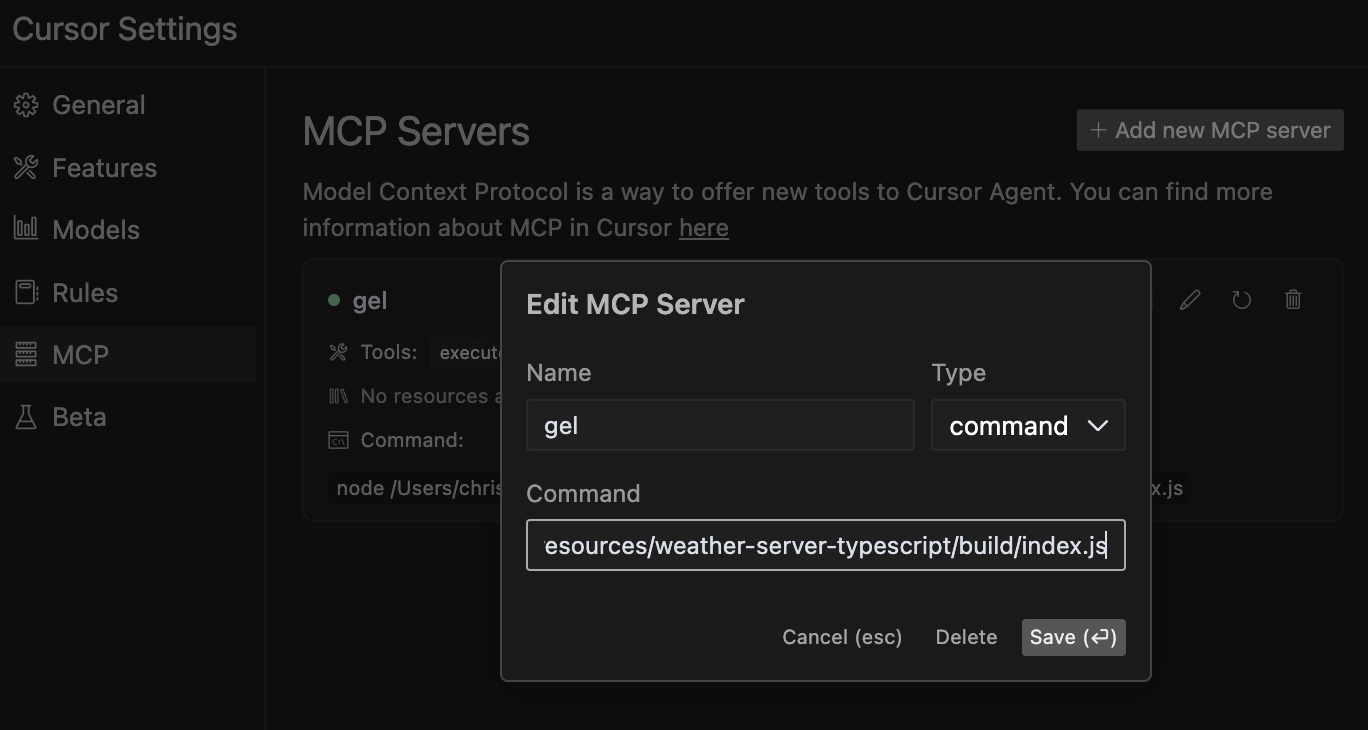
Note: While this server has been primarily tested with Cursor's agent, it should work with other agents and LLMs that support the Model Context Protocol. If you test with other agents, please feel free to contribute your findings!
Related MCP server: MCP Docs RAG Server
The Gel Database MCP Server provides the following tools:
This helps your LLM agent learn and understand your database structure without having to manually inspect the code. The agent can discover available entity types, their properties, relationships, and constraints to generate more accurate queries.
When to use: When your agent needs to understand the structure of a database entity before querying it.
This helps your LLM agent verify raw EdgeQL query syntax without executing it, allowing safe validation of generated queries before they're run against your database.
When to use: During query development to check syntax without risking execution side effects.
This helps your LLM agent directly interact with your database by running raw EdgeQL queries, retrieving data, and performing operations based on your instructions. Your LLM can generate EdgeQL queries and execute them autonomously.
Example:
SELECT Product { name, price } FILTER .price > 100;This tool allows your LLM agent to search through the Gel documentation to find relevant information about EdgeQL syntax, features, or examples. It returns comprehensive results with context to help the agent better understand Gel database concepts.
When to use: When your agent needs to learn about specific Gel/EdgeQL features, understand syntax, or find examples for implementing database operations.
Example:
search_term: "for loop"
context_lines: 10  # Optional: Number of context lines to show (default: 5)
match_all_terms: true  # Optional: Require all terms to match (default: false)
Note on Documentation Hybrid Approach: For optimal results, we recommend both:
Including the gel_llm.txt file in your project root (for direct file access)
Using the search-gel-docs tool for targeted queries
This hybrid approach gives your LLM agent the flexibility to search for specific terms while also accessing the complete documentation when needed for broader context.
Similar to execute-edgeql but can use this for testing and running Typescript Gel queries made with the query builder syntax.
Instructions are included in the tool, but still a good idea to ask the agent what instructions it has so it loads them up in context. This makes sure it doesn't skip them.
Note: General JavaScript syntax errors can crash the server, so if the connection is appearing as closed you will have to refresh the crashed server in Cursor MCP settings or restart the server.
Tell the LLM these are the Best practices:
Use await gelClient.query() with console.log to display results
Use ORDER BY with THEN, not commas (e.g., ORDER BY .field1 THEN .field2)
Keep code simple and focused on a single operation
Example:
console.log(await gelClient.query(`
  SELECT Product {
    name,
    price
  }
  FILTER .price > 100
  ORDER BY .price DESC
  LIMIT 5;
`));
When to use: For complex queries that require programmatic logic or when you need to process query results with JavaScript.
For more information about the Model Context Protocol, visit modelcontextprotocol.io/quickstart.
Get weather alerts for a state
| Name | Required | Description | Default |
|---|---|---|---|
| state | Yes | Two-letter state code (e.g. CA, NY) |
Does the description disclose side effects, auth requirements, rate limits, or destructive behavior?
With no annotations provided, the description carries the full burden of behavioral disclosure. It states what the tool does but doesn't describe traits like rate limits, authentication needs, error handling, or response format. For a tool with no annotation coverage, this leaves significant gaps in understanding its behavior.
Agents need to know what a tool does to the world before calling it. Descriptions should go beyond structured annotations to explain consequences.
Is the description appropriately sized, front-loaded, and free of redundancy?
The description is a single, clear sentence with no wasted words, making it highly concise and front-loaded. It efficiently communicates the core purpose without unnecessary elaboration.
Shorter descriptions cost fewer tokens and are easier for agents to parse. Every sentence should earn its place.
Given the tool's complexity, does the description cover enough for an agent to succeed on first attempt?
Given the lack of annotations and output schema, the description is incomplete for a tool that likely returns complex alert data. It doesn't explain what the alerts include, how they're formatted, or any limitations, leaving the agent with insufficient context for effective use.
Complex tools with many parameters or behaviors need more documentation. Simple tools need less. This dimension scales expectations accordingly.
Does the description clarify parameter syntax, constraints, interactions, or defaults beyond what the schema provides?
The description doesn't add any parameter-specific information beyond what's in the input schema, which has 100% coverage and fully documents the 'state' parameter. This meets the baseline score of 3, as the schema adequately handles parameter semantics without needing extra description.
Input schemas describe structure but not intent. Descriptions should explain non-obvious parameter relationships and valid value ranges.
Does the description clearly state what the tool does and how it differs from similar tools?
The description clearly states the verb ('Get') and resource ('weather alerts for a state'), making the purpose specific and understandable. However, it doesn't explicitly differentiate from its sibling tool 'get-forecast', which likely provides different weather data, so it doesn't reach the highest score.
Agents choose between tools based on descriptions. A clear purpose with a specific verb and resource helps agents select the right tool.
Does the description explain when to use this tool, when not to, or what alternatives exist?
The description provides no guidance on when to use this tool versus its sibling 'get-forecast' or any alternatives. It lacks context about usage scenarios, exclusions, or prerequisites, offering only a basic statement of function.
Agents often have multiple tools that could apply. Explicit usage guidance like "use X instead of Y when Z" prevents misuse.
Get weather forecast for a location
| Name | Required | Description | Default |
|---|---|---|---|
| latitude | Yes | Latitude of the location | |
| longitude | Yes | Longitude of the location |
Does the description disclose side effects, auth requirements, rate limits, or destructive behavior?
With no annotations provided, the description carries the full burden of behavioral disclosure. It states what the tool does but doesn't describe any behavioral traits such as whether this is a read-only operation, if it requires authentication, rate limits, or what the response format might be. This is inadequate for a tool with zero annotation coverage.
Agents need to know what a tool does to the world before calling it. Descriptions should go beyond structured annotations to explain consequences.
Is the description appropriately sized, front-loaded, and free of redundancy?
The description is a single, clear sentence that efficiently conveys the core purpose without any unnecessary words. It's appropriately sized and front-loaded, making it easy for an agent to parse quickly.
Shorter descriptions cost fewer tokens and are easier for agents to parse. Every sentence should earn its place.
Given the tool's complexity, does the description cover enough for an agent to succeed on first attempt?
Given that there are no annotations and no output schema, the description is incomplete. It doesn't provide enough context about behavioral aspects, response format, or how this tool differs from its sibling. For a tool with this level of complexity and lack of structured data, the description should do more to compensate.
Complex tools with many parameters or behaviors need more documentation. Simple tools need less. This dimension scales expectations accordingly.
Does the description clarify parameter syntax, constraints, interactions, or defaults beyond what the schema provides?
The schema description coverage is 100%, with both parameters (latitude and longitude) well-documented in the schema. The description doesn't add any meaningful parameter semantics beyond what's already in the schema, so it meets the baseline score of 3.
Input schemas describe structure but not intent. Descriptions should explain non-obvious parameter relationships and valid value ranges.
Does the description clearly state what the tool does and how it differs from similar tools?
The description clearly states the verb ('Get') and resource ('weather forecast for a location'), making the purpose immediately understandable. However, it doesn't distinguish this tool from its sibling 'get-alerts', which likely provides different weather-related information, so it doesn't achieve the highest score.
Agents choose between tools based on descriptions. A clear purpose with a specific verb and resource helps agents select the right tool.
Does the description explain when to use this tool, when not to, or what alternatives exist?
The description provides no guidance on when to use this tool versus alternatives. It doesn't mention the sibling 'get-alerts' or explain the difference between getting a forecast versus alerts, leaving the agent without context for tool selection.
Agents often have multiple tools that could apply. Explicit usage guidance like "use X instead of Y when Z" prevents misuse.
Recent tool additions, removals, and schema changes observed during successful MCP inspections.
v1.0.0get-alertsget-forecastScored across 2 tools
The two tools have clearly distinct purposes: one retrieves weather alerts for states, while the other retrieves forecasts for locations. There is no overlap in functionality, and an agent can easily differentiate between them based on their descriptions.
Both tools follow a consistent verb_noun naming pattern (get-alerts and get-forecast). The hyphenated style is uniform across all tools, making them predictable and easy to understand.
With only two tools, the server feels thin for a weather database domain. It lacks essential operations like updating data, searching historical records, or managing locations, which limits its utility for comprehensive weather-related tasks.
The tool surface is severely incomplete for a database server. It only provides read operations (get-alerts and get-forecast) with no create, update, delete, or search capabilities. This creates significant gaps that will hinder agents from performing full database workflows.
MCP server for AI agents to plan, verify, and deploy Cloudflare-native apps.
Text-to-SQL MCP server: read-only queries on PostgreSQL, MySQL and SQL Server with your real schema
The Grafbase MCP server sits in front of a GraphQL API and exposes an MCP protocol-compliant interface that allows AI agents and LLMs to explore and query GraphQL APIs using natural language. It provides tools to search schemas, introspect types and fields, and execute GraphQL queries while minimizing context bloat by returning only relevant schema subsets, with built-in support for authentication, authorization, and configurable access control.