

F
licenseA
qualityD
maintenanceA TypeScript-based MCP server that enables AI assistants to interact with CouchDB databases through a simple interface, providing tools for creating, reading, and querying databases and documents.
5
5
-

Un servidor de Protocolo de Contexto de Modelo (MCP) basado en TypeScript, diseñado para optimizar las operaciones de la base de datos Gel con consultas EdgeQL. Este proyecto proporciona herramientas para agentes LLM (Cursor Agent, Claude Code, etc.) que automatizan el aprendizaje de su esquema, así como la escritura, validación y ejecución de consultas de base de datos. Interactúe fácilmente con su base de datos Gel mediante lenguaje natural. ¡Programadores de Vibe, descúbralo!
Nota: No se incluye la generación de consultas, ya que los LLM pueden escribir consultas más flexibles. Se probó esto con el agente Cursor usando Claude-3.7-sonnet-thinking y se obtuvieron buenos resultados tras proporcionar la documentación de Gel enlazando las páginas web relevantes.

# 1. Install dependencies
yarn install

# 2. Copy your dbschema folder into the project if you have one already
# cp -r /path/to/your/dbschema ./
# or just copy and paste

# 3. Initialize a Gel project
npx gel project init
# Follow prompts to set up a new project
# Can point to an existing gel instance by providing the name of your instance
#   -Import migrations if it asks

# 4. Generate EdgeQL JavaScript query builder files
npx @gel/generate edgeql-js
# Note: Re-run this command after any schema changes

# 5. Update connection settings
# Edit src/index_gel.ts lines 19-25 with your database, host, port, user, password
# Edit src/index_gel.ts line 37 with your branch name

# 6. Build the project
yarn build

# 7. (optional) Test the server runs without errors
node build/index.js

# 7.1 (if you have errors) Test server with a UI that provides more clear error logs using:
npx @modelcontextprotocol/inspector node build/index.js

# 8. (Recommended) Include the gel_llm.txt documentation file
# Download the Gel documentation file and place it in your project root
# This allows both the search tool and direct file access for your LLM agent
# curl -o gel_llm.txt https://raw.githubusercontent.com/yourorg/gel-docs/main/gel_llm.txt
# Note: Replace the URL with the actual source of your gel_llm.txt fileHaga clic en el ícono de engranaje en la parte superior derecha > MCP > +Agregar un nuevo servidor
Ponle el nombre que quieras
Seleccionar tipo: Comando
Ingresa esto: nodo tu/ruta/completa/a/construir/index.js
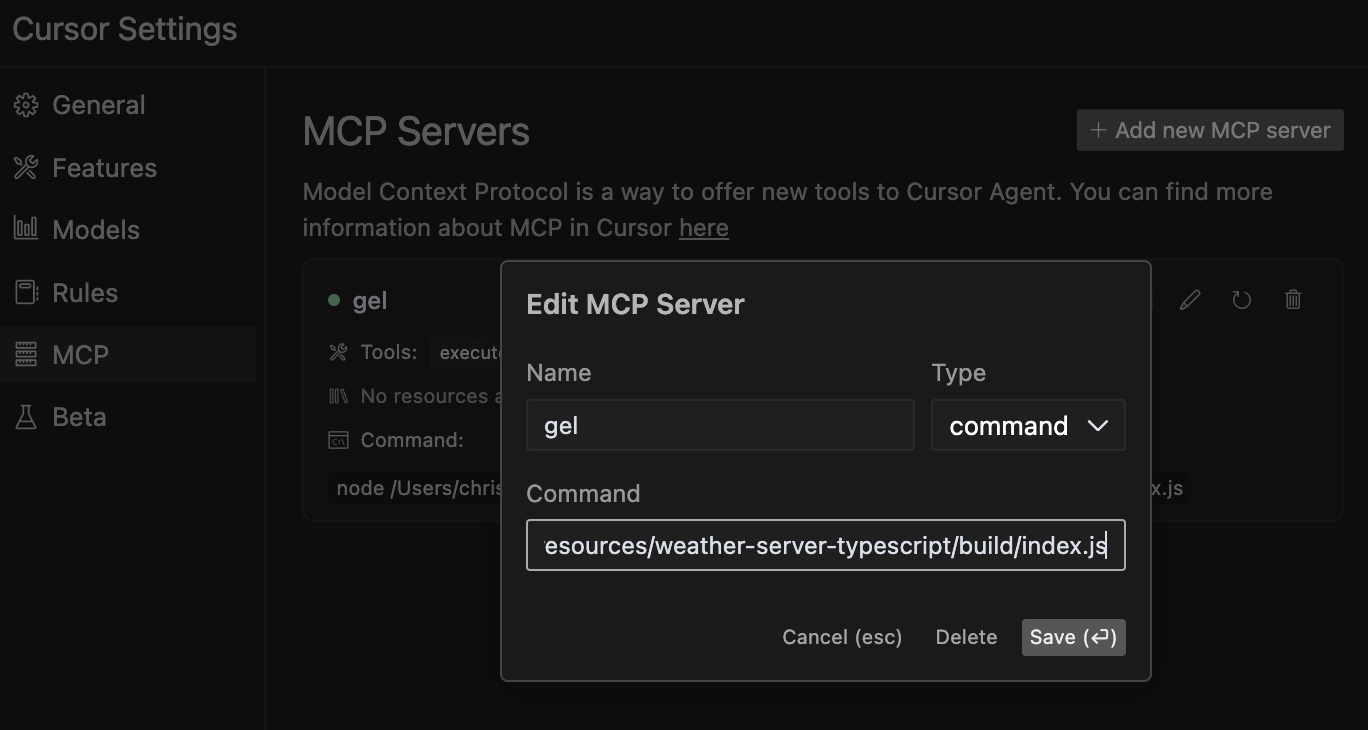
Nota: Si bien este servidor se ha probado principalmente con el agente de Cursor, debería funcionar con otros agentes y LLM compatibles con el Protocolo de Contexto de Modelo. Si realiza pruebas con otros agentes, no dude en compartir sus resultados.
Related MCP server: MCP Docs RAG Server
El servidor MCP de la base de datos Gel proporciona las siguientes herramientas:
Esto ayuda a su agente LLM a aprender y comprender la estructura de su base de datos sin tener que inspeccionar manualmente el código. El agente puede descubrir los tipos de entidad disponibles, sus propiedades, relaciones y restricciones para generar consultas más precisas.
Cuándo usarlo: cuando su agente necesita comprender la estructura de una entidad de base de datos antes de consultarla.
Esto ayuda a su agente LLM a verificar la sintaxis de consulta de EdgeQL sin ejecutarla, lo que permite una validación segura de las consultas generadas antes de que se ejecuten en su base de datos.
Cuándo usarlo: Durante el desarrollo de consultas para verificar la sintaxis sin correr el riesgo de efectos secundarios en la ejecución.
Esto permite que su agente LLM interactúe directamente con su base de datos ejecutando consultas EdgeQL sin procesar, recuperando datos y realizando operaciones según sus instrucciones. Su LLM puede generar consultas EdgeQL y ejecutarlas de forma autónoma.
Ejemplo:
SELECT Product { name, price } FILTER .price > 100;Esta herramienta permite a su agente LLM buscar en la documentación de Gel para encontrar información relevante sobre la sintaxis, las características o los ejemplos de EdgeQL. Ofrece resultados completos con contexto para que el agente comprenda mejor los conceptos de la base de datos de Gel.
Cuándo usarlo: cuando su agente necesita aprender sobre características específicas de Gel/EdgeQL, comprender la sintaxis o encontrar ejemplos para implementar operaciones de base de datos.
Ejemplo:
search_term: "for loop"
context_lines: 10  # Optional: Number of context lines to show (default: 5)
match_all_terms: true  # Optional: Require all terms to match (default: false)
Nota sobre el enfoque híbrido de documentación: para obtener resultados óptimos, recomendamos ambos:
Incluir el archivo gel_llm.txt en la raíz del proyecto (para acceso directo al archivo)
Uso de la herramienta search-gel-docs para consultas específicas
Este enfoque híbrido le brinda a su agente LLM la flexibilidad de buscar términos específicos y también acceder a la documentación completa cuando sea necesario para un contexto más amplio.
Similar a execute-edgeql pero se puede usar para probar y ejecutar consultas Typescript Gel realizadas con la sintaxis del generador de consultas.
Las instrucciones están incluidas en la herramienta, pero es recomendable preguntar al agente qué instrucciones tiene para que las cargue en contexto. Esto garantiza que no las omita.
Nota: Los errores generales de sintaxis de JavaScript pueden hacer que el servidor se bloquee, por lo que si la conexión aparece como cerrada, tendrá que actualizar el servidor bloqueado en la configuración de Cursor MCP o reiniciar el servidor.
Dígale al LLM que estas son las mejores prácticas:
Utilice await gelClient.query() con console.log para mostrar los resultados
Utilice ORDER BY con THEN, no comas (por ejemplo, ORDER BY .campo1 THEN .campo2)
Mantenga el código simple y centrado en una sola operación
Ejemplo:
console.log(await gelClient.query(`
  SELECT Product {
    name,
    price
  }
  FILTER .price > 100
  ORDER BY .price DESC
  LIMIT 5;
`));
Cuándo usarlo: para consultas complejas que requieren lógica programática o cuando necesita procesar resultados de consultas con JavaScript.
Para obtener más información sobre el Protocolo de contexto de modelo, visita modelcontextprotocol.io/quickstart .
Get weather alerts for a state
| Name | Required | Description | Default |
|---|---|---|---|
| state | Yes | Two-letter state code (e.g. CA, NY) |
Does the description disclose side effects, auth requirements, rate limits, or destructive behavior?
With no annotations provided, the description carries the full burden of behavioral disclosure. It states what the tool does but doesn't describe traits like rate limits, authentication needs, error handling, or response format. For a tool with no annotation coverage, this leaves significant gaps in understanding its behavior.
Agents need to know what a tool does to the world before calling it. Descriptions should go beyond structured annotations to explain consequences.
Is the description appropriately sized, front-loaded, and free of redundancy?
The description is a single, clear sentence with no wasted words, making it highly concise and front-loaded. It efficiently communicates the core purpose without unnecessary elaboration.
Shorter descriptions cost fewer tokens and are easier for agents to parse. Every sentence should earn its place.
Given the tool's complexity, does the description cover enough for an agent to succeed on first attempt?
Given the lack of annotations and output schema, the description is incomplete for a tool that likely returns complex alert data. It doesn't explain what the alerts include, how they're formatted, or any limitations, leaving the agent with insufficient context for effective use.
Complex tools with many parameters or behaviors need more documentation. Simple tools need less. This dimension scales expectations accordingly.
Does the description clarify parameter syntax, constraints, interactions, or defaults beyond what the schema provides?
The description doesn't add any parameter-specific information beyond what's in the input schema, which has 100% coverage and fully documents the 'state' parameter. This meets the baseline score of 3, as the schema adequately handles parameter semantics without needing extra description.
Input schemas describe structure but not intent. Descriptions should explain non-obvious parameter relationships and valid value ranges.
Does the description clearly state what the tool does and how it differs from similar tools?
The description clearly states the verb ('Get') and resource ('weather alerts for a state'), making the purpose specific and understandable. However, it doesn't explicitly differentiate from its sibling tool 'get-forecast', which likely provides different weather data, so it doesn't reach the highest score.
Agents choose between tools based on descriptions. A clear purpose with a specific verb and resource helps agents select the right tool.
Does the description explain when to use this tool, when not to, or what alternatives exist?
The description provides no guidance on when to use this tool versus its sibling 'get-forecast' or any alternatives. It lacks context about usage scenarios, exclusions, or prerequisites, offering only a basic statement of function.
Agents often have multiple tools that could apply. Explicit usage guidance like "use X instead of Y when Z" prevents misuse.
Get weather forecast for a location
| Name | Required | Description | Default |
|---|---|---|---|
| latitude | Yes | Latitude of the location | |
| longitude | Yes | Longitude of the location |
Does the description disclose side effects, auth requirements, rate limits, or destructive behavior?
With no annotations provided, the description carries the full burden of behavioral disclosure. It states what the tool does but doesn't describe any behavioral traits such as whether this is a read-only operation, if it requires authentication, rate limits, or what the response format might be. This is inadequate for a tool with zero annotation coverage.
Agents need to know what a tool does to the world before calling it. Descriptions should go beyond structured annotations to explain consequences.
Is the description appropriately sized, front-loaded, and free of redundancy?
The description is a single, clear sentence that efficiently conveys the core purpose without any unnecessary words. It's appropriately sized and front-loaded, making it easy for an agent to parse quickly.
Shorter descriptions cost fewer tokens and are easier for agents to parse. Every sentence should earn its place.
Given the tool's complexity, does the description cover enough for an agent to succeed on first attempt?
Given that there are no annotations and no output schema, the description is incomplete. It doesn't provide enough context about behavioral aspects, response format, or how this tool differs from its sibling. For a tool with this level of complexity and lack of structured data, the description should do more to compensate.
Complex tools with many parameters or behaviors need more documentation. Simple tools need less. This dimension scales expectations accordingly.
Does the description clarify parameter syntax, constraints, interactions, or defaults beyond what the schema provides?
The schema description coverage is 100%, with both parameters (latitude and longitude) well-documented in the schema. The description doesn't add any meaningful parameter semantics beyond what's already in the schema, so it meets the baseline score of 3.
Input schemas describe structure but not intent. Descriptions should explain non-obvious parameter relationships and valid value ranges.
Does the description clearly state what the tool does and how it differs from similar tools?
The description clearly states the verb ('Get') and resource ('weather forecast for a location'), making the purpose immediately understandable. However, it doesn't distinguish this tool from its sibling 'get-alerts', which likely provides different weather-related information, so it doesn't achieve the highest score.
Agents choose between tools based on descriptions. A clear purpose with a specific verb and resource helps agents select the right tool.
Does the description explain when to use this tool, when not to, or what alternatives exist?
The description provides no guidance on when to use this tool versus alternatives. It doesn't mention the sibling 'get-alerts' or explain the difference between getting a forecast versus alerts, leaving the agent without context for tool selection.
Agents often have multiple tools that could apply. Explicit usage guidance like "use X instead of Y when Z" prevents misuse.
Recent tool additions, removals, and schema changes observed during successful MCP inspections.
v1.0.0get-alertsget-forecastScored across 2 tools
The two tools have clearly distinct purposes: one retrieves weather alerts for states, while the other retrieves forecasts for locations. There is no overlap in functionality, and an agent can easily differentiate between them based on their descriptions.
Both tools follow a consistent verb_noun naming pattern (get-alerts and get-forecast). The hyphenated style is uniform across all tools, making them predictable and easy to understand.
With only two tools, the server feels thin for a weather database domain. It lacks essential operations like updating data, searching historical records, or managing locations, which limits its utility for comprehensive weather-related tasks.
The tool surface is severely incomplete for a database server. It only provides read operations (get-alerts and get-forecast) with no create, update, delete, or search capabilities. This creates significant gaps that will hinder agents from performing full database workflows.
GibsonAI MCP server: manage your databases with natural language
MCP server for AI agents to plan, verify, and deploy Cloudflare-native apps.
Text-to-SQL MCP server: read-only queries on PostgreSQL, MySQL and SQL Server with your real schema
The Grafbase MCP server sits in front of a GraphQL API and exposes an MCP protocol-compliant interface that allows AI agents and LLMs to explore and query GraphQL APIs using natural language. It provides tools to search schemas, introspect types and fields, and execute GraphQL queries while minimizing context bloat by returning only relevant schema subsets, with built-in support for authentication, authorization, and configurable access control.