
A
licenseB
qualityD
maintenanceA template for creating and connecting custom tools to Cursor IDE using Model Context Protocol with support for cheerful server responses.
4
1
MIT

一个使用模型上下文协议 (MCP) 为 Cursor IDE 创建自定义工具的简单模板。您可以使用此模板创建自己的代码库,修改工具并将其连接到您的 Cursor IDE。
点击“部署到 Heroku”按钮

部署完成后,配置Cursor:
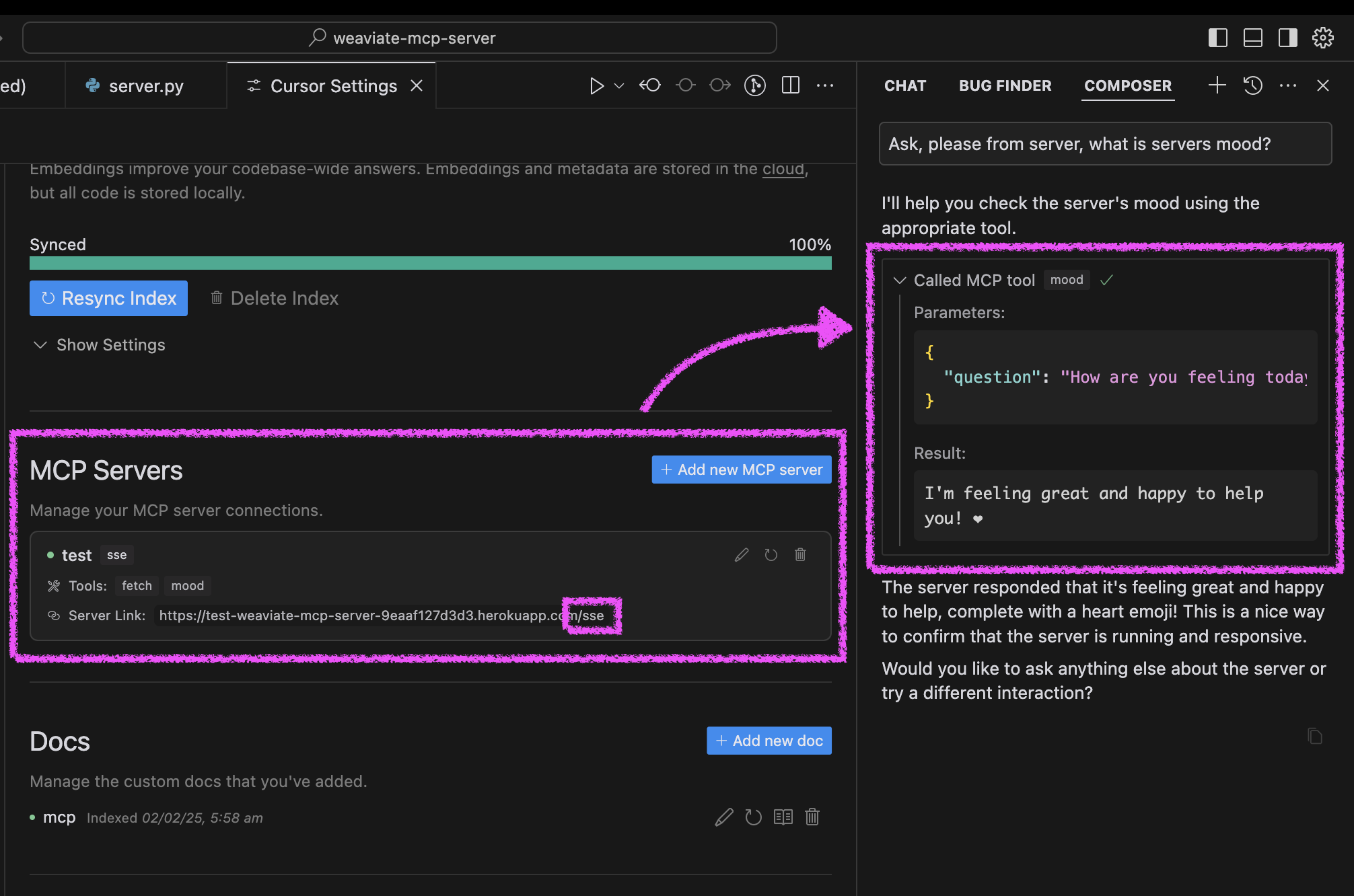
打开游标设置 → 功能
添加新的 MCP 服务器
使用带有/sse路径的 Heroku URL(例如https://<your-app-name>.herokuapp.com/sse )
在 Cursor 中测试您的代理的心情:
询问您的代理“请询问我们的服务器状况并让我知道情况如何。”
服务器将回复一条欢快的消息和一颗心❤️
Related MCP server: MCP Server Template for Cursor IDE
您可以通过三种方式运行服务器:使用 Docker、传统 Python 设置或直接在 Cursor IDE 中运行。
该项目包括 Docker 支持,可轻松部署:
初始设置:
# Clone the repository
git clone https://github.com/kirill-markin/weaviate-mcp-server.git
cd weaviate-mcp-server

# Create environment file
cp .env.example .env
使用 Docker Compose 构建并运行:
# Build and start the server
docker compose up --build -d

# View logs
docker compose logs -f

# Check server status
docker compose ps

# Stop the server
docker compose down
该服务器将在以下位置可用:
SSE 端点: http://localhost:8000/sse
快速测试:
# Test the server endpoint
curl -i http://localhost:8000/sse
连接到 Cursor IDE:
打开游标设置 → 功能
添加新的 MCP 服务器
类型:选择“sse”
网址:输入http://localhost:8000/sse
首先,安装 uv 包管理器:
# Install uv on macOS
brew install uv
# Or install via pip (any OS)
pip install uv
使用 stdio(默认)或 SSE 传输启动服务器:
# Install the package with development dependencies
uv pip install -e ".[dev]"

# Using stdio transport (default)
uv run mcp-simple-tool

# Using SSE transport on custom port
uv run mcp-simple-tool --transport sse --port 8000

# Run tests
uv run pytest -v
安装完成后,您可以将服务器直接连接到Cursor IDE:
在 Cursor 中右键单击cursor-run-mcp-server.sh文件
选择“复制路径”复制绝对路径
打开光标设置(齿轮图标)
导航至“功能”选项卡
向下滚动到“MCP 服务器”
点击“添加新的 MCP 服务器”
填写表格:
名称:选择任意名称(例如“my-mcp-server-1”)
类型:选择“stdio”(而不是“sse”,因为我们在本地运行服务器)
命令:粘贴您之前复制的cursor-run-mcp-server.sh的绝对路径。例如: /Users/kirillmarkin/weaviate-mcp-server/cursor-run-mcp-server.sh
可用的环境变量(可以在.env中设置):
MCP_SERVER_PORT (默认值:8000)- 运行服务器的端口
MCP_SERVER_HOST (默认值:0.0.0.0)- 绑定服务器的主机
DEBUG (默认值:false)-启用调试模式
MCP_USER_AGENT - 用于网站抓取的自定义用户代理
要通过Smithery自动安装用于 Claude Desktop 的 Cursor IDE 的 MCP 服务器模板:
npx -y @smithery/cli install @kirill-markin/example-mcp-server --client claudeFetches a website and returns its content
| Name | Required | Description | Default |
|---|---|---|---|
| url | Yes | URL to fetch |
Does the description disclose side effects, auth requirements, rate limits, or destructive behavior?
No annotations are provided, so the description carries the full burden of behavioral disclosure. It states the tool fetches and returns content, but lacks details on error handling, rate limits, authentication needs, or response format. For a tool with no annotations, this is a significant gap in transparency about its operational behavior.
Agents need to know what a tool does to the world before calling it. Descriptions should go beyond structured annotations to explain consequences.
Is the description appropriately sized, front-loaded, and free of redundancy?
The description is extremely concise and front-loaded, consisting of a single, clear sentence: 'Fetches a website and returns its content'. Every word earns its place, with no redundant or unnecessary information, making it efficient and easy to parse.
Shorter descriptions cost fewer tokens and are easier for agents to parse. Every sentence should earn its place.
Given the tool's complexity, does the description cover enough for an agent to succeed on first attempt?
Given the tool's complexity (a fetch operation with potential behavioral nuances), lack of annotations, and no output schema, the description is incomplete. It doesn't explain what 'content' includes (e.g., HTML, text), error cases, or limitations, leaving gaps in understanding how the tool behaves in practice.
Complex tools with many parameters or behaviors need more documentation. Simple tools need less. This dimension scales expectations accordingly.
Does the description clarify parameter syntax, constraints, interactions, or defaults beyond what the schema provides?
The schema description coverage is 100%, with the parameter 'url' fully documented in the schema. The description adds no additional meaning beyond the schema, such as URL format constraints or examples. With high schema coverage, the baseline score of 3 is appropriate, as the description doesn't enhance parameter understanding.
Input schemas describe structure but not intent. Descriptions should explain non-obvious parameter relationships and valid value ranges.
Does the description clearly state what the tool does and how it differs from similar tools?
The description clearly states the action ('fetches') and resource ('a website'), specifying what the tool does. It distinguishes from most siblings (e.g., 'apply_prompt_' tools, 'mood') by focusing on web content retrieval, though it doesn't explicitly differentiate from 'fetch_railway_docs' tools. The purpose is specific but lacks sibling comparison.
Agents choose between tools based on descriptions. A clear purpose with a specific verb and resource helps agents select the right tool.
Does the description explain when to use this tool, when not to, or what alternatives exist?
The description provides no guidance on when to use this tool versus alternatives. It doesn't mention scenarios for usage, prerequisites, or exclusions, and offers no comparison to sibling tools like 'fetch_railway_docs' or 'fetch_railway_docs_optimized'. Usage is implied only by the action 'fetches', with no explicit context.
Agents often have multiple tools that could apply. Explicit usage guidance like "use X instead of Y when Z" prevents misuse.
Ask the server about its mood - it's always happy!
| Name | Required | Description | Default |
|---|---|---|---|
| question | Yes | Ask this MCP server about its mood! You can phrase your question in any way you like - 'How are you?', 'What's your mood?', or even 'Are you having a good day?'. The server will always respond with a cheerful message and a heart ❤️ |
Does the description disclose side effects, auth requirements, rate limits, or destructive behavior?
With no annotations provided, the description carries the full burden of behavioral disclosure. It effectively describes key traits: the tool queries the server's mood, the server is 'always happy', and responses include 'a cheerful message and a heart ❤️'. This covers the interactive nature and predictable output style, though it lacks details like response format or error handling. No contradiction with annotations exists.
Agents need to know what a tool does to the world before calling it. Descriptions should go beyond structured annotations to explain consequences.
Is the description appropriately sized, front-loaded, and free of redundancy?
The description is extremely concise (one sentence) and front-loaded with the core purpose. Every word earns its place: 'Ask the server about its mood' defines the action, and 'it's always happy!' adds essential behavioral context. There's zero redundancy or fluff, making it highly efficient for an agent to parse.
Shorter descriptions cost fewer tokens and are easier for agents to parse. Every sentence should earn its place.
Given the tool's complexity, does the description cover enough for an agent to succeed on first attempt?
Given the tool's low complexity (single parameter, no output schema, no annotations), the description is reasonably complete for its purpose. It explains what the tool does and the expected response behavior. However, it lacks output details (e.g., response structure) and doesn't address potential edge cases, leaving some gaps in full contextual understanding for an agent.
Complex tools with many parameters or behaviors need more documentation. Simple tools need less. This dimension scales expectations accordingly.
Does the description clarify parameter syntax, constraints, interactions, or defaults beyond what the schema provides?
The input schema has 100% description coverage, with the parameter 'question' fully documented in the schema itself (including examples like 'How are you?'). The description adds no additional parameter semantics beyond what the schema provides, such as formatting tips or constraints. According to rules, with high schema coverage (>80%), the baseline is 3 even without param info in the description.
Input schemas describe structure but not intent. Descriptions should explain non-obvious parameter relationships and valid value ranges.
Does the description clearly state what the tool does and how it differs from similar tools?
The description clearly states the tool's purpose: to ask the server about its mood, with the specific behavioral outcome that it 'always responds with a cheerful message and a heart ❤️'. It distinguishes from sibling tools (all related to prompt application or documentation fetching) by focusing on a conversational interaction rather than functional operations. However, it doesn't explicitly contrast with specific alternatives for mood-checking, keeping it at 4 rather than 5.
Agents choose between tools based on descriptions. A clear purpose with a specific verb and resource helps agents select the right tool.
Does the description explain when to use this tool, when not to, or what alternatives exist?
The description provides no guidance on when to use this tool versus alternatives. While it implies usage for checking server mood, it doesn't specify contexts (e.g., after errors, during idle time) or exclusions (e.g., not for functional queries). With sibling tools focused on practical tasks, the lack of when/when-not guidance leaves the agent guessing about appropriate use cases.
Agents often have multiple tools that could apply. Explicit usage guidance like "use X instead of Y when Z" prevents misuse.
Recent tool additions, removals, and schema changes observed during successful MCP inspections.
mcp_fetchmoodScored across 2 tools
The two tools have completely distinct purposes: one fetches website content, while the other returns a static mood response. There is no overlap or ambiguity between them.
The naming is inconsistent: 'mcp_fetch' uses a prefix and verb_noun pattern, while 'mood' is a single noun with no verb. This mixed convention lacks a predictable pattern.
With only two tools, the server feels thin and under-scoped for a template intended for Cursor IDE, suggesting it might not cover enough functionality for typical IDE use cases.
The tool surface is severely incomplete for an IDE template, lacking core operations like file manipulation, code analysis, or project management. The existing tools do not form a coherent workflow.
Build and publish Overskill apps from Cursor, Claude, ChatGPT, or any MCP client.
A comprehensive Model Context Protocol (MCP) server that enables AI assistants to interact with yo…
A Model Context Protocol server for Wix AI tools
Build your own tools from chat: design, test and host them on a shareable MCP server URL.