Glama
anoopt

Outlook Meetings Scheduler MCP Server

by anoopt

Outlook 회의 스케줄러 MCP 서버

Microsoft Graph API를 사용하여 Microsoft Outlook에서 회의 일정을 예약하기 위한 MCP 서버입니다.

이 MCP 서버를 사용하면 캘린더 이벤트를 생성하고, 참석자와 함께 이벤트를 생성하고(이메일 주소 확인 포함) 작업을 수행할 수 있습니다. GitHub MCP 서버 등 다른 MCP 서버와 원활하게 통합되어 워크플로우를 향상시킵니다.

샘플 쿼리

  • 내일 오후 3시에 사라와 회의를 예약하세요.

  • 내일 오후 2시에 "프로젝트 시작"이라는 이름의 회의를 만드세요. 메건과 존을 필수 참석자로 추가하세요.

GitHub MCP 서버와 함께 사용

  • 조직/저장소 저장소에 "사용자 대시보드의 페이지 번호 매기기 버그 수정"이라는 제목의 이슈를 생성하고, "사용자들이 페이지 간 이동 시 중복 항목이 표시된다고 보고합니다."라는 설명을 추가하세요. 그리고 내일 오후 3시에 이 이슈를 검토하도록 캘린더 알림을 예약하세요.

Related MCP server: M365 Calendar MCP Server

데모
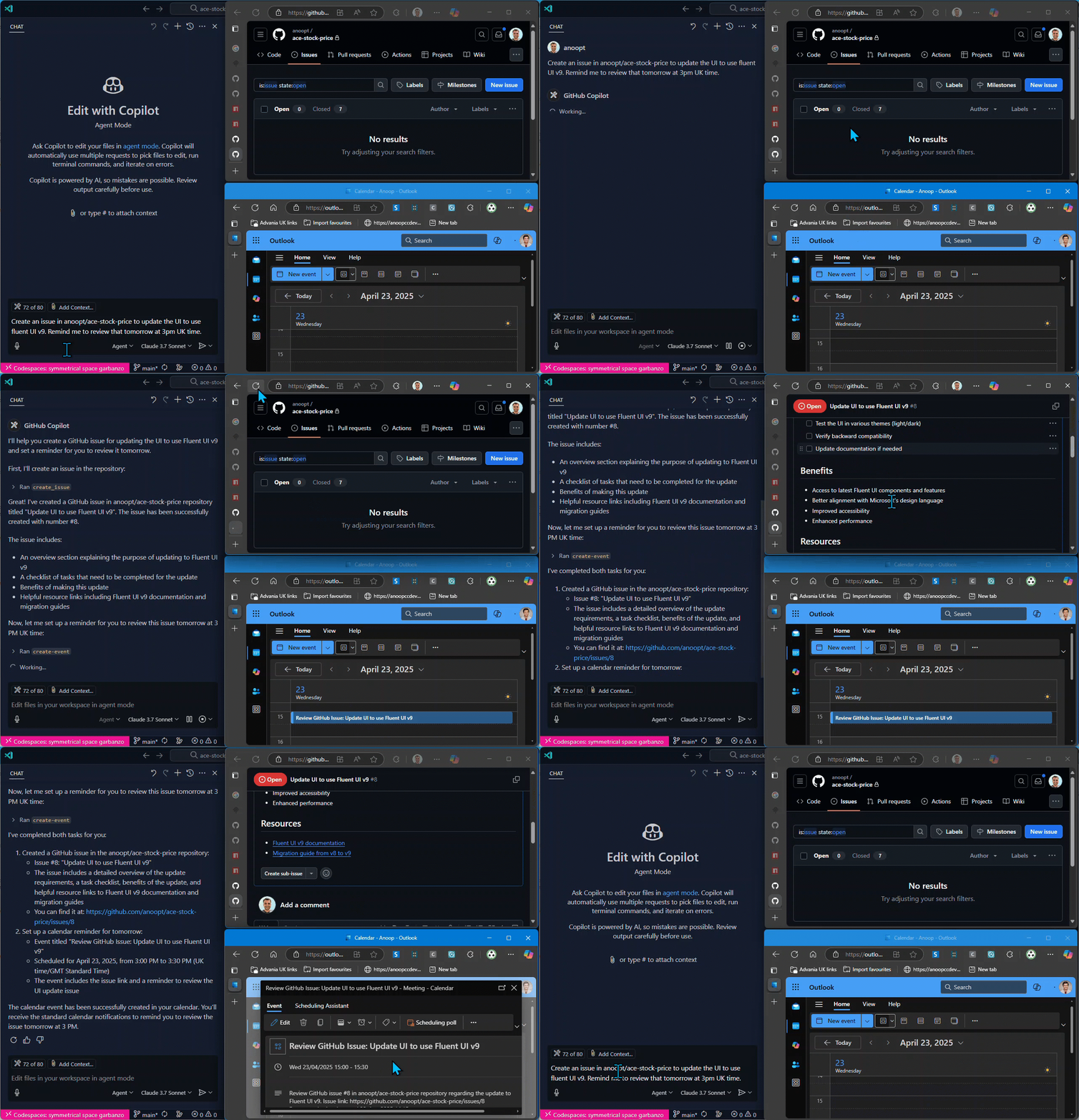
데모

도구

  1. find-person

    • 이름으로 사람의 이메일 주소 찾기

    • 입력: name (문자열)

    • 반환: 이름과 이메일 주소가 일치하는 사람들의 목록

  2. create-event

    • Microsoft Graph API를 사용하여 캘린더 이벤트 만들기

    • 입력:

      • subject (문자열): 캘린더 이벤트의 제목

      • body (문자열): 캘린더 이벤트의 콘텐츠/본문

      • start (선택 사항): ISO 형식 날짜/시간(예: 2025-04-20T12:00:00)

      • end (선택 사항): ISO 형식 날짜/시간(예: 2025-04-20T13:00:00)

      • timeZone (선택 사항): 이벤트의 시간대(기본값: "GMT 표준시")

    • 반환: URL 및 ID를 포함한 이벤트 세부 정보

  3. create-event-with-attendees

    • Microsoft Graph API를 사용하여 참석자가 있는 캘린더 이벤트 만들기

    • 입력:

      • subject (문자열): 캘린더 이벤트의 제목

      • body (문자열): 캘린더 이벤트의 콘텐츠/본문

      • start (선택 사항): ISO 형식 날짜/시간(예: 2025-04-20T12:00:00)

      • end (선택 사항): ISO 형식 날짜/시간(예: 2025-04-20T13:00:00)

      • timeZone (선택 사항): 이벤트의 시간대(기본값: "GMT 표준시")

      • location (선택 사항): 이벤트 위치

      • attendees : {이메일, 이름(선택 사항), 유형(선택 사항)} 배열

    • 반환: URL, ID, 참석자 목록을 포함한 이벤트 세부 정보

  4. get-event

    • ID로 캘린더 이벤트의 세부 정보 가져오기

    • 입력:

      • eventId (문자열): 검색할 이벤트의 ID

    • 반환: 주제, 시간, 참석자 및 URL을 포함한 자세한 이벤트 정보

  5. list-events

    • 선택적 필터링을 사용하여 일정 이벤트 나열

    • 입력:

      • subject (선택 사항): 이 텍스트를 포함하는 제목으로 이벤트를 필터링합니다.

      • startDate (선택 사항): 이벤트를 필터링하기 위한 ISO 형식의 시작 날짜(예: 2025-04-20T00:00:00)

      • endDate (선택 사항): 이벤트를 필터링하기 위한 ISO 형식의 종료 날짜(예: 2025-04-20T23:59:59)

      • maxResults (선택 사항): 반환할 최대 이벤트 수

    • 반환: 기본 정보 및 ID가 포함된 캘린더 이벤트 목록

  6. delete-event

    • 캘린더 이벤트 삭제

    • 입력:

      • eventId (문자열): 삭제할 이벤트의 ID

    • 반환: 이벤트 삭제 확인

  7. update-event

    • 기존 캘린더 이벤트 업데이트

    • 입력:

      • eventId (문자열): 업데이트할 이벤트의 ID

      • subject (선택 사항): 캘린더 이벤트의 새 제목

      • body (선택 사항): 캘린더 이벤트에 대한 새 콘텐츠/본문

      • start (선택 사항): ISO 형식의 새로운 시작 시간(예: 2025-04-20T12:00:00)

      • end (선택 사항): ISO 형식의 새로운 종료 시간(예: 2025-04-20T13:00:00)

      • timeZone (선택 사항): 이벤트의 새로운 시간대

      • location (선택 사항): 이벤트의 새로운 위치

      • attendees (선택 사항): { 이메일, 이름(선택 사항), 유형(선택 사항) } 배열

    • 반환: 변경 사항을 보여주는 업데이트된 이벤트 세부 정보

  8. update-event-attendees

    • 캘린더 이벤트에 참석자 추가 또는 제거

    • 입력:

      • eventId (문자열): 업데이트할 이벤트의 ID

      • addAttendees (선택 사항): 추가할 참석자 배열: { email, name(선택 사항), type(선택 사항) }

      • removeAttendees (선택 사항): 이벤트에서 제거할 이메일 주소 배열

    • 반환: 이벤트 참석자 정보가 업데이트되었습니다.

설정

Microsoft Graph API 설정

  1. Microsoft Azure Portal 에 애플리케이션 등록

  2. 클라이언트 비밀을 생성하세요

  3. 필요한 권한 부여(Microsoft Graph API > 애플리케이션 권한 > Calendars.ReadWrite, People.Read.All, User.ReadBasic.All)

  4. 클라이언트 ID, 클라이언트 비밀번호 및 테넌트 ID를 기록하세요.

VS Code를 사용한 사용

로컬 Node.js

로컬 빌드에서 Node.js를 사용하여 MCP 서버를 직접 실행할 수 있습니다.

  1. 저장소를 복제하고 프로젝트를 빌드합니다.

지엑스피1

  1. 수동 설치의 경우, VS Code의 사용자 설정(JSON) 파일에 다음 JSON 블록을 추가하세요. Ctrl + Shift + P 를 누르고 Preferences: Open User Settings (JSON) 입력하면 됩니다.

원하는 경우, 작업 공간의 .vscode/mcp.json 파일에 추가할 수 있습니다. 이렇게 하면 다른 사용자와 구성을 공유할 수 있습니다.

{
  "mcpServers": {
    "outlook-meetings-scheduler": {
      "command": "node",
      "args": [
        "/path/to/outlook-meetings-scheduler-mcp-server/build/index.js"
      ],
      "env": {
        "CLIENT_ID": "<YOUR_CLIENT_ID>",
        "CLIENT_SECRET": "<YOUR_CLIENT_SECRET>",
        "TENANT_ID": "<YOUR_TENANT_ID>",
        "USER_EMAIL": "<YOUR_EMAIL>"
      }
    }
  }
}

/path/to/outlook-meetings-scheduler-mcp-server 복제된 저장소의 절대 경로로 바꿉니다.

도커

Docker를 사용하여 로컬에서 MCP 서버를 실행하세요. 다음 명령으로 Docker 이미지를 빌드하세요.

docker build -t mcp/outlook-meetings-scheduler .

수동 설치의 경우, VS Code의 사용자 설정(JSON) 파일에 다음 JSON 블록을 추가하세요. Ctrl + Shift + P 를 누르고 Preferences: Open User Settings (JSON) 입력하면 됩니다.

원하는 경우, 작업 공간의 .vscode/mcp.json 파일에 추가할 수 있습니다. 이렇게 하면 다른 사용자와 구성을 공유할 수 있습니다.

{
     "inputs": [
      {
        "type": "promptString",
        "id": "client_secret",
        "description": "Enter the client secret",
        "password": true
      }
    ],
    "servers": {
        "outlook-meetings-scheduler": {
            "command": "docker",
            "args": [
                "run",
                "-i",
                "--rm",
                "-e",
                "CLIENT_ID",
                "-e",
                "CLIENT_SECRET",
                "-e",
                "TENANT_ID",
                "-e",
                "USER_EMAIL",
                "mcp/outlook-meetings-scheduler"
            ],
            "env": {
                "USER_EMAIL": "<YOUR_EMAIL>",
                "CLIENT_ID": "<YOUR_CLIENT_ID>",
                "CLIENT_SECRET": "${input:client_secret}",
                "TENANT_ID": "<YOUR_TENANT_ID>"
            }
        }
    }
}

엔피엑스

{
  "mcpServers": {
    "outlook-meetings-scheduler": {
      "command": "npx",
      "args": [
        "-y",
        "outlook-meetings-scheduler"
      ],
      "env": {
        "CLIENT_ID": "<YOUR_CLIENT_ID>",
        "CLIENT_SECRET": "<YOUR_CLIENT_SECRET>",
        "TENANT_ID": "<YOUR_TENANT_ID>",
        "USER_EMAIL": "<YOUR_EMAIL>"
      }
    }
  }
}

Claude Desktop과 함께 사용

도커

  1. Docker를 사용하여 로컬에서 MCP 서버를 실행하세요. 다음 명령으로 Docker 이미지를 빌드하세요.

docker build -t mcp/outlook-meetings-scheduler .
  1. claude_desktop_config.json 에 다음을 추가하세요.

{
  "mcpServers": {
    "outlook-meetings-scheduler": {
      "command": "docker",
      "args": [
        "run",
        "-i",
        "--rm",
        "-e",
        "CLIENT_ID",
        "-e",
        "CLIENT_SECRET",
        "-e",
        "TENANT_ID",
        "-e",
        "USER_EMAIL",
        "mcp/outlook-meetings-scheduler"
      ],
      "env": {
        "CLIENT_ID": "<YOUR_CLIENT_ID>",
        "CLIENT_SECRET": "<YOUR_CLIENT_SECRET>",
        "TENANT_ID": "<YOUR_TENANT_ID>",
        "USER_EMAIL": "<YOUR_EMAIL>"
      }
    }
  }
}

엔피엑스

{
  "mcpServers": {
    "outlook-meetings-scheduler": {
      "command": "npx",
      "args": [
        "-y",
        "outlook-meetings-scheduler"
      ],
      "env": {
        "CLIENT_ID": "<YOUR_CLIENT_ID>",
        "CLIENT_SECRET": "<YOUR_CLIENT_SECRET>",
        "TENANT_ID": "<YOUR_TENANT_ID>",
        "USER_EMAIL": "<YOUR_EMAIL>"
      }
    }
  }
}

예시 시나리오

GitHub MCP 서버와의 통합

이 MCP 서버를 GitHub MCP 서버 등 다른 MCP 서버와 결합하여 강력한 워크플로를 구축할 수 있습니다.

이슈 생성 및 후속 검토 예약

Create an issue in the organization/repo repository titled "Fix pagination bug in user dashboard" with the description "Users report seeing duplicate entries when navigating between pages." Then schedule a calendar reminder for me to review this issue tomorrow at 3 PM.

이렇게 하면:

  1. GitHub MCP 서버를 사용하여 문제를 생성하세요.

  2. Outlook Meetings Scheduler MCP 서버를 사용하여 검토를 위한 일정 이벤트를 만듭니다.

풀 리퀘스트를 기반으로 코드 검토 회의 일정 잡기

Find the open PR about the authentication feature in the organization/app-backend repository and schedule a code review meeting with the contributors for tomorrow morning.

이렇게 하면:

  1. GitHub MCP 서버를 사용하여 풀 리퀘스트를 찾고 기여자를 식별합니다.

  2. Outlook Meetings Scheduler MCP 서버를 사용하여 팀원들과의 회의 일정을 예약하세요.

다중 MCP 설정을 위한 구성

GitHub와 Outlook MCP 서버를 함께 사용하려면:

{
  "mcpServers": {
    "outlook-meetings-scheduler": {
      "command": "npx",
      "args": [
        "-y",
        "outlook-meetings-scheduler"
      ],
      "env": {
        "CLIENT_ID": "<YOUR_CLIENT_ID>",
        "CLIENT_SECRET": "<YOUR_CLIENT_SECRET>",
        "TENANT_ID": "<YOUR_TENANT_ID>",
        "USER_EMAIL": "<YOUR_EMAIL>"
      }
    },
    "github": {
      "command": "npx",
      "args": [
        "-y",
        "@modelcontextprotocol/github-mcp"
      ],
      "env": {
        "GITHUB_TOKEN": "<YOUR_GITHUB_TOKEN>"
      }
    }
  }
}

직접 사용

동료의 이메일 찾기

I need to schedule a meeting with John Smith. Can you find his email address?

간단한 캘린더 이벤트 만들기

Schedule a meeting titled "Weekly Team Sync" for next Monday at 10 AM with the following agenda:
- Project updates
- Resource allocation
- Questions and concerns

단일 참석자와의 회의 예약

Schedule a 1:1 meeting with Sarah for tomorrow at 3 PM.

이렇게 하면 Sarah의 이메일 주소를 찾아 캘린더 일정을 만들 수 있습니다. Sarah의 이메일 주소를 찾기 위해 MCP 서버는 Microsoft Graph API를 사용하여 USER_EMAIL 과 관련된 사람을 찾거나 조직 내에서 해당 이름을 검색하는 find-person 도구를 사용합니다.

여러 참석자가 있는 회의 예약

Create a meeting called "Project Kickoff" for tomorrow at 2 PM. 
Add sarah.jones@example.com and mike.thompson@example.com as required attendees.
The agenda is:
1. Project overview
2. Timeline discussion
3. Role assignments
4. Next steps

짓다

# Install dependencies
npm install

# Build the project
npm run build

# Docker build
docker build -t mcp/outlook-meetings-scheduler .

특허

이 MCP 서버는 ISC 라이선스에 따라 라이선스가 부여됩니다. 자세한 내용은 프로젝트 저장소의 LICENSE 파일을 참조하세요.

부인 성명

이 MCP 서버는 Microsoft 또는 Microsoft Graph API와 제휴 관계가 없습니다. 사용에 따른 모든 책임은 사용자에게 있습니다. 이 도구를 사용할 때는 조직의 정책과 지침을 준수해야 합니다.

Available Tools

8 tools
create-eventC

Create a calendar event using Microsoft Graph API

ParametersJSON Schema
NameRequiredDescriptionDefault
bodyYesContent/body of the calendar event
endNoEnd time in ISO format (e.g. 2025-04-20T13:00:00). Defaults to next business day at 1PM
startNoStart time in ISO format (e.g. 2025-04-20T12:00:00). Defaults to next business day at noon
subjectYesSubject of the calendar event
timeZoneNoTime zone for the event. Defaults to GMT Standard Time

TDQS

C2.9/5.0
Behavior2/5

Does the description disclose side effects, auth requirements, rate limits, or destructive behavior?

No annotations are provided, so the description carries full burden. It states 'Create' which implies a write/mutation operation, but doesn't disclose behavioral traits like required permissions, whether the event is saved immediately, error handling, or rate limits. The description adds minimal value beyond the basic action.

Agents need to know what a tool does to the world before calling it. Descriptions should go beyond structured annotations to explain consequences.

Conciseness5/5

Is the description appropriately sized, front-loaded, and free of redundancy?

The description is a single, efficient sentence that directly states the tool's purpose without unnecessary words. It's appropriately sized and front-loaded with the core action.

Shorter descriptions cost fewer tokens and are easier for agents to parse. Every sentence should earn its place.

Completeness2/5

Given the tool's complexity, does the description cover enough for an agent to succeed on first attempt?

Given this is a mutation tool (create operation) with no annotations and no output schema, the description is incomplete. It doesn't explain what happens after creation, error conditions, or return values. For a tool that modifies data, more behavioral context is needed.

Complex tools with many parameters or behaviors need more documentation. Simple tools need less. This dimension scales expectations accordingly.

Parameters3/5

Does the description clarify parameter syntax, constraints, interactions, or defaults beyond what the schema provides?

Schema description coverage is 100%, so the schema already documents all 5 parameters thoroughly with descriptions and defaults. The description adds no additional meaning about parameters beyond what's in the schema, meeting the baseline of 3 when schema coverage is high.

Input schemas describe structure but not intent. Descriptions should explain non-obvious parameter relationships and valid value ranges.

Purpose4/5

Does the description clearly state what the tool does and how it differs from similar tools?

The description clearly states the verb ('Create') and resource ('calendar event') with the specific API ('Microsoft Graph API'). It distinguishes from siblings like 'update-event' or 'delete-event' by specifying creation, but doesn't explicitly differentiate from 'create-event-with-attendees' which suggests a more specialized version.

Agents choose between tools based on descriptions. A clear purpose with a specific verb and resource helps agents select the right tool.

Usage Guidelines2/5

Does the description explain when to use this tool, when not to, or what alternatives exist?

The description provides no guidance on when to use this tool versus alternatives. It doesn't mention when to choose 'create-event-with-attendees' for events with attendees, or when to use 'update-event' for modifications. No prerequisites or context for usage are provided.

Agents often have multiple tools that could apply. Explicit usage guidance like "use X instead of Y when Z" prevents misuse.

create-event-with-attendeesC

Create a calendar event with attendees using Microsoft Graph API

ParametersJSON Schema
NameRequiredDescriptionDefault
attendeesYesList of attendees for the event
bodyYesContent/body of the calendar event
endNoEnd time in ISO format (e.g. 2025-04-20T13:00:00). Defaults to next business day at 1PM
locationNoLocation of the event
startNoStart time in ISO format (e.g. 2025-04-20T12:00:00). Defaults to next business day at noon
subjectYesSubject of the calendar event
timeZoneNoTime zone for the event. Defaults to GMT Standard Time

TDQS

C2.9/5.0
Behavior2/5

Does the description disclose side effects, auth requirements, rate limits, or destructive behavior?

No annotations are provided, so the description carries full burden. It states it creates an event with attendees via Microsoft Graph API, implying a write operation, but doesn't disclose permissions needed, rate limits, whether it sends invitations, or what happens on failure. For a mutation tool with zero annotation coverage, this is inadequate.

Agents need to know what a tool does to the world before calling it. Descriptions should go beyond structured annotations to explain consequences.

Conciseness5/5

Is the description appropriately sized, front-loaded, and free of redundancy?

Single sentence, front-loaded with the core action, zero waste. It efficiently conveys the tool's purpose without unnecessary elaboration.

Shorter descriptions cost fewer tokens and are easier for agents to parse. Every sentence should earn its place.

Completeness2/5

Given the tool's complexity, does the description cover enough for an agent to succeed on first attempt?

For a mutation tool with 7 parameters, no annotations, and no output schema, the description is insufficient. It doesn't explain return values, error handling, or behavioral details like whether attendees receive invitations. Given the complexity and lack of structured data, more context is needed.

Complex tools with many parameters or behaviors need more documentation. Simple tools need less. This dimension scales expectations accordingly.

Parameters3/5

Does the description clarify parameter syntax, constraints, interactions, or defaults beyond what the schema provides?

Schema description coverage is 100%, so the schema fully documents all 7 parameters. The description adds no additional parameter semantics beyond what's in the schema, such as explaining attendee invitation behavior or event creation constraints. Baseline 3 is appropriate when schema does all the work.

Input schemas describe structure but not intent. Descriptions should explain non-obvious parameter relationships and valid value ranges.

Purpose4/5

Does the description clearly state what the tool does and how it differs from similar tools?

The description clearly states the action ('Create') and resource ('calendar event with attendees'), specifying it uses Microsoft Graph API. It distinguishes from 'create-event' by explicitly mentioning attendees, but doesn't fully differentiate from 'update-event-attendees' which also handles attendees.

Agents choose between tools based on descriptions. A clear purpose with a specific verb and resource helps agents select the right tool.

Usage Guidelines2/5

Does the description explain when to use this tool, when not to, or what alternatives exist?

No guidance on when to use this tool versus alternatives like 'create-event' (without attendees) or 'update-event-attendees'. The description mentions attendees but doesn't provide explicit usage context or exclusions relative to sibling tools.

Agents often have multiple tools that could apply. Explicit usage guidance like "use X instead of Y when Z" prevents misuse.

delete-eventC

Delete a calendar event

ParametersJSON Schema
NameRequiredDescriptionDefault
eventIdYesID of the event to delete

TDQS

C2.9/5.0
Behavior2/5

Does the description disclose side effects, auth requirements, rate limits, or destructive behavior?

No annotations are provided, so the description carries the full burden of behavioral disclosure. While 'delete' implies a destructive mutation, the description doesn't specify whether this action is reversible, requires specific permissions, has side effects (e.g., on attendees), or what happens on success/failure. For a destructive tool with zero annotation coverage, this is a significant gap in transparency.

Agents need to know what a tool does to the world before calling it. Descriptions should go beyond structured annotations to explain consequences.

Conciseness5/5

Is the description appropriately sized, front-loaded, and free of redundancy?

The description is a single, direct sentence ('Delete a calendar event') with zero wasted words. It is front-loaded and efficiently communicates the core action without unnecessary elaboration, making it easy for an agent to parse quickly.

Shorter descriptions cost fewer tokens and are easier for agents to parse. Every sentence should earn its place.

Completeness2/5

Given the tool's complexity, does the description cover enough for an agent to succeed on first attempt?

Given the complexity of a destructive operation, lack of annotations, and no output schema, the description is incomplete. It doesn't address critical aspects like error handling, return values, or behavioral nuances (e.g., confirmation prompts). For a tool that permanently removes data, more context is needed to ensure safe and correct usage by an agent.

Complex tools with many parameters or behaviors need more documentation. Simple tools need less. This dimension scales expectations accordingly.

Parameters3/5

Does the description clarify parameter syntax, constraints, interactions, or defaults beyond what the schema provides?

The input schema has 100% description coverage, with the 'eventId' parameter clearly documented in the schema. The description adds no additional meaning beyond what the schema provides (e.g., format examples, source of the ID, or validation rules). According to the rules, when schema coverage is high (>80%), the baseline score is 3, which applies here as the description doesn't compensate with extra param details.

Input schemas describe structure but not intent. Descriptions should explain non-obvious parameter relationships and valid value ranges.

Purpose4/5

Does the description clearly state what the tool does and how it differs from similar tools?

The description 'Delete a calendar event' clearly states the action (delete) and resource (calendar event), making the purpose immediately understandable. It distinguishes from siblings like 'create-event' or 'update-event' by specifying deletion. However, it doesn't explicitly mention what distinguishes it from other destructive operations or provide additional context about the scope of deletion.

Agents choose between tools based on descriptions. A clear purpose with a specific verb and resource helps agents select the right tool.

Usage Guidelines2/5

Does the description explain when to use this tool, when not to, or what alternatives exist?

The description provides no guidance on when to use this tool versus alternatives. It doesn't mention prerequisites (e.g., needing an event ID from 'get-event' or 'list-events'), when not to use it (e.g., for soft deletion), or how it compares to siblings like 'update-event' for modifying instead of deleting. This leaves the agent without context for tool selection.

Agents often have multiple tools that could apply. Explicit usage guidance like "use X instead of Y when Z" prevents misuse.

find-personC

Find a person's email address by their name

ParametersJSON Schema
NameRequiredDescriptionDefault
nameYesName or partial name of the person to find

TDQS

C2.9/5.0
Behavior2/5

Does the description disclose side effects, auth requirements, rate limits, or destructive behavior?

No annotations are provided, so the description carries the full burden of behavioral disclosure. The description only states what the tool does ('Find a person's email address'), but doesn't disclose important behavioral aspects like what happens when multiple matches are found, whether it's case-sensitive, what format the email address is returned in, or any error conditions. For a lookup tool with zero annotation coverage, this is a significant gap.

Agents need to know what a tool does to the world before calling it. Descriptions should go beyond structured annotations to explain consequences.

Conciseness5/5

Is the description appropriately sized, front-loaded, and free of redundancy?

The description is extremely concise - a single sentence that directly states the tool's purpose. There's no wasted words or unnecessary elaboration. It's front-loaded with the essential information and doesn't include any extraneous details.

Shorter descriptions cost fewer tokens and are easier for agents to parse. Every sentence should earn its place.

Completeness2/5

Given the tool's complexity, does the description cover enough for an agent to succeed on first attempt?

Given that there are no annotations and no output schema, the description is incomplete for effective tool usage. While it states what the tool does, it doesn't provide enough context about the behavior, return format, or error handling. For a lookup tool that presumably returns email addresses, the description should ideally specify what format the result comes in or what happens when no match is found.

Complex tools with many parameters or behaviors need more documentation. Simple tools need less. This dimension scales expectations accordingly.

Parameters3/5

Does the description clarify parameter syntax, constraints, interactions, or defaults beyond what the schema provides?

The schema description coverage is 100%, with the single parameter 'name' clearly documented as 'Name or partial name of the person to find'. The description adds minimal value beyond what's already in the schema - it mentions 'by their name' which is redundant with the parameter documentation. Since schema coverage is high, the baseline score of 3 is appropriate.

Input schemas describe structure but not intent. Descriptions should explain non-obvious parameter relationships and valid value ranges.

Purpose4/5

Does the description clearly state what the tool does and how it differs from similar tools?

The description clearly states the tool's purpose: 'Find a person's email address by their name'. It specifies both the action ('Find') and the resource ('person's email address'), making it easy to understand what the tool does. However, it doesn't distinguish this tool from any potential sibling tools that might also involve finding people or email addresses, which prevents a perfect score.

Agents choose between tools based on descriptions. A clear purpose with a specific verb and resource helps agents select the right tool.

Usage Guidelines2/5

Does the description explain when to use this tool, when not to, or what alternatives exist?

The description provides no guidance on when to use this tool versus alternatives. It doesn't mention any prerequisites, limitations, or suggest other tools for related tasks. While the sibling tools are all event-related (create, delete, get, list, update events), there's no explicit comparison or context provided for when to choose this person-finding tool over other methods.

Agents often have multiple tools that could apply. Explicit usage guidance like "use X instead of Y when Z" prevents misuse.

get-eventC

Get details of a calendar event by its ID

ParametersJSON Schema
NameRequiredDescriptionDefault
eventIdYesID of the event to retrieve

TDQS

C2.9/5.0
Behavior2/5

Does the description disclose side effects, auth requirements, rate limits, or destructive behavior?

With no annotations, the description carries full burden but only states the basic action. It doesn't disclose behavioral traits like authentication needs, rate limits, error handling, or what details are returned (e.g., title, time, attendees), which is inadequate for a read operation with no output schema.

Agents need to know what a tool does to the world before calling it. Descriptions should go beyond structured annotations to explain consequences.

Conciseness5/5

Is the description appropriately sized, front-loaded, and free of redundancy?

The description is a single, efficient sentence that front-loads the purpose without waste. It's appropriately sized for a simple tool, making it easy for an agent to parse quickly.

Shorter descriptions cost fewer tokens and are easier for agents to parse. Every sentence should earn its place.

Completeness2/5

Given the tool's complexity, does the description cover enough for an agent to succeed on first attempt?

Given no annotations and no output schema, the description is incomplete. It doesn't explain what details are returned (e.g., event properties), potential errors, or usage context, leaving gaps for the agent to infer behavior in a server with multiple event-related tools.

Complex tools with many parameters or behaviors need more documentation. Simple tools need less. This dimension scales expectations accordingly.

Parameters3/5

Does the description clarify parameter syntax, constraints, interactions, or defaults beyond what the schema provides?

Schema description coverage is 100%, so the schema already documents the 'eventId' parameter. The description adds no additional meaning beyond implying retrieval by ID, which aligns with the schema. Baseline 3 is appropriate as the schema handles parameter documentation.

Input schemas describe structure but not intent. Descriptions should explain non-obvious parameter relationships and valid value ranges.

Purpose4/5

Does the description clearly state what the tool does and how it differs from similar tools?

The description clearly states the action ('Get details') and resource ('calendar event'), specifying it retrieves by ID. However, it doesn't differentiate from sibling tools like 'list-events' or 'find-person' that might also retrieve event information, so it lacks sibling differentiation.

Agents choose between tools based on descriptions. A clear purpose with a specific verb and resource helps agents select the right tool.

Usage Guidelines2/5

Does the description explain when to use this tool, when not to, or what alternatives exist?

No guidance is provided on when to use this tool versus alternatives. For example, it doesn't mention using 'list-events' for multiple events or 'find-person' for person-related queries, leaving the agent without context for selection among siblings.

Agents often have multiple tools that could apply. Explicit usage guidance like "use X instead of Y when Z" prevents misuse.

list-eventsC

List calendar events with optional filtering

ParametersJSON Schema
NameRequiredDescriptionDefault
endDateNoEnd date in ISO format (e.g. 2025-04-20T23:59:59) to filter events until
maxResultsNoMaximum number of events to return
startDateNoStart date in ISO format (e.g. 2025-04-20T00:00:00) to filter events from
subjectNoFilter events by subject containing this text

TDQS

C2.9/5.0
Behavior2/5

Does the description disclose side effects, auth requirements, rate limits, or destructive behavior?

No annotations are provided, so the description carries the full burden of behavioral disclosure. While 'List' implies a read operation, it doesn't specify whether this requires authentication, how results are ordered, if pagination is supported, what happens with large result sets, or the format of returned data. For a list tool with zero annotation coverage, this leaves significant gaps in understanding its behavior.

Agents need to know what a tool does to the world before calling it. Descriptions should go beyond structured annotations to explain consequences.

Conciseness5/5

Is the description appropriately sized, front-loaded, and free of redundancy?

The description is a single, efficient sentence that gets straight to the point without any wasted words. It's appropriately sized for a simple list tool and front-loads the core functionality.

Shorter descriptions cost fewer tokens and are easier for agents to parse. Every sentence should earn its place.

Completeness2/5

Given the tool's complexity, does the description cover enough for an agent to succeed on first attempt?

Given the tool has 4 parameters, no annotations, and no output schema, the description is insufficiently complete. It doesn't explain what the output looks like (e.g., list format, included fields), doesn't address authentication requirements, and provides minimal guidance on usage. For a list tool in a calendar context with multiple sibling tools, more context is needed.

Complex tools with many parameters or behaviors need more documentation. Simple tools need less. This dimension scales expectations accordingly.

Parameters3/5

Does the description clarify parameter syntax, constraints, interactions, or defaults beyond what the schema provides?

The description mentions 'optional filtering' which aligns with the parameters in the schema, but adds no specific meaning beyond what the schema already provides. With 100% schema description coverage, the baseline is 3, and the description doesn't enhance understanding of parameter interactions, default behaviors, or filtering logic.

Input schemas describe structure but not intent. Descriptions should explain non-obvious parameter relationships and valid value ranges.

Purpose4/5

Does the description clearly state what the tool does and how it differs from similar tools?

The description clearly states the verb ('List') and resource ('calendar events'), making the purpose immediately understandable. However, it doesn't distinguish this tool from sibling tools like 'get-event' or 'find-person' which might also retrieve event-related information, so it doesn't achieve the highest score.

Agents choose between tools based on descriptions. A clear purpose with a specific verb and resource helps agents select the right tool.

Usage Guidelines2/5

Does the description explain when to use this tool, when not to, or what alternatives exist?

The description mentions 'optional filtering' which implies some context for usage, but provides no explicit guidance on when to use this tool versus alternatives like 'get-event' (for single events) or 'find-person' (which might find events indirectly). There's no mention of prerequisites, limitations, or typical use cases.

Agents often have multiple tools that could apply. Explicit usage guidance like "use X instead of Y when Z" prevents misuse.

update-eventC

Update an existing calendar event

ParametersJSON Schema
NameRequiredDescriptionDefault
attendeesNoList of attendees to add or update for the event
bodyNoNew content/body for the calendar event
endNoNew end time in ISO format (e.g. 2025-04-20T13:00:00)
eventIdYesID of the event to update
locationNoNew location for the event
startNoNew start time in ISO format (e.g. 2025-04-20T12:00:00)
subjectNoNew subject for the calendar event
timeZoneNoNew time zone for the event

TDQS

C2.9/5.0
Behavior2/5

Does the description disclose side effects, auth requirements, rate limits, or destructive behavior?

With no annotations provided, the description carries full burden for behavioral disclosure. While 'update' implies mutation, it doesn't specify whether this requires specific permissions, whether changes are reversible, what happens to fields not mentioned in the update (partial vs. full replacement), or what the response looks like. For a mutation tool with zero annotation coverage, this is a significant gap.

Agents need to know what a tool does to the world before calling it. Descriptions should go beyond structured annotations to explain consequences.

Conciseness5/5

Is the description appropriately sized, front-loaded, and free of redundancy?

The description is a single, efficient sentence that states the core purpose without any wasted words. It's appropriately sized and front-loaded with the essential information.

Shorter descriptions cost fewer tokens and are easier for agents to parse. Every sentence should earn its place.

Completeness2/5

Given the tool's complexity, does the description cover enough for an agent to succeed on first attempt?

For a mutation tool with 8 parameters, no annotations, and no output schema, the description is insufficient. It doesn't address behavioral aspects like permissions, side effects, or response format. While the schema covers parameters well, the description fails to provide the contextual information needed for safe and effective use of this update operation.

Complex tools with many parameters or behaviors need more documentation. Simple tools need less. This dimension scales expectations accordingly.

Parameters3/5

Does the description clarify parameter syntax, constraints, interactions, or defaults beyond what the schema provides?

The schema description coverage is 100%, so the schema already documents all 8 parameters thoroughly. The description adds no additional parameter information beyond what's in the schema. According to guidelines, when schema coverage is high (>80%), the baseline score is 3 even with no parameter info in the description.

Input schemas describe structure but not intent. Descriptions should explain non-obvious parameter relationships and valid value ranges.

Purpose4/5

Does the description clearly state what the tool does and how it differs from similar tools?

The description clearly states the verb ('update') and resource ('existing calendar event'), making the purpose immediately understandable. However, it doesn't differentiate this tool from its sibling 'update-event-attendees' which also updates events but focuses specifically on attendees.

Agents choose between tools based on descriptions. A clear purpose with a specific verb and resource helps agents select the right tool.

Usage Guidelines2/5

Does the description explain when to use this tool, when not to, or what alternatives exist?

The description provides no guidance about when to use this tool versus alternatives like 'update-event-attendees' (for attendee-only updates) or 'create-event' (for new events). There's no mention of prerequisites, such as needing an existing event ID, or when partial versus full updates are appropriate.

Agents often have multiple tools that could apply. Explicit usage guidance like "use X instead of Y when Z" prevents misuse.

update-event-attendeesC

Add or remove attendees from a calendar event

ParametersJSON Schema
NameRequiredDescriptionDefault
addAttendeesNoList of attendees to add to the event
eventIdYesID of the event to update
removeAttendeesNoList of email addresses to remove from the event

TDQS

C2.9/5.0
Behavior2/5

Does the description disclose side effects, auth requirements, rate limits, or destructive behavior?

With no annotations provided, the description carries full burden for behavioral disclosure. While 'Add or remove attendees' implies mutation, it doesn't specify permission requirements, whether changes are reversible, how conflicts are handled, or what happens to event notifications. For a mutation tool with zero annotation coverage, this leaves significant behavioral gaps.

Agents need to know what a tool does to the world before calling it. Descriptions should go beyond structured annotations to explain consequences.

Conciseness5/5

Is the description appropriately sized, front-loaded, and free of redundancy?

The description is a single, efficient sentence that communicates the core functionality without any wasted words. It's appropriately sized for the tool's scope and gets straight to the point with clear subject-verb-object structure.

Shorter descriptions cost fewer tokens and are easier for agents to parse. Every sentence should earn its place.

Completeness2/5

Given the tool's complexity, does the description cover enough for an agent to succeed on first attempt?

For a mutation tool with no annotations and no output schema, the description is insufficient. It doesn't address permission requirements, error conditions, response format, or how this tool differs from sibling update tools. Given the complexity of modifying calendar events and the lack of structured safety information, more contextual guidance is needed.

Complex tools with many parameters or behaviors need more documentation. Simple tools need less. This dimension scales expectations accordingly.

Parameters3/5

Does the description clarify parameter syntax, constraints, interactions, or defaults beyond what the schema provides?

Schema description coverage is 100%, so the schema already fully documents all three parameters. The description mentions 'attendees' which aligns with the parameters but adds no additional semantic context beyond what's in the schema. This meets the baseline expectation when schema coverage is complete.

Input schemas describe structure but not intent. Descriptions should explain non-obvious parameter relationships and valid value ranges.

Purpose4/5

Does the description clearly state what the tool does and how it differs from similar tools?

The description clearly states the action ('Add or remove attendees') and resource ('from a calendar event'), making the purpose immediately understandable. However, it doesn't distinguish this tool from sibling tools like 'update-event' which might also handle attendee updates, leaving some ambiguity about specialization.

Agents choose between tools based on descriptions. A clear purpose with a specific verb and resource helps agents select the right tool.

Usage Guidelines2/5

Does the description explain when to use this tool, when not to, or what alternatives exist?

The description provides no guidance on when to use this tool versus alternatives like 'update-event' or 'create-event-with-attendees'. There's no mention of prerequisites, permissions needed, or scenarios where this specific attendee-focused update is preferred over broader event updates.

Agents often have multiple tools that could apply. Explicit usage guidance like "use X instead of Y when Z" prevents misuse.

Tool Schema Changelog

Recent tool additions, removals, and schema changes observed during successful MCP inspections.

  1. 8 tool updatesv1.0.0
    • First observedcreate-event
    • First observedcreate-event-with-attendees
    • First observeddelete-event
    • First observedfind-person
    • First observedget-event
    • First observedlist-events
    • First observedupdate-event
    • First observedupdate-event-attendees

TDQS

A3.5/5.0

Scored across 8 tools

Disambiguation4/5

Most tools have distinct purposes, but there is some overlap between create-event and create-event-with-attendees, which could cause confusion about when to use each. The other tools are clearly differentiated by their specific actions on calendar events or person lookup.

Naming Consistency5/5

All tool names follow a consistent verb-noun pattern using snake_case, such as create-event, delete-event, and update-event-attendees. This predictability makes it easy for agents to understand and select the appropriate tool.

Tool Count5/5

With 8 tools, the server is well-scoped for scheduling meetings in Outlook, covering essential CRUD operations for events, attendee management, and person lookup. Each tool serves a clear purpose without being overwhelming.

Completeness5/5

The tool set provides complete coverage for the domain, including create, read, update, and delete for events, plus specific tools for managing attendees and finding people. There are no obvious gaps that would hinder agent workflows in scheduling meetings.

Maintenance

ActivityInactive
ResponsivenessNo issues

Related MCP Connectors

Related MCP Servers

  • F
    license
    Not graded
    quality
    D
    maintenance
    Enables AI assistants to intelligently schedule meetings by checking Microsoft Outlook calendars, finding available time slots across multiple participants, and automatically booking meetings with Teams integration. Uses Microsoft Graph API with smart fallback logic for optimal scheduling.
    1
    -
  • A
    license
    B
    quality
    C
    maintenance
    Enables AI assistants to manage Microsoft Outlook email and calendar through the Microsoft Graph API, including reading, sending, searching emails, and handling calendar events.
    43
    185 npm
    27
    MIT