Glama
anoopt

Outlook Meetings Scheduler MCP Server

by anoopt

Outlook Meetings Scheduler MCP Server

MCP Server for scheduling meetings in Microsoft Outlook using Microsoft Graph API.

This MCP server allows you to create calendar events, create events with attendees (including finding their email addresses). It integrates seamlessly with other MCP servers, such as the GitHub MCP server, to enhance your workflow.

Sample queries

  • Schedule a meeting with Sarah for tomorrow at 3 PM.

  • Create a meeting called "Project Kickoff" for tomorrow at 2 PM. Add Megan and John as required attendees.

Usage with GitHub MCP Server

  • Create an issue in the organization/repo repository titled "Fix pagination bug in user dashboard" with the description "Users report seeing duplicate entries when navigating between pages." Then schedule a calendar reminder for me to review this issue tomorrow at 3 PM.

Related MCP server: M365 Calendar MCP Server

Demo
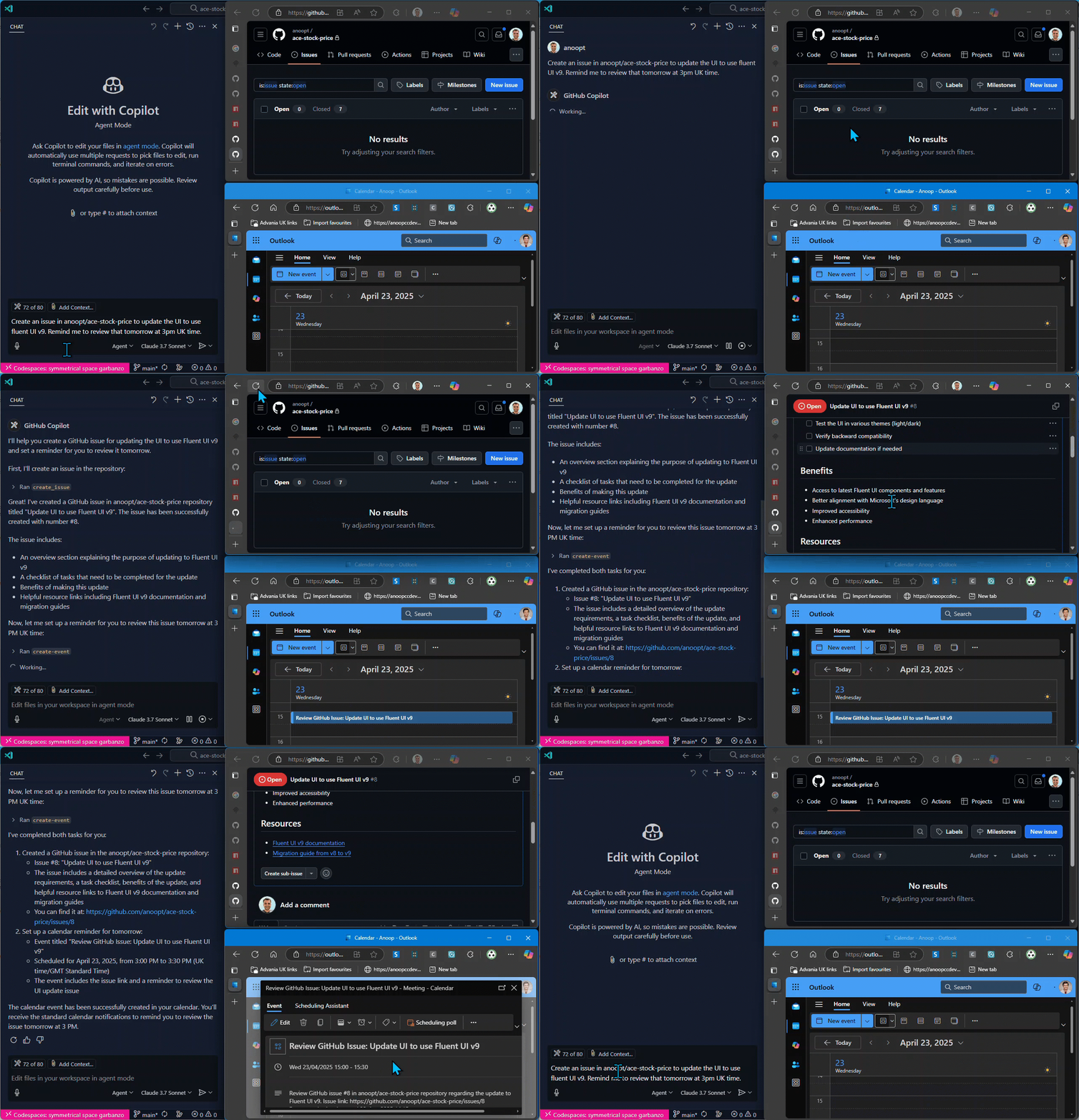
Demo

Tools

  1. find-person

    • Find a person's email address by their name

    • Input: name (string)

    • Returns: List of matching people with names and email addresses

  2. create-event

    • Create a calendar event using Microsoft Graph API

    • Inputs:

      • subject (string): Subject of the calendar event

      • body (string): Content/body of the calendar event

      • start (optional): ISO format datetime (e.g., 2025-04-20T12:00:00)

      • end (optional): ISO format datetime (e.g., 2025-04-20T13:00:00)

      • timeZone (optional): Time zone for the event (default: "GMT Standard Time")

    • Returns: Event details including URL and ID

  3. create-event-with-attendees

    • Create a calendar event with attendees using Microsoft Graph API

    • Inputs:

      • subject (string): Subject of the calendar event

      • body (string): Content/body of the calendar event

      • start (optional): ISO format datetime (e.g., 2025-04-20T12:00:00)

      • end (optional): ISO format datetime (e.g., 2025-04-20T13:00:00)

      • timeZone (optional): Time zone for the event (default: "GMT Standard Time")

      • location (optional): Location of the event

      • attendees: Array of { email, name (optional), type (optional) }

    • Returns: Event details including URL, ID, and attendees list

  4. get-event

    • Get details of a calendar event by its ID

    • Input:

      • eventId (string): ID of the event to retrieve

    • Returns: Detailed event information including subject, time, attendees, and URL

  5. list-events

    • List calendar events with optional filtering

    • Inputs:

      • subject (optional): Filter events by subject containing this text

      • startDate (optional): Start date in ISO format (e.g., 2025-04-20T00:00:00) to filter events from

      • endDate (optional): End date in ISO format (e.g., 2025-04-20T23:59:59) to filter events until

      • maxResults (optional): Maximum number of events to return

    • Returns: List of calendar events with basic information and IDs

  6. delete-event

    • Delete a calendar event

    • Input:

      • eventId (string): ID of the event to delete

    • Returns: Confirmation of event deletion

  7. update-event

    • Update an existing calendar event

    • Inputs:

      • eventId (string): ID of the event to update

      • subject (optional): New subject for the calendar event

      • body (optional): New content/body for the calendar event

      • start (optional): New start time in ISO format (e.g., 2025-04-20T12:00:00)

      • end (optional): New end time in ISO format (e.g., 2025-04-20T13:00:00)

      • timeZone (optional): New time zone for the event

      • location (optional): New location for the event

      • attendees (optional): Array of { email, name (optional), type (optional) }

    • Returns: Updated event details showing changes

  8. update-event-attendees

    • Add or remove attendees from a calendar event

    • Inputs:

      • eventId (string): ID of the event to update

      • addAttendees (optional): Array of attendees to add: { email, name (optional), type (optional) }

      • removeAttendees (optional): Array of email addresses to remove from the event

    • Returns: Updated event attendee information

Setup

Authentication Modes

This MCP server supports three authentication modes:

1. Interactive (Delegated)

Thank you Lokka

Best for: User-impersonation scenarios, accessing user-specific data

  • Prompts user to login interactively

  • Uses delegated permissions

  • Authenticates as the signed-in user

2. Client Credentials (App-Only)

Best for: Server-to-server scenarios, automated processes

  • Uses Azure AD application credentials

  • Requires Application permissions

  • Works without user interaction

3. Client Provided Token

Best for: Custom token management, pre-acquired tokens

  • Uses a token provided by the client

  • Requires managing token refresh externally

Microsoft Graph API Setup

For Interactive (Delegated) Mode

  1. Register an application in the Microsoft Azure Portal (or use an existing app)

  2. Add a redirect URI: http://localhost (Mobile and desktop applications platform)

  3. Enable public client flows: Go to Authentication > Advanced settings > "Allow public client flows" = YES

  4. Grant necessary Delegated permissions: Microsoft Graph API > Delegated permissions > Calendars.ReadWrite, People.Read, User.Read

  5. Note your Client ID and Tenant ID (Client Secret not needed for interactive mode with custom app)

Note: The server uses a built-in multi-tenant app by default, so custom app setup is optional. When authentication is needed, the device code and login URL will appear directly in your MCP client chat interface.

For Client Credentials (App-Only) Mode

  1. Register an application in the Microsoft Azure Portal

  2. Create a client secret

  3. Grant necessary Application permissions: Microsoft Graph API > Application permissions > Calendars.ReadWrite, People.Read.All, User.ReadBasic.All

  4. Grant admin consent for your organization

  5. Note your Client ID, Client Secret, and Tenant ID

Usage with VS Code

Authentication Mode Configuration

The MCP server supports different authentication modes via the AUTH_MODE environment variable:

  • interactive (default) - User authentication with browser or device code flow

  • client_credentials - App-only authentication with client secret

  • client_provided_token - Use a pre-acquired token

Backward Compatibility: If AUTH_MODE is not specified, the server automatically detects the mode:

  • Presence of CLIENT_SECRETclient_credentials mode

  • Presence of ACCESS_TOKENclient_provided_token mode

  • Neither present → interactive mode (default)

Local Node.js

You can run the MCP server directly with Node.js from your local build:

  1. Clone the repository and build the project:

git clone https://github.com/anoopt/outlook-meetings-scheduler-mcp-server.git
cd outlook-meetings-scheduler-mcp-server
npm install
npm run build
  1. For manual installation, add the following JSON block to your User Settings (JSON) file in VS Code. You can do this by pressing Ctrl + Shift + P and typing Preferences: Open User Settings (JSON).

Optionally, you can add it to a file called .vscode/mcp.json in your workspace. This will allow you to share the configuration with others:

Interactive Mode (Default - Zero Configuration):

{
  "mcpServers": {
    "outlook-meetings-scheduler": {
      "command": "node",
      "args": [
        "/path/to/outlook-meetings-scheduler-mcp-server/build/index.js"
      ]
    }
  }
}

Interactive Mode with Custom App:

{
  "mcpServers": {
    "outlook-meetings-scheduler": {
      "command": "node",
      "args": [
        "/path/to/outlook-meetings-scheduler-mcp-server/build/index.js"
      ],
      "env": {
        "AUTH_MODE": "interactive",
        "CLIENT_ID": "<YOUR_CLIENT_ID>",
        "TENANT_ID": "<YOUR_TENANT_ID>"
      }
    }
  }
}

Client Credentials Mode:

{
  "mcpServers": {
    "outlook-meetings-scheduler": {
      "command": "node",
      "args": [
        "/path/to/outlook-meetings-scheduler-mcp-server/build/index.js"
      ],
      "env": {
        "AUTH_MODE": "client_credentials",
        "CLIENT_ID": "<YOUR_CLIENT_ID>",
        "CLIENT_SECRET": "<YOUR_CLIENT_SECRET>",
        "TENANT_ID": "<YOUR_TENANT_ID>",
        "USER_EMAIL": "<YOUR_EMAIL>"
      }
    }
  }
}

Client Provided Token Mode:

{
  "mcpServers": {
    "outlook-meetings-scheduler": {
      "command": "node",
      "args": [
        "/path/to/outlook-meetings-scheduler-mcp-server/build/index.js"
      ],
      "env": {
        "AUTH_MODE": "client_provided_token",
        "ACCESS_TOKEN": "<YOUR_ACCESS_TOKEN>",
        "TOKEN_EXPIRES_ON": "2025-10-03T12:00:00Z",
        "USER_EMAIL": "<YOUR_EMAIL>"
      }
    }
  }
}

Note:

  • Uses a built-in multi-tenant Azure AD app (works for any organization)

  • USER_EMAIL is automatically determined from the signed-in user

  • Users will see a one-time consent prompt (no admin approval needed)

  • Zero configuration required - works out of the box

Interactive Mode with Custom App:

{
  "mcpServers": {
    "outlook-meetings-scheduler": {
      "command": "node",
      "args": [
        "/path/to/outlook-meetings-scheduler-mcp-server/build/index.js"
      ],
      "env": {
        "AUTH_MODE": "interactive",
        "CLIENT_ID": "<YOUR_CLIENT_ID>",
        "TENANT_ID": "<YOUR_TENANT_ID>"
      }
    }
  }
}

Use a custom app if you need specific branding or tenant restrictions.

Replace /path/to/outlook-meetings-scheduler-mcp-server with the absolute path to your cloned repository.

Docker

Run the MCP server using Docker locally. Build the Docker image with the following command:

docker build -t mcp/outlook-meetings-scheduler .

For manual installation, add the following JSON block to your User Settings (JSON) file in VS Code. You can do this by pressing Ctrl + Shift + P and typing Preferences: Open User Settings (JSON).

Optionally, you can add it to a file called .vscode/mcp.json in your workspace. This will allow you to share the configuration with others.

{
     "inputs": [
      {
        "type": "promptString",
        "id": "client_secret",
        "description": "Enter the client secret",
        "password": true
      }
    ],
    "servers": {
        "outlook-meetings-scheduler": {
            "command": "docker",
            "args": [
                "run",
                "-i",
                "--rm",
                "-e",
                "CLIENT_ID",
                "-e",
                "CLIENT_SECRET",
                "-e",
                "TENANT_ID",
                "-e",
                "USER_EMAIL",
                "mcp/outlook-meetings-scheduler"
            ],
            "env": {
                "USER_EMAIL": "<YOUR_EMAIL>",
                "CLIENT_ID": "<YOUR_CLIENT_ID>",
                "CLIENT_SECRET": "${input:client_secret}",
                "TENANT_ID": "<YOUR_TENANT_ID>"
            }
        }
    }
}

NPX

Interactive Mode (Default - Zero Configuration):

{
  "mcpServers": {
    "outlook-meetings-scheduler": {
      "command": "npx",
      "args": [
        "-y",
        "outlook-meetings-scheduler"
      ]
    }
  }
}

Interactive Mode with Custom App:

{
  "mcpServers": {
    "outlook-meetings-scheduler": {
      "command": "npx",
      "args": [
        "-y",
        "outlook-meetings-scheduler"
      ],
      "env": {
        "AUTH_MODE": "interactive",
        "CLIENT_ID": "<YOUR_CLIENT_ID>",
        "TENANT_ID": "<YOUR_TENANT_ID>"
      }
    }
  }
}

Client Credentials Mode:

{
  "mcpServers": {
    "outlook-meetings-scheduler": {
      "command": "npx",
      "args": [
        "-y",
        "outlook-meetings-scheduler"
      ],
      "env": {
        "AUTH_MODE": "client_credentials",
        "CLIENT_ID": "<YOUR_CLIENT_ID>",
        "CLIENT_SECRET": "<YOUR_CLIENT_SECRET>",
        "TENANT_ID": "<YOUR_TENANT_ID>",
        "USER_EMAIL": "<YOUR_EMAIL>"
      }
    }
  }
}

Client Provided Token Mode:

{
  "mcpServers": {
    "outlook-meetings-scheduler": {
      "command": "npx",
      "args": [
        "-y",
        "outlook-meetings-scheduler"
      ],
      "env": {
        "AUTH_MODE": "client_provided_token",
        "ACCESS_TOKEN": "<YOUR_ACCESS_TOKEN>",
        "TOKEN_EXPIRES_ON": "2025-10-03T12:00:00Z",
        "USER_EMAIL": "<YOUR_EMAIL>"
      }
    }
  }
}

Usage with Claude Desktop

Docker

  1. Run the MCP server using Docker locally. Build the Docker image with the following command:

docker build -t mcp/outlook-meetings-scheduler .
  1. Add the following to your claude_desktop_config.json:

{
  "mcpServers": {
    "outlook-meetings-scheduler": {
      "command": "docker",
      "args": [
        "run",
        "-i",
        "--rm",
        "-e",
        "CLIENT_ID",
        "-e",
        "CLIENT_SECRET",
        "-e",
        "TENANT_ID",
        "-e",
        "USER_EMAIL",
        "mcp/outlook-meetings-scheduler"
      ],
      "env": {
        "CLIENT_ID": "<YOUR_CLIENT_ID>",
        "CLIENT_SECRET": "<YOUR_CLIENT_SECRET>",
        "TENANT_ID": "<YOUR_TENANT_ID>",
        "USER_EMAIL": "<YOUR_EMAIL>"
      }
    }
  }
}

NPX

Interactive Mode (Default - Zero Configuration):

{
  "mcpServers": {
    "outlook-meetings-scheduler": {
      "command": "npx",
      "args": [
        "-y",
        "outlook-meetings-scheduler"
      ]
    }
  }
}

Interactive Mode with Custom App:

{
  "mcpServers": {
    "outlook-meetings-scheduler": {
      "command": "npx",
      "args": [
        "-y",
        "outlook-meetings-scheduler"
      ],
      "env": {
        "AUTH_MODE": "interactive",
        "CLIENT_ID": "<YOUR_CLIENT_ID>",
        "TENANT_ID": "<YOUR_TENANT_ID>"
      }
    }
  }
}

Client Credentials Mode:

{
  "mcpServers": {
    "outlook-meetings-scheduler": {
      "command": "npx",
      "args": [
        "-y",
        "outlook-meetings-scheduler"
      ],
      "env": {
        "AUTH_MODE": "client_credentials",
        "CLIENT_ID": "<YOUR_CLIENT_ID>",
        "CLIENT_SECRET": "<YOUR_CLIENT_SECRET>",
        "TENANT_ID": "<YOUR_TENANT_ID>",
        "USER_EMAIL": "<YOUR_EMAIL>"
      }
    }
  }
}

Client Provided Token Mode:

{
  "mcpServers": {
    "outlook-meetings-scheduler": {
      "command": "npx",
      "args": [
        "-y",
        "outlook-meetings-scheduler"
      ],
      "env": {
        "AUTH_MODE": "client_provided_token",
        "ACCESS_TOKEN": "<YOUR_ACCESS_TOKEN>",
        "TOKEN_EXPIRES_ON": "2025-10-03T12:00:00Z",
        "USER_EMAIL": "<YOUR_EMAIL>"
      }
    }
  }
}

Example Scenarios

Integration with GitHub MCP Server

You can combine this MCP server with other MCP servers like the GitHub MCP server for powerful workflows.

Create an Issue and Schedule a Follow-up Review

Create an issue in the organization/repo repository titled "Fix pagination bug in user dashboard" with the description "Users report seeing duplicate entries when navigating between pages." Then schedule a calendar reminder for me to review this issue tomorrow at 3 PM.

This will:

  1. Use the GitHub MCP server to create the issue

  2. Use the Outlook Meetings Scheduler MCP server to create a calendar event for the review

Schedule a Code Review Meeting Based on a Pull Request

Find the open PR about the authentication feature in the organization/app-backend repository and schedule a code review meeting with the contributors for tomorrow morning.

This will:

  1. Use GitHub MCP server to find the pull request and identify contributors

  2. Use the Outlook Meetings Scheduler MCP server to schedule a meeting with those team members

Configuration for Multi-MCP Setup

To use both GitHub and Outlook MCP servers together :

{
  "mcpServers": {
    "outlook-meetings-scheduler": {
      "command": "npx",
      "args": [
        "-y",
        "outlook-meetings-scheduler"
      ],
      "env": {
        "CLIENT_ID": "<YOUR_CLIENT_ID>",
        "CLIENT_SECRET": "<YOUR_CLIENT_SECRET>",
        "TENANT_ID": "<YOUR_TENANT_ID>",
        "USER_EMAIL": "<YOUR_EMAIL>"
      }
    },
    "github": {
      "command": "npx",
      "args": [
        "-y",
        "@modelcontextprotocol/github-mcp"
      ],
      "env": {
        "GITHUB_TOKEN": "<YOUR_GITHUB_TOKEN>"
      }
    }
  }
}

Direct Usage

Finding a Colleague's Email

I need to schedule a meeting with John Smith. Can you find his email address?

Creating a Simple Calendar Event

Schedule a meeting titled "Weekly Team Sync" for next Monday at 10 AM with the following agenda:
- Project updates
- Resource allocation
- Questions and concerns

Scheduling a Meeting with Single Attendee

Schedule a 1:1 meeting with Sarah for tomorrow at 3 PM.

This will find Sarah's email address and create a calendar event. To find Sarah's email address, the MCP server will use the find-person tool - which uses the Microsoft Graph API to find relevant people for USER_EMAIL or searches for the name in the organization.

Scheduling a Meeting with Multiple Attendees

Create a meeting called "Project Kickoff" for tomorrow at 2 PM. 
Add sarah.jones@example.com and mike.thompson@example.com as required attendees.
The agenda is:
1. Project overview
2. Timeline discussion
3. Role assignments
4. Next steps

Environment Variables

Interactive Mode (Default)

Variable

Description

Required

Default

AUTH_MODE

Authentication mode

No

interactive

CLIENT_ID

Azure AD Application (Client) ID

No

Built-in multi-tenant app

TENANT_ID

Azure AD Tenant ID

No

common (multi-tenant)

USER_EMAIL

Email address of the user

No

Auto-detected from signed-in user

REDIRECT_URI

Custom redirect URI

No

http://localhost

Client Credentials Mode

Variable

Description

Required

AUTH_MODE

Authentication mode

Yes

CLIENT_ID

Azure AD Application (Client) ID

Yes

CLIENT_SECRET

Azure AD Application Client Secret

Yes

TENANT_ID

Azure AD Tenant ID

Yes

USER_EMAIL

Email address of the user whose calendar to access

Yes

Client Provided Token Mode

Variable

Description

Required

Default

AUTH_MODE

Authentication mode

Yes

-

ACCESS_TOKEN

Pre-acquired access token

Yes

-

USER_EMAIL

Email address of the user

Yes

-

TOKEN_EXPIRES_ON

Token expiration date (ISO format)

No

1 hour from start time

How to Obtain an Access Token

You can obtain an access token through several methods:

1. Azure CLI (For Microsoft Graph - Recommended for testing):

# Login to Azure
az login

# Get token specifically for Microsoft Graph with correct scopes
az account get-access-token --resource=https://graph.microsoft.com --query accessToken --output tsv

Note: The Azure CLI token has broad permissions but may not include specific calendar scopes (Calendars.ReadWrite). For production use, consider methods 3 or 4 below with explicit scope configuration.

2. PowerShell REST API (Recommended for Windows):

# For client credentials flow (app-only) - most reliable method
$clientId = "your-client-id"
$clientSecret = "your-client-secret" 
$tenantId = "your-tenant-id"

$body = @{
    grant_type = "client_credentials"
    client_id = $clientId
    client_secret = $clientSecret
    scope = "https://graph.microsoft.com/.default"
}

$response = Invoke-RestMethod -Uri "https://login.microsoftonline.com/$tenantId/oauth2/v2.0/token" -Method Post -Body $body
$token = $response.access_token
Write-Host "Access Token: $token"

3. From Your Own Application (Most Reliable):

// Using @azure/identity with specific scopes
import { ClientSecretCredential } from '@azure/identity';

const credential = new ClientSecretCredential(
  'your-tenant-id',
  'your-client-id', 
  'your-client-secret'
);

// Request token with specific Microsoft Graph scopes
const token = await credential.getToken([
  'https://graph.microsoft.com/Calendars.ReadWrite',
  'https://graph.microsoft.com/People.Read', 
  'https://graph.microsoft.com/User.Read'
]);

// Use token.token as your ACCESS_TOKEN
console.log(token.token);

4. Using OAuth2 Device Code Flow (Interactive):

# For personal Microsoft accounts or when you need user consent
curl -X POST \
  https://login.microsoftonline.com/common/oauth2/v2.0/devicecode \
  -H 'Content-Type: application/x-www-form-urlencoded' \
  -d 'client_id={your-client-id}&scope=https://graph.microsoft.com/Calendars.ReadWrite https://graph.microsoft.com/People.Read https://graph.microsoft.com/User.Read'

# Follow the device code instructions, then exchange for token
curl -X POST \
  https://login.microsoftonline.com/common/oauth2/v2.0/token \
  -H 'Content-Type: application/x-www-form-urlencoded' \
  -d 'grant_type=urn:ietf:params:oauth:grant-type:device_code&client_id={your-client-id}&device_code={device-code-from-step-1}'

5. Client Credentials Flow (App-Only):

curl -X POST \
  https://login.microsoftonline.com/{tenant-id}/oauth2/v2.0/token \
  -H 'Content-Type: application/x-www-form-urlencoded' \
  -d 'grant_type=client_credentials&client_id={client-id}&client_secret={client-secret}&scope=https://graph.microsoft.com/.default'

Important: Ensure your Azure AD app registration has the required delegated or application permissions:

  • Delegated: Calendars.ReadWrite, People.Read, User.Read

  • Application: Calendars.ReadWrite, People.Read.All, User.ReadBasic.All (requires admin consent)

Authentication Mode Details

client_credentials

  • Best for: Automated scenarios, server-to-server communication

  • Requires: CLIENT_ID, CLIENT_SECRET, TENANT_ID, USER_EMAIL

  • Permissions: Application permissions (e.g., Calendars.ReadWrite)

  • Note: Requires admin consent for the application

interactive (Default)

  • Best for: User-impersonation scenarios, delegated access (most common use case)

  • Setup: Zero configuration required - works out of the box

  • Requires: Nothing (uses built-in multi-tenant app)

  • Optional: CLIENT_ID and TENANT_ID for custom app

  • Permissions: Delegated permissions (e.g., Calendars.ReadWrite)

  • Authentication Flow:

    • Attempts browser-based interactive login first

    • Falls back to device code flow if browser auth fails

    • Device code and URL appear in MCP client chat for easy access

    • User will be prompted to authenticate in their browser

  • Note: Uses built-in multi-tenant app (works for any organization)

client_provided_token

  • Best for: Custom token management, integration with existing auth systems

  • Requires: ACCESS_TOKEN, USER_EMAIL

  • Optional: TOKEN_EXPIRES_ON (if not provided, assumes 1-hour validity from start time)

  • Token Sources: Microsoft Graph PowerShell, custom applications, OAuth2 flows, Azure CLI (with limitations)

  • Use Cases: Testing with specific scopes, integration with existing auth flows, CI/CD pipelines, development/debugging

  • Note: Token refresh must be handled externally

Build

# Install dependencies
npm install

# Build the project
npm run build

# Docker build
docker build -t mcp/outlook-meetings-scheduler .

License

This MCP server is licensed under the ISC License. For more details, please see the LICENSE file in the project repository.

Disclaimer

This MCP server is not affiliated with Microsoft or Microsoft Graph API. Use at your own risk. Ensure you comply with your organization's policies and guidelines when using this tool.

Available Tools

8 tools
create-eventC

Create a calendar event using Microsoft Graph API

ParametersJSON Schema
NameRequiredDescriptionDefault
bodyYesContent/body of the calendar event
endNoEnd time in ISO format (e.g. 2025-04-20T13:00:00). Defaults to next business day at 1PM
startNoStart time in ISO format (e.g. 2025-04-20T12:00:00). Defaults to next business day at noon
subjectYesSubject of the calendar event
timeZoneNoTime zone for the event. Defaults to GMT Standard Time

TDQS

C2.9/5.0
Behavior2/5

Does the description disclose side effects, auth requirements, rate limits, or destructive behavior?

No annotations are provided, so the description carries full burden. It states 'Create' which implies a write/mutation operation, but doesn't disclose behavioral traits like required permissions, whether the event is saved immediately, error handling, or rate limits. The description adds minimal value beyond the basic action.

Agents need to know what a tool does to the world before calling it. Descriptions should go beyond structured annotations to explain consequences.

Conciseness5/5

Is the description appropriately sized, front-loaded, and free of redundancy?

The description is a single, efficient sentence that directly states the tool's purpose without unnecessary words. It's appropriately sized and front-loaded with the core action.

Shorter descriptions cost fewer tokens and are easier for agents to parse. Every sentence should earn its place.

Completeness2/5

Given the tool's complexity, does the description cover enough for an agent to succeed on first attempt?

Given this is a mutation tool (create operation) with no annotations and no output schema, the description is incomplete. It doesn't explain what happens after creation, error conditions, or return values. For a tool that modifies data, more behavioral context is needed.

Complex tools with many parameters or behaviors need more documentation. Simple tools need less. This dimension scales expectations accordingly.

Parameters3/5

Does the description clarify parameter syntax, constraints, interactions, or defaults beyond what the schema provides?

Schema description coverage is 100%, so the schema already documents all 5 parameters thoroughly with descriptions and defaults. The description adds no additional meaning about parameters beyond what's in the schema, meeting the baseline of 3 when schema coverage is high.

Input schemas describe structure but not intent. Descriptions should explain non-obvious parameter relationships and valid value ranges.

Purpose4/5

Does the description clearly state what the tool does and how it differs from similar tools?

The description clearly states the verb ('Create') and resource ('calendar event') with the specific API ('Microsoft Graph API'). It distinguishes from siblings like 'update-event' or 'delete-event' by specifying creation, but doesn't explicitly differentiate from 'create-event-with-attendees' which suggests a more specialized version.

Agents choose between tools based on descriptions. A clear purpose with a specific verb and resource helps agents select the right tool.

Usage Guidelines2/5

Does the description explain when to use this tool, when not to, or what alternatives exist?

The description provides no guidance on when to use this tool versus alternatives. It doesn't mention when to choose 'create-event-with-attendees' for events with attendees, or when to use 'update-event' for modifications. No prerequisites or context for usage are provided.

Agents often have multiple tools that could apply. Explicit usage guidance like "use X instead of Y when Z" prevents misuse.

create-event-with-attendeesC

Create a calendar event with attendees using Microsoft Graph API

ParametersJSON Schema
NameRequiredDescriptionDefault
attendeesYesList of attendees for the event
bodyYesContent/body of the calendar event
endNoEnd time in ISO format (e.g. 2025-04-20T13:00:00). Defaults to next business day at 1PM
locationNoLocation of the event
startNoStart time in ISO format (e.g. 2025-04-20T12:00:00). Defaults to next business day at noon
subjectYesSubject of the calendar event
timeZoneNoTime zone for the event. Defaults to GMT Standard Time

TDQS

C2.9/5.0
Behavior2/5

Does the description disclose side effects, auth requirements, rate limits, or destructive behavior?

No annotations are provided, so the description carries full burden. It states it creates an event with attendees via Microsoft Graph API, implying a write operation, but doesn't disclose permissions needed, rate limits, whether it sends invitations, or what happens on failure. For a mutation tool with zero annotation coverage, this is inadequate.

Agents need to know what a tool does to the world before calling it. Descriptions should go beyond structured annotations to explain consequences.

Conciseness5/5

Is the description appropriately sized, front-loaded, and free of redundancy?

Single sentence, front-loaded with the core action, zero waste. It efficiently conveys the tool's purpose without unnecessary elaboration.

Shorter descriptions cost fewer tokens and are easier for agents to parse. Every sentence should earn its place.

Completeness2/5

Given the tool's complexity, does the description cover enough for an agent to succeed on first attempt?

For a mutation tool with 7 parameters, no annotations, and no output schema, the description is insufficient. It doesn't explain return values, error handling, or behavioral details like whether attendees receive invitations. Given the complexity and lack of structured data, more context is needed.

Complex tools with many parameters or behaviors need more documentation. Simple tools need less. This dimension scales expectations accordingly.

Parameters3/5

Does the description clarify parameter syntax, constraints, interactions, or defaults beyond what the schema provides?

Schema description coverage is 100%, so the schema fully documents all 7 parameters. The description adds no additional parameter semantics beyond what's in the schema, such as explaining attendee invitation behavior or event creation constraints. Baseline 3 is appropriate when schema does all the work.

Input schemas describe structure but not intent. Descriptions should explain non-obvious parameter relationships and valid value ranges.

Purpose4/5

Does the description clearly state what the tool does and how it differs from similar tools?

The description clearly states the action ('Create') and resource ('calendar event with attendees'), specifying it uses Microsoft Graph API. It distinguishes from 'create-event' by explicitly mentioning attendees, but doesn't fully differentiate from 'update-event-attendees' which also handles attendees.

Agents choose between tools based on descriptions. A clear purpose with a specific verb and resource helps agents select the right tool.

Usage Guidelines2/5

Does the description explain when to use this tool, when not to, or what alternatives exist?

No guidance on when to use this tool versus alternatives like 'create-event' (without attendees) or 'update-event-attendees'. The description mentions attendees but doesn't provide explicit usage context or exclusions relative to sibling tools.

Agents often have multiple tools that could apply. Explicit usage guidance like "use X instead of Y when Z" prevents misuse.

delete-eventC

Delete a calendar event

ParametersJSON Schema
NameRequiredDescriptionDefault
eventIdYesID of the event to delete

TDQS

C2.9/5.0
Behavior2/5

Does the description disclose side effects, auth requirements, rate limits, or destructive behavior?

No annotations are provided, so the description carries the full burden of behavioral disclosure. While 'delete' implies a destructive mutation, the description doesn't specify whether this action is reversible, requires specific permissions, has side effects (e.g., on attendees), or what happens on success/failure. For a destructive tool with zero annotation coverage, this is a significant gap in transparency.

Agents need to know what a tool does to the world before calling it. Descriptions should go beyond structured annotations to explain consequences.

Conciseness5/5

Is the description appropriately sized, front-loaded, and free of redundancy?

The description is a single, direct sentence ('Delete a calendar event') with zero wasted words. It is front-loaded and efficiently communicates the core action without unnecessary elaboration, making it easy for an agent to parse quickly.

Shorter descriptions cost fewer tokens and are easier for agents to parse. Every sentence should earn its place.

Completeness2/5

Given the tool's complexity, does the description cover enough for an agent to succeed on first attempt?

Given the complexity of a destructive operation, lack of annotations, and no output schema, the description is incomplete. It doesn't address critical aspects like error handling, return values, or behavioral nuances (e.g., confirmation prompts). For a tool that permanently removes data, more context is needed to ensure safe and correct usage by an agent.

Complex tools with many parameters or behaviors need more documentation. Simple tools need less. This dimension scales expectations accordingly.

Parameters3/5

Does the description clarify parameter syntax, constraints, interactions, or defaults beyond what the schema provides?

The input schema has 100% description coverage, with the 'eventId' parameter clearly documented in the schema. The description adds no additional meaning beyond what the schema provides (e.g., format examples, source of the ID, or validation rules). According to the rules, when schema coverage is high (>80%), the baseline score is 3, which applies here as the description doesn't compensate with extra param details.

Input schemas describe structure but not intent. Descriptions should explain non-obvious parameter relationships and valid value ranges.

Purpose4/5

Does the description clearly state what the tool does and how it differs from similar tools?

The description 'Delete a calendar event' clearly states the action (delete) and resource (calendar event), making the purpose immediately understandable. It distinguishes from siblings like 'create-event' or 'update-event' by specifying deletion. However, it doesn't explicitly mention what distinguishes it from other destructive operations or provide additional context about the scope of deletion.

Agents choose between tools based on descriptions. A clear purpose with a specific verb and resource helps agents select the right tool.

Usage Guidelines2/5

Does the description explain when to use this tool, when not to, or what alternatives exist?

The description provides no guidance on when to use this tool versus alternatives. It doesn't mention prerequisites (e.g., needing an event ID from 'get-event' or 'list-events'), when not to use it (e.g., for soft deletion), or how it compares to siblings like 'update-event' for modifying instead of deleting. This leaves the agent without context for tool selection.

Agents often have multiple tools that could apply. Explicit usage guidance like "use X instead of Y when Z" prevents misuse.

find-personC

Find a person's email address by their name

ParametersJSON Schema
NameRequiredDescriptionDefault
nameYesName or partial name of the person to find

TDQS

C2.9/5.0
Behavior2/5

Does the description disclose side effects, auth requirements, rate limits, or destructive behavior?

No annotations are provided, so the description carries the full burden of behavioral disclosure. The description only states what the tool does ('Find a person's email address'), but doesn't disclose important behavioral aspects like what happens when multiple matches are found, whether it's case-sensitive, what format the email address is returned in, or any error conditions. For a lookup tool with zero annotation coverage, this is a significant gap.

Agents need to know what a tool does to the world before calling it. Descriptions should go beyond structured annotations to explain consequences.

Conciseness5/5

Is the description appropriately sized, front-loaded, and free of redundancy?

The description is extremely concise - a single sentence that directly states the tool's purpose. There's no wasted words or unnecessary elaboration. It's front-loaded with the essential information and doesn't include any extraneous details.

Shorter descriptions cost fewer tokens and are easier for agents to parse. Every sentence should earn its place.

Completeness2/5

Given the tool's complexity, does the description cover enough for an agent to succeed on first attempt?

Given that there are no annotations and no output schema, the description is incomplete for effective tool usage. While it states what the tool does, it doesn't provide enough context about the behavior, return format, or error handling. For a lookup tool that presumably returns email addresses, the description should ideally specify what format the result comes in or what happens when no match is found.

Complex tools with many parameters or behaviors need more documentation. Simple tools need less. This dimension scales expectations accordingly.

Parameters3/5

Does the description clarify parameter syntax, constraints, interactions, or defaults beyond what the schema provides?

The schema description coverage is 100%, with the single parameter 'name' clearly documented as 'Name or partial name of the person to find'. The description adds minimal value beyond what's already in the schema - it mentions 'by their name' which is redundant with the parameter documentation. Since schema coverage is high, the baseline score of 3 is appropriate.

Input schemas describe structure but not intent. Descriptions should explain non-obvious parameter relationships and valid value ranges.

Purpose4/5

Does the description clearly state what the tool does and how it differs from similar tools?

The description clearly states the tool's purpose: 'Find a person's email address by their name'. It specifies both the action ('Find') and the resource ('person's email address'), making it easy to understand what the tool does. However, it doesn't distinguish this tool from any potential sibling tools that might also involve finding people or email addresses, which prevents a perfect score.

Agents choose between tools based on descriptions. A clear purpose with a specific verb and resource helps agents select the right tool.

Usage Guidelines2/5

Does the description explain when to use this tool, when not to, or what alternatives exist?

The description provides no guidance on when to use this tool versus alternatives. It doesn't mention any prerequisites, limitations, or suggest other tools for related tasks. While the sibling tools are all event-related (create, delete, get, list, update events), there's no explicit comparison or context provided for when to choose this person-finding tool over other methods.

Agents often have multiple tools that could apply. Explicit usage guidance like "use X instead of Y when Z" prevents misuse.

get-eventC

Get details of a calendar event by its ID

ParametersJSON Schema
NameRequiredDescriptionDefault
eventIdYesID of the event to retrieve

TDQS

C2.9/5.0
Behavior2/5

Does the description disclose side effects, auth requirements, rate limits, or destructive behavior?

With no annotations, the description carries full burden but only states the basic action. It doesn't disclose behavioral traits like authentication needs, rate limits, error handling, or what details are returned (e.g., title, time, attendees), which is inadequate for a read operation with no output schema.

Agents need to know what a tool does to the world before calling it. Descriptions should go beyond structured annotations to explain consequences.

Conciseness5/5

Is the description appropriately sized, front-loaded, and free of redundancy?

The description is a single, efficient sentence that front-loads the purpose without waste. It's appropriately sized for a simple tool, making it easy for an agent to parse quickly.

Shorter descriptions cost fewer tokens and are easier for agents to parse. Every sentence should earn its place.

Completeness2/5

Given the tool's complexity, does the description cover enough for an agent to succeed on first attempt?

Given no annotations and no output schema, the description is incomplete. It doesn't explain what details are returned (e.g., event properties), potential errors, or usage context, leaving gaps for the agent to infer behavior in a server with multiple event-related tools.

Complex tools with many parameters or behaviors need more documentation. Simple tools need less. This dimension scales expectations accordingly.

Parameters3/5

Does the description clarify parameter syntax, constraints, interactions, or defaults beyond what the schema provides?

Schema description coverage is 100%, so the schema already documents the 'eventId' parameter. The description adds no additional meaning beyond implying retrieval by ID, which aligns with the schema. Baseline 3 is appropriate as the schema handles parameter documentation.

Input schemas describe structure but not intent. Descriptions should explain non-obvious parameter relationships and valid value ranges.

Purpose4/5

Does the description clearly state what the tool does and how it differs from similar tools?

The description clearly states the action ('Get details') and resource ('calendar event'), specifying it retrieves by ID. However, it doesn't differentiate from sibling tools like 'list-events' or 'find-person' that might also retrieve event information, so it lacks sibling differentiation.

Agents choose between tools based on descriptions. A clear purpose with a specific verb and resource helps agents select the right tool.

Usage Guidelines2/5

Does the description explain when to use this tool, when not to, or what alternatives exist?

No guidance is provided on when to use this tool versus alternatives. For example, it doesn't mention using 'list-events' for multiple events or 'find-person' for person-related queries, leaving the agent without context for selection among siblings.

Agents often have multiple tools that could apply. Explicit usage guidance like "use X instead of Y when Z" prevents misuse.

list-eventsC

List calendar events with optional filtering

ParametersJSON Schema
NameRequiredDescriptionDefault
endDateNoEnd date in ISO format (e.g. 2025-04-20T23:59:59) to filter events until
maxResultsNoMaximum number of events to return
startDateNoStart date in ISO format (e.g. 2025-04-20T00:00:00) to filter events from
subjectNoFilter events by subject containing this text

TDQS

C2.9/5.0
Behavior2/5

Does the description disclose side effects, auth requirements, rate limits, or destructive behavior?

No annotations are provided, so the description carries the full burden of behavioral disclosure. While 'List' implies a read operation, it doesn't specify whether this requires authentication, how results are ordered, if pagination is supported, what happens with large result sets, or the format of returned data. For a list tool with zero annotation coverage, this leaves significant gaps in understanding its behavior.

Agents need to know what a tool does to the world before calling it. Descriptions should go beyond structured annotations to explain consequences.

Conciseness5/5

Is the description appropriately sized, front-loaded, and free of redundancy?

The description is a single, efficient sentence that gets straight to the point without any wasted words. It's appropriately sized for a simple list tool and front-loads the core functionality.

Shorter descriptions cost fewer tokens and are easier for agents to parse. Every sentence should earn its place.

Completeness2/5

Given the tool's complexity, does the description cover enough for an agent to succeed on first attempt?

Given the tool has 4 parameters, no annotations, and no output schema, the description is insufficiently complete. It doesn't explain what the output looks like (e.g., list format, included fields), doesn't address authentication requirements, and provides minimal guidance on usage. For a list tool in a calendar context with multiple sibling tools, more context is needed.

Complex tools with many parameters or behaviors need more documentation. Simple tools need less. This dimension scales expectations accordingly.

Parameters3/5

Does the description clarify parameter syntax, constraints, interactions, or defaults beyond what the schema provides?

The description mentions 'optional filtering' which aligns with the parameters in the schema, but adds no specific meaning beyond what the schema already provides. With 100% schema description coverage, the baseline is 3, and the description doesn't enhance understanding of parameter interactions, default behaviors, or filtering logic.

Input schemas describe structure but not intent. Descriptions should explain non-obvious parameter relationships and valid value ranges.

Purpose4/5

Does the description clearly state what the tool does and how it differs from similar tools?

The description clearly states the verb ('List') and resource ('calendar events'), making the purpose immediately understandable. However, it doesn't distinguish this tool from sibling tools like 'get-event' or 'find-person' which might also retrieve event-related information, so it doesn't achieve the highest score.

Agents choose between tools based on descriptions. A clear purpose with a specific verb and resource helps agents select the right tool.

Usage Guidelines2/5

Does the description explain when to use this tool, when not to, or what alternatives exist?

The description mentions 'optional filtering' which implies some context for usage, but provides no explicit guidance on when to use this tool versus alternatives like 'get-event' (for single events) or 'find-person' (which might find events indirectly). There's no mention of prerequisites, limitations, or typical use cases.

Agents often have multiple tools that could apply. Explicit usage guidance like "use X instead of Y when Z" prevents misuse.

update-eventC

Update an existing calendar event

ParametersJSON Schema
NameRequiredDescriptionDefault
attendeesNoList of attendees to add or update for the event
bodyNoNew content/body for the calendar event
endNoNew end time in ISO format (e.g. 2025-04-20T13:00:00)
eventIdYesID of the event to update
locationNoNew location for the event
startNoNew start time in ISO format (e.g. 2025-04-20T12:00:00)
subjectNoNew subject for the calendar event
timeZoneNoNew time zone for the event

TDQS

C2.9/5.0
Behavior2/5

Does the description disclose side effects, auth requirements, rate limits, or destructive behavior?

With no annotations provided, the description carries full burden for behavioral disclosure. While 'update' implies mutation, it doesn't specify whether this requires specific permissions, whether changes are reversible, what happens to fields not mentioned in the update (partial vs. full replacement), or what the response looks like. For a mutation tool with zero annotation coverage, this is a significant gap.

Agents need to know what a tool does to the world before calling it. Descriptions should go beyond structured annotations to explain consequences.

Conciseness5/5

Is the description appropriately sized, front-loaded, and free of redundancy?

The description is a single, efficient sentence that states the core purpose without any wasted words. It's appropriately sized and front-loaded with the essential information.

Shorter descriptions cost fewer tokens and are easier for agents to parse. Every sentence should earn its place.

Completeness2/5

Given the tool's complexity, does the description cover enough for an agent to succeed on first attempt?

For a mutation tool with 8 parameters, no annotations, and no output schema, the description is insufficient. It doesn't address behavioral aspects like permissions, side effects, or response format. While the schema covers parameters well, the description fails to provide the contextual information needed for safe and effective use of this update operation.

Complex tools with many parameters or behaviors need more documentation. Simple tools need less. This dimension scales expectations accordingly.

Parameters3/5

Does the description clarify parameter syntax, constraints, interactions, or defaults beyond what the schema provides?

The schema description coverage is 100%, so the schema already documents all 8 parameters thoroughly. The description adds no additional parameter information beyond what's in the schema. According to guidelines, when schema coverage is high (>80%), the baseline score is 3 even with no parameter info in the description.

Input schemas describe structure but not intent. Descriptions should explain non-obvious parameter relationships and valid value ranges.

Purpose4/5

Does the description clearly state what the tool does and how it differs from similar tools?

The description clearly states the verb ('update') and resource ('existing calendar event'), making the purpose immediately understandable. However, it doesn't differentiate this tool from its sibling 'update-event-attendees' which also updates events but focuses specifically on attendees.

Agents choose between tools based on descriptions. A clear purpose with a specific verb and resource helps agents select the right tool.

Usage Guidelines2/5

Does the description explain when to use this tool, when not to, or what alternatives exist?

The description provides no guidance about when to use this tool versus alternatives like 'update-event-attendees' (for attendee-only updates) or 'create-event' (for new events). There's no mention of prerequisites, such as needing an existing event ID, or when partial versus full updates are appropriate.

Agents often have multiple tools that could apply. Explicit usage guidance like "use X instead of Y when Z" prevents misuse.

update-event-attendeesC

Add or remove attendees from a calendar event

ParametersJSON Schema
NameRequiredDescriptionDefault
addAttendeesNoList of attendees to add to the event
eventIdYesID of the event to update
removeAttendeesNoList of email addresses to remove from the event

TDQS

C2.9/5.0
Behavior2/5

Does the description disclose side effects, auth requirements, rate limits, or destructive behavior?

With no annotations provided, the description carries full burden for behavioral disclosure. While 'Add or remove attendees' implies mutation, it doesn't specify permission requirements, whether changes are reversible, how conflicts are handled, or what happens to event notifications. For a mutation tool with zero annotation coverage, this leaves significant behavioral gaps.

Agents need to know what a tool does to the world before calling it. Descriptions should go beyond structured annotations to explain consequences.

Conciseness5/5

Is the description appropriately sized, front-loaded, and free of redundancy?

The description is a single, efficient sentence that communicates the core functionality without any wasted words. It's appropriately sized for the tool's scope and gets straight to the point with clear subject-verb-object structure.

Shorter descriptions cost fewer tokens and are easier for agents to parse. Every sentence should earn its place.

Completeness2/5

Given the tool's complexity, does the description cover enough for an agent to succeed on first attempt?

For a mutation tool with no annotations and no output schema, the description is insufficient. It doesn't address permission requirements, error conditions, response format, or how this tool differs from sibling update tools. Given the complexity of modifying calendar events and the lack of structured safety information, more contextual guidance is needed.

Complex tools with many parameters or behaviors need more documentation. Simple tools need less. This dimension scales expectations accordingly.

Parameters3/5

Does the description clarify parameter syntax, constraints, interactions, or defaults beyond what the schema provides?

Schema description coverage is 100%, so the schema already fully documents all three parameters. The description mentions 'attendees' which aligns with the parameters but adds no additional semantic context beyond what's in the schema. This meets the baseline expectation when schema coverage is complete.

Input schemas describe structure but not intent. Descriptions should explain non-obvious parameter relationships and valid value ranges.

Purpose4/5

Does the description clearly state what the tool does and how it differs from similar tools?

The description clearly states the action ('Add or remove attendees') and resource ('from a calendar event'), making the purpose immediately understandable. However, it doesn't distinguish this tool from sibling tools like 'update-event' which might also handle attendee updates, leaving some ambiguity about specialization.

Agents choose between tools based on descriptions. A clear purpose with a specific verb and resource helps agents select the right tool.

Usage Guidelines2/5

Does the description explain when to use this tool, when not to, or what alternatives exist?

The description provides no guidance on when to use this tool versus alternatives like 'update-event' or 'create-event-with-attendees'. There's no mention of prerequisites, permissions needed, or scenarios where this specific attendee-focused update is preferred over broader event updates.

Agents often have multiple tools that could apply. Explicit usage guidance like "use X instead of Y when Z" prevents misuse.

Tool Schema Changelog

Recent tool additions, removals, and schema changes observed during successful MCP inspections.

  1. 8 tool updatesv1.0.0
    • First observedcreate-event
    • First observedcreate-event-with-attendees
    • First observeddelete-event
    • First observedfind-person
    • First observedget-event
    • First observedlist-events
    • First observedupdate-event
    • First observedupdate-event-attendees

TDQS

A3.5/5.0

Scored across 8 tools

Disambiguation4/5

Most tools have distinct purposes, but there is some overlap between create-event and create-event-with-attendees, which could cause confusion about when to use each. The other tools are clearly differentiated by their specific actions on calendar events or person lookup.

Naming Consistency5/5

All tool names follow a consistent verb-noun pattern using snake_case, such as create-event, delete-event, and update-event-attendees. This predictability makes it easy for agents to understand and select the appropriate tool.

Tool Count5/5

With 8 tools, the server is well-scoped for scheduling meetings in Outlook, covering essential CRUD operations for events, attendee management, and person lookup. Each tool serves a clear purpose without being overwhelming.

Completeness5/5

The tool set provides complete coverage for the domain, including create, read, update, and delete for events, plus specific tools for managing attendees and finding people. There are no obvious gaps that would hinder agent workflows in scheduling meetings.

Maintenance

ActivityInactive
ResponsivenessNo issues

Related MCP Connectors

Related MCP Servers

  • F
    license
    Not graded
    quality
    D
    maintenance
    Enables AI assistants to intelligently schedule meetings by checking Microsoft Outlook calendars, finding available time slots across multiple participants, and automatically booking meetings with Teams integration. Uses Microsoft Graph API with smart fallback logic for optimal scheduling.
    1
    -
  • A
    license
    B
    quality
    C
    maintenance
    Enables AI assistants to manage Microsoft Outlook email and calendar through the Microsoft Graph API, including reading, sending, searching emails, and handling calendar events.
    43
    86 npm
    27
    MIT