Outlook Meetings Scheduler MCP Server
Servidor MCP del Programador de reuniones de Outlook
Servidor MCP para programar reuniones en Microsoft Outlook mediante Microsoft Graph API.
Este servidor MCP permite crear eventos de calendario y eventos con asistentes (incluida la búsqueda de sus direcciones de correo electrónico). Se integra a la perfección con otros servidores MCP, como el de GitHub, para optimizar el flujo de trabajo.
Consultas de muestra
Programe una reunión con Sarah para mañana a las 3 pm.
Crea una reunión llamada "Inicio del Proyecto" para mañana a las 14:00. Agrega a Megan y John como asistentes obligatorios.
Uso con el servidor MCP de GitHub
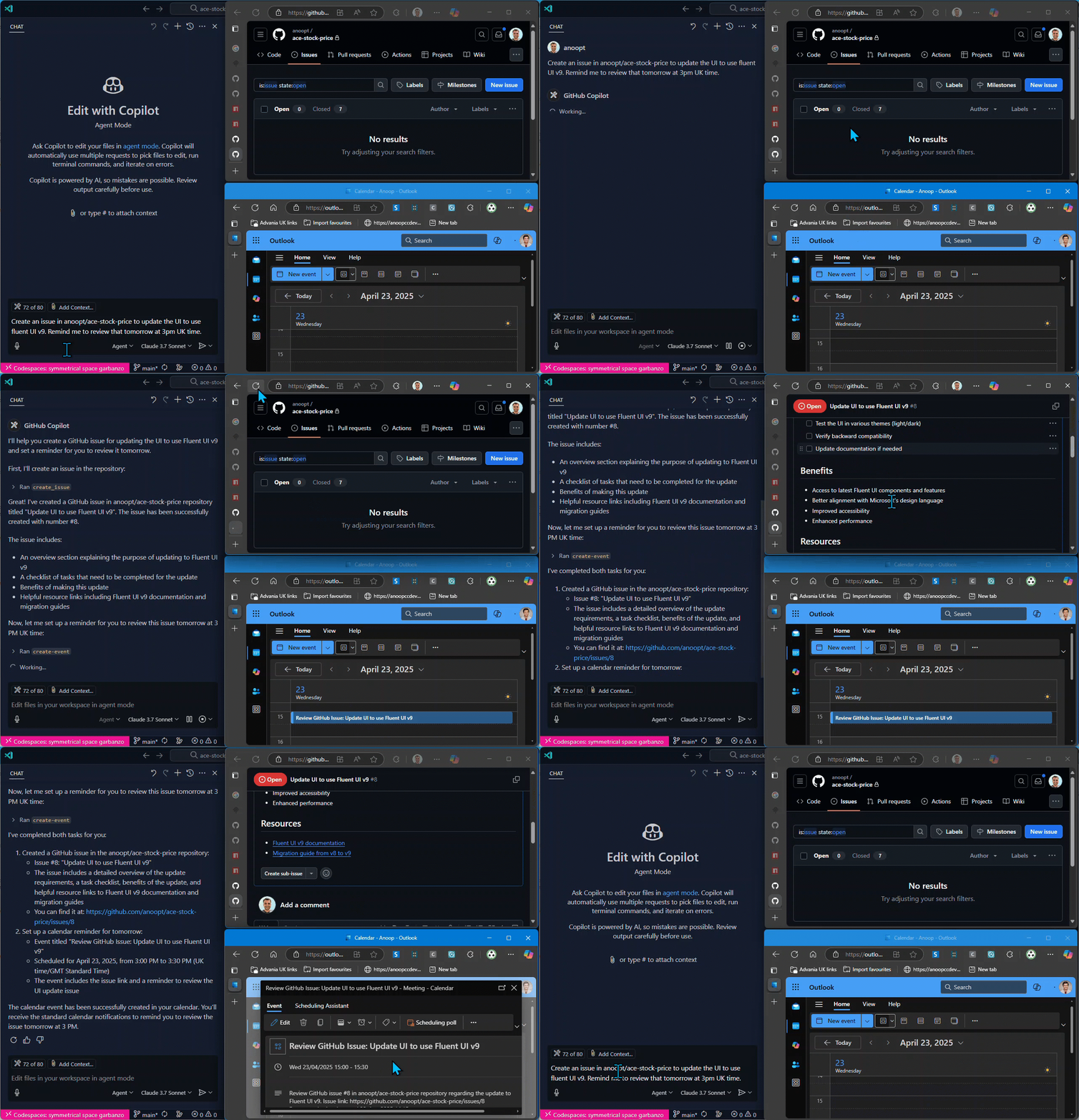
Crea un problema en el repositorio de la organización/repositorio titulado "Corregir error de paginación en el panel de usuario" con la descripción "Los usuarios informan que ven entradas duplicadas al navegar entre páginas". Luego, programa un recordatorio en el calendario para que revise este problema mañana a las 15:00.
Related MCP server: M365 Calendar MCP Server
Manifestación
Herramientas
find-personEncuentra la dirección de correo electrónico de una persona por su nombre
Entrada:
name(cadena)Devuelve: Lista de personas coincidentes con nombres y direcciones de correo electrónico
create-eventCrear un evento de calendario usando la API de Microsoft Graph
Entradas:
subject(cadena): Asunto del evento del calendariobody(cadena): Contenido/cuerpo del evento del calendariostart(opcional): fecha y hora en formato ISO (por ejemplo, 2025-04-20T12:00:00)end(opcional): fecha y hora en formato ISO (p. ej., 2025-04-20T13:00:00)timeZone(opcional): Zona horaria del evento (predeterminada: "Hora estándar GMT")
Devoluciones: Detalles del evento, incluyendo URL e ID
create-event-with-attendeesCree un evento de calendario con asistentes mediante la API de Microsoft Graph
Entradas:
subject(cadena): Asunto del evento del calendariobody(cadena): Contenido/cuerpo del evento del calendariostart(opcional): fecha y hora en formato ISO (por ejemplo, 2025-04-20T12:00:00)end(opcional): fecha y hora en formato ISO (p. ej., 2025-04-20T13:00:00)timeZone(opcional): Zona horaria del evento (predeterminada: "Hora estándar GMT")location(opcional): Ubicación del eventoattendees: Matriz de { correo electrónico, nombre (opcional), tipo (opcional) }
Devoluciones: Detalles del evento, incluyendo URL, ID y lista de asistentes
get-eventObtener detalles de un evento del calendario por su ID
Aporte:
eventId(cadena): ID del evento a recuperar
Devoluciones: Información detallada del evento, incluyendo tema, hora, asistentes y URL
list-eventsLista de eventos del calendario con filtrado opcional
Entradas:
subject(opcional): Filtrar eventos por tema que contengan este textostartDate(opcional): fecha de inicio en formato ISO (por ejemplo, 2025-04-20T00:00:00) para filtrar eventosendDate(opcional): Fecha de finalización en formato ISO (por ejemplo, 2025-04-20T23:59:59) para filtrar eventos hastamaxResults(opcional): Número máximo de eventos a devolver
Devuelve: Lista de eventos del calendario con información básica e identificaciones
delete-eventEliminar un evento del calendario
Aporte:
eventId(cadena): ID del evento a eliminar
Devoluciones: Confirmación de eliminación del evento
update-eventActualizar un evento de calendario existente
Entradas:
eventId(cadena): ID del evento a actualizarsubject(opcional): Nuevo asunto para el evento del calendariobody(opcional): Nuevo contenido/cuerpo para el evento del calendariostart(opcional): Nueva hora de inicio en formato ISO (por ejemplo, 2025-04-20T12:00:00)end(opcional): Nueva hora de finalización en formato ISO (por ejemplo, 2025-04-20T13:00:00)timeZone(opcional): Nueva zona horaria para el eventolocation(opcional): Nueva ubicación para el evento.attendees(opcional): Matriz de { correo electrónico, nombre (opcional), tipo (opcional) }
Devoluciones: Detalles del evento actualizados que muestran los cambios
update-event-attendeesAgregar o eliminar asistentes de un evento del calendario
Entradas:
eventId(cadena): ID del evento a actualizaraddAttendees(opcional): Matriz de asistentes para agregar: { correo electrónico, nombre (opcional), tipo (opcional) }removeAttendees(opcional): Matriz de direcciones de correo electrónico para eliminar del evento
Devoluciones: Información actualizada de los asistentes al evento
Configuración
Configuración de la API de Microsoft Graph
Registrar una aplicación en el Portal de Microsoft Azure
Crear un secreto de cliente
Otorgar los permisos necesarios (Microsoft Graph API > Permisos de aplicación > Calendars.ReadWrite, People.Read.All, User.ReadBasic.All)
Anote su ID de cliente, secreto de cliente e ID de inquilino
Uso con VS Code
Node.js local
Puede ejecutar el servidor MCP directamente con Node.js desde su compilación local:
Clonar el repositorio y construir el proyecto:
git clone https://github.com/anoopt/outlook-meetings-scheduler-mcp-server.git
cd outlook-meetings-scheduler-mcp-server
npm install
npm run buildPara la instalación manual, agregue el siguiente bloque JSON a su archivo de configuración de usuario (JSON) en VS Code. Para ello, presione
Ctrl + Shift + Py escriba Preferencias:Open User Settings (JSON).
Opcionalmente, puede agregarlo a un archivo llamado .vscode/mcp.json en su espacio de trabajo. Esto le permitirá compartir la configuración con otros:
{
"mcpServers": {
"outlook-meetings-scheduler": {
"command": "node",
"args": [
"/path/to/outlook-meetings-scheduler-mcp-server/build/index.js"
],
"env": {
"CLIENT_ID": "<YOUR_CLIENT_ID>",
"CLIENT_SECRET": "<YOUR_CLIENT_SECRET>",
"TENANT_ID": "<YOUR_TENANT_ID>",
"USER_EMAIL": "<YOUR_EMAIL>"
}
}
}
}Reemplace /path/to/outlook-meetings-scheduler-mcp-server con la ruta absoluta a su repositorio clonado.
Estibador
Ejecute el servidor MCP con Docker localmente. Cree la imagen de Docker con el siguiente comando:
docker build -t mcp/outlook-meetings-scheduler .Para la instalación manual, agregue el siguiente bloque JSON a su archivo de configuración de usuario (JSON) en VS Code. Para ello, presione Ctrl + Shift + P y escriba Preferencias: Open User Settings (JSON) .
Opcionalmente, puede agregarlo a un archivo llamado .vscode/mcp.json en su espacio de trabajo. Esto le permitirá compartir la configuración con otros.
{
"inputs": [
{
"type": "promptString",
"id": "client_secret",
"description": "Enter the client secret",
"password": true
}
],
"servers": {
"outlook-meetings-scheduler": {
"command": "docker",
"args": [
"run",
"-i",
"--rm",
"-e",
"CLIENT_ID",
"-e",
"CLIENT_SECRET",
"-e",
"TENANT_ID",
"-e",
"USER_EMAIL",
"mcp/outlook-meetings-scheduler"
],
"env": {
"USER_EMAIL": "<YOUR_EMAIL>",
"CLIENT_ID": "<YOUR_CLIENT_ID>",
"CLIENT_SECRET": "${input:client_secret}",
"TENANT_ID": "<YOUR_TENANT_ID>"
}
}
}
}NPX
{
"mcpServers": {
"outlook-meetings-scheduler": {
"command": "npx",
"args": [
"-y",
"outlook-meetings-scheduler"
],
"env": {
"CLIENT_ID": "<YOUR_CLIENT_ID>",
"CLIENT_SECRET": "<YOUR_CLIENT_SECRET>",
"TENANT_ID": "<YOUR_TENANT_ID>",
"USER_EMAIL": "<YOUR_EMAIL>"
}
}
}
}Uso con Claude Desktop
Estibador
Ejecute el servidor MCP con Docker localmente. Cree la imagen de Docker con el siguiente comando:
docker build -t mcp/outlook-meetings-scheduler .Agregue lo siguiente a su
claude_desktop_config.json:
{
"mcpServers": {
"outlook-meetings-scheduler": {
"command": "docker",
"args": [
"run",
"-i",
"--rm",
"-e",
"CLIENT_ID",
"-e",
"CLIENT_SECRET",
"-e",
"TENANT_ID",
"-e",
"USER_EMAIL",
"mcp/outlook-meetings-scheduler"
],
"env": {
"CLIENT_ID": "<YOUR_CLIENT_ID>",
"CLIENT_SECRET": "<YOUR_CLIENT_SECRET>",
"TENANT_ID": "<YOUR_TENANT_ID>",
"USER_EMAIL": "<YOUR_EMAIL>"
}
}
}
}NPX
{
"mcpServers": {
"outlook-meetings-scheduler": {
"command": "npx",
"args": [
"-y",
"outlook-meetings-scheduler"
],
"env": {
"CLIENT_ID": "<YOUR_CLIENT_ID>",
"CLIENT_SECRET": "<YOUR_CLIENT_SECRET>",
"TENANT_ID": "<YOUR_TENANT_ID>",
"USER_EMAIL": "<YOUR_EMAIL>"
}
}
}
}Escenarios de ejemplo
Integración con el servidor MCP de GitHub
Puede combinar este servidor MCP con otros servidores MCP como el servidor MCP de GitHub para lograr flujos de trabajo potentes.
Crear un problema y programar una revisión de seguimiento
Create an issue in the organization/repo repository titled "Fix pagination bug in user dashboard" with the description "Users report seeing duplicate entries when navigating between pages." Then schedule a calendar reminder for me to review this issue tomorrow at 3 PM.Esto hará lo siguiente:
Utilice el servidor MCP de GitHub para crear el problema
Utilice el servidor MCP del Programador de reuniones de Outlook para crear un evento de calendario para la revisión
Programar una reunión de revisión de código basada en una solicitud de extracción
Find the open PR about the authentication feature in the organization/app-backend repository and schedule a code review meeting with the contributors for tomorrow morning.Esto hará lo siguiente:
Utilice el servidor MCP de GitHub para encontrar la solicitud de extracción e identificar a los contribuyentes
Utilice el servidor MCP del Programador de reuniones de Outlook para programar una reunión con esos miembros del equipo
Configuración para instalación de múltiples MCP
Para utilizar los servidores MCP de GitHub y Outlook juntos:
{
"mcpServers": {
"outlook-meetings-scheduler": {
"command": "npx",
"args": [
"-y",
"outlook-meetings-scheduler"
],
"env": {
"CLIENT_ID": "<YOUR_CLIENT_ID>",
"CLIENT_SECRET": "<YOUR_CLIENT_SECRET>",
"TENANT_ID": "<YOUR_TENANT_ID>",
"USER_EMAIL": "<YOUR_EMAIL>"
}
},
"github": {
"command": "npx",
"args": [
"-y",
"@modelcontextprotocol/github-mcp"
],
"env": {
"GITHUB_TOKEN": "<YOUR_GITHUB_TOKEN>"
}
}
}
}Uso directo
Cómo encontrar el correo electrónico de un colega
I need to schedule a meeting with John Smith. Can you find his email address?Crear un evento de calendario simple
Schedule a meeting titled "Weekly Team Sync" for next Monday at 10 AM with the following agenda:
- Project updates
- Resource allocation
- Questions and concernsProgramar una reunión con un solo asistente
Schedule a 1:1 meeting with Sarah for tomorrow at 3 PM.Esto encontrará la dirección de correo electrónico de Sarah y creará un evento de calendario. Para encontrarla, el servidor MCP usará la herramienta " find-person ", que usa la API de Microsoft Graph para encontrar personas relevantes para USER_EMAIL o busca el nombre en la organización.
Programar una reunión con varios asistentes
Create a meeting called "Project Kickoff" for tomorrow at 2 PM.
Add sarah.jones@example.com and mike.thompson@example.com as required attendees.
The agenda is:
1. Project overview
2. Timeline discussion
3. Role assignments
4. Next stepsConstruir
# Install dependencies
npm install
# Build the project
npm run build
# Docker build
docker build -t mcp/outlook-meetings-scheduler .Licencia
Este servidor MCP cuenta con la licencia ISC. Para más detalles, consulte el archivo de licencia en el repositorio del proyecto.
Descargo de responsabilidad
Este servidor MCP no está afiliado a Microsoft ni a la API de Microsoft Graph. Úselo bajo su propia responsabilidad. Asegúrese de cumplir con las políticas y directrices de su organización al usar esta herramienta.
Available Tools
8 toolscreate-eventC
Create a calendar event using Microsoft Graph API
| Name | Required | Description | Default |
|---|---|---|---|
| body | Yes | Content/body of the calendar event | |
| end | No | End time in ISO format (e.g. 2025-04-20T13:00:00). Defaults to next business day at 1PM | |
| start | No | Start time in ISO format (e.g. 2025-04-20T12:00:00). Defaults to next business day at noon | |
| subject | Yes | Subject of the calendar event | |
| timeZone | No | Time zone for the event. Defaults to GMT Standard Time |
TDQS
Does the description disclose side effects, auth requirements, rate limits, or destructive behavior?
No annotations are provided, so the description carries full burden. It states 'Create' which implies a write/mutation operation, but doesn't disclose behavioral traits like required permissions, whether the event is saved immediately, error handling, or rate limits. The description adds minimal value beyond the basic action.
Agents need to know what a tool does to the world before calling it. Descriptions should go beyond structured annotations to explain consequences.
Is the description appropriately sized, front-loaded, and free of redundancy?
The description is a single, efficient sentence that directly states the tool's purpose without unnecessary words. It's appropriately sized and front-loaded with the core action.
Shorter descriptions cost fewer tokens and are easier for agents to parse. Every sentence should earn its place.
Given the tool's complexity, does the description cover enough for an agent to succeed on first attempt?
Given this is a mutation tool (create operation) with no annotations and no output schema, the description is incomplete. It doesn't explain what happens after creation, error conditions, or return values. For a tool that modifies data, more behavioral context is needed.
Complex tools with many parameters or behaviors need more documentation. Simple tools need less. This dimension scales expectations accordingly.
Does the description clarify parameter syntax, constraints, interactions, or defaults beyond what the schema provides?
Schema description coverage is 100%, so the schema already documents all 5 parameters thoroughly with descriptions and defaults. The description adds no additional meaning about parameters beyond what's in the schema, meeting the baseline of 3 when schema coverage is high.
Input schemas describe structure but not intent. Descriptions should explain non-obvious parameter relationships and valid value ranges.
Does the description clearly state what the tool does and how it differs from similar tools?
The description clearly states the verb ('Create') and resource ('calendar event') with the specific API ('Microsoft Graph API'). It distinguishes from siblings like 'update-event' or 'delete-event' by specifying creation, but doesn't explicitly differentiate from 'create-event-with-attendees' which suggests a more specialized version.
Agents choose between tools based on descriptions. A clear purpose with a specific verb and resource helps agents select the right tool.
Does the description explain when to use this tool, when not to, or what alternatives exist?
The description provides no guidance on when to use this tool versus alternatives. It doesn't mention when to choose 'create-event-with-attendees' for events with attendees, or when to use 'update-event' for modifications. No prerequisites or context for usage are provided.
Agents often have multiple tools that could apply. Explicit usage guidance like "use X instead of Y when Z" prevents misuse.
create-event-with-attendeesC
Create a calendar event with attendees using Microsoft Graph API
| Name | Required | Description | Default |
|---|---|---|---|
| attendees | Yes | List of attendees for the event | |
| body | Yes | Content/body of the calendar event | |
| end | No | End time in ISO format (e.g. 2025-04-20T13:00:00). Defaults to next business day at 1PM | |
| location | No | Location of the event | |
| start | No | Start time in ISO format (e.g. 2025-04-20T12:00:00). Defaults to next business day at noon | |
| subject | Yes | Subject of the calendar event | |
| timeZone | No | Time zone for the event. Defaults to GMT Standard Time |
TDQS
Does the description disclose side effects, auth requirements, rate limits, or destructive behavior?
No annotations are provided, so the description carries full burden. It states it creates an event with attendees via Microsoft Graph API, implying a write operation, but doesn't disclose permissions needed, rate limits, whether it sends invitations, or what happens on failure. For a mutation tool with zero annotation coverage, this is inadequate.
Agents need to know what a tool does to the world before calling it. Descriptions should go beyond structured annotations to explain consequences.
Is the description appropriately sized, front-loaded, and free of redundancy?
Single sentence, front-loaded with the core action, zero waste. It efficiently conveys the tool's purpose without unnecessary elaboration.
Shorter descriptions cost fewer tokens and are easier for agents to parse. Every sentence should earn its place.
Given the tool's complexity, does the description cover enough for an agent to succeed on first attempt?
For a mutation tool with 7 parameters, no annotations, and no output schema, the description is insufficient. It doesn't explain return values, error handling, or behavioral details like whether attendees receive invitations. Given the complexity and lack of structured data, more context is needed.
Complex tools with many parameters or behaviors need more documentation. Simple tools need less. This dimension scales expectations accordingly.
Does the description clarify parameter syntax, constraints, interactions, or defaults beyond what the schema provides?
Schema description coverage is 100%, so the schema fully documents all 7 parameters. The description adds no additional parameter semantics beyond what's in the schema, such as explaining attendee invitation behavior or event creation constraints. Baseline 3 is appropriate when schema does all the work.
Input schemas describe structure but not intent. Descriptions should explain non-obvious parameter relationships and valid value ranges.
Does the description clearly state what the tool does and how it differs from similar tools?
The description clearly states the action ('Create') and resource ('calendar event with attendees'), specifying it uses Microsoft Graph API. It distinguishes from 'create-event' by explicitly mentioning attendees, but doesn't fully differentiate from 'update-event-attendees' which also handles attendees.
Agents choose between tools based on descriptions. A clear purpose with a specific verb and resource helps agents select the right tool.
Does the description explain when to use this tool, when not to, or what alternatives exist?
No guidance on when to use this tool versus alternatives like 'create-event' (without attendees) or 'update-event-attendees'. The description mentions attendees but doesn't provide explicit usage context or exclusions relative to sibling tools.
Agents often have multiple tools that could apply. Explicit usage guidance like "use X instead of Y when Z" prevents misuse.
delete-eventC
Delete a calendar event
| Name | Required | Description | Default |
|---|---|---|---|
| eventId | Yes | ID of the event to delete |
TDQS
Does the description disclose side effects, auth requirements, rate limits, or destructive behavior?
No annotations are provided, so the description carries the full burden of behavioral disclosure. While 'delete' implies a destructive mutation, the description doesn't specify whether this action is reversible, requires specific permissions, has side effects (e.g., on attendees), or what happens on success/failure. For a destructive tool with zero annotation coverage, this is a significant gap in transparency.
Agents need to know what a tool does to the world before calling it. Descriptions should go beyond structured annotations to explain consequences.
Is the description appropriately sized, front-loaded, and free of redundancy?
The description is a single, direct sentence ('Delete a calendar event') with zero wasted words. It is front-loaded and efficiently communicates the core action without unnecessary elaboration, making it easy for an agent to parse quickly.
Shorter descriptions cost fewer tokens and are easier for agents to parse. Every sentence should earn its place.
Given the tool's complexity, does the description cover enough for an agent to succeed on first attempt?
Given the complexity of a destructive operation, lack of annotations, and no output schema, the description is incomplete. It doesn't address critical aspects like error handling, return values, or behavioral nuances (e.g., confirmation prompts). For a tool that permanently removes data, more context is needed to ensure safe and correct usage by an agent.
Complex tools with many parameters or behaviors need more documentation. Simple tools need less. This dimension scales expectations accordingly.
Does the description clarify parameter syntax, constraints, interactions, or defaults beyond what the schema provides?
The input schema has 100% description coverage, with the 'eventId' parameter clearly documented in the schema. The description adds no additional meaning beyond what the schema provides (e.g., format examples, source of the ID, or validation rules). According to the rules, when schema coverage is high (>80%), the baseline score is 3, which applies here as the description doesn't compensate with extra param details.
Input schemas describe structure but not intent. Descriptions should explain non-obvious parameter relationships and valid value ranges.
Does the description clearly state what the tool does and how it differs from similar tools?
The description 'Delete a calendar event' clearly states the action (delete) and resource (calendar event), making the purpose immediately understandable. It distinguishes from siblings like 'create-event' or 'update-event' by specifying deletion. However, it doesn't explicitly mention what distinguishes it from other destructive operations or provide additional context about the scope of deletion.
Agents choose between tools based on descriptions. A clear purpose with a specific verb and resource helps agents select the right tool.
Does the description explain when to use this tool, when not to, or what alternatives exist?
The description provides no guidance on when to use this tool versus alternatives. It doesn't mention prerequisites (e.g., needing an event ID from 'get-event' or 'list-events'), when not to use it (e.g., for soft deletion), or how it compares to siblings like 'update-event' for modifying instead of deleting. This leaves the agent without context for tool selection.
Agents often have multiple tools that could apply. Explicit usage guidance like "use X instead of Y when Z" prevents misuse.
find-personC
Find a person's email address by their name
| Name | Required | Description | Default |
|---|---|---|---|
| name | Yes | Name or partial name of the person to find |
TDQS
Does the description disclose side effects, auth requirements, rate limits, or destructive behavior?
No annotations are provided, so the description carries the full burden of behavioral disclosure. The description only states what the tool does ('Find a person's email address'), but doesn't disclose important behavioral aspects like what happens when multiple matches are found, whether it's case-sensitive, what format the email address is returned in, or any error conditions. For a lookup tool with zero annotation coverage, this is a significant gap.
Agents need to know what a tool does to the world before calling it. Descriptions should go beyond structured annotations to explain consequences.
Is the description appropriately sized, front-loaded, and free of redundancy?
The description is extremely concise - a single sentence that directly states the tool's purpose. There's no wasted words or unnecessary elaboration. It's front-loaded with the essential information and doesn't include any extraneous details.
Shorter descriptions cost fewer tokens and are easier for agents to parse. Every sentence should earn its place.
Given the tool's complexity, does the description cover enough for an agent to succeed on first attempt?
Given that there are no annotations and no output schema, the description is incomplete for effective tool usage. While it states what the tool does, it doesn't provide enough context about the behavior, return format, or error handling. For a lookup tool that presumably returns email addresses, the description should ideally specify what format the result comes in or what happens when no match is found.
Complex tools with many parameters or behaviors need more documentation. Simple tools need less. This dimension scales expectations accordingly.
Does the description clarify parameter syntax, constraints, interactions, or defaults beyond what the schema provides?
The schema description coverage is 100%, with the single parameter 'name' clearly documented as 'Name or partial name of the person to find'. The description adds minimal value beyond what's already in the schema - it mentions 'by their name' which is redundant with the parameter documentation. Since schema coverage is high, the baseline score of 3 is appropriate.
Input schemas describe structure but not intent. Descriptions should explain non-obvious parameter relationships and valid value ranges.
Does the description clearly state what the tool does and how it differs from similar tools?
The description clearly states the tool's purpose: 'Find a person's email address by their name'. It specifies both the action ('Find') and the resource ('person's email address'), making it easy to understand what the tool does. However, it doesn't distinguish this tool from any potential sibling tools that might also involve finding people or email addresses, which prevents a perfect score.
Agents choose between tools based on descriptions. A clear purpose with a specific verb and resource helps agents select the right tool.
Does the description explain when to use this tool, when not to, or what alternatives exist?
The description provides no guidance on when to use this tool versus alternatives. It doesn't mention any prerequisites, limitations, or suggest other tools for related tasks. While the sibling tools are all event-related (create, delete, get, list, update events), there's no explicit comparison or context provided for when to choose this person-finding tool over other methods.
Agents often have multiple tools that could apply. Explicit usage guidance like "use X instead of Y when Z" prevents misuse.
get-eventC
Get details of a calendar event by its ID
| Name | Required | Description | Default |
|---|---|---|---|
| eventId | Yes | ID of the event to retrieve |
TDQS
Does the description disclose side effects, auth requirements, rate limits, or destructive behavior?
With no annotations, the description carries full burden but only states the basic action. It doesn't disclose behavioral traits like authentication needs, rate limits, error handling, or what details are returned (e.g., title, time, attendees), which is inadequate for a read operation with no output schema.
Agents need to know what a tool does to the world before calling it. Descriptions should go beyond structured annotations to explain consequences.
Is the description appropriately sized, front-loaded, and free of redundancy?
The description is a single, efficient sentence that front-loads the purpose without waste. It's appropriately sized for a simple tool, making it easy for an agent to parse quickly.
Shorter descriptions cost fewer tokens and are easier for agents to parse. Every sentence should earn its place.
Given the tool's complexity, does the description cover enough for an agent to succeed on first attempt?
Given no annotations and no output schema, the description is incomplete. It doesn't explain what details are returned (e.g., event properties), potential errors, or usage context, leaving gaps for the agent to infer behavior in a server with multiple event-related tools.
Complex tools with many parameters or behaviors need more documentation. Simple tools need less. This dimension scales expectations accordingly.
Does the description clarify parameter syntax, constraints, interactions, or defaults beyond what the schema provides?
Schema description coverage is 100%, so the schema already documents the 'eventId' parameter. The description adds no additional meaning beyond implying retrieval by ID, which aligns with the schema. Baseline 3 is appropriate as the schema handles parameter documentation.
Input schemas describe structure but not intent. Descriptions should explain non-obvious parameter relationships and valid value ranges.
Does the description clearly state what the tool does and how it differs from similar tools?
The description clearly states the action ('Get details') and resource ('calendar event'), specifying it retrieves by ID. However, it doesn't differentiate from sibling tools like 'list-events' or 'find-person' that might also retrieve event information, so it lacks sibling differentiation.
Agents choose between tools based on descriptions. A clear purpose with a specific verb and resource helps agents select the right tool.
Does the description explain when to use this tool, when not to, or what alternatives exist?
No guidance is provided on when to use this tool versus alternatives. For example, it doesn't mention using 'list-events' for multiple events or 'find-person' for person-related queries, leaving the agent without context for selection among siblings.
Agents often have multiple tools that could apply. Explicit usage guidance like "use X instead of Y when Z" prevents misuse.
list-eventsC
List calendar events with optional filtering
| Name | Required | Description | Default |
|---|---|---|---|
| endDate | No | End date in ISO format (e.g. 2025-04-20T23:59:59) to filter events until | |
| maxResults | No | Maximum number of events to return | |
| startDate | No | Start date in ISO format (e.g. 2025-04-20T00:00:00) to filter events from | |
| subject | No | Filter events by subject containing this text |
TDQS
Does the description disclose side effects, auth requirements, rate limits, or destructive behavior?
No annotations are provided, so the description carries the full burden of behavioral disclosure. While 'List' implies a read operation, it doesn't specify whether this requires authentication, how results are ordered, if pagination is supported, what happens with large result sets, or the format of returned data. For a list tool with zero annotation coverage, this leaves significant gaps in understanding its behavior.
Agents need to know what a tool does to the world before calling it. Descriptions should go beyond structured annotations to explain consequences.
Is the description appropriately sized, front-loaded, and free of redundancy?
The description is a single, efficient sentence that gets straight to the point without any wasted words. It's appropriately sized for a simple list tool and front-loads the core functionality.
Shorter descriptions cost fewer tokens and are easier for agents to parse. Every sentence should earn its place.
Given the tool's complexity, does the description cover enough for an agent to succeed on first attempt?
Given the tool has 4 parameters, no annotations, and no output schema, the description is insufficiently complete. It doesn't explain what the output looks like (e.g., list format, included fields), doesn't address authentication requirements, and provides minimal guidance on usage. For a list tool in a calendar context with multiple sibling tools, more context is needed.
Complex tools with many parameters or behaviors need more documentation. Simple tools need less. This dimension scales expectations accordingly.
Does the description clarify parameter syntax, constraints, interactions, or defaults beyond what the schema provides?
The description mentions 'optional filtering' which aligns with the parameters in the schema, but adds no specific meaning beyond what the schema already provides. With 100% schema description coverage, the baseline is 3, and the description doesn't enhance understanding of parameter interactions, default behaviors, or filtering logic.
Input schemas describe structure but not intent. Descriptions should explain non-obvious parameter relationships and valid value ranges.
Does the description clearly state what the tool does and how it differs from similar tools?
The description clearly states the verb ('List') and resource ('calendar events'), making the purpose immediately understandable. However, it doesn't distinguish this tool from sibling tools like 'get-event' or 'find-person' which might also retrieve event-related information, so it doesn't achieve the highest score.
Agents choose between tools based on descriptions. A clear purpose with a specific verb and resource helps agents select the right tool.
Does the description explain when to use this tool, when not to, or what alternatives exist?
The description mentions 'optional filtering' which implies some context for usage, but provides no explicit guidance on when to use this tool versus alternatives like 'get-event' (for single events) or 'find-person' (which might find events indirectly). There's no mention of prerequisites, limitations, or typical use cases.
Agents often have multiple tools that could apply. Explicit usage guidance like "use X instead of Y when Z" prevents misuse.
update-eventC
Update an existing calendar event
| Name | Required | Description | Default |
|---|---|---|---|
| attendees | No | List of attendees to add or update for the event | |
| body | No | New content/body for the calendar event | |
| end | No | New end time in ISO format (e.g. 2025-04-20T13:00:00) | |
| eventId | Yes | ID of the event to update | |
| location | No | New location for the event | |
| start | No | New start time in ISO format (e.g. 2025-04-20T12:00:00) | |
| subject | No | New subject for the calendar event | |
| timeZone | No | New time zone for the event |
TDQS
Does the description disclose side effects, auth requirements, rate limits, or destructive behavior?
With no annotations provided, the description carries full burden for behavioral disclosure. While 'update' implies mutation, it doesn't specify whether this requires specific permissions, whether changes are reversible, what happens to fields not mentioned in the update (partial vs. full replacement), or what the response looks like. For a mutation tool with zero annotation coverage, this is a significant gap.
Agents need to know what a tool does to the world before calling it. Descriptions should go beyond structured annotations to explain consequences.
Is the description appropriately sized, front-loaded, and free of redundancy?
The description is a single, efficient sentence that states the core purpose without any wasted words. It's appropriately sized and front-loaded with the essential information.
Shorter descriptions cost fewer tokens and are easier for agents to parse. Every sentence should earn its place.
Given the tool's complexity, does the description cover enough for an agent to succeed on first attempt?
For a mutation tool with 8 parameters, no annotations, and no output schema, the description is insufficient. It doesn't address behavioral aspects like permissions, side effects, or response format. While the schema covers parameters well, the description fails to provide the contextual information needed for safe and effective use of this update operation.
Complex tools with many parameters or behaviors need more documentation. Simple tools need less. This dimension scales expectations accordingly.
Does the description clarify parameter syntax, constraints, interactions, or defaults beyond what the schema provides?
The schema description coverage is 100%, so the schema already documents all 8 parameters thoroughly. The description adds no additional parameter information beyond what's in the schema. According to guidelines, when schema coverage is high (>80%), the baseline score is 3 even with no parameter info in the description.
Input schemas describe structure but not intent. Descriptions should explain non-obvious parameter relationships and valid value ranges.
Does the description clearly state what the tool does and how it differs from similar tools?
The description clearly states the verb ('update') and resource ('existing calendar event'), making the purpose immediately understandable. However, it doesn't differentiate this tool from its sibling 'update-event-attendees' which also updates events but focuses specifically on attendees.
Agents choose between tools based on descriptions. A clear purpose with a specific verb and resource helps agents select the right tool.
Does the description explain when to use this tool, when not to, or what alternatives exist?
The description provides no guidance about when to use this tool versus alternatives like 'update-event-attendees' (for attendee-only updates) or 'create-event' (for new events). There's no mention of prerequisites, such as needing an existing event ID, or when partial versus full updates are appropriate.
Agents often have multiple tools that could apply. Explicit usage guidance like "use X instead of Y when Z" prevents misuse.
update-event-attendeesC
Add or remove attendees from a calendar event
| Name | Required | Description | Default |
|---|---|---|---|
| addAttendees | No | List of attendees to add to the event | |
| eventId | Yes | ID of the event to update | |
| removeAttendees | No | List of email addresses to remove from the event |
TDQS
Does the description disclose side effects, auth requirements, rate limits, or destructive behavior?
With no annotations provided, the description carries full burden for behavioral disclosure. While 'Add or remove attendees' implies mutation, it doesn't specify permission requirements, whether changes are reversible, how conflicts are handled, or what happens to event notifications. For a mutation tool with zero annotation coverage, this leaves significant behavioral gaps.
Agents need to know what a tool does to the world before calling it. Descriptions should go beyond structured annotations to explain consequences.
Is the description appropriately sized, front-loaded, and free of redundancy?
The description is a single, efficient sentence that communicates the core functionality without any wasted words. It's appropriately sized for the tool's scope and gets straight to the point with clear subject-verb-object structure.
Shorter descriptions cost fewer tokens and are easier for agents to parse. Every sentence should earn its place.
Given the tool's complexity, does the description cover enough for an agent to succeed on first attempt?
For a mutation tool with no annotations and no output schema, the description is insufficient. It doesn't address permission requirements, error conditions, response format, or how this tool differs from sibling update tools. Given the complexity of modifying calendar events and the lack of structured safety information, more contextual guidance is needed.
Complex tools with many parameters or behaviors need more documentation. Simple tools need less. This dimension scales expectations accordingly.
Does the description clarify parameter syntax, constraints, interactions, or defaults beyond what the schema provides?
Schema description coverage is 100%, so the schema already fully documents all three parameters. The description mentions 'attendees' which aligns with the parameters but adds no additional semantic context beyond what's in the schema. This meets the baseline expectation when schema coverage is complete.
Input schemas describe structure but not intent. Descriptions should explain non-obvious parameter relationships and valid value ranges.
Does the description clearly state what the tool does and how it differs from similar tools?
The description clearly states the action ('Add or remove attendees') and resource ('from a calendar event'), making the purpose immediately understandable. However, it doesn't distinguish this tool from sibling tools like 'update-event' which might also handle attendee updates, leaving some ambiguity about specialization.
Agents choose between tools based on descriptions. A clear purpose with a specific verb and resource helps agents select the right tool.
Does the description explain when to use this tool, when not to, or what alternatives exist?
The description provides no guidance on when to use this tool versus alternatives like 'update-event' or 'create-event-with-attendees'. There's no mention of prerequisites, permissions needed, or scenarios where this specific attendee-focused update is preferred over broader event updates.
Agents often have multiple tools that could apply. Explicit usage guidance like "use X instead of Y when Z" prevents misuse.
Tool Schema Changelog
Recent tool additions, removals, and schema changes observed during successful MCP inspections.
8 tool updates
v1.0.0- First observed
create-event - First observed
create-event-with-attendees - First observed
delete-event - First observed
find-person - First observed
get-event - First observed
list-events - First observed
update-event - First observed
update-event-attendees
TDQS
Scored across 8 tools
Most tools have distinct purposes, but there is some overlap between create-event and create-event-with-attendees, which could cause confusion about when to use each. The other tools are clearly differentiated by their specific actions on calendar events or person lookup.
All tool names follow a consistent verb-noun pattern using snake_case, such as create-event, delete-event, and update-event-attendees. This predictability makes it easy for agents to understand and select the appropriate tool.
With 8 tools, the server is well-scoped for scheduling meetings in Outlook, covering essential CRUD operations for events, attendee management, and person lookup. Each tool serves a clear purpose without being overwhelming.
The tool set provides complete coverage for the domain, including create, read, update, and delete for events, plus specific tools for managing attendees and finding people. There are no obvious gaps that would hinder agent workflows in scheduling meetings.
Maintenance
Related MCP Connectors
Manage Microsoft 365 email, calendar, contacts and inbox rules via the Graph API with OAuth 2.0.
Permissioned access to Outlook, OneDrive and Teams via the user's own Microsoft account
Meeting scheduling across time zones: slot finding, DST checks, .ics invites.
Merged free/busy, find mutual time, propose bookings with human approval. Never event contents.
Related MCP Servers
- FlicenseNot gradedqualityDmaintenanceEnables AI assistants to intelligently schedule meetings by checking Microsoft Outlook calendars, finding available time slots across multiple participants, and automatically booking meetings with Teams integration. Uses Microsoft Graph API with smart fallback logic for optimal scheduling.1-
- FlicenseNot gradedqualityNot gradedmaintenanceEnables AI assistants to manage Microsoft 365 and Outlook calendars through the Microsoft Graph API. It supports comprehensive event operations including listing, creating, and updating meetings, as well as finding available slots across multiple attendees.-
- AlicenseBqualityCmaintenanceEnables AI assistants to manage Microsoft Outlook email and calendar through the Microsoft Graph API, including reading, sending, searching emails, and handling calendar events.43185 npm27MIT
- AlicenseNot gradedqualityBmaintenanceEnables interaction with Outlook / Microsoft 365 calendar, allowing users to list events, get event details, find meeting times, and access calendar and profile information.380 npm1MIT