Glama
VinayakTiwari1103

MCP-Smallest.ai

画像

MCP-Smallest.ai

Smallest.ai API統合のためのモデルコンテキストプロトコル(MCP)サーバー実装。このプロジェクトは、Smallest.aiのナレッジベース管理システムと連携するための標準化されたインターフェースを提供します。

建築

システムの概要
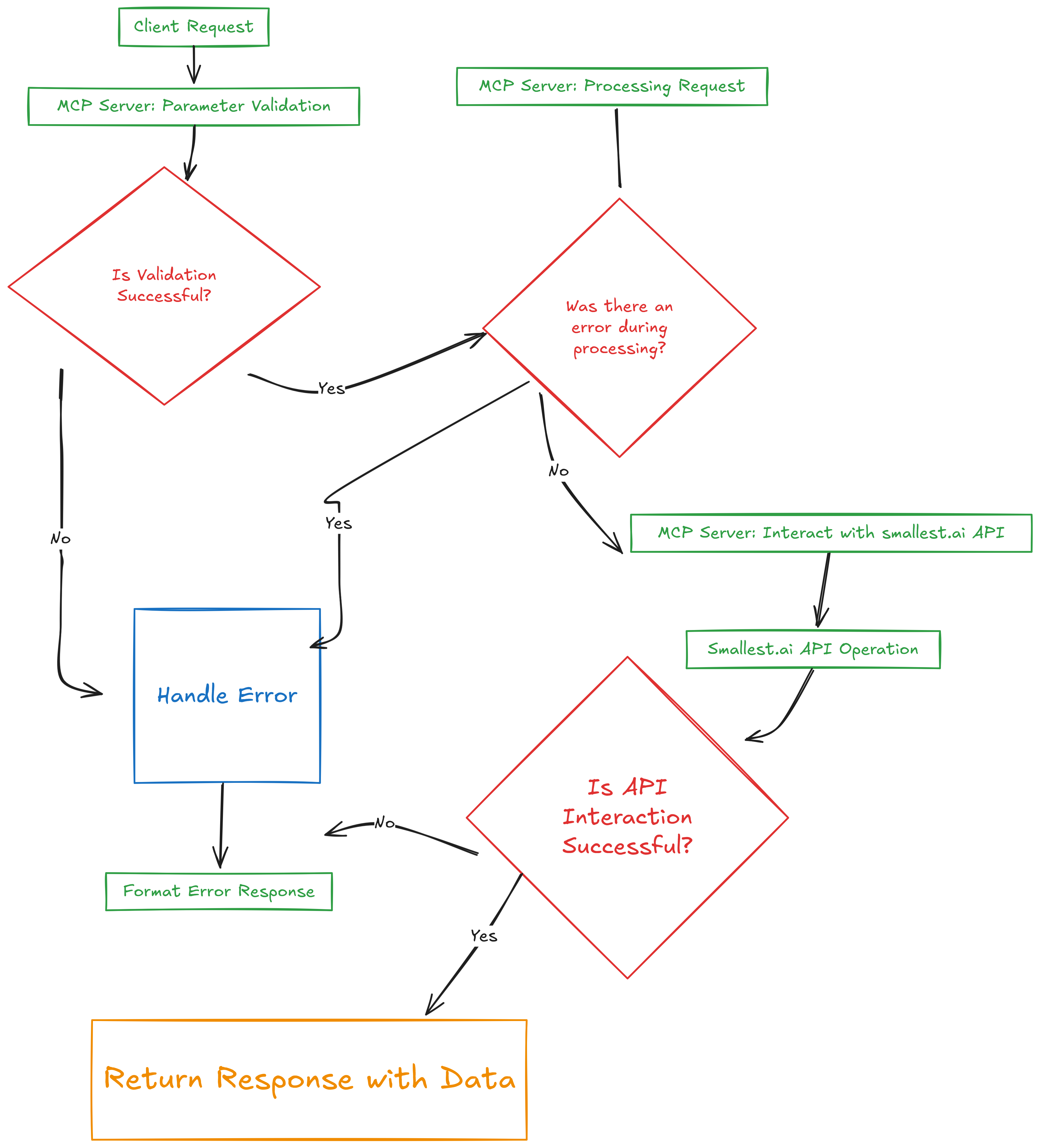
無題-2025-03-21-0340(6)

┌─────────────────┐     ┌─────────────────┐     ┌─────────────────┐
│                 │     │                 │     │                 │
│  Client App     │◄────┤   MCP Server    │◄────┤  Smallest.ai    │
│                 │     │                 │     │    API          │
└─────────────────┘     └─────────────────┘     └─────────────────┘

コンポーネントの詳細

1. クライアントアプリケーション層

  • MCPクライアントプロトコルを実装

  • リクエストのフォーマットを処理する

  • レスポンス解析を管理する

  • エラー処理を提供します

2. MCPサーバー層

  • プロトコルハンドラー

    • MCPプロトコル通信を管理する

    • クライアント接続を処理する

    • リクエストを適切なツールにルーティングします

  • ツールの実装

    • ナレッジベース管理ツール

    • パラメータ検証

    • 応答のフォーマット

    • エラー処理

  • API統合

    • Smallest.ai API通信

    • 認証管理

    • リクエスト/レスポンス処理

3. Smallest.ai APIレイヤー

  • ナレッジベース管理

  • データの保存と検索

  • 認証と承認

データフロー

1. Client Request
   └─► MCP Protocol Validation
       └─► Tool Parameter Validation
           └─► API Request Formation
               └─► Smallest.ai API Call
                   └─► Response Processing
                       └─► Client Response

セキュリティアーキテクチャ

┌─────────────────┐
│  Client Auth    │
└────────┬────────┘
         │
┌────────▼────────┐
│  MCP Validation │
└────────┬────────┘
         │
┌────────▼────────┐
│  API Auth       │
└────────┬────────┘
         │
┌────────▼────────┐
│  Smallest.ai    │
└─────────────────┘

Related MCP server: Rememberizer MCP Server

概要

このプロジェクトは、クライアントとSmallest.ai API間のミドルウェアとして機能するMCPサーバーを実装します。モデルコンテキストプロトコル(MCP)を介してSmallest.aiのナレッジベース管理機能とやり取りするための標準化された方法を提供します。

建築

[Client Application] <---> [MCP Server] <---> [Smallest.ai API]

コンポーネント

  1. MCPサーバー

    • クライアントのリクエストを処理する

    • API通信を管理する

    • 標準化された応答を提供する

    • エラー処理を実装する

  2. ナレッジベースツール

    • listKnowledgeBases : すべてのナレッジベースを一覧表示します

    • createKnowledgeBase : 新しいナレッジベースを作成する

    • getKnowledgeBase : 特定のナレッジベースの詳細を取得します

  3. ドキュメントリソース

    • docs://smallest.aiで入手可能

    • 使用方法と例を示します

前提条件

  • Node.js 18+ または Bun ランタイム

  • Smallest.ai APIキー

  • TypeScriptの知識

インストール

  1. リポジトリをクローンします。

git clone https://github.com/yourusername/MCP-smallest.ai.git
cd MCP-smallest.ai
  1. 依存関係をインストールします:

bun install
  1. ルート ディレクトリに.envファイルを作成します。

SMALLEST_AI_API_KEY=your_api_key_here

構成

Smallest.ai API 構成を含むconfig.tsファイルを作成します。

export const config = {
    API_KEY: process.env.SMALLEST_AI_API_KEY,
    BASE_URL: 'https://atoms-api.smallest.ai/api/v1'
};

使用法

サーバーの起動

bun run index.ts

サーバーのテスト

bun run test-client.ts

利用可能なツール

  1. ナレッジベースのリスト

await client.callTool({
  name: "listKnowledgeBases",
  arguments: {}
});
  1. ナレッジベースを作成する

await client.callTool({
  name: "createKnowledgeBase",
  arguments: {
    name: "My Knowledge Base",
    description: "Description of the knowledge base"
  }
});
  1. ナレッジベースを入手

await client.callTool({
  name: "getKnowledgeBase",
  arguments: {
    id: "knowledge_base_id"
  }
});

応答フォーマット

すべての応答は次の構造に従います。

{
  content: [{
    type: "text",
    text: JSON.stringify(data, null, 2)
  }]
}

エラー処理

サーバーは包括的なエラー処理を実装します。

  • HTTPエラー

  • APIエラー

  • パラメータ検証エラー

  • 型安全なエラー応答

発達

プロジェクト構造

MCP-smallest.ai/
├── index.ts           # MCP server implementation
├── test-client.ts     # Test client implementation
├── config.ts          # Configuration file
├── package.json       # Project dependencies
├── tsconfig.json      # TypeScript configuration
└── README.md          # This file

新しいツールの追加

  1. index.tsでツールを定義します。

server.tool(
  "toolName",
  {
    param1: z.string(),
    param2: z.number()
  },
  async (args) => {
    // Implementation
  }
);
  1. リソース内のドキュメントを更新します。

server.resource(
  "documentation",
  "docs://smallest.ai",
  async (uri) => ({
    contents: [{
      uri: uri.href,
      text: `Updated documentation...`
    }]
  })
);

安全

  • APIキーは環境変数に保存されます

  • すべてのリクエストは認証されます

  • パラメータ検証が実装されています

  • エラーメッセージはサニタイズされる

貢献

  1. リポジトリをフォークする

  2. 機能ブランチを作成します( git checkout -b feature/amazing-feature )

  3. 変更をコミットします ( git commit -m 'Add some amazing feature' )

  4. ブランチにプッシュする ( git push origin feature/amazing-feature )

  5. プルリクエストを開く

ライセンス

このプロジェクトは MIT ライセンスに基づいてライセンスされています - 詳細についてはLICENSEファイルを参照してください。

謝辞

Available Tools

3 tools
createKnowledgeBaseD
ParametersJSON Schema
NameRequiredDescriptionDefault
descriptionYes
nameYes

TDQS

D1/5.0
Behavior1/5

Does the description disclose side effects, auth requirements, rate limits, or destructive behavior?

Tool has no description.

Agents need to know what a tool does to the world before calling it. Descriptions should go beyond structured annotations to explain consequences.

Conciseness1/5

Is the description appropriately sized, front-loaded, and free of redundancy?

Tool has no description.

Shorter descriptions cost fewer tokens and are easier for agents to parse. Every sentence should earn its place.

Completeness1/5

Given the tool's complexity, does the description cover enough for an agent to succeed on first attempt?

Tool has no description.

Complex tools with many parameters or behaviors need more documentation. Simple tools need less. This dimension scales expectations accordingly.

Parameters1/5

Does the description clarify parameter syntax, constraints, interactions, or defaults beyond what the schema provides?

Tool has no description.

Input schemas describe structure but not intent. Descriptions should explain non-obvious parameter relationships and valid value ranges.

Purpose1/5

Does the description clearly state what the tool does and how it differs from similar tools?

Tool has no description.

Agents choose between tools based on descriptions. A clear purpose with a specific verb and resource helps agents select the right tool.

Usage Guidelines1/5

Does the description explain when to use this tool, when not to, or what alternatives exist?

Tool has no description.

Agents often have multiple tools that could apply. Explicit usage guidance like "use X instead of Y when Z" prevents misuse.

getKnowledgeBaseD
ParametersJSON Schema
NameRequiredDescriptionDefault
idYes

TDQS

D1/5.0
Behavior1/5

Does the description disclose side effects, auth requirements, rate limits, or destructive behavior?

Tool has no description.

Agents need to know what a tool does to the world before calling it. Descriptions should go beyond structured annotations to explain consequences.

Conciseness1/5

Is the description appropriately sized, front-loaded, and free of redundancy?

Tool has no description.

Shorter descriptions cost fewer tokens and are easier for agents to parse. Every sentence should earn its place.

Completeness1/5

Given the tool's complexity, does the description cover enough for an agent to succeed on first attempt?

Tool has no description.

Complex tools with many parameters or behaviors need more documentation. Simple tools need less. This dimension scales expectations accordingly.

Parameters1/5

Does the description clarify parameter syntax, constraints, interactions, or defaults beyond what the schema provides?

Tool has no description.

Input schemas describe structure but not intent. Descriptions should explain non-obvious parameter relationships and valid value ranges.

Purpose1/5

Does the description clearly state what the tool does and how it differs from similar tools?

Tool has no description.

Agents choose between tools based on descriptions. A clear purpose with a specific verb and resource helps agents select the right tool.

Usage Guidelines1/5

Does the description explain when to use this tool, when not to, or what alternatives exist?

Tool has no description.

Agents often have multiple tools that could apply. Explicit usage guidance like "use X instead of Y when Z" prevents misuse.

listKnowledgeBasesD
ParametersJSON Schema
NameRequiredDescriptionDefault

No parameters

TDQS

D1/5.0
Behavior1/5

Does the description disclose side effects, auth requirements, rate limits, or destructive behavior?

Tool has no description.

Agents need to know what a tool does to the world before calling it. Descriptions should go beyond structured annotations to explain consequences.

Conciseness1/5

Is the description appropriately sized, front-loaded, and free of redundancy?

Tool has no description.

Shorter descriptions cost fewer tokens and are easier for agents to parse. Every sentence should earn its place.

Completeness1/5

Given the tool's complexity, does the description cover enough for an agent to succeed on first attempt?

Tool has no description.

Complex tools with many parameters or behaviors need more documentation. Simple tools need less. This dimension scales expectations accordingly.

Parameters1/5

Does the description clarify parameter syntax, constraints, interactions, or defaults beyond what the schema provides?

Tool has no description.

Input schemas describe structure but not intent. Descriptions should explain non-obvious parameter relationships and valid value ranges.

Purpose1/5

Does the description clearly state what the tool does and how it differs from similar tools?

Tool has no description.

Agents choose between tools based on descriptions. A clear purpose with a specific verb and resource helps agents select the right tool.

Usage Guidelines1/5

Does the description explain when to use this tool, when not to, or what alternatives exist?

Tool has no description.

Agents often have multiple tools that could apply. Explicit usage guidance like "use X instead of Y when Z" prevents misuse.

Tool Schema Changelog

Recent tool additions, removals, and schema changes observed during successful MCP inspections.

  1. 3 tool updatesv1.0.0
    • First observedcreateKnowledgeBase
    • First observedgetKnowledgeBase
    • First observedlistKnowledgeBases

TDQS

D1.9/5.0

Scored across 3 tools

Disambiguation5/5

Each tool has a clearly distinct purpose: create, get, and list operations on knowledge bases. There is no overlap in functionality, and the action verbs (create, get, list) are unambiguous and standard for CRUD operations.

Naming Consistency5/5

All tool names follow a consistent camelCase pattern with a verb-noun structure (createKnowledgeBase, getKnowledgeBase, listKnowledgeBases). The naming is predictable and uniform across all three tools.

Tool Count3/5

With only 3 tools, the set feels thin for a knowledge base management server, as it lacks update and delete operations. However, it covers basic create, retrieve, and list functions, which is minimal but functional for a small scope.

Completeness3/5

The tools provide create, get, and list operations, but there are notable gaps such as update and delete for knowledge bases. This limits full lifecycle management, though core retrieval and creation are covered.

Maintenance

ActivityInactive
ResponsivenessNo issues

Related MCP Connectors

Related MCP Servers

  • A
    license
    B
    quality
    D
    maintenance
    A Model Context Protocol server that enables AI models to interact with SourceSync.ai's knowledge management platform for managing documents, ingesting content from various sources, and performing semantic searches.
    25
    59 npm
    1
    ISC
  • A
    license
    A
    quality
    D
    maintenance
    A comprehensive Model Context Protocol server that integrates Elasticsearch search with file operations, document validation, and version control to transform AI assistants into powerful knowledge management systems.
    27
    93 PyPI
    27
    MIT