Glama
VinayakTiwari1103

MCP-Smallest.ai

imagen

MCP-Smallest.ai

Implementación de un servidor del Protocolo de Contexto de Modelo (MCP) para la integración de la API de Smallest.ai. Este proyecto proporciona una interfaz estandarizada para interactuar con el sistema de gestión de la base de conocimientos de Smallest.ai.

Arquitectura

Descripción general del sistema
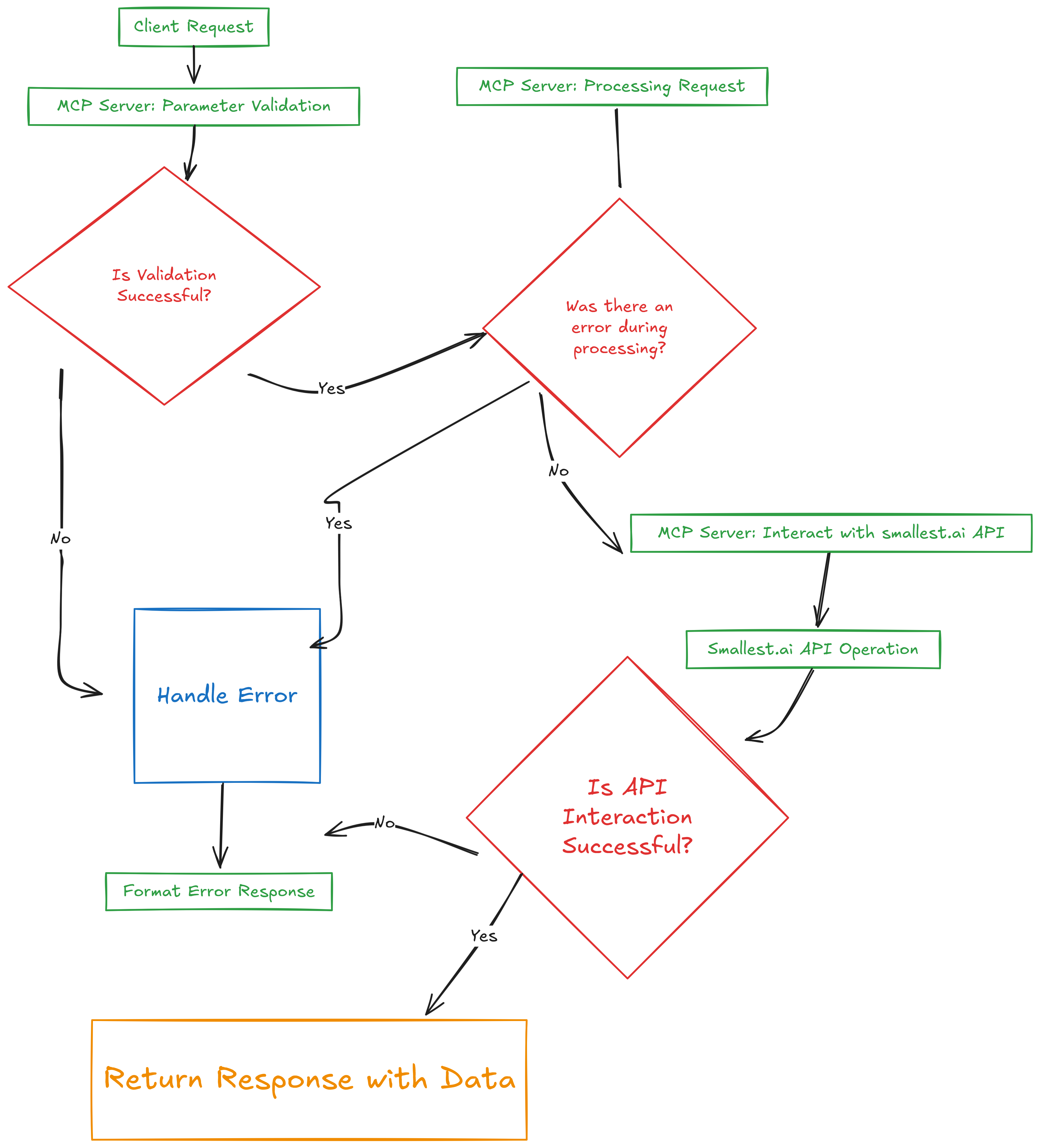
Sin título-2025-03-21-0340(6)

┌─────────────────┐     ┌─────────────────┐     ┌─────────────────┐
│                 │     │                 │     │                 │
│  Client App     │◄────┤   MCP Server    │◄────┤  Smallest.ai    │
│                 │     │                 │     │    API          │
└─────────────────┘     └─────────────────┘     └─────────────────┘

Detalles del componente

1. Capa de aplicación del cliente

  • Implementa el protocolo de cliente MCP

  • Maneja el formato de la solicitud

  • Gestiona el análisis de respuestas

  • Proporciona manejo de errores

2. Capa de servidor MCP

  • Manejador de protocolo

    • Gestiona la comunicación del protocolo MCP

    • Maneja las conexiones del cliente

    • Envía solicitudes a las herramientas adecuadas

  • Implementación de herramientas

    • Herramientas de gestión de bases de conocimientos

    • Validación de parámetros

    • Formato de respuesta

    • Manejo de errores

  • Integración de API

    • Comunicación API de Smallest.ai

    • Gestión de autenticación

    • Manejo de solicitudes/respuestas

3. Capa de API de Smallest.ai

  • Gestión de la base de conocimientos

  • Almacenamiento y recuperación de datos

  • Autenticación y autorización

Flujo de datos

1. Client Request
   └─► MCP Protocol Validation
       └─► Tool Parameter Validation
           └─► API Request Formation
               └─► Smallest.ai API Call
                   └─► Response Processing
                       └─► Client Response

Arquitectura de seguridad

┌─────────────────┐
│  Client Auth    │
└────────┬────────┘
         │
┌────────▼────────┐
│  MCP Validation │
└────────┬────────┘
         │
┌────────▼────────┐
│  API Auth       │
└────────┬────────┘
         │
┌────────▼────────┐
│  Smallest.ai    │
└─────────────────┘

Related MCP server: Rememberizer MCP Server

Descripción general

Este proyecto implementa un servidor MCP que actúa como middleware entre los clientes y la API de Smallest.ai. Proporciona una forma estandarizada de interactuar con las funciones de gestión de la base de conocimiento de Smallest.ai mediante el Protocolo de Contexto de Modelo.

Arquitectura

[Client Application] <---> [MCP Server] <---> [Smallest.ai API]

Componentes

  1. Servidor MCP

    • Maneja las solicitudes de los clientes

    • Gestiona la comunicación API

    • Proporciona respuestas estandarizadas

    • Implementa el manejo de errores

  2. Herramientas de la base de conocimientos

    • listKnowledgeBases : enumera todas las bases de conocimiento

    • createKnowledgeBase : Crea nuevas bases de conocimiento

    • getKnowledgeBase : recupera detalles específicos de la base de conocimientos

  3. Recurso de documentación

    • Disponible en docs://smallest.ai

    • Proporciona instrucciones de uso y ejemplos.

Prerrequisitos

  • Node.js 18+ o entorno de ejecución de Bun

  • Clave API de Smallest.ai

  • Conocimiento de TypeScript

Instalación

  1. Clonar el repositorio:

git clone https://github.com/yourusername/MCP-smallest.ai.git
cd MCP-smallest.ai
  1. Instalar dependencias:

bun install
  1. Cree un archivo .env en el directorio raíz:

SMALLEST_AI_API_KEY=your_api_key_here

Configuración

Cree un archivo config.ts con la configuración de su API de Smallest.ai:

export const config = {
    API_KEY: process.env.SMALLEST_AI_API_KEY,
    BASE_URL: 'https://atoms-api.smallest.ai/api/v1'
};

Uso

Iniciando el servidor

bun run index.ts

Probando el servidor

bun run test-client.ts

Herramientas disponibles

  1. Lista de bases de conocimiento

await client.callTool({
  name: "listKnowledgeBases",
  arguments: {}
});
  1. Crear una base de conocimientos

await client.callTool({
  name: "createKnowledgeBase",
  arguments: {
    name: "My Knowledge Base",
    description: "Description of the knowledge base"
  }
});
  1. Obtener base de conocimientos

await client.callTool({
  name: "getKnowledgeBase",
  arguments: {
    id: "knowledge_base_id"
  }
});

Formato de respuesta

Todas las respuestas siguen esta estructura:

{
  content: [{
    type: "text",
    text: JSON.stringify(data, null, 2)
  }]
}

Manejo de errores

El servidor implementa un manejo integral de errores:

  • Errores HTTP

  • Errores de API

  • Errores de validación de parámetros

  • Respuestas de error de tipo seguro

Desarrollo

Estructura del proyecto

MCP-smallest.ai/
├── index.ts           # MCP server implementation
├── test-client.ts     # Test client implementation
├── config.ts          # Configuration file
├── package.json       # Project dependencies
├── tsconfig.json      # TypeScript configuration
└── README.md          # This file

Agregar nuevas herramientas

  1. Define la herramienta en index.ts :

server.tool(
  "toolName",
  {
    param1: z.string(),
    param2: z.number()
  },
  async (args) => {
    // Implementation
  }
);
  1. Actualizar la documentación en el recurso:

server.resource(
  "documentation",
  "docs://smallest.ai",
  async (uri) => ({
    contents: [{
      uri: uri.href,
      text: `Updated documentation...`
    }]
  })
);

Seguridad

  • Las claves API se almacenan en variables de entorno

  • Todas las solicitudes están autenticadas

  • Se implementa la validación de parámetros

  • Los mensajes de error se desinfectan

Contribuyendo

  1. Bifurcar el repositorio

  2. Crea tu rama de funciones ( git checkout -b feature/amazing-feature )

  3. Confirme sus cambios ( git commit -m 'Add some amazing feature' )

  4. Empujar a la rama ( git push origin feature/amazing-feature )

  5. Abrir una solicitud de extracción

Licencia

Este proyecto está licenciado bajo la licencia MIT: consulte el archivo de LICENCIA para obtener más detalles.

Expresiones de gratitud

Available Tools

3 tools
createKnowledgeBaseD
ParametersJSON Schema
NameRequiredDescriptionDefault
descriptionYes
nameYes

TDQS

D1/5.0
Behavior1/5

Does the description disclose side effects, auth requirements, rate limits, or destructive behavior?

Tool has no description.

Agents need to know what a tool does to the world before calling it. Descriptions should go beyond structured annotations to explain consequences.

Conciseness1/5

Is the description appropriately sized, front-loaded, and free of redundancy?

Tool has no description.

Shorter descriptions cost fewer tokens and are easier for agents to parse. Every sentence should earn its place.

Completeness1/5

Given the tool's complexity, does the description cover enough for an agent to succeed on first attempt?

Tool has no description.

Complex tools with many parameters or behaviors need more documentation. Simple tools need less. This dimension scales expectations accordingly.

Parameters1/5

Does the description clarify parameter syntax, constraints, interactions, or defaults beyond what the schema provides?

Tool has no description.

Input schemas describe structure but not intent. Descriptions should explain non-obvious parameter relationships and valid value ranges.

Purpose1/5

Does the description clearly state what the tool does and how it differs from similar tools?

Tool has no description.

Agents choose between tools based on descriptions. A clear purpose with a specific verb and resource helps agents select the right tool.

Usage Guidelines1/5

Does the description explain when to use this tool, when not to, or what alternatives exist?

Tool has no description.

Agents often have multiple tools that could apply. Explicit usage guidance like "use X instead of Y when Z" prevents misuse.

getKnowledgeBaseD
ParametersJSON Schema
NameRequiredDescriptionDefault
idYes

TDQS

D1/5.0
Behavior1/5

Does the description disclose side effects, auth requirements, rate limits, or destructive behavior?

Tool has no description.

Agents need to know what a tool does to the world before calling it. Descriptions should go beyond structured annotations to explain consequences.

Conciseness1/5

Is the description appropriately sized, front-loaded, and free of redundancy?

Tool has no description.

Shorter descriptions cost fewer tokens and are easier for agents to parse. Every sentence should earn its place.

Completeness1/5

Given the tool's complexity, does the description cover enough for an agent to succeed on first attempt?

Tool has no description.

Complex tools with many parameters or behaviors need more documentation. Simple tools need less. This dimension scales expectations accordingly.

Parameters1/5

Does the description clarify parameter syntax, constraints, interactions, or defaults beyond what the schema provides?

Tool has no description.

Input schemas describe structure but not intent. Descriptions should explain non-obvious parameter relationships and valid value ranges.

Purpose1/5

Does the description clearly state what the tool does and how it differs from similar tools?

Tool has no description.

Agents choose between tools based on descriptions. A clear purpose with a specific verb and resource helps agents select the right tool.

Usage Guidelines1/5

Does the description explain when to use this tool, when not to, or what alternatives exist?

Tool has no description.

Agents often have multiple tools that could apply. Explicit usage guidance like "use X instead of Y when Z" prevents misuse.

listKnowledgeBasesD
ParametersJSON Schema
NameRequiredDescriptionDefault

No parameters

TDQS

D1/5.0
Behavior1/5

Does the description disclose side effects, auth requirements, rate limits, or destructive behavior?

Tool has no description.

Agents need to know what a tool does to the world before calling it. Descriptions should go beyond structured annotations to explain consequences.

Conciseness1/5

Is the description appropriately sized, front-loaded, and free of redundancy?

Tool has no description.

Shorter descriptions cost fewer tokens and are easier for agents to parse. Every sentence should earn its place.

Completeness1/5

Given the tool's complexity, does the description cover enough for an agent to succeed on first attempt?

Tool has no description.

Complex tools with many parameters or behaviors need more documentation. Simple tools need less. This dimension scales expectations accordingly.

Parameters1/5

Does the description clarify parameter syntax, constraints, interactions, or defaults beyond what the schema provides?

Tool has no description.

Input schemas describe structure but not intent. Descriptions should explain non-obvious parameter relationships and valid value ranges.

Purpose1/5

Does the description clearly state what the tool does and how it differs from similar tools?

Tool has no description.

Agents choose between tools based on descriptions. A clear purpose with a specific verb and resource helps agents select the right tool.

Usage Guidelines1/5

Does the description explain when to use this tool, when not to, or what alternatives exist?

Tool has no description.

Agents often have multiple tools that could apply. Explicit usage guidance like "use X instead of Y when Z" prevents misuse.

Tool Schema Changelog

Recent tool additions, removals, and schema changes observed during successful MCP inspections.

  1. 3 tool updatesv1.0.0
    • First observedcreateKnowledgeBase
    • First observedgetKnowledgeBase
    • First observedlistKnowledgeBases

TDQS

D1.9/5.0

Scored across 3 tools

Disambiguation5/5

Each tool has a clearly distinct purpose: create, get, and list operations on knowledge bases. There is no overlap in functionality, and the action verbs (create, get, list) are unambiguous and standard for CRUD operations.

Naming Consistency5/5

All tool names follow a consistent camelCase pattern with a verb-noun structure (createKnowledgeBase, getKnowledgeBase, listKnowledgeBases). The naming is predictable and uniform across all three tools.

Tool Count3/5

With only 3 tools, the set feels thin for a knowledge base management server, as it lacks update and delete operations. However, it covers basic create, retrieve, and list functions, which is minimal but functional for a small scope.

Completeness3/5

The tools provide create, get, and list operations, but there are notable gaps such as update and delete for knowledge bases. This limits full lifecycle management, though core retrieval and creation are covered.

Maintenance

ActivityInactive
ResponsivenessNo issues

Related MCP Connectors

Related MCP Servers

  • A
    license
    B
    quality
    D
    maintenance
    A Model Context Protocol server that enables AI models to interact with SourceSync.ai's knowledge management platform for managing documents, ingesting content from various sources, and performing semantic searches.
    25
    59 npm
    1
    ISC
  • A
    license
    A
    quality
    D
    maintenance
    A comprehensive Model Context Protocol server that integrates Elasticsearch search with file operations, document validation, and version control to transform AI assistants into powerful knowledge management systems.
    27
    93 PyPI
    27
    MIT