

A
licenseNot graded
qualityA
maintenanceA server that enables Large Language Models to discover and interact with REST APIs defined by OpenAPI specifications through the Model Context Protocol.
11,255 npm
301
MIT

一个模型上下文协议 (MCP) 服务器,它将 API 市场的端点公开为 MCP 资源。该服务器允许大型语言模型通过 MCP 协议发现并交互 OpenAPI 规范定义的 API。
此存储库提供对API.market上可用 API 的访问。该工具免费使用,并允许代理与所有可用 API 自由通信,功能极其强大。API.market上提供200 多个 API ,您可以利用其丰富的功能。
Related MCP server: OpenAPI MCP Server
您无需克隆此代码库即可使用此 MCP 服务器。您只需在您选择的客户端中进行配置即可。
找到或创建您的 Claude Desktop 配置文件:
在 macOS 上: ~/Library/Application Support/Claude/claude_desktop_config.json
添加以下配置以启用 API-Market MCP 服务器:
{
  "mcpServers": {
    "api-market": {
      "command": "npx",
      "args": ["-y", "@noveum-ai/mcp-server"],
      "env": {
        "API_HEADERS": "x-magicapi-key:your-api-key"
      }
    }
  }
}转到文件->首选项->光标设置。
选择 MCP。
单击添加新的全局 MCP 服务器。
将以下内容粘贴到 mcp.json 文件中。
  {
    "mcpServers": {
      "api-market": {
        "command": "npx",
        "args": [
          "-y",
          "@noveum-ai/mcp-server",
          "--headers",
          "x-magicapi-key:<your-api-key>"
        ]
      }
    }
  }
或者,将其添加为 mcpServers 中的第一个条目。
    "api-market": {
      "command": "npx",
      "args": [
        "-y",
        "@noveum-ai/mcp-server",
        "--headers",
        "x-magicapi-key:<your-api-key>"
      ]
    },
对于旧版本的 Cursor,在点击“添加新的 MCP 服务器”后添加以下命令
npx -y @noveum-ai/mcp-server --headers x-magicapi-key:your-api-key获取 API 密钥
转到您的个人资料并选择“我的 API 密钥”
您的 API 密钥将显示在这里
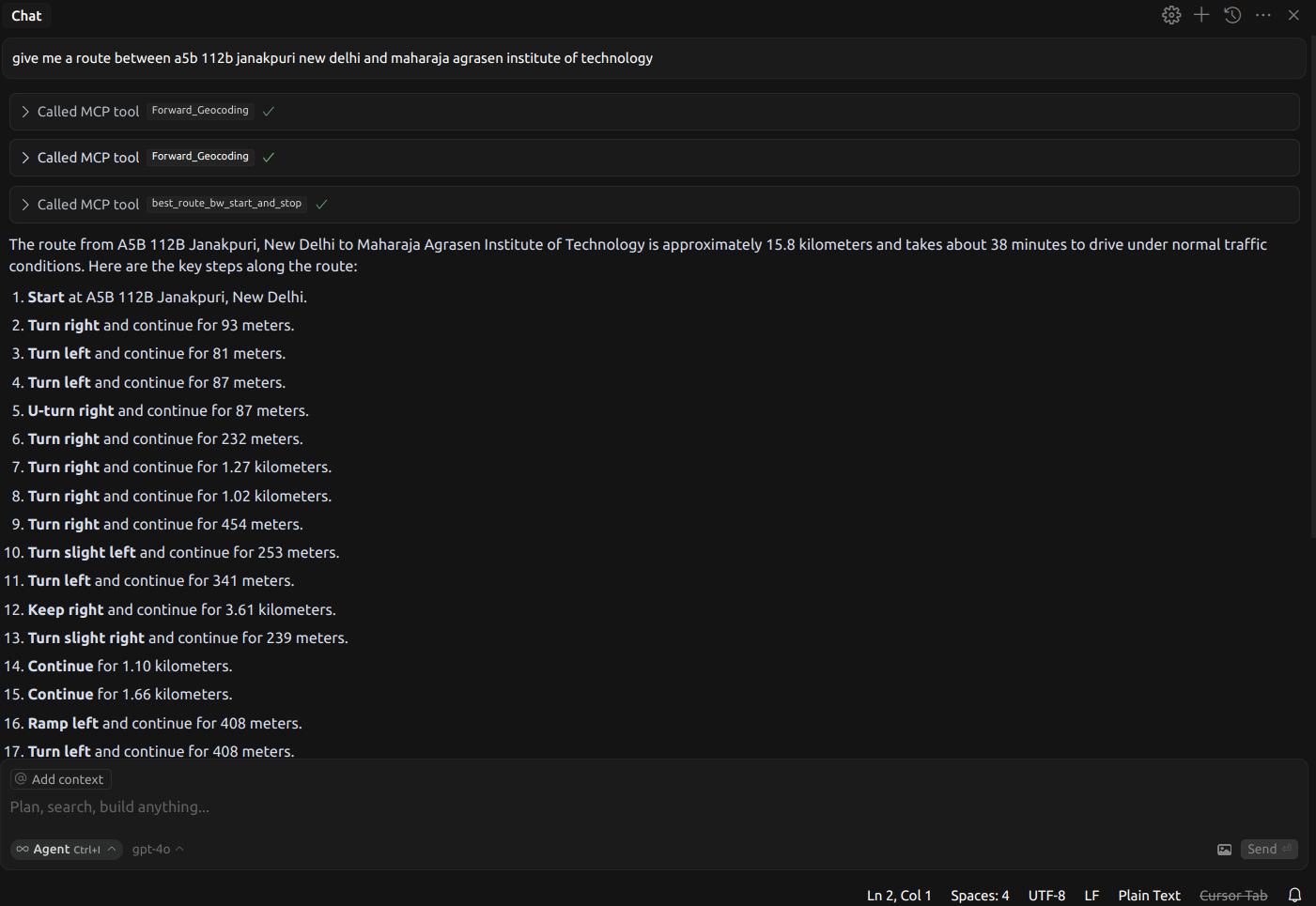
我们可以使用代理来找到任意两点之间的路线
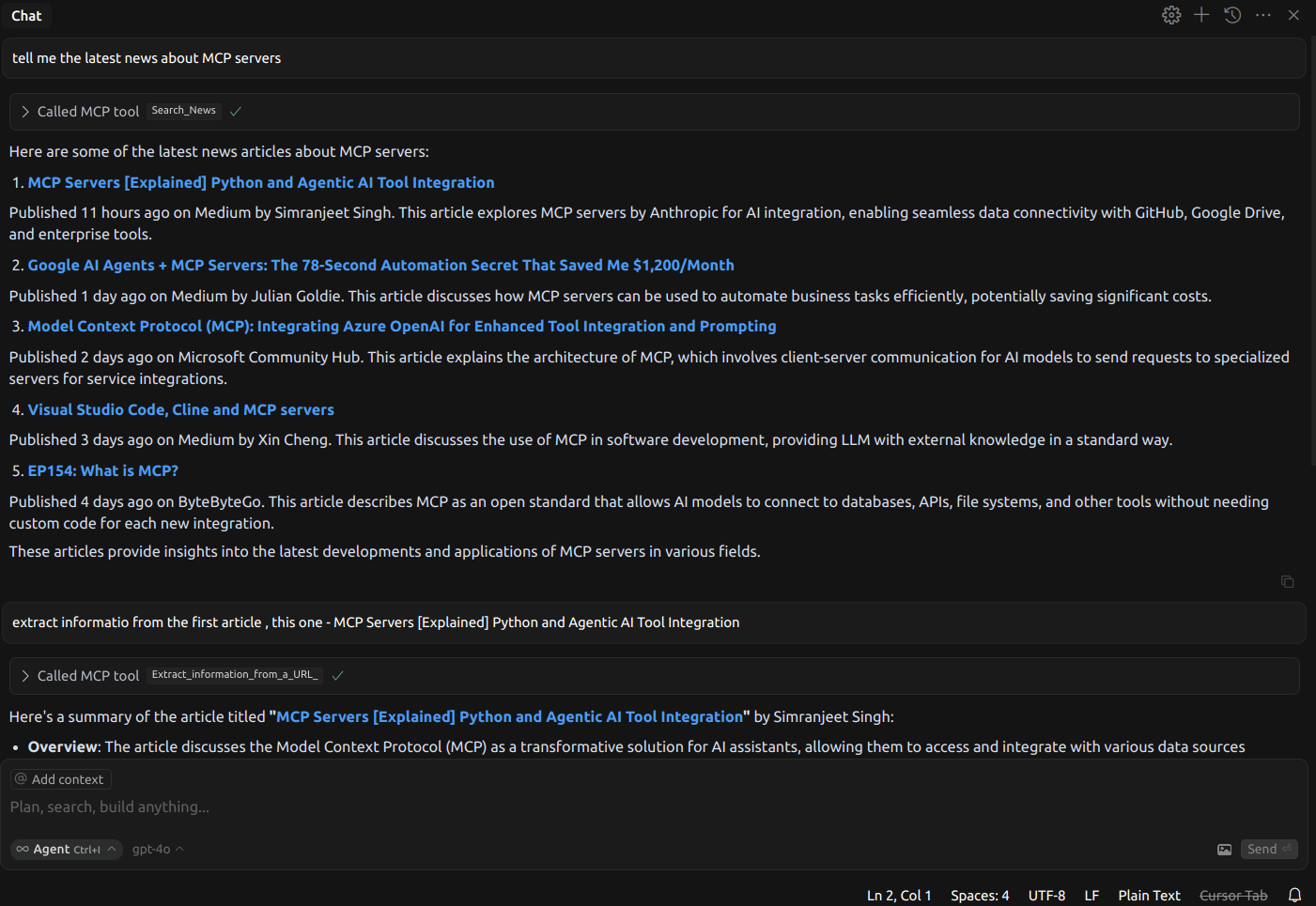
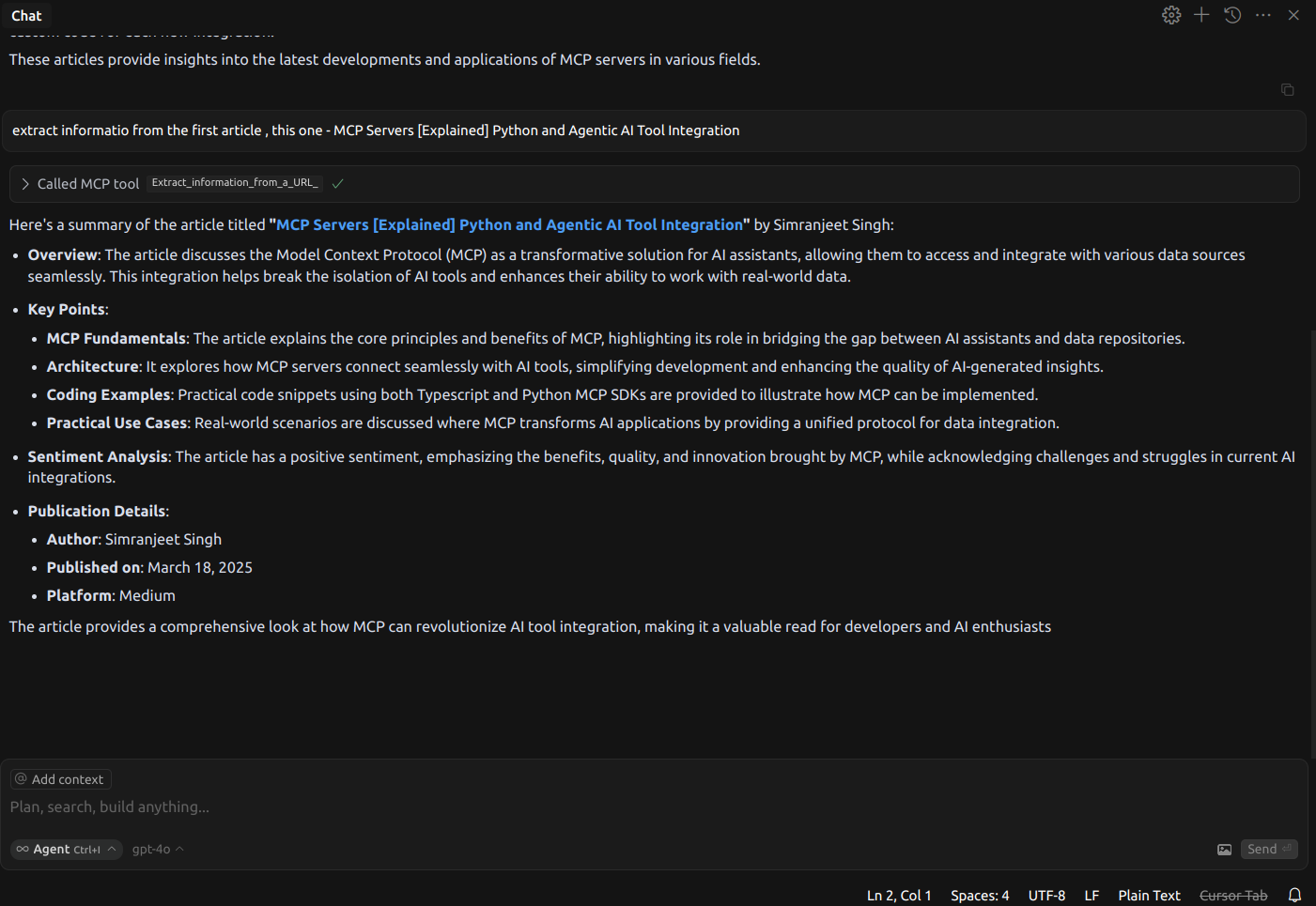
我们可以使用代理查找有关任何主题的新闻,然后深入挖掘文章
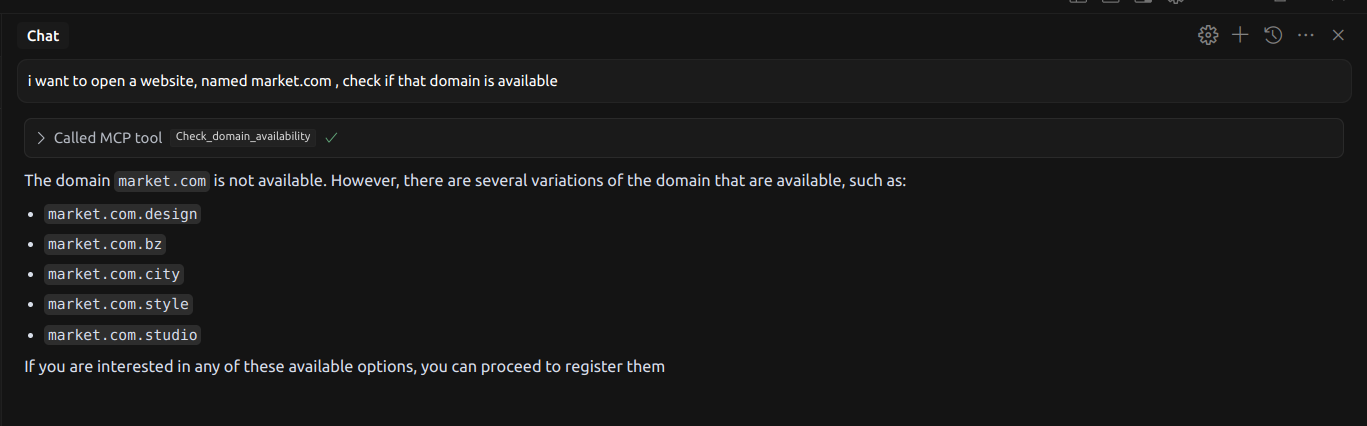
我们可以使用代理来寻找可用的域名
utils文件夹包含用于管理 API 配置、解析 OpenAPI 规范以及将新 API 注册到 MCP 服务器的帮助脚本。
找到要集成的 API 的 OpenAPI JSON。之后,在项目根目录中创建一个json_files文件夹,并将您的 OpenAPI JSON 规范添加到该文件夹中
获取 OpenAPI 规范后,使用modify_api.py更新规范内的路径以包含文件名。
python utils/modify_api.py修改路径后,通过选择以下选项之一来更新 API 摘要:
使用 LLM 自动缩短摘要:
python utils/LLM_summary_shortener.py 手动更新摘要:
python utils/manual_summary_shortener.py 重建项目以应用更改:
npm run build然后,使用以下方法测试新的 API 集成:
npm run inspect如果您想将这个新 API 贡献给存储库:
分叉 repo。
创建分支。
提交拉取请求 (PR)。
如果您想发布您的更改:
相应地更新package.json (例如,更新版本、名称等)。
发布包:
npm publish --access publicnpm run build - 构建 TypeScript 源。
npm run clean - 删除构建工件。
npm run typecheck - 运行 TypeScript 类型检查。
npm run dev - 监视源文件并在发生更改时重建。
npm run inspect-watch - 运行检查器并在发生更改时自动重新加载。
npm run lint运行 ESLint。
npm run typecheck - 验证 TypeScript 类型。
npm run inspect -- \
  --api-base-url https://api.magicapi.dev/api/v1/ \
  --openapi-spec modified_files.txt \
  --headers "x-magicapi-key:your-api-key" \
  --name "my-mcp-server" \
--version "1.0.0"启动开发环境:
npm run inspect-watch修改src/中的 TypeScript 文件。
服务器将自动重建并重启。
使用 MCP Inspector UI 测试您的更改。
要在本地调试或运行 MCP 服务器:
克隆存储库并安装依赖项:
git clone https://github.com/Noveum/api-market-mcp-server.git
cd api-market-mcp-server
npm install
构建服务器:
npm run build为了调试,您可以运行:
npm run inspect 分叉存储库。
创建一个功能分支。
做出更改。
运行测试和 linting:
npm run typecheck
npm run lint
提交拉取请求。
麻省理工学院
Make a POST request to bridgeml/nsfw!detection/nsfw_detection
Inputs: image (required).
Finding optimal route from a origin to a destination, passing through multiple waypoints(optional).
Inputs: destination (required), origin (required), avoid_ferries, avoid_highways, +3 more.
Finding optimal route to visit several locations.
Inputs: stops (required), avoid_ferries, avoid_highways, avoid_tolls, +1 more.
Make a POST request to bridgeml/codellama/bridgeml/codellama
Inputs: frequency_penalty, max_tokens, messages, stream, +2 more.
Submit a domain name to check its availability.
Inputs: domain_name.
Coding Assistant. Make sure you call get coder output URL MCP tool to get the URL for the request id received from this API
Inputs: frequency_penalty (required), max_tokens (required), presence_penalty (required), prompt (required), +5 more.
API for image deblurring. Make sure you call get deblurred image URL, MCP tool to get the URL for the request id received from this API
Inputs: image (required), task_type (required).
Calculate length and driving time of the optimal routes between origin and destination points on the real road network.
Inputs: origins (required), avoid_ferries, avoid_highways, avoid_tolls, +2 more.
Make a POST request to magicapi/dnschecker/dnschecker
Inputs: domain (required).
Make a POST request to pipfeed/parse/extract
Inputs: url (required).
Obtain location(geographic coordinates) for address.
Inputs: address (required), area, bounds, country, +5 more.
This endpoint retrieves the URL of the ageing gif for a given request ID.
Inputs: request_id (required).
This endpoint retrieves the URL of the transcription and analysis of the audio for the given request ID.
Inputs: request_id (required).
This endpoint retrieves the URL of the coding assistant's response for a given request ID.
Inputs: request_id (required).
This endpoint retrieves the URL of the simulated hairstyle image for a given request ID.
Inputs: request_id (required).
This endpoint retrieves the URL of the Unblurred image for a given request ID.
Inputs: request_id (required).
Make a GET request to magicapi/whois/whois/{domain}
Inputs: domain (required).
API for simulating different hair styles using AI models. Make sure to call get hairstyled image after with the request id received from this API.
Inputs: color_description (required), editing_type (required), hairstyle_description (required), image (required).
Make a POST request to capix/faceswap/faceswap/v1/image
Inputs: swap_url (required), target_url (required).
API for generating ageing gif using AI models. Make sure to call get ageing gif URL, with the result id received from this API
Inputs: image (required), target_age (required).
Make a POST request to capix/faceswap/result/
Inputs: request_id (required).
Obtain address for location.
Inputs: location (required), language.
Search for places around location within a specified radius.
Inputs: location (required), language, radius, type.
Search for places by text string
Inputs: text (required), bounds, language.
Retrieve image search results based on query parameters
Inputs: q (required), count, country, safesearch, +2 more.
Retrieve news search results based on query parameters
Inputs: q (required), count, country, search_lang, +1 more.
Retrieve search suggestions based on query parameters
Inputs: q (required), count, country.
Retrieve video search results based on query parameters
Inputs: q (required), count, country, search_lang, +1 more.
Retrieve web search results based on query parameters
Inputs: q (required).
Retrieve spellcheck suggestions based on query parameters
Inputs: q (required), country.
Make a POST request to bridgeml/text!to!image/text_to_image
Inputs: height (required), prompt (required), width (required), guidance_scale, +4 more.
Make a POST request to capix/faceswap/upload/
Inputs: no named parameters.
Make a POST request to capix/faceswap/faceswap/v1/video
Inputs: swap_url (required), target_url (required).
API for sentece wise transcription and analysis of audio, using AI models. Make sure to call get audio analysis URL with the request ID received from this API.
Inputs: audio (required), compression_ratio_threshold (required), condition_on_previous_text (required), logprob_threshold (required), +7 more.
Recent tool additions, removals, and schema changes observed during successful MCP inspections.
Loading tool schema changelog…
Scored across 34 tools
Multiple tools have overlapping or unclear boundaries, causing confusion. For example, 'best_route_bw_start_and_stop' and 'best_route_for_multiple_stops' both handle routing with similar purposes, while 'BridgeML_API', 'Coding_Assistant', and 'text-to-image' are vague and could be misselected. The set mixes distinct APIs (e.g., geocoding, search) with redundant or poorly differentiated tools.
Naming conventions are highly inconsistent, mixing styles like snake_case ('best_route_bw_start_and_stop'), CamelCase ('Get_ageing_gif_URL'), and kebab-case ('text-to-image'). Verbs vary widely (e.g., 'Check_domain_availability', 'Search_for_nearby_places', 'getWhoisInfo'), and some names are overly verbose or cryptic, lacking a predictable pattern across the toolset.
With 34 tools, the count is excessive for a single server, suggesting poor scoping. The tools cover disparate domains like routing, image processing, search, and APIs, making the set feel bloated and unfocused. A more coherent server would split these into multiple specialized servers, as the current scope is too broad for effective agent use.
The toolset covers various domains but has notable gaps in lifecycle coverage. For instance, in image processing, tools like 'Deblurer' and 'Get_Unblurred_Image_URL' exist, but other operations (e.g., image deletion or updates) are missing. Similarly, search tools are present but lack filtering or pagination options. While agents can perform basic tasks, the surface is incomplete for robust workflows.
Discover and call 10,000+ production APIs from one MCP server. Pay-per-call billing for AI agents.
The Mercado Pago MCP Server implements the Model Context Protocol to provide AI agents and LLMs with access to Mercado Pago's APIs and tools within compatible development environments. It acts as an intermediary that translates Mercado Pago resources into executable functions (tools) that AI applications can invoke to perform actions and automate flows. The server simplifies integration, enables using documentation to implement or improve code, and optimizes operations through natural language interactions without manual implementations.
Model Context Protocol server for the Apideck Unified API. Connect any MCP-compatible agent framework to 100+ accounting systems, HRIS platforms, file storage providers, and more through one integration. More information https://www.apideck.com/mcp-server
Hosted MCP server for live public-data APIs and Skills for AI agents.