

A
licenseNot graded
qualityB
maintenanceA server that enables Large Language Models to discover and interact with REST APIs defined by OpenAPI specifications through the Model Context Protocol.
9,156 npm
298
MIT

API-Market のエンドポイントを MCP リソースとして公開するモデルコンテキストプロトコル (MCP) サーバー。このサーバーにより、大規模言語モデルは MCP プロトコルを介して OpenAPI 仕様で定義された API を検出し、操作できるようになります。
このリポジトリは、 API.marketで利用可能なAPIへのアクセスを提供します。このツールは無料で利用でき、エージェントは利用可能なすべてのAPIと自由に通信できるため、非常に強力です。API.marketには200以上のAPIが用意されており、幅広い機能を活用できます。
Related MCP server: OpenAPI MCP Server
このMCPサーバーを使用するために、このリポジトリをクローンする必要はありません。お好みのクライアントで設定するだけで済みます。
Claude Desktop 構成ファイルを見つけるか作成します。
macOSの場合: ~/Library/Application Support/Claude/claude_desktop_config.json
API-Market MCP サーバーを有効にするには、次の構成を追加します。
{
  "mcpServers": {
    "api-market": {
      "command": "npx",
      "args": ["-y", "@noveum-ai/mcp-server"],
      "env": {
        "API_HEADERS": "x-magicapi-key:your-api-key"
      }
    }
  }
}「ファイル」->「設定」->「カーソル設定」に移動します。
MCPを選択します。
新しいグローバル MCP サーバーの追加をクリックします。
次の内容を mcp.json ファイルに貼り付けます。
  {
    "mcpServers": {
      "api-market": {
        "command": "npx",
        "args": [
          "-y",
          "@noveum-ai/mcp-server",
          "--headers",
          "x-magicapi-key:<your-api-key>"
        ]
      }
    }
  }
あるいは、これを mcpServers の最初のエントリとして追加します。
    "api-market": {
      "command": "npx",
      "args": [
        "-y",
        "@noveum-ai/mcp-server",
        "--headers",
        "x-magicapi-key:<your-api-key>"
      ]
    },
Cursorの古いバージョンの場合は、新しいMCPサーバーの追加をクリックした後、次のコマンドを追加します。
npx -y @noveum-ai/mcp-server --headers x-magicapi-key:your-api-keyAPIキーを取得するには
API.marketにログイン
プロフィールに移動して「マイAPIキー」を選択します
APIキーはここに表示されます
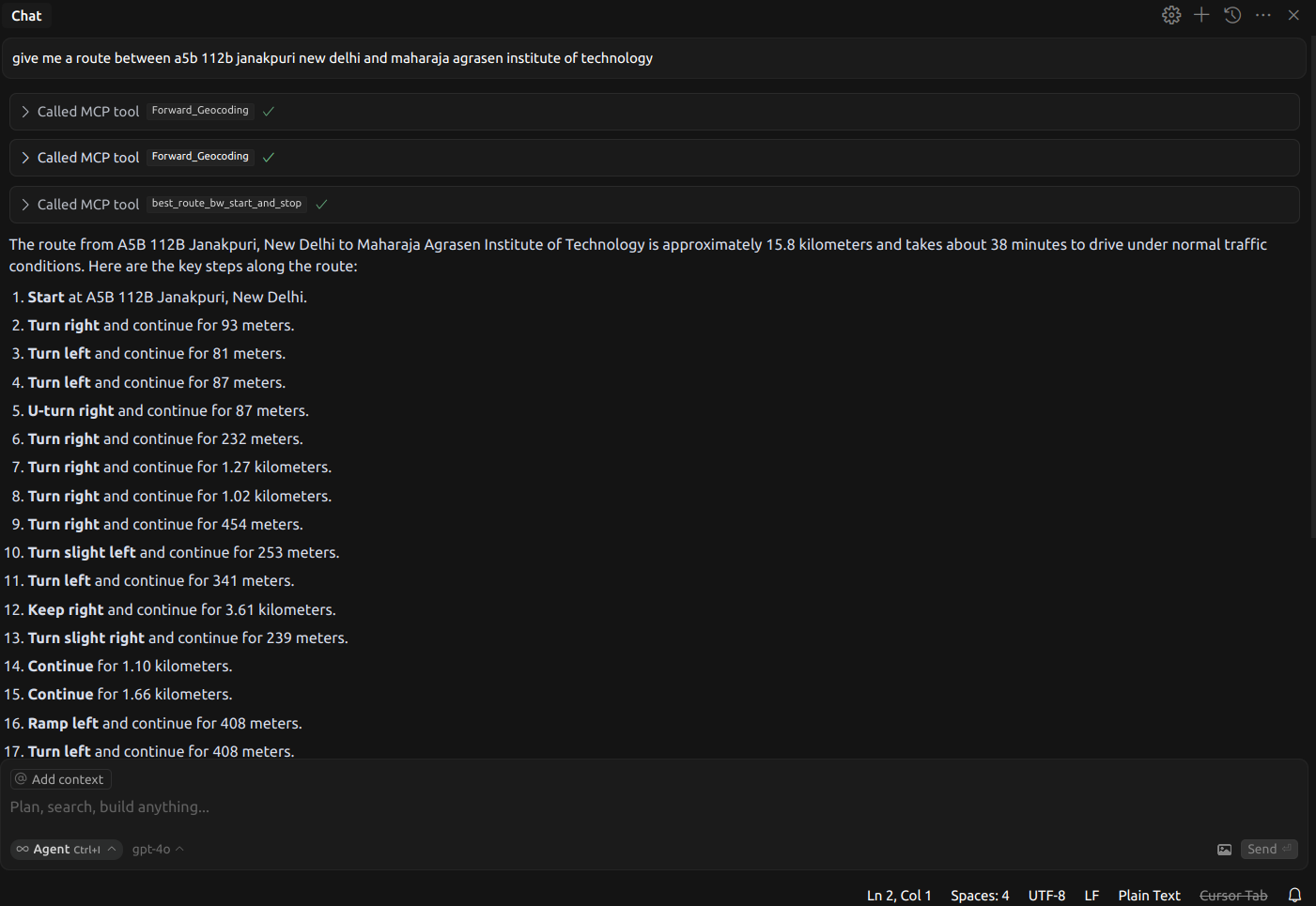
エージェントを使って任意の2点間の経路を見つけることができる
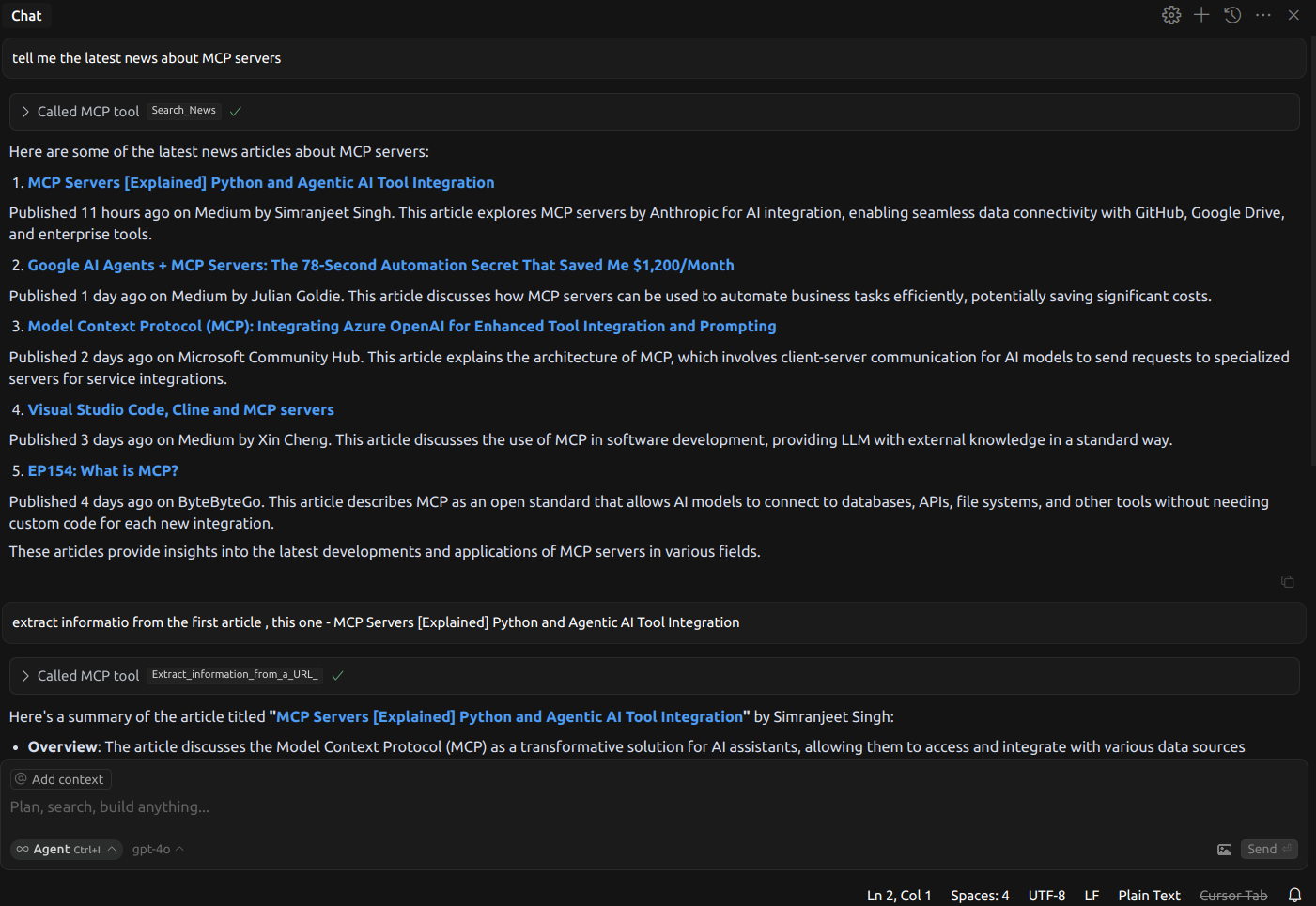
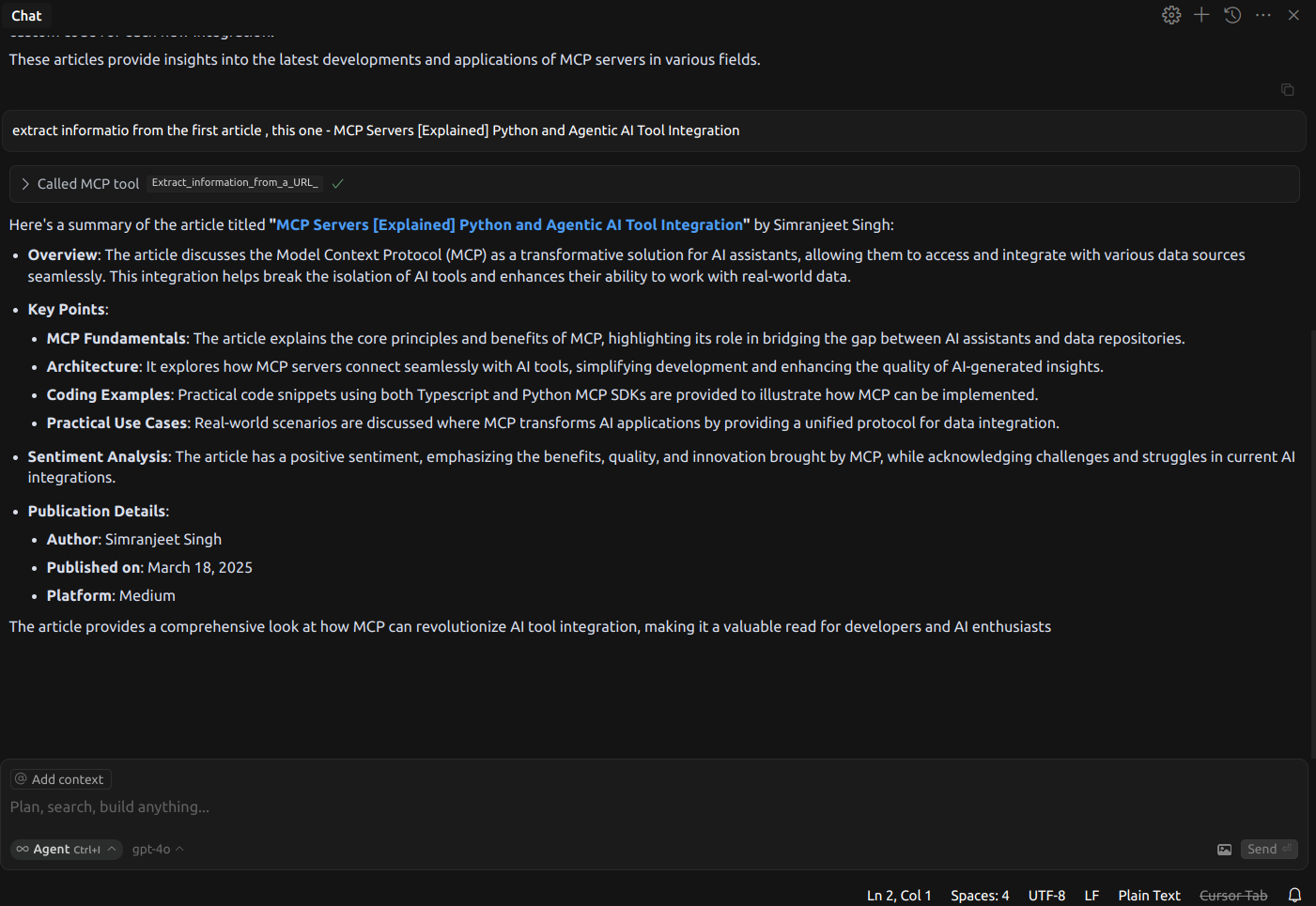
エージェントを使ってあらゆるトピックに関するニュースを見つけ、記事を深く掘り下げることができます。
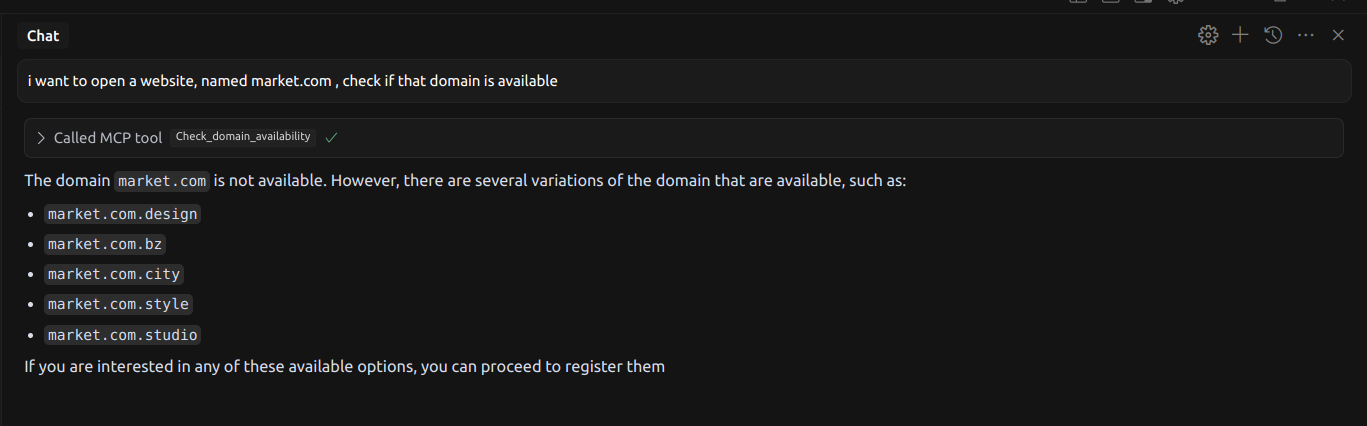
エージェントを使用して利用可能なドメインを検索できます
utilsフォルダーには、API 構成の管理、OpenAPI 仕様の解析、MCP サーバーへの新しい API の登録を行うためのヘルパー スクリプトが含まれています。
統合したいAPIのOpenAPI JSONファイルを見つけます。その後、プロジェクトのルートディレクトリにjson_filesフォルダを作成し、OpenAPI JSON仕様をそのフォルダに追加します。
OpenAPI 仕様を取得したら、 modify_api.pyを使用して、仕様内のパスを更新し、ファイル名を含めます。
python utils/modify_api.pyパスを変更した後、次のいずれかのオプションを選択して API サマリーを更新します。
LLM を使用して要約を自動的に短縮します。
python utils/LLM_summary_shortener.py 要約を手動で更新します。
python utils/manual_summary_shortener.py 変更を適用するには、プロジェクトを再構築します。
npm run build次に、以下を使用して新しい API 統合をテストします。
npm run inspectこの新しい API をリポジトリに提供したい場合は、次の手順を実行します。
リポジトリをフォークします。
ブランチを作成します。
プルリクエスト (PR) を送信します。
変更を公開する場合:
それに応じてpackage.jsonを更新します (例: バージョン、名前などを更新します)。
パッケージを公開します。
npm publish --access publicnpm run build - TypeScript ソースをビルドします。
npm run clean - ビルド成果物を削除します。
npm run typecheck - TypeScript の型チェックを実行します。
npm run dev - ソース ファイルを監視し、変更があれば再構築します。
npm run inspect-watch - 変更時に自動リロードしてインスペクターを実行します。
npm run lint - ESLint を実行します。
npm run typecheck - TypeScript の型を検証します。
npm run inspect -- \
  --api-base-url https://api.magicapi.dev/api/v1/ \
  --openapi-spec modified_files.txt \
  --headers "x-magicapi-key:your-api-key" \
  --name "my-mcp-server" \
--version "1.0.0"開発環境を起動します。
npm run inspect-watchsrc/内の TypeScript ファイルを変更します。
サーバーは自動的に再構築され、再起動します。
MCP Inspector UI を使用して変更をテストします。
MCP サーバーをローカルでデバッグまたは実行するには:
リポジトリをクローンし、依存関係をインストールします。
git clone https://github.com/Noveum/api-market-mcp-server.git
cd api-market-mcp-server
npm install
サーバーを構築します。
npm run buildデバッグの場合は、次のコマンドを実行できます。
npm run inspect リポジトリをフォークします。
機能ブランチを作成します。
変更を加えます。
テストとリンティングを実行します。
npm run typecheck
npm run lint
プルリクエストを送信します。
マサチューセッツ工科大学
Make a POST request to bridgeml/nsfw!detection/nsfw_detection
| Name | Required | Description | Default |
|---|---|---|---|
| image | Yes | The url for image that wants to be checked for nsfw | https://blog.api.market/wp-content/uploads/2024/07/wonder_woman.png |
Does the description disclose side effects, auth requirements, rate limits, or destructive behavior?
No annotations are provided, so the description carries the full burden of behavioral disclosure. It states it's a POST request but doesn't describe authentication needs, rate limits, error handling, or what the API returns (e.g., detection scores or categories). This is a significant gap for an API tool with no structured behavioral hints.
Agents need to know what a tool does to the world before calling it. Descriptions should go beyond structured annotations to explain consequences.
Is the description appropriately sized, front-loaded, and free of redundancy?
The description is a single, direct sentence with zero waste—it efficiently states the action and endpoint. It's appropriately sized and front-loaded, making it easy to parse without unnecessary elaboration.
Shorter descriptions cost fewer tokens and are easier for agents to parse. Every sentence should earn its place.
Given the tool's complexity, does the description cover enough for an agent to succeed on first attempt?
Given the tool's complexity (an API call for NSFW detection), lack of annotations, and no output schema, the description is incomplete. It doesn't explain what the tool returns, potential side effects, or usage constraints, leaving gaps that could hinder an agent's ability to invoke it correctly.
Complex tools with many parameters or behaviors need more documentation. Simple tools need less. This dimension scales expectations accordingly.
Does the description clarify parameter syntax, constraints, interactions, or defaults beyond what the schema provides?
Schema description coverage is 100%, with the single parameter 'image' fully documented in the schema. The description adds no additional parameter information beyond what the schema provides, such as image format constraints or size limits. Baseline score of 3 is appropriate since the schema handles the parameter semantics adequately.
Input schemas describe structure but not intent. Descriptions should explain non-obvious parameter relationships and valid value ranges.
Does the description clearly state what the tool does and how it differs from similar tools?
The description states the action ('Make a POST request') and target resource ('bridgeml/nsfw!detection/nsfw_detection'), clearly indicating it performs NSFW detection via an API call. It doesn't explicitly differentiate from sibling tools, but the purpose is unambiguous. No tautology or misleading elements are present.
Agents choose between tools based on descriptions. A clear purpose with a specific verb and resource helps agents select the right tool.
Does the description explain when to use this tool, when not to, or what alternatives exist?
The description provides no guidance on when to use this tool versus alternatives. It doesn't mention context, prerequisites, or exclusions, nor does it reference any of the sibling tools (e.g., other image-related tools like 'ImageFaceSwap' or 'Get_Unblurred_Image_URL'). Usage is implied only by the tool name and description.
Agents often have multiple tools that could apply. Explicit usage guidance like "use X instead of Y when Z" prevents misuse.
Finding optimal route from a origin to a destination, passing through multiple waypoints(optional).
| Name | Required | Description | Default |
|---|---|---|---|
| avoid_ferries | No | Avoid ferries | |
| avoid_highways | No | Avoid highways | |
| avoid_tolls | No | Avoid tolls | |
| destination | Yes | The location to which you wish to calculate directions. | |
| origin | Yes | The location from which you wish to calculate directions. | |
| start_time | No | Time when travel is expected to start. You can specify the time as an integer in seconds since midnight, January 1, 1970 UTC or you can use 'now' to specify the current time. | |
| waypoints | No | An array of intermediate locations to include along the route between the origin and destination points as pass through locations. Maximum: 23 per request. |
Does the description disclose side effects, auth requirements, rate limits, or destructive behavior?
No annotations are provided, so the description carries the full burden of behavioral disclosure. While it mentions 'optimal route' and optional waypoints, it doesn't describe what 'optimal' means (fastest, shortest, etc.), performance characteristics, rate limits, authentication needs, error conditions, or what the output contains. For a routing tool with no annotation coverage, this is a significant gap.
Agents need to know what a tool does to the world before calling it. Descriptions should go beyond structured annotations to explain consequences.
Is the description appropriately sized, front-loaded, and free of redundancy?
The description is a single, efficient sentence that states the core functionality. It's appropriately sized and front-loaded with the main purpose. However, the grammar could be slightly improved ('a origin' should be 'an origin'), and it could benefit from more structure for clarity.
Shorter descriptions cost fewer tokens and are easier for agents to parse. Every sentence should earn its place.
Given the tool's complexity, does the description cover enough for an agent to succeed on first attempt?
Given the tool's complexity (routing with multiple parameters) and the absence of both annotations and an output schema, the description is incomplete. It doesn't explain what constitutes an 'optimal' route, how waypoints affect routing, what the output format is, or any behavioral constraints. For a tool with 7 parameters and no structured output documentation, more context is needed.
Complex tools with many parameters or behaviors need more documentation. Simple tools need less. This dimension scales expectations accordingly.
Does the description clarify parameter syntax, constraints, interactions, or defaults beyond what the schema provides?
Schema description coverage is 100%, so the schema already documents all 7 parameters thoroughly. The description mentions origin, destination, and waypoints but doesn't add any meaning beyond what the schema provides about these parameters. It doesn't explain the relationship between parameters or provide usage examples. Baseline 3 is appropriate when the schema does the heavy lifting.
Input schemas describe structure but not intent. Descriptions should explain non-obvious parameter relationships and valid value ranges.
Does the description clearly state what the tool does and how it differs from similar tools?
The description clearly states the tool's purpose: 'Finding optimal route from a origin to a destination, passing through multiple waypoints(optional).' It specifies the verb ('finding optimal route'), resources (origin, destination, waypoints), and scope (optimal routing). However, it doesn't explicitly differentiate from its sibling 'best_route_for_multiple_stops', which appears similar.
Agents choose between tools based on descriptions. A clear purpose with a specific verb and resource helps agents select the right tool.
Does the description explain when to use this tool, when not to, or what alternatives exist?
The description provides no guidance on when to use this tool versus alternatives. It doesn't mention the sibling tool 'best_route_for_multiple_stops' or other routing-related tools like 'distance_and_duration_bw_starts_and_stops'. There's no context about prerequisites, limitations, or typical use cases.
Agents often have multiple tools that could apply. Explicit usage guidance like "use X instead of Y when Z" prevents misuse.
Finding optimal route to visit several locations.
| Name | Required | Description | Default |
|---|---|---|---|
| avoid_ferries | No | Avoid ferries | |
| avoid_highways | No | Avoid highways | |
| avoid_tolls | No | Avoid tolls | |
| optimize | No | Instructs the API to reorder stops to find the optimized route. The route first stop and last stop order is not changed, their position is considered fixed. | |
| stops | Yes | List of locations described as semicolon-delimited coordinate pairs with latitudes and longitudes. Maximum 25 pairs per request. |
Does the description disclose side effects, auth requirements, rate limits, or destructive behavior?
No annotations are provided, so the description carries the full burden of behavioral disclosure. It mentions 'optimal route' but doesn't clarify what 'optimal' entails (e.g., based on time, distance, or cost), whether it's a read-only operation, potential rate limits, or error conditions. The description is too vague to inform the agent about key behavioral traits beyond the basic action, missing critical details for a tool with multiple parameters and no output schema.
Agents need to know what a tool does to the world before calling it. Descriptions should go beyond structured annotations to explain consequences.
Is the description appropriately sized, front-loaded, and free of redundancy?
The description is a single, efficient sentence: 'Finding optimal route to visit several locations.' It's front-loaded with the core purpose, has zero wasted words, and is appropriately sized for the tool's complexity. Every part of the sentence contributes to understanding the tool's function, making it highly concise and well-structured.
Shorter descriptions cost fewer tokens and are easier for agents to parse. Every sentence should earn its place.
Given the tool's complexity, does the description cover enough for an agent to succeed on first attempt?
Given the tool's complexity (5 parameters, no output schema, and no annotations), the description is incomplete. It lacks details on behavioral aspects like what 'optimal' means, how results are returned, or any constraints beyond implied multiple stops. Without annotations or an output schema, the description should provide more context to help the agent use the tool effectively, but it falls short, leaving significant gaps in understanding.
Complex tools with many parameters or behaviors need more documentation. Simple tools need less. This dimension scales expectations accordingly.
Does the description clarify parameter syntax, constraints, interactions, or defaults beyond what the schema provides?
Schema description coverage is 100%, so the schema already documents all parameters thoroughly (e.g., 'stops' as semicolon-delimited coordinates with a 25-pair maximum, 'optimize' with fixed first/last stops). The description adds no additional meaning beyond what's in the schema, such as explaining how 'optimal' relates to the boolean parameters or providing examples. With high schema coverage, the baseline score of 3 is appropriate, as the description doesn't compensate but doesn't need to heavily.
Input schemas describe structure but not intent. Descriptions should explain non-obvious parameter relationships and valid value ranges.
Does the description clearly state what the tool does and how it differs from similar tools?
The description clearly states the tool's purpose as 'Finding optimal route to visit several locations,' which specifies the verb ('finding optimal route') and resource ('several locations'). It distinguishes from the sibling tool 'best_route_bw_start_and_stop' by implying multiple stops rather than just two, but doesn't explicitly contrast them. The purpose is specific but could be more precise about what 'optimal' means (e.g., shortest distance, fastest time).
Agents choose between tools based on descriptions. A clear purpose with a specific verb and resource helps agents select the right tool.
Does the description explain when to use this tool, when not to, or what alternatives exist?
The description provides no guidance on when to use this tool versus alternatives. It doesn't mention the sibling tool 'best_route_bw_start_and_stop' for simpler two-point routes or 'distance_and_duration_bw_starts_and_stops' for basic distance calculations. There's no context about prerequisites, limitations (e.g., maximum stops), or typical use cases, leaving the agent to infer usage from the purpose alone.
Agents often have multiple tools that could apply. Explicit usage guidance like "use X instead of Y when Z" prevents misuse.
Make a POST request to bridgeml/codellama/bridgeml/codellama
| Name | Required | Description | Default |
|---|---|---|---|
| frequency_penalty | No | Frequency penalty value | |
| max_tokens | No | Maximum number of tokens to generate | |
| messages | No | List of messages | |
| stream | No | Flag indicating if response should be streamed | |
| temperature | No | Temperature for text generation | |
| top_p | No | Top P sampling value |
Does the description disclose side effects, auth requirements, rate limits, or destructive behavior?
No annotations are provided, so the description carries full burden for behavioral disclosure. The description only mentions making a POST request without explaining what the API does, what kind of response to expect, whether it's idempotent, rate limits, authentication requirements, or error conditions. For a tool with 6 parameters and no output schema, this is completely inadequate behavioral transparency.
Agents need to know what a tool does to the world before calling it. Descriptions should go beyond structured annotations to explain consequences.
Is the description appropriately sized, front-loaded, and free of redundancy?
While technically concise (one sentence), this is a case of under-specification rather than effective conciseness. The single sentence doesn't earn its place by providing meaningful information - it merely restates the endpoint path. Good conciseness balances brevity with information density; this has brevity without substance.
Shorter descriptions cost fewer tokens and are easier for agents to parse. Every sentence should earn its place.
Given the tool's complexity, does the description cover enough for an agent to succeed on first attempt?
Given the tool's complexity (6 parameters, no annotations, no output schema, 35 sibling tools), the description is completely inadequate. It doesn't explain what the tool does, when to use it, what behavior to expect, or what the response contains. For an API call tool with multiple configuration parameters, this minimal description leaves the agent guessing about fundamental aspects of the tool's purpose and operation.
Complex tools with many parameters or behaviors need more documentation. Simple tools need less. This dimension scales expectations accordingly.
Does the description clarify parameter syntax, constraints, interactions, or defaults beyond what the schema provides?
Schema description coverage is 100%, so all parameters are documented in the schema itself. The description adds zero information about parameters beyond what's in the schema. According to scoring rules, when schema coverage is high (>80%), the baseline is 3 even with no parameter information in the description. The description doesn't compensate or add value, but doesn't detract either.
Input schemas describe structure but not intent. Descriptions should explain non-obvious parameter relationships and valid value ranges.
Does the description clearly state what the tool does and how it differs from similar tools?
The description 'Make a POST request to bridgeml/codellama/bridgeml/codellama' is a tautology that merely restates the tool name 'BridgeML_API' in different words. It doesn't explain what the tool actually does (e.g., generate text using CodeLlama model, process code completions, etc.). No specific verb+resource combination is provided, and it doesn't distinguish this tool from its many siblings on the server.
Agents choose between tools based on descriptions. A clear purpose with a specific verb and resource helps agents select the right tool.
Does the description explain when to use this tool, when not to, or what alternatives exist?
The description provides zero guidance on when to use this tool versus alternatives. With 35 sibling tools on the server including 'Coding_Assistant' and other text/API tools, there's no indication of what problem this tool solves, what context it's appropriate for, or what alternatives might exist. The agent receives no usage direction.
Agents often have multiple tools that could apply. Explicit usage guidance like "use X instead of Y when Z" prevents misuse.
Submit a domain name to check its availability.
| Name | Required | Description | Default |
|---|---|---|---|
| domain_name | No |
Does the description disclose side effects, auth requirements, rate limits, or destructive behavior?
With no annotations provided, the description carries the full burden of behavioral disclosure. It mentions 'check its availability' but doesn't specify what 'availability' means (e.g., registration status, DNS resolution), potential rate limits, authentication needs, or response format. This leaves significant gaps for an agent to understand the tool's behavior.
Agents need to know what a tool does to the world before calling it. Descriptions should go beyond structured annotations to explain consequences.
Is the description appropriately sized, front-loaded, and free of redundancy?
The description is extremely concise with a single sentence that directly states the tool's purpose without any fluff. It's front-loaded and wastes no words, making it efficient for quick understanding.
Shorter descriptions cost fewer tokens and are easier for agents to parse. Every sentence should earn its place.
Given the tool's complexity, does the description cover enough for an agent to succeed on first attempt?
Given the complexity of domain checking (which can involve network calls, error handling, etc.), no annotations, no output schema, and low parameter coverage, the description is incomplete. It doesn't address key aspects like what the tool returns, error conditions, or operational constraints, leaving the agent under-informed.
Complex tools with many parameters or behaviors need more documentation. Simple tools need less. This dimension scales expectations accordingly.
Does the description clarify parameter syntax, constraints, interactions, or defaults beyond what the schema provides?
The input schema has 1 parameter with 0% description coverage, and the description only mentions 'domain name' without adding details like format constraints (e.g., TLD requirements, length limits) or examples. It fails to compensate for the low schema coverage, providing minimal semantic value beyond the parameter name.
Input schemas describe structure but not intent. Descriptions should explain non-obvious parameter relationships and valid value ranges.
Does the description clearly state what the tool does and how it differs from similar tools?
The description clearly states the action ('Submit a domain name to check') and the resource ('its availability'), making the purpose evident. However, it doesn't differentiate from sibling tools like 'getWhoisInfo', which might provide overlapping functionality, so it doesn't reach a perfect score.
Agents choose between tools based on descriptions. A clear purpose with a specific verb and resource helps agents select the right tool.
Does the description explain when to use this tool, when not to, or what alternatives exist?
The description provides no guidance on when to use this tool versus alternatives, such as 'getWhoisInfo' or other domain-related tools. It lacks context about prerequisites, exclusions, or specific scenarios for usage.
Agents often have multiple tools that could apply. Explicit usage guidance like "use X instead of Y when Z" prevents misuse.
Coding Assistant. Make sure you call get coder output URL MCP tool to get the URL for the request id received from this API
| Name | Required | Description | Default |
|---|---|---|---|
| frequency_penalty | Yes | ||
| max_tokens | Yes | ||
| presence_penalty | Yes | ||
| prompt | Yes | Write a javascript function that calculates euclidean distance between two coordinates of any dimension | |
| repeat_penalty | Yes | ||
| system_prompt | Yes | ||
| temperature | Yes | ||
| top_k | Yes | ||
| top_p | Yes |
Does the description disclose side effects, auth requirements, rate limits, or destructive behavior?
No annotations are provided, so the description carries full burden. It mentions getting a URL from another tool for a 'request id received from this API', implying this tool returns a request ID rather than direct output. However, it doesn't disclose critical behavioral traits like whether this is a read/write operation, latency expectations, rate limits, authentication needs, or what the API actually does with the coding parameters.
Agents need to know what a tool does to the world before calling it. Descriptions should go beyond structured annotations to explain consequences.
Is the description appropriately sized, front-loaded, and free of redundancy?
The description is brief (two sentences) but poorly structured. The first sentence 'Coding Assistant.' is redundant with the tool name. The second sentence provides some workflow guidance but is awkwardly phrased. While concise, it doesn't effectively front-load essential information about the tool's purpose.
Shorter descriptions cost fewer tokens and are easier for agents to parse. Every sentence should earn its place.
Given the tool's complexity, does the description cover enough for an agent to succeed on first attempt?
For a complex tool with 9 required parameters, no annotations, 0% schema coverage, and no output schema, the description is completely inadequate. It doesn't explain what the tool does, how to use the parameters, what behavior to expect, or what format the response will be in. The mention of needing another tool for output adds confusion rather than clarity.
Complex tools with many parameters or behaviors need more documentation. Simple tools need less. This dimension scales expectations accordingly.
Does the description clarify parameter syntax, constraints, interactions, or defaults beyond what the schema provides?
With 9 parameters and 0% schema description coverage, the description provides no information about any parameters. It doesn't explain what 'frequency_penalty', 'max_tokens', 'temperature', etc. mean or how they affect the coding assistance. The description fails to compensate for the complete lack of schema documentation.
Input schemas describe structure but not intent. Descriptions should explain non-obvious parameter relationships and valid value ranges.
Does the description clearly state what the tool does and how it differs from similar tools?
The description states 'Coding Assistant' (tautology with the tool name) and mentions calling another tool to get a URL, but doesn't specify what this tool actually does. It doesn't describe the core function (generating code or processing coding requests) or distinguish it from sibling tools like 'Get_coder_output_URL'.
Agents choose between tools based on descriptions. A clear purpose with a specific verb and resource helps agents select the right tool.
Does the description explain when to use this tool, when not to, or what alternatives exist?
The description provides minimal guidance by mentioning to call 'get coder output URL' after using this API, but doesn't explain when to use this tool versus alternatives, what kind of coding tasks it handles, or any prerequisites. No explicit when/when-not guidance is provided.
Agents often have multiple tools that could apply. Explicit usage guidance like "use X instead of Y when Z" prevents misuse.
API for image deblurring. Make sure you call get deblurred image URL, MCP tool to get the URL for the request id received from this API
| Name | Required | Description | Default |
|---|---|---|---|
| image | Yes | https://replicate.delivery/mgxm/e7a66188-34c6-483b-813f-be5c96a3952b/blurry-reds-0.jpg | |
| task_type | Yes | Image Debluring (REDS) |
Does the description disclose side effects, auth requirements, rate limits, or destructive behavior?
No annotations are provided, so the description carries full burden. It mentions the tool returns a request ID and requires a follow-up call to get the URL, which is useful behavioral context. However, it doesn't disclose rate limits, authentication needs, processing time, error conditions, or what happens to the original image. For a mutation tool with zero annotation coverage, this is inadequate.
Agents need to know what a tool does to the world before calling it. Descriptions should go beyond structured annotations to explain consequences.
Is the description appropriately sized, front-loaded, and free of redundancy?
The description is brief (two sentences) but not optimally structured. The first sentence states the purpose, while the second provides workflow guidance. However, it could be more front-loaded with critical information, and the second sentence is somewhat awkwardly phrased ('Make sure you call get deblurred image URL').
Shorter descriptions cost fewer tokens and are easier for agents to parse. Every sentence should earn its place.
Given the tool's complexity, does the description cover enough for an agent to succeed on first attempt?
Given no annotations, 0% schema coverage, no output schema, and 2 parameters, the description is incomplete. It mentions the asynchronous workflow (request ID → follow-up call) which is helpful, but doesn't cover parameter details, error handling, performance characteristics, or how it differs from similar tools. For an image processing tool with mutation implications, this leaves significant gaps.
Complex tools with many parameters or behaviors need more documentation. Simple tools need less. This dimension scales expectations accordingly.
Does the description clarify parameter syntax, constraints, interactions, or defaults beyond what the schema provides?
Schema description coverage is 0%, so the description must compensate for undocumented parameters. The description provides no information about the 'image' parameter (e.g., format requirements, size limits) or 'task_type' parameter (e.g., what values are valid, what 'Image Debluring (REDS)' means). It fails to add any meaningful semantic context beyond what's in the bare schema.
Input schemas describe structure but not intent. Descriptions should explain non-obvious parameter relationships and valid value ranges.
Does the description clearly state what the tool does and how it differs from similar tools?
The description states 'API for image deblurring' which identifies the verb (deblurring) and resource (images), but it's vague about scope and doesn't distinguish from sibling tools like 'Get_Unblurred_Image_URL' or 'ImageFaceSwap'. It doesn't specify whether this applies blur removal, sharpening, or other deblurring techniques.
Agents choose between tools based on descriptions. A clear purpose with a specific verb and resource helps agents select the right tool.
Does the description explain when to use this tool, when not to, or what alternatives exist?
The description provides no guidance on when to use this tool versus alternatives. It mentions calling 'get deblurred image URL' afterward but doesn't explain when this tool is appropriate versus other image processing tools like 'Get_Unblurred_Image_URL' or 'ImageFaceSwap', nor does it mention prerequisites or exclusions.
Agents often have multiple tools that could apply. Explicit usage guidance like "use X instead of Y when Z" prevents misuse.
Calculate length and driving time of the optimal routes between origin and destination points on the real road network.
| Name | Required | Description | Default |
|---|---|---|---|
| avoid_ferries | No | Avoid ferries | |
| avoid_highways | No | Avoid highways | |
| avoid_tolls | No | Avoid tolls | |
| destinations | No | List of destinations described as semicolon-delimited coordinate pairs with latitudes and longitudes. If not specified, an n x n matrix will be generated using the origins. Maximum 25 pairs per request. | |
| origins | Yes | List of origins described as semicolon-delimited coordinate pairs with latitudes and longitudes. Maximum 25 pairs per request. | |
| start_time | No | Time when travel is expected to start. You can specify the time as an integer in seconds since midnight, January 1, 1970 UTC or you can use 'now' to specify the current time. |
Does the description disclose side effects, auth requirements, rate limits, or destructive behavior?
With no annotations provided, the description carries full burden for behavioral disclosure. It mentions 'optimal routes' and 'real road network' but doesn't specify what service/provider is used, rate limits, authentication needs, error conditions, or what the output format looks like. For a tool with 6 parameters and no output schema, this leaves significant behavioral gaps.
Agents need to know what a tool does to the world before calling it. Descriptions should go beyond structured annotations to explain consequences.
Is the description appropriately sized, front-loaded, and free of redundancy?
The description is a single, well-structured sentence that efficiently communicates the core functionality. It's front-loaded with the main purpose and contains no redundant information or unnecessary elaboration.
Shorter descriptions cost fewer tokens and are easier for agents to parse. Every sentence should earn its place.
Given the tool's complexity, does the description cover enough for an agent to succeed on first attempt?
For a tool with 6 parameters, no annotations, and no output schema, the description is insufficient. It doesn't explain what the tool returns (distance units, time format, matrix structure), error handling, rate limits, or service dependencies. The agent would struggle to use this effectively without trial and error.
Complex tools with many parameters or behaviors need more documentation. Simple tools need less. This dimension scales expectations accordingly.
Does the description clarify parameter syntax, constraints, interactions, or defaults beyond what the schema provides?
Schema description coverage is 100%, so the schema already documents all 6 parameters thoroughly. The description adds minimal value beyond what's in the schema - it mentions 'origin and destination points' which aligns with the origins/destinations parameters, but doesn't provide additional context about parameter interactions or usage patterns.
Input schemas describe structure but not intent. Descriptions should explain non-obvious parameter relationships and valid value ranges.
Does the description clearly state what the tool does and how it differs from similar tools?
The description clearly states the tool's purpose with specific verbs ('calculate length and driving time') and resources ('optimal routes between origin and destination points on the real road network'). It distinguishes itself from sibling tools like 'best_route_bw_start_and_stop' by focusing on distance/duration calculation rather than route details.
Agents choose between tools based on descriptions. A clear purpose with a specific verb and resource helps agents select the right tool.
Does the description explain when to use this tool, when not to, or what alternatives exist?
The description provides no guidance on when to use this tool versus alternatives like 'best_route_bw_start_and_stop' or 'best_route_for_multiple_stops'. It doesn't mention prerequisites, limitations, or comparative use cases, leaving the agent to infer usage context.
Agents often have multiple tools that could apply. Explicit usage guidance like "use X instead of Y when Z" prevents misuse.
Make a POST request to magicapi/dnschecker/dnschecker
| Name | Required | Description | Default |
|---|---|---|---|
| domain | Yes | google.com |
Does the description disclose side effects, auth requirements, rate limits, or destructive behavior?
With no annotations provided, the description carries the full burden of behavioral disclosure but fails to do so. It does not mention whether this is a read-only or mutating operation, authentication requirements, rate limits, error handling, or expected output format. This leaves critical behavioral traits undisclosed.
Agents need to know what a tool does to the world before calling it. Descriptions should go beyond structured annotations to explain consequences.
Is the description appropriately sized, front-loaded, and free of redundancy?
The description is a single sentence that is technically concise but under-specified, as it lacks necessary details. While front-loaded, it does not efficiently convey purpose or usage, making it more of an incomplete specification than true conciseness.
Shorter descriptions cost fewer tokens and are easier for agents to parse. Every sentence should earn its place.
Given the tool's complexity, does the description cover enough for an agent to succeed on first attempt?
Given the complexity of a DNS checking tool, no annotations, no output schema, and 0% schema description coverage, the description is severely incomplete. It does not cover purpose, usage, parameters, behavior, or expected results, failing to provide adequate context for an AI agent to use the tool effectively.
Complex tools with many parameters or behaviors need more documentation. Simple tools need less. This dimension scales expectations accordingly.
Does the description clarify parameter syntax, constraints, interactions, or defaults beyond what the schema provides?
Schema description coverage is 0%, and the description provides no information about the single parameter 'domain'. It does not explain what the domain parameter represents (e.g., a valid domain name format), its constraints, or examples beyond the default 'google.com'. This fails to compensate for the lack of schema documentation.
Input schemas describe structure but not intent. Descriptions should explain non-obvious parameter relationships and valid value ranges.
Does the description clearly state what the tool does and how it differs from similar tools?
The description 'Make a POST request to magicapi/dnschecker/dnschecker' restates the tool name 'DNS_Checker_API' in action form but lacks specificity about what DNS checking entails (e.g., DNS record lookup, domain resolution). It does not distinguish from sibling tools like 'Check_domain_availability' or 'getWhoisInfo', leaving the exact purpose vague.
Agents choose between tools based on descriptions. A clear purpose with a specific verb and resource helps agents select the right tool.
Does the description explain when to use this tool, when not to, or what alternatives exist?
No guidance is provided on when to use this tool versus alternatives such as 'Check_domain_availability' or 'getWhoisInfo'. The description offers no context, prerequisites, or exclusions, making it impossible to determine appropriate usage scenarios.
Agents often have multiple tools that could apply. Explicit usage guidance like "use X instead of Y when Z" prevents misuse.
Make a POST request to pipfeed/parse/extract
| Name | Required | Description | Default |
|---|---|---|---|
| url | Yes |
Does the description disclose side effects, auth requirements, rate limits, or destructive behavior?
With no annotations provided, the description carries the full burden of behavioral disclosure but fails to do so. It does not mention whether this is a read-only operation, potential rate limits, authentication needs, or what the output entails (e.g., structured data vs. raw text). This leaves critical behavioral traits undisclosed.
Agents need to know what a tool does to the world before calling it. Descriptions should go beyond structured annotations to explain consequences.
Is the description appropriately sized, front-loaded, and free of redundancy?
The description is extremely concise—a single sentence with zero wasted words. It is front-loaded and efficiently states the action, though this brevity comes at the cost of clarity and completeness.
Shorter descriptions cost fewer tokens and are easier for agents to parse. Every sentence should earn its place.
Given the tool's complexity, does the description cover enough for an agent to succeed on first attempt?
Given the tool's complexity (extracting information from URLs), lack of annotations, 0% schema coverage, and no output schema, the description is severely incomplete. It does not address what information is extracted, output format, error handling, or usage constraints, making it inadequate for effective tool invocation.
Complex tools with many parameters or behaviors need more documentation. Simple tools need less. This dimension scales expectations accordingly.
Does the description clarify parameter syntax, constraints, interactions, or defaults beyond what the schema provides?
Schema description coverage is 0%, and the description adds no meaning beyond the input schema. It does not explain what the 'url' parameter expects (e.g., valid formats, restrictions) or how it influences extraction, failing to compensate for the lack of schema documentation.
Input schemas describe structure but not intent. Descriptions should explain non-obvious parameter relationships and valid value ranges.
Does the description clearly state what the tool does and how it differs from similar tools?
The description 'Make a POST request to pipfeed/parse/extract' is tautological—it restates the tool name 'Extract_information_from_a_URL' without specifying what information is extracted or how it differs from siblings like 'Search_Web' or 'Search_News'. It lacks a clear verb+resource distinction, making the purpose vague beyond a generic API call.
Agents choose between tools based on descriptions. A clear purpose with a specific verb and resource helps agents select the right tool.
Does the description explain when to use this tool, when not to, or what alternatives exist?
No guidance is provided on when to use this tool versus alternatives such as 'Search_Web' or 'Search_News'. The description offers no context, prerequisites, or exclusions, leaving the agent with no basis for selection among similar tools.
Agents often have multiple tools that could apply. Explicit usage guidance like "use X instead of Y when Z" prevents misuse.
Obtain location(geographic coordinates) for address.
| Name | Required | Description | Default |
|---|---|---|---|
| address | Yes | The address that you want to geocode | |
| area | No | area parameter | |
| bounds | No | The bounding box for results preference | |
| country | No | The two-letter bias country code (ccTLD or ISO 3166-1) in which to return results | |
| language | No | The two-letter language code in which to return results (ISO 639-1) | |
| locality | No | locality parameter | |
| postal_code | No | postal_code parameter | |
| region | No | region parameter | |
| street | No | street parameter |
Does the description disclose side effects, auth requirements, rate limits, or destructive behavior?
With no annotations provided, the description carries the full burden of behavioral disclosure but provides minimal information. It doesn't mention rate limits, authentication requirements, error conditions, response format, or what happens with ambiguous addresses. For a geocoding service with 9 parameters, this leaves significant behavioral questions unanswered.
Agents need to know what a tool does to the world before calling it. Descriptions should go beyond structured annotations to explain consequences.
Is the description appropriately sized, front-loaded, and free of redundancy?
The description is extremely concise at just 6 words, front-loading the core purpose with zero wasted words. Every word earns its place, making it easy for an AI agent to quickly understand the tool's function without parsing unnecessary information.
Shorter descriptions cost fewer tokens and are easier for agents to parse. Every sentence should earn its place.
Given the tool's complexity, does the description cover enough for an agent to succeed on first attempt?
For a geocoding tool with 9 parameters, no annotations, and no output schema, the description is insufficiently complete. It doesn't explain what format the coordinates will be in (lat/long pairs, GeoJSON, etc.), how precise they are, what happens with partial matches, or any quality indicators. The agent would need to guess about the tool's behavior and output.
Complex tools with many parameters or behaviors need more documentation. Simple tools need less. This dimension scales expectations accordingly.
Does the description clarify parameter syntax, constraints, interactions, or defaults beyond what the schema provides?
The description mentions 'address' but doesn't explain the relationship between the 9 parameters or their collective purpose. With 100% schema description coverage, the schema already documents each parameter individually. The description adds minimal value beyond what's in the schema, meeting the baseline for high schema coverage.
Input schemas describe structure but not intent. Descriptions should explain non-obvious parameter relationships and valid value ranges.
Does the description clearly state what the tool does and how it differs from similar tools?
The description clearly states the tool's purpose: 'Obtain location(geographic coordinates) for address.' It specifies the verb ('obtain'), resource ('location'), and output type ('geographic coordinates'), making it easy to understand what the tool does. However, it doesn't explicitly differentiate from its sibling 'Reverse_Geocoding', which would have earned a 5.
Agents choose between tools based on descriptions. A clear purpose with a specific verb and resource helps agents select the right tool.
Does the description explain when to use this tool, when not to, or what alternatives exist?
The description provides no guidance on when to use this tool versus alternatives. It doesn't mention the sibling 'Reverse_Geocoding' tool (which converts coordinates to addresses) or any other geocoding alternatives. There's no context about when this forward geocoding approach is appropriate versus other methods.
Agents often have multiple tools that could apply. Explicit usage guidance like "use X instead of Y when Z" prevents misuse.
This endpoint retrieves the URL of the ageing gif for a given request ID.
| Name | Required | Description | Default |
|---|---|---|---|
| request_id | Yes | Unique identifier for the request. |
Does the description disclose side effects, auth requirements, rate limits, or destructive behavior?
With no annotations provided, the description carries the full burden of behavioral disclosure. It states the tool retrieves a URL, implying a read-only operation, but lacks details on permissions, rate limits, error handling, or output format. This is a significant gap for a tool with no annotation coverage.
Agents need to know what a tool does to the world before calling it. Descriptions should go beyond structured annotations to explain consequences.
Is the description appropriately sized, front-loaded, and free of redundancy?
The description is a single, efficient sentence that directly states the tool's purpose without unnecessary words. It is front-loaded and appropriately sized for its simple function.
Shorter descriptions cost fewer tokens and are easier for agents to parse. Every sentence should earn its place.
Given the tool's complexity, does the description cover enough for an agent to succeed on first attempt?
Given the lack of annotations and output schema, the description is incomplete. It doesn't explain what the retrieved URL is used for, potential errors, or behavioral traits, making it inadequate for a tool that likely involves external resources or specific workflows.
Complex tools with many parameters or behaviors need more documentation. Simple tools need less. This dimension scales expectations accordingly.
Does the description clarify parameter syntax, constraints, interactions, or defaults beyond what the schema provides?
The schema description coverage is 100%, with the parameter 'request_id' documented as a 'Unique identifier for the request.' The description adds no additional meaning beyond this, so it meets the baseline of 3 where the schema handles parameter documentation adequately.
Input schemas describe structure but not intent. Descriptions should explain non-obvious parameter relationships and valid value ranges.
Does the description clearly state what the tool does and how it differs from similar tools?
The description clearly states the action ('retrieves') and resource ('URL of the ageing gif'), making the purpose understandable. However, it doesn't differentiate from sibling tools like 'Get_audio_analysis_URL' or 'Get_coder_output_URL' beyond specifying 'ageing gif', which is somewhat specific but lacks explicit comparison.
Agents choose between tools based on descriptions. A clear purpose with a specific verb and resource helps agents select the right tool.
Does the description explain when to use this tool, when not to, or what alternatives exist?
No guidance is provided on when to use this tool versus alternatives. The description mentions 'for a given request ID', but it doesn't explain prerequisites, context, or exclusions, leaving usage unclear relative to other tools.
Agents often have multiple tools that could apply. Explicit usage guidance like "use X instead of Y when Z" prevents misuse.
This endpoint retrieves the URL of the transcription and analysis of the audio for the given request ID.
| Name | Required | Description | Default |
|---|---|---|---|
| request_id | Yes | Unique identifier for the request. |
Does the description disclose side effects, auth requirements, rate limits, or destructive behavior?
No annotations are provided, so the description carries the full burden. It states the tool retrieves a URL but does not disclose behavioral traits like authentication needs, rate limits, error handling, or what the URL contains (e.g., format, accessibility). This leaves significant gaps in understanding how the tool behaves in practice.
Agents need to know what a tool does to the world before calling it. Descriptions should go beyond structured annotations to explain consequences.
Is the description appropriately sized, front-loaded, and free of redundancy?
The description is a single, efficient sentence that front-loads the core action ('retrieves the URL'). It avoids unnecessary words, but could be slightly more structured by explicitly mentioning the tool's scope or limitations to enhance clarity without adding bulk.
Shorter descriptions cost fewer tokens and are easier for agents to parse. Every sentence should earn its place.
Given the tool's complexity, does the description cover enough for an agent to succeed on first attempt?
Given the lack of annotations and output schema, the description is incomplete for a tool that retrieves a URL. It does not explain what the URL points to (e.g., a file, API endpoint), how to use it, or any response details, leaving the agent with insufficient context for effective use.
Complex tools with many parameters or behaviors need more documentation. Simple tools need less. This dimension scales expectations accordingly.
Does the description clarify parameter syntax, constraints, interactions, or defaults beyond what the schema provides?
The input schema has 100% description coverage, with the 'request_id' parameter documented as a 'Unique identifier for the request.' The description adds no additional meaning beyond this, such as format examples or constraints, so it meets the baseline of 3 where the schema does the heavy lifting.
Input schemas describe structure but not intent. Descriptions should explain non-obvious parameter relationships and valid value ranges.
Does the description clearly state what the tool does and how it differs from similar tools?
The description clearly states the verb ('retrieves') and resource ('URL of the transcription and analysis of the audio'), making the purpose specific and understandable. However, it does not differentiate from sibling tools like 'Whisper_Audio_Processing' or 'Get_coder_output_URL', which might have overlapping domains, so it lacks explicit sibling distinction.
Agents choose between tools based on descriptions. A clear purpose with a specific verb and resource helps agents select the right tool.
Does the description explain when to use this tool, when not to, or what alternatives exist?
The description provides no guidance on when to use this tool versus alternatives, such as other audio or URL retrieval tools in the sibling list. It mentions the 'request ID' but does not specify prerequisites, context, or exclusions for usage, leaving the agent without clear direction.
Agents often have multiple tools that could apply. Explicit usage guidance like "use X instead of Y when Z" prevents misuse.
This endpoint retrieves the URL of the coding assistant's response for a given request ID.
| Name | Required | Description | Default |
|---|---|---|---|
| request_id | Yes | Unique identifier for the request. |
Does the description disclose side effects, auth requirements, rate limits, or destructive behavior?
No annotations are provided, so the description carries the full burden. It states the tool 'retrieves' a URL, implying a read-only operation, but doesn't disclose behavioral traits like authentication needs, rate limits, error handling, or what the URL contains (e.g., temporary vs. permanent). This leaves significant gaps for an agent to use it effectively.
Agents need to know what a tool does to the world before calling it. Descriptions should go beyond structured annotations to explain consequences.
Is the description appropriately sized, front-loaded, and free of redundancy?
The description is a single, well-structured sentence that efficiently conveys the core purpose without any wasted words. It's front-loaded and appropriately sized for a simple tool, making it easy to parse quickly.
Shorter descriptions cost fewer tokens and are easier for agents to parse. Every sentence should earn its place.
Given the tool's complexity, does the description cover enough for an agent to succeed on first attempt?
Given the lack of annotations and output schema, the description is incomplete. It doesn't explain what the retrieved URL is used for, its format, or any post-retrieval steps. For a tool with no structured context, this leaves the agent with insufficient information to handle the tool's output or integration.
Complex tools with many parameters or behaviors need more documentation. Simple tools need less. This dimension scales expectations accordingly.
Does the description clarify parameter syntax, constraints, interactions, or defaults beyond what the schema provides?
The input schema has 100% description coverage, with the 'request_id' parameter documented as a 'Unique identifier for the request.' The description adds no additional meaning beyond this, such as format examples or source context. Since schema coverage is high, the baseline score of 3 is appropriate, as the description doesn't compensate but doesn't need to.
Input schemas describe structure but not intent. Descriptions should explain non-obvious parameter relationships and valid value ranges.
Does the description clearly state what the tool does and how it differs from similar tools?
The description clearly states the verb ('retrieves') and resource ('URL of the coding assistant's response'), making the purpose specific and understandable. However, it doesn't explicitly differentiate from sibling tools like 'Coding_Assistant' or 'Result', which might have overlapping functionality, so it doesn't reach the highest score.
Agents choose between tools based on descriptions. A clear purpose with a specific verb and resource helps agents select the right tool.
Does the description explain when to use this tool, when not to, or what alternatives exist?
The description provides no guidance on when to use this tool versus alternatives, such as whether it's for async results, follow-up queries, or specific contexts. It mentions a 'request ID' but doesn't explain prerequisites or relationships with other tools, leaving usage unclear.
Agents often have multiple tools that could apply. Explicit usage guidance like "use X instead of Y when Z" prevents misuse.
This endpoint retrieves the URL of the simulated hairstyle image for a given request ID.
| Name | Required | Description | Default |
|---|---|---|---|
| request_id | Yes | Unique identifier for the request. |
Does the description disclose side effects, auth requirements, rate limits, or destructive behavior?
No annotations are provided, so the description carries the full burden of behavioral disclosure. It states the tool retrieves a URL, implying a read-only operation, but doesn't specify whether it's idempotent, requires authentication, has rate limits, or what happens if the request ID is invalid. For a retrieval tool with zero annotation coverage, this leaves significant gaps in understanding its behavior.
Agents need to know what a tool does to the world before calling it. Descriptions should go beyond structured annotations to explain consequences.
Is the description appropriately sized, front-loaded, and free of redundancy?
The description is a single, efficient sentence that front-loads the core purpose ('retrieves the URL') and includes essential context ('simulated hairstyle image,' 'for a given request ID'). There is no wasted language, and it's appropriately sized for a simple retrieval tool.
Shorter descriptions cost fewer tokens and are easier for agents to parse. Every sentence should earn its place.
Given the tool's complexity, does the description cover enough for an agent to succeed on first attempt?
Given the tool's low complexity (one parameter, no output schema, no annotations), the description is minimally complete. It explains what the tool does but lacks behavioral details (e.g., error handling, response format) and usage context. Without annotations or output schema, it should provide more guidance on what to expect, but it's adequate for basic understanding.
Complex tools with many parameters or behaviors need more documentation. Simple tools need less. This dimension scales expectations accordingly.
Does the description clarify parameter syntax, constraints, interactions, or defaults beyond what the schema provides?
The input schema has 100% description coverage, with the 'request_id' parameter documented as 'Unique identifier for the request.' The description adds no additional meaning beyond this, as it only repeats that it's 'for a given request ID.' With high schema coverage, the baseline score is 3, as the schema adequately handles parameter documentation.
Input schemas describe structure but not intent. Descriptions should explain non-obvious parameter relationships and valid value ranges.
Does the description clearly state what the tool does and how it differs from similar tools?
The description clearly states the tool's purpose: 'retrieves the URL of the simulated hairstyle image for a given request ID.' It specifies the verb ('retrieves'), resource ('URL of the simulated hairstyle image'), and scope ('for a given request ID'). However, it doesn't explicitly differentiate from sibling tools like 'Hair_style_simulator' or 'Get_ageing_gif_URL', which likely have related but distinct functions.
Agents choose between tools based on descriptions. A clear purpose with a specific verb and resource helps agents select the right tool.
Does the description explain when to use this tool, when not to, or what alternatives exist?
The description provides no guidance on when to use this tool versus alternatives. It doesn't mention prerequisites (e.g., needing a request ID from another process), exclusions, or comparisons to siblings like 'Hair_style_simulator' (which might generate the image) or 'Get_ageing_gif_URL' (a similar retrieval tool for a different resource). Usage is implied but not explicitly stated.
Agents often have multiple tools that could apply. Explicit usage guidance like "use X instead of Y when Z" prevents misuse.
This endpoint retrieves the URL of the Unblurred image for a given request ID.
| Name | Required | Description | Default |
|---|---|---|---|
| request_id | Yes | Unique identifier for the request. |
Does the description disclose side effects, auth requirements, rate limits, or destructive behavior?
No annotations are provided, so the description carries the full burden of behavioral disclosure. It states the tool retrieves a URL but does not describe key behaviors: whether this is a read-only operation, if it requires authentication, rate limits, error handling, or what happens if the request ID is invalid. For a tool with zero annotation coverage, this leaves significant gaps in understanding its operational traits.
Agents need to know what a tool does to the world before calling it. Descriptions should go beyond structured annotations to explain consequences.
Is the description appropriately sized, front-loaded, and free of redundancy?
The description is concise and front-loaded in a single sentence that directly states the tool's purpose. There is no wasted text or redundancy. However, it could be slightly more structured by including usage hints or behavioral notes, but it efficiently conveys the core function without unnecessary elaboration.
Shorter descriptions cost fewer tokens and are easier for agents to parse. Every sentence should earn its place.
Given the tool's complexity, does the description cover enough for an agent to succeed on first attempt?
Given the tool's complexity (a retrieval operation with no output schema and no annotations), the description is incomplete. It lacks details on return values (e.g., URL format, expiration), error conditions, or dependencies on other tools. Without annotations or output schema, the description should compensate more to provide a complete understanding, but it does not.
Complex tools with many parameters or behaviors need more documentation. Simple tools need less. This dimension scales expectations accordingly.
Does the description clarify parameter syntax, constraints, interactions, or defaults beyond what the schema provides?
The input schema has 100% description coverage, with the 'request_id' parameter documented as a 'Unique identifier for the request.' The description adds no additional semantic meaning beyond this, such as format examples or constraints. With high schema coverage, the baseline score is 3, as the schema adequately handles parameter documentation without needing extra details from the description.
Input schemas describe structure but not intent. Descriptions should explain non-obvious parameter relationships and valid value ranges.
Does the description clearly state what the tool does and how it differs from similar tools?
The description clearly states the tool's purpose: 'retrieves the URL of the Unblurred image for a given request ID.' It specifies the verb ('retrieves'), resource ('URL of the Unblurred image'), and key input ('request ID'). However, it does not explicitly differentiate from sibling tools like 'Get_ageing_gif_URL' or 'Get_audio_analysis_URL', which have similar naming patterns but different purposes, so it lacks sibling differentiation.
Agents choose between tools based on descriptions. A clear purpose with a specific verb and resource helps agents select the right tool.
Does the description explain when to use this tool, when not to, or what alternatives exist?
The description provides no guidance on when to use this tool versus alternatives. It does not mention prerequisites (e.g., needing a prior request ID from another tool), exclusions, or comparisons to siblings like 'Deblurer' (which might handle image deblurring differently). Usage is implied only by the tool name and description, with no explicit context.
Agents often have multiple tools that could apply. Explicit usage guidance like "use X instead of Y when Z" prevents misuse.
Make a GET request to magicapi/whois/whois/{domain}
| Name | Required | Description | Default |
|---|---|---|---|
| domain | Yes | Domain to query WHOIS information for |
Does the description disclose side effects, auth requirements, rate limits, or destructive behavior?
With no annotations provided, the description carries the full burden of behavioral disclosure. It mentions a GET request, implying a read-only operation, but doesn't specify rate limits, authentication needs, error handling, or response format (e.g., JSON structure). For a tool with zero annotation coverage, this leaves significant gaps in understanding how it behaves beyond the basic HTTP method.
Agents need to know what a tool does to the world before calling it. Descriptions should go beyond structured annotations to explain consequences.
Is the description appropriately sized, front-loaded, and free of redundancy?
The description is a single, efficient sentence that directly states the action and endpoint. It's front-loaded with the core functionality, though it could be more informative. There's no wasted text, making it appropriately sized for a simple tool, but it lacks depth that might be needed for clarity.
Shorter descriptions cost fewer tokens and are easier for agents to parse. Every sentence should earn its place.
Given the tool's complexity, does the description cover enough for an agent to succeed on first attempt?
Given the tool's complexity (a single-parameter API call) and the absence of annotations and output schema, the description is incomplete. It doesn't explain what WHOIS information is returned (e.g., registrar, creation date, expiration), potential errors, or usage constraints. For a tool with no structured output documentation, more descriptive context is needed to be fully helpful.
Complex tools with many parameters or behaviors need more documentation. Simple tools need less. This dimension scales expectations accordingly.
Does the description clarify parameter syntax, constraints, interactions, or defaults beyond what the schema provides?
The input schema has 100% description coverage, with the 'domain' parameter clearly documented. The description adds no additional meaning beyond what's in the schema, such as domain format examples (e.g., 'example.com') or validation rules. Since schema coverage is high, the baseline score of 3 is appropriate, as the description doesn't compensate but also doesn't detract.
Input schemas describe structure but not intent. Descriptions should explain non-obvious parameter relationships and valid value ranges.
Does the description clearly state what the tool does and how it differs from similar tools?
The description states the tool makes a GET request to a specific API endpoint, which implies it retrieves WHOIS information for a domain. However, it's vague about what WHOIS information entails (e.g., domain registration details) and doesn't explicitly distinguish it from sibling tools like 'Check_domain_availability' or 'DNS_Checker_API', which might have overlapping purposes. The verb 'Make a GET request' is generic rather than specific to WHOIS functionality.
Agents choose between tools based on descriptions. A clear purpose with a specific verb and resource helps agents select the right tool.
Does the description explain when to use this tool, when not to, or what alternatives exist?
No guidance is provided on when to use this tool versus alternatives. It doesn't mention scenarios like checking domain ownership, expiration dates, or registrar details, nor does it contrast with siblings such as 'Check_domain_availability' (which might check if a domain is free) or 'DNS_Checker_API' (which might query DNS records). The description lacks any context for usage decisions.
Agents often have multiple tools that could apply. Explicit usage guidance like "use X instead of Y when Z" prevents misuse.
API for simulating different hair styles using AI models. Make sure to call get hairstyled image after with the request id received from this API.
| Name | Required | Description | Default |
|---|---|---|---|
| color_description | Yes | blond | |
| editing_type | Yes | both | |
| hairstyle_description | Yes | hi-top fade hairstyle | |
| image | Yes | https://replicate.delivery/mgxm/b8be17a7-abcb-4421-80f2-e6a1e3fe38c7/MarkZuckerberg.jpg |
Does the description disclose side effects, auth requirements, rate limits, or destructive behavior?
No annotations are provided, so the description carries the full burden. It mentions the tool is an 'API for simulating' and requires a follow-up call, implying it's a two-step asynchronous process. However, it doesn't disclose critical behavioral traits like rate limits, authentication needs, error handling, or what the simulation entails (e.g., whether it modifies the original image). The description is insufficient for a mutation tool with no annotation coverage.
Agents need to know what a tool does to the world before calling it. Descriptions should go beyond structured annotations to explain consequences.
Is the description appropriately sized, front-loaded, and free of redundancy?
The description is two sentences and reasonably concise, but not optimally structured. The first sentence states the purpose, and the second provides a usage note. However, the second sentence could be more integrated, and overall, it lacks front-loading of critical information like parameter guidance. It's adequate but not exemplary.
Shorter descriptions cost fewer tokens and are easier for agents to parse. Every sentence should earn its place.
Given the tool's complexity, does the description cover enough for an agent to succeed on first attempt?
Given the tool's complexity (AI simulation with 4 parameters), no annotations, and no output schema, the description is incomplete. It doesn't explain the simulation process, output format, error cases, or integration with the follow-up tool. For a tool with rich functionality and no structured support, it should provide more context to be useful.
Complex tools with many parameters or behaviors need more documentation. Simple tools need less. This dimension scales expectations accordingly.
Does the description clarify parameter syntax, constraints, interactions, or defaults beyond what the schema provides?
Schema description coverage is 0%, so the description must compensate for all 4 parameters. It adds no meaning beyond the schema—no explanation of what 'color_description', 'editing_type', 'hairstyle_description', or 'image' represent, their formats, or constraints. The description fails to provide any parameter semantics, leaving parameters undocumented.
Input schemas describe structure but not intent. Descriptions should explain non-obvious parameter relationships and valid value ranges.
Does the description clearly state what the tool does and how it differs from similar tools?
The description clearly states the tool's purpose: simulating different hair styles using AI models. It specifies the verb ('simulating') and resource ('hair styles'), but doesn't differentiate from siblings like 'ImageFaceSwap' or 'VideoFaceSwap' which might involve similar image manipulation. The purpose is specific but lacks sibling distinction.
Agents choose between tools based on descriptions. A clear purpose with a specific verb and resource helps agents select the right tool.
Does the description explain when to use this tool, when not to, or what alternatives exist?
The description provides minimal usage guidance, only stating to call 'get hairstyled image' after receiving a request ID. It doesn't explain when to use this tool versus alternatives like 'ImageFaceSwap' or 'text-to-image', nor does it mention prerequisites or exclusions. No explicit when/when-not guidance is provided.
Agents often have multiple tools that could apply. Explicit usage guidance like "use X instead of Y when Z" prevents misuse.
Make a POST request to capix/faceswap/faceswap/v1/image
| Name | Required | Description | Default |
|---|---|---|---|
| swap_url | Yes | Require an image with a face | https://storage.ws.pho.to/s2/818f3e408ee37c090cf23a3d12e15a08ada80ad9_m.jpeg |
| target_url | Yes | Require an image with a face | https://storage.ws.pho.to/s2/7aa4876bc1f50bc92fc54cb3c326181ac5bbf5ef_m.jpeg |
Does the description disclose side effects, auth requirements, rate limits, or destructive behavior?
With no annotations provided, the description carries full burden for behavioral disclosure but fails completely. It doesn't indicate this is a mutation/write operation (face swapping modifies images), doesn't mention authentication requirements, rate limits, output format, error conditions, or any behavioral characteristics. The description is purely technical implementation details.
Agents need to know what a tool does to the world before calling it. Descriptions should go beyond structured annotations to explain consequences.
Is the description appropriately sized, front-loaded, and free of redundancy?
The description is technically concise (one sentence) but under-specified rather than efficiently informative. It wastes its single sentence on implementation details (POST request path) rather than conveying purpose or usage. While brief, it fails to use its limited space effectively.
Shorter descriptions cost fewer tokens and are easier for agents to parse. Every sentence should earn its place.
Given the tool's complexity, does the description cover enough for an agent to succeed on first attempt?
For a face-swapping tool with no annotations and no output schema, the description is completely inadequate. It doesn't explain what the tool does, when to use it, what behavior to expect, or what the output will be. The description fails to provide the minimal context needed for an AI agent to understand and use this tool effectively.
Complex tools with many parameters or behaviors need more documentation. Simple tools need less. This dimension scales expectations accordingly.
Does the description clarify parameter syntax, constraints, interactions, or defaults beyond what the schema provides?
Schema description coverage is 100%, with both parameters clearly documented as requiring 'an image with a face'. The description adds no additional parameter information beyond what's in the schema, so the baseline score of 3 is appropriate since the schema does the heavy lifting for parameter documentation.
Input schemas describe structure but not intent. Descriptions should explain non-obvious parameter relationships and valid value ranges.
Does the description clearly state what the tool does and how it differs from similar tools?
The description 'Make a POST request to capix/faceswap/faceswap/v1/image' is tautological - it restates the tool's name 'ImageFaceSwap' as a generic HTTP action without specifying what the tool actually does. It doesn't explain that this tool swaps faces between two images, nor does it differentiate from sibling 'VideoFaceSwap' which handles video instead of images.
Agents choose between tools based on descriptions. A clear purpose with a specific verb and resource helps agents select the right tool.
Does the description explain when to use this tool, when not to, or what alternatives exist?
No guidance is provided about when to use this tool versus alternatives. The description doesn't mention that this is for image face swapping specifically (versus video face swapping), nor does it provide any context about appropriate use cases, prerequisites, or limitations.
Agents often have multiple tools that could apply. Explicit usage guidance like "use X instead of Y when Z" prevents misuse.
API for generating ageing gif using AI models. Make sure to call get ageing gif URL, with the result id received from this API
| Name | Required | Description | Default |
|---|---|---|---|
| image | Yes | https://replicate.delivery/mgxm/806bea64-bb51-4c8a-bf4d-15602eb60fdd/1287.jpg | |
| target_age | Yes | default |
Does the description disclose side effects, auth requirements, rate limits, or destructive behavior?
No annotations are provided, so the description carries the full burden. It mentions generating a GIF and a follow-up call to retrieve the URL, but fails to disclose critical behavioral traits: whether this is a read/write operation, potential rate limits, authentication needs, error handling, or what the 'result id' entails. The description adds some context but leaves significant gaps for a tool with no annotation coverage.
Agents need to know what a tool does to the world before calling it. Descriptions should go beyond structured annotations to explain consequences.
Is the description appropriately sized, front-loaded, and free of redundancy?
The description is brief with two sentences, but it's not optimally structured. The first sentence states the purpose, while the second adds usage context, but it could be more front-loaded with key details. It avoids redundancy but under-specifies critical information, making it less efficient than it could be.
Shorter descriptions cost fewer tokens and are easier for agents to parse. Every sentence should earn its place.
Given the tool's complexity, does the description cover enough for an agent to succeed on first attempt?
Given the complexity (AI model tool with 2 parameters), no annotations, 0% schema coverage, and no output schema, the description is incomplete. It mentions the tool's purpose and a follow-up step but lacks details on parameters, behavioral traits, error handling, and output expectations. For a tool with no structured data support, this leaves too many gaps for effective use.
Complex tools with many parameters or behaviors need more documentation. Simple tools need less. This dimension scales expectations accordingly.
Does the description clarify parameter syntax, constraints, interactions, or defaults beyond what the schema provides?
Schema description coverage is 0%, meaning parameters 'image' and 'target_age' are undocumented in the schema. The description provides no information about these parameters—no meaning, format, or usage examples. It doesn't compensate for the lack of schema documentation, leaving parameters entirely unexplained.
Input schemas describe structure but not intent. Descriptions should explain non-obvious parameter relationships and valid value ranges.
Does the description clearly state what the tool does and how it differs from similar tools?
The description clearly states the tool's purpose: 'generating ageing gif using AI models'. It specifies the verb ('generating') and resource ('ageing gif'), though it doesn't explicitly differentiate from sibling tools like 'Get_ageing_gif_URL' beyond mentioning the relationship. The purpose is specific but could be more distinct from its sibling.
Agents choose between tools based on descriptions. A clear purpose with a specific verb and resource helps agents select the right tool.
Does the description explain when to use this tool, when not to, or what alternatives exist?
The description provides minimal usage guidance: it mentions calling 'get ageing gif URL' with a result id from this API, implying a two-step process. However, it lacks explicit when-to-use instructions, alternatives, or context for choosing this tool over others, such as 'Get_ageing_gif_URL' or 'Hair_style_simulator'. No exclusions or prerequisites are stated.
Agents often have multiple tools that could apply. Explicit usage guidance like "use X instead of Y when Z" prevents misuse.
Make a POST request to capix/faceswap/result/
| Name | Required | Description | Default |
|---|---|---|---|
| request_id | Yes |
Does the description disclose side effects, auth requirements, rate limits, or destructive behavior?
No annotations are provided, so the description must fully disclose behavior. It only states the HTTP method and endpoint, missing critical details like what the POST request does (e.g., retrieves results, triggers processing), authentication needs, rate limits, error handling, or response format. This leaves the agent with insufficient information to use the tool correctly.
Agents need to know what a tool does to the world before calling it. Descriptions should go beyond structured annotations to explain consequences.
Is the description appropriately sized, front-loaded, and free of redundancy?
The description is a single, direct sentence with no wasted words, making it highly concise. However, it's under-specified rather than efficiently informative—it lacks necessary details but isn't verbose.
Shorter descriptions cost fewer tokens and are easier for agents to parse. Every sentence should earn its place.
Given the tool's complexity, does the description cover enough for an agent to succeed on first attempt?
Given the complexity implied by sibling tools (e.g., faceswap operations), no annotations, no output schema, and a parameter with 0% coverage, the description is severely incomplete. It doesn't explain the tool's role in a workflow, what it returns, or how it interacts with other tools, leaving the agent unable to use it effectively.
Complex tools with many parameters or behaviors need more documentation. Simple tools need less. This dimension scales expectations accordingly.
Does the description clarify parameter syntax, constraints, interactions, or defaults beyond what the schema provides?
The input schema has 1 parameter with 0% description coverage, and the tool description provides no information about the 'request_id' parameter. It doesn't explain what a request_id is, how to obtain it, or its format (e.g., from a previous faceswap request). The description fails to compensate for the lack of schema documentation.
Input schemas describe structure but not intent. Descriptions should explain non-obvious parameter relationships and valid value ranges.
Does the description clearly state what the tool does and how it differs from similar tools?
The description 'Make a POST request to capix/faceswap/result/' restates the tool name 'Result' in action form but lacks specificity about what the tool actually does. It mentions the endpoint but doesn't explain the purpose (e.g., retrieving faceswap results, checking status, or fetching output). This is a tautology that adds little beyond the name.
Agents choose between tools based on descriptions. A clear purpose with a specific verb and resource helps agents select the right tool.
Does the description explain when to use this tool, when not to, or what alternatives exist?
There is no guidance on when to use this tool versus alternatives. Given sibling tools like 'ImageFaceSwap' and 'VideoFaceSwap', it's unclear if this tool is for checking results of those operations or something else. The description provides no context, prerequisites, or exclusions.
Agents often have multiple tools that could apply. Explicit usage guidance like "use X instead of Y when Z" prevents misuse.
Obtain address for location.
| Name | Required | Description | Default |
|---|---|---|---|
| language | No | The two-letter language code in which to return results (ISO 639-1) | |
| location | Yes | The location for which you wish to obtain the human-readable address |
Does the description disclose side effects, auth requirements, rate limits, or destructive behavior?
No annotations are provided, so the description carries the full burden of behavioral disclosure. It states the tool 'obtains' an address, implying a read operation, but lacks details on permissions, rate limits, error handling, or output format. For a tool with no annotations, this is insufficient to inform the agent about how the tool behaves beyond its basic function.
Agents need to know what a tool does to the world before calling it. Descriptions should go beyond structured annotations to explain consequences.
Is the description appropriately sized, front-loaded, and free of redundancy?
The description is extremely concise with a single sentence: 'Obtain address for location.' It is front-loaded and wastes no words, making it easy to parse. Every part of the sentence contributes directly to understanding the tool's purpose without redundancy.
Shorter descriptions cost fewer tokens and are easier for agents to parse. Every sentence should earn its place.
Given the tool's complexity, does the description cover enough for an agent to succeed on first attempt?
Given the complexity (a geocoding tool with 2 parameters), lack of annotations, and no output schema, the description is incomplete. It does not explain what the output looks like (e.g., address format), potential errors, or usage constraints. For a tool that converts coordinates to addresses, more context is needed to ensure the agent can use it effectively.
Complex tools with many parameters or behaviors need more documentation. Simple tools need less. This dimension scales expectations accordingly.
Does the description clarify parameter syntax, constraints, interactions, or defaults beyond what the schema provides?
Schema description coverage is 100%, with clear descriptions for both parameters ('language' and 'location'). The description does not add any semantic details beyond what the schema provides, such as examples or constraints. Since the schema fully documents the parameters, the baseline score of 3 is appropriate, as the description does not compensate but also does not detract.
Input schemas describe structure but not intent. Descriptions should explain non-obvious parameter relationships and valid value ranges.
Does the description clearly state what the tool does and how it differs from similar tools?
The description clearly states the tool's purpose: 'Obtain address for location.' It specifies the verb ('obtain') and resource ('address') with the target ('location'), making the function unambiguous. However, it does not explicitly differentiate from its sibling 'Forward_Geocoding', which likely converts addresses to coordinates, so it misses full sibling distinction.
Agents choose between tools based on descriptions. A clear purpose with a specific verb and resource helps agents select the right tool.
Does the description explain when to use this tool, when not to, or what alternatives exist?
The description provides no guidance on when to use this tool versus alternatives. It does not mention the sibling 'Forward_Geocoding' or other geocoding-related tools in the list, nor does it specify any prerequisites, exclusions, or contextual cues for usage. This leaves the agent without direction on tool selection.
Agents often have multiple tools that could apply. Explicit usage guidance like "use X instead of Y when Z" prevents misuse.
Search for places around location within a specified radius.
| Name | Required | Description | Default |
|---|---|---|---|
| language | No | The two-letter language code in which to return results (ISO 639-1) | |
| location | Yes | The latitude/longitude around which to retrieve places | |
| radius | No | The distance (in meters) within which to return results. Max = 10000 m. | |
| type | No | The type of places that are returned |
Does the description disclose side effects, auth requirements, rate limits, or destructive behavior?
No annotations are provided, so the description carries the full burden of behavioral disclosure. It mentions searching for places but does not describe key behavioral traits such as rate limits, authentication needs, error handling, or the format of results (e.g., list of places with details). This leaves significant gaps in understanding how the tool operates beyond basic functionality.
Agents need to know what a tool does to the world before calling it. Descriptions should go beyond structured annotations to explain consequences.
Is the description appropriately sized, front-loaded, and free of redundancy?
The description is a single, efficient sentence that directly states the tool's purpose without unnecessary words. It is front-loaded with the core action and scope, making it easy to parse quickly. There is no wasted language, and it effectively communicates the essential information in a compact form.
Shorter descriptions cost fewer tokens and are easier for agents to parse. Every sentence should earn its place.
Given the tool's complexity, does the description cover enough for an agent to succeed on first attempt?
Given the complexity of a search tool with 4 parameters and no output schema, the description is incomplete. It lacks details on behavioral aspects (e.g., result format, pagination, errors) and does not provide usage context or differentiate from siblings. Without annotations or an output schema, the description fails to offer sufficient context for an AI agent to fully understand how to invoke and interpret results from this tool.
Complex tools with many parameters or behaviors need more documentation. Simple tools need less. This dimension scales expectations accordingly.
Does the description clarify parameter syntax, constraints, interactions, or defaults beyond what the schema provides?
Schema description coverage is 100%, meaning all parameters are documented in the input schema with clear descriptions (e.g., 'location' as latitude/longitude, 'radius' in meters with a max). The description adds no additional meaning beyond the schema, such as examples or constraints not covered. With high schema coverage, the baseline score of 3 is appropriate as the description does not compensate but also does not detract.
Input schemas describe structure but not intent. Descriptions should explain non-obvious parameter relationships and valid value ranges.
Does the description clearly state what the tool does and how it differs from similar tools?
The description clearly states the tool's purpose as 'Search for places around location within a specified radius,' which includes a specific verb ('Search') and resource ('places'), and specifies the spatial scope ('around location within a specified radius'). However, it does not explicitly differentiate from its sibling 'Search_for_places_by_text,' which appears to be a text-based alternative, leaving some ambiguity about when to use each.
Agents choose between tools based on descriptions. A clear purpose with a specific verb and resource helps agents select the right tool.
Does the description explain when to use this tool, when not to, or what alternatives exist?
The description provides no guidance on when to use this tool versus alternatives. It mentions the action but does not specify contexts, prerequisites, or exclusions, such as comparing it to 'Search_for_places_by_text' for text-based queries or other location-based tools in the sibling list. This lack of explicit usage instructions limits its effectiveness for an AI agent.
Agents often have multiple tools that could apply. Explicit usage guidance like "use X instead of Y when Z" prevents misuse.
Search for places by text string
| Name | Required | Description | Default |
|---|---|---|---|
| bounds | No | The bounding box for results preference. Format: south,west,north,east. Coordinates: decimal degrees. | |
| language | No | The two-letter language code in which to return results (ISO 639-1) | |
| text | Yes | A text string on which to search |
Does the description disclose side effects, auth requirements, rate limits, or destructive behavior?
With no annotations provided, the description carries the full burden of behavioral disclosure. It only states the basic action without mentioning any traits like rate limits, authentication needs, response format, or error handling. This is inadequate for a search tool that likely interacts with external APIs.
Agents need to know what a tool does to the world before calling it. Descriptions should go beyond structured annotations to explain consequences.
Is the description appropriately sized, front-loaded, and free of redundancy?
The description is a single, efficient sentence with no wasted words. It's front-loaded with the core action and resource, making it easy to parse quickly. This is an example of optimal conciseness for a simple tool.
Shorter descriptions cost fewer tokens and are easier for agents to parse. Every sentence should earn its place.
Given the tool's complexity, does the description cover enough for an agent to succeed on first attempt?
Given the lack of annotations and output schema, the description is insufficient. It doesn't explain what the tool returns (e.g., list of places, coordinates, types) or any behavioral context like pagination or API limits. For a search tool with potential complexity, this leaves critical gaps.
Complex tools with many parameters or behaviors need more documentation. Simple tools need less. This dimension scales expectations accordingly.
Does the description clarify parameter syntax, constraints, interactions, or defaults beyond what the schema provides?
The schema description coverage is 100%, so the schema already documents all parameters thoroughly. The description adds no additional meaning beyond what's in the schema, such as examples or usage tips. This meets the baseline for high schema coverage but doesn't enhance understanding.
Input schemas describe structure but not intent. Descriptions should explain non-obvious parameter relationships and valid value ranges.
Does the description clearly state what the tool does and how it differs from similar tools?
The description clearly states the verb ('Search') and resource ('places'), and specifies the method ('by text string'), making the purpose understandable. However, it doesn't distinguish this tool from its sibling 'Search_for_nearby_places', which could cause confusion about when to use each.
Agents choose between tools based on descriptions. A clear purpose with a specific verb and resource helps agents select the right tool.
Does the description explain when to use this tool, when not to, or what alternatives exist?
The description provides no guidance on when to use this tool versus alternatives like 'Search_for_nearby_places' or other search tools in the list. There's no mention of context, prerequisites, or exclusions, leaving the agent to infer usage from the name alone.
Agents often have multiple tools that could apply. Explicit usage guidance like "use X instead of Y when Z" prevents misuse.
Retrieve image search results based on query parameters
| Name | Required | Description | Default |
|---|---|---|---|
| count | No | Number of results to return | |
| country | No | Country code | |
| q | Yes | Search query | |
| safesearch | No | Safe search filter | |
| search_lang | No | Search language | |
| spellcheck | No | Enable spellcheck |
Does the description disclose side effects, auth requirements, rate limits, or destructive behavior?
No annotations are provided, so the description carries full burden. It mentions retrieving results but lacks critical behavioral details: whether this is a read-only operation, if it has rate limits, authentication requirements, pagination behavior, or what the output format looks like. The description is too vague for a tool with 6 parameters.
Agents need to know what a tool does to the world before calling it. Descriptions should go beyond structured annotations to explain consequences.
Is the description appropriately sized, front-loaded, and free of redundancy?
The description is a single, efficient sentence with zero wasted words. It's appropriately sized and front-loaded with the core functionality, making it easy to parse quickly.
Shorter descriptions cost fewer tokens and are easier for agents to parse. Every sentence should earn its place.
Given the tool's complexity, does the description cover enough for an agent to succeed on first attempt?
For a search tool with 6 parameters and no annotations or output schema, the description is inadequate. It doesn't explain what the tool returns, how results are structured, or any behavioral constraints. The agent would struggle to use this effectively without additional context.
Complex tools with many parameters or behaviors need more documentation. Simple tools need less. This dimension scales expectations accordingly.
Does the description clarify parameter syntax, constraints, interactions, or defaults beyond what the schema provides?
Schema description coverage is 100%, so the schema already documents all 6 parameters thoroughly. The description adds no additional parameter semantics beyond what's in the schema, but meets the baseline of 3 since the schema does the heavy lifting.
Input schemas describe structure but not intent. Descriptions should explain non-obvious parameter relationships and valid value ranges.
Does the description clearly state what the tool does and how it differs from similar tools?
The description clearly states the verb 'Retrieve' and resource 'image search results', specifying the action and target. However, it doesn't differentiate from sibling tools like 'Search_Web' or 'Search_Videos' that likely perform similar search operations on different content types, missing explicit distinction.
Agents choose between tools based on descriptions. A clear purpose with a specific verb and resource helps agents select the right tool.
Does the description explain when to use this tool, when not to, or what alternatives exist?
The description provides no guidance on when to use this tool versus alternatives. With siblings like 'Search_Web' and 'Search_Videos' available, there's no indication of when image search is preferred over other search types or what specific scenarios warrant its use.
Agents often have multiple tools that could apply. Explicit usage guidance like "use X instead of Y when Z" prevents misuse.
Retrieve news search results based on query parameters
| Name | Required | Description | Default |
|---|---|---|---|
| count | No | Number of results to return | |
| country | No | Country code | |
| q | Yes | Search query | |
| search_lang | No | Search language | |
| spellcheck | No | Enable spellcheck |
Does the description disclose side effects, auth requirements, rate limits, or destructive behavior?
With no annotations provided, the description carries the full burden of behavioral disclosure. It states 'Retrieve news search results' which implies a read-only operation, but doesn't mention any behavioral traits such as rate limits, authentication needs, result formats, pagination, or error handling.
Agents need to know what a tool does to the world before calling it. Descriptions should go beyond structured annotations to explain consequences.
Is the description appropriately sized, front-loaded, and free of redundancy?
The description is a single, efficient sentence that front-loads the core purpose. There's no wasted language, though it could be slightly more informative given the lack of other context.
Shorter descriptions cost fewer tokens and are easier for agents to parse. Every sentence should earn its place.
Given the tool's complexity, does the description cover enough for an agent to succeed on first attempt?
For a search tool with 5 parameters, no annotations, and no output schema, the description is inadequate. It doesn't explain what the results look like, any limitations, or how to interpret outputs, leaving significant gaps for an AI agent.
Complex tools with many parameters or behaviors need more documentation. Simple tools need less. This dimension scales expectations accordingly.
Does the description clarify parameter syntax, constraints, interactions, or defaults beyond what the schema provides?
The description mentions 'based on query parameters', which aligns with the input schema. With 100% schema description coverage, the schema already documents all 5 parameters well. The description adds no additional meaning beyond this, so the baseline score of 3 is appropriate.
Input schemas describe structure but not intent. Descriptions should explain non-obvious parameter relationships and valid value ranges.
Does the description clearly state what the tool does and how it differs from similar tools?
The description clearly states the tool's purpose with a specific verb ('Retrieve') and resource ('news search results'), and mentions the basis ('based on query parameters'). It doesn't explicitly differentiate from sibling tools like 'Search_Web' or 'Search_Images', but the 'news' focus provides some implicit distinction.
Agents choose between tools based on descriptions. A clear purpose with a specific verb and resource helps agents select the right tool.
Does the description explain when to use this tool, when not to, or what alternatives exist?
The description provides no guidance on when to use this tool versus alternatives like 'Search_Web' or 'Search_Images'. It mentions query parameters but doesn't specify contexts, exclusions, or prerequisites for usage.
Agents often have multiple tools that could apply. Explicit usage guidance like "use X instead of Y when Z" prevents misuse.
Retrieve search suggestions based on query parameters
| Name | Required | Description | Default |
|---|---|---|---|
| count | No | Number of suggestions to return | |
| country | No | Country code | |
| q | Yes | Search query |
Does the description disclose side effects, auth requirements, rate limits, or destructive behavior?
No annotations are provided, so the description carries the full burden of behavioral disclosure. It only states the action ('retrieve search suggestions') without detailing aspects like rate limits, authentication needs, response format, error handling, or whether it's read-only or has side effects. For a tool with no annotation coverage, this is a significant gap in transparency.
Agents need to know what a tool does to the world before calling it. Descriptions should go beyond structured annotations to explain consequences.
Is the description appropriately sized, front-loaded, and free of redundancy?
The description is a single, efficient sentence that directly states the tool's function without unnecessary words. It's front-loaded and avoids redundancy, though it could be slightly more informative without sacrificing brevity. Overall, it's appropriately sized for its content.
Shorter descriptions cost fewer tokens and are easier for agents to parse. Every sentence should earn its place.
Given the tool's complexity, does the description cover enough for an agent to succeed on first attempt?
Given the complexity of a search tool with no annotations and no output schema, the description is incomplete. It lacks details on behavioral traits, response format, and usage context, which are crucial for an AI agent to effectively invoke the tool. The high schema coverage helps with parameters, but other aspects remain underspecified.
Complex tools with many parameters or behaviors need more documentation. Simple tools need less. This dimension scales expectations accordingly.
Does the description clarify parameter syntax, constraints, interactions, or defaults beyond what the schema provides?
The input schema has 100% description coverage, with clear documentation for all three parameters ('count', 'country', 'q'). The description adds no additional meaning beyond what the schema provides, such as explaining how parameters interact or typical use cases. Given the high schema coverage, a baseline score of 3 is appropriate as the schema does the heavy lifting.
Input schemas describe structure but not intent. Descriptions should explain non-obvious parameter relationships and valid value ranges.
Does the description clearly state what the tool does and how it differs from similar tools?
The description states the tool 'retrieves search suggestions based on query parameters', which provides a basic verb+resource combination ('retrieve search suggestions'). However, it doesn't specify what type of search suggestions (e.g., autocomplete, related queries, or content-specific) or distinguish this tool from sibling search tools like 'Search_Web', 'Search_Images', or 'Spellcheck_Search', making the purpose somewhat vague.
Agents choose between tools based on descriptions. A clear purpose with a specific verb and resource helps agents select the right tool.
Does the description explain when to use this tool, when not to, or what alternatives exist?
The description offers no guidance on when to use this tool versus alternatives. It doesn't mention any specific context, prerequisites, or exclusions, nor does it reference sibling tools like 'Search_Web' or 'Spellcheck_Search' that might serve similar or overlapping purposes. This leaves the agent without clear usage instructions.
Agents often have multiple tools that could apply. Explicit usage guidance like "use X instead of Y when Z" prevents misuse.
Retrieve video search results based on query parameters
| Name | Required | Description | Default |
|---|---|---|---|
| count | No | Number of results to return | |
| country | No | Country code | |
| q | Yes | Search query | |
| search_lang | No | Search language | |
| spellcheck | No | Enable spellcheck |
Does the description disclose side effects, auth requirements, rate limits, or destructive behavior?
No annotations are provided, so the description carries the full burden of behavioral disclosure. While 'Retrieve' implies a read-only operation, it lacks details on permissions, rate limits, pagination, or response format. This is inadequate for a search tool with no annotation coverage.
Agents need to know what a tool does to the world before calling it. Descriptions should go beyond structured annotations to explain consequences.
Is the description appropriately sized, front-loaded, and free of redundancy?
The description is a single, efficient sentence that directly states the tool's function without unnecessary words. It's front-loaded with the core purpose, making it easy to parse quickly.
Shorter descriptions cost fewer tokens and are easier for agents to parse. Every sentence should earn its place.
Given the tool's complexity, does the description cover enough for an agent to succeed on first attempt?
Given no annotations and no output schema, the description is incomplete. It doesn't explain what the search results contain, how they're structured, or any behavioral traits like error handling. For a search tool with multiple parameters, more context is needed to guide effective use.
Complex tools with many parameters or behaviors need more documentation. Simple tools need less. This dimension scales expectations accordingly.
Does the description clarify parameter syntax, constraints, interactions, or defaults beyond what the schema provides?
Schema description coverage is 100%, so the schema fully documents all 5 parameters. The description adds no additional meaning beyond implying query-based filtering, which is already covered by the 'q' parameter in the schema. Baseline 3 is appropriate when the schema handles parameter documentation.
Input schemas describe structure but not intent. Descriptions should explain non-obvious parameter relationships and valid value ranges.
Does the description clearly state what the tool does and how it differs from similar tools?
The description clearly states the verb ('Retrieve') and resource ('video search results'), making the purpose understandable. However, it doesn't distinguish this tool from sibling tools like 'Search_Images' or 'Search_Web', which have similar search functionality but target different media types.
Agents choose between tools based on descriptions. A clear purpose with a specific verb and resource helps agents select the right tool.
Does the description explain when to use this tool, when not to, or what alternatives exist?
The description provides no guidance on when to use this tool versus alternatives. It doesn't mention sibling tools like 'Search_Images' or 'Search_Web', nor does it specify use cases or exclusions for video search, leaving the agent without context for tool selection.
Agents often have multiple tools that could apply. Explicit usage guidance like "use X instead of Y when Z" prevents misuse.
Retrieve web search results based on query parameters
| Name | Required | Description | Default |
|---|---|---|---|
| q | Yes | Search query |
Does the description disclose side effects, auth requirements, rate limits, or destructive behavior?
With no annotations provided, the description carries full burden for behavioral disclosure. 'Retrieve web search results' implies a read-only operation, but it doesn't mention authentication requirements, rate limits, result format, pagination, or whether this is a real-time search versus cached results. The description provides minimal behavioral context beyond the basic operation.
Agents need to know what a tool does to the world before calling it. Descriptions should go beyond structured annotations to explain consequences.
Is the description appropriately sized, front-loaded, and free of redundancy?
The description is a single, efficient sentence that states the core functionality without unnecessary words. It's appropriately sized for a simple search tool with one parameter.
Shorter descriptions cost fewer tokens and are easier for agents to parse. Every sentence should earn its place.
Given the tool's complexity, does the description cover enough for an agent to succeed on first attempt?
For a search tool with no annotations and no output schema, the description is insufficient. It doesn't explain what format results come in (HTML snippets, structured data, links only), how many results are returned, whether there's pagination, or any quality/recency characteristics. The description leaves too many operational questions unanswered.
Complex tools with many parameters or behaviors need more documentation. Simple tools need less. This dimension scales expectations accordingly.
Does the description clarify parameter syntax, constraints, interactions, or defaults beyond what the schema provides?
Schema description coverage is 100%, so the schema already documents the single 'q' parameter as 'Search query'. The description adds no additional parameter semantics beyond what's in the schema, such as query format examples, length limits, or special syntax. Baseline 3 is appropriate when schema does the documentation work.
Input schemas describe structure but not intent. Descriptions should explain non-obvious parameter relationships and valid value ranges.
Does the description clearly state what the tool does and how it differs from similar tools?
The description clearly states the verb 'retrieve' and resource 'web search results', making the purpose understandable. However, it doesn't differentiate from sibling tools like Search_Images, Search_News, or Search_Videos, which all retrieve search results for different content types.
Agents choose between tools based on descriptions. A clear purpose with a specific verb and resource helps agents select the right tool.
Does the description explain when to use this tool, when not to, or what alternatives exist?
The description provides no guidance on when to use this tool versus alternatives. With multiple search-related sibling tools (Search_Images, Search_News, Search_Videos, Search_for_nearby_places, etc.), there's no indication that this tool is specifically for general web search versus other search types.
Agents often have multiple tools that could apply. Explicit usage guidance like "use X instead of Y when Z" prevents misuse.
Retrieve spellcheck suggestions based on query parameters
| Name | Required | Description | Default |
|---|---|---|---|
| country | No | Country code | |
| q | Yes | Search query |
Does the description disclose side effects, auth requirements, rate limits, or destructive behavior?
No annotations are provided, so the description carries the full burden of behavioral disclosure. It states the tool retrieves suggestions, implying a read-only operation, but doesn't cover critical aspects like authentication needs, rate limits, error handling, or what the output looks like (e.g., list of corrections). For a tool with no annotation coverage, this leaves significant gaps in understanding its behavior and constraints.
Agents need to know what a tool does to the world before calling it. Descriptions should go beyond structured annotations to explain consequences.
Is the description appropriately sized, front-loaded, and free of redundancy?
The description is a single, efficient sentence that directly states the tool's function without unnecessary words. It's appropriately sized for a simple tool, though it could be more front-loaded with key details. Every sentence earns its place, but the brevity contributes to gaps in other dimensions rather than optimal clarity.
Shorter descriptions cost fewer tokens and are easier for agents to parse. Every sentence should earn its place.
Given the tool's complexity, does the description cover enough for an agent to succeed on first attempt?
Given the tool's moderate complexity (2 parameters, no output schema, no annotations), the description is incomplete. It lacks details on output format, error cases, or behavioral traits, which are crucial for an AI agent to use it correctly. Without annotations or an output schema, the description should provide more context, such as what the suggestions look like or usage prerequisites, but it falls short.
Complex tools with many parameters or behaviors need more documentation. Simple tools need less. This dimension scales expectations accordingly.
Does the description clarify parameter syntax, constraints, interactions, or defaults beyond what the schema provides?
Schema description coverage is 100%, with both parameters ('country' and 'q') documented in the schema. The description adds minimal value beyond the schema, as it only generically references 'query parameters' without explaining semantics like how 'country' affects results or what 'q' expects (e.g., misspelled text). Baseline 3 is appropriate since the schema does the heavy lifting, but the description doesn't compensate with additional insights.
Input schemas describe structure but not intent. Descriptions should explain non-obvious parameter relationships and valid value ranges.
Does the description clearly state what the tool does and how it differs from similar tools?
The description states the tool's purpose as 'Retrieve spellcheck suggestions based on query parameters', which specifies the verb ('Retrieve') and resource ('spellcheck suggestions'). However, it's somewhat vague about what 'spellcheck suggestions' entails compared to siblings like 'Search_Suggestions' or 'Search_Web', lacking differentiation in scope or output type. It avoids tautology but doesn't clearly distinguish from similar tools.
Agents choose between tools based on descriptions. A clear purpose with a specific verb and resource helps agents select the right tool.
Does the description explain when to use this tool, when not to, or what alternatives exist?
The description provides no guidance on when to use this tool versus alternatives. It mentions 'based on query parameters' but doesn't specify contexts, exclusions, or compare to siblings like 'Search_Suggestions' or general search tools. Without explicit when/when-not instructions or named alternatives, usage is implied at best, leaving the agent to infer based on the tool name alone.
Agents often have multiple tools that could apply. Explicit usage guidance like "use X instead of Y when Z" prevents misuse.
Make a POST request to bridgeml/text!to!image/text_to_image
| Name | Required | Description | Default |
|---|---|---|---|
| guidance_scale | No | The guidance scale | |
| height | Yes | The height of the image | |
| negative_prompt | No | The negative prompt | worst quality, low quality |
| num_inference_steps | No | The number of inference steps | |
| num_outputs | No | The number of outputs | |
| prompt | Yes | The prompt for generating the image | Futuristic space battle, hyper realistic, 4k |
| scheduler | No | The scheduler to use | K_EULER |
| width | Yes | The width of the image |
Does the description disclose side effects, auth requirements, rate limits, or destructive behavior?
No annotations are provided, so the description must fully disclose behavioral traits, but it only states a technical request without explaining that this is a generative AI tool, its potential costs, rate limits, or output format. It fails to describe key behaviors like image generation, making it inadequate for a tool with no annotation support.
Agents need to know what a tool does to the world before calling it. Descriptions should go beyond structured annotations to explain consequences.
Is the description appropriately sized, front-loaded, and free of redundancy?
The description is a single, overly technical sentence that under-specifies the tool's purpose rather than being concise. It wastes space on implementation details ('POST request to bridgeml/text!to!image/text_to_image') without front-loading useful information for an AI agent.
Shorter descriptions cost fewer tokens and are easier for agents to parse. Every sentence should earn its place.
Given the tool's complexity, does the description cover enough for an agent to succeed on first attempt?
Given the tool's complexity (8 parameters, no output schema, no annotations), the description is incomplete. It lacks explanation of what the tool does, when to use it, behavioral traits, and output expectations, making it insufficient for effective agent use despite good schema coverage.
Complex tools with many parameters or behaviors need more documentation. Simple tools need less. This dimension scales expectations accordingly.
Does the description clarify parameter syntax, constraints, interactions, or defaults beyond what the schema provides?
Schema description coverage is 100%, providing detailed parameter documentation, so the baseline is 3. The description adds no additional meaning beyond the schema, as it doesn't explain parameter interactions or usage context, but the schema adequately covers semantics.
Input schemas describe structure but not intent. Descriptions should explain non-obvious parameter relationships and valid value ranges.
Does the description clearly state what the tool does and how it differs from similar tools?
The description 'Make a POST request to bridgeml/text!to!image/text_to_image' is a tautology that restates the tool name 'text-to-image' in a technical format without explaining what the tool actually does. It doesn't specify that this generates images from text prompts or distinguish it from other image-related tools like 'Get_hairstyled_image_URL' or 'ImageFaceSwap' among the siblings.
Agents choose between tools based on descriptions. A clear purpose with a specific verb and resource helps agents select the right tool.
Does the description explain when to use this tool, when not to, or what alternatives exist?
No guidance is provided on when to use this tool versus alternatives. The description offers no context about its application, prerequisites, or comparisons to sibling tools such as 'Search_Images' or 'ImageFaceSwap', leaving the agent without usage direction.
Agents often have multiple tools that could apply. Explicit usage guidance like "use X instead of Y when Z" prevents misuse.
Make a POST request to capix/faceswap/upload/
| Name | Required | Description | Default |
|---|---|---|---|
No parameters | |||
Does the description disclose side effects, auth requirements, rate limits, or destructive behavior?
With no annotations provided, the description carries the full burden of behavioral disclosure. It states 'Make a POST request' which implies a write operation, but does not clarify authentication needs, rate limits, error handling, or what happens after upload (e.g., processing for face swap). This leaves critical behavioral traits unspecified for a mutation tool.
Agents need to know what a tool does to the world before calling it. Descriptions should go beyond structured annotations to explain consequences.
Is the description appropriately sized, front-loaded, and free of redundancy?
The description is a single, direct sentence with no wasted words, making it appropriately concise. However, it is front-loaded with technical details ('POST request to capix/faceswap/upload/') rather than a clear purpose, slightly reducing effectiveness.
Shorter descriptions cost fewer tokens and are easier for agents to parse. Every sentence should earn its place.
Given the tool's complexity, does the description cover enough for an agent to succeed on first attempt?
Given the complexity implied by 'faceswap' (likely image/video processing), no annotations, and no output schema, the description is incomplete. It lacks details on what to upload, expected outcomes, error cases, or how it integrates with sibling tools like 'ImageFaceSwap', failing to provide sufficient context for effective use.
Complex tools with many parameters or behaviors need more documentation. Simple tools need less. This dimension scales expectations accordingly.
Does the description clarify parameter syntax, constraints, interactions, or defaults beyond what the schema provides?
The input schema has 0 parameters with 100% coverage, so no parameter documentation is needed. The description does not add parameter details, which is appropriate. Baseline is 4 for 0 parameters, as the schema fully covers the absence of inputs.
Input schemas describe structure but not intent. Descriptions should explain non-obvious parameter relationships and valid value ranges.
Does the description clearly state what the tool does and how it differs from similar tools?
The description 'Make a POST request to capix/faceswap/upload/' restates the tool name 'Upload' in a technical manner without specifying what resource is being uploaded or what the operation achieves. It mentions 'faceswap' which hints at image processing, but lacks a clear verb+resource statement like 'Upload an image for face swapping' that distinguishes it from generic upload tools.
Agents choose between tools based on descriptions. A clear purpose with a specific verb and resource helps agents select the right tool.
Does the description explain when to use this tool, when not to, or what alternatives exist?
No guidance is provided on when to use this tool versus alternatives. The description does not mention prerequisites, context, or sibling tools like 'ImageFaceSwap' or 'VideoFaceSwap' that might be related. It fails to specify if this is for images, videos, or other data, leaving usage unclear.
Agents often have multiple tools that could apply. Explicit usage guidance like "use X instead of Y when Z" prevents misuse.
Make a POST request to capix/faceswap/faceswap/v1/video
| Name | Required | Description | Default |
|---|---|---|---|
| swap_url | Yes | Require an image with a face | https://storage.ws.pho.to/s2/818f3e408ee37c090cf23a3d12e15a08ada80ad9_m.jpeg |
| target_url | Yes | Require only .mp4 video file url | https://storage.ws.pho.to/s2/7e2131eaef5e5cbb0d2c9eef7e2f19343b5a1292.mp4 |
Does the description disclose side effects, auth requirements, rate limits, or destructive behavior?
With no annotations provided, the description carries full burden for behavioral disclosure but fails completely. It doesn't indicate this is a mutation/write operation (face swapping modifies content), doesn't mention authentication requirements, rate limits, processing time, output format, or any side effects. The HTTP POST method hint is insufficient for an agent to understand the tool's behavior.
Agents need to know what a tool does to the world before calling it. Descriptions should go beyond structured annotations to explain consequences.
Is the description appropriately sized, front-loaded, and free of redundancy?
While technically concise (one sentence), this is under-specification rather than effective brevity. The single sentence wastes its limited space on HTTP mechanics instead of explaining the tool's purpose. It's front-loaded with irrelevant technical details rather than user-facing functionality.
Shorter descriptions cost fewer tokens and are easier for agents to parse. Every sentence should earn its place.
Given the tool's complexity, does the description cover enough for an agent to succeed on first attempt?
For a video processing tool with 2 required parameters, no annotations, and no output schema, the description is completely inadequate. It doesn't explain what the tool does, when to use it, what behavior to expect, or what format the output takes. The agent would struggle to use this tool correctly based solely on this description.
Complex tools with many parameters or behaviors need more documentation. Simple tools need less. This dimension scales expectations accordingly.
Does the description clarify parameter syntax, constraints, interactions, or defaults beyond what the schema provides?
Schema description coverage is 100%, so the schema already documents both parameters thoroughly with descriptions, patterns, and defaults. The description adds absolutely no additional parameter information beyond what's in the schema. This meets the baseline of 3 when schema does the heavy lifting, but earns no extra credit.
Input schemas describe structure but not intent. Descriptions should explain non-obvious parameter relationships and valid value ranges.
Does the description clearly state what the tool does and how it differs from similar tools?
The description 'Make a POST request to capix/faceswap/faceswap/v1/video' is a tautology that merely restates the tool's HTTP method and endpoint without explaining what the tool actually does. It fails to mention face swapping between video and image, which is only implied by the tool name 'VideoFaceSwap' and parameter descriptions. Compared to sibling 'ImageFaceSwap', it doesn't differentiate that this tool processes videos rather than images.
Agents choose between tools based on descriptions. A clear purpose with a specific verb and resource helps agents select the right tool.
Does the description explain when to use this tool, when not to, or what alternatives exist?
The description provides zero guidance on when to use this tool versus alternatives. It doesn't mention the sibling 'ImageFaceSwap' tool for image-based face swapping, nor does it explain prerequisites like needing specific URL formats or file types. There's no context about appropriate use cases or limitations.
Agents often have multiple tools that could apply. Explicit usage guidance like "use X instead of Y when Z" prevents misuse.
API for sentece wise transcription and analysis of audio, using AI models. Make sure to call get audio analysis URL with the request ID received from this API.
| Name | Required | Description | Default |
|---|---|---|---|
| audio | Yes | https://replicate.delivery/mgxm/e5159b1b-508a-4be4-b892-e1eb47850bdc/OSR_uk_000_0050_8k.wav | |
| compression_ratio_threshold | Yes | ||
| condition_on_previous_text | Yes | ||
| logprob_threshold | Yes | ||
| model | Yes | large-v3 | |
| no_speech_threshold | Yes | ||
| suppress_tokens | Yes | ||
| temperature | Yes | ||
| temperature_increment_on_fallback | Yes | ||
| transcription | Yes | plain text | |
| translate | Yes |
Does the description disclose side effects, auth requirements, rate limits, or destructive behavior?
No annotations are provided, so the description carries the full burden of behavioral disclosure. It mentions the tool uses AI models and requires a follow-up call to 'get audio analysis URL,' but doesn't describe rate limits, authentication needs, error handling, output format, or whether it's read-only or destructive. For an 11-parameter tool with no annotations, this leaves significant behavioral gaps.
Agents need to know what a tool does to the world before calling it. Descriptions should go beyond structured annotations to explain consequences.
Is the description appropriately sized, front-loaded, and free of redundancy?
The description is concise with two sentences: one stating the purpose and one providing a workflow instruction. It's front-loaded with the core function, and both sentences add value (purpose and usage step). There's no unnecessary verbosity, making it efficient in structure.
Shorter descriptions cost fewer tokens and are easier for agents to parse. Every sentence should earn its place.
Given the tool's complexity, does the description cover enough for an agent to succeed on first attempt?
Given the complexity (11 parameters, no annotations, no output schema), the description is incomplete. It doesn't explain the return values (e.g., what the 'request ID' is or the transcription output), parameter semantics, or behavioral traits like error conditions. For a tool with rich input schema but no other structured data, this description lacks sufficient context for effective use.
Complex tools with many parameters or behaviors need more documentation. Simple tools need less. This dimension scales expectations accordingly.
Does the description clarify parameter syntax, constraints, interactions, or defaults beyond what the schema provides?
The description provides no information about any of the 11 parameters (schema description coverage is 0%). It doesn't explain what parameters like 'compression_ratio_threshold' or 'logprob_threshold' mean, their effects, or typical values. With low schema coverage, the description fails to compensate, leaving parameters largely undocumented.
Input schemas describe structure but not intent. Descriptions should explain non-obvious parameter relationships and valid value ranges.
Does the description clearly state what the tool does and how it differs from similar tools?
The description states the tool performs 'sentence wise transcription and analysis of audio, using AI models,' which provides a clear purpose (transcription + analysis). However, it doesn't differentiate from sibling tools like 'Get_audio_analysis_URL' or explain how this transcription differs from other potential audio processing tools in the list. The purpose is clear but lacks sibling differentiation.
Agents choose between tools based on descriptions. A clear purpose with a specific verb and resource helps agents select the right tool.
Does the description explain when to use this tool, when not to, or what alternatives exist?
The description includes a usage instruction: 'Make sure to call get audio analysis URL with the request ID received from this API,' which implies a workflow dependency. However, it doesn't specify when to use this tool versus alternatives (e.g., other audio or transcription tools), provide exclusions, or explain prerequisites beyond the workflow step. This offers minimal guidance without broader context.
Agents often have multiple tools that could apply. Explicit usage guidance like "use X instead of Y when Z" prevents misuse.
Recent tool additions, removals, and schema changes observed during successful MCP inspections.
v1.0.0A_fast_nsfw_detection_APIbest_route_bw_start_and_stopbest_route_for_multiple_stopsBridgeML_APICheck_domain_availabilityCoding_AssistantDeblurerdistance_and_duration_bw_starts_and_stopsDNS_Checker_APIExtract_information_from_a_URLForward_GeocodingGet_ageing_gif_URLGet_audio_analysis_URLGet_coder_output_URLGet_hairstyled_image_URLGet_Unblurred_Image_URLgetWhoisInfoHair_style_simulatorImageFaceSwapPeriod_changerResultReverse_GeocodingSearch_for_nearby_placesSearch_for_places_by_textSearch_ImagesSearch_NewsSearch_SuggestionsSearch_VideosSearch_WebSpellcheck_Searchtext-to-imageUploadVideoFaceSwapWhisper_Audio_ProcessingScored across 34 tools
Multiple tools have overlapping or unclear boundaries, causing confusion. For example, 'best_route_bw_start_and_stop' and 'best_route_for_multiple_stops' both handle routing with similar purposes, while 'BridgeML_API', 'Coding_Assistant', and 'text-to-image' are vague and could be misselected. The set mixes distinct APIs (e.g., geocoding, search) with redundant or poorly differentiated tools.
Naming conventions are highly inconsistent, mixing styles like snake_case ('best_route_bw_start_and_stop'), CamelCase ('Get_ageing_gif_URL'), and kebab-case ('text-to-image'). Verbs vary widely (e.g., 'Check_domain_availability', 'Search_for_nearby_places', 'getWhoisInfo'), and some names are overly verbose or cryptic, lacking a predictable pattern across the toolset.
With 34 tools, the count is excessive for a single server, suggesting poor scoping. The tools cover disparate domains like routing, image processing, search, and APIs, making the set feel bloated and unfocused. A more coherent server would split these into multiple specialized servers, as the current scope is too broad for effective agent use.
The toolset covers various domains but has notable gaps in lifecycle coverage. For instance, in image processing, tools like 'Deblurer' and 'Get_Unblurred_Image_URL' exist, but other operations (e.g., image deletion or updates) are missing. Similarly, search tools are present but lack filtering or pagination options. While agents can perform basic tasks, the surface is incomplete for robust workflows.
Discover and call 10,000+ production APIs from one MCP server. Pay-per-call billing for AI agents.
The Mercado Pago MCP Server implements the Model Context Protocol to provide AI agents and LLMs with access to Mercado Pago's APIs and tools within compatible development environments. It acts as an intermediary that translates Mercado Pago resources into executable functions (tools) that AI applications can invoke to perform actions and automate flows. The server simplifies integration, enables using documentation to implement or improve code, and optimizes operations through natural language interactions without manual implementations.
Model Context Protocol server for the Apideck Unified API. Connect any MCP-compatible agent framework to 100+ accounting systems, HRIS platforms, file storage providers, and more through one integration. More information https://www.apideck.com/mcp-server
Hosted MCP server for live public-data APIs and Skills for AI agents.