

A
licenseNot graded
qualityA
maintenanceA server that enables Large Language Models to discover and interact with REST APIs defined by OpenAPI specifications through the Model Context Protocol.
11,255 npm
301
MIT

API-Market의 엔드포인트를 MCP 리소스로 노출하는 모델 컨텍스트 프로토콜(MCP) 서버입니다. 이 서버를 통해 대규모 언어 모델(Large Language Models)이 MCP 프로토콜을 통해 OpenAPI 사양에 정의된 API를 검색하고 상호 작용할 수 있습니다.
이 저장소는 API.market 에서 제공되는 API에 대한 액세스를 제공합니다. 이 도구는 무료로 사용할 수 있으며, 상담원이 사용 가능한 모든 API와 자유롭게 소통할 수 있도록 지원하여 매우 강력합니다. API.market 에서 제공되는 200개 이상의 API를 통해 다양한 기능을 활용할 수 있습니다.
Related MCP server: OpenAPI MCP Server
이 MCP 서버를 사용하기 위해 이 저장소를 복제할 필요는 없습니다. 원하는 클라이언트에서 간단히 구성하면 됩니다.
Claude Desktop 구성 파일을 찾거나 만드세요.
macOS의 경우: ~/Library/Application Support/Claude/claude_desktop_config.json
API-Market MCP 서버를 활성화하려면 다음 구성을 추가하세요.
지엑스피1
파일 -> 기본 설정 -> 커서 설정으로 이동합니다.
MCP를 선택하세요.
새로운 글로벌 MCP 서버 추가를 클릭합니다.
다음을 mcp.json 파일에 붙여넣습니다.
  {
    "mcpServers": {
      "api-market": {
        "command": "npx",
        "args": [
          "-y",
          "@noveum-ai/mcp-server",
          "--headers",
          "x-magicapi-key:<your-api-key>"
        ]
      }
    }
  }
또는 mcpServers의 첫 번째 항목으로 이것을 추가합니다.
    "api-market": {
      "command": "npx",
      "args": [
        "-y",
        "@noveum-ai/mcp-server",
        "--headers",
        "x-magicapi-key:<your-api-key>"
      ]
    },
이전 버전의 Cursor의 경우 새 MCP 서버 추가를 클릭한 후 다음 명령을 추가하세요.
npx -y @noveum-ai/mcp-server --headers x-magicapi-key:your-api-keyAPI 키를 얻으려면
API.market 에 로그인하세요
프로필로 이동하여 '내 API 키'를 선택하세요.
귀하의 API 키가 여기에 표시됩니다.
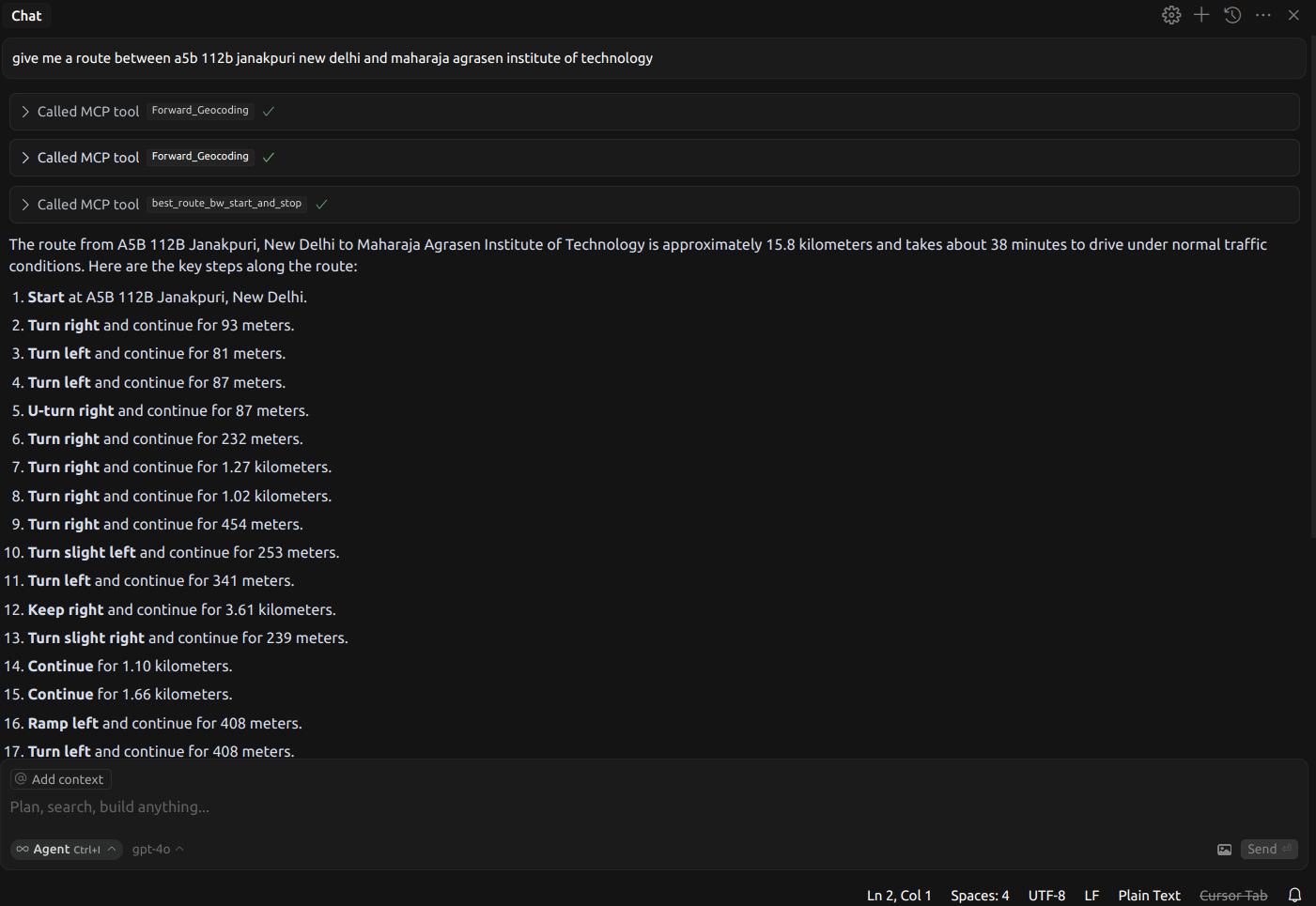
우리는 에이전트를 사용하여 두 지점 사이의 경로를 찾을 수 있습니다.
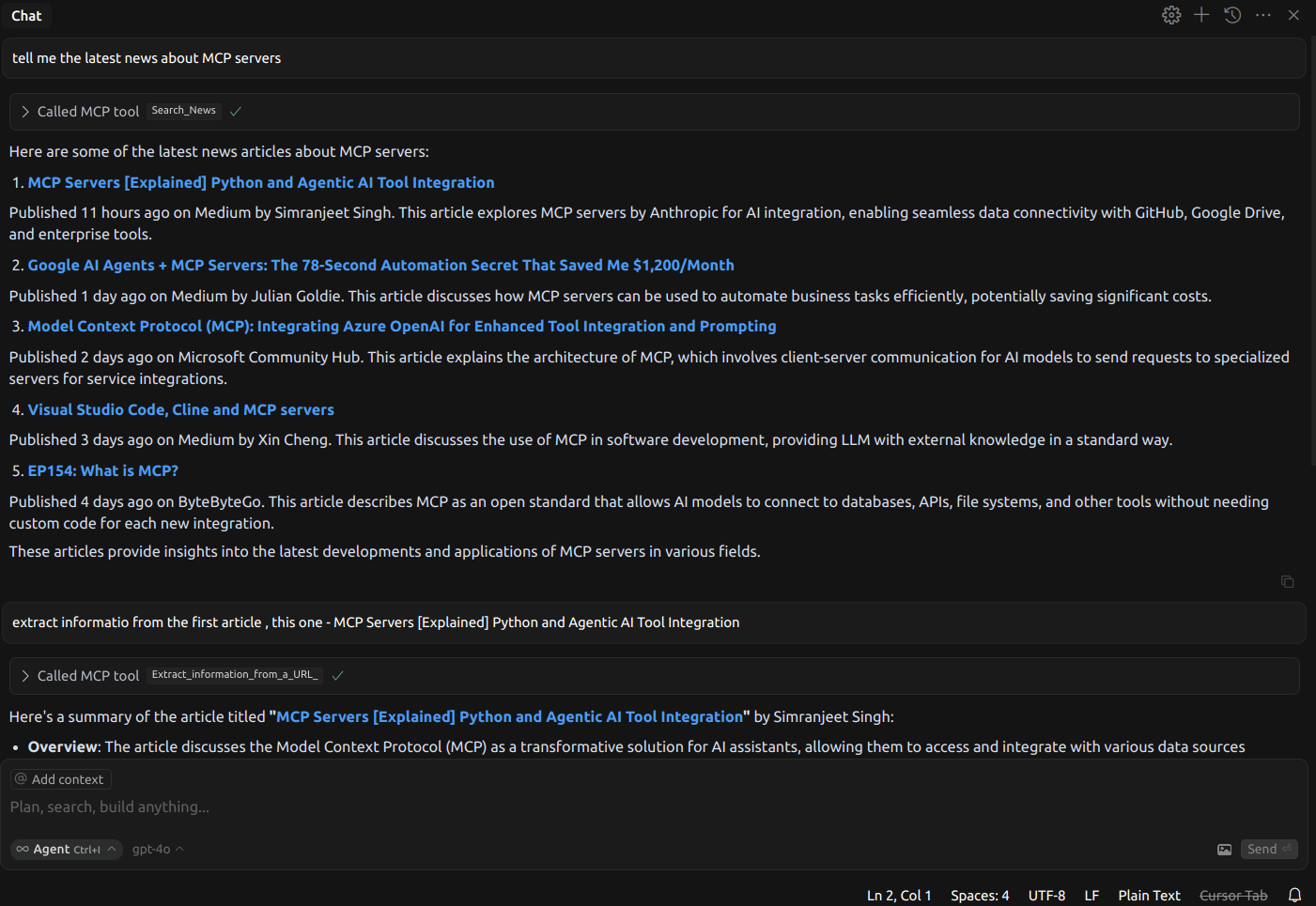
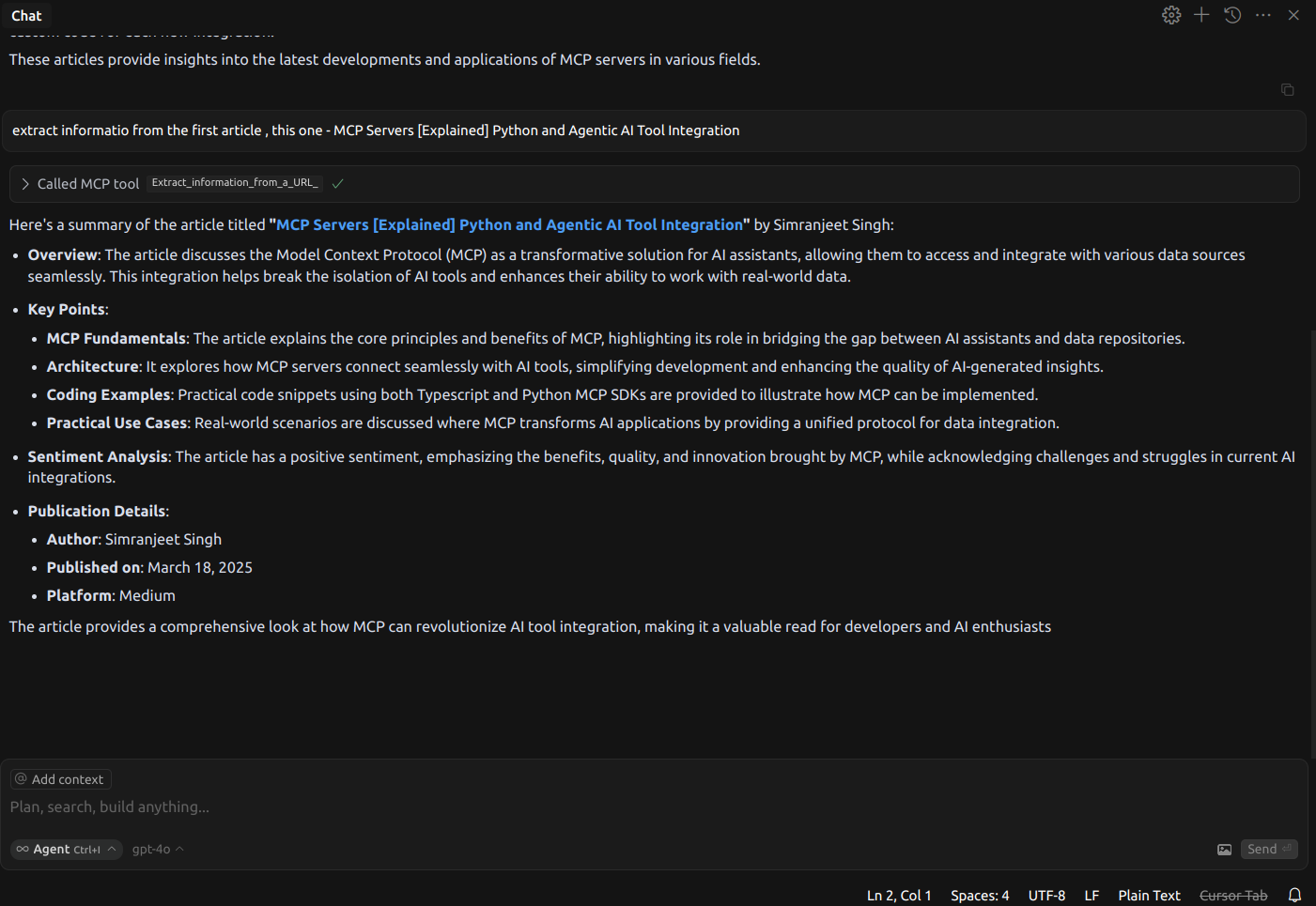
에이전트를 사용하면 어떤 주제에 대한 뉴스를 찾은 다음 기사를 더 자세히 살펴볼 수 있습니다.
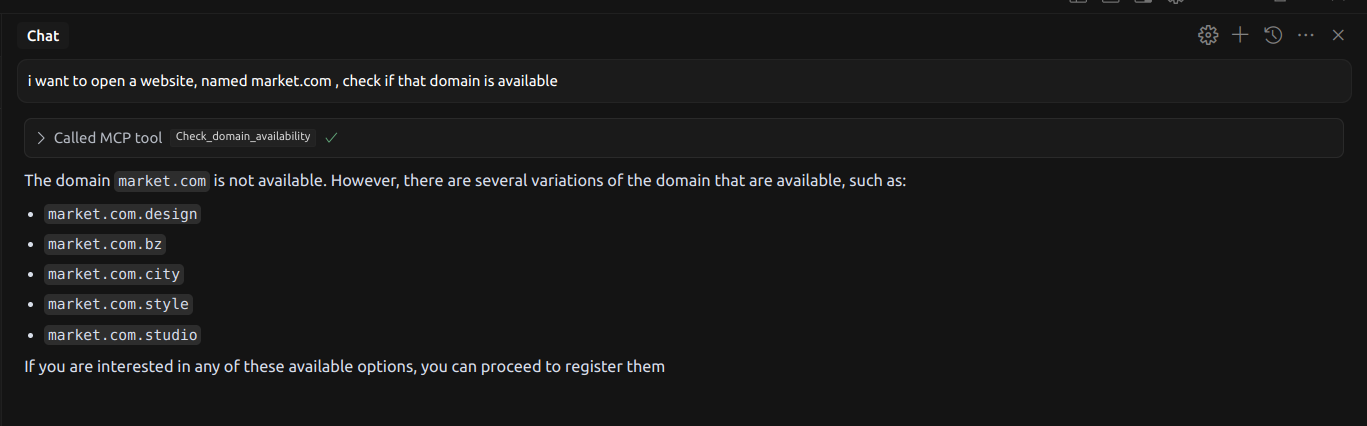
에이전트를 사용하여 사용 가능한 도메인을 찾을 수 있습니다.
utils 폴더에는 API 구성 관리, OpenAPI 사양 구문 분석, MCP 서버에 새 API 등록을 위한 도우미 스크립트가 들어 있습니다.
통합하려는 API의 OpenAPI JSON 파일을 찾으세요. 그런 다음 프로젝트 루트 디렉터리에 json_files 폴더를 만들고 OpenAPI JSON 사양을 해당 폴더에 추가하세요.
OpenAPI 사양을 얻은 후, modify_api.py 사용하여 사양 내부의 경로를 업데이트하여 파일 이름을 포함합니다.
python utils/modify_api.py경로를 수정한 후 다음 옵션 중 하나를 선택하여 API 요약을 업데이트합니다.
LLM을 사용하여 요약을 자동으로 단축:
python utils/LLM_summary_shortener.py 요약을 수동으로 업데이트합니다.
python utils/manual_summary_shortener.py 변경 사항을 적용하려면 프로젝트를 다시 빌드하세요.
npm run build그런 다음, 다음을 사용하여 새로운 API 통합을 테스트합니다.
npm run inspect이 새로운 API를 저장소에 기여하려면 다음을 수행하세요.
저장소를 포크하세요.
지점을 만듭니다.
풀 리퀘스트(PR)를 제출하세요.
변경 사항을 게시하려면 다음을 수행하세요.
package.json 적절히 업데이트합니다(예: 버전, 이름 등을 업데이트합니다).
패키지를 게시합니다.
npm publish --access publicnpm run build - TypeScript 소스를 빌드합니다.
npm run clean - 빌드 아티팩트를 제거합니다.
npm run typecheck - TypeScript 유형 검사를 실행합니다.
npm run dev - 소스 파일을 감시하고 변경 사항을 다시 빌드합니다.
npm run inspect-watch - 변경 사항에 대한 자동 다시 로드와 함께 검사기를 실행합니다.
npm run lint - ESLint를 실행합니다.
npm run typecheck - TypeScript 유형을 확인합니다.
npm run inspect -- \
  --api-base-url https://api.magicapi.dev/api/v1/ \
  --openapi-spec modified_files.txt \
  --headers "x-magicapi-key:your-api-key" \
  --name "my-mcp-server" \
  --version "1.0.0"
개발 환경 시작:
npm run inspect-watchsrc/ 에 있는 TypeScript 파일을 수정합니다.
서버가 자동으로 재구축되고 다시 시작됩니다.
MCP 검사기 UI를 사용하여 변경 사항을 테스트하세요.
MCP 서버를 로컬로 디버깅하거나 실행하려면:
저장소를 복제하고 종속성을 설치합니다.
git clone https://github.com/Noveum/api-market-mcp-server.git
cd api-market-mcp-server
npm install
서버를 빌드하세요:
npm run build디버깅을 위해 다음을 실행할 수 있습니다.
npm run inspect 저장소를 포크합니다.
기능 브랜치를 생성합니다.
변경 사항을 적용하세요.
테스트 및 린팅 실행:
npm run typecheck
npm run lint
풀 리퀘스트를 제출하세요.
MIT
Make a POST request to bridgeml/nsfw!detection/nsfw_detection
Inputs: image (required).
Finding optimal route from a origin to a destination, passing through multiple waypoints(optional).
Inputs: destination (required), origin (required), avoid_ferries, avoid_highways, +3 more.
Finding optimal route to visit several locations.
Inputs: stops (required), avoid_ferries, avoid_highways, avoid_tolls, +1 more.
Make a POST request to bridgeml/codellama/bridgeml/codellama
Inputs: frequency_penalty, max_tokens, messages, stream, +2 more.
Submit a domain name to check its availability.
Inputs: domain_name.
Coding Assistant. Make sure you call get coder output URL MCP tool to get the URL for the request id received from this API
Inputs: frequency_penalty (required), max_tokens (required), presence_penalty (required), prompt (required), +5 more.
API for image deblurring. Make sure you call get deblurred image URL, MCP tool to get the URL for the request id received from this API
Inputs: image (required), task_type (required).
Calculate length and driving time of the optimal routes between origin and destination points on the real road network.
Inputs: origins (required), avoid_ferries, avoid_highways, avoid_tolls, +2 more.
Make a POST request to magicapi/dnschecker/dnschecker
Inputs: domain (required).
Make a POST request to pipfeed/parse/extract
Inputs: url (required).
Obtain location(geographic coordinates) for address.
Inputs: address (required), area, bounds, country, +5 more.
This endpoint retrieves the URL of the ageing gif for a given request ID.
Inputs: request_id (required).
This endpoint retrieves the URL of the transcription and analysis of the audio for the given request ID.
Inputs: request_id (required).
This endpoint retrieves the URL of the coding assistant's response for a given request ID.
Inputs: request_id (required).
This endpoint retrieves the URL of the simulated hairstyle image for a given request ID.
Inputs: request_id (required).
This endpoint retrieves the URL of the Unblurred image for a given request ID.
Inputs: request_id (required).
Make a GET request to magicapi/whois/whois/{domain}
Inputs: domain (required).
API for simulating different hair styles using AI models. Make sure to call get hairstyled image after with the request id received from this API.
Inputs: color_description (required), editing_type (required), hairstyle_description (required), image (required).
Make a POST request to capix/faceswap/faceswap/v1/image
Inputs: swap_url (required), target_url (required).
API for generating ageing gif using AI models. Make sure to call get ageing gif URL, with the result id received from this API
Inputs: image (required), target_age (required).
Make a POST request to capix/faceswap/result/
Inputs: request_id (required).
Obtain address for location.
Inputs: location (required), language.
Search for places around location within a specified radius.
Inputs: location (required), language, radius, type.
Search for places by text string
Inputs: text (required), bounds, language.
Retrieve image search results based on query parameters
Inputs: q (required), count, country, safesearch, +2 more.
Retrieve news search results based on query parameters
Inputs: q (required), count, country, search_lang, +1 more.
Retrieve search suggestions based on query parameters
Inputs: q (required), count, country.
Retrieve video search results based on query parameters
Inputs: q (required), count, country, search_lang, +1 more.
Retrieve web search results based on query parameters
Inputs: q (required).
Retrieve spellcheck suggestions based on query parameters
Inputs: q (required), country.
Make a POST request to bridgeml/text!to!image/text_to_image
Inputs: height (required), prompt (required), width (required), guidance_scale, +4 more.
Make a POST request to capix/faceswap/upload/
Inputs: no named parameters.
Make a POST request to capix/faceswap/faceswap/v1/video
Inputs: swap_url (required), target_url (required).
API for sentece wise transcription and analysis of audio, using AI models. Make sure to call get audio analysis URL with the request ID received from this API.
Inputs: audio (required), compression_ratio_threshold (required), condition_on_previous_text (required), logprob_threshold (required), +7 more.
Recent tool additions, removals, and schema changes observed during successful MCP inspections.
Loading tool schema changelog…
Scored across 34 tools
Multiple tools have overlapping or unclear boundaries, causing confusion. For example, 'best_route_bw_start_and_stop' and 'best_route_for_multiple_stops' both handle routing with similar purposes, while 'BridgeML_API', 'Coding_Assistant', and 'text-to-image' are vague and could be misselected. The set mixes distinct APIs (e.g., geocoding, search) with redundant or poorly differentiated tools.
Naming conventions are highly inconsistent, mixing styles like snake_case ('best_route_bw_start_and_stop'), CamelCase ('Get_ageing_gif_URL'), and kebab-case ('text-to-image'). Verbs vary widely (e.g., 'Check_domain_availability', 'Search_for_nearby_places', 'getWhoisInfo'), and some names are overly verbose or cryptic, lacking a predictable pattern across the toolset.
With 34 tools, the count is excessive for a single server, suggesting poor scoping. The tools cover disparate domains like routing, image processing, search, and APIs, making the set feel bloated and unfocused. A more coherent server would split these into multiple specialized servers, as the current scope is too broad for effective agent use.
The toolset covers various domains but has notable gaps in lifecycle coverage. For instance, in image processing, tools like 'Deblurer' and 'Get_Unblurred_Image_URL' exist, but other operations (e.g., image deletion or updates) are missing. Similarly, search tools are present but lack filtering or pagination options. While agents can perform basic tasks, the surface is incomplete for robust workflows.
Discover and call 10,000+ production APIs from one MCP server. Pay-per-call billing for AI agents.
The Mercado Pago MCP Server implements the Model Context Protocol to provide AI agents and LLMs with access to Mercado Pago's APIs and tools within compatible development environments. It acts as an intermediary that translates Mercado Pago resources into executable functions (tools) that AI applications can invoke to perform actions and automate flows. The server simplifies integration, enables using documentation to implement or improve code, and optimizes operations through natural language interactions without manual implementations.
Model Context Protocol server for the Apideck Unified API. Connect any MCP-compatible agent framework to 100+ accounting systems, HRIS platforms, file storage providers, and more through one integration. More information https://www.apideck.com/mcp-server
Hosted MCP server for live public-data APIs and Skills for AI agents.