Glama
NealZhi
by NealZhi

Codex JetBrains HUD + Hooks 接入说明

项目背景:这个适配方案是基于对 Claude Code v2.1.88 泄露源码的分析做出来的,目标是让 Codex 也具备类似 Claude Code 的能力,能够感知 JetBrains 系列 IDE 当前选中的文件、行号和代码范围。

Author: nealzhi

本文档只保留一条接入路径:HUD + hooks。

本仓库已经移除了旧的“本地 MCP server + 全局提示词”方案,不再推荐也不再提供那套接法。
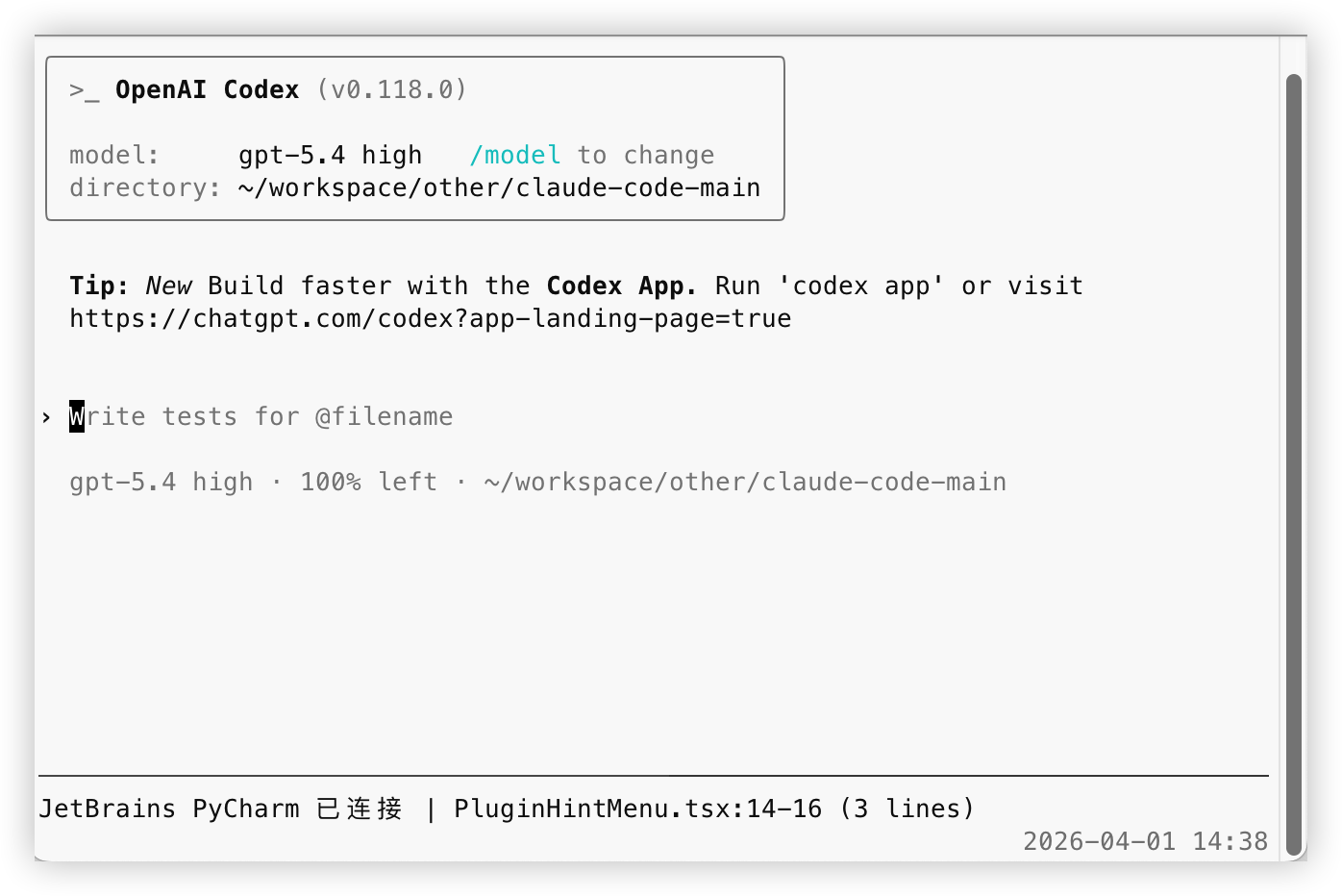
成功截图

1. 前提

先满足下面两个条件:

  1. 你使用的是 JetBrains 系列 IDE
    例如:IntelliJ IDEA、PyCharm、WebStorm、GoLand、Android Studio

  2. 你的 IDE 已安装 Claude Code 官方 JetBrains 插件
    这是联动前提。没有这个插件,就不会有本地 ~/.claude/ide/*.lock 和对应的本地接口,Codex 也就无法读取当前选中的文件和代码范围。

Related MCP server: Claude Code Control MCP

2. 安装依赖

在仓库根目录执行:

cd codex-jetbrains-mcp
npm install
brew install tmux

说明:

  • npm install:安装 HUD 和 hooks 依赖

  • tmux:HUD 依赖

3. 接入 HUD

在仓库根目录执行:

chmod +x codex-jetbrains-mcp/bin/codex-jetbrains-hud

如果你希望以后直接运行 codex 就自动带 HUD,请把下面这一行加到 ~/.zshrc 或 ~/.bashrc:

alias codex='$(pwd)/codex-jetbrains-mcp/bin/codex-jetbrains-hud'

重新加载 shell:

source ~/.zshrc

如果你用的是 bash,就执行:

source ~/.bashrc

如果你在 macOS 自带终端或 Warp 终端里发现鼠标滚轮无法滚动 Codex 窗口,可以执行下面这条命令开启 tmux 鼠标支持:

tmux set -g mouse on

HUD 启动后会显示一行:

JetBrains PyCharm 已连接 | test_main.py:2140-2147 (8 lines)

4. 配置 hooks

这套方案的核心就是:

  1. 启动 codex 时同时启动 HUD

  2. HUD 自动把 JetBrains 当前文件/行号写入 .codex/jetbrains-selection-state.json

  3. UserPromptSubmit hook 在你发消息时读取这份状态

  4. 有 JetBrains 上下文时,只注入“文件路径”或“文件路径 + 行号”

  5. 不注入选中文本,让 Codex 自己按需读文件

4.1 推荐启动方式

在仓库根目录执行:

chmod +x codex-jetbrains-mcp/bin/codex-jetbrains-hud
alias codex='$(pwd)/codex-jetbrains-mcp/bin/codex-jetbrains-hud'

之后你正常执行 codex 即可。

现在 codex-jetbrains-hud 除了显示 HUD,还会自动同步 hook 所需状态。这是唯一推荐路径,不需要也不再提供单独的同步进程。

状态文件会写到:

.codex/jetbrains-selection-state.json

4.2 配置 hooks

仓库里已经带了:

  • .codex/config.toml

  • .codex/hooks/selection-state.mjs

  • .codex/hooks.json

  • .codex/hooks/user-prompt-submit-jetbrains-selection.mjs

接入方式分两种:

  1. 如果你在这个仓库目录里启动 codex Codex 会直接读取仓库里的 .codex/config.toml 和 .codex/hooks.json,不需要你再额外指定路径。

  2. 如果你已经有自己的全局 ~/.codex/hooks.json 不要覆盖它,把仓库里这个 UserPromptSubmit 配置合并进去就行。 如果你要复制到 ~/.codex/hooks/,请把整个 .codex/hooks/ 目录一起复制,不要只拷贝入口文件。

其中 .codex/config.toml 的作用是打开官方要求的 hooks 功能开关:

[features]
codex_hooks = true

按官方文档,hooks 默认是关闭的,必须在 config.toml 里开启,或者启动时传 codex --enable codex_hooks。另外,Codex 的配置层会从 ~/.codex/config.toml 和仓库内 .codex/config.toml 一起读取;如果项目没有被标记为 trusted,仓库级 .codex/config.toml 不会生效。

仓库自带的配置内容就是:

{
  "hooks": {
    "UserPromptSubmit": [
      {
        "hooks": [
          {
            "type": "command",
            "command": "node \"$(git rev-parse --show-toplevel)/.codex/hooks/user-prompt-submit-jetbrains-selection.mjs\"",
            "statusMessage": "Loading JetBrains selection"
          }
        ]
      }
    ]
  }
}

这个 hook 会在每次 UserPromptSubmit 时读取本地状态文件:

  • 如果当前只选中了文件,就给 Codex 注入“当前文件是哪个”

  • 如果当前选中了代码范围,就给 Codex 注入“当前文件 + 行号”

  • 如果当前没有 JetBrains 上下文,或者状态已经过期,就什么都不注入

它不会注入代码文本,只做位置指引。

4.3 清理旧配置

如果你以前接过旧版方案,请把下面两样删掉:

  1. 删除本地 MCP 配置

codex mcp remove jetbrains-selection
  1. 删除你自己的全局提示词里这类内容

每次用户请求时,先调用 MCP 工具 jetbrains-selection.jetbrains_get_selection 获取 JetBrains 当前选区

这一步一定要做,不然模型还是可能沿着旧思路去调用一个已经不存在的 MCP 工具。

4.4 hook 实际注入的内容

只选中文件时,注入类似:

JetBrains 当前选中文件:/path/to/file.ts
这只是文件指引,没有附带文件内容。
如果本轮问题和这个文件相关,请先自行读取该文件;如果无关,请忽略这条上下文。

选中了代码行号时,注入类似:

JetBrains 当前选中位置:/path/to/file.ts:120-146
这只是位置指引,没有附带代码内容。
如果本轮问题和这个位置相关,请先自行读取对应文件和行号;如果无关,请忽略这条上下文。

默认状态有效期是 20s。HUD 运行期间会每 5s 刷新一次状态;如果 HUD 退出,hook 很快就会停止注入旧状态。你也可以通过环境变量 CODEX_JB_HOOK_MAX_AGE_MS 调整这个时间。

5. 为什么不再保留本地 MCP 方案

旧方案的问题主要有这几类:

  • 需要额外执行 codex mcp add,多一层安装和维护成本

  • 模型通常还要依赖全局提示词强制“每轮先调用一次 MCP”,即使这轮问题跟 JetBrains 选区无关,也会白走一步

  • 选区是否相关,本来应该由当前提问来决定;放到全局提示词里会让行为过于机械

  • 本地 MCP server 只是中转层,实际还是要连 Claude Code JetBrains 插件;这层单独保留,收益不高,复杂度更高

  • 旧配置不容易清理干净,迁移后很容易残留无效工具名或旧提示词

改成 HUD + hooks 之后,收益会更直接:

  • 只有在发消息时才读取本地状态,不再每轮多起一层 MCP 调用

  • 注入内容只包含文件路径或行号,信息量更干净,模型再自己决定要不要去读文件

  • 状态文件按项目根目录隔离,不同项目各写各的 .codex/jetbrains-selection-state.json

  • HUD 存活时持续刷新心跳,HUD 停掉后旧状态会在超时后自动失效

  • 接入路径更单一,用户只需要维护 HUD 和 hooks,不需要再维护 MCP 配置

6. 现在这套方案怎么工作

数据链路是这样的:

  1. Claude Code 官方 JetBrains 插件暴露本地连接信息和选区事件

  2. HUD 根据当前工作目录匹配正确的 JetBrains 项目窗口

  3. HUD 收到选区变化后,把文件路径、行号和心跳时间写入当前项目的 .codex/jetbrains-selection-state.json

  4. UserPromptSubmit hook 在你发消息时读取这份状态

  5. 如果状态有效,就给 Codex 注入“当前文件”或“当前文件 + 行号”的轻量提示

这条链路里没有本地 MCP server,也不需要额外的全局提示词。

7. 验证

完成上面步骤后:

  1. 打开 JetBrains IDE

  2. 启动 codex

  3. 如果你用了 HUD 包装启动,HUD 会自动同步 hook 状态

  4. 回到安装了 Claude Code 官方插件的 JetBrains IDE 中选中文件或一段代码

  5. 确认 HUD 已显示当前文件和行号

  6. 在 Codex 中正常提问

如果 HUD 没刷新,最稳的做法是:

  • 回到 IDE 里重新点一下文件

  • 或重新拖一下选区

正常情况下:

  • 只选中文件时,Codex 会拿到文件路径指引

  • 选中代码范围时,Codex 会拿到文件路径和行号指引

  • 没有 JetBrains 上下文时,不会注入任何 JetBrains 提示

Available Tools

5 tools
jetbrains_get_selectionC

Return the current file path and selected lines forwarded by the Claude JetBrains plugin.

ParametersJSON Schema
NameRequiredDescriptionDefault
maxCharsNo
includeTextNo

TDQS

C2.9/5.0
Behavior2/5

Does the description disclose side effects, auth requirements, rate limits, or destructive behavior?

No annotations are present, so the description must fully disclose behavioral traits. It fails to indicate whether the operation is read-only, destructive, or requires authentication. Mentioning 'forwarded by the Claude JetBrains plugin' weakly implies a read operation but is insufficient.

Agents need to know what a tool does to the world before calling it. Descriptions should go beyond structured annotations to explain consequences.

Conciseness4/5

Is the description appropriately sized, front-loaded, and free of redundancy?

The description is a single concise sentence that front-loads the main purpose. However, it is slightly under-specified for a tool with multiple parameters, but still efficient.

Shorter descriptions cost fewer tokens and are easier for agents to parse. Every sentence should earn its place.

Completeness3/5

Given the tool's complexity, does the description cover enough for an agent to succeed on first attempt?

Given the tool's complexity (2 parameters, no output schema), the description provides a high-level overview of the return value ('file path and selected lines') but lacks details about the format, structure, or behavior (e.g., what happens if no selection exists). It is minimally adequate but not comprehensive.

Complex tools with many parameters or behaviors need more documentation. Simple tools need less. This dimension scales expectations accordingly.

Parameters1/5

Does the description clarify parameter syntax, constraints, interactions, or defaults beyond what the schema provides?

Schema coverage is 0%, and the description does not explain any parameters (maxChars, includeText) or their purpose. The schema provides defaults and constraints, but the description adds no value beyond that, leaving the agent uninformed about how to use the parameters effectively.

Input schemas describe structure but not intent. Descriptions should explain non-obvious parameter relationships and valid value ranges.

Purpose5/5

Does the description clearly state what the tool does and how it differs from similar tools?

The description clearly states that the tool returns the current file path and selected lines from the JetBrains plugin. This verb-resource combination is specific and distinct from sibling tools like jetbrains_list_instances or jetbrains_status.

Agents choose between tools based on descriptions. A clear purpose with a specific verb and resource helps agents select the right tool.

Usage Guidelines2/5

Does the description explain when to use this tool, when not to, or what alternatives exist?

No guidance is provided on when to use this tool versus alternatives, nor are there any exclusions or prerequisites mentioned. The description only states what it does, not the context for usage.

Agents often have multiple tools that could apply. Explicit usage guidance like "use X instead of Y when Z" prevents misuse.

jetbrains_list_instancesA

List discovered JetBrains plugin instances and show which one matches the current project.

ParametersJSON Schema
NameRequiredDescriptionDefault

No parameters

TDQS

A3.6/5.0
Behavior2/5

Does the description disclose side effects, auth requirements, rate limits, or destructive behavior?

No annotations are provided, so the description must carry the full burden of behavioral disclosure. It mentions listing and matching but does not discuss side effects (likely none, read-only), authorization requirements, or potential limitations. This is a significant gap.

Agents need to know what a tool does to the world before calling it. Descriptions should go beyond structured annotations to explain consequences.

Conciseness4/5

Is the description appropriately sized, front-loaded, and free of redundancy?

The description is a single, front-loaded sentence that conveys the core functionality with no unnecessary words. It is concise, though could be slightly more structured.

Shorter descriptions cost fewer tokens and are easier for agents to parse. Every sentence should earn its place.

Completeness3/5

Given the tool's complexity, does the description cover enough for an agent to succeed on first attempt?

Given there are no parameters, no output schema, and no annotations, the description provides minimal context. It lacks details about the output format, the definition of 'matches', and any behavior beyond listing. While acceptable for a simple list tool, it leaves gaps for an AI agent.

Complex tools with many parameters or behaviors need more documentation. Simple tools need less. This dimension scales expectations accordingly.

Parameters4/5

Does the description clarify parameter syntax, constraints, interactions, or defaults beyond what the schema provides?

The input schema has zero properties, so there are no parameters to describe. Per guidelines, a baseline of 4 is appropriate since the description does not need to add parameter semantics.

Input schemas describe structure but not intent. Descriptions should explain non-obvious parameter relationships and valid value ranges.

Purpose5/5

Does the description clearly state what the tool does and how it differs from similar tools?

The description clearly states the verb 'List' and the resource 'JetBrains plugin instances', and adds the specific behavior of showing which instance matches the current project. This distinctly differentiates it from sibling tools like jetbrains_get_selection or jetbrains_status.

Agents choose between tools based on descriptions. A clear purpose with a specific verb and resource helps agents select the right tool.

Usage Guidelines3/5

Does the description explain when to use this tool, when not to, or what alternatives exist?

The description implies that the tool is for listing instances and identifying the project-matched one, but it does not explicitly state when to use it over alternatives or when to avoid using it. No usage context or exclusions are provided.

Agents often have multiple tools that could apply. Explicit usage guidance like "use X instead of Y when Z" prevents misuse.

jetbrains_list_upstream_toolsA

List the upstream MCP tools exposed by the Claude JetBrains plugin connection for debugging and extension work.

ParametersJSON Schema
NameRequiredDescriptionDefault

No parameters

TDQS

A3.9/5.0
Behavior3/5

Does the description disclose side effects, auth requirements, rate limits, or destructive behavior?

The description indicates a read operation by 'list', but with no annotations, it does not disclose any additional behavioral traits such as permissions, side effects, or limitations. Basic transparency is adequate but minimal.

Agents need to know what a tool does to the world before calling it. Descriptions should go beyond structured annotations to explain consequences.

Conciseness5/5

Is the description appropriately sized, front-loaded, and free of redundancy?

The description is a single sentence with no superfluous words, clearly stating the tool's function and context.

Shorter descriptions cost fewer tokens and are easier for agents to parse. Every sentence should earn its place.

Completeness3/5

Given the tool's complexity, does the description cover enough for an agent to succeed on first attempt?

The description covers purpose and use-case but does not specify output format (e.g., list of tool names or details). For a simple list tool without output schema, this is adequate but could be more informative.

Complex tools with many parameters or behaviors need more documentation. Simple tools need less. This dimension scales expectations accordingly.

Parameters4/5

Does the description clarify parameter syntax, constraints, interactions, or defaults beyond what the schema provides?

The tool has zero parameters; the empty schema is fully described. The description does not need to add parameter information beyond what the schema already provides.

Input schemas describe structure but not intent. Descriptions should explain non-obvious parameter relationships and valid value ranges.

Purpose5/5

Does the description clearly state what the tool does and how it differs from similar tools?

The description explicitly states 'List the upstream MCP tools' with a clear verb and resource, and distinguishes from siblings like jetbrains_get_selection by specifying 'upstream MCP tools'.

Agents choose between tools based on descriptions. A clear purpose with a specific verb and resource helps agents select the right tool.

Usage Guidelines3/5

Does the description explain when to use this tool, when not to, or what alternatives exist?

The description mentions 'for debugging and extension work' which gives context, but lacks explicit when-to-use or alternatives guidance. No comparison with sibling tools is provided.

Agents often have multiple tools that could apply. Explicit usage guidance like "use X instead of Y when Z" prevents misuse.

jetbrains_refresh_connectionA

Force a fresh scan of lockfiles and reconnect to the matching JetBrains plugin instance.

ParametersJSON Schema
NameRequiredDescriptionDefault

No parameters

TDQS

A3.7/5.0
Behavior2/5

Does the description disclose side effects, auth requirements, rate limits, or destructive behavior?

No annotations are provided, so the description must disclose behavioral traits. It mentions 'force a fresh scan' and 'reconnect' but does not explain side effects (e.g., whether current state is disrupted, auth requirements) or what happens to existing connections.

Agents need to know what a tool does to the world before calling it. Descriptions should go beyond structured annotations to explain consequences.

Conciseness5/5

Is the description appropriately sized, front-loaded, and free of redundancy?

A single, front-loaded sentence with no wasted words. Every part delivers essential information.

Shorter descriptions cost fewer tokens and are easier for agents to parse. Every sentence should earn its place.

Completeness3/5

Given the tool's complexity, does the description cover enough for an agent to succeed on first attempt?

Given no output schema and no annotations, the description is minimal but covers the core action. However, it lacks details on side effects, prerequisites, or postconditions, leaving some gaps for a complete understanding.

Complex tools with many parameters or behaviors need more documentation. Simple tools need less. This dimension scales expectations accordingly.

Parameters4/5

Does the description clarify parameter syntax, constraints, interactions, or defaults beyond what the schema provides?

No parameters exist, so baseline is 4. The description adds meaning by explaining the tool's actions (scan lockfiles, reconnect) beyond the empty schema.

Input schemas describe structure but not intent. Descriptions should explain non-obvious parameter relationships and valid value ranges.

Purpose5/5

Does the description clearly state what the tool does and how it differs from similar tools?

Description clearly states it forces a fresh scan of lockfiles and reconnects to the matching JetBrains plugin instance. This specific verb-resource pair distinguishes it from siblings like get_selection or list_instances.

Agents choose between tools based on descriptions. A clear purpose with a specific verb and resource helps agents select the right tool.

Usage Guidelines3/5

Does the description explain when to use this tool, when not to, or what alternatives exist?

No explicit when-to-use or when-not-to-use guidance is given. The description implies it's for refreshing a stale connection or lockfiles, but alternatives are not mentioned.

Agents often have multiple tools that could apply. Explicit usage guidance like "use X instead of Y when Z" prevents misuse.

jetbrains_statusA

Show connection status for the Claude JetBrains plugin adapter.

ParametersJSON Schema
NameRequiredDescriptionDefault

No parameters

TDQS

A3.9/5.0
Behavior2/5

Does the description disclose side effects, auth requirements, rate limits, or destructive behavior?

No annotations provided, and the description only says 'Show connection status'. Does not disclose whether it performs a live check or returns cached state, or any side effects. Minimal disclosure.

Agents need to know what a tool does to the world before calling it. Descriptions should go beyond structured annotations to explain consequences.

Conciseness5/5

Is the description appropriately sized, front-loaded, and free of redundancy?

Single sentence, no fluff, perfectly sized for the tool's simplicity.

Shorter descriptions cost fewer tokens and are easier for agents to parse. Every sentence should earn its place.

Completeness5/5

Given the tool's complexity, does the description cover enough for an agent to succeed on first attempt?

Given zero complexity, no parameters, no output schema, and no annotations, the description fully covers what the tool does.

Complex tools with many parameters or behaviors need more documentation. Simple tools need less. This dimension scales expectations accordingly.

Parameters4/5

Does the description clarify parameter syntax, constraints, interactions, or defaults beyond what the schema provides?

Zero parameters, so the description naturally adds no param info. According to calibration rules, 0 params = baseline 4.

Input schemas describe structure but not intent. Descriptions should explain non-obvious parameter relationships and valid value ranges.

Purpose5/5

Does the description clearly state what the tool does and how it differs from similar tools?

Clearly states verb 'Show' and resource 'connection status for the Claude JetBrains plugin adapter'. Distinguishes from sibling tools like jetbrains_refresh_connection which implies a different action.

Agents choose between tools based on descriptions. A clear purpose with a specific verb and resource helps agents select the right tool.

Usage Guidelines3/5

Does the description explain when to use this tool, when not to, or what alternatives exist?

No explicit when or when-not to use, but the simplicity of a zero-parameter status check makes usage obvious. No alternatives mentioned, but siblings indicate other connection-related tools.

Agents often have multiple tools that could apply. Explicit usage guidance like "use X instead of Y when Z" prevents misuse.

Tool Schema Changelog

Recent tool additions, removals, and schema changes observed during successful MCP inspections.

  1. 5 tool updatesv0.1.0
    • First observedjetbrains_get_selection
    • First observedjetbrains_list_instances
    • First observedjetbrains_list_upstream_tools
    • First observedjetbrains_refresh_connection
    • First observedjetbrains_status

TDQS

A3.7/5.0

Scored across 5 tools

Disambiguation5/5

Each tool has a clearly distinct purpose: getting selection, listing instances, listing upstream tools, refreshing connection, and showing status. No two tools could be confused.

Naming Consistency5/5

All tools follow a consistent 'jetbrains_' prefix with verb_noun pattern (get_selection, list_instances, list_upstream_tools, refresh_connection, status). No mixing of conventions.

Tool Count5/5

With 5 tools, the set is well-scoped for a connection adapter that manages plugin instances and retrieves selections. Each tool earns its place without unnecessary bloat.

Completeness4/5

The tool surface covers the core operations: get current selection, list/manage instances, refresh connection, and check status. Minor gaps like setting selection or executing actions are absent, but the stated purpose is well-covered.

Maintenance

ActivityInactive
ResponsivenessNo issues

Related MCP Connectors

Related MCP Servers