Codex JetBrains MCP
Инструкция по подключению Codex JetBrains HUD + Hooks
Предыстория проекта: это решение по адаптации было создано на основе анализа утечки исходного кода
Claude Code v2.1.88. Цель — наделитьCodexвозможностями, аналогичнымиClaude Code, чтобы он мог распознавать текущий выбранный файл, номера строк и диапазон кода в IDE семейства JetBrains.Автор:
nealzhi
В этом документе оставлен только один путь подключения: HUD + hooks.
Из этого репозитория удалено старое решение «локальный MCP server + глобальные промпты», оно больше не рекомендуется и не поддерживается.
1. Предварительные требования
Сначала выполните следующие два условия:
Вы используете IDE семейства JetBrains Например:
IntelliJ IDEA,PyCharm,WebStorm,GoLand,Android StudioВ вашей IDE установлен официальный плагин Claude Code для JetBrains Это необходимое условие для интеграции. Без этого плагина не будет локальных файлов
~/.claude/ide/*.lockи соответствующих локальных интерфейсов, поэтому Codex не сможет считывать текущий выбранный файл и диапазон кода.
Related MCP server: Claude Code Control MCP
2. Установка зависимостей
Выполните в корневом каталоге репозитория:
cd codex-jetbrains-mcp
npm install
brew install tmuxПояснение:
npm install: установка зависимостей HUD и hookstmux: зависимость для HUD
3. Подключение HUD
Выполните в корневом каталоге репозитория:
chmod +x codex-jetbrains-mcp/bin/codex-jetbrains-hudЕсли вы хотите, чтобы при запуске codex HUD запускался автоматически, добавьте следующую строку в ~/.zshrc или ~/.bashrc:
alias codex='$(pwd)/codex-jetbrains-mcp/bin/codex-jetbrains-hud'Перезагрузите оболочку:
source ~/.zshrcЕсли вы используете bash, выполните:
source ~/.bashrcЕсли вы обнаружили, что в терминале macOS или Warp колесо мыши не прокручивает окно Codex, можно выполнить следующую команду для включения поддержки мыши в tmux:
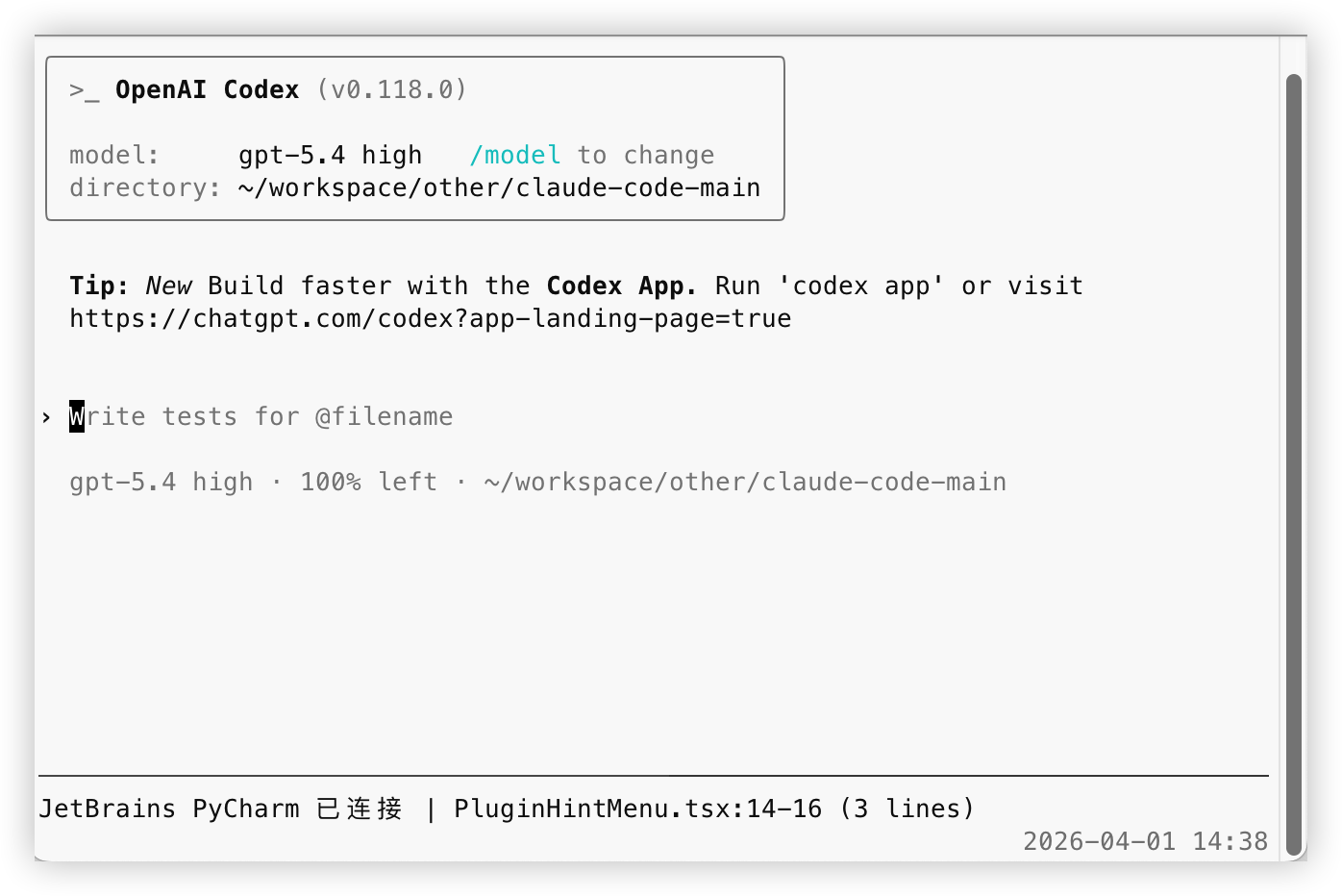
tmux set -g mouse onПосле запуска HUD отобразится строка:
JetBrains PyCharm 已连接 | test_main.py:2140-2147 (8 lines)4. Настройка hooks
Суть этого решения заключается в следующем:
При запуске
codexодновременно запускается HUDHUD автоматически записывает текущий файл/номер строки из JetBrains в
.codex/jetbrains-selection-state.jsonХук
UserPromptSubmitсчитывает это состояние при отправке сообщенияПри наличии контекста JetBrains внедряется только «путь к файлу» или «путь к файлу + номер строки»
Выбранный текст не внедряется, позволяя Codex самостоятельно считывать файл по мере необходимости
4.1 Рекомендуемый способ запуска
Выполните в корневом каталоге репозитория:
chmod +x codex-jetbrains-mcp/bin/codex-jetbrains-hud
alias codex='$(pwd)/codex-jetbrains-mcp/bin/codex-jetbrains-hud'После этого вы можете нормально запускать codex.
Теперь codex-jetbrains-hud не только отображает HUD, но и автоматически синхронизирует состояние, необходимое для хуков. Это единственный рекомендуемый путь, отдельный процесс синхронизации больше не требуется и не предоставляется.
Файл состояния будет записан в:
.codex/jetbrains-selection-state.json4.2 Настройка hooks
В репозитории уже есть:
.codex/config.toml.codex/hooks/selection-state.mjs.codex/hooks.json.codex/hooks/user-prompt-submit-jetbrains-selection.mjs
Способы подключения:
Если вы запускаете
codexв каталоге этого репозитория Codex напрямую считает.codex/config.tomlи.codex/hooks.jsonиз репозитория, вам не нужно указывать дополнительные пути.Если у вас уже есть свой глобальный файл
~/.codex/hooks.jsonНе перезаписывайте его, просто объедините конфигурациюUserPromptSubmitиз репозитория. Если вы хотите скопировать его в~/.codex/hooks/, скопируйте весь каталог.codex/hooks/, а не только входной файл.
Назначение .codex/config.toml — включение функции хуков, требуемой официально:
[features]
codex_hooks = trueСогласно официальной документации, хуки по умолчанию отключены, их необходимо включить в config.toml или передать codex --enable codex_hooks при запуске. Кроме того, уровень конфигурации Codex считывается из ~/.codex/config.toml и .codex/config.toml внутри репозитория; если проект не помечен как доверенный (trusted), config.toml на уровне репозитория не вступит в силу.
Содержимое конфигурации, поставляемой с репозиторием:
{
"hooks": {
"UserPromptSubmit": [
{
"hooks": [
{
"type": "command",
"command": "node \"$(git rev-parse --show-toplevel)/.codex/hooks/user-prompt-submit-jetbrains-selection.mjs\"",
"statusMessage": "Loading JetBrains selection"
}
]
}
]
}
}Этот хук считывает локальный файл состояния при каждом UserPromptSubmit:
Если выбран только файл, он внедряет в Codex информацию о том, «какой файл является текущим»
Если выбран диапазон кода, он внедряет в Codex «текущий файл + номер строки»
Если контекст JetBrains отсутствует или состояние устарело, ничего не внедряется
Он не внедряет текст кода, а только дает указания по местоположению.
4.3 Очистка старых конфигураций
Если вы ранее использовали старую версию решения, удалите следующее:
Удалите локальную конфигурацию MCP
codex mcp remove jetbrains-selectionУдалите подобный контент из ваших собственных глобальных промптов
每次用户请求时,先调用 MCP 工具 jetbrains-selection.jetbrains_get_selection 获取 JetBrains 当前选区Этот шаг обязателен, иначе модель может продолжать пытаться вызвать несуществующий инструмент MCP, следуя старой логике.
4.4 Содержимое, фактически внедряемое хуком
При выборе только файла внедряется нечто подобное:
JetBrains 当前选中文件:/path/to/file.ts
这只是文件指引,没有附带文件内容。
如果本轮问题和这个文件相关,请先自行读取该文件;如果无关,请忽略这条上下文。При выборе диапазона строк кода внедряется нечто подобное:
JetBrains 当前选中位置:/path/to/file.ts:120-146
这只是位置指引,没有附带代码内容。
如果本轮问题和这个位置相关,请先自行读取对应文件和行号;如果无关,请忽略这条上下文。Срок действия состояния по умолчанию составляет 20s. Во время работы HUD состояние обновляется каждые 5s; если HUD завершает работу, хук вскоре перестанет внедрять старое состояние. Вы также можете настроить это время с помощью переменной окружения CODEX_JB_HOOK_MAX_AGE_MS.
5. Почему решение с локальным MCP больше не поддерживается
Основные проблемы старого решения:
Требовалось дополнительное выполнение
codex mcp add, что увеличивало затраты на установку и обслуживаниеМодель обычно полагалась на глобальные промпты, принудительно «вызывая MCP один раз за раунд», даже если вопрос не был связан с выбором в JetBrains, что приводило к лишним действиям
Решение о том, связан ли выбор с вопросом, должно приниматься на основе текущего запроса; помещение этого в глобальные промпты делало поведение слишком механическим
Локальный MCP server был лишь промежуточным слоем, фактически все равно нужно было подключаться к плагину Claude Code JetBrains; сохранение этого слоя отдельно не дает преимуществ, но увеличивает сложность
Старые конфигурации трудно полностью очистить, после миграции легко остаются недействительные имена инструментов или старые промпты
После перехода на HUD + hooks преимущества стали более очевидными:
Локальное состояние считывается только при отправке сообщения, нет лишних вызовов MCP в каждом раунде
Внедряемый контент содержит только путь к файлу или номер строки, информация чище, модель сама решает, нужно ли читать файл
Файлы состояния изолированы по корневому каталогу проекта, каждый проект записывает свой
.codex/jetbrains-selection-state.jsonHUD обновляет пульс, пока он активен, после остановки HUD старое состояние автоматически аннулируется по истечении времени ожидания
Путь подключения более единый, пользователю нужно поддерживать только HUD и хуки, не нужно поддерживать конфигурацию MCP
6. Как работает это решение
Цепочка данных выглядит так:
Официальный плагин Claude Code для JetBrains предоставляет информацию о локальном подключении и событиях выбора
HUD сопоставляет правильное окно проекта JetBrains на основе текущего рабочего каталога
После получения изменений выбора HUD записывает путь к файлу, номер строки и время пульса в
.codex/jetbrains-selection-state.jsonтекущего проектаХук
UserPromptSubmitсчитывает это состояние при отправке сообщенияЕсли состояние действительно, он внедряет легкую подсказку «текущий файл» или «текущий файл + номер строки» в Codex
В этой цепочке нет локального MCP server, и не требуются дополнительные глобальные промпты.
7. Проверка
После выполнения вышеуказанных шагов:
Откройте IDE JetBrains
Запустите
codexЕсли вы использовали обертку HUD для запуска, HUD автоматически синхронизирует состояние хука
Вернитесь в IDE JetBrains с установленным официальным плагином Claude Code и выберите файл или фрагмент кода
Убедитесь, что HUD отображает текущий файл и номер строки
Задайте вопрос в Codex как обычно
Если HUD не обновляется, самый надежный способ:
Вернитесь в IDE и снова нажмите на файл
Или перетащите выделение заново
В нормальных условиях:
При выборе только файла Codex получит указание на путь к файлу
При выборе диапазона кода Codex получит указание на путь к файлу и номер строки
При отсутствии контекста JetBrains никакие подсказки JetBrains внедряться не будут
Available Tools
5 toolsjetbrains_get_selectionC
Return the current file path and selected lines forwarded by the Claude JetBrains plugin.
| Name | Required | Description | Default |
|---|---|---|---|
| maxChars | No | ||
| includeText | No |
TDQS
Does the description disclose side effects, auth requirements, rate limits, or destructive behavior?
No annotations are present, so the description must fully disclose behavioral traits. It fails to indicate whether the operation is read-only, destructive, or requires authentication. Mentioning 'forwarded by the Claude JetBrains plugin' weakly implies a read operation but is insufficient.
Agents need to know what a tool does to the world before calling it. Descriptions should go beyond structured annotations to explain consequences.
Is the description appropriately sized, front-loaded, and free of redundancy?
The description is a single concise sentence that front-loads the main purpose. However, it is slightly under-specified for a tool with multiple parameters, but still efficient.
Shorter descriptions cost fewer tokens and are easier for agents to parse. Every sentence should earn its place.
Given the tool's complexity, does the description cover enough for an agent to succeed on first attempt?
Given the tool's complexity (2 parameters, no output schema), the description provides a high-level overview of the return value ('file path and selected lines') but lacks details about the format, structure, or behavior (e.g., what happens if no selection exists). It is minimally adequate but not comprehensive.
Complex tools with many parameters or behaviors need more documentation. Simple tools need less. This dimension scales expectations accordingly.
Does the description clarify parameter syntax, constraints, interactions, or defaults beyond what the schema provides?
Schema coverage is 0%, and the description does not explain any parameters (maxChars, includeText) or their purpose. The schema provides defaults and constraints, but the description adds no value beyond that, leaving the agent uninformed about how to use the parameters effectively.
Input schemas describe structure but not intent. Descriptions should explain non-obvious parameter relationships and valid value ranges.
Does the description clearly state what the tool does and how it differs from similar tools?
The description clearly states that the tool returns the current file path and selected lines from the JetBrains plugin. This verb-resource combination is specific and distinct from sibling tools like jetbrains_list_instances or jetbrains_status.
Agents choose between tools based on descriptions. A clear purpose with a specific verb and resource helps agents select the right tool.
Does the description explain when to use this tool, when not to, or what alternatives exist?
No guidance is provided on when to use this tool versus alternatives, nor are there any exclusions or prerequisites mentioned. The description only states what it does, not the context for usage.
Agents often have multiple tools that could apply. Explicit usage guidance like "use X instead of Y when Z" prevents misuse.
jetbrains_list_instancesA
List discovered JetBrains plugin instances and show which one matches the current project.
| Name | Required | Description | Default |
|---|---|---|---|
No parameters | |||
TDQS
Does the description disclose side effects, auth requirements, rate limits, or destructive behavior?
No annotations are provided, so the description must carry the full burden of behavioral disclosure. It mentions listing and matching but does not discuss side effects (likely none, read-only), authorization requirements, or potential limitations. This is a significant gap.
Agents need to know what a tool does to the world before calling it. Descriptions should go beyond structured annotations to explain consequences.
Is the description appropriately sized, front-loaded, and free of redundancy?
The description is a single, front-loaded sentence that conveys the core functionality with no unnecessary words. It is concise, though could be slightly more structured.
Shorter descriptions cost fewer tokens and are easier for agents to parse. Every sentence should earn its place.
Given the tool's complexity, does the description cover enough for an agent to succeed on first attempt?
Given there are no parameters, no output schema, and no annotations, the description provides minimal context. It lacks details about the output format, the definition of 'matches', and any behavior beyond listing. While acceptable for a simple list tool, it leaves gaps for an AI agent.
Complex tools with many parameters or behaviors need more documentation. Simple tools need less. This dimension scales expectations accordingly.
Does the description clarify parameter syntax, constraints, interactions, or defaults beyond what the schema provides?
The input schema has zero properties, so there are no parameters to describe. Per guidelines, a baseline of 4 is appropriate since the description does not need to add parameter semantics.
Input schemas describe structure but not intent. Descriptions should explain non-obvious parameter relationships and valid value ranges.
Does the description clearly state what the tool does and how it differs from similar tools?
The description clearly states the verb 'List' and the resource 'JetBrains plugin instances', and adds the specific behavior of showing which instance matches the current project. This distinctly differentiates it from sibling tools like jetbrains_get_selection or jetbrains_status.
Agents choose between tools based on descriptions. A clear purpose with a specific verb and resource helps agents select the right tool.
Does the description explain when to use this tool, when not to, or what alternatives exist?
The description implies that the tool is for listing instances and identifying the project-matched one, but it does not explicitly state when to use it over alternatives or when to avoid using it. No usage context or exclusions are provided.
Agents often have multiple tools that could apply. Explicit usage guidance like "use X instead of Y when Z" prevents misuse.
jetbrains_list_upstream_toolsA
List the upstream MCP tools exposed by the Claude JetBrains plugin connection for debugging and extension work.
| Name | Required | Description | Default |
|---|---|---|---|
No parameters | |||
TDQS
Does the description disclose side effects, auth requirements, rate limits, or destructive behavior?
The description indicates a read operation by 'list', but with no annotations, it does not disclose any additional behavioral traits such as permissions, side effects, or limitations. Basic transparency is adequate but minimal.
Agents need to know what a tool does to the world before calling it. Descriptions should go beyond structured annotations to explain consequences.
Is the description appropriately sized, front-loaded, and free of redundancy?
The description is a single sentence with no superfluous words, clearly stating the tool's function and context.
Shorter descriptions cost fewer tokens and are easier for agents to parse. Every sentence should earn its place.
Given the tool's complexity, does the description cover enough for an agent to succeed on first attempt?
The description covers purpose and use-case but does not specify output format (e.g., list of tool names or details). For a simple list tool without output schema, this is adequate but could be more informative.
Complex tools with many parameters or behaviors need more documentation. Simple tools need less. This dimension scales expectations accordingly.
Does the description clarify parameter syntax, constraints, interactions, or defaults beyond what the schema provides?
The tool has zero parameters; the empty schema is fully described. The description does not need to add parameter information beyond what the schema already provides.
Input schemas describe structure but not intent. Descriptions should explain non-obvious parameter relationships and valid value ranges.
Does the description clearly state what the tool does and how it differs from similar tools?
The description explicitly states 'List the upstream MCP tools' with a clear verb and resource, and distinguishes from siblings like jetbrains_get_selection by specifying 'upstream MCP tools'.
Agents choose between tools based on descriptions. A clear purpose with a specific verb and resource helps agents select the right tool.
Does the description explain when to use this tool, when not to, or what alternatives exist?
The description mentions 'for debugging and extension work' which gives context, but lacks explicit when-to-use or alternatives guidance. No comparison with sibling tools is provided.
Agents often have multiple tools that could apply. Explicit usage guidance like "use X instead of Y when Z" prevents misuse.
jetbrains_refresh_connectionA
Force a fresh scan of lockfiles and reconnect to the matching JetBrains plugin instance.
| Name | Required | Description | Default |
|---|---|---|---|
No parameters | |||
TDQS
Does the description disclose side effects, auth requirements, rate limits, or destructive behavior?
No annotations are provided, so the description must disclose behavioral traits. It mentions 'force a fresh scan' and 'reconnect' but does not explain side effects (e.g., whether current state is disrupted, auth requirements) or what happens to existing connections.
Agents need to know what a tool does to the world before calling it. Descriptions should go beyond structured annotations to explain consequences.
Is the description appropriately sized, front-loaded, and free of redundancy?
A single, front-loaded sentence with no wasted words. Every part delivers essential information.
Shorter descriptions cost fewer tokens and are easier for agents to parse. Every sentence should earn its place.
Given the tool's complexity, does the description cover enough for an agent to succeed on first attempt?
Given no output schema and no annotations, the description is minimal but covers the core action. However, it lacks details on side effects, prerequisites, or postconditions, leaving some gaps for a complete understanding.
Complex tools with many parameters or behaviors need more documentation. Simple tools need less. This dimension scales expectations accordingly.
Does the description clarify parameter syntax, constraints, interactions, or defaults beyond what the schema provides?
No parameters exist, so baseline is 4. The description adds meaning by explaining the tool's actions (scan lockfiles, reconnect) beyond the empty schema.
Input schemas describe structure but not intent. Descriptions should explain non-obvious parameter relationships and valid value ranges.
Does the description clearly state what the tool does and how it differs from similar tools?
Description clearly states it forces a fresh scan of lockfiles and reconnects to the matching JetBrains plugin instance. This specific verb-resource pair distinguishes it from siblings like get_selection or list_instances.
Agents choose between tools based on descriptions. A clear purpose with a specific verb and resource helps agents select the right tool.
Does the description explain when to use this tool, when not to, or what alternatives exist?
No explicit when-to-use or when-not-to-use guidance is given. The description implies it's for refreshing a stale connection or lockfiles, but alternatives are not mentioned.
Agents often have multiple tools that could apply. Explicit usage guidance like "use X instead of Y when Z" prevents misuse.
jetbrains_statusA
Show connection status for the Claude JetBrains plugin adapter.
| Name | Required | Description | Default |
|---|---|---|---|
No parameters | |||
TDQS
Does the description disclose side effects, auth requirements, rate limits, or destructive behavior?
No annotations provided, and the description only says 'Show connection status'. Does not disclose whether it performs a live check or returns cached state, or any side effects. Minimal disclosure.
Agents need to know what a tool does to the world before calling it. Descriptions should go beyond structured annotations to explain consequences.
Is the description appropriately sized, front-loaded, and free of redundancy?
Single sentence, no fluff, perfectly sized for the tool's simplicity.
Shorter descriptions cost fewer tokens and are easier for agents to parse. Every sentence should earn its place.
Given the tool's complexity, does the description cover enough for an agent to succeed on first attempt?
Given zero complexity, no parameters, no output schema, and no annotations, the description fully covers what the tool does.
Complex tools with many parameters or behaviors need more documentation. Simple tools need less. This dimension scales expectations accordingly.
Does the description clarify parameter syntax, constraints, interactions, or defaults beyond what the schema provides?
Zero parameters, so the description naturally adds no param info. According to calibration rules, 0 params = baseline 4.
Input schemas describe structure but not intent. Descriptions should explain non-obvious parameter relationships and valid value ranges.
Does the description clearly state what the tool does and how it differs from similar tools?
Clearly states verb 'Show' and resource 'connection status for the Claude JetBrains plugin adapter'. Distinguishes from sibling tools like jetbrains_refresh_connection which implies a different action.
Agents choose between tools based on descriptions. A clear purpose with a specific verb and resource helps agents select the right tool.
Does the description explain when to use this tool, when not to, or what alternatives exist?
No explicit when or when-not to use, but the simplicity of a zero-parameter status check makes usage obvious. No alternatives mentioned, but siblings indicate other connection-related tools.
Agents often have multiple tools that could apply. Explicit usage guidance like "use X instead of Y when Z" prevents misuse.
Tool Schema Changelog
Recent tool additions, removals, and schema changes observed during successful MCP inspections.
5 tool updates
v0.1.0- First observed
jetbrains_get_selection - First observed
jetbrains_list_instances - First observed
jetbrains_list_upstream_tools - First observed
jetbrains_refresh_connection - First observed
jetbrains_status
TDQS
Scored across 5 tools
Each tool has a clearly distinct purpose: getting selection, listing instances, listing upstream tools, refreshing connection, and showing status. No two tools could be confused.
All tools follow a consistent 'jetbrains_' prefix with verb_noun pattern (get_selection, list_instances, list_upstream_tools, refresh_connection, status). No mixing of conventions.
With 5 tools, the set is well-scoped for a connection adapter that manages plugin instances and retrieves selections. Each tool earns its place without unnecessary bloat.
The tool surface covers the core operations: get current selection, list/manage instances, refresh connection, and check status. Minor gaps like setting selection or executing actions are absent, but the stated purpose is well-covered.
Maintenance
Related MCP Connectors
Use your Mac, Windows or Linux computer from ChatGPT, Claude or Codex: files, commands, documents.
Share context and questions between Claude instances — VS Code, claude.ai web, and mobile.
Persistent memory for Claude Code and Cursor. Stop re-explaining your project every session.
- mcpOAuthcom.attendmeet
Bring meeting decisions, tasks and user stories into your AI editor (Claude, Cursor, Copilot).
Related MCP Servers
- AlicenseCqualityFmaintenanceConnects AI assistants like Claude to the Codex CLI for code analysis, editing, and execution. Supports file references with @ syntax, sandboxed code execution with approval workflows, and structured code changes for automated refactoring and documentation.893 npm178MIT
- FlicenseNot gradedqualityDmaintenanceEnables programmatic execution of coding tasks and autonomous file operations using Claude AI. It allows agents to search codebases, run shell commands, and track file changes through the Model Context Protocol.-
- FlicenseNot gradedqualityDmaintenanceTurns Claude Desktop into a Cursor-like assistant for code browsing, editing, searching, linting, formatting, and version control.-
- AlicenseNot gradedqualityDmaintenanceEnables Claude.ai to interact with the Cursor editor to read files, write code, get selections, and more.14 npm1MIT