Glama
NealZhi
by NealZhi

Codex JetBrains HUD + Hooks Integration Guide

Project Background: This adaptation is based on an analysis of the leaked Claude Code v2.1.88 source code. The goal is to give Codex capabilities similar to Claude Code, allowing it to perceive the currently selected file, line numbers, and code range in JetBrains IDEs.

Author: nealzhi

This document only retains one integration path: HUD + hooks.

This repository has removed the old "local MCP server + global prompt" scheme, which is no longer recommended or supported.
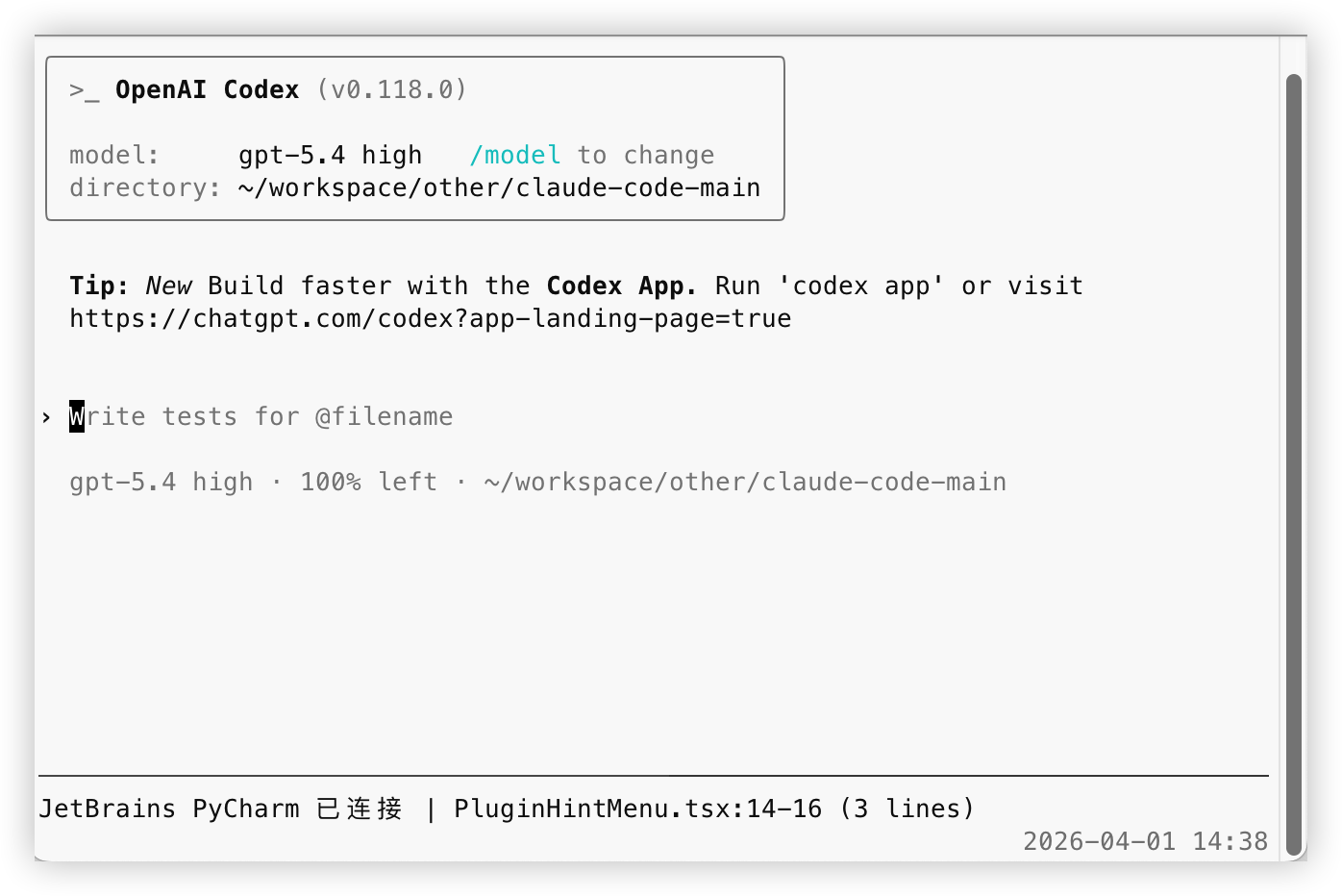
Success Screenshot

1. Prerequisites

Ensure the following two conditions are met:

  1. You are using a JetBrains IDE Examples: IntelliJ IDEA, PyCharm, WebStorm, GoLand, Android Studio

  2. Your IDE has the official Claude Code JetBrains plugin installed This is a prerequisite for integration. Without this plugin, there will be no local ~/.claude/ide/*.lock files or corresponding local interfaces, and Codex will be unable to read the currently selected file and code range.

Related MCP server: Claude Code Control MCP

2. Install Dependencies

Run the following in the root directory of the repository:

cd codex-jetbrains-mcp
npm install
brew install tmux

Notes:

  • npm install: Installs HUD and hooks dependencies

  • tmux: Required by the HUD

3. Integrate HUD

Run the following in the root directory of the repository:

chmod +x codex-jetbrains-mcp/bin/codex-jetbrains-hud

If you want to automatically run the HUD whenever you run codex, add the following line to your ~/.zshrc or ~/.bashrc:

alias codex='$(pwd)/codex-jetbrains-mcp/bin/codex-jetbrains-hud'

Reload your shell:

source ~/.zshrc

If you are using bash, run:

source ~/.bashrc

If you find that the mouse wheel cannot scroll the Codex window in the default macOS terminal or Warp terminal, you can run the following command to enable tmux mouse support:

tmux set -g mouse on

After the HUD starts, it will display a line:

JetBrains PyCharm 已连接 | test_main.py:2140-2147 (8 lines)

4. Configure Hooks

The core of this scheme is:

  1. Start the HUD simultaneously when starting codex

  2. The HUD automatically writes the current JetBrains file/line number to .codex/jetbrains-selection-state.json

  3. The UserPromptSubmit hook reads this state when you send a message

  4. When JetBrains context is available, it only injects the "file path" or "file path + line number"

  5. It does not inject the selected text, allowing Codex to read the file as needed

Run the following in the root directory of the repository:

chmod +x codex-jetbrains-mcp/bin/codex-jetbrains-hud
alias codex='$(pwd)/codex-jetbrains-mcp/bin/codex-jetbrains-hud'

After that, you can run codex as usual.

Now, codex-jetbrains-hud not only displays the HUD but also automatically synchronizes the state required by the hook. This is the only recommended path; no separate synchronization process is provided or needed.

The state file will be written to:

.codex/jetbrains-selection-state.json

4.2 Configure Hooks

The repository already includes:

  • .codex/config.toml

  • .codex/hooks/selection-state.mjs

  • .codex/hooks.json

  • .codex/hooks/user-prompt-submit-jetbrains-selection.mjs

There are two ways to integrate:

  1. If you start codex in this repository directory Codex will directly read the .codex/config.toml and .codex/hooks.json in the repository, so you don't need to specify additional paths.

  2. If you already have your own global ~/.codex/hooks.json Do not overwrite it; just merge the UserPromptSubmit configuration from the repository into it. If you want to copy it to ~/.codex/hooks/, please copy the entire .codex/hooks/ directory, not just the entry file.

The purpose of .codex/config.toml is to enable the hooks feature required by the official documentation:

[features]
codex_hooks = true

According to the official documentation, hooks are disabled by default and must be enabled in config.toml, or by passing codex --enable codex_hooks at startup. Additionally, the Codex configuration layer reads from both ~/.codex/config.toml and the .codex/config.toml in the repository; if the project is not marked as trusted, the repository-level .codex/config.toml will not take effect.

The configuration content included in the repository is:

{
  "hooks": {
    "UserPromptSubmit": [
      {
        "hooks": [
          {
            "type": "command",
            "command": "node \"$(git rev-parse --show-toplevel)/.codex/hooks/user-prompt-submit-jetbrains-selection.mjs\"",
            "statusMessage": "Loading JetBrains selection"
          }
        ]
      }
    ]
  }
}

This hook reads the local state file every time UserPromptSubmit is triggered:

  • If only a file is selected, it injects "which file is current" into Codex

  • If a code range is selected, it injects "current file + line number" into Codex

  • If there is no JetBrains context, or the state has expired, nothing is injected

It does not inject code text, only location guidance.

4.3 Clean Up Old Configurations

If you have used the old scheme before, please delete the following two items:

  1. Delete local MCP configuration

codex mcp remove jetbrains-selection
  1. Delete content like this from your own global prompts

每次用户请求时,先调用 MCP 工具 jetbrains-selection.jetbrains_get_selection 获取 JetBrains 当前选区

This step is essential; otherwise, the model might still try to call an MCP tool that no longer exists.

4.4 Content Actually Injected by the Hook

When only a file is selected, it injects something like:

JetBrains 当前选中文件:/path/to/file.ts
这只是文件指引,没有附带文件内容。
如果本轮问题和这个文件相关,请先自行读取该文件;如果无关,请忽略这条上下文。

When a code range is selected, it injects something like:

JetBrains 当前选中位置:/path/to/file.ts:120-146
这只是位置指引,没有附带代码内容。
如果本轮问题和这个位置相关,请先自行读取对应文件和行号;如果无关,请忽略这条上下文。

The default state validity period is 20s. While the HUD is running, it refreshes the state every 5s; if the HUD exits, the hook will quickly stop injecting the old state. You can also adjust this time via the environment variable CODEX_JB_HOOK_MAX_AGE_MS.

5. Why the Local MCP Scheme is No Longer Retained

The problems with the old scheme were mainly:

  • Required running codex mcp add additionally, adding installation and maintenance costs

  • The model usually relied on global prompts to force "calling an MCP tool every round," even if the question was unrelated to the JetBrains selection, wasting a step

  • Whether the selection is relevant should be determined by the current question; putting it in global prompts makes the behavior too mechanical

  • The local MCP server was just a relay layer; it still had to connect to the Claude Code JetBrains plugin. Keeping this layer separately provides little benefit and increases complexity

  • Old configurations were not easy to clean up, and invalid tool names or old prompts were easily left behind after migration

After switching to HUD + hooks, the benefits are more direct:

  • Local state is only read when sending a message, no extra MCP call per round

  • Injected content only contains file paths or line numbers, keeping the information cleaner and letting the model decide whether to read the file itself

  • State files are isolated by project root; each project writes its own .codex/jetbrains-selection-state.json

  • The HUD refreshes the heartbeat while alive, and old states automatically expire after the HUD stops

  • The integration path is more unified; users only need to maintain the HUD and hooks, not MCP configurations

6. How This Scheme Works Now

The data link is as follows:

  1. The official Claude Code JetBrains plugin exposes local connection information and selection events

  2. The HUD matches the correct JetBrains project window based on the current working directory

  3. After receiving a selection change, the HUD writes the file path, line number, and heartbeat time to the current project's .codex/jetbrains-selection-state.json

  4. The UserPromptSubmit hook reads this state when you send a message

  5. If the state is valid, it injects a lightweight prompt of "current file" or "current file + line number" into Codex

There is no local MCP server in this link, and no additional global prompts are required.

7. Verification

After completing the steps above:

  1. Open JetBrains IDE

  2. Start codex

  3. If you used the HUD wrapper to start, the HUD will automatically synchronize the hook state

  4. Return to the JetBrains IDE with the official Claude Code plugin installed and select a file or a piece of code

  5. Confirm that the HUD displays the current file and line number

  6. Ask questions in Codex as usual

If the HUD does not refresh, the most reliable approach is:

  • Go back to the IDE and click the file again

  • Or re-drag the selection

Under normal circumstances:

  • When only a file is selected, Codex will receive file path guidance

  • When a code range is selected, Codex will receive file path and line number guidance

  • When there is no JetBrains context, no JetBrains prompts will be injected

Available Tools

5 tools
jetbrains_get_selectionC

Return the current file path and selected lines forwarded by the Claude JetBrains plugin.

ParametersJSON Schema
NameRequiredDescriptionDefault
maxCharsNo
includeTextNo

TDQS

C2.9/5.0
Behavior2/5

Does the description disclose side effects, auth requirements, rate limits, or destructive behavior?

No annotations are present, so the description must fully disclose behavioral traits. It fails to indicate whether the operation is read-only, destructive, or requires authentication. Mentioning 'forwarded by the Claude JetBrains plugin' weakly implies a read operation but is insufficient.

Agents need to know what a tool does to the world before calling it. Descriptions should go beyond structured annotations to explain consequences.

Conciseness4/5

Is the description appropriately sized, front-loaded, and free of redundancy?

The description is a single concise sentence that front-loads the main purpose. However, it is slightly under-specified for a tool with multiple parameters, but still efficient.

Shorter descriptions cost fewer tokens and are easier for agents to parse. Every sentence should earn its place.

Completeness3/5

Given the tool's complexity, does the description cover enough for an agent to succeed on first attempt?

Given the tool's complexity (2 parameters, no output schema), the description provides a high-level overview of the return value ('file path and selected lines') but lacks details about the format, structure, or behavior (e.g., what happens if no selection exists). It is minimally adequate but not comprehensive.

Complex tools with many parameters or behaviors need more documentation. Simple tools need less. This dimension scales expectations accordingly.

Parameters1/5

Does the description clarify parameter syntax, constraints, interactions, or defaults beyond what the schema provides?

Schema coverage is 0%, and the description does not explain any parameters (maxChars, includeText) or their purpose. The schema provides defaults and constraints, but the description adds no value beyond that, leaving the agent uninformed about how to use the parameters effectively.

Input schemas describe structure but not intent. Descriptions should explain non-obvious parameter relationships and valid value ranges.

Purpose5/5

Does the description clearly state what the tool does and how it differs from similar tools?

The description clearly states that the tool returns the current file path and selected lines from the JetBrains plugin. This verb-resource combination is specific and distinct from sibling tools like jetbrains_list_instances or jetbrains_status.

Agents choose between tools based on descriptions. A clear purpose with a specific verb and resource helps agents select the right tool.

Usage Guidelines2/5

Does the description explain when to use this tool, when not to, or what alternatives exist?

No guidance is provided on when to use this tool versus alternatives, nor are there any exclusions or prerequisites mentioned. The description only states what it does, not the context for usage.

Agents often have multiple tools that could apply. Explicit usage guidance like "use X instead of Y when Z" prevents misuse.

jetbrains_list_instancesA

List discovered JetBrains plugin instances and show which one matches the current project.

ParametersJSON Schema
NameRequiredDescriptionDefault

No parameters

TDQS

A3.6/5.0
Behavior2/5

Does the description disclose side effects, auth requirements, rate limits, or destructive behavior?

No annotations are provided, so the description must carry the full burden of behavioral disclosure. It mentions listing and matching but does not discuss side effects (likely none, read-only), authorization requirements, or potential limitations. This is a significant gap.

Agents need to know what a tool does to the world before calling it. Descriptions should go beyond structured annotations to explain consequences.

Conciseness4/5

Is the description appropriately sized, front-loaded, and free of redundancy?

The description is a single, front-loaded sentence that conveys the core functionality with no unnecessary words. It is concise, though could be slightly more structured.

Shorter descriptions cost fewer tokens and are easier for agents to parse. Every sentence should earn its place.

Completeness3/5

Given the tool's complexity, does the description cover enough for an agent to succeed on first attempt?

Given there are no parameters, no output schema, and no annotations, the description provides minimal context. It lacks details about the output format, the definition of 'matches', and any behavior beyond listing. While acceptable for a simple list tool, it leaves gaps for an AI agent.

Complex tools with many parameters or behaviors need more documentation. Simple tools need less. This dimension scales expectations accordingly.

Parameters4/5

Does the description clarify parameter syntax, constraints, interactions, or defaults beyond what the schema provides?

The input schema has zero properties, so there are no parameters to describe. Per guidelines, a baseline of 4 is appropriate since the description does not need to add parameter semantics.

Input schemas describe structure but not intent. Descriptions should explain non-obvious parameter relationships and valid value ranges.

Purpose5/5

Does the description clearly state what the tool does and how it differs from similar tools?

The description clearly states the verb 'List' and the resource 'JetBrains plugin instances', and adds the specific behavior of showing which instance matches the current project. This distinctly differentiates it from sibling tools like jetbrains_get_selection or jetbrains_status.

Agents choose between tools based on descriptions. A clear purpose with a specific verb and resource helps agents select the right tool.

Usage Guidelines3/5

Does the description explain when to use this tool, when not to, or what alternatives exist?

The description implies that the tool is for listing instances and identifying the project-matched one, but it does not explicitly state when to use it over alternatives or when to avoid using it. No usage context or exclusions are provided.

Agents often have multiple tools that could apply. Explicit usage guidance like "use X instead of Y when Z" prevents misuse.

jetbrains_list_upstream_toolsA

List the upstream MCP tools exposed by the Claude JetBrains plugin connection for debugging and extension work.

ParametersJSON Schema
NameRequiredDescriptionDefault

No parameters

TDQS

A3.9/5.0
Behavior3/5

Does the description disclose side effects, auth requirements, rate limits, or destructive behavior?

The description indicates a read operation by 'list', but with no annotations, it does not disclose any additional behavioral traits such as permissions, side effects, or limitations. Basic transparency is adequate but minimal.

Agents need to know what a tool does to the world before calling it. Descriptions should go beyond structured annotations to explain consequences.

Conciseness5/5

Is the description appropriately sized, front-loaded, and free of redundancy?

The description is a single sentence with no superfluous words, clearly stating the tool's function and context.

Shorter descriptions cost fewer tokens and are easier for agents to parse. Every sentence should earn its place.

Completeness3/5

Given the tool's complexity, does the description cover enough for an agent to succeed on first attempt?

The description covers purpose and use-case but does not specify output format (e.g., list of tool names or details). For a simple list tool without output schema, this is adequate but could be more informative.

Complex tools with many parameters or behaviors need more documentation. Simple tools need less. This dimension scales expectations accordingly.

Parameters4/5

Does the description clarify parameter syntax, constraints, interactions, or defaults beyond what the schema provides?

The tool has zero parameters; the empty schema is fully described. The description does not need to add parameter information beyond what the schema already provides.

Input schemas describe structure but not intent. Descriptions should explain non-obvious parameter relationships and valid value ranges.

Purpose5/5

Does the description clearly state what the tool does and how it differs from similar tools?

The description explicitly states 'List the upstream MCP tools' with a clear verb and resource, and distinguishes from siblings like jetbrains_get_selection by specifying 'upstream MCP tools'.

Agents choose between tools based on descriptions. A clear purpose with a specific verb and resource helps agents select the right tool.

Usage Guidelines3/5

Does the description explain when to use this tool, when not to, or what alternatives exist?

The description mentions 'for debugging and extension work' which gives context, but lacks explicit when-to-use or alternatives guidance. No comparison with sibling tools is provided.

Agents often have multiple tools that could apply. Explicit usage guidance like "use X instead of Y when Z" prevents misuse.

jetbrains_refresh_connectionA

Force a fresh scan of lockfiles and reconnect to the matching JetBrains plugin instance.

ParametersJSON Schema
NameRequiredDescriptionDefault

No parameters

TDQS

A3.7/5.0
Behavior2/5

Does the description disclose side effects, auth requirements, rate limits, or destructive behavior?

No annotations are provided, so the description must disclose behavioral traits. It mentions 'force a fresh scan' and 'reconnect' but does not explain side effects (e.g., whether current state is disrupted, auth requirements) or what happens to existing connections.

Agents need to know what a tool does to the world before calling it. Descriptions should go beyond structured annotations to explain consequences.

Conciseness5/5

Is the description appropriately sized, front-loaded, and free of redundancy?

A single, front-loaded sentence with no wasted words. Every part delivers essential information.

Shorter descriptions cost fewer tokens and are easier for agents to parse. Every sentence should earn its place.

Completeness3/5

Given the tool's complexity, does the description cover enough for an agent to succeed on first attempt?

Given no output schema and no annotations, the description is minimal but covers the core action. However, it lacks details on side effects, prerequisites, or postconditions, leaving some gaps for a complete understanding.

Complex tools with many parameters or behaviors need more documentation. Simple tools need less. This dimension scales expectations accordingly.

Parameters4/5

Does the description clarify parameter syntax, constraints, interactions, or defaults beyond what the schema provides?

No parameters exist, so baseline is 4. The description adds meaning by explaining the tool's actions (scan lockfiles, reconnect) beyond the empty schema.

Input schemas describe structure but not intent. Descriptions should explain non-obvious parameter relationships and valid value ranges.

Purpose5/5

Does the description clearly state what the tool does and how it differs from similar tools?

Description clearly states it forces a fresh scan of lockfiles and reconnects to the matching JetBrains plugin instance. This specific verb-resource pair distinguishes it from siblings like get_selection or list_instances.

Agents choose between tools based on descriptions. A clear purpose with a specific verb and resource helps agents select the right tool.

Usage Guidelines3/5

Does the description explain when to use this tool, when not to, or what alternatives exist?

No explicit when-to-use or when-not-to-use guidance is given. The description implies it's for refreshing a stale connection or lockfiles, but alternatives are not mentioned.

Agents often have multiple tools that could apply. Explicit usage guidance like "use X instead of Y when Z" prevents misuse.

jetbrains_statusA

Show connection status for the Claude JetBrains plugin adapter.

ParametersJSON Schema
NameRequiredDescriptionDefault

No parameters

TDQS

A3.9/5.0
Behavior2/5

Does the description disclose side effects, auth requirements, rate limits, or destructive behavior?

No annotations provided, and the description only says 'Show connection status'. Does not disclose whether it performs a live check or returns cached state, or any side effects. Minimal disclosure.

Agents need to know what a tool does to the world before calling it. Descriptions should go beyond structured annotations to explain consequences.

Conciseness5/5

Is the description appropriately sized, front-loaded, and free of redundancy?

Single sentence, no fluff, perfectly sized for the tool's simplicity.

Shorter descriptions cost fewer tokens and are easier for agents to parse. Every sentence should earn its place.

Completeness5/5

Given the tool's complexity, does the description cover enough for an agent to succeed on first attempt?

Given zero complexity, no parameters, no output schema, and no annotations, the description fully covers what the tool does.

Complex tools with many parameters or behaviors need more documentation. Simple tools need less. This dimension scales expectations accordingly.

Parameters4/5

Does the description clarify parameter syntax, constraints, interactions, or defaults beyond what the schema provides?

Zero parameters, so the description naturally adds no param info. According to calibration rules, 0 params = baseline 4.

Input schemas describe structure but not intent. Descriptions should explain non-obvious parameter relationships and valid value ranges.

Purpose5/5

Does the description clearly state what the tool does and how it differs from similar tools?

Clearly states verb 'Show' and resource 'connection status for the Claude JetBrains plugin adapter'. Distinguishes from sibling tools like jetbrains_refresh_connection which implies a different action.

Agents choose between tools based on descriptions. A clear purpose with a specific verb and resource helps agents select the right tool.

Usage Guidelines3/5

Does the description explain when to use this tool, when not to, or what alternatives exist?

No explicit when or when-not to use, but the simplicity of a zero-parameter status check makes usage obvious. No alternatives mentioned, but siblings indicate other connection-related tools.

Agents often have multiple tools that could apply. Explicit usage guidance like "use X instead of Y when Z" prevents misuse.

TDQS

A3.7/5.0
Disambiguation5/5

Each tool has a clearly distinct purpose: getting selection, listing instances, listing upstream tools, refreshing connection, and showing status. No two tools could be confused.

Naming Consistency5/5

All tools follow a consistent 'jetbrains_' prefix with verb_noun pattern (get_selection, list_instances, list_upstream_tools, refresh_connection, status). No mixing of conventions.

Tool Count5/5

With 5 tools, the set is well-scoped for a connection adapter that manages plugin instances and retrieves selections. Each tool earns its place without unnecessary bloat.

Completeness4/5

The tool surface covers the core operations: get current selection, list/manage instances, refresh connection, and check status. Minor gaps like setting selection or executing actions are absent, but the stated purpose is well-covered.

Maintenance

ActivityInactive
ResponsivenessNo issues

Resources

Unclaimed servers have limited discoverability.

Looking for Admin?

If you are the server author, to access and configure the admin panel.

Related MCP Connectors

Related MCP Servers

Latest Blog Posts

MCP directory API

We provide all the information about MCP servers via our MCP API.

curl -X GET 'https://glama.ai/api/mcp/v1/servers/NealZhi/codex-jetbrains-mcp'

If you have feedback or need assistance with the MCP directory API, please join our Discord server