Glama
NealZhi
by NealZhi

Codex JetBrains HUD + Hooks 연동 설명

프로젝트 배경: 이 어댑터 솔루션은 Claude Code v2.1.88 유출 소스 코드 분석을 기반으로 만들어졌으며, Codex가 Claude Code와 유사한 기능을 갖추어 JetBrains 시리즈 IDE에서 현재 선택된 파일, 줄 번호 및 코드 범위를 인식할 수 있도록 하는 것을 목표로 합니다.

Author: nealzhi

본 문서는 단 하나의 연동 경로인 HUD + hooks만 다룹니다.

본 저장소에서는 기존의 "로컬 MCP server + 전역 프롬프트" 방식이 제거되었으며, 더 이상 권장하거나 제공하지 않습니다.
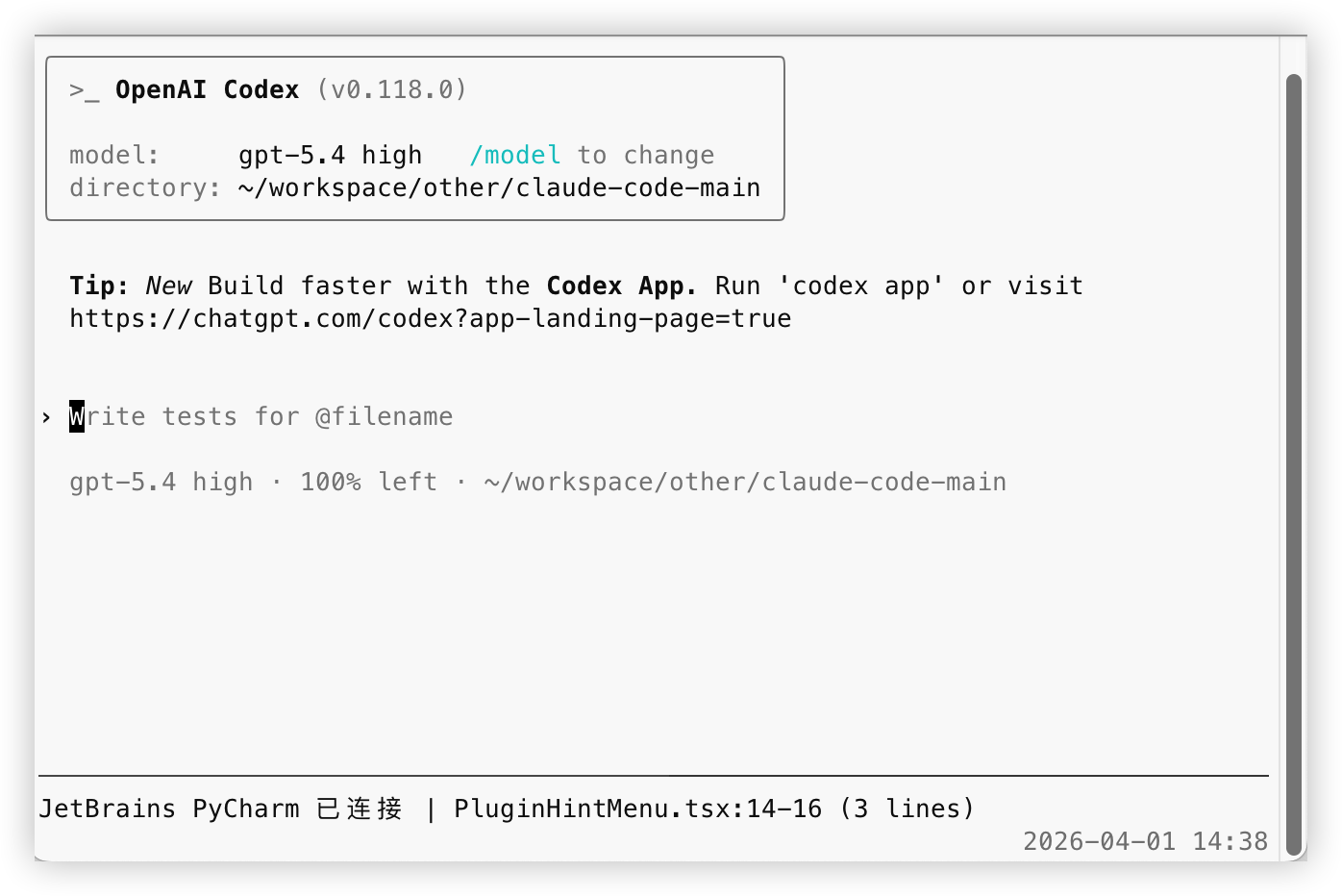
성공 스크린샷

1. 전제 조건

다음 두 가지 조건을 먼저 충족해야 합니다:

  1. JetBrains 시리즈 IDE를 사용 중이어야 합니다. 예: IntelliJ IDEA, PyCharm, WebStorm, GoLand, Android Studio

  2. IDE에 Claude Code 공식 JetBrains 플러그인이 설치되어 있어야 합니다. 이는 연동의 전제 조건입니다. 이 플러그인이 없으면 로컬 ~/.claude/ide/*.lock 및 해당 로컬 인터페이스가 생성되지 않으며, Codex가 현재 선택된 파일과 코드 범위를 읽을 수 없습니다.

Related MCP server: Claude Code Control MCP

2. 의존성 설치

저장소 루트 디렉토리에서 다음을 실행합니다:

cd codex-jetbrains-mcp
npm install
brew install tmux

설명:

  • npm install: HUD 및 hooks 의존성 설치

  • tmux: HUD 의존성

3. HUD 연동

저장소 루트 디렉토리에서 다음을 실행합니다:

chmod +x codex-jetbrains-mcp/bin/codex-jetbrains-hud

앞으로 codex를 실행할 때마다 자동으로 HUD가 함께 실행되기를 원한다면, 다음 줄을 ~/.zshrc 또는 ~/.bashrc에 추가하세요:

alias codex='$(pwd)/codex-jetbrains-mcp/bin/codex-jetbrains-hud'

쉘을 다시 로드합니다:

source ~/.zshrc

bash를 사용하는 경우 다음을 실행합니다:

source ~/.bashrc

macOS 기본 터미널이나 Warp 터미널에서 마우스 휠로 Codex 창을 스크롤할 수 없는 경우, 다음 명령어를 실행하여 tmux 마우스 지원을 활성화할 수 있습니다:

tmux set -g mouse on

HUD가 시작되면 다음 줄이 표시됩니다:

JetBrains PyCharm 已连接 | test_main.py:2140-2147 (8 lines)

4. hooks 설정

이 솔루션의 핵심은 다음과 같습니다:

  1. codex 시작 시 HUD를 동시에 시작

  2. HUD가 JetBrains의 현재 파일/줄 번호를 .codex/jetbrains-selection-state.json에 자동으로 기록

  3. UserPromptSubmit hook이 메시지 전송 시 해당 상태를 읽음

  4. JetBrains 컨텍스트가 있을 경우 "파일 경로" 또는 "파일 경로 + 줄 번호"만 주입

  5. 선택된 텍스트는 주입하지 않고, Codex가 필요에 따라 파일을 직접 읽도록 함

4.1 권장 시작 방식

저장소 루트 디렉토리에서 다음을 실행합니다:

chmod +x codex-jetbrains-mcp/bin/codex-jetbrains-hud
alias codex='$(pwd)/codex-jetbrains-mcp/bin/codex-jetbrains-hud'

그 후에는 평소처럼 codex를 실행하면 됩니다.

이제 codex-jetbrains-hud는 HUD 표시 외에도 hook에 필요한 상태를 자동으로 동기화합니다. 이것이 유일하게 권장되는 경로이며, 별도의 동기화 프로세스는 더 이상 제공하지 않습니다.

상태 파일은 다음 위치에 기록됩니다:

.codex/jetbrains-selection-state.json

4.2 hooks 설정

저장소에는 이미 다음 파일들이 포함되어 있습니다:

  • .codex/config.toml

  • .codex/hooks/selection-state.mjs

  • .codex/hooks.json

  • .codex/hooks/user-prompt-submit-jetbrains-selection.mjs

연동 방식은 두 가지입니다:

  1. 이 저장소 디렉토리에서 codex를 실행하는 경우 Codex가 저장소 내의 .codex/config.toml과 .codex/hooks.json을 직접 읽으므로 별도의 경로 지정이 필요 없습니다.

  2. 이미 자신만의 전역 ~/.codex/hooks.json이 있는 경우 기존 파일을 덮어쓰지 말고, 저장소의 UserPromptSubmit 설정을 병합하세요. ~/.codex/hooks/로 복사해야 한다면 전체 .codex/hooks/ 디렉토리를 함께 복사하고, 진입 파일만 복사하지 마세요.

.codex/config.toml의 역할은 공식적으로 요구되는 hooks 기능 스위치를 켜는 것입니다:

[features]
codex_hooks = true

공식 문서에 따르면 hooks는 기본적으로 꺼져 있으므로 config.toml에서 켜거나 실행 시 codex --enable codex_hooks를 전달해야 합니다. 또한, Codex의 설정 계층은 ~/.codex/config.toml과 저장소 내 .codex/config.toml을 함께 읽습니다. 프로젝트가 신뢰(trusted) 상태로 표시되지 않으면 저장소 수준의 .codex/config.toml은 적용되지 않습니다.

저장소에 포함된 기본 설정 내용은 다음과 같습니다:

{
  "hooks": {
    "UserPromptSubmit": [
      {
        "hooks": [
          {
            "type": "command",
            "command": "node \"$(git rev-parse --show-toplevel)/.codex/hooks/user-prompt-submit-jetbrains-selection.mjs\"",
            "statusMessage": "Loading JetBrains selection"
          }
        ]
      }
    ]
  }
}

이 hook은 UserPromptSubmit 시마다 로컬 상태 파일을 읽습니다:

  • 파일만 선택된 경우, Codex에 "현재 파일이 무엇인지" 주입

  • 코드 범위가 선택된 경우, Codex에 "현재 파일 + 줄 번호" 주입

  • JetBrains 컨텍스트가 없거나 상태가 만료된 경우, 아무것도 주입하지 않음

코드 텍스트는 주입하지 않으며 위치 정보만 제공합니다.

4.3 이전 설정 정리

이전 버전 솔루션을 사용했다면 다음 두 가지를 삭제하세요:

  1. 로컬 MCP 설정 삭제

codex mcp remove jetbrains-selection
  1. 전역 프롬프트에서 관련 내용 삭제

每次用户请求时,先调用 MCP 工具 jetbrains-selection.jetbrains_get_selection 获取 JetBrains 当前选区

이 단계를 반드시 수행해야 합니다. 그렇지 않으면 모델이 여전히 존재하지 않는 MCP 도구를 호출하려는 이전 방식을 따를 수 있습니다.

4.4 hook이 실제로 주입하는 내용

파일만 선택했을 때 주입되는 내용:

JetBrains 当前选中文件:/path/to/file.ts
这只是文件指引,没有附带文件内容。
如果本轮问题和这个文件相关,请先自行读取该文件;如果无关,请忽略这条上下文。

코드 줄 번호를 선택했을 때 주입되는 내용:

JetBrains 当前选中位置:/path/to/file.ts:120-146
这只是位置指引,没有附带代码内容。
如果本轮问题和这个位置相关,请先自行读取对应文件和行号;如果无关,请忽略这条上下文。

기본 상태 유효 기간은 20s입니다. HUD 실행 중에는 5s마다 상태가 새로 고쳐지며, HUD가 종료되면 hook은 곧 이전 상태 주입을 중단합니다. 환경 변수 CODEX_JB_HOOK_MAX_AGE_MS를 통해 이 시간을 조정할 수 있습니다.

5. 로컬 MCP 솔루션을 더 이상 유지하지 않는 이유

기존 솔루션의 주요 문제점은 다음과 같습니다:

  • codex mcp add를 추가로 실행해야 하므로 설치 및 유지 관리 비용 발생

  • 모델이 전역 프롬프트에 의존하여 "매 라운드마다 MCP를 먼저 호출"하도록 강제됨. 질문이 JetBrains 선택 영역과 무관해도 불필요한 호출이 발생함

  • 선택 영역의 관련 여부는 현재 질문에 따라 결정되어야 함. 전역 프롬프트에 넣으면 동작이 지나치게 기계적이 됨

  • 로컬 MCP server는 중계 계층일 뿐이며, 실제로는 Claude Code JetBrains 플러그인에 연결해야 함. 이 계층을 별도로 유지하는 것은 복잡도만 높이고 이득이 적음

  • 이전 설정을 깔끔하게 제거하기 어려워 마이그레이션 후 유효하지 않은 도구 이름이나 이전 프롬프트가 남기 쉬움

HUD + hooks로 변경한 후의 이점은 다음과 같습니다:

  • 메시지 전송 시에만 로컬 상태를 읽으므로 매 라운드마다 MCP 호출을 추가할 필요 없음

  • 주입 내용이 파일 경로 또는 줄 번호만 포함하여 정보가 더 깔끔하며, 모델이 파일을 읽을지 여부를 스스로 결정함

  • 상태 파일이 프로젝트 루트 디렉토리별로 격리되어 프로젝트마다 .codex/jetbrains-selection-state.json을 따로 관리함

  • HUD가 활성화된 동안 하트비트를 지속적으로 새로 고치며, HUD가 중단되면 이전 상태는 시간 초과 후 자동으로 무효화됨

  • 연동 경로가 단일화되어 사용자는 HUD와 hooks만 유지 관리하면 되며 MCP 설정을 관리할 필요 없음

6. 현재 솔루션의 작동 방식

데이터 흐름은 다음과 같습니다:

  1. Claude Code 공식 JetBrains 플러그인이 로컬 연결 정보와 선택 영역 이벤트를 노출

  2. HUD가 현재 작업 디렉토리에 따라 올바른 JetBrains 프로젝트 창을 매칭

  3. HUD가 선택 영역 변경을 수신하면 파일 경로, 줄 번호 및 하트비트 시간을 현재 프로젝트의 .codex/jetbrains-selection-state.json에 기록

  4. UserPromptSubmit hook이 메시지 전송 시 해당 상태를 읽음

  5. 상태가 유효하면 Codex에 "현재 파일" 또는 "현재 파일 + 줄 번호"에 대한 가벼운 프롬프트를 주입

이 경로에는 로컬 MCP server가 없으며 추가적인 전역 프롬프트도 필요하지 않습니다.

7. 검증

위 단계를 완료한 후:

  1. JetBrains IDE를 엽니다.

  2. codex를 시작합니다.

  3. HUD 래퍼를 사용하여 시작했다면 HUD가 자동으로 hook 상태를 동기화합니다.

  4. Claude Code 공식 플러그인이 설치된 JetBrains IDE로 돌아가 파일이나 코드 일부를 선택합니다.

  5. HUD에 현재 파일과 줄 번호가 표시되는지 확인합니다.

  6. Codex에서 평소처럼 질문합니다.

HUD가 새로 고쳐지지 않는 경우 가장 확실한 방법은 다음과 같습니다:

  • IDE로 돌아가 파일을 다시 클릭합니다.

  • 또는 선택 영역을 다시 드래그합니다.

정상적인 경우:

  • 파일만 선택하면 Codex가 파일 경로 가이드를 받습니다.

  • 코드 범위를 선택하면 Codex가 파일 경로와 줄 번호 가이드를 받습니다.

  • JetBrains 컨텍스트가 없으면 JetBrains 관련 프롬프트가 전혀 주입되지 않습니다.

Available Tools

5 tools
jetbrains_get_selectionC

Return the current file path and selected lines forwarded by the Claude JetBrains plugin.

ParametersJSON Schema
NameRequiredDescriptionDefault
maxCharsNo
includeTextNo

TDQS

C2.9/5.0
Behavior2/5

Does the description disclose side effects, auth requirements, rate limits, or destructive behavior?

No annotations are present, so the description must fully disclose behavioral traits. It fails to indicate whether the operation is read-only, destructive, or requires authentication. Mentioning 'forwarded by the Claude JetBrains plugin' weakly implies a read operation but is insufficient.

Agents need to know what a tool does to the world before calling it. Descriptions should go beyond structured annotations to explain consequences.

Conciseness4/5

Is the description appropriately sized, front-loaded, and free of redundancy?

The description is a single concise sentence that front-loads the main purpose. However, it is slightly under-specified for a tool with multiple parameters, but still efficient.

Shorter descriptions cost fewer tokens and are easier for agents to parse. Every sentence should earn its place.

Completeness3/5

Given the tool's complexity, does the description cover enough for an agent to succeed on first attempt?

Given the tool's complexity (2 parameters, no output schema), the description provides a high-level overview of the return value ('file path and selected lines') but lacks details about the format, structure, or behavior (e.g., what happens if no selection exists). It is minimally adequate but not comprehensive.

Complex tools with many parameters or behaviors need more documentation. Simple tools need less. This dimension scales expectations accordingly.

Parameters1/5

Does the description clarify parameter syntax, constraints, interactions, or defaults beyond what the schema provides?

Schema coverage is 0%, and the description does not explain any parameters (maxChars, includeText) or their purpose. The schema provides defaults and constraints, but the description adds no value beyond that, leaving the agent uninformed about how to use the parameters effectively.

Input schemas describe structure but not intent. Descriptions should explain non-obvious parameter relationships and valid value ranges.

Purpose5/5

Does the description clearly state what the tool does and how it differs from similar tools?

The description clearly states that the tool returns the current file path and selected lines from the JetBrains plugin. This verb-resource combination is specific and distinct from sibling tools like jetbrains_list_instances or jetbrains_status.

Agents choose between tools based on descriptions. A clear purpose with a specific verb and resource helps agents select the right tool.

Usage Guidelines2/5

Does the description explain when to use this tool, when not to, or what alternatives exist?

No guidance is provided on when to use this tool versus alternatives, nor are there any exclusions or prerequisites mentioned. The description only states what it does, not the context for usage.

Agents often have multiple tools that could apply. Explicit usage guidance like "use X instead of Y when Z" prevents misuse.

jetbrains_list_instancesA

List discovered JetBrains plugin instances and show which one matches the current project.

ParametersJSON Schema
NameRequiredDescriptionDefault

No parameters

TDQS

A3.6/5.0
Behavior2/5

Does the description disclose side effects, auth requirements, rate limits, or destructive behavior?

No annotations are provided, so the description must carry the full burden of behavioral disclosure. It mentions listing and matching but does not discuss side effects (likely none, read-only), authorization requirements, or potential limitations. This is a significant gap.

Agents need to know what a tool does to the world before calling it. Descriptions should go beyond structured annotations to explain consequences.

Conciseness4/5

Is the description appropriately sized, front-loaded, and free of redundancy?

The description is a single, front-loaded sentence that conveys the core functionality with no unnecessary words. It is concise, though could be slightly more structured.

Shorter descriptions cost fewer tokens and are easier for agents to parse. Every sentence should earn its place.

Completeness3/5

Given the tool's complexity, does the description cover enough for an agent to succeed on first attempt?

Given there are no parameters, no output schema, and no annotations, the description provides minimal context. It lacks details about the output format, the definition of 'matches', and any behavior beyond listing. While acceptable for a simple list tool, it leaves gaps for an AI agent.

Complex tools with many parameters or behaviors need more documentation. Simple tools need less. This dimension scales expectations accordingly.

Parameters4/5

Does the description clarify parameter syntax, constraints, interactions, or defaults beyond what the schema provides?

The input schema has zero properties, so there are no parameters to describe. Per guidelines, a baseline of 4 is appropriate since the description does not need to add parameter semantics.

Input schemas describe structure but not intent. Descriptions should explain non-obvious parameter relationships and valid value ranges.

Purpose5/5

Does the description clearly state what the tool does and how it differs from similar tools?

The description clearly states the verb 'List' and the resource 'JetBrains plugin instances', and adds the specific behavior of showing which instance matches the current project. This distinctly differentiates it from sibling tools like jetbrains_get_selection or jetbrains_status.

Agents choose between tools based on descriptions. A clear purpose with a specific verb and resource helps agents select the right tool.

Usage Guidelines3/5

Does the description explain when to use this tool, when not to, or what alternatives exist?

The description implies that the tool is for listing instances and identifying the project-matched one, but it does not explicitly state when to use it over alternatives or when to avoid using it. No usage context or exclusions are provided.

Agents often have multiple tools that could apply. Explicit usage guidance like "use X instead of Y when Z" prevents misuse.

jetbrains_list_upstream_toolsA

List the upstream MCP tools exposed by the Claude JetBrains plugin connection for debugging and extension work.

ParametersJSON Schema
NameRequiredDescriptionDefault

No parameters

TDQS

A3.9/5.0
Behavior3/5

Does the description disclose side effects, auth requirements, rate limits, or destructive behavior?

The description indicates a read operation by 'list', but with no annotations, it does not disclose any additional behavioral traits such as permissions, side effects, or limitations. Basic transparency is adequate but minimal.

Agents need to know what a tool does to the world before calling it. Descriptions should go beyond structured annotations to explain consequences.

Conciseness5/5

Is the description appropriately sized, front-loaded, and free of redundancy?

The description is a single sentence with no superfluous words, clearly stating the tool's function and context.

Shorter descriptions cost fewer tokens and are easier for agents to parse. Every sentence should earn its place.

Completeness3/5

Given the tool's complexity, does the description cover enough for an agent to succeed on first attempt?

The description covers purpose and use-case but does not specify output format (e.g., list of tool names or details). For a simple list tool without output schema, this is adequate but could be more informative.

Complex tools with many parameters or behaviors need more documentation. Simple tools need less. This dimension scales expectations accordingly.

Parameters4/5

Does the description clarify parameter syntax, constraints, interactions, or defaults beyond what the schema provides?

The tool has zero parameters; the empty schema is fully described. The description does not need to add parameter information beyond what the schema already provides.

Input schemas describe structure but not intent. Descriptions should explain non-obvious parameter relationships and valid value ranges.

Purpose5/5

Does the description clearly state what the tool does and how it differs from similar tools?

The description explicitly states 'List the upstream MCP tools' with a clear verb and resource, and distinguishes from siblings like jetbrains_get_selection by specifying 'upstream MCP tools'.

Agents choose between tools based on descriptions. A clear purpose with a specific verb and resource helps agents select the right tool.

Usage Guidelines3/5

Does the description explain when to use this tool, when not to, or what alternatives exist?

The description mentions 'for debugging and extension work' which gives context, but lacks explicit when-to-use or alternatives guidance. No comparison with sibling tools is provided.

Agents often have multiple tools that could apply. Explicit usage guidance like "use X instead of Y when Z" prevents misuse.

jetbrains_refresh_connectionA

Force a fresh scan of lockfiles and reconnect to the matching JetBrains plugin instance.

ParametersJSON Schema
NameRequiredDescriptionDefault

No parameters

TDQS

A3.7/5.0
Behavior2/5

Does the description disclose side effects, auth requirements, rate limits, or destructive behavior?

No annotations are provided, so the description must disclose behavioral traits. It mentions 'force a fresh scan' and 'reconnect' but does not explain side effects (e.g., whether current state is disrupted, auth requirements) or what happens to existing connections.

Agents need to know what a tool does to the world before calling it. Descriptions should go beyond structured annotations to explain consequences.

Conciseness5/5

Is the description appropriately sized, front-loaded, and free of redundancy?

A single, front-loaded sentence with no wasted words. Every part delivers essential information.

Shorter descriptions cost fewer tokens and are easier for agents to parse. Every sentence should earn its place.

Completeness3/5

Given the tool's complexity, does the description cover enough for an agent to succeed on first attempt?

Given no output schema and no annotations, the description is minimal but covers the core action. However, it lacks details on side effects, prerequisites, or postconditions, leaving some gaps for a complete understanding.

Complex tools with many parameters or behaviors need more documentation. Simple tools need less. This dimension scales expectations accordingly.

Parameters4/5

Does the description clarify parameter syntax, constraints, interactions, or defaults beyond what the schema provides?

No parameters exist, so baseline is 4. The description adds meaning by explaining the tool's actions (scan lockfiles, reconnect) beyond the empty schema.

Input schemas describe structure but not intent. Descriptions should explain non-obvious parameter relationships and valid value ranges.

Purpose5/5

Does the description clearly state what the tool does and how it differs from similar tools?

Description clearly states it forces a fresh scan of lockfiles and reconnects to the matching JetBrains plugin instance. This specific verb-resource pair distinguishes it from siblings like get_selection or list_instances.

Agents choose between tools based on descriptions. A clear purpose with a specific verb and resource helps agents select the right tool.

Usage Guidelines3/5

Does the description explain when to use this tool, when not to, or what alternatives exist?

No explicit when-to-use or when-not-to-use guidance is given. The description implies it's for refreshing a stale connection or lockfiles, but alternatives are not mentioned.

Agents often have multiple tools that could apply. Explicit usage guidance like "use X instead of Y when Z" prevents misuse.

jetbrains_statusA

Show connection status for the Claude JetBrains plugin adapter.

ParametersJSON Schema
NameRequiredDescriptionDefault

No parameters

TDQS

A3.9/5.0
Behavior2/5

Does the description disclose side effects, auth requirements, rate limits, or destructive behavior?

No annotations provided, and the description only says 'Show connection status'. Does not disclose whether it performs a live check or returns cached state, or any side effects. Minimal disclosure.

Agents need to know what a tool does to the world before calling it. Descriptions should go beyond structured annotations to explain consequences.

Conciseness5/5

Is the description appropriately sized, front-loaded, and free of redundancy?

Single sentence, no fluff, perfectly sized for the tool's simplicity.

Shorter descriptions cost fewer tokens and are easier for agents to parse. Every sentence should earn its place.

Completeness5/5

Given the tool's complexity, does the description cover enough for an agent to succeed on first attempt?

Given zero complexity, no parameters, no output schema, and no annotations, the description fully covers what the tool does.

Complex tools with many parameters or behaviors need more documentation. Simple tools need less. This dimension scales expectations accordingly.

Parameters4/5

Does the description clarify parameter syntax, constraints, interactions, or defaults beyond what the schema provides?

Zero parameters, so the description naturally adds no param info. According to calibration rules, 0 params = baseline 4.

Input schemas describe structure but not intent. Descriptions should explain non-obvious parameter relationships and valid value ranges.

Purpose5/5

Does the description clearly state what the tool does and how it differs from similar tools?

Clearly states verb 'Show' and resource 'connection status for the Claude JetBrains plugin adapter'. Distinguishes from sibling tools like jetbrains_refresh_connection which implies a different action.

Agents choose between tools based on descriptions. A clear purpose with a specific verb and resource helps agents select the right tool.

Usage Guidelines3/5

Does the description explain when to use this tool, when not to, or what alternatives exist?

No explicit when or when-not to use, but the simplicity of a zero-parameter status check makes usage obvious. No alternatives mentioned, but siblings indicate other connection-related tools.

Agents often have multiple tools that could apply. Explicit usage guidance like "use X instead of Y when Z" prevents misuse.

Tool Schema Changelog

Recent tool additions, removals, and schema changes observed during successful MCP inspections.

  1. 5 tool updatesv0.1.0
    • First observedjetbrains_get_selection
    • First observedjetbrains_list_instances
    • First observedjetbrains_list_upstream_tools
    • First observedjetbrains_refresh_connection
    • First observedjetbrains_status

TDQS

A3.7/5.0

Scored across 5 tools

Disambiguation5/5

Each tool has a clearly distinct purpose: getting selection, listing instances, listing upstream tools, refreshing connection, and showing status. No two tools could be confused.

Naming Consistency5/5

All tools follow a consistent 'jetbrains_' prefix with verb_noun pattern (get_selection, list_instances, list_upstream_tools, refresh_connection, status). No mixing of conventions.

Tool Count5/5

With 5 tools, the set is well-scoped for a connection adapter that manages plugin instances and retrieves selections. Each tool earns its place without unnecessary bloat.

Completeness4/5

The tool surface covers the core operations: get current selection, list/manage instances, refresh connection, and check status. Minor gaps like setting selection or executing actions are absent, but the stated purpose is well-covered.

Maintenance

ActivityInactive
ResponsivenessNo issues

Related MCP Connectors

Related MCP Servers