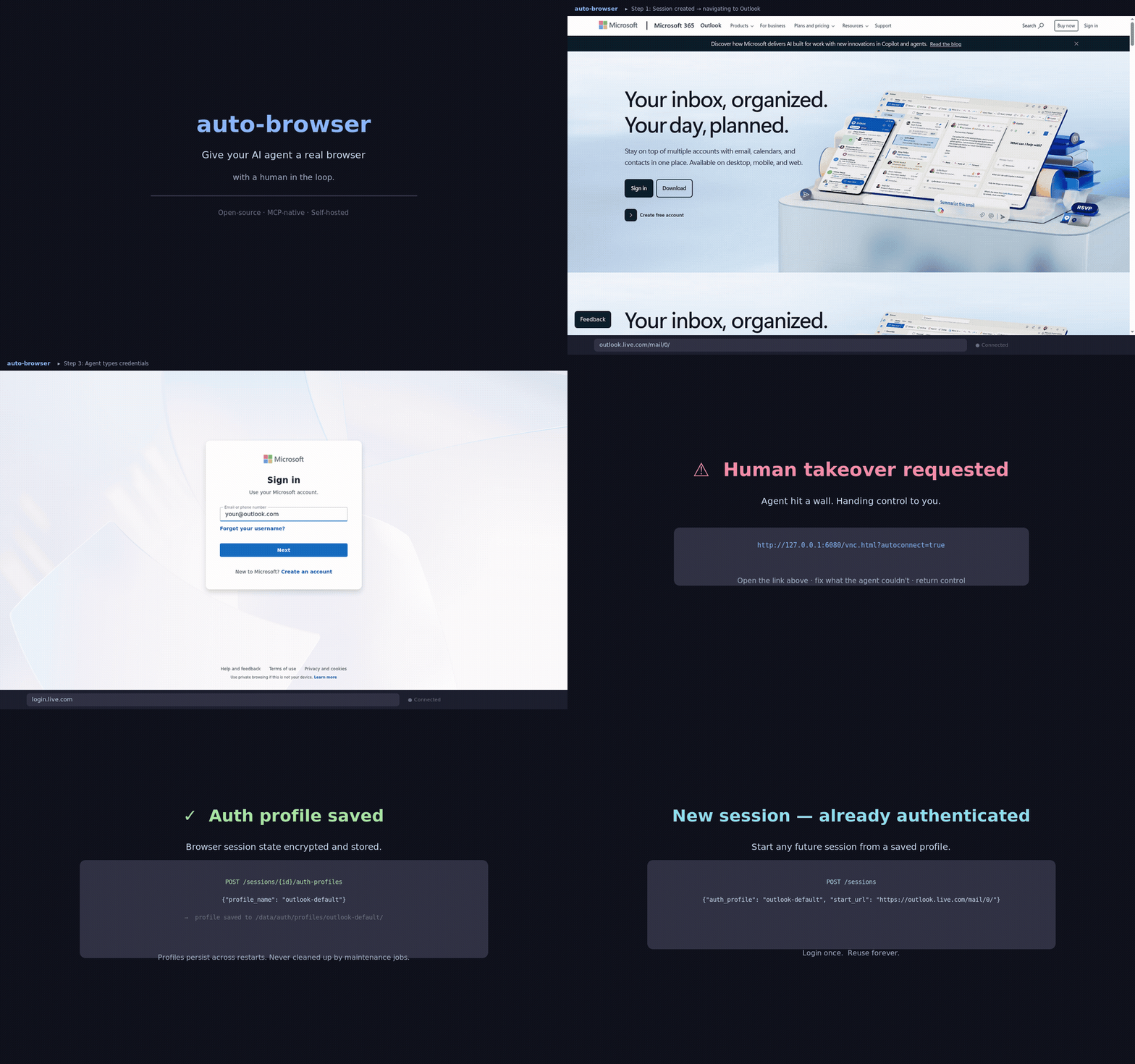
Auto-Browser is an open-source, MCP-native browser automation server that gives AI agents full control over a real Chromium browser, with human intervention support, auth profile reuse, and rich web interaction capabilities.
Session Management
Create, list, get, and close browser sessions (with optional URL, user agent, auth profile, proxy, TOTP, or storage state)
Fork sessions to clone cookies/storage into a new independent session
Manage tabs: list, activate, and close
Resize viewport programmatically
Observation & Data Capture
Full page observation: screenshot, interactable elements, DOM outline, accessibility tree, OCR, and console errors
Lightweight screenshot capture
Retrieve page HTML/plain text (full page or viewport)
Find elements by CSS selector (text, href, value, bounding box, visibility)
Vision-grounded element targeting via natural language using Claude Vision
Console logs, uncaught page errors, failed network requests, and detailed network logs (with PII scrubbing)
List downloaded files; finalize Playwright traces for debugging
Browser Automation
Execute actions: navigate, click, type, hover, press, scroll, select option, drag-and-drop, reload, go back/forward, upload
Run arbitrary JavaScript in page context
Wait for CSS selectors to reach specific states (visible, hidden, attached, detached)
Authentication & Security
Save, list, and reuse named auth profiles ("login once, reuse later")
TOTP authentication support
Encrypted auth state at rest
Policy rails: host allowlists, upload approval, PII scrubbing, proxy partitioning, API bearer tokens, rate limiting
Human-in-the-Loop
Request human takeover via noVNC without losing session state
Shadow Browsing: dynamically switch between headless and headed modes for live debugging
Approval workflows for sensitive agent actions (uploads, posts, payments, destructive actions)
Social Media Helpers
Login to X/Twitter, Instagram, LinkedIn, Outlook/Microsoft with TOTP support
Extract feed posts and profile info (username, bio, followers, avatar)
Submit search queries
Approval-gated write actions (post, comment, like, follow, DM, etc.)
Integration & Deployment
Native MCP JSON-RPC (
/mcp) and REST endpoints for AI agent integration (OpenAI, Claude, Gemini)Background agent job queuing with persistence across restarts
Cron and webhook triggers for scheduled browser jobs
Docker-based per-session browser isolation for parallel workflows
Prometheus-style metrics, audit trails, and automated cleanup
Secure remote access via Tailscale/Cloudflare Access or reverse-SSH tunneling
Auto Browser

Give your AI agent a real browser — with a human in the loop.
Open-source MCP-native browser agent for authorized workflows.
Works with:
Claude Desktop
Cursor
any MCP client that can speak JSON-RPC tools
direct REST callers when you want curl-first control
Why Auto Browser?
MCP-native, not bolted on later. Use it from Claude Desktop, Cursor, or any MCP client.
Human takeover when the web gets weird. noVNC lets you recover from brittle flows without losing the session.
Login once, reuse later. Save named auth profiles and reopen fresh sessions already signed in.
If you want one clean mental model, this repo is:
browser agent as an MCP server
If Auto Browser is useful, a ⭐ helps others find it.
3-command quickstart
git clone https://github.com/LvcidPsyche/auto-browser.git
cd auto-browser
docker compose up --buildThat works with zero config for local dev.
Optional sanity check:
make doctorOpen:
API docs:
http://localhost:8000/docsOperator Dashboard:
http://localhost:8000/ui/Visual takeover:
http://localhost:6080/vnc.html?autoconnect=true&resize=scale
All published ports bind to 127.0.0.1 by default.
Only copy .env.example if you want to change ports, providers, or allowed hosts:
cp .env.example .envTo see the rest of the common commands:
make helpWhat’s new in v0.5.1
Maintenance release — no API changes, all fixes are backwards compatible.
network_inspectorpending leak fixed — in-flight requests are now flushed asfailedwhen a session is detached (tab close, crash), preventing unbounded memory growthGlobal
KeyError → 404handler — all store-layerKeyErrorraises are now handled uniformly; ~30 route handlers simplified_WithApprovalmixin — 9 social action models andUploadRequestno longer repeatapproval_id: str | None = None_MarkInterruptedMixin—mark_all_active_interruptedextracted from the three session store classes that each had identical copiesutils.utc_now()— shared ISO-8601 timestamp helper;_timestamp()removed from 5 modulestool_inputs.py— Pydantic input models split fromtool_gateway.py(dispatch logic vs. schema definitions)create_sessiondecomposed — 190-line method split into 4 focused private helpersagent_jobs.pycleanup — deadhasattrguard deleted;enqueue_step/enqueue_runmerged
All 149 tests pass.
What’s new in v0.5.0
CDP Connect Mode — attach to an existing Chrome via
--remote-debugging-portinstead of launching a new oneNetwork Inspector — per-session request/response capture with header masking and PII scrubbing
PII Scrubbing Layer — 16 pattern classes (AWS keys, JWTs, credit cards, SSNs, emails…); pixel redaction on screenshots; console + network body scrubbing
Proxy Partitioning — named proxy personas for per-agent static IPs, preventing shared network footprints
Shadow Browsing — flip a headless session to a headed (visible) browser mid-run for live debugging
Session Forking — branch a session’s auth state (cookies + storage) into a new independent session
Playwright Script Export —
GET /sessions/{id}/export-scriptdownloads the session as runnable PythonShared Session Links — HMAC-signed, TTL-enforced observer tokens for team handoffs
Vision-Grounded Targeting —
browser.find_by_visionuses Claude Vision to locate elements by natural language descriptionCron + Webhook Triggers — APScheduler-backed autonomous jobs; HMAC webhook keys; full CRUD at
/cronsMCP Resources Protocol —
resources/list+resources/readexpose live screenshot, DOM, console, and network log as MCP resources30+ new MCP tools — eval_js, get_html, find_elements, drag_drop, set_viewport, cookies/storage R/W, and more
See CHANGELOG.md for the full list.
What’s included
a browser node with Chromium, Xvfb, x11vnc, and noVNC
a controller API built on FastAPI + Playwright
screen-aware observations with screenshots and interactable element IDs
optional OCR excerpts from screenshots via Tesseract
human takeover through noVNC
artifact capture for screenshots, traces, and storage state
optional encrypted auth-state storage with max-age enforcement on restore
reusable named auth profiles for login-once, reuse-later workflows
basic policy rails with host allowlists and upload approval gates
durable session metadata under
/data/sessions, with optional Redis backingdurable agent job records under
/data/jobswith background workers for queued step/run requestsaudit events with per-request operator identity headers
optional SQLite backing for approvals + audit events
optional built-in REST agent runner for OpenAI, Claude, and Gemini
one-step and multi-step REST agent orchestration endpoints
richer browser abilities through the shared action schema: hover, select_option, wait, reload, back, forward
tab awareness and tab controls for popup-heavy workflows
download capture with session-scoped files and URLs under
/artifactsoptional session-level proxy routing and custom user agents for controlled network paths
social page helpers for feed scrolling, post/profile extraction, search, and approval-gated write actions
a browser-node managed Playwright server endpoint so the controller connects over Playwright protocol instead of CDP
optional docker-ephemeral per-session browser isolation with dedicated noVNC ports
a real MCP JSON-RPC transport at
/mcp, plus convenience endpoints at/mcp/tools+/mcp/tools/callCDP connect mode — attach to an existing Chrome instance instead of launching a new one
network inspector — per-session request/response capture with PII scrubbing and header masking
PII scrubbing layer — 16 pattern classes with Pillow pixel redaction on screenshots
proxy partitioning — named proxy personas for per-agent static IP assignment
shadow browsing — flip headless → headed mid-run for live visual debugging
session forking — clone auth state into a new independent session branch
Playwright script export — download any session as a runnable
.pyfileshared session links — HMAC-signed, TTL-bound observer tokens
vision-grounded targeting — Claude Vision locates elements by natural language
cron + webhook triggers — autonomous scheduled browser jobs via APScheduler
MCP Resources Protocol — live screenshot, DOM, console, network as
browser://resources30+ MCP tools —
eval_js,get_html,find_elements,drag_drop, cookies/storage R/W, and more
It is intentionally not a stealth or anti-bot system. It is for operator-assisted browser workflows on sites and accounts you are authorized to use.
Good fits
internal dashboards and admin tools
agent-assisted QA and browser debugging
login-once, reuse-later account workflows
export/download/report flows
brittle sites where a human may need to step in
MCP-powered agent workflows that need a real browser
Not the goal
anti-bot bypass
CAPTCHA solving
stealth/evasion work
unauthorized scraping or account automation
Architecture at a glance
flowchart LR
User[Human operator] -->|watch / takeover| noVNC[noVNC]
LLM[OpenAI / Claude / Gemini] -->|shared tools| Controller[Controller API]
Controller -->|Playwright protocol| Browser[Browser node]
noVNC --> Browser
Browser --> Artifacts[(screenshots / traces / auth state)]
Controller --> Artifacts
Controller --> Policy[Allowlist + approval gates]See:
docs/architecture.mdfor the full designdocs/llm-adapters.mdfor the model-facing action loopdocs/mcp-clients.mdfor MCP client integration notesdocs/production-hardening.mdfor the production target/specdocs/deployment.mdfor the deployment and credential handoff checklistdocs/good-first-issues.mdfor contributor-friendly starter workexamples/README.mdfor curl-first examplesROADMAP.mdfor project directionCODE_OF_CONDUCT.mdfor community expectationsCONTRIBUTING.mdif you want to help
Quick demo flow
The fastest way to understand the project:
create a session
observe the page
take over visually if needed
save an auth profile
reopen a new session from that saved profile
That flow is what makes the project actually useful in day-to-day work.
If you want the shortest copy-paste curl walkthrough for that pattern, start with:
examples/login-and-save-profile.md
Real demo flow
The simplest high-signal demo for this project is:
log into Outlook once
save the browser state as
outlook-defaultopen a fresh session from
auth_profile: "outlook-default"continue work without reauthing
That is the clearest example of why this is more useful than plain browser automation.
MCP usage
Auto Browser exposes a real MCP transport at:
/mcpIt also exposes convenience tool endpoints at:
/mcp/tools
/mcp/tools/callThat means you can use it as:
a local browser tool server for MCP clients
a supervised browser backend for agent frameworks
a plain REST API if you want to script it directly
The differentiator is not just “browser automation.” The differentiator is a browser agent that is already packaged as an MCP server.
MCP transport modes
HTTP MCP server at
http://127.0.0.1:8000/mcpstdio bridge at
scripts/mcp_stdio_bridge.py
Most MCP clients still default to stdio. Auto Browser now ships the bridge out of the box, so you do not need a separate compatibility layer.
Claude Desktop quickstart
Copy examples/claude_desktop_config.json and replace <ABSOLUTE_PATH_TO_AUTO_BROWSER> with your real clone path:
{
"mcpServers": {
"auto-browser": {
"command": "python3",
"args": [
"<ABSOLUTE_PATH_TO_AUTO_BROWSER>/scripts/mcp_stdio_bridge.py"
],
"env": {
"AUTO_BROWSER_BASE_URL": "http://127.0.0.1:8000/mcp",
"AUTO_BROWSER_BEARER_TOKEN": ""
}
}
}
}Then:
start Auto Browser with
docker compose up --buildoptional manual bridge command:
make stdio-bridgepaste that config into Claude Desktop
restart Claude Desktop
use the
auto-browserMCP server through stdio
Tool surface
The default MCP tool profile exposes 32 tools covering:
session lifecycle, navigation, observation
click, type, hover, scroll, select, drag-drop, eval JS
screenshot, DOM access, cookies, local/session storage
network log inspection, console log access
auth profiles, proxy personas, session forking
vision-grounded element targeting
cron job management, shared session links
Playwright script export, shadow browsing
Internal queue/provider/admin tools are hidden by default.
If you want the entire internal tool surface, set:
MCP_TOOL_PROFILE=fullWhy this is free
Auto Browser is designed to be free to use because it is:
open-source
self-hosted
local-first
bring-your-own browser/runtime
bring-your-own model/provider
There is no required hosted control plane in the core project.
One-command readiness check
For a quick VPS sanity check before a live session:
make doctorFor a fuller pre-release pass that validates docs, compose config, tests, and the live smoke:
make release-auditThat script:
picks alternate local ports automatically if
8000,6080, or5900are already occupiedwaits for
/readyzprints provider readiness
runs a real create-session + observe smoke
runs one agent-step smoke when the chosen provider is configured
loads the repo-local
.envso ambient shell secrets do not accidentally override tonight's config
If you also want it to rebuild the images first:
DOCTOR_BUILD=1 make doctorIf you are using OPENAI_AUTH_MODE=host_bridge, make sure the Codex bridge is already running first.
If you want the controller API itself protected, set API_BEARER_TOKEN and send:
Authorization: Bearer <token>Optional operator headers:
X-Operator-Id: alice
X-Operator-Name: Alice ExampleSet REQUIRE_OPERATOR_ID=true if every non-health request must carry an operator ID.
Production-mode minimums
For a real private beta, set at least:
APP_ENV=production
API_BEARER_TOKEN=<strong-random-secret>
REQUIRE_OPERATOR_ID=true
AUTH_STATE_ENCRYPTION_KEY=<44-char-fernet-key>
REQUIRE_AUTH_STATE_ENCRYPTION=true
REQUEST_RATE_LIMIT_ENABLED=true
METRICS_ENABLED=trueThe controller now fails closed on startup in production mode if the required security settings are missing.
Provider auth modes
By default the controller talks to vendor APIs directly with API keys.
If you already use subscription-backed CLIs instead, Auto Browser can route provider decisions through:
codexfor OpenAIclaudefor Anthropic / Claude Codegeminifor Gemini CLI
Set the auth modes explicitly:
OPENAI_AUTH_MODE=cli
CLAUDE_AUTH_MODE=cli
GEMINI_AUTH_MODE=cli
CLI_HOME=/data/cli-homeThen populate data/cli-home with the auth caches from the machine where those CLIs are already signed in:
mkdir -p data/cli-home
rsync -a ~/.codex data/cli-home/.codex
cp ~/.claude.json data/cli-home/.claude.json
rsync -a ~/.claude data/cli-home/.claude
rsync -a ~/.gemini data/cli-home/.geminiIf you just want to sign in interactively on this host, use the included bootstrap helper instead. It is meant for the default writable /data/... auth-cache flow and opens the CLI inside the controller image with HOME=$CLI_HOME (normally /data/cli-home), so the login state lands exactly where Auto Browser expects it:
./scripts/bootstrap_cli_auth.sh codex
./scripts/bootstrap_cli_auth.sh claude
./scripts/bootstrap_cli_auth.sh gemini
# or
./scripts/bootstrap_cli_auth.sh allIf this box already has those subscription logins locally, the smoother path is to mount the real host homes read-only at their native paths instead of copying caches around:
CLI_HOST_HOME=/home/youruser \
OPENAI_AUTH_MODE=cli \
CLAUDE_AUTH_MODE=cli \
GEMINI_AUTH_MODE=cli \
docker compose -f docker-compose.yml -f docker-compose.host-subscriptions.yml up --buildThat override:
mounts
~/.codex,~/.claude,~/.claude.json, and~/.geminiread-onlysets
CLI_HOMEto the host-style home path inside the containerbehaves much more like running the CLIs directly on the host
If your host home is not /home/youruser, set CLI_HOST_HOME first. Do not use bootstrap_cli_auth.sh in this mode; sign in on the host first and then start the override.
If Codex subscription auth still does not survive inside Docker cleanly, use the host-side bridge instead. It runs codex on the host and exposes a Unix socket through the shared ./data mount:
mkdir -p data/host-bridge
python3 scripts/codex_host_bridge.py --socket-path data/host-bridge/codex.sockIf you want it to behave more like a persistent host skill, install the included user-service template once:
mkdir -p ~/.config/systemd/user
cp ops/systemd/codex-host-bridge.service ~/.config/systemd/user/
systemctl --user daemon-reload
systemctl --user enable --now codex-host-bridge.serviceThen start the controller with:
OPENAI_AUTH_MODE=host_bridge \
OPENAI_HOST_BRIDGE_SOCKET=/data/host-bridge/codex.sock \
docker compose up --buildThat gives OpenAI/Codex the closest behavior to a host-side skill, because the actual CLI stays on the host instead of inside the container.
Notes:
the bridge socket is now health-checked, not just path-checked
host codex requests are killed after 55s by default so the bridge does not leak orphaned CLI jobs
the bridge is a local trust boundary: anyone who can talk to that Unix socket can make the host run
codex execkeep
data/host-bridgeprivate to trusted local users/processes onlykeep
data/cli-homeprivate; it contains live auth materialAPI keys are still the better default for CI/public automation
CLI auth is aimed at trusted single-tenant boxes like your VPS + Tailscale setup
If you want true per-session browser isolation, use the compose override:
docker compose -f docker-compose.yml -f docker-compose.isolation.yml up --buildThat keeps the default shared browser-node available, but new sessions are provisioned as one-off browser containers with their own noVNC ports when SESSION_ISOLATION_MODE=docker_ephemeral.
Raise MAX_SESSIONS above 1 if you want multiple isolated sessions live at once.
The existing reverse-SSH sidecar still only tunnels the controller API plus the shared browser-node noVNC port.
If isolated session noVNC ports are only bound locally, enable the controller-managed ISOLATED_TUNNEL_* settings to open a reverse-SSH tunnel per session.
If you already have direct host reachability, set ISOLATED_TAKEOVER_HOST to a host humans can actually reach and skip the extra tunnel broker.
When the controller brokers an isolated-session tunnel, it targets the per-session browser container over the Docker network by default instead of hairpinning back through a host-published port.
For remote access, you now have two sane paths:
put the stack behind Tailscale / Cloudflare Access
run the optional reverse-SSH sidecar and point
TAKEOVER_URLat the forwarded noVNC URL
If 8000, 6080, or 5900 are already taken on the host, override them inline:
API_PORT=8010 NOVNC_PORT=6081 VNC_PORT=5901 \
TAKEOVER_URL='http://127.0.0.1:6081/vnc.html?autoconnect=true&resize=scale' \
docker compose up --buildShared action schema and download API
Beyond the convenience routes (/actions/click, /actions/type, etc.), the controller now exposes:
POST /sessions/{session_id}/actions/executeaccepts the full shared
BrowserActionDecisionschemasupports
hover,select_option,wait,reload,go_back, andgo_forward
GET /sessions/{session_id}/tabslists the currently open pages in the session
POST /sessions/{session_id}/tabs/activatemakes a tab the primary page for future observations/actions
POST /sessions/{session_id}/tabs/closecloses a tab by index and rebinds the session to the active tab
GET /sessions/{session_id}/downloadslists files captured for that session
download files are saved under the session artifact tree and served from
/artifacts/...
Reverse SSH remote access
This repo now includes an optional reverse-ssh profile that forwards:
controller API
8000-> remote portREVERSE_SSH_REMOTE_API_PORTnoVNC
6080-> remote portREVERSE_SSH_REMOTE_NOVNC_PORT
Setup:
mkdir -p data/ssh data/tunnels
chmod 700 data/ssh
cp ~/.ssh/id_ed25519 data/ssh/id_ed25519
chmod 600 data/ssh/id_ed25519
ssh-keyscan -p 22 bastion.example.com > data/ssh/known_hostsThen set these in .env:
REVERSE_SSH_HOST=bastion.example.com
REVERSE_SSH_USER=browserbot
REVERSE_SSH_PORT=22
REVERSE_SSH_REMOTE_BIND_ADDRESS=127.0.0.1
REVERSE_SSH_REMOTE_API_PORT=18000
REVERSE_SSH_REMOTE_NOVNC_PORT=16080
REVERSE_SSH_ACCESS_MODE=private
TAKEOVER_URL=http://bastion.example.com:16080/vnc.html?autoconnect=true&resize=scaleStart it:
docker compose --profile reverse-ssh up --buildNotes:
default remote bind is
127.0.0.1on the SSH server. That is safer.the sidecar refuses non-local reverse binds unless
REVERSE_SSH_ALLOW_NONLOCAL_BIND=true.REVERSE_SSH_ACCESS_MODE=privateis the default. That means bastion-only unless you front it with Tailscale or Cloudflare Access.REVERSE_SSH_ACCESS_MODE=cloudflare-accessexpectsREVERSE_SSH_PUBLIC_SCHEME=https.non-local reverse binds are only allowed in
REVERSE_SSH_ACCESS_MODE=unsafe-public. That is intentionally loud becauseGatewayPortsexposure is easy to get wrong.the sidecar writes connection metadata to
data/tunnels/reverse-ssh.json.the sidecar refreshes that metadata on a heartbeat, and the controller marks stale tunnel metadata as inactive.
Run the local reverse-SSH smoke test
This repo includes a self-contained smoke harness with a disposable SSH bastion container:
./scripts/smoke_reverse_ssh.shIf 8000 is busy on the host, run the smoke with an override like API_PORT=8010 ./scripts/smoke_reverse_ssh.sh.
It verifies:
controller
/remote-accessforwarded API through the bastion
forwarded noVNC through the bastion
session create + observe through the forwarded API
Run the local isolated-session smoke test
This repo also includes a smoke harness for per-session docker isolation:
./scripts/smoke_isolated_session.shIf the default controller port is busy, run API_PORT=8010 ./scripts/smoke_isolated_session.sh.
It verifies:
controller readiness with the isolation override enabled
session create in
docker_ephemeralmodededicated per-session noVNC port wiring
session-scoped
remote_accessmetadataobserve + close flow
isolated browser container cleanup after close
Run the local isolated-session tunnel smoke test
This repo also includes a smoke harness for controller-managed reverse tunnels on isolated session takeover ports:
./scripts/smoke_isolated_session_tunnel.shIf the default controller port is busy, run API_PORT=8010 ./scripts/smoke_isolated_session_tunnel.sh.
It verifies:
controller-managed isolated session tunnel provisioning against the disposable bastion
session-specific remote-access payloads flipping to
activeremote noVNC reachability from the bastion on the assigned per-session port
isolated tunnel teardown on session close
Check configured model providers
curl -s http://localhost:8000/agent/providers | jqEach provider entry reports:
configuredauth_mode(apiorcli)modeldetailwith the concrete readiness reason or missing prerequisite
Inspect active remote-access metadata
curl -s http://localhost:8000/remote-access | jq
curl -s 'http://localhost:8000/remote-access?session_id=<session-id>' | jqIf the reverse-SSH sidecar is running, observations and session summaries will automatically return the forwarded takeover_url from data/tunnels/reverse-ssh.json.
For isolated sessions, the remote_access payload becomes session-specific so you can see whether that session’s own noVNC URL is still local-only, directly reachable, or being served through a controller-managed session tunnel.
Create a session
curl -s http://localhost:8000/sessions \
-X POST \
-H 'content-type: application/json' \
-d '{"name":"demo","start_url":"https://example.com"}' | jqObserve the page
curl -s http://localhost:8000/sessions/<session-id>/observe | jqThe response includes:
current URL and title
a page-level
text_excerpta compact
dom_outlinewith headings, forms, and element countsan
accessibility_outlinedistilled from Playwright’s accessibility treean
ocrpayload with screenshot text excerpts and bounding boxesa screenshot path and artifact URL
interactable elements with observation-scoped
element_idvaluesrecent console errors
the effective noVNC takeover URL
remote-access metadata when a tunnel sidecar is active
explicit isolation metadata, including per-session auth/upload roots and the shared-browser-node limit
Click by element_id
curl -s http://localhost:8000/sessions/<session-id>/actions/click \
-X POST \
-H 'content-type: application/json' \
-d '{"element_id":"op-abc123"}' | jqType into an input
curl -s http://localhost:8000/sessions/<session-id>/actions/type \
-X POST \
-H 'content-type: application/json' \
-d '{"selector":"input[name=q]","text":"playwright mcp","clear_first":true}' | jqFor secrets, set sensitive=true so action logs redact the typed preview:
curl -s http://localhost:8000/sessions/<session-id>/actions/type \
-X POST \
-H 'content-type: application/json' \
-d '{"selector":"input[type=password]","text":"super-secret","clear_first":true,"sensitive":true}' | jqFor passwords, OTPs, or other secrets, set sensitive: true so action logs redact the typed value preview:
curl -s http://localhost:8000/sessions/<session-id>/actions/type \
-X POST \
-H 'content-type: application/json' \
-d '{"element_id":"op-password","text":"super-secret","clear_first":true,"sensitive":true}' | jqHover over an element
curl -s http://localhost:8000/sessions/<session-id>/actions/hover \
-X POST \
-H 'content-type: application/json' \
-d '{"selector":"#dropdown-trigger"}' | jqUse coordinates instead: {"x": 640, "y": 360}
Select a dropdown option
curl -s http://localhost:8000/sessions/<session-id>/actions/select-option \
-X POST \
-H 'content-type: application/json' \
-d '{"selector":"select#size","value":"large"}' | jqAlso accepts label (visible text) or index (0-based position).
Wait, reload, and navigate history
# Wait 1.5 seconds
curl -s http://localhost:8000/sessions/<session-id>/actions/wait \
-X POST -H 'content-type: application/json' -d '{"wait_ms":1500}' | jq
# Reload the current page
curl -s http://localhost:8000/sessions/<session-id>/actions/reload \
-X POST | jq
# Browser back / forward
curl -s http://localhost:8000/sessions/<session-id>/actions/go-back -X POST | jq
curl -s http://localhost:8000/sessions/<session-id>/actions/go-forward -X POST | jqSave auth state for later reuse
curl -s http://localhost:8000/sessions/<session-id>/storage-state \
-X POST \
-H 'content-type: application/json' \
-d '{"path":"demo-auth.json"}' | jqThat path is now saved under the session’s own auth root:
/data/auth/<session-id>/demo-auth.jsonIf AUTH_STATE_ENCRYPTION_KEY is set, the controller saves:
/data/auth/<session-id>/demo-auth.json.encRestores enforce AUTH_STATE_MAX_AGE_HOURS, so stale auth-state files are rejected instead of silently reused.
Inspect the current auth-state metadata:
curl -s http://localhost:8000/sessions/<session-id>/auth-state | jqSave a reusable auth profile
Auth profiles live under /data/auth/profiles/<profile-name>/ and are not cleaned up by routine retention jobs.
curl -s http://localhost:8000/sessions/<session-id>/auth-profiles \
-X POST \
-H 'content-type: application/json' \
-d '{"profile_name":"outlook-default"}' | jqList saved profiles:
curl -s http://localhost:8000/auth-profiles | jq
curl -s http://localhost:8000/auth-profiles/outlook-default | jqStart a new session from a saved profile:
curl -s http://localhost:8000/sessions \
-X POST \
-H 'content-type: application/json' \
-d '{"name":"outlook-resume","auth_profile":"outlook-default","start_url":"https://outlook.live.com/mail/0/"}' | jqOutlook login + save workflow
This is the simplest pattern for “human login once, then reuse later”.
curl -s http://localhost:8000/sessions \
-X POST \
-H 'content-type: application/json' \
-d '{"name":"outlook-login","start_url":"https://login.live.com/"}' | jqThen log in and save the profile in one step:
curl -s http://localhost:8000/sessions/<session-id>/social/login \
-X POST \
-H 'content-type: application/json' \
-d '{
"platform":"outlook",
"username":"you@example.com",
"password":"REDACTED",
"auth_profile":"outlook-default"
}' | jqIf Microsoft throws a human verification wall, use the returned takeover_url, finish the challenge manually in noVNC, then save the profile:
curl -s http://localhost:8000/sessions/<session-id>/auth-profiles \
-X POST \
-H 'content-type: application/json' \
-d '{"profile_name":"outlook-default"}' | jqSave a reusable auth profile
Per-session auth-state files are good for debugging. Named auth profiles are better for repeat runs.
Save the current browser context as a reusable profile:
curl -s http://localhost:8000/sessions/<session-id>/auth-profiles \
-X POST \
-H 'content-type: application/json' \
-d '{"profile_name":"outlook-default"}' | jqList saved profiles:
curl -s http://localhost:8000/auth-profiles | jqStart a new session from a saved profile:
curl -s http://localhost:8000/sessions \
-X POST \
-H 'content-type: application/json' \
-d '{"name":"outlook-mail","start_url":"https://outlook.live.com/mail/0/","auth_profile":"outlook-default"}' | jqSaved auth profiles live under:
/data/auth/profiles/<profile-name>/The maintenance cleaner treats /data/auth/profiles as persistent state, so reusable profiles are not pruned like stale session artifacts.
Outlook login + save-session workflow
If you already own the mailbox and just need a reusable logged-in session:
Create a session at
https://login.live.com/Run
POST /sessions/<id>/social/loginwith:"platform": "outlook""username": "<mailbox>""password": "<password>"optional
"auth_profile": "outlook-default"
If Microsoft shows CAPTCHA or “press and hold”, switch to the session
takeover_urlWhen login completes, reuse the saved auth profile in future sessions
Example:
curl -s http://localhost:8000/sessions/<session-id>/social/login \
-X POST \
-H 'content-type: application/json' \
-d '{"platform":"outlook","username":"you@outlook.com","password":"...","auth_profile":"outlook-default"}' | jqStage upload files
This POC expects upload files to be staged on disk first:
cp ~/Downloads/example.pdf data/uploads/For cleaner isolation, you can also stage per-session files under:
data/uploads/<session-id>/Then request and execute approval through the queue:
curl -s http://localhost:8000/sessions/<session-id>/actions/upload \
-X POST \
-H 'content-type: application/json' \
-d '{"selector":"input[type=file]","file_path":"example.pdf"}' | jqThat returns 409 with a pending approval payload. Then:
curl -s http://localhost:8000/approvals/<approval-id>/approve \
-X POST \
-H 'content-type: application/json' \
-d '{"comment":"approved"}' | jq
curl -s http://localhost:8000/approvals/<approval-id>/execute \
-X POST | jqInspect approvals
curl -s http://localhost:8000/approvals | jq
curl -s http://localhost:8000/approvals/<approval-id> | jqAsk a provider for one next step
curl -s http://localhost:8000/sessions/<session-id>/agent/step \
-X POST \
-H 'content-type: application/json' \
-d '{
"provider":"openai",
"goal":"Open the main link on the page and stop.",
"observation_limit":25
}' | jqLet a provider run a short loop
curl -s http://localhost:8000/sessions/<session-id>/agent/run \
-X POST \
-H 'content-type: application/json' \
-d '{
"provider":"claude",
"goal":"Fill the search field with playwright mcp and stop before submitting.",
"max_steps":4
}' | jqIf a model proposes an upload, post/send, payment, account change, or destructive step, the run now stops with status=approval_required and writes a queued approval item instead of executing the side effect.
Queue agent work for background execution
curl -s http://localhost:8000/sessions/<session-id>/agent/jobs/step \
-X POST \
-H 'content-type: application/json' \
-d '{
"provider":"openai",
"goal":"Inspect the page and stop."
}' | jq
curl -s http://localhost:8000/sessions/<session-id>/agent/jobs/run \
-X POST \
-H 'content-type: application/json' \
-d '{
"provider":"claude",
"goal":"Open the first result and summarize it.",
"max_steps":4
}' | jq
curl -s http://localhost:8000/agent/jobs | jq
curl -s http://localhost:8000/agent/jobs/<job-id> | jqQueued jobs are persisted under /data/jobs. If the controller restarts mid-run, any previously running jobs are marked interrupted on startup instead of disappearing.
Audit trail and operator identity
curl -s http://localhost:8000/operator | jq
curl -s 'http://localhost:8000/audit/events?limit=20' | jq
curl -s 'http://localhost:8000/audit/events?session_id=<session-id>' | jqAudit events are written to /data/audit/events.jsonl.
If STATE_DB_PATH is set, approvals and audit events are also stored in SQLite and served from there. AUDIT_MAX_EVENTS caps retained audit rows/events in both SQLite and the mirrored JSONL file.
Metrics and cleanup
curl -s http://localhost:8000/metrics | head
curl -s http://localhost:8000/maintenance/status | jq
curl -s http://localhost:8000/maintenance/cleanup \
-X POST \
-H "Authorization: Bearer <token>" \
-H "X-Operator-Id: ops" | jqThe controller can now:
expose Prometheus-style request/session metrics at
/metricsprune stale artifacts, uploads, and auth-state files on startup and on a configurable interval
If METRICS_ENABLED=false, /metrics returns 404.
MCP browser gateway
Convenience endpoints still exist:
curl -s http://localhost:8000/mcp/tools | jq
curl -s http://localhost:8000/mcp/tools/call \
-X POST \
-H 'content-type: application/json' \
-d '{
"name":"browser.observe",
"arguments":{"session_id":"<session-id>","limit":20}
}' | jqThe controller now also exposes a real MCP-style JSON-RPC session transport at /mcp:
INIT=$(curl -si http://localhost:8000/mcp \
-X POST \
-H 'content-type: application/json' \
-d '{
"jsonrpc":"2.0",
"id":1,
"method":"initialize",
"params":{
"protocolVersion":"2025-11-25",
"clientInfo":{"name":"demo-client","version":"0.1.0"},
"capabilities":{}
}
}')
SESSION_ID=$(printf "%s" "$INIT" | awk -F": " '/^MCP-Session-Id:/ {print $2}' | tr -d '\r')
curl -s http://localhost:8000/mcp \
-X POST \
-H "content-type: application/json" \
-H "MCP-Session-Id: $SESSION_ID" \
-H "MCP-Protocol-Version: 2025-11-25" \
-d '{"jsonrpc":"2.0","method":"notifications/initialized","params":{}}'
curl -s http://localhost:8000/mcp \
-X POST \
-H "content-type: application/json" \
-H "MCP-Session-Id: $SESSION_ID" \
-H "MCP-Protocol-Version: 2025-11-25" \
-d '{"jsonrpc":"2.0","id":2,"method":"tools/list","params":{}}' | jqNotes:
this transport supports
initialize,notifications/initialized,ping,tools/list,tools/call, andDELETE /mcpsession teardownJSON-RPC batching is intentionally rejected
if a browser client sends an
Originheader, setMCP_ALLOWED_ORIGINSto the exact allowed origins
Project layout
auto-browser/
├── browser-node/ # headed Chromium + noVNC image
├── controller/ # FastAPI + Playwright control plane
├── data/ # artifacts, uploads, auth state, durable session/job records, profile data
├── reverse-ssh/ # optional autossh sidecar for private remote access
├── docker-compose.yml
├── docker-compose.isolation.yml
└── docs/
├── architecture.md
└── llm-adapters.mdOpinionated defaults
Keep Playwright as the execution engine.
Use screenshots + DOM/interactable metadata together.
Use noVNC/xpra-style takeover when a flow gets brittle.
Use one session per account/workflow.
Never automate with your daily browser profile.
Keep one active session per browser node in this POC because takeover is tied to one visible desktop.
If you need parallel sessions, switch to
docker_ephemeralisolation so each live session gets its own browser container and takeover port.Keep a durable session registry even in the POC so restarts downgrade active sessions to interrupted instead of losing them.
Treat each session’s auth/upload roots as isolated working state even though the visible desktop is still shared.
Encrypt auth-state at rest once you move beyond localhost demos.
Require operator IDs once more than one human or worker touches the system.
Production upgrades after the POC
replace raw local ports with Tailscale, Cloudflare Access, or a hardened bastion
move session metadata from file/Redis into a richer Postgres model if you need querying and joins
promote the docker-ephemeral path into one browser pod per account once you want scheduler-level isolation
persist approvals in a database instead of flat files when the POC grows
add per-operator identity / SSO on top of the approval queue
add SSE streaming on top of the current MCP JSON-RPC transport if you need server-pushed events
References
OpenAI Computer Use:
https://developers.openai.com/api/docs/guides/tools-computer-use/Playwright Trace Viewer:
https://playwright.dev/docs/trace-viewerPlaywright BrowserType
connect:https://playwright.dev/docs/api/class-browsertypeChrome for Testing:
https://developer.chrome.com/blog/chrome-for-testingnoVNC embedding:
https://novnc.com/noVNC/docs/EMBEDDING.html
Provider environment variables
Set one or more providers before starting the stack:
API mode:
OPENAI_API_KEY,ANTHROPIC_API_KEY,GEMINI_API_KEYCLI mode:
OPENAI_AUTH_MODE=cli,CLAUDE_AUTH_MODE=cli,GEMINI_AUTH_MODE=cli
The controller exposes provider readiness at GET /agent/providers.
Optional provider resilience knobs:
MODEL_MAX_RETRIESMODEL_RETRY_BACKOFF_SECONDS
Optional durable session-store knobs:
SESSION_STORE_ROOTREDIS_URLSESSION_STORE_REDIS_PREFIX
Optional auth/audit/operator knobs:
AUDIT_ROOTSTATE_DB_PATHAUDIT_MAX_EVENTSMCP_ALLOWED_ORIGINSSESSION_ISOLATION_MODEISOLATED_BROWSER_IMAGEISOLATED_BROWSER_CONTAINER_PREFIXISOLATED_BROWSER_WAIT_TIMEOUT_SECONDSISOLATED_BROWSER_KEEP_CONTAINERSISOLATED_BROWSER_BIND_HOSTISOLATED_TAKEOVER_HOSTISOLATED_TAKEOVER_SCHEMEISOLATED_TAKEOVER_PATHISOLATED_BROWSER_NETWORKISOLATED_HOST_DATA_ROOTISOLATED_DOCKER_HOSTISOLATED_TUNNEL_ENABLEDISOLATED_TUNNEL_HOSTISOLATED_TUNNEL_PORTISOLATED_TUNNEL_USERISOLATED_TUNNEL_KEY_PATHISOLATED_TUNNEL_KNOWN_HOSTS_PATHISOLATED_TUNNEL_STRICT_HOST_KEY_CHECKINGISOLATED_TUNNEL_REMOTE_BIND_ADDRESSISOLATED_TUNNEL_REMOTE_PORT_STARTISOLATED_TUNNEL_REMOTE_PORT_ENDISOLATED_TUNNEL_SERVER_ALIVE_INTERVALISOLATED_TUNNEL_SERVER_ALIVE_COUNT_MAXISOLATED_TUNNEL_INFO_INTERVAL_SECONDSISOLATED_TUNNEL_STARTUP_GRACE_SECONDSISOLATED_TUNNEL_ACCESS_MODEISOLATED_TUNNEL_PUBLIC_HOSTISOLATED_TUNNEL_PUBLIC_SCHEMEISOLATED_TUNNEL_LOCAL_HOSTISOLATED_TUNNEL_INFO_ROOTAUTH_STATE_ENCRYPTION_KEYREQUIRE_AUTH_STATE_ENCRYPTIONAUTH_STATE_MAX_AGE_HOURSOCR_ENABLEDOCR_LANGUAGEOCR_MAX_BLOCKSOCR_TEXT_LIMITOPERATOR_ID_HEADEROPERATOR_NAME_HEADERREQUIRE_OPERATOR_ID