Context Sync
Local-first Projektgedächtnis für KI-Coding-Tools über MCP.
Context Sync bietet einem Agenten eine persistente Speicherebene für eine Codebase:
Projektidentität und Tech-Stack
Aktuelle Arbeit, Entscheidungen, Einschränkungen und Vorbehalte
Strukturierte Dateierkundung
Git-bewusster Kontext
Optionale schreibgeschützte Notion-Suche
Was es tut
Context Sync wurde für Sitzungskontinuität entwickelt. Anstatt sich darauf zu verlassen, dass ein Modell sich an frühere Konversationen erinnert, speichert es den relevanten Projektkontext und macht ihn über eine kleine MCP-Tool-Oberfläche abrufbar.
Die aktuellen Kern-Tools sind:
set_project
remember
recall
read_file
search
structure
git
notion
Related MCP server: Doclea MCP
Installation
Global installieren:
npm install -g @context-sync/server
Die automatische Konfiguration erfolgt während der globalen Installation. Starten Sie nach der Installation Ihr KI-Tool neu.
Wenn Sie lokal statt global installieren, wird die automatische Konfiguration nicht ausgeführt. Verwenden Sie die Anleitung zur manuellen Konfiguration in docs/CONFIG.md.
Überprüfung
Prüfen Sie, ob context-sync in Ihrer MCP-Tool-Liste erscheint:
Claude Desktop: Öffnen Sie die Tool-Liste
Cursor: Öffnen Sie die Tool-Liste
VS Code / Copilot Chat Agent Modus: Prüfen Sie die Tools
Continue.dev: Öffnen Sie das Continue-Panel
Codex CLI: codex mcp list
Claude Code: claude mcp list
Wenn die automatische Konfiguration fehlschlägt, verwenden Sie docs/TROUBLESHOOTING.md und docs/CONFIG.md.
Optionale Notion-Einrichtung
Führen Sie den Einrichtungsassistenten aus, wenn Sie eine Notion-Integration wünschen:
oder:
Die Notion-Unterstützung ist auf der Tool-Oberfläche absichtlich schreibgeschützt:
notion({ action: "search", query: "..." })
notion({ action: "read", pageId: "..." })
Workflow für die erste Nutzung
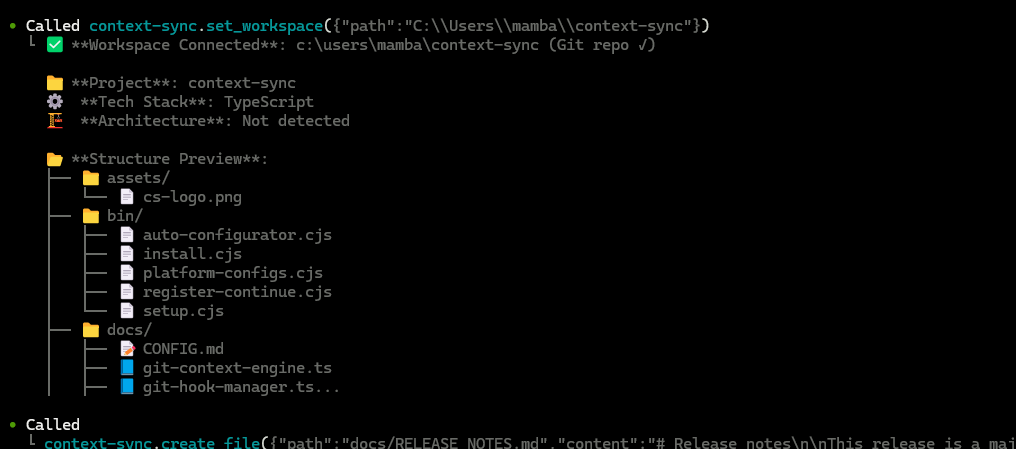
Starten Sie jede neue Sitzung, indem Sie zuerst das Projekt festlegen:
1. set_project({ path: "/absolute/path/to/project" })
2. recall()
3. structure({ depth: 2 })
4. read_file({ path: "src/index.ts" })
5. remember({ type: "decision", content: "Use SQLite for local storage" })
Empfohlenes Muster:
set_project einmal pro Projekt/Sitzungsstart
recall zum Wiederherstellen des Kontexts
structure und search zum Erkunden
read_file für gezielte Inspektion
remember wenn etwas die aktuelle Sitzung überdauern soll
Git-Integration
Wenn Sie set_project innerhalb eines Git-Repositorys ausführen, kann Context Sync Hooks für die automatische Kontexterfassung installieren.
Installierte Hooks:
post-commit
pre-push
post-merge
post-checkout
Hooks sind mit Context Sync Auto-Hook gekennzeichnet, und bestehende Hooks werden vorher gesichert.
Das git-Tool unterstützt:
status
context
hotspots
coupling
blame
analysis
Daten und Konfiguration
Standard-Speicherorte:
Datenbank: ~/.context-sync/data.db
Konfiguration: ~/.context-sync/config.json
Installationsstatus: ~/.context-sync/install-status.json
Benutzerdefinierte Datenbankoptionen:
Siehe docs/DATA.md für Details zur Speicherung.
Unterstützte Plattformen
Claude Desktop
Cursor
VS Code + GitHub Copilot
Continue.dev
Zed
Windsurf
Codeium
TabNine
Codex CLI
Claude Code
Antigravity
Dokumentation