ContextForge
一个开源注册中心和代理,通过集中式治理、发现和可观测性来联合 MCP、A2A 和 REST/gRPC API。优化了 Agent 和工具调用,并支持插件。










ContextForge 是一个开源注册中心和代理,它将工具、Agent 和 API 联合为一个面向 AI 客户端的简洁端点。它为您的 AI 基础设施提供集中式治理、发现和可观测性:
工具网关 — MCP、REST、gRPC 转 MCP 转换以及 TOON 压缩
Agent 网关 — A2A 协议、兼容 OpenAI 和 Anthropic 的 Agent 路由
API 网关 — 针对 REST 服务的速率限制、身份验证、重试和反向代理
插件扩展性 — 40+ 个插件,用于额外的传输、协议和集成
可观测性 — 带有 Phoenix、Jaeger、Zipkin 和其他 OTLP 后端的 OpenTelemetry 追踪
它作为一个完全兼容的 MCP 服务器运行,可通过 PyPI 或 Docker 部署,并可通过基于 Redis 的联邦和缓存扩展到 Kubernetes 中的多集群环境。
Related MCP server: ContextForge MCP Gateway
目录
📌 快速链接
资源 | 描述 |
5 分钟设置 | 快速上手 — uvx、Docker、Compose 或本地开发 |
获取帮助 | 支持选项、常见问题解答、社区频道 |
问题指南 | 如何提交 Bug、请求功能、贡献 |
完整文档 | 完整指南、教程、API 参考 |
概述与目标
ContextForge 是一个开源注册中心和代理,它联合任何 Model Context Protocol (MCP) 服务器、A2A 服务器或 REST/gRPC API,提供集中式治理、发现和可观测性。它优化了 Agent 和工具调用,并支持插件。有关更多详细信息,请参阅 项目路线图。
它目前支持:
跨多个 MCP 和 REST 服务的联邦
A2A (Agent-to-Agent) 集成,用于外部 AI Agent(OpenAI、Anthropic、自定义)
gRPC 转 MCP 转换,通过基于反射的自动服务发现
将遗留 API 虚拟化为符合 MCP 标准的工具和服务器
通过 HTTP、JSON-RPC、WebSocket、SSE(具有可配置的 keepalive)、stdio 和可流式传输的 HTTP 进行传输
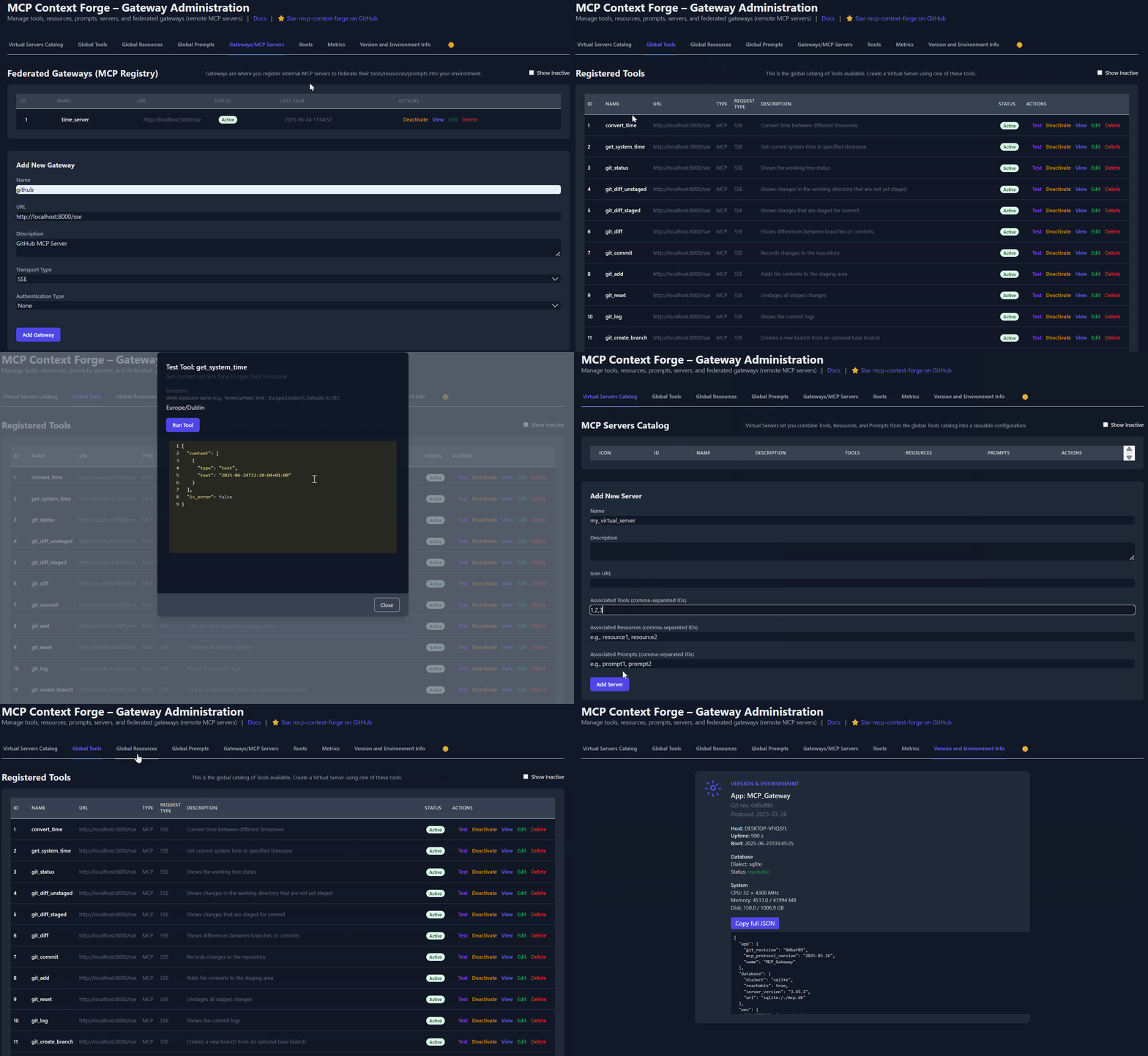
用于实时管理、配置和日志监控的管理 UI(支持气隙部署)
内置身份验证、重试和速率限制,具有用户范围的 OAuth 令牌和无条件 X-Upstream-Authorization 标头支持
OpenTelemetry 可观测性,带有 Phoenix、Jaeger、Zipkin 和其他 OTLP 后端
通过 Docker 或 PyPI、基于 Redis 的缓存和多集群联邦实现可扩展部署

有关即将推出的功能列表,请查看 ContextForge 路线图
将非 MCP 服务包装为虚拟 MCP 服务器
以最少的配置注册工具、提示词和资源
gRPC 转 MCP 转换,通过服务器反射协议
自动服务发现和方法内省
将 REST API 适配为工具,具有:
自动 JSON Schema 提取
支持标头、令牌和自定义身份验证
重试、超时和速率限制策略
提示词 (Prompts):Jinja2 模板、多模态支持、回滚/版本控制
资源 (Resources):基于 URI 的访问、MIME 检测、缓存、SSE 更新
工具 (Tools):原生或适配,具有输入验证和并发控制
请参阅 可观测性文档 以获取有关 Phoenix、Jaeger 和其他后端的设置指南。
快速入门 - PyPI
ContextForge 已发布在 PyPI 上,名称为 mcp-contextforge-gateway。
TLDR;:
(使用 uv 的单条命令)
# Quick start with environment variables
BASIC_AUTH_PASSWORD=pass \
MCPGATEWAY_UI_ENABLED=true \
MCPGATEWAY_ADMIN_API_ENABLED=true \
PLATFORM_ADMIN_EMAIL=admin@example.com \
PLATFORM_ADMIN_PASSWORD=changeme \
PLATFORM_ADMIN_FULL_NAME="Platform Administrator" \
uvx --from mcp-contextforge-gateway mcpgateway --host 0.0.0.0 --port 4444

# Or better: use the provided .env.example
cp .env.example .env
# Edit .env to customize your settings
uvx --from mcp-contextforge-gateway mcpgateway --host 0.0.0.0 --port 4444
Python ≥ 3.11
curl + jq - 仅用于最后的冒烟测试步骤
1 - 安装并运行(可直接复制)
# 1️⃣  Isolated env + install from pypi
mkdir mcpgateway && cd mcpgateway
python3 -m venv .venv && source .venv/bin/activate
pip install --upgrade pip
pip install mcp-contextforge-gateway

# 2️⃣  Copy and customize the configuration
# Download the example environment file
curl -O https://raw.githubusercontent.com/IBM/mcp-context-forge/main/.env.example
cp .env.example .env
# Edit .env to customize your settings (especially passwords!)

# Or set environment variables directly:
export MCPGATEWAY_UI_ENABLED=true
export MCPGATEWAY_ADMIN_API_ENABLED=true
export PLATFORM_ADMIN_EMAIL=admin@example.com
export PLATFORM_ADMIN_PASSWORD=changeme
export PLATFORM_ADMIN_FULL_NAME="Platform Administrator"

BASIC_AUTH_PASSWORD=pass JWT_SECRET_KEY=my-test-key-but-now-longer-than-32-bytes \
  mcpgateway --host 0.0.0.0 --port 4444 &   # admin/pass

# 3️⃣  Generate a bearer token & smoke-test the API
export MCPGATEWAY_BEARER_TOKEN=$(python3 -m mcpgateway.utils.create_jwt_token \
    --username admin@example.com --exp 10080 --secret my-test-key-but-now-longer-than-32-bytes)

curl -s -H "Authorization: Bearer $MCPGATEWAY_BEARER_TOKEN" \
     http://127.0.0.1:4444/version | jq
# 1️⃣  Isolated env + install from PyPI
mkdir mcpgateway ; cd mcpgateway
python3 -m venv .venv ; .\.venv\Scripts\Activate.ps1
pip install --upgrade pip
pip install mcp-contextforge-gateway

# 2️⃣  Copy and customize the configuration
# Download the example environment file
Invoke-WebRequest -Uri "https://raw.githubusercontent.com/IBM/mcp-context-forge/main/.env.example" -OutFile ".env.example"
Copy-Item .env.example .env
# Edit .env to customize your settings

# Or set environment variables (session-only)
$Env:MCPGATEWAY_UI_ENABLED        = "true"
$Env:MCPGATEWAY_ADMIN_API_ENABLED = "true"
# Note: Basic auth for API is disabled by default (API_ALLOW_BASIC_AUTH=false)
$Env:JWT_SECRET_KEY               = "my-test-key-but-now-longer-than-32-bytes"
$Env:PLATFORM_ADMIN_EMAIL         = "admin@example.com"
$Env:PLATFORM_ADMIN_PASSWORD      = "changeme"
$Env:PLATFORM_ADMIN_FULL_NAME     = "Platform Administrator"

# 3️⃣  Launch the gateway
mcpgateway.exe --host 0.0.0.0 --port 4444

#   Optional: background it
# Start-Process -FilePath "mcpgateway.exe" -ArgumentList "--host 0.0.0.0 --port 4444"

# 4️⃣  Bearer token and smoke-test
$Env:MCPGATEWAY_BEARER_TOKEN = python3 -m mcpgateway.utils.create_jwt_token `
    --username admin@example.com --exp 10080 --secret my-test-key-but-now-longer-than-32-bytes

curl -s -H "Authorization: Bearer $Env:MCPGATEWAY_BEARER_TOKEN" `
     http://127.0.0.1:4444/version | jq
# 1️⃣  Isolated env + install from PyPI using uv
mkdir mcpgateway ; cd mcpgateway
uv venv
.\.venv\Scripts\activate
uv pip install mcp-contextforge-gateway

# Continue with steps 2️⃣-4️⃣ above...
将 .env.example 复制到 .env 并调整任何设置(或将其用作环境变量)。
# 1️⃣  Spin up the sample GO MCP time server using mcpgateway.translate & docker (replace docker with podman if needed)
python3 -m mcpgateway.translate \
     --stdio "docker run --rm -i ghcr.io/ibm/fast-time-server:latest -transport=stdio" \
     --expose-sse \
     --port 8003

# Or using the official mcp-server-git using uvx:
pip install uv # to install uvx, if not already installed
python3 -m mcpgateway.translate --stdio "uvx mcp-server-git" --expose-sse --port 9000

# Alternative: running the local binary
# cd mcp-servers/go/fast-time-server; make build
# python3 -m mcpgateway.translate --stdio "./dist/fast-time-server -transport=stdio" --expose-sse --port 8002

# NEW: Expose via multiple protocols simultaneously!
python3 -m mcpgateway.translate \
     --stdio "uvx mcp-server-git" \
     --expose-sse \
     --expose-streamable-http \
     --port 9000
# Now accessible via both /sse (SSE) and /mcp (streamable HTTP) endpoints

# 2️⃣  Register it with the gateway
curl -s -X POST -H "Authorization: Bearer $MCPGATEWAY_BEARER_TOKEN" \
     -H "Content-Type: application/json" \
     -d '{"name":"fast_time","url":"http://localhost:8003/sse"}' \
     http://localhost:4444/gateways

# 3️⃣  Verify tool catalog
curl -s -H "Authorization: Bearer $MCPGATEWAY_BEARER_TOKEN" http://localhost:4444/tools | jq

# 4️⃣  Create a *virtual server* bundling those tools. Use the ID of tools from the tool catalog (Step #3) and pass them in the associatedTools list.
curl -s -X POST -H "Authorization: Bearer $MCPGATEWAY_BEARER_TOKEN" \
     -H "Content-Type: application/json" \
     -d '{"server":{"name":"time_server","description":"Fast time tools","associated_tools":[<ID_OF_TOOLS>]}}' \
     http://localhost:4444/servers | jq

# Example curl
curl -s -X POST -H "Authorization: Bearer $MCPGATEWAY_BEARER_TOKEN"
     -H "Content-Type: application/json"
     -d '{"server":{"name":"time_server","description":"Fast time tools","associated_tools":["6018ca46d32a4ac6b4c054c13a1726a2"]}}' \
     http://localhost:4444/servers | jq

# 5️⃣  List servers (should now include the UUID of the newly created virtual server)
curl -s -H "Authorization: Bearer $MCPGATEWAY_BEARER_TOKEN" http://localhost:4444/servers | jq

# 6️⃣  Client HTTP endpoint. Inspect it interactively with the MCP Inspector CLI (or use any MCP client)
npx -y @modelcontextprotocol/inspector
# Transport Type: Streamable HTTP, URL: http://localhost:4444/servers/UUID_OF_SERVER_1/mcp,  Header Name: "Authorization", Bearer Token
export MCP_AUTH="Bearer ${MCPGATEWAY_BEARER_TOKEN}"
export MCP_SERVER_URL=http://localhost:4444/servers/UUID_OF_SERVER_1/mcp
python3 -m mcpgateway.wrapper  # Ctrl-C to exit
您也可以使用 uv 或在 Docker/Podman 中运行它 - 请参阅上面的 容器 部分。
在 MCP Inspector 中,定义 MCP_AUTH 和 MCP_SERVER_URL 环境变量,选择 python3 作为命令,并将 -m mcpgateway.wrapper 作为参数。
echo $PWD/.venv/bin/python3 # Using the Python3 full path ensures you have a working venv
export MCP_SERVER_URL='http://localhost:4444/servers/UUID_OF_SERVER_1/mcp'
export MCP_AUTH="Bearer ${MCPGATEWAY_BEARER_TOKEN}"
npx -y @modelcontextprotocol/inspector
或者
将 url 和 auth 作为参数传递(无需设置环境变量)
npx -y @modelcontextprotocol/inspector
command as `python`
Arguments as `-m mcpgateway.wrapper --url "http://localhost:4444/servers/UUID_OF_SERVER_1/mcp" --auth "Bearer <your token>"`
当使用诸如 Claude 之类的 MCP 客户端并使用 stdio 时:
{
  "mcpServers": {
    "mcpgateway-wrapper": {
      "command": "python",
      "args": ["-m", "mcpgateway.wrapper"],
      "env": {
        "MCP_AUTH": "Bearer your-token-here",
        "MCP_SERVER_URL": "http://localhost:4444/servers/UUID_OF_SERVER_1",
        "MCP_TOOL_CALL_TIMEOUT": "120"
      }
    }
  }
}
快速入门 - 容器
使用来自 GHCR 的官方 OCI 镜像,配合 Docker 或 Podman。
请注意:目前生产环境不支持 arm64。如果您在 Apple Silicon 芯片(M1、M2 等)的 MacOS 上运行,可以使用 Rosetta 运行容器,或者通过 PyPi 安装。
🚀 快速入门 - Docker Compose
在 30 秒内运行包含 PostgreSQL 和 Redis 的完整堆栈:
# Clone and start the stack
git clone https://github.com/IBM/mcp-context-forge.git
cd mcp-context-forge

# Start with PostgreSQL (recommended for production)
docker compose up -d

# Check status
docker compose ps

# View logs
docker compose logs -f gateway

# Access Admin UI: http://localhost:8080/admin (login with PLATFORM_ADMIN_EMAIL/PASSWORD)
# Generate API token
docker compose exec gateway python3 -m mcpgateway.utils.create_jwt_token \
  --username admin@example.com --exp 10080 --secret my-test-key-but-now-longer-than-32-bytes
您将获得:
🗄️ PostgreSQL - 生产就绪的数据库,包含 55+ 张表
🚀 ContextForge - 功能齐全的网关,带有管理 UI
📊 Redis - 高性能缓存和会话存储
🔧 管理工具 - pgAdmin、Redis Insight,用于数据库管理
🌐 Nginx 代理 - 端口 8080 上的缓存反向代理
启用 HTTPS (可选):
# Start with TLS enabled (auto-generates self-signed certs)
make compose-tls

# Access via HTTPS: https://localhost:8443/admin

# Or bring your own certificates:
# Unencrypted key:
mkdir -p certs
cp your-cert.pem certs/cert.pem && cp your-key.pem certs/key.pem
make compose-tls

# Passphrase-protected key:
mkdir -p certs
cp your-cert.pem certs/cert.pem && cp your-encrypted-key.pem certs/key-encrypted.pem
echo "KEY_FILE_PASSWORD=your-passphrase" >> .env
make compose-tls
☸️ 快速入门 - Helm (Kubernetes)
部署到具有企业级功能的 Kubernetes:
# Add Helm repository (when available)
# helm repo add mcp-context-forge https://ibm.github.io/mcp-context-forge
# helm repo update

# For now, use local chart
git clone https://github.com/IBM/mcp-context-forge.git
cd mcp-context-forge/charts/mcp-stack

# Install with PostgreSQL (default)
helm install mcp-gateway . \
  --set mcpContextForge.secret.PLATFORM_ADMIN_EMAIL=admin@yourcompany.com \
  --set mcpContextForge.secret.PLATFORM_ADMIN_PASSWORD=changeme \
  --set mcpContextForge.secret.JWT_SECRET_KEY=your-secret-key

# Check deployment status
kubectl get pods -l app.kubernetes.io/name=mcp-context-forge

# Port forward to access Admin UI
kubectl port-forward svc/mcp-gateway-mcp-context-forge 4444:80
# Access: http://localhost:4444/admin

# Generate API token
kubectl exec deployment/mcp-gateway-mcp-context-forge -- \
  python3 -m mcpgateway.utils.create_jwt_token \
  --username admin@yourcompany.com --exp 10080 --secret your-secret-key
SSRF 注意:Helm 默认为严格的 SSRF 设置 (SSRF_ALLOW_PRIVATE_NETWORKS=false)。
如果您注册集群内工具 URL(例如 fast-time 或 fast-test 服务),
请通过 mcpContextForge.config.SSRF_ALLOWED_NETWORKS 仅允许您的集群 CIDR,或者
对于仅限本地的基准测试设置,暂时将 SSRF_ALLOW_PRIVATE_NETWORKS=true。
请参阅 docs/docs/manage/configuration.md#ssrf-protection 和 docs/docs/deployment/helm.md。
企业功能:
🔄 自动缩放 - 具有 CPU/内存目标的 HPA
🗄️ 数据库选择 - PostgreSQL (生产), SQLite (开发)
📊 可观测性 - Prometheus 指标, OpenTelemetry 追踪
🔒 安全性 - RBAC, 网络策略, 密钥管理
🚀 高可用性 - 具有 Redis 集群的多副本部署
📈 监控 - 内置 Grafana 仪表板和警报
🐳 Docker (单容器)
docker run -d --name mcpgateway \
  -p 4444:4444 \
  -e MCPGATEWAY_UI_ENABLED=true \
  -e MCPGATEWAY_ADMIN_API_ENABLED=true \
  -e HOST=0.0.0.0 \
  -e JWT_SECRET_KEY=my-test-key-but-now-longer-than-32-bytes \
  -e AUTH_REQUIRED=true \
  -e PLATFORM_ADMIN_EMAIL=admin@example.com \
  -e PLATFORM_ADMIN_PASSWORD=changeme \
  -e PLATFORM_ADMIN_FULL_NAME="Platform Administrator" \
  -e DATABASE_URL=sqlite:///./mcp.db \
  -e SECURE_COOKIES=false \
  ghcr.io/ibm/mcp-context-forge:1.0.0-RC-2

# Tail logs and generate API key
docker logs -f mcpgateway
docker run --rm -it ghcr.io/ibm/mcp-context-forge:1.0.0-RC-2 \
  python3 -m mcpgateway.utils.create_jwt_token --username admin@example.com --exp 10080 --secret my-test-key-but-now-longer-than-32-bytes
浏览至 http://localhost:4444/admin 并使用 PLATFORM_ADMIN_EMAIL / PLATFORM_ADMIN_PASSWORD 登录。
持久化 SQLite 数据库:
mkdir -p $(pwd)/data && touch $(pwd)/data/mcp.db && chmod 777 $(pwd)/data
docker run -d --name mcpgateway --restart unless-stopped \
  -p 4444:4444 -v $(pwd)/data:/data \
  -e DATABASE_URL=sqlite:////data/mcp.db \
  -e MCPGATEWAY_UI_ENABLED=true -e MCPGATEWAY_ADMIN_API_ENABLED=true \
  -e HOST=0.0.0.0 -e JWT_SECRET_KEY=my-test-key-but-now-longer-than-32-bytes \
  -e PLATFORM_ADMIN_EMAIL=admin@example.com -e PLATFORM_ADMIN_PASSWORD=changeme \
  ghcr.io/ibm/mcp-context-forge:1.0.0-RC-2
主机网络(访问本地 MCP 服务器):
docker run -d --name mcpgateway --network=host \
  -v $(pwd)/data:/data -e DATABASE_URL=sqlite:////data/mcp.db \
  -e MCPGATEWAY_UI_ENABLED=true -e HOST=0.0.0.0 -e PORT=4444 \
  ghcr.io/ibm/mcp-context-forge:1.0.0-RC-2
气隙部署(无互联网):
docker build -f Containerfile.lite -t mcpgateway:airgapped .
docker run -d --name mcpgateway -p 4444:4444 \
  -e MCPGATEWAY_UI_AIRGAPPED=true -e MCPGATEWAY_UI_ENABLED=true \
  -e HOST=0.0.0.0 -e JWT_SECRET_KEY=my-test-key-but-now-longer-than-32-bytes \
  mcpgateway:airgapped
🦭 Podman (对 rootless 友好)
podman run -d --name mcpgateway \
  -p 4444:4444 -e HOST=0.0.0.0 -e DATABASE_URL=sqlite:///./mcp.db \
  ghcr.io/ibm/mcp-context-forge:1.0.0-RC-2
持久化 SQLite:
mkdir -p $(pwd)/data && chmod 777 $(pwd)/data
podman run -d --name mcpgateway --restart=on-failure \
  -p 4444:4444 -v $(pwd)/data:/data \
  -e DATABASE_URL=sqlite:////data/mcp.db \
  ghcr.io/ibm/mcp-context-forge:1.0.0-RC-2
主机网络:
podman run -d --name mcpgateway --network=host \
  -v $(pwd)/data:/data -e DATABASE_URL=sqlite:////data/mcp.db \
  ghcr.io/ibm/mcp-context-forge:1.0.0-RC-2
.env 文件 - 将所有 -e FOO= 行放入一个文件中,并将其替换为 --env-file .env。请参阅提供的 .env.example 以供参考。
固定标签 - 使用显式版本(例如 1.0.0-RC-2)而不是 latest 以实现可重现的构建。
JWT 令牌 - 在运行的容器中生成一个:
docker exec mcpgateway python3 -m mcpgateway.utils.create_jwt_token --username admin@example.com --exp 10080 --secret my-test-key-but-now-longer-than-32-bytes
升级 - 停止、删除并使用相同的 -v $(pwd)/data:/data 挂载重新运行;您的数据库和配置保持不变。
curl -s -H "Authorization: Bearer $MCPGATEWAY_BEARER_TOKEN" \
     http://localhost:4444/health | jq
curl -s -H "Authorization: Bearer $MCPGATEWAY_BEARER_TOKEN" \
     http://localhost:4444/tools | jq
curl -s -H "Authorization: Bearer $MCPGATEWAY_BEARER_TOKEN" \
     http://localhost:4444/version | jq
mcpgateway.wrapper 允许您通过 stdio 连接到网关,同时保留 JWT 身份验证。您应该从 MCP
