blend-ai
Provides a comprehensive suite of over 100 tools to control Blender's 3D creation pipeline, enabling modeling, scene setup, material management, lighting, animation, and rendering through natural language.
Click on "Install Server".
Wait a few minutes for the server to deploy. Once ready, it will show a "Started" state.
In the chat, type
@followed by the MCP server name and your instructions, e.g., "@blend-aiCreate a glossy red sphere on a plane with three-point lighting"
That's it! The server will respond to your query, and you can continue using it as needed.
Here is a step-by-step guide with screenshots.
blend-ai
The most intuitive and efficient MCP Server for Blender. Control Blender entirely through AI assistants like Claude — create 3D models, set up scenes, animate, render, and more, all through natural language.
blend-ai goes beyond tool exposure: it guides the LLM to produce professional 3D results through expert prompts, proven workflows, visual feedback, and mesh quality analysis.
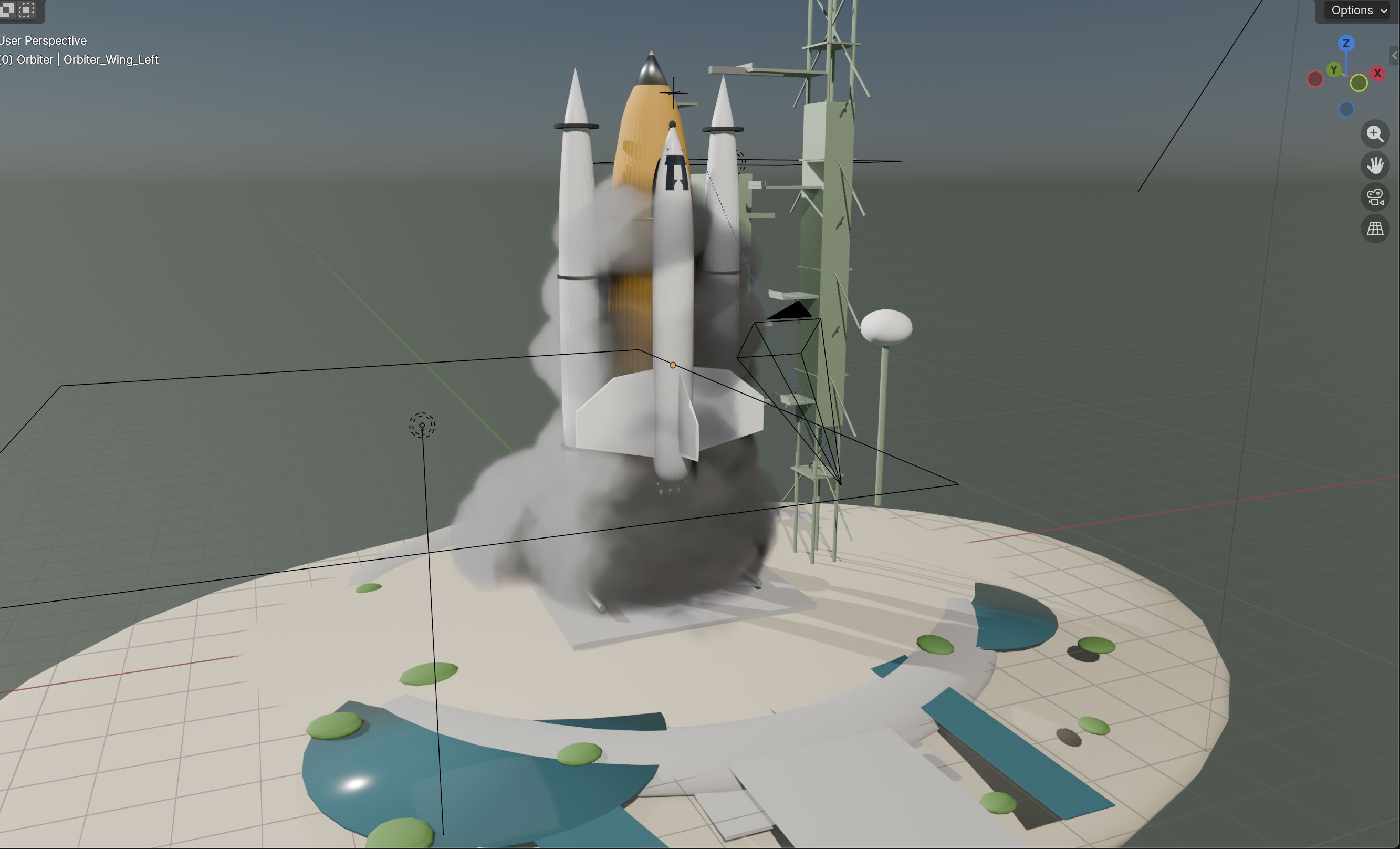
This was created via Claude Code using the Haiku model and 20 random reference images. It took 5 minutes:

Key Features
164 tools across 24 modules covering every major Blender domain: modeling, mesh editing, materials, shader nodes, lighting, camera, animation, rendering, sculpting, UV mapping, physics, geometry nodes, rigging, curves, annotations, collections, file I/O, Bool Tool, viewport control, mesh quality analysis, and extension suggestions
12 expert prompts — topology best practices, real-world scale references, lighting principles, studio setup, character basemesh workflow, PBR material guide, auto-critique feedback loop, and more
Visual feedback loop — fast viewport screenshots via OpenGL render (~ms, not seconds) with auto-critique prompts that guide the LLM to check its own work
Mesh quality analysis — structured reports covering non-manifold edges, loose vertices, zero-area faces, duplicate vertices, and wire edges
Extension suggestions — proactively recommends Bool Tool, LoopTools, and Node Wrangler when a task would benefit from them (skips already-installed extensions)
Sandboxed code execution —
execute_blender_codeblocks dangerous imports (os,subprocess,socket, etc.) and dangerous builtins (exec,eval,open) while allowing safe Blender operationsRender-aware — automatically detects when Blender is rendering and queues commands. Recovers from stuck render guards via
load_posthandler and reset commandBlender 4.2+ compatible — ships as a Blender Extension; tested against Blender 5.1 with EEVEE identifier, Annotation API, sculpt stroke_method, SLIM UV unwrap, Raycast shader node, and EEVEE light path intensity controls
Custom port — configure the server port from the N-panel UI (default: 9876, range: 1024–65535)
Zero telemetry — no usage tracking, no analytics, no data collection. Everything runs locally on
127.0.0.1Zero-dependency addon — the Blender addon uses only Python stdlib +
bpy. Nothing to pip install inside BlenderThread-safe architecture — background TCP server with queue-based main-thread execution, TCP keepalive for stale connection detection
1190 tests — comprehensive coverage across tools, handlers, validators, prompts, and the cross-platform installer (ubuntu/macos/windows × py3.11/3.13 in CI)
Quickstart
1. Install the MCP server
git clone https://github.com/HoldMyBeer-gg/blend-ai.git
cd blend-ai
uv pip install -e .2. Install the Blender addon
Download the latest addon zip from GitHub Releases
Open Blender 4.2 or later
Go to Edit > Preferences > Get Extensions, click the dropdown (▾) top-right, and choose Install from Disk...
Select the downloaded
.zipfileEnable "blend-ai" in the extensions list
Blender 4.0 / 4.1 users: Not supported. blend-ai ships as a Blender Extension, which requires Blender 4.2 (LTS) or later. Please upgrade Blender from blender.org/download.
If you're developing on blend-ai, symlink the addon folder into Blender's user extensions directory instead. Replace <ver> with your Blender version (e.g. 4.2, 5.1).
# macOS
ln -s "$(pwd)/addon" ~/Library/Application\ Support/Blender/<ver>/extensions/user_default/blend_ai
# Linux
ln -s "$(pwd)/addon" ~/.config/blender/<ver>/extensions/user_default/blend_ai
# Windows (run as admin)
mklink /D "%APPDATA%\Blender Foundation\Blender\<ver>\extensions\user_default\blend_ai" "%cd%\addon"Then enable the extension in Blender preferences under Get Extensions > User.
blend-ai ships as a Blender Extension (blender_manifest.toml), installed under Edit > Preferences > Get Extensions. Python caches imported modules, so replacing files in-place without a restart can leave stale handlers registered.
If the server is running, open the N-panel blend-ai tab and click Stop Server.
In Blender, open Edit > Preferences > Get Extensions, find blend-ai, and click Uninstall.
Quit and restart Blender (this clears cached
blend_aimodules).Install the new
.zipvia the ▾ > Install from Disk... menu and enable it.
For the developer symlink install, upgrading is just git pull followed by a full Blender restart — do not rely on reloading scripts, because the background TCP server thread survives reloads.
3. Start the server in Blender
In Blender's 3D Viewport, open the N-panel (press N), find the blend-ai tab. Set your preferred port (default: 9876), then click Start Server.
4. Connect your AI assistant
claude mcp add blend-ai -- uv run --directory /path/to/blend-ai blend-aiReplace /path/to/blend-ai with the actual path to your clone. Make sure Blender is running with the addon server started before using the tools.
Usage:
$ claude
> Create a red metallic sphere on a white plane with three-point lighting
> Add a subdivision surface modifier to the sphere and set it to level 3
> Analyze the mesh quality of the sphere and fix any issues
> Set up a turntable animation and render it to /tmp/turntable/Add blend-ai to your Claude Desktop config (~/Library/Application Support/Claude/claude_desktop_config.json on macOS):
{
"mcpServers": {
"blend-ai": {
"command": "uv",
"args": ["run", "--directory", "/path/to/blend-ai", "blend-ai"]
}
}
}Replace /path/to/blend-ai with the actual path to your clone.
Restart Claude Desktop. The Blender tools will appear in the tool list.
blend-ai is a standard MCP server using stdio transport. Any MCP-compatible client can connect by running the server directly:
uv run --directory /path/to/blend-ai blend-ai
# or: python -m blend_ai.serverThe exact config location and format vary by client (typically JSON or TOML under ~/.<client>/). The command is uv and the args are ["run", "--directory", "/path/to/blend-ai", "blend-ai"].
The server communicates over stdin/stdout using the MCP protocol. It connects to Blender's addon over TCP on 127.0.0.1:9876 (or your configured port).
Expert Guidance
blend-ai includes 12 MCP prompts that guide the LLM toward professional-quality results:
Prompt | What It Teaches |
| Bool Tool preference, mesh editing patterns, modifier workflow |
| Quad topology, edge flow, poles, n-gon cleanup, face density |
| Real-world dimensions for 8 common objects, unit system setup |
| Three-point lighting, HDRI, EEVEE vs Cycles, color temperature |
| 6-step studio lighting workflow with specific energy values |
| 7-step character base mesh from cube with mirror + subdivision |
| PBR materials, Principled BSDF recipes, texture color spaces |
| Visual feedback loop — when to screenshot, what to check, token budget |
| Professional product shot setup guide |
| Character modeling guide |
| Scene organization workflow |
| Turntable animation setup |
Tool Domains
Domain | Tools | Highlights |
Scene | 6 | Get scene info, set frame range, manage scenes, suggest helpful extensions |
Objects | 14 | Create primitives, duplicate, parent, join, visibility, origin, convert, auto-smooth |
Transforms | 6 | Position, rotation (euler/quat), scale, apply, snap |
Modeling | 13 | Modifiers, booleans, subdivide, extrude, bevel, loop cut, bridge edge loops |
Mesh Editing | 16 | Inset, fill, grid fill, mark seam/sharp, normals, dissolve, knife project, spin, crease |
Mesh Quality | 1 | Analyze mesh defects: non-manifold, loose verts, zero-area faces, duplicates |
Bool Tool | 4 | Auto union, difference, intersect, slice (via Blender's Bool Tool addon) |
Materials | 15 | Principled BSDF, textures, blend modes, shader node graph (add/connect/remove nodes, including 5.1 Raycast node) |
Lighting | 7 | Point/sun/spot/area lights, HDRIs, light rigs, shadows |
Camera | 6 | Create, aim, DOF, viewport capture, active camera |
Animation | 8 | Keyframes, interpolation, frame range, follow path |
Rendering | 7 | Engine, resolution, samples, output format, render, EEVEE light path intensity |
Curves | 10 | Bezier/NURBS/path, 3D text, convert, reverse, handle types, cyclic, subdivide |
Sculpting | 8 | Brushes, remesh, multires, symmetry, dynamic topology, stroke_method |
UV Mapping | 4 | Smart project, unwrap (ANGLE_BASED, CONFORMAL, SLIM), projection, pack islands |
Physics | 9 | Rigid body, cloth, fluid, particles (velocity, rendering, delete), bake |
Geometry Nodes | 5 | Create node trees, add/connect nodes, set inputs |
Armature | 6 | Bones, constraints, auto weights, pose |
Annotations | 5 | Annotation layers and strokes (5.1 Annotation API) |
Collections | 4 | Create, move objects, visibility, delete |
File I/O | 5 | Import/export (FBX, OBJ, glTF, USD, STL...), save/open |
Viewport | 3 | Shading mode, overlays, focus on object |
Screenshot | 1 | Fast viewport capture (OpenGL) or full render, base64 output |
Code Exec | 1 | Sandboxed Python execution in Blender (dangerous imports blocked) |
Architecture
AI Assistant <--stdio/MCP--> blend-ai server <--TCP socket--> Blender addon <--bpy--> BlenderMCP Server (
src/blend_ai/): Python process using themcpSDK. Exposes tools, resources, and prompts over stdio. Validates all inputs before forwarding to Blender.Blender Addon (
addon/): Runs a TCP socket server inside Blender on a background thread. Commands are queued and executed on the main thread viabpy.app.timersto respect Blender's threading model.Render Guard: Tracks render state via
bpy.app.handlers. During renders, the server immediately returns a "busy" status. Automatically recovers from crashed renders viaload_posthandler. Can be force-reset via MCP command.Protocol: Length-prefixed JSON messages over TCP with SO_KEEPALIVE for stale connection detection. Each message is a 4-byte big-endian length header followed by a UTF-8 JSON payload.
Privacy & Security
Zero telemetry — blend-ai collects no usage data, sends no analytics, and makes no network requests beyond the local TCP connection to Blender.
Fully local — all communication stays on your machine. No cloud services, no external APIs, no phone-home behavior.
Open source — the entire codebase is auditable. What you see is what runs.
Localhost only: The TCP socket binds to
127.0.0.1— never exposed to the network.Sandboxed code execution:
execute_blender_codeblocks 25 dangerous imports (os,subprocess,socket,shutil,sys,ctypes,importlib,pathlib,signal,multiprocessing,pickle,shelve,tempfile,http,urllib,ftplib,smtplib,xmlrpc,code,codeop,compileall,webbrowser,antigravity,turtle,tkinter) and removes dangerous builtins (__import__,exec,eval,compile,open,globals,locals,vars,input,breakpoint,exit,quit,help,memoryview). Safe Blender imports (bpy,bmesh,mathutils,math,json) are allowed.Input validation: All inputs pass through validators before reaching Blender — name sanitization, path traversal prevention, numeric range checks, enum allowlists.
File safety: Import operations disable
use_scripts_auto_executeto prevent script injection from imported files. File extensions are checked against allowlists.Command allowlist: The addon dispatcher only processes explicitly registered commands. Unknown commands are rejected.
Shader node allowlist: Only 64 known shader node types can be created — prevents arbitrary type injection.
Limitations
Blender must be running: The MCP server communicates with Blender over TCP. Blender must be open with the addon enabled and server started.
Single connection: The addon accepts one client connection at a time. Multiple AI assistants cannot control the same Blender instance simultaneously.
Selection is all-or-nothing: Most mesh editing tools operate on all geometry. Fine-grained vertex/edge/face selection by index is not yet exposed, though
select_linkedis available.Sculpt strokes cannot be simulated: You can configure brushes, symmetry, dyntopo, and remeshing, but actual brush strokes are not yet exposed.
Node graphs require sequential calls: Both shader node trees and geometry node trees must be built one node/connection at a time.
No undo integration: Operations appear in Blender's undo history individually but there's no MCP-level undo/redo or transaction grouping.
Viewport capture requires a visible 3D viewport: Headless Blender may not support viewport screenshots.
No real-time feedback: The MCP protocol is request/response. There's no streaming of viewport updates or render progress.
Development
# Install with dev dependencies
uv pip install -e ".[dev]"
# Run tests (1190 tests)
uv run --extra dev pytest
# Run tests with coverage
uv run --extra dev pytest --cov=blend_ai
# Lint
ruff check src/ tests/
# Format
ruff format src/ tests/blend-ai/
├── src/blend_ai/ # MCP server
│ ├── server.py # FastMCP entry point
│ ├── connection.py # TCP client to Blender (with busy-retry)
│ ├── validators.py # Input validation
│ ├── tools/ # 24 tool modules (164 tools)
│ ├── resources/ # MCP resources (scene, objects, materials)
│ └── prompts/ # 12 expert prompt templates
├── addon/ # Blender addon (zero external deps)
│ ├── blender_manifest.toml # Blender 4.2+ Extension manifest
│ ├── __init__.py # bl_info (legacy fallback) + register/unregister
│ ├── server.py # TCP socket server (SO_KEEPALIVE)
│ ├── dispatcher.py # Command routing + allowlist
│ ├── thread_safety.py # Main-thread execution queue
│ ├── render_guard.py # Render state tracking + crash recovery
│ ├── ui_panel.py # N-panel UI (start/stop + port config)
│ └── handlers/ # 23 handler modules
└── tests/ # 1186 unit testsLicense
AGPL-3.0-or-later. See LICENSE.
Copyright © 2026 jabberwock.
Resources
Unclaimed servers have limited discoverability.
Looking for Admin?
If you are the server author, to access and configure the admin panel.
Latest Blog Posts
MCP directory API
We provide all the information about MCP servers via our MCP API.
curl -X GET 'https://glama.ai/api/mcp/v1/servers/HoldMyBeer-gg/blend-ai'
If you have feedback or need assistance with the MCP directory API, please join our Discord server