mcp-pdf2md
MCP-PDF2MD
MCP-PDF2MD服务
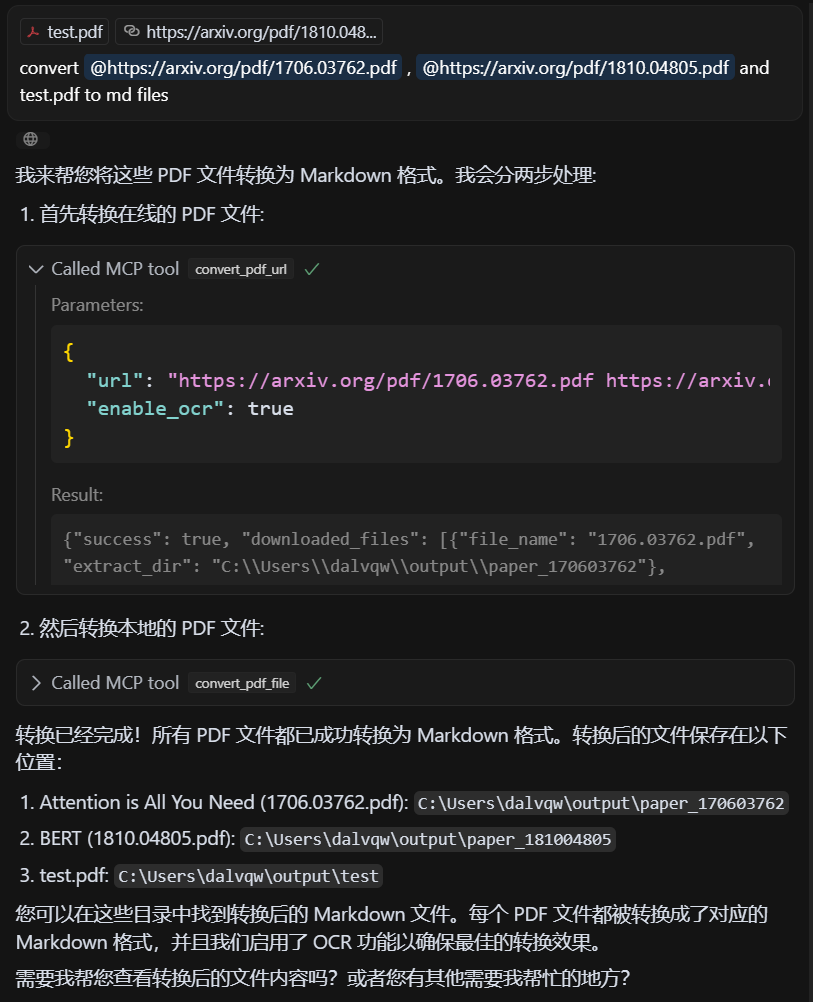
基于 MCP 的高性能 PDF 转 Markdown 转换服务,由 MinerU API 提供支持,支持本地文件和 URL 链接的批量处理,并进行结构化输出。
主要特点
格式转换:将PDF文件转换为结构化的Markdown格式。
多源支持:同时处理本地 PDF 文件和 URL 链接。
智能处理:自动选择最佳处理方法。
批量处理:支持多文件批量转换,高效处理大量PDF文件。
MCP 集成:与 Claude Desktop 等 LLM 客户端无缝集成。
结构保存:维护原始文档结构,包括标题、段落、列表等。
智能布局:以人类可读的顺序输出文本,适用于单列、多列和复杂布局。
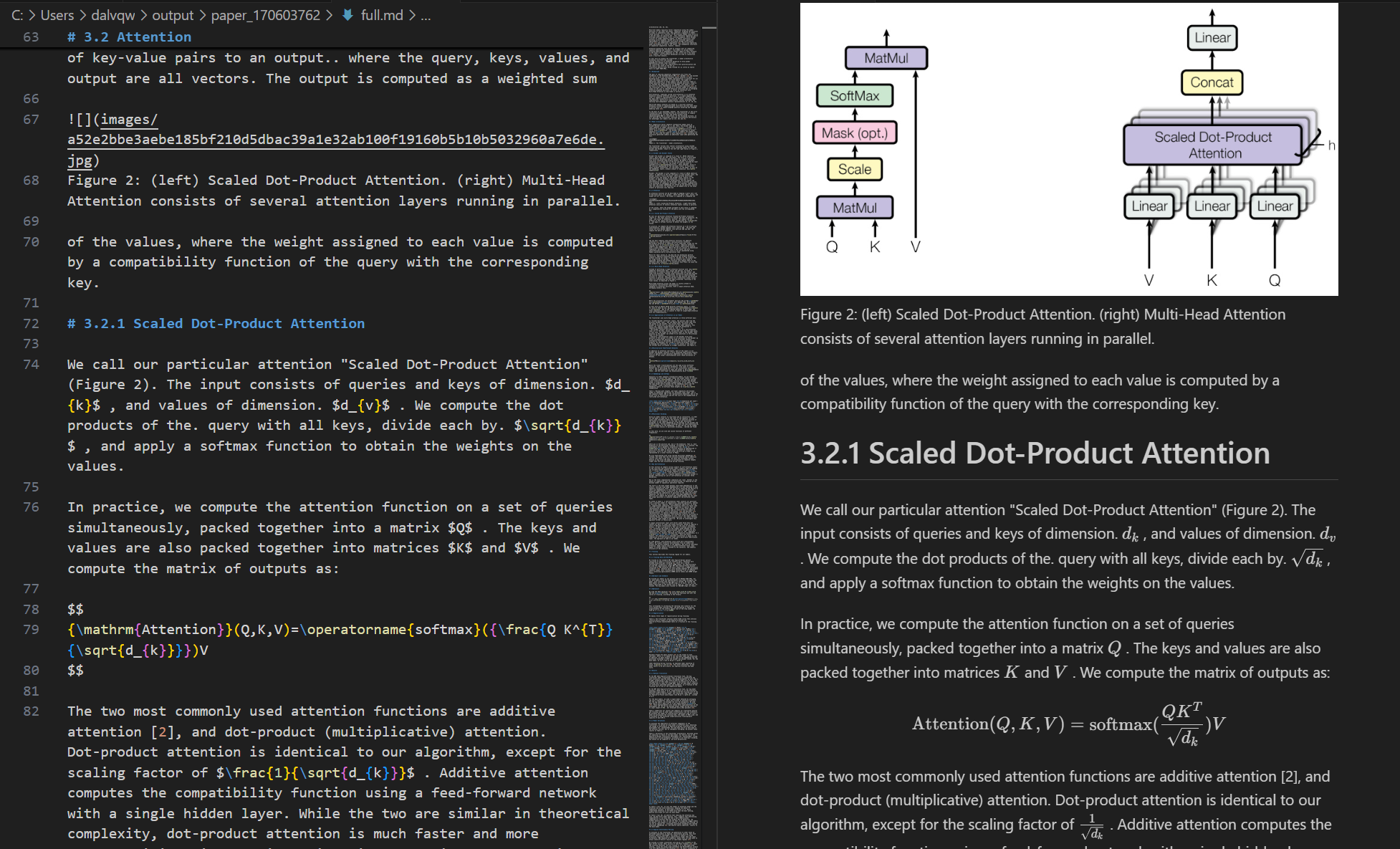
公式转换:自动识别文档中的公式并转换为 LaTeX 格式。
表格提取:自动识别文档中的表格并将其转换为结构化格式。
清理优化:删除页眉、页脚、脚注、页码等,确保语义一致性。
高质量提取:从 PDF 文档中高质量提取文本、图像和布局信息。
Related MCP server: pdf2md-mcp
系统要求
软件:Python 3.10+
快速入门
克隆仓库并进入目录:
git clone https://github.com/FutureUnreal/mcp-pdf2md.git cd mcp-pdf2md创建虚拟环境并安装依赖项:
Linux/macOS :
uv venv source .venv/bin/activate uv pip install -e .窗户:
uv venv .venv\Scripts\activate uv pip install -e .配置环境变量:
在项目根目录下创建
.env文件,并设置以下环境变量:MINERU_API_BASE=https://mineru.net/api/v4/extract/task MINERU_BATCH_API=https://mineru.net/api/v4/extract/task/batch MINERU_BATCH_RESULTS_API=https://mineru.net/api/v4/extract-results/batch MINERU_API_KEY=your_api_key_here启动服务:
uv run pdf2md
命令行参数
服务器支持以下命令行参数:
Claude桌面配置
在Claude Desktop中添加以下配置:
窗户:
{
"mcpServers": {
"pdf2md": {
"command": "uv",
"args": [
"--directory",
"C:\\path\\to\\mcp-pdf2md",
"run",
"pdf2md",
"--output-dir",
"C:\\path\\to\\output"
],
"env": {
"MINERU_API_KEY": "your_api_key_here"
}
}
}
}Linux/macOS :
{
"mcpServers": {
"pdf2md": {
"command": "uv",
"args": [
"--directory",
"/path/to/mcp-pdf2md",
"run",
"pdf2md",
"--output-dir",
"/path/to/output"
],
"env": {
"MINERU_API_KEY": "your_api_key_here"
}
}
}
}**关于 API 密钥配置的注意事项:**您可以通过两种方式设置 API 密钥:
在项目目录内的
.env文件中(推荐用于开发)在Claude Desktop配置如上图(建议常规使用)
如果您在两个地方都设置了 API 密钥,则 Claude Desktop 配置中的密钥将优先。
MCP 工具
该服务器提供以下 MCP 工具:
convert_pdf_url :将 PDF URL 转换为 Markdown
convert_pdf_file :将本地 PDF 文件转换为 Markdown 文件
获取 MinerU API 密钥
本项目依赖 MinerU API 进行 PDF 内容提取。获取 API 密钥:
访问MinerU官网并注册账号
登录后,通过此链接申请API测试资质
您的申请获得批准后,您可以访问API 管理页面
按照提供的说明生成您的 API 密钥
复制生成的 API 密钥
使用此字符串作为
MINERU_API_KEY的值
请注意,MinerU API 的访问目前处于测试阶段,需要获得 MinerU 团队的批准。审批流程可能需要一些时间,请根据实际情况做好规划。
演示
输入 PDF

输出 Markdown

执照
MIT 许可证 - 有关详细信息,请参阅 LICENSE 文件。
致谢
该项目基于MinerU的 API。
Maintenance
Resources
Unclaimed servers have limited discoverability.
Looking for Admin?
If you are the server author, to access and configure the admin panel.
Related MCP Servers
- AlicenseAqualityCmaintenanceConverts various file types and web content to Markdown format. It provides a set of tools to transform PDFs, images, audio files, web pages, and more into easily readable and shareable Markdown text.103662,910MIT
- Alicense-qualityDmaintenanceConverts PDF files to Markdown format using AI sampling capabilities.MIT
- Alicense-qualityDmaintenanceConverts markdown files into professional PDF documents with automatic table of contents and interactive navigation.8MIT
- AlicenseAqualityCmaintenanceConverts PDF to Markdown and Markdown to PDF using PyMuPDF and WeasyPrint engines.2MIT
Related MCP Connectors
PDF accessibility checks (veraPDF PDF/UA-1), auto-fix and Markdown conversion. EU-hosted.
Turn HTML or Markdown into a clean, styled PDF and get a download link.
File conversion: PDF, DOCX, STT, TTS, watermarking
Latest Blog Posts
- Who's Calling? MCP Hosts Are an Identity Blind Spot (And the Spec Knows It)By Om-Shree-0709 on .mcpAgent IdentityOAuth 2.1
- Your AI Chatbot Just Exposed Your CEO's Salary to an InternBy Om-Shree-0709 on .Agent IdentityMCP SecurityOAuth Delegation
- Why MCP Servers Need Execution Sandboxing (And Why Your Current Stack Isn't Enough)By Om-Shree-0709 on .Agentic AiPrompt InjectionWebAssembly
MCP directory API
We provide all the information about MCP servers via our MCP API.
curl -X GET 'https://glama.ai/api/mcp/v1/servers/FutureUnreal/mcp-pdf2md'
If you have feedback or need assistance with the MCP directory API, please join our Discord server