Glama

MCP-PDF2MD

鍛冶屋のバッジ英語|中国語

MCP-PDF2MDサービス

MinerU API を搭載した MCP ベースの高性能 PDF から Markdown への変換サービス。構造化された出力によるローカル ファイルと URL リンクのバッチ処理をサポートします。

主な特徴

  • フォーマット変換: PDF ファイルを構造化された Markdown フォーマットに変換します。

  • マルチソース サポート: ローカル PDF ファイルと URL リンクの両方を処理します。

  • インテリジェント処理: 最適な処理方法を自動的に選択します。

  • バッチ処理: 大量の PDF ファイルを効率的に処理するために、複数ファイルのバッチ変換をサポートします。

  • MCP 統合: Claude Desktop などの LLM クライアントとのシームレスな統合。

  • 構造の保持: 見出し、段落、リストなど、元のドキュメント構造を維持します。

  • スマート レイアウト: 単一列、複数列、複雑なレイアウトに適した、人間が読める順序でテキストを出力します。

  • 数式変換: 文書内の数式を自動的に認識し、LaTeX 形式に変換します。

  • 表の抽出: ドキュメント内の表を自動的に認識し、構造化された形式に変換します。

  • クリーンアップの最適化: ヘッダー、フッター、脚注、ページ番号などを削除して、意味の一貫性を確保します。

  • 高品質の抽出: PDF ドキュメントからテキスト、画像、レイアウト情報を高品質に抽出します。

Related MCP server: pdf2md-mcp

システム要件

  • ソフトウェア: Python 3.10+

クイックスタート

  1. リポジトリをクローンしてディレクトリに入ります:

    git clone https://github.com/FutureUnreal/mcp-pdf2md.git
    cd mcp-pdf2md
  2. 仮想環境を作成し、依存関係をインストールします。

    Linux/macOS :

    uv venv
    source .venv/bin/activate
    uv pip install -e .

    ウィンドウズ:

    uv venv
    .venv\Scripts\activate
    uv pip install -e .
  3. 環境変数を設定します。

    プロジェクトのルート ディレクトリに.envファイルを作成し、次の環境変数を設定します。

    MINERU_API_BASE=https://mineru.net/api/v4/extract/task
    MINERU_BATCH_API=https://mineru.net/api/v4/extract/task/batch
    MINERU_BATCH_RESULTS_API=https://mineru.net/api/v4/extract-results/batch
    MINERU_API_KEY=your_api_key_here
  4. サービスを開始します:

    uv run pdf2md

コマンドライン引数

サーバーは次のコマンド ライン引数をサポートしています:

クロードデスクトップ構成

Claude Desktop に次の構成を追加します。

ウィンドウズ:

{
    "mcpServers": {
        "pdf2md": {
            "command": "uv",
            "args": [
                "--directory",
                "C:\\path\\to\\mcp-pdf2md",
                "run",
                "pdf2md",
                "--output-dir",
                "C:\\path\\to\\output"
            ],
            "env": {
                "MINERU_API_KEY": "your_api_key_here"
            }
        }
    }
}

Linux/macOS :

{
    "mcpServers": {
        "pdf2md": {
            "command": "uv",
            "args": [
                "--directory",
                "/path/to/mcp-pdf2md",
                "run",
                "pdf2md",
                "--output-dir",
                "/path/to/output"
            ],
            "env": {
                "MINERU_API_KEY": "your_api_key_here"
            }
        }
    }
}

API キー設定に関する注意: API キーは次の 2 つの方法で設定できます。

  1. プロジェクトディレクトリ内の.envファイル内(開発に推奨)

  2. 上記のClaude Desktop構成(通常の使用に推奨)

両方の場所で API キーを設定した場合、Claude Desktop 構成のキーが優先されます。

MCPツール

サーバーは次の MCP ツールを提供します。

  • convert_pdf_url : PDF URL を Markdown に変換する

  • convert_pdf_file : ローカルのPDFファイルをMarkdownに変換する

MinerU APIキーの取得

このプロジェクトは、PDFコンテンツの抽出にMinerU APIを使用しています。APIキーを取得するには、以下の手順に従ってください。

  1. MinerUの公式サイトにアクセスしてアカウントを登録してください

  2. ログイン後、こちらのリンクからAPIテスト資格を申請してください。

  3. アプリケーションが承認されると、 API管理ページにアクセスできるようになります。

  4. 提供された指示に従ってAPIキーを生成します

  5. 生成されたAPIキーをコピーします

  6. この文字列をMINERU_API_KEYの値として使用します

MinerU APIへのアクセスは現在テスト段階であり、MinerUチームの承認が必要です。承認プロセスには時間がかかる場合がありますので、計画的に進めてください。

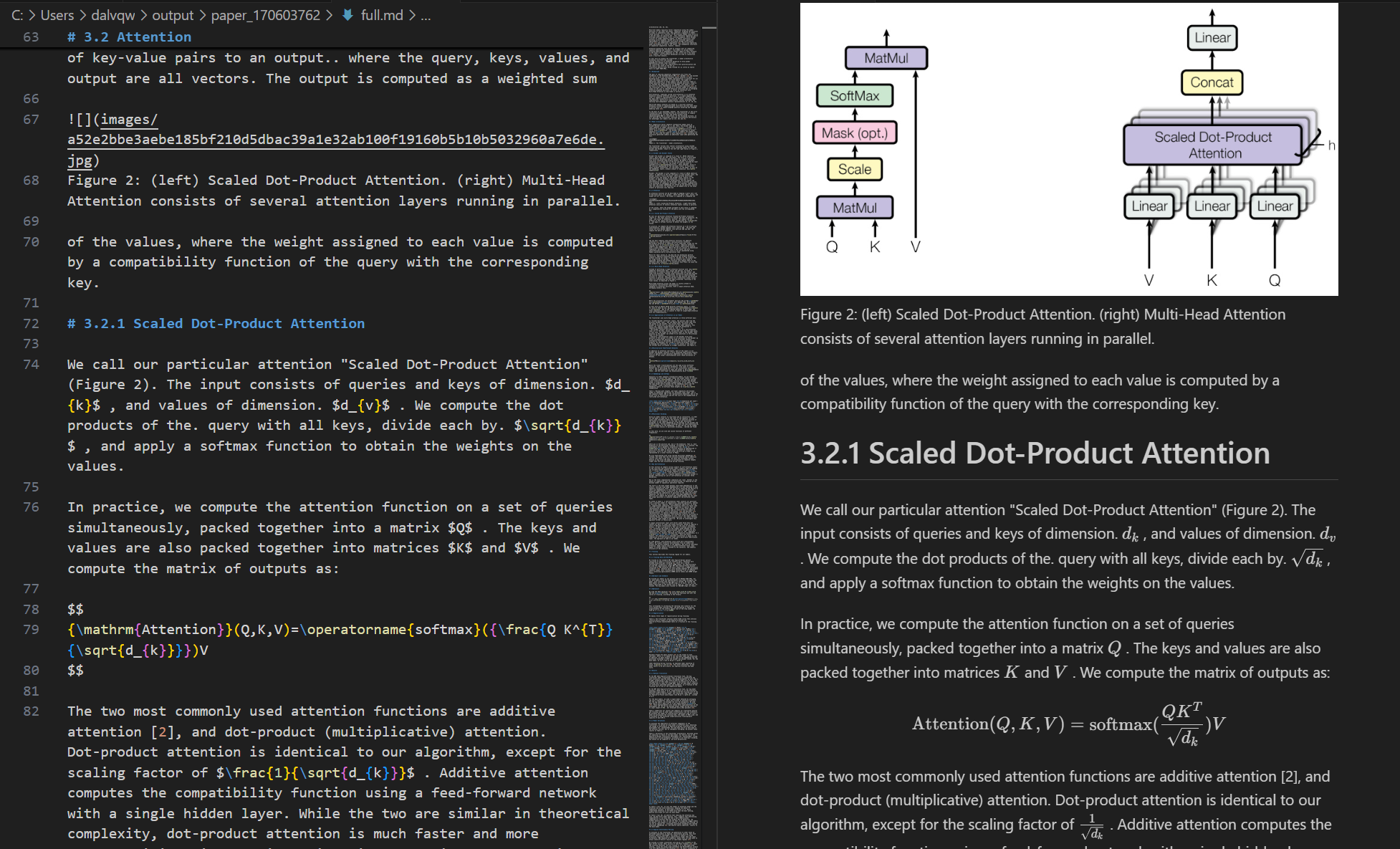
デモ

入力PDF
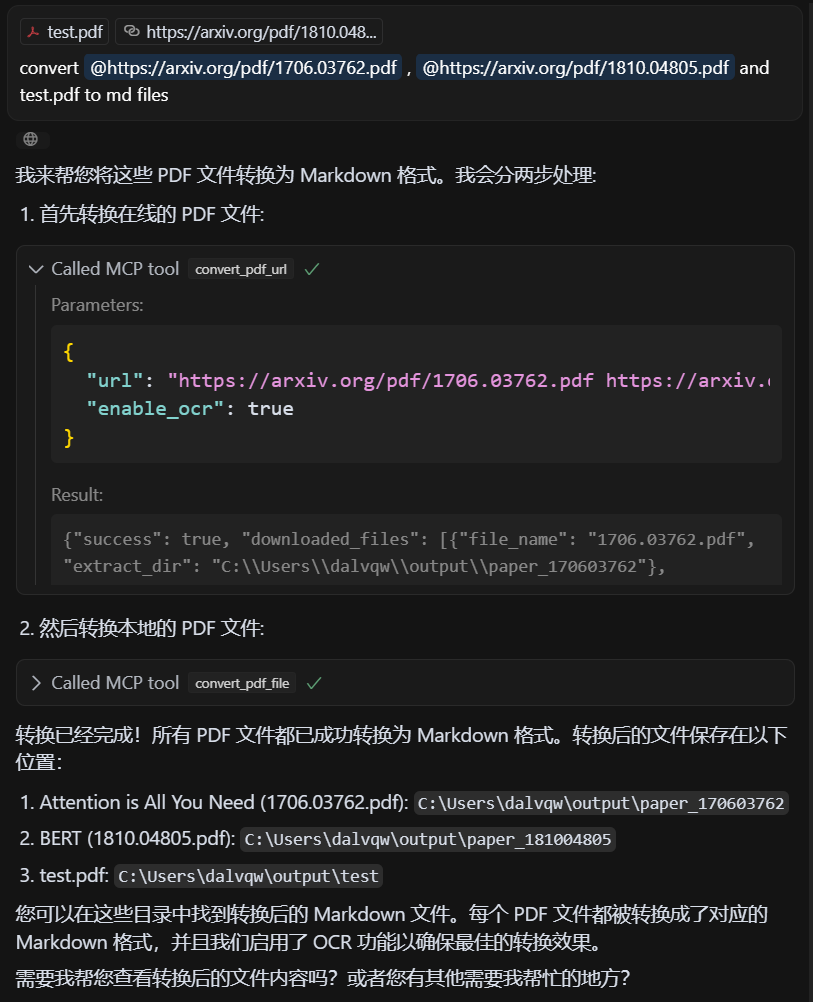
入力PDF

出力マークダウン

出力マークダウン

ライセンス

MIT ライセンス - 詳細については LICENSE ファイルを参照してください。

クレジット

このプロジェクトは、 MinerUの API に基づいています。

Available Tools

2 tools
convert_pdf_fileC
Convert local PDF file to Markdown, supports single file or file list

Args:
    file_path: PDF file local path or path list, can be separated by spaces, commas, or newlines
    enable_ocr: Whether to enable OCR (default: True)

Returns:
    dict: Conversion result information
ParametersJSON Schema
NameRequiredDescriptionDefault
file_pathYes
enable_ocrNo

TDQS

C2.9/5.0
Behavior2/5

Does the description disclose side effects, auth requirements, rate limits, or destructive behavior?

With no annotations provided, the description carries full burden for behavioral disclosure. It mentions the OCR capability and return format (dict with conversion result information), but lacks critical details: whether this is a read-only operation, what happens with invalid files, if there are size/time limitations, what specific information the result dict contains, or error handling behavior.

Agents need to know what a tool does to the world before calling it. Descriptions should go beyond structured annotations to explain consequences.

Conciseness4/5

Is the description appropriately sized, front-loaded, and free of redundancy?

The description is reasonably concise with clear sections (Args, Returns) and front-loaded purpose statement. However, the 'Args' and 'Returns' labels add some redundancy since this information is partially available in the schema, and some sentences could be more efficiently worded.

Shorter descriptions cost fewer tokens and are easier for agents to parse. Every sentence should earn its place.

Completeness2/5

Given the tool's complexity, does the description cover enough for an agent to succeed on first attempt?

For a file conversion tool with 2 parameters, no annotations, and no output schema, the description is insufficient. It lacks information about file format requirements, conversion quality, error conditions, output structure details, performance characteristics, or how the tool differs from its sibling. The return value description ('dict: Conversion result information') is particularly vague given no output schema exists.

Complex tools with many parameters or behaviors need more documentation. Simple tools need less. This dimension scales expectations accordingly.

Parameters3/5

Does the description clarify parameter syntax, constraints, interactions, or defaults beyond what the schema provides?

The description provides basic parameter information in the Args section, explaining that file_path accepts local paths or lists with various separators, and enable_ocr defaults to True. However, with 0% schema description coverage, it doesn't fully compensate by explaining path format requirements, file accessibility constraints, or what OCR actually does in this context beyond the boolean toggle.

Input schemas describe structure but not intent. Descriptions should explain non-obvious parameter relationships and valid value ranges.

Purpose4/5

Does the description clearly state what the tool does and how it differs from similar tools?

The description clearly states the tool's purpose: converting PDF files to Markdown format, with support for single files or lists. It specifies the resource (PDF files) and action (convert to Markdown), though it doesn't explicitly differentiate from the sibling tool 'convert_pdf_url' which likely handles URL-based PDFs rather than local files.

Agents choose between tools based on descriptions. A clear purpose with a specific verb and resource helps agents select the right tool.

Usage Guidelines2/5

Does the description explain when to use this tool, when not to, or what alternatives exist?

The description provides no guidance on when to use this tool versus alternatives. While it mentions support for single files or lists, it doesn't explain when to choose this over 'convert_pdf_url' or other potential conversion tools. There's no mention of prerequisites, limitations, or typical use cases.

Agents often have multiple tools that could apply. Explicit usage guidance like "use X instead of Y when Z" prevents misuse.

convert_pdf_urlB
Convert PDF URL to Markdown, supports single URL or URL list

Args:
    url: PDF file URL or URL list, can be separated by spaces, commas, or newlines
    enable_ocr: Whether to enable OCR (default: True)

Returns:
    dict: Conversion result information
ParametersJSON Schema
NameRequiredDescriptionDefault
urlYes
enable_ocrNo

TDQS

B3.3/5.0
Behavior2/5

Does the description disclose side effects, auth requirements, rate limits, or destructive behavior?

No annotations are provided, so the description carries the full burden of behavioral disclosure. It mentions OCR support with a default setting, which adds some context, but fails to describe critical behaviors such as rate limits, authentication requirements, error handling, or what the conversion result information includes. For a tool that processes external URLs and performs conversion, this is a significant gap in transparency.

Agents need to know what a tool does to the world before calling it. Descriptions should go beyond structured annotations to explain consequences.

Conciseness4/5

Is the description appropriately sized, front-loaded, and free of redundancy?

The description is appropriately sized and front-loaded, starting with the core purpose followed by parameter details in a structured format. Every sentence adds value, with no redundant information. However, the use of 'dict' in the returns section is slightly vague, though this is mitigated by the lack of an output schema.

Shorter descriptions cost fewer tokens and are easier for agents to parse. Every sentence should earn its place.

Completeness3/5

Given the tool's complexity, does the description cover enough for an agent to succeed on first attempt?

Given the tool's complexity (processing PDF URLs with OCR options) and the absence of annotations and output schema, the description is minimally adequate. It covers the basic purpose and parameters but lacks details on behavioral traits, error cases, and output structure. This leaves gaps that could hinder an agent's ability to use the tool effectively in varied contexts.

Complex tools with many parameters or behaviors need more documentation. Simple tools need less. This dimension scales expectations accordingly.

Parameters4/5

Does the description clarify parameter syntax, constraints, interactions, or defaults beyond what the schema provides?

The description adds meaningful semantics beyond the input schema, which has 0% description coverage. It explains that 'url' can be a single URL or a list separated by spaces, commas, or newlines, and clarifies the default value and purpose of 'enable_ocr'. This compensates well for the schema's lack of descriptions, making the parameters understandable without relying on the schema alone.

Input schemas describe structure but not intent. Descriptions should explain non-obvious parameter relationships and valid value ranges.

Purpose4/5

Does the description clearly state what the tool does and how it differs from similar tools?

The description clearly states the tool's purpose: converting PDF URLs to Markdown format. It specifies the resource (PDF URLs) and the action (convert to Markdown), which is specific and actionable. However, it doesn't explicitly differentiate from its sibling tool 'convert_pdf_file' beyond mentioning URL vs. file handling.

Agents choose between tools based on descriptions. A clear purpose with a specific verb and resource helps agents select the right tool.

Usage Guidelines3/5

Does the description explain when to use this tool, when not to, or what alternatives exist?

The description implies usage by mentioning support for single URLs or URL lists, but it doesn't provide explicit guidance on when to use this tool versus alternatives like 'convert_pdf_file'. No when-not-to-use scenarios or prerequisites are mentioned, leaving the agent to infer context from the tool name and description alone.

Agents often have multiple tools that could apply. Explicit usage guidance like "use X instead of Y when Z" prevents misuse.

Tool Schema Changelog

Recent tool additions, removals, and schema changes observed during successful MCP inspections.

  1. 2 tool updates
    • First observedconvert_pdf_file
    • First observedconvert_pdf_url

TDQS

B3.4/5.0

Scored across 2 tools

Disambiguation5/5

The two tools have clearly distinct purposes: one handles local file paths, the other handles URLs. The naming and descriptions make it impossible to confuse which tool to use for a given input source.

Naming Consistency5/5

Both tools follow an identical verb_noun pattern (convert_pdf_file and convert_pdf_url) with consistent snake_case formatting. The naming is perfectly predictable across the toolset.

Tool Count3/5

With only two tools, the server feels minimal but functional. While it covers the core conversion task for both local files and URLs, the count is borderline thin for a PDF-to-Markdown domain that could potentially include more operations like batch processing, format options, or metadata extraction.

Completeness4/5

The server covers the essential conversion operation for both local files and remote URLs, which are the two main input sources for PDFs. The minor gap is the lack of additional PDF manipulation or output customization tools, but agents can perform basic conversions without dead ends.

Maintenance

ActivityInactive
ResponsivenessNo issues

Related MCP Connectors

Related MCP Servers