mcp-pdf2md
MCP-PDF2MD
Servicio MCP-PDF2MD
Un servicio de conversión de PDF a Markdown de alto rendimiento basado en MCP, impulsado por la API de MinerU, que admite el procesamiento por lotes de archivos locales y enlaces URL con salida estructurada.
Características principales
Conversión de formato: convierte archivos PDF al formato Markdown estructurado.
Compatibilidad con múltiples fuentes: procesa tanto archivos PDF locales como enlaces URL.
Procesamiento inteligente: selecciona automáticamente el mejor método de procesamiento.
Procesamiento por lotes: admite la conversión por lotes de múltiples archivos para un manejo eficiente de grandes volúmenes de archivos PDF.
Integración MCP: Integración perfecta con clientes LLM como Claude Desktop.
Preservación de la estructura: mantener la estructura original del documento, incluidos encabezados, párrafos, listas, etc.
Diseño inteligente: genera texto en un orden legible para humanos, adecuado para diseños de una sola columna, de varias columnas y complejos.
Conversión de fórmulas: reconoce y convierte automáticamente las fórmulas del documento al formato LaTeX.
Extracción de tablas: reconoce y convierte automáticamente las tablas del documento a formato estructurado.
Optimización de limpieza: elimine encabezados, pies de página, notas al pie, números de página, etc., para garantizar la coherencia semántica.
Extracción de alta calidad: extracción de alta calidad de texto, imágenes e información de diseño de documentos PDF.
Related MCP server: pdf2md-mcp
Requisitos del sistema
Software: Python 3.10+
Inicio rápido
Clonar el repositorio e ingresar al directorio:
git clone https://github.com/FutureUnreal/mcp-pdf2md.git cd mcp-pdf2mdCree un entorno virtual e instale dependencias:
Linux/macOS :
uv venv source .venv/bin/activate uv pip install -e .Ventanas :
uv venv .venv\Scripts\activate uv pip install -e .Configurar variables de entorno:
Cree un archivo
.enven el directorio raíz del proyecto y configure las siguientes variables de entorno:MINERU_API_BASE=https://mineru.net/api/v4/extract/task MINERU_BATCH_API=https://mineru.net/api/v4/extract/task/batch MINERU_BATCH_RESULTS_API=https://mineru.net/api/v4/extract-results/batch MINERU_API_KEY=your_api_key_hereIniciar el servicio:
uv run pdf2md
Argumentos de la línea de comandos
El servidor admite los siguientes argumentos de línea de comandos:
Configuración del escritorio de Claude
Agregue la siguiente configuración en Claude Desktop:
Ventanas :
{
"mcpServers": {
"pdf2md": {
"command": "uv",
"args": [
"--directory",
"C:\\path\\to\\mcp-pdf2md",
"run",
"pdf2md",
"--output-dir",
"C:\\path\\to\\output"
],
"env": {
"MINERU_API_KEY": "your_api_key_here"
}
}
}
}Linux/macOS :
{
"mcpServers": {
"pdf2md": {
"command": "uv",
"args": [
"--directory",
"/path/to/mcp-pdf2md",
"run",
"pdf2md",
"--output-dir",
"/path/to/output"
],
"env": {
"MINERU_API_KEY": "your_api_key_here"
}
}
}
}Nota sobre la configuración de la clave API: puede configurar la clave API de dos maneras:
En el archivo
.envdentro del directorio del proyecto (recomendado para desarrollo)En la configuración de Claude Desktop como se muestra arriba (recomendado para uso regular)
Si configura la clave API en ambos lugares, tendrá prioridad la de la configuración de Claude Desktop.
Herramientas MCP
El servidor proporciona las siguientes herramientas MCP:
convert_pdf_url : Convertir URL de PDF a Markdown
convert_pdf_file : Convierte un archivo PDF local a Markdown
Obtener la clave API de MinerU
Este proyecto utiliza la API de MinerU para la extracción de contenido PDF. Para obtener una clave API:
Visita el sitio web oficial de MinerU y regístrate para obtener una cuenta
Después de iniciar sesión, solicite la calificación de prueba API en este enlace
Una vez aprobada su solicitud, podrá acceder a la página de Administración de API
Genere su clave API siguiendo las instrucciones proporcionadas
Copiar la clave API generada
Utilice esta cadena como valor para
MINERU_API_KEY
Tenga en cuenta que el acceso a la API de MinerU se encuentra actualmente en fase de prueba y requiere la aprobación del equipo de MinerU. El proceso de aprobación puede tardar un tiempo, así que planifique con antelación.
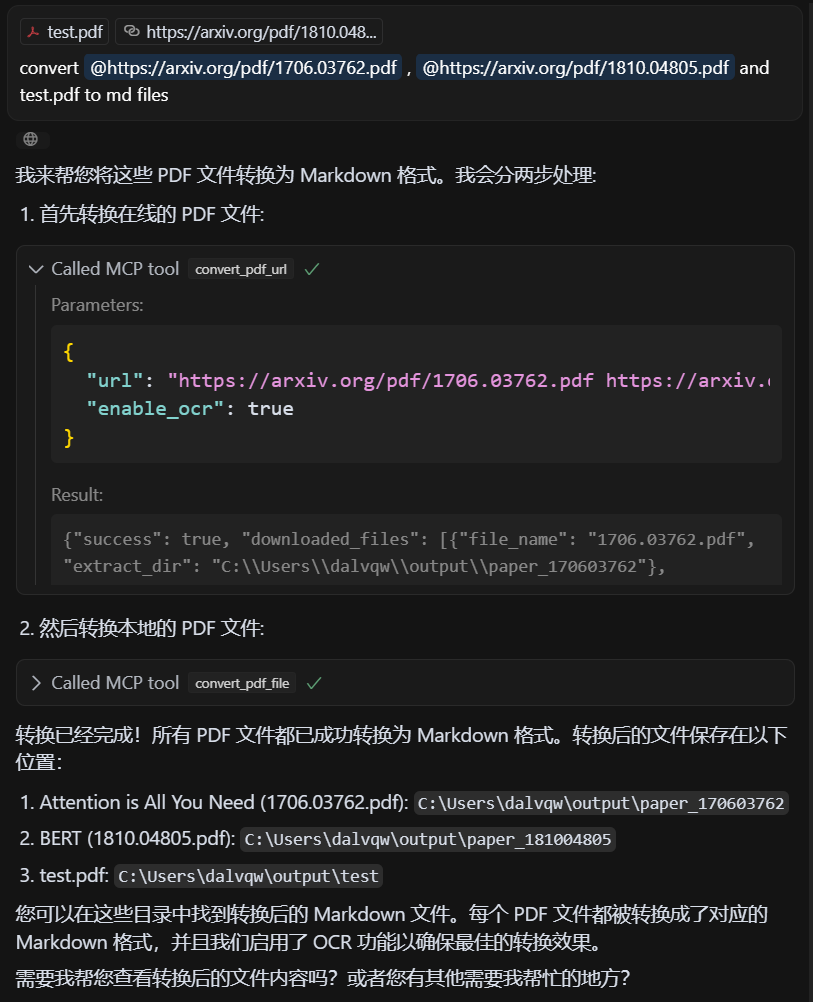
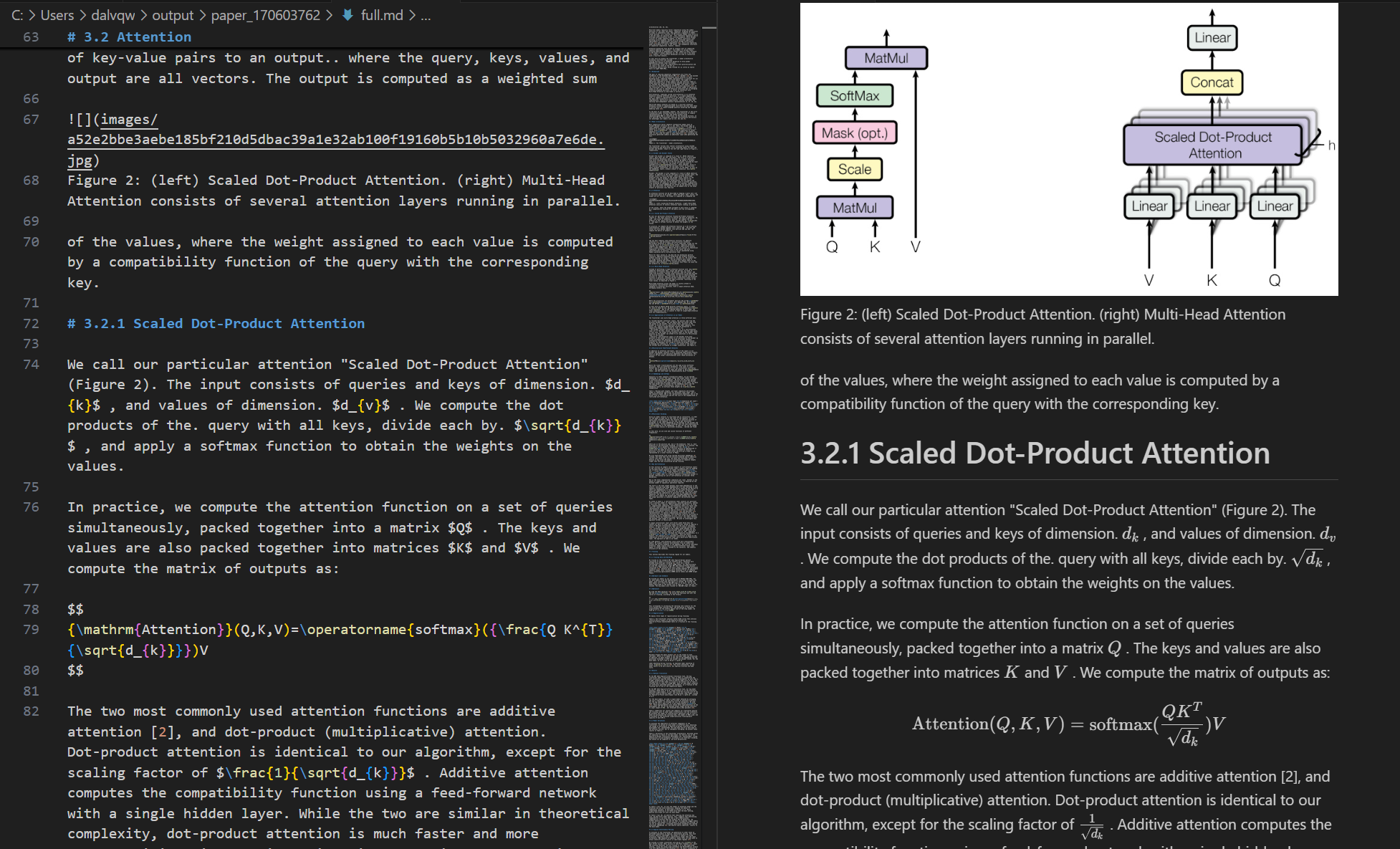
Manifestación
PDF de entrada
Markdown de salida
Licencia
Licencia MIT: consulte el archivo LICENCIA para obtener más detalles.
Créditos
Este proyecto se basa en la API de MinerU .
Available Tools
2 toolsconvert_pdf_fileC
Convert local PDF file to Markdown, supports single file or file list
Args:
file_path: PDF file local path or path list, can be separated by spaces, commas, or newlines
enable_ocr: Whether to enable OCR (default: True)
Returns:
dict: Conversion result information
| Name | Required | Description | Default |
|---|---|---|---|
| file_path | Yes | ||
| enable_ocr | No |
TDQS
Does the description disclose side effects, auth requirements, rate limits, or destructive behavior?
With no annotations provided, the description carries full burden for behavioral disclosure. It mentions the OCR capability and return format (dict with conversion result information), but lacks critical details: whether this is a read-only operation, what happens with invalid files, if there are size/time limitations, what specific information the result dict contains, or error handling behavior.
Agents need to know what a tool does to the world before calling it. Descriptions should go beyond structured annotations to explain consequences.
Is the description appropriately sized, front-loaded, and free of redundancy?
The description is reasonably concise with clear sections (Args, Returns) and front-loaded purpose statement. However, the 'Args' and 'Returns' labels add some redundancy since this information is partially available in the schema, and some sentences could be more efficiently worded.
Shorter descriptions cost fewer tokens and are easier for agents to parse. Every sentence should earn its place.
Given the tool's complexity, does the description cover enough for an agent to succeed on first attempt?
For a file conversion tool with 2 parameters, no annotations, and no output schema, the description is insufficient. It lacks information about file format requirements, conversion quality, error conditions, output structure details, performance characteristics, or how the tool differs from its sibling. The return value description ('dict: Conversion result information') is particularly vague given no output schema exists.
Complex tools with many parameters or behaviors need more documentation. Simple tools need less. This dimension scales expectations accordingly.
Does the description clarify parameter syntax, constraints, interactions, or defaults beyond what the schema provides?
The description provides basic parameter information in the Args section, explaining that file_path accepts local paths or lists with various separators, and enable_ocr defaults to True. However, with 0% schema description coverage, it doesn't fully compensate by explaining path format requirements, file accessibility constraints, or what OCR actually does in this context beyond the boolean toggle.
Input schemas describe structure but not intent. Descriptions should explain non-obvious parameter relationships and valid value ranges.
Does the description clearly state what the tool does and how it differs from similar tools?
The description clearly states the tool's purpose: converting PDF files to Markdown format, with support for single files or lists. It specifies the resource (PDF files) and action (convert to Markdown), though it doesn't explicitly differentiate from the sibling tool 'convert_pdf_url' which likely handles URL-based PDFs rather than local files.
Agents choose between tools based on descriptions. A clear purpose with a specific verb and resource helps agents select the right tool.
Does the description explain when to use this tool, when not to, or what alternatives exist?
The description provides no guidance on when to use this tool versus alternatives. While it mentions support for single files or lists, it doesn't explain when to choose this over 'convert_pdf_url' or other potential conversion tools. There's no mention of prerequisites, limitations, or typical use cases.
Agents often have multiple tools that could apply. Explicit usage guidance like "use X instead of Y when Z" prevents misuse.
convert_pdf_urlB
Convert PDF URL to Markdown, supports single URL or URL list
Args:
url: PDF file URL or URL list, can be separated by spaces, commas, or newlines
enable_ocr: Whether to enable OCR (default: True)
Returns:
dict: Conversion result information
| Name | Required | Description | Default |
|---|---|---|---|
| url | Yes | ||
| enable_ocr | No |
TDQS
Does the description disclose side effects, auth requirements, rate limits, or destructive behavior?
No annotations are provided, so the description carries the full burden of behavioral disclosure. It mentions OCR support with a default setting, which adds some context, but fails to describe critical behaviors such as rate limits, authentication requirements, error handling, or what the conversion result information includes. For a tool that processes external URLs and performs conversion, this is a significant gap in transparency.
Agents need to know what a tool does to the world before calling it. Descriptions should go beyond structured annotations to explain consequences.
Is the description appropriately sized, front-loaded, and free of redundancy?
The description is appropriately sized and front-loaded, starting with the core purpose followed by parameter details in a structured format. Every sentence adds value, with no redundant information. However, the use of 'dict' in the returns section is slightly vague, though this is mitigated by the lack of an output schema.
Shorter descriptions cost fewer tokens and are easier for agents to parse. Every sentence should earn its place.
Given the tool's complexity, does the description cover enough for an agent to succeed on first attempt?
Given the tool's complexity (processing PDF URLs with OCR options) and the absence of annotations and output schema, the description is minimally adequate. It covers the basic purpose and parameters but lacks details on behavioral traits, error cases, and output structure. This leaves gaps that could hinder an agent's ability to use the tool effectively in varied contexts.
Complex tools with many parameters or behaviors need more documentation. Simple tools need less. This dimension scales expectations accordingly.
Does the description clarify parameter syntax, constraints, interactions, or defaults beyond what the schema provides?
The description adds meaningful semantics beyond the input schema, which has 0% description coverage. It explains that 'url' can be a single URL or a list separated by spaces, commas, or newlines, and clarifies the default value and purpose of 'enable_ocr'. This compensates well for the schema's lack of descriptions, making the parameters understandable without relying on the schema alone.
Input schemas describe structure but not intent. Descriptions should explain non-obvious parameter relationships and valid value ranges.
Does the description clearly state what the tool does and how it differs from similar tools?
The description clearly states the tool's purpose: converting PDF URLs to Markdown format. It specifies the resource (PDF URLs) and the action (convert to Markdown), which is specific and actionable. However, it doesn't explicitly differentiate from its sibling tool 'convert_pdf_file' beyond mentioning URL vs. file handling.
Agents choose between tools based on descriptions. A clear purpose with a specific verb and resource helps agents select the right tool.
Does the description explain when to use this tool, when not to, or what alternatives exist?
The description implies usage by mentioning support for single URLs or URL lists, but it doesn't provide explicit guidance on when to use this tool versus alternatives like 'convert_pdf_file'. No when-not-to-use scenarios or prerequisites are mentioned, leaving the agent to infer context from the tool name and description alone.
Agents often have multiple tools that could apply. Explicit usage guidance like "use X instead of Y when Z" prevents misuse.
Tool Schema Changelog
Recent tool additions, removals, and schema changes observed during successful MCP inspections.
2 tool updates
- First observed
convert_pdf_file - First observed
convert_pdf_url
TDQS
Scored across 2 tools
The two tools have clearly distinct purposes: one handles local file paths, the other handles URLs. The naming and descriptions make it impossible to confuse which tool to use for a given input source.
Both tools follow an identical verb_noun pattern (convert_pdf_file and convert_pdf_url) with consistent snake_case formatting. The naming is perfectly predictable across the toolset.
With only two tools, the server feels minimal but functional. While it covers the core conversion task for both local files and URLs, the count is borderline thin for a PDF-to-Markdown domain that could potentially include more operations like batch processing, format options, or metadata extraction.
The server covers the essential conversion operation for both local files and remote URLs, which are the two main input sources for PDFs. The minor gap is the lack of additional PDF manipulation or output customization tools, but agents can perform basic conversions without dead ends.
Maintenance
Related MCP Connectors
PDF, Word, PowerPoint, Excel, HTML, EPUB to Markdown: OCR, page ranges, tables, RAG chunking
Convert documents and web pages to clean Markdown: PDF, DOCX, XLSX, EPUB, scanned files, any URL.
High-fidelity PDF to structured Markdown conversion and document field extraction.
Convert PDF, DOCX, HTML, and URLs to clean, LLM-ready markdown with tables preserved
Related MCP Servers
- AlicenseAqualityDmaintenanceConverts various file types and web content to Markdown format. It provides a set of tools to transform PDFs, images, audio files, web pages, and more into easily readable and shareable Markdown text.10345 npm2,997MIT
- AlicenseNot gradedqualityDmaintenanceConverts PDF files to Markdown format using AI sampling capabilities.MIT
- AlicenseNot gradedqualityFmaintenanceConverts markdown files into professional PDF documents with automatic table of contents and interactive navigation.8MIT
- AlicenseNot gradedqualityCmaintenanceConvert PDF documents to Markdown and query them using AI with source attribution and confidence scoring, supporting multiple LLM providers.MIT