Glama

MCP-PDF2MD

대장간 배지 영어 | 중국어

MCP-PDF2MD 서비스

MinerU API를 기반으로 하는 MCP 기반 고성능 PDF-마크다운 변환 서비스로, 구조화된 출력을 통해 로컬 파일과 URL 링크에 대한 일괄 처리를 지원합니다.

주요 특징

  • 형식 변환: PDF 파일을 구조화된 마크다운 형식으로 변환합니다.

  • 다중 소스 지원: 로컬 PDF 파일과 URL 링크를 모두 처리합니다.

  • 지능형 처리: 최적의 처리 방법을 자동으로 선택합니다.

  • 일괄 처리: 대용량 PDF 파일을 효율적으로 처리하기 위해 여러 파일 일괄 변환을 지원합니다.

  • MCP 통합: Claude Desktop과 같은 LLM 클라이언트와 원활하게 통합됩니다.

  • 구조 보존: 제목, 문단, 목록 등을 포함한 원본 문서 구조를 유지합니다.

  • 스마트 레이아웃: 단일 열, 다중 열 및 복잡한 레이아웃에 적합하며 사람이 읽을 수 있는 순서로 텍스트를 출력합니다.

  • 수식 변환: 문서의 수식을 자동으로 인식하여 LaTeX 형식으로 변환합니다.

  • 표 추출: 문서의 표를 자동으로 인식하고 구조화된 형식으로 변환합니다.

  • 정리 최적화: 의미적 일관성을 보장하기 위해 머리글, 바닥글, 각주, 페이지 번호 등을 제거합니다.

  • 고품질 추출: PDF 문서에서 텍스트, 이미지, 레이아웃 정보를 고품질로 추출합니다.

Related MCP server: pdf2md-mcp

시스템 요구 사항

  • 소프트웨어: Python 3.10+

빠른 시작

  1. 저장소를 복제하고 디렉토리로 들어갑니다.

    지엑스피1

  2. 가상 환경을 만들고 종속성을 설치합니다.

    리눅스/맥OS :

    uv venv
    source .venv/bin/activate
    uv pip install -e .

    윈도우 :

    uv venv
    .venv\Scripts\activate
    uv pip install -e .
  3. 환경 변수 구성:

    프로젝트 루트 디렉토리에 .env 파일을 만들고 다음 환경 변수를 설정합니다.

    MINERU_API_BASE=https://mineru.net/api/v4/extract/task
    MINERU_BATCH_API=https://mineru.net/api/v4/extract/task/batch
    MINERU_BATCH_RESULTS_API=https://mineru.net/api/v4/extract-results/batch
    MINERU_API_KEY=your_api_key_here
  4. 서비스 시작:

    uv run pdf2md

명령줄 인수

서버는 다음 명령줄 인수를 지원합니다.

클로드 데스크톱 구성

Claude Desktop에 다음 구성을 추가합니다.

윈도우 :

{
    "mcpServers": {
        "pdf2md": {
            "command": "uv",
            "args": [
                "--directory",
                "C:\\path\\to\\mcp-pdf2md",
                "run",
                "pdf2md",
                "--output-dir",
                "C:\\path\\to\\output"
            ],
            "env": {
                "MINERU_API_KEY": "your_api_key_here"
            }
        }
    }
}

리눅스/맥OS :

{
    "mcpServers": {
        "pdf2md": {
            "command": "uv",
            "args": [
                "--directory",
                "/path/to/mcp-pdf2md",
                "run",
                "pdf2md",
                "--output-dir",
                "/path/to/output"
            ],
            "env": {
                "MINERU_API_KEY": "your_api_key_here"
            }
        }
    }
}

API 키 구성에 대한 참고 사항: API 키는 두 가지 방법으로 설정할 수 있습니다.

  1. 프로젝트 디렉토리 내의 .env 파일에서(개발용으로 권장)

  2. 위에 표시된 Claude Desktop 구성(일반 사용 권장)

두 곳 모두에 API 키를 설정하는 경우, Claude Desktop 구성에 있는 API 키가 우선 적용됩니다.

MCP 도구

서버는 다음과 같은 MCP 도구를 제공합니다.

  • convert_pdf_url : PDF URL을 마크다운으로 변환

  • convert_pdf_file : 로컬 PDF 파일을 마크다운으로 변환

MinerU API 키 받기

이 프로젝트는 PDF 콘텐츠 추출을 위해 MinerU API를 사용합니다. API 키를 받으려면:

  1. MinerU 공식 웹사이트를 방문하여 계정을 등록하세요.

  2. 로그인 후, 이 링크 에서 API 테스팅 자격을 신청하세요.

  3. 신청서가 승인되면 API 관리 페이지에 액세스할 수 있습니다.

  4. 제공된 지침에 따라 API 키를 생성하세요.

  5. 생성된 API 키를 복사하세요

  6. 이 문자열을 MINERU_API_KEY 의 값으로 사용하세요.

MinerU API 이용은 현재 테스트 단계이며 MinerU 팀의 승인이 필요합니다. 승인 절차에 다소 시간이 걸릴 수 있으니, 이에 따라 계획을 세우시기 바랍니다.

데모

PDF 입력
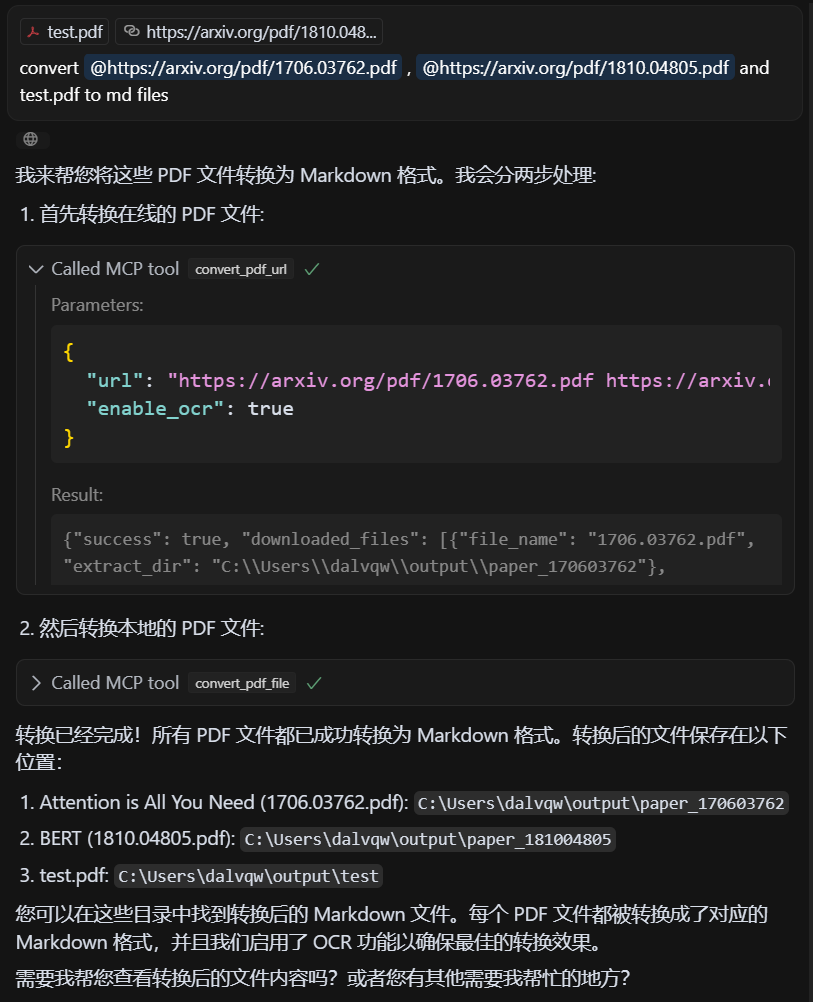
PDF 입력

출력 마크다운

출력 마크다운

특허

MIT 라이센스 - 자세한 내용은 LICENSE 파일을 참조하세요.

크레딧

이 프로젝트는 MinerU 의 API를 기반으로 합니다.

Available Tools

2 tools
convert_pdf_fileC
Convert local PDF file to Markdown, supports single file or file list

Args:
    file_path: PDF file local path or path list, can be separated by spaces, commas, or newlines
    enable_ocr: Whether to enable OCR (default: True)

Returns:
    dict: Conversion result information
ParametersJSON Schema
NameRequiredDescriptionDefault
file_pathYes
enable_ocrNo

TDQS

C2.9/5.0
Behavior2/5

Does the description disclose side effects, auth requirements, rate limits, or destructive behavior?

With no annotations provided, the description carries full burden for behavioral disclosure. It mentions the OCR capability and return format (dict with conversion result information), but lacks critical details: whether this is a read-only operation, what happens with invalid files, if there are size/time limitations, what specific information the result dict contains, or error handling behavior.

Agents need to know what a tool does to the world before calling it. Descriptions should go beyond structured annotations to explain consequences.

Conciseness4/5

Is the description appropriately sized, front-loaded, and free of redundancy?

The description is reasonably concise with clear sections (Args, Returns) and front-loaded purpose statement. However, the 'Args' and 'Returns' labels add some redundancy since this information is partially available in the schema, and some sentences could be more efficiently worded.

Shorter descriptions cost fewer tokens and are easier for agents to parse. Every sentence should earn its place.

Completeness2/5

Given the tool's complexity, does the description cover enough for an agent to succeed on first attempt?

For a file conversion tool with 2 parameters, no annotations, and no output schema, the description is insufficient. It lacks information about file format requirements, conversion quality, error conditions, output structure details, performance characteristics, or how the tool differs from its sibling. The return value description ('dict: Conversion result information') is particularly vague given no output schema exists.

Complex tools with many parameters or behaviors need more documentation. Simple tools need less. This dimension scales expectations accordingly.

Parameters3/5

Does the description clarify parameter syntax, constraints, interactions, or defaults beyond what the schema provides?

The description provides basic parameter information in the Args section, explaining that file_path accepts local paths or lists with various separators, and enable_ocr defaults to True. However, with 0% schema description coverage, it doesn't fully compensate by explaining path format requirements, file accessibility constraints, or what OCR actually does in this context beyond the boolean toggle.

Input schemas describe structure but not intent. Descriptions should explain non-obvious parameter relationships and valid value ranges.

Purpose4/5

Does the description clearly state what the tool does and how it differs from similar tools?

The description clearly states the tool's purpose: converting PDF files to Markdown format, with support for single files or lists. It specifies the resource (PDF files) and action (convert to Markdown), though it doesn't explicitly differentiate from the sibling tool 'convert_pdf_url' which likely handles URL-based PDFs rather than local files.

Agents choose between tools based on descriptions. A clear purpose with a specific verb and resource helps agents select the right tool.

Usage Guidelines2/5

Does the description explain when to use this tool, when not to, or what alternatives exist?

The description provides no guidance on when to use this tool versus alternatives. While it mentions support for single files or lists, it doesn't explain when to choose this over 'convert_pdf_url' or other potential conversion tools. There's no mention of prerequisites, limitations, or typical use cases.

Agents often have multiple tools that could apply. Explicit usage guidance like "use X instead of Y when Z" prevents misuse.

convert_pdf_urlB
Convert PDF URL to Markdown, supports single URL or URL list

Args:
    url: PDF file URL or URL list, can be separated by spaces, commas, or newlines
    enable_ocr: Whether to enable OCR (default: True)

Returns:
    dict: Conversion result information
ParametersJSON Schema
NameRequiredDescriptionDefault
urlYes
enable_ocrNo

TDQS

B3.3/5.0
Behavior2/5

Does the description disclose side effects, auth requirements, rate limits, or destructive behavior?

No annotations are provided, so the description carries the full burden of behavioral disclosure. It mentions OCR support with a default setting, which adds some context, but fails to describe critical behaviors such as rate limits, authentication requirements, error handling, or what the conversion result information includes. For a tool that processes external URLs and performs conversion, this is a significant gap in transparency.

Agents need to know what a tool does to the world before calling it. Descriptions should go beyond structured annotations to explain consequences.

Conciseness4/5

Is the description appropriately sized, front-loaded, and free of redundancy?

The description is appropriately sized and front-loaded, starting with the core purpose followed by parameter details in a structured format. Every sentence adds value, with no redundant information. However, the use of 'dict' in the returns section is slightly vague, though this is mitigated by the lack of an output schema.

Shorter descriptions cost fewer tokens and are easier for agents to parse. Every sentence should earn its place.

Completeness3/5

Given the tool's complexity, does the description cover enough for an agent to succeed on first attempt?

Given the tool's complexity (processing PDF URLs with OCR options) and the absence of annotations and output schema, the description is minimally adequate. It covers the basic purpose and parameters but lacks details on behavioral traits, error cases, and output structure. This leaves gaps that could hinder an agent's ability to use the tool effectively in varied contexts.

Complex tools with many parameters or behaviors need more documentation. Simple tools need less. This dimension scales expectations accordingly.

Parameters4/5

Does the description clarify parameter syntax, constraints, interactions, or defaults beyond what the schema provides?

The description adds meaningful semantics beyond the input schema, which has 0% description coverage. It explains that 'url' can be a single URL or a list separated by spaces, commas, or newlines, and clarifies the default value and purpose of 'enable_ocr'. This compensates well for the schema's lack of descriptions, making the parameters understandable without relying on the schema alone.

Input schemas describe structure but not intent. Descriptions should explain non-obvious parameter relationships and valid value ranges.

Purpose4/5

Does the description clearly state what the tool does and how it differs from similar tools?

The description clearly states the tool's purpose: converting PDF URLs to Markdown format. It specifies the resource (PDF URLs) and the action (convert to Markdown), which is specific and actionable. However, it doesn't explicitly differentiate from its sibling tool 'convert_pdf_file' beyond mentioning URL vs. file handling.

Agents choose between tools based on descriptions. A clear purpose with a specific verb and resource helps agents select the right tool.

Usage Guidelines3/5

Does the description explain when to use this tool, when not to, or what alternatives exist?

The description implies usage by mentioning support for single URLs or URL lists, but it doesn't provide explicit guidance on when to use this tool versus alternatives like 'convert_pdf_file'. No when-not-to-use scenarios or prerequisites are mentioned, leaving the agent to infer context from the tool name and description alone.

Agents often have multiple tools that could apply. Explicit usage guidance like "use X instead of Y when Z" prevents misuse.

Tool Schema Changelog

Recent tool additions, removals, and schema changes observed during successful MCP inspections.

  1. 2 tool updates
    • First observedconvert_pdf_file
    • First observedconvert_pdf_url

TDQS

B3.4/5.0

Scored across 2 tools

Disambiguation5/5

The two tools have clearly distinct purposes: one handles local file paths, the other handles URLs. The naming and descriptions make it impossible to confuse which tool to use for a given input source.

Naming Consistency5/5

Both tools follow an identical verb_noun pattern (convert_pdf_file and convert_pdf_url) with consistent snake_case formatting. The naming is perfectly predictable across the toolset.

Tool Count3/5

With only two tools, the server feels minimal but functional. While it covers the core conversion task for both local files and URLs, the count is borderline thin for a PDF-to-Markdown domain that could potentially include more operations like batch processing, format options, or metadata extraction.

Completeness4/5

The server covers the essential conversion operation for both local files and remote URLs, which are the two main input sources for PDFs. The minor gap is the lack of additional PDF manipulation or output customization tools, but agents can perform basic conversions without dead ends.

Maintenance

ActivityInactive
ResponsivenessNo issues

Related MCP Connectors

Related MCP Servers