---
title: "Release Notes"
description: The latest from the Phoenix team.
---
<Card title="Releases · Arize-ai/phoenix" href="https://github.com/Arize-ai/phoenix/releases" icon="github" horizontal>
GitHub
</Card>
<Update label="12.20.2025">
## [12.20.2025: Improved User Preferences](/docs/phoenix/release-notes/12-2025/12-20-2025-improved-user-preferences) ⚙️
**Available in Phoenix 12.27+**
Phoenix now offers enhanced user preference settings, giving you more control over your experience. This update includes theme selection in viewer preferences and programming language preference.
</Update>
<Update label="12.12.2025">
## [12.12.2025: Support for Gemini Tool Calls](/docs/phoenix/release-notes/12-2025/12-12-2025-support-for-gemini-tool-calls) 🤖
**Available in Phoenix 12.25+**
Phoenix now supports Gemini tool calls, enabling enhanced integration capabilities with Google's Gemini models. This update allows for more robust and feature-complete interactions with Gemini, including improved request/response translation and advanced conversation handling with tool calls.
</Update>
<Update label="12.09.2025">
## [12.09.2025: Span Notes API](/docs/phoenix/release-notes/12-2025/12-09-2025-span-notes-api) 📝
**Available in Phoenix 12.21+**
New dedicated endpoints for span notes enable open coding and seamless annotation integrations. Add notes to spans programmatically using the Phoenix client in both Python and TypeScript—perfect for debugging sessions, human feedback, and building custom annotation pipelines.
</Update>
<Update label="12.06.2025">
## [12.06.2025: LDAP Authentication Support](/docs/phoenix/release-notes/12-2025/12-06-2025-ldap-authentication-support) 🔐
**Available in Phoenix 12.20+**
Phoenix now supports authentication against LDAP directories, enabling integration with enterprise identity infrastructure including Microsoft Active Directory, OpenLDAP, and any LDAP v3 compliant directory. Key features include group-based role mapping, multi-server failover, TLS encryption, and automatic user provisioning.
</Update>
<Update label="12.04.2025">
## [12.04.2025: Evaluator Message Formats](/docs/phoenix/release-notes/12-2025/12-04-2025-evaluator-message-formats) 💬
**Available in phoenix-evals 0.22+ (Python) and @arizeai/phoenix-evals 2.0+ (TypeScript)**
Phoenix evaluators now support flexible prompt formats including simple string templates and OpenAI-style message arrays for multi-turn prompts. Python supports both f-string and mustache syntax, while TypeScript uses mustache syntax. Adapters handle provider-specific transformations automatically.
</Update>
<Update label="12.03.2025">
## [12.03.2025: TypeScript createEvaluator](/docs/phoenix/release-notes/12-2025/12-03-2025-typescript-create-evaluator) 🧪
**Available in @arizeai/phoenix-evals 2.0+**
The `createEvaluator` utility provides a type-safe way to build custom code evaluators for experiments in TypeScript. Define evaluators with full type inference, access `input`, `output`, `expected`, and `metadata` parameters, and integrate seamlessly with `runExperiment`.
</Update>
<Update label="12.01.2025">
## [12.01.2025: Splits on Experiments Table](/docs/phoenix/release-notes/12-2025/12-01-2025-splits-on-experiments-table) 📊
**Available in Phoenix 12.20+**
You can now view and filter experiment results by data splits directly in the experiments table. This enhancement makes it easier to analyze performance across different data subsets (such as train, validation, and test) and compare how your models perform on each split.
</Update>
<Update label="11.29.2025">
## [11.29.2025: Add support for Claude Opus 4-5](/docs/phoenix/release-notes/11-2025/11-29-2025-add-support-for-claude-opus-4-5) 🤖
**Available in Phoenix 12.18+**
<Frame>
<img src="https://storage.googleapis.com/arize-phoenix-assets/assets/images/claude-opus-4-5-support.png" alt="Claude Opus 4-5 support" />
</Frame>
Phoenix now supports Claude Opus 4 and 4-5 as models you can invoke from the Playground.
</Update>
<Update label="11.27.2025">
## [11.27.2025: Show Server Credential Setup in Playground API Keys](/docs/phoenix/release-notes/11-2025/11-27-2025-show-server-credential-setup-in-playground-api-keys) 🔐
**Available in Phoenix 12.18+**
<Frame>
<img src="https://storage.googleapis.com/arize-phoenix-assets/assets/images/playground-server-credential-set-up.png" alt="Playground server credential setup" />
</Frame>
The Playground now clearly indicates when server credentials are configured.
</Update>
<Update label="11.25.2025">
## [11.25.2025: Split Assignments When Uploading a Dataset](/docs/phoenix/release-notes/11-2025/11-25-2025-split-assignments-when-uploading-a-dataset) 🗂️
**Available in Phoenix 12.18+**
<Frame>
<video src="https://storage.googleapis.com/arize-phoenix-assets/assets/images/upload-dataset-splits.mp4" controls style={{ width: '100%' }} />
</Frame>
You can now assign data splits (ex: train/test/validation) directly when uploading a dataset into Arize Phoenix.
</Update>
<Update label="11.23.2025">
## [11.23.2025: Repetitions for Manual Playground Invocations](/docs/phoenix/release-notes/11-2025/11-23-2025-repetitions-for-manual-playground-invocations) 🛝
**Available in Phoenix 12.17+**
<Frame>
<img src="https://storage.googleapis.com/arize-phoenix-assets/assets/images/playground-repetitions-rn.png" alt="Playground repetitions feature" />
</Frame>
This update adds an easy way to run several repetitions of the same prompt directly from the Playground.
</Update>
<Update label="11.14.2025">
## [11.14.2025: Expanded Provider Support with OpenAI 5.1 + Gemini 3](/docs/phoenix/release-notes/11-2025/11-19-2025-expanded-provider-support-with-openai-5-1-+-gemini-3) 🔧
**Available in Phoenix 12.15+**
This update enhances LLM provider support by adding **OpenAI v5.1** compatibility (including reasoning capabilities), expanding support for **Google DeepMind/Gemini** models, and introducing the **gemini-3** model variant.
</Update>
<Update label="11.12.2025">
## [11.12.2025: Updated Anthropic Model List](/docs/phoenix/release-notes/11-2025/11-12-2025-updated-anthropic-model-list) 🧠
**Available in Phoenix 12.15+**
This update enhances the Anthropic model registrations in Arize Phoenix by adding support for the **4.5 Sonnet/Haiku variants** and removing several legacy **3.x Sonnet/Opus entries.**
</Update>
<Update label="11.09.2025">
## [11.09.2025: OpenInference TypeScript 2.0](/docs/phoenix/release-notes/11-2025/11-09-2025-openinference-typescript-2-0) 💻
<Frame>
<img src="https://storage.googleapis.com/arize-phoenix-assets/assets/images/traced_agent.mp4" alt="traced agent" />
</Frame>
* Added **easy manual instrumentation** with the same decorators, wrappers, and attribute helpers found in the Python `openinference-instrumentation` package.
* Introduced **function tracing utilities** that automatically create spans for sync/async function execution, including specialized wrappers for **chains**, **agents**, and **tools**.
* Added **decorator-based method tracing**, enabling automatic span creation on class methods via the `@observe` decorator.
* Expanded **attribute helper utilities** for standardized OpenTelemetry metadata creation, including helpers for **inputs/outputs**, **LLM operations**, **embeddings**, **retrievers**, and **tool definitions**.
* Overall, tracing workflows, agent behavior, and external tool calls is now significantly simpler and more consistent across languages.
</Update>
<Update label="11.07.2025">
## [11.07.2025: Timezone Preference](/docs/phoenix/release-notes/11-2025/11-07-2025-timezone-preference) 🌍
**Available in Phoenix 12.11+**
<Frame>
<img src="https://storage.googleapis.com/arize-phoenix-assets/assets/images/timezone_preferences.mp4" alt="timezone preferences" />
</Frame>
This update adds a new **display timezone preference** feature for users: you can now specify how timestamps are shown across the UI, making time-based data more intuitive and aligned with your locale.
</Update>
<Update label="11.05.2025">
## [11.05.2025: Metadata for Prompts](/docs/phoenix/release-notes/11-2025/11-05-2025-metadata-for-prompts) 🗂️
**Available in Phoenix 12.10+**
<Frame>
<img src="https://storage.googleapis.com/arize-phoenix-assets/assets/images/metadata_for_prompts.png" alt="metadata for prompts" />
</Frame>
Added full prompt-level metadata support across API, UI, and clients: you can now create, clone, patch, and display a JSON `metadata` field for prompts.
</Update>
<Update label="11.03.2025">
## [11.03.2025: Playground Dataset Label Display](/docs/phoenix/release-notes/11-2025/11-03-2025-playground-dataset-label-display) 🏷️
**Available in Phoenix 12.10+**
<Frame>
<img src="https://storage.googleapis.com/arize-phoenix-assets/assets/images/dataset_labels_phoenix.png" alt="dataset labels in playground" />
</Frame>
You can now view dataset labels as you load datasets into the Playground. This enhancement makes it easier to identify and select your desired dataset.
</Update>
<Update label="11.01.2025">
## [11.01.2025: Resume Experiments and Evaluations](/docs/phoenix/release-notes/11-2025/11-01-2025-resume-experiments-and-evaluations) 🔄
**Available in Phoenix 12.10+**
This release allows you to resume your experiments and evaluations at your convenience. If certain examples fail, there is no need to repeat an entire task you already completed. This feature provides you with new management capabilities across servers and clients. It's designed to save effort, making your experimentation workflow more flexible.
</Update>
<Update label="10.30.2025">
## [10.30.2025: Metadata Support for Experiment Run Annotations](/docs/phoenix/release-notes/10-2025/10-30-2025-metadata-support-for-experiment-run-annotations) 🧩
**Available in Phoenix 12.9+**
<Frame>
<img src="https://storage.googleapis.com/arize-phoenix-assets/assets/images/releasenotes-10-30.png" alt="metadata support for experiment run annotations" />
</Frame>
Added **metadata support for experiment run annotations**, with GraphQL updates to fetch and expose this information. The annotation details view now displays formatted JSON metadata across both **compare** and **example** views for easier inspection and debugging.
</Update>
<Update label="10.28.2025">
## [10.28.2025: Enable AWS IAM Auth for DB Configuration](/docs/phoenix/release-notes/10-2025/10-28-2025-enable-aws-iam-auth-for-db-configuration) 🔐
**Available in Phoenix 12.9+**
Added support for **AWS IAM–based authentication** for PostgreSQL connections to **AWS Aurora and RDS**. This enhancement enables the use of **short-lived IAM tokens** instead of static passwords, improving security and compliance for database access.
</Update>
<Update label="10.26.2025">
## [10.26.2025: Add Split Edit Menu to Examples](/docs/phoenix/release-notes/10-2025/10-26-2025-add-split-edit-menu-to-examples) ䷖
**Available in Phoenix 12.8+**
<Frame>
<img src="https://storage.googleapis.com/arize-phoenix-assets/assets/images/add-splits-to-example.png" alt="add splits to example" />
</Frame>
Added a new **"Split"** dropdown to single-example view on the dataset pages, allowing users to update the data split classification (e.g., train/validation/test) directly from the example level. This improvement makes it easier to correct or adjust split assignments dynamically.
</Update>
<Update label="10.24.2025">
## [10.24.2025: Filter Prompts Page by Label](/docs/phoenix/release-notes/10-2025/10-24-2025-filter-prompts-page-by-label) 🏷️
**Available in Phoenix 12.7+**
<Frame>
<img src="https://storage.googleapis.com/arize-phoenix-assets/assets/images/filter-prompts-by-label.png" alt="filter prompts by label" />
</Frame>
Added filtering by label on the Prompts page—users can now pick one or more labels to narrow the prompts list.
</Update>
<Update label="10.20.2025">
## [10.20.2025: Splits](/docs/phoenix/release-notes/10-2025/10-20-2025-splits) ䷖
**Available in Phoenix 12.7+**
In Arize Phoenix, _splits_ let you categorize your dataset into distinct subsets—such as **train**, **validation**, or **test**—enabling structured workflows for experiments and evaluations. This capability offers more flexibility in how you organize, filter, and compare your data across different stages or experimental conditions.
</Update>
<Update label="10.18.2025">
## [10.18.2025: Filter Annotations in Compare Experiments Slideover](/docs/phoenix/release-notes/10-2025/10-18-2025-filter-annotations-in-compare-experiments-slideover) ✍️
**Available in Phoenix 12.7+**
<Frame>
<img src="https://storage.googleapis.com/arize-phoenix-assets/assets/images/filter-annotation-compare-experiments.png" alt="filter annotations in compare experiments" />
</Frame>
Added filtering of annotations in the experiment compare slideover so that only annotations present on the selected experiment runs are displayed. This ensures a cleaner UI and avoids filters for annotations that don't appear in the comparison set.
</Update>
<Update label="10.15.2025">
## [10.15.2025: Enhanced Filtering for Examples Table](/docs/phoenix/release-notes/10-2025/10-15-2025-enhanced-filtering-for-examples-table) 🔍
**Available in Phoenix 12.5+**
<Frame>
<img src="https://storage.googleapis.com/arize-phoenix-assets/assets/images/experiment-examples-filtering.png" alt="enhanced filtering for examples table" />
</Frame>
Added filtering capabilities to the **Dataset Examples table**, allowing users to search examples by text or split ID. Additionally, the split-management filter menu has been reorganized to separate filtering by splits from split management actions.
</Update>
<Update label="10.13.2025">
## [10.13.2025: View Traces in Compare Experiments](/docs/phoenix/release-notes/10-2025/10-13-2025-view-traces-in-compare-experiments) 🧪
**Available in Phoenix 12.5+**
<Frame>
<img src="https://storage.googleapis.com/arize-phoenix-assets/assets/images/view-trace-in-compare.png" alt="view traces in compare experiments" />
</Frame>
We've added trace-links to the experiment compare slideover for runs and annotations. Clicking the new trace icons opens the Trace View.
</Update>
<Update label="10.10.2025">
## [10.10.2025: Viewer Role](/docs/phoenix/release-notes/10-2025/10-10-2025-viewer-role) 👀
**Available in Phoenix 12.5+**
Introduced a new **VIEWER role** with enforced read-only permissions across both GraphQL and REST APIs, improving access control and security.
</Update>
<Update label="10.08.2025">
## [10.08.2025: Dataset Labels](/docs/phoenix/release-notes/10-2025/10-08-2025-dataset-labels) 🏷️
**Available in Phoenix 12.3+**
<Frame>
<img src="https://storage.googleapis.com/arize-phoenix-assets/assets/images/dataset-labels.png" alt="dataset labels" />
</Frame>
Added support for **dataset labels** — you can now label datasets and view these labels in a dedicated column on the dataset list page, making it easier to **filter and group datasets**. All dataset labels can also be managed and viewed in the **"Datasets" tab** on the Settings page.
</Update>
<Update label="10.06.2025">
## [10.06.2025: Paginate Compare Experiments](/docs/phoenix/release-notes/10-2025/10-06-2025-paginate-compare-experiments) 📃
**Available in Phoenix 12.3+**
<Frame>
<img src="https://storage.googleapis.com/arize-phoenix-assets/assets/images/compare-experiment-paginate.png" alt="paginate compare experiments" />
</Frame>
We added pagination to the **experiment comparison slideover** on the list page for smoother navigation through results. We also introduced a new **repetition number column**, visible only when the base experiment includes multiple repetitions.
</Update>
<Update label="10.05.2025">
## [10.05.2025: Load Prompt by Tag into Playground](/docs/phoenix/release-notes/10-2025/10-05-2025-load-prompt-by-tag-into-playground) 🛝
**Available in Phoenix 12.2+**
<Frame>
<img src="https://storage.googleapis.com/arize-phoenix-assets/assets/images/prompt-tags-in-playground.png" alt="prompt tags in playground" />
</Frame>
We have added support for **selecting and loading prompts by tag** in the Playground. Users can now open specific prompts tagged for easier comparison and reproducibility.
</Update>
<Update label="10.03.2025">
## [10.03.2025: Prompt Version Editing in Playground](/docs/phoenix/release-notes/10-2025/10-03-2025-prompt-version-editing-in-playground) 🛝
**Available in Phoenix 12.2+**
<Frame>
<img src="https://storage.googleapis.com/arize-phoenix-assets/assets/images/prompt-versions-in-playground.png" alt="prompt versions in playground" />
</Frame>
We added support for **prompt versioning in the Playground** — users can now select, edit, and experiment with specific prompt versions directly. This update improves traceability and reproducibility for prompt iterations, making it easier to manage and compare different versions.
</Update>
<Update label="09.29.2025">
## [09.29.2025: Day 0 support for Claude Sonnet 4.5](/docs/phoenix/release-notes/09-2025/09-29-2025-day-0-support-for-claude-sonnet-4.5) ⚡
**Available in Phoenix 12.1+**
<Frame>
<iframe src="https://cdn.iframe.ly/8Pt0YVT4" className="aspect-video" allowfullscreen="" allow="encrypted-media *;"></iframe>
</Frame>
Day-0 support for Claude Sonnet 4.5.
</Update>
<Update label="09.27.2025">
## [09.27.2025: Dataset Splits ](/docs/phoenix/release-notes/09-2025/09-27-2025-dataset-splits)📊
**Available in Phoenix 12.0+**
Add support for custom dataset splits to organize examples by category.
</Update>
<Update label="09.26.2025">
## [09.26.2025: Session Annotations 🗂️](/docs/phoenix/release-notes/09-2025/09-26-2025-session-annotations) 
**Available in Phoenix 12.0+**
<Frame>
<img src="https://storage.googleapis.com/arize-phoenix-assets/assets/images/session-annotation.png" alt="" />
</Frame>
You can now annotate sessions with conversational evaluations like coherency and tone. 
</Update>
<Update label="09.25.2025">
## [09.25.2025: Repetitions](/docs/phoenix/release-notes/09-2025/09-25-2025-repetitions) 🔁
**Available in Phoenix 11.38+**
<Frame>
<iframe src="https://cdn.iframe.ly/8MbuGb7L" className="aspect-video" allowfullscreen="" allow="encrypted-media *;"></iframe>
</Frame>
Support for repetitions is now enabled in Playground and SDK workflows.
</Update>
<Update label="09.24.2025">
## [09.24.2025: Custom HTTP headers for requests in Playground](/docs/phoenix/release-notes/09-2025/09-24-2025-custom-http-headers-for-requests-in-playground) 🛠️
**Available in Phoenix 11.36+**
<Frame>
<img src="https://storage.googleapis.com/arize-phoenix-assets/assets/images/custom-headers-playground.png" alt="" />
</Frame>
Enable configuring custom HTTP headers for playground requests.
</Update>
<Update label="09.23.2025">
## [09.23.2025: Repetitions in experiment compare slideover ](/docs/phoenix/release-notes/09-2025/09-23-2025-repetitions-in-experiment-compare-slideover)🔄
**Available in Phoenix 11.36+**
<Frame>
<iframe src="https://cdn.iframe.ly/pNndVmT2" className="aspect-video" allowfullscreen="" allow="encrypted-media *;"></iframe>
</Frame>
Show experiment repetitions as separate cards in the compare slideover 🔄
</Update>
<Update label="09.22.2025">
## [09.22.2025: Helm configurable image registry & IPv6 support ](/docs/phoenix/release-notes/09-2025/09-22-2025-helm-configurable-image-registry-and-ipv6-support)🌐
**Available in Phoenix 11.35+**
</Update>
<Update label="09.17.2025">
## [09.17.2025: Experiment compare details slideover in list view](/docs/phoenix/release-notes/09-2025/09-17-2025-experiment-compare-details-slideover-in-list-view) 🔍
**Available in Phoenix 11.34+**
<Frame>
<iframe src="https://cdn.iframe.ly/V5RZhXO1" className="aspect-video" allowfullscreen="" allow="encrypted-media *;"></iframe>
</Frame>
Added a slideover in the experiments list view to show compare details inline.
</Update>
<Update label="09.15.2025">
## [09.15.2025: Prompt Labels 🏷️](/docs/phoenix/release-notes/09-2025/09-15-2025-prompt-labels)
**Available in Phoenix 11.33+**
<Frame>
<iframe src="https://cdn.iframe.ly/pEtL2hyu" className="aspect-video" allowfullscreen="" allow="encrypted-media *;"></iframe>
</Frame>
We’ve added support for labeling prompts so you can categorize them by use-case, provider, or any custom tag.
</Update>
<Update label="09.12.2025">
## [09.12.2025: Enable Paging in Experiment Compare Details 📄](/docs/phoenix/release-notes/09-2025/09-12-2025-enable-paging-in-experiment-compare-details)
**Available in Phoenix 11.33+**
<Frame>
<iframe src="https://cdn.iframe.ly/iKFc6xPj" className="aspect-video" allowfullscreen="" allow="encrypted-media *;"></iframe>
</Frame>
We’ve added paging functionality to the Experiment Compare details slide-over view, allowing users to navigate between individual examples using arrow buttons or keyboard shortcuts (`J` / `K`). Pagination
</Update>
<Update label="09.08.2025">
## [09.08.2025: Experiment Annotation Popover in Detail View 🔍](/docs/phoenix/release-notes/09-2025/09-08-2025-experiment-annotation-popover-in-detail-view)
**Available in Phoenix 11.33+**
<Frame>
<img src="https://storage.googleapis.com/arize-phoenix-assets/assets/images/annotation-popover-releasenotes.png" alt="" />
</Frame>
Added an annotation popover in the experiment detail view to reveal full annotation content without leaving the page.
</Update>
<Update label="09.04.2025">
## [09.04.2025: Experiment Lists Page Frontend Enhancements 💻](/docs/phoenix/release-notes/09-2025/09-04-2025-experiment-lists-page-frontend-enhancements)
**Available in Phoenix 11.32+**
<Frame>
<iframe src="https://cdn.iframe.ly/V5RZhXO1" className="aspect-video" allowfullscreen="" allow="encrypted-media *;"></iframe>
</Frame>
In this update, the Experiment Lists page has received several user-facing enhancements to improve usability and responsiveness.
</Update>
<Update label="09.03.2025">
## [09.03.2025: Add Methods to Log Document Annotations 📜](/docs/phoenix/release-notes/09-2025/09-03-2025-add-methods-to-log-document-annotations)
**Available in Phoenix 11.31+**
Added client-side support for logging document annotations with a new `log_document_annotations(...)` method, supporting both sync and async API calls.
</Update>
<Update label="08.28.2025">
## [08.28.2025: New arize-phoenix-client Package 📦](/docs/phoenix/release-notes/08-2025/08-28-2025-new-arize-phoenix-client-package)
<Frame>
<iframe src="https://cdn.iframe.ly/WV8gKiCy?app=1" allowfullscreen="" style={{ width: '100%', height: '700px' }}></iframe>
</Frame>
**`arize-phoenix-client`** is a lightweight, fully-featured package for interacting with Phoenix. It lets you manage datasets, experiments, prompts, spans, annotations, and projects - without needing a local Phoenix installation. 
</Update>
<Update label="08.22.2025">
## [08.22.2025: New Trace Timeline View 🔭](/docs/phoenix/release-notes/08-2025/08-22-2025-new-trace-timeline-view)
**Available in Phoenix 11.26+**
<Frame>
<iframe src="https://cdn.iframe.ly/LncZbISK" className="aspect-video" autoplay allowfullscreen="" allow="encrypted-media *;"></iframe>
</Frame>
Easily spot timing bottlenecks with the new trace timeline visualization.
</Update>
<Update label="08.20.2025">
## [08.20.2025: New Experiment and Annotation Quick Filters 🏎️](/docs/phoenix/release-notes/08-2025/08-20-2025-new-experiment-and-annotation-quick-filters)
**Available in Phoenix 11.25+**
<Frame>
<iframe src="https://cdn.iframe.ly/Af9ZAMJh" className="aspect-video" allowfullscreen="" allow="encrypted-media *;"></iframe>
</Frame>
Quick filters in experiment views let you drill down by eval scores and labels to quickly spot regressions and outliers.
</Update>
<Update label="08.15.2025">
## [08.15.2025: Enhance Experiment Comparison Views 🧪](/docs/phoenix/release-notes/08-2025/08-15-2025-enhance-experiment-comparison-views)
**Available in Phoenix 11.24+**
<Frame>

</Frame>
</Update>
<Update label="08.14.2025">
## [08.14.2025: Trace Transfer for Long-Term Storage 📦](/docs/phoenix/release-notes/08-2025/08-14-2025-trace-transfer-for-long-term-storage)
**Available in Phoenix 11.23+**
<Frame>
<iframe src="https://cdn.iframe.ly/Xr1GsClM" className="aspect-video" allowfullscreen="" allow="encrypted-media *;"></iframe>
</Frame>
 Transfer traces across projects for long-term storage while preserving annotations, dataset links, and full context.
</Update>
<Update label="08.12.2025">
## [08.12.2025: UI Design Overhauls 🎨](/docs/phoenix/release-notes/08-2025/08-12-2025-ui-design-overhauls)
**Available in Phoenix 11.22+**
<Frame>
<iframe src="https://cdn.iframe.ly/dEjnFGBs" className="aspect-video" allowfullscreen="" allow="encrypted-media *;"></iframe>
</Frame>
The platform now features refreshed design elements including expandable navigation, an “Action” bar, and dynamic color contrast for clearer and more intuitive workflows.
</Update>
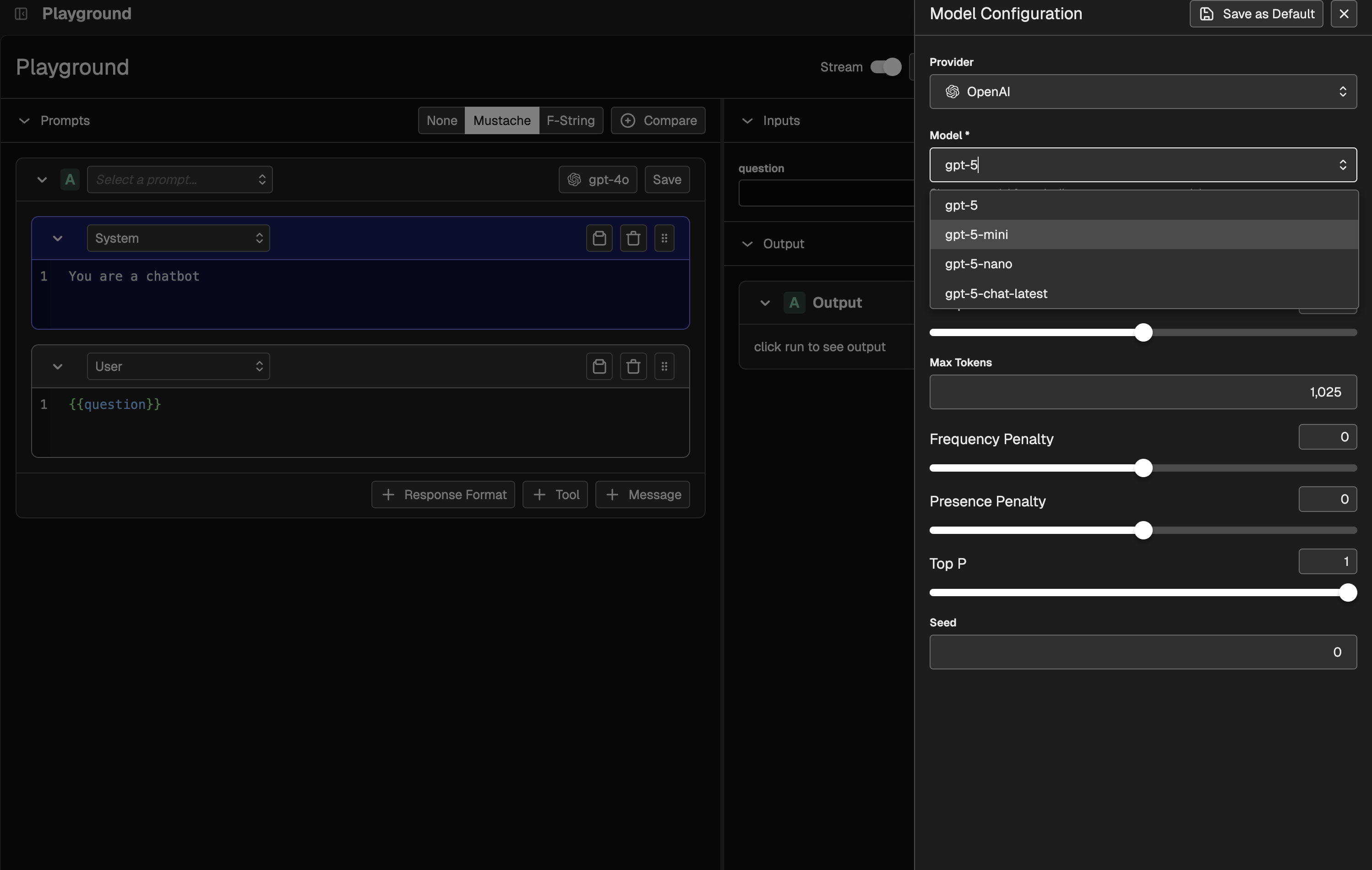
<Update label="08.09.2025">
## [08.09.2025: Day 0 Playground Support for GPT-5 🚀](/docs/phoenix/release-notes/08-2025/08-09-2025-playground-support-for-gpt-5)
**Available in Phoenix 11.21+**
<Frame>
</Frame>
</Update>
<Update label="08.07.2025">
## [08.07.2025: Improved Error Handling in Prompt Playground ⚠️](/docs/phoenix/release-notes/08-2025/08-07-2025-improved-error-handling-in-prompt-playground)
**Available in Phoenix 11.20+**
<Frame>

</Frame>
Prompt Playground experiments now provide clearer error messages, listing valid options when an input is invalid.
</Update>
<Update label="08.06.2025">
## [08.06.2025: Expanded Search Capabilities 🔍](/docs/phoenix/release-notes/08-2025/08-06-2025-expanded-search-capabilities)
**Available in Phoenix 11.19+**
<Frame>
<iframe src="https://cdn.iframe.ly/flavAd2Y" className="aspect-video" allowfullscreen="" allow="encrypted-media *;"></iframe>
</Frame>
Search functionality has been enhanced across the platform. Users can now search projects, prompts, and datasets, making it easier to quickly find and access the resources they need.
</Update>
<Update label="08.05.2025">
## [08.05.2025: Claude Opus 4-1 Support 🤖](/docs/phoenix/release-notes/08-2025/08-05-2025-claude-opus-4-1-support)
**Available in Phoenix 11.19+**
<Frame>
<iframe src="https://cdn.iframe.ly/sOaicT9u" className="aspect-video" allowfullscreen="" allow="encrypted-media *;"></iframe>
</Frame>
Support for Claude Opus 4-1 is now available, enabling teams to begin experimenting and evaluating with the new model from day 0.
</Update>
<Update label="08.04.2025">
## [08.04.2025: Manual Project Creation & Trace Duplication 📂](/docs/phoenix/release-notes/08-2025/08-04-2025-manual-project-creation-and-trace-duplication)
**Available in Phoenix 11.19+**
<Frame>
<iframe src="https://cdn.iframe.ly/mRMXQ9QK" className="aspect-video" allowfullscreen="" allow="encrypted-media *;"></iframe>
</Frame>
You can now create projects manually in the UI and duplicate traces into other projects via the SDK, making it easier to organize evaluation data and streamline workflows.
</Update>
<Update label="08.03.2025">
## [08.03.2025: Delete Spans via REST API 🧹](/docs/phoenix/release-notes/08-2025/08-03-2025-delete-spans-via-rest-api)
**Available in Phoenix 11.18+**
You can now delete spans using the REST API, enabling efficient data redaction and giving teams greater control over trace data.
</Update>
<Update label="07.29.2025" >
## [07.29.2025: Google GenAI Evals](/docs/phoenix/release-notes/07-2025/07-29-2025-google-genai-evals) 🌐
<Frame>

</Frame>
New in `phoenix-evals`: Added support for Google's Gemini models via the Google GenAI SDK — multimodal, async, and ready to scale. Huge shoutout to [Siddharth Sahu](https://github.com/sahusiddharth) for this contribution!
</Update>
<Update label="07.25.2025" >
## [07.25.2025: Project Dashboards](/docs/phoenix/release-notes/07-2025/07-25-2025-project-dashboards) 📈
**Available in Phoenix 11.12+**
<Frame>

</Frame>
Phoenix now has comprehensive project dashboards for detailed performance, cost, and error insights.
</Update>
<Update label="07.25.2025" >
## [07.25.2025: Average Metrics in Experiment Comparison Table](/docs/phoenix/release-notes/07-2025/07-25-2025-average-metrics-in-experiment-comparison-table) 📊
**Available in Phoenix 11.12+**
<Frame>
<video width="800" height="450" controls>
<source src="https://storage.googleapis.com/arize-phoenix-assets/assets/images/phoenix-docs-images/experiment-headers-average-metrics.mp4" type="video/mp4" />
Your browser does not support the video tag.
</video>
</Frame>
View average run metrics directly in the headers of the experiment comparison table for quick insights.
</Update>
<Update label="07.21.2025" >
## [07.21.2025: Project and Trace Management via GraphQL](/docs/phoenix/release-notes/07-2025/07-21-2025-project-and-trace-management-via-graphql) 📤
**Available in Phoenix 11.9+**
Create new projects and transfer traces between them via GraphQL, with full preservation of annotations and cost data.
</Update>
<Update label="07.18.2025" >
## [07.18.2025: OpenInference Java ✨](/docs/phoenix/release-notes/07-2025/07-18-2025-openinference-java)
OpenInference Java now offers full OpenTelemetry-compatible tracing for AI apps, including auto-instrumentation for LangChain4j and semantic conventions.
</Update>
<Update label="07.13.2025" >
## [07.13.2025: Experiments Module in `phoenix-client`](/docs/phoenix/release-notes/07-2025/07-13-2025-experiments-module-in-phoenix-client) 🧪
**Available in Phoenix 11.7+**
New experiments feature set in phoenix-client, enabling sync and async execution with task runs, evaluations, rate limiting, and progress reporting.
</Update>
<Update label="07.09.2025" >
## [07.09.2025: Baseline for Experiment Comparisons](/docs/phoenix/release-notes/07-2025/07-09-2025-baseline-for-experiment-comparisons) 🔁
**Available in Phoenix 11.6+**
<Frame>
<video controls width="800">
<source src="https://storage.googleapis.com/arize-phoenix-assets/assets/videos/experiment-baseline-comparison.mp4" type="video/mp4"/>
Your browser does not support the video tag or cannot load the video from this source.
</video>
</Frame>
Compare experiments relative to a baseline run to easily spot regressions and improvements across metrics.
</Update>
<Update label="07.07.2025" >
## [07.07.2025: Database Disk Usage Monitor](/docs/phoenix/release-notes/07-2025/07-07-2025-databse-disk-usage-monitor) 🛑
**Available in Phoenix 11.5+**
Monitor database disk usage, notify admins when nearing capacity, and automatically block writes when critical thresholds are reached.
</Update>
<Update label="07.03.2025" >
## [07.03.2025: Cost Summaries in Trace Headers](/docs/phoenix/release-notes/07-2025/07-03-2025-cost-summaries-in-trace-headers) 💸
**Available in Phoenix 11.4+**
<Frame>
<iframe src="https://cdn.iframe.ly/v6DMYMvx" width={1000} height={400} allowFullScreen></iframe>
</Frame>
Added cost summaries to trace headers, showing total and segmented (prompt & completion) costs at a glance while debugging.
</Update>
<Update label="07.02.2025" >
## [07.02.2025: Cursor MCP Button](/docs/phoenix/release-notes/07-2025/07-02-2025-cursor-mcp-button) ⚡️
**Available in Phoenix 11.3+**
<Frame>
<iframe src="https://cdn.iframe.ly/81oyvI06" width={1000} height={400} allowFullScreen scrolling="no" allow="encrypted-media *;"></iframe>
</Frame>
Phoenix README now has a "Add to Cursor" button for seamless IDE integration with Cursor. `@arizeai/phoenix-mcp@2.2.0` also includes a new tool called `phoenix-support`, letting agents like Cursor auto-instrument your apps using Phoenix and OpenInference best practices.
</Update>
<Update label="06.25.2025" >
## [06.25.2025: Cost Tracking](/docs/phoenix/release-notes/06-2025/06-25-2025-cost-tracking) 💰
**Available in Phoenix 11.0+**
<Frame>
<iframe src="https://cdn.iframe.ly/rIqN5QUj" width={1000} height={400} allowFullScreen allow="encrypted-media *;"></iframe>
</Frame>
Phoenix now automatically tracks token-based LLM costs using model pricing and token counts, rolling them up to trace and project levels for clear, actionable cost insights.
</Update>
<Update label="06.25.2025" >
## [06.25.2025: New Phoenix Cloud](/docs/phoenix/release-notes/06-2025/06-25-2025-new-phoenix-cloud) ☁️
<Frame>
<iframe src="https://cdn.iframe.ly/dBzo5JPj" width={1000} height={400} allowFullScreen allow="encrypted-media *;"></iframe>
</Frame>
Phoenix now supports multiple customizable spaces with individual user access and collaboration, enabling teams to work together seamlessly.
</Update>
<Update label="06.25.2025" >
## [06.25.2025: Amazon Bedrock Support in Playground](/docs/phoenix/release-notes/06-2025/06-25-2025-amazon-bedrock-support-in-playground) 🛝
**Available in Phoenix 10.15+**
<Frame>
<iframe src="https://cdn.iframe.ly/43ycpquD" width={1000} height={400} allowFullScreen allow="encrypted-media *;"></iframe>
</Frame>
Phoenix’s Playground now supports Amazon Bedrock, letting you run, compare, and track Bedrock models alongside others—all in one place.
</Update>
<Update label="06.13.2025" >
## [06.13.2025: Session Filtering 🪄](/docs/phoenix/release-notes/06-2025/06-13-2025-session-filtering)
**Available in Phoenix 10.12+**
<Frame>
<iframe src="https://cdn.iframe.ly/mYd4HURy" width={1000} height={400} allowFullScreen></iframe>
</Frame>
Now you can filter sessions by their unique `session_id` across the API and UI, making it easier to pinpoint and inspect specific sessions.
</Update>
<Update label="06.13.2025" >
## [06.13.2025: Enhanced Span Creation and Logging](/docs/phoenix/release-notes/06-2025/06-13-2025-enhanced-span-creation-and-logging) 🪐
**Available in Phoenix 10.12+**
Now you can create spans directly via a new POST API and client methods, with helpers to safely regenerate IDs and prevent conflicts on insertion.
</Update>
<Update label="06.12.2025" >
## [06.12.2025: Dataset Filtering 🔍](/docs/phoenix/release-notes/06-2025/06-12-2025-dataset-filtering)
**Available in Phoenix 10.11+**
<Frame>
<iframe src="https://cdn.iframe.ly/D9lKIPd9" width={1000} height={400} allowFullScreen></iframe>
</Frame>
Dataset name filtering with live search support across the API and UI.
</Update>
<Update label="06.06.2025" >
## [06.06.2025: Experiment Progress Graph](/docs/phoenix/release-notes/06-2025/06-06-2025-experiment-progress-graph) 📊
**Available in Phoenix 10.9+**
<Frame>
<iframe src="https://cdn.iframe.ly/YEIcIgm6" width={1000} height={400} allowFullScreen allow="encrypted-media *;"></iframe>
</Frame>
Phoenix now has experiment graphs to track how your evaluation scores and latency evolve over time.
</Update>
<Update label="06.04.2025" >
## [06.04-2025: Ollama Support in Playground 🛝](/docs/phoenix/release-notes/06-2025/06-04-2025-ollama-support-in-playground)
<Frame>
<iframe src="https://cdn.iframe.ly/mFE0Hgex" width={1000} height={400} allowFullScreen></iframe>
</Frame>
**Ollama** is now supported in the Playground, letting you experiment with its models and customize parameters for tailored prompting.
</Update>
<Update label="06.03.2025" >
## [06.03.2025: Deploy Phoenix via Helm](/docs/phoenix/release-notes/06-2025/06-03-2025-deploy-via-helm) ☸️
**Available in Phoenix 10.6+**
<Frame>
<iframe src="https://cdn.iframe.ly/oApxptTr" width={1000} height={400} allowFullScreen></iframe>
</Frame>
Added Helm chart support for Phoenix, making Kubernetes deployment fast, consistent, and easy to upgrade.
</Update>
<Update label="05.30.2025" >
## [05.30.2025: xAI and Deepseek Support in Playground](/docs/phoenix/release-notes/05-2025/05-30-2025-xai-and-deepseek-support-in-playground) 🛝
**Available in Phoenix 10.7+**
<Frame>
<iframe src="https://cdn.iframe.ly/GZuNzZG7" width={1000} height={400} allowFullScreen allow="encrypted-media *;"></iframe>
</Frame>
Deepseek and xAI models are now available in Prompt Playground!
</Update>
<Update label="05.20.2025" >
## [05.20.2025: Datasets and Experiment Evaluations in the JS Client](/docs/phoenix/release-notes/05-2025/05-20-2025-datasets-and-experiment-evaluations-in-the-js-client) 🧪
<Frame>
<iframe src="https://cdn.iframe.ly/z3Fw8fwy" width={1000} height={400} allowFullScreen></iframe>
</Frame>
We've added a host of new methods to the JS client:
* [getExperiment](https://arize-ai.github.io/docs/phoenix/functions/experiments.getExperiment.html) - allows you to retrieve an Experiment to view its results, and run evaluations on it
* [evaluateExperiment](https://arize-ai.github.io/docs/phoenix/functions/experiments.evaluateExperiment.html) - allows you to evaluate previously run Experiments using LLM as a Judge or Code-based evaluators
* [createDataset](https://arize-ai.github.io/docs/phoenix/functions/datasets.createDataset.html) - allows you to create Datasets in Phoenix using the client
* [appendDatasetExamples](https://arize-ai.github.io/docs/phoenix/functions/datasets.appendDatasetExamples.html) - allows you to append additional examples to a Dataset
</Update>
<Update label="05.14.2025" >
## [05.14.2025: Experiments in the JS Client](/docs/phoenix/release-notes/05-2025/05-14-2025-experiments-in-the-js-client) **🔬**
<Frame caption="Experiments CLI output">
<iframe src="https://cdn.iframe.ly/4vqTlUCW" width={1000} height={400} allowFullScreen></iframe>
</Frame>
You can now run Experiments using the Phoenix JS client! Use Experiments to test different iterations of your applications over a set of test cases, then evaluate the results. This release includes:
* Native tracing of tasks and evaluators
* Async concurrency queues
* Support for any evaluator (including bring your own evals)
</Update>
<Update label="05.09.2025" >
## [05.09.2025: Annotations, Data Retention Policies, Hotkeys](/docs/phoenix/release-notes/05-2025/05-09-2025-annotations-data-retention-policies-hotkeys) 📓
**Available in Phoenix 9.0+**
<Tip>
**Major Release:** Phoenix v9.0.0
</Tip>
<Frame caption="Annotation Improvements">
<iframe src="https://cdn.iframe.ly/Gfnn20w" width={1000} height={400} allowFullScreen allow="encrypted-media *;"></iframe>
</Frame>
Phoenix's v9.0.0 release brings with it:
* A host of improvements to [Annotations](/docs/phoenix/tracing/llm-traces/how-to-annotate-traces), including one-to-many support, API access, annotation configs, and custom metadata
* Customizable data retention policies
* Hotkeys! 🔥
</Update>
<Update label="05.05.2025" >
## [05.05.2025: OpenInference Google GenAI Instrumentation](/docs/phoenix/release-notes/05-2025/05-05-2025-openinference-google-genai-instrumentation) 🧩
<Frame>
<iframe src="https://cdn.iframe.ly/bdf8oY5" width={1000} height={400} allowFullScreen allow="encrypted-media *;"></iframe>
</Frame>
We’ve added a Python auto-instrumentation library for the Google GenAI SDK. This enables seamless tracing of GenAI workflows with full OpenTelemetry compatibility. Additionally, the Google GenAI instrumentor is now supported and works seamlessly with Span Replay in Phoenix.
</Update>
<Update label="04.30.2025" >
## [04.30.2025: Span Querying & Data Extraction for PX Client 📊](/docs/phoenix/release-notes/04-2025/04-30-2025-span-querying-and-data-extraction-for-phoenix-client)
**Available in Phoenix 8.30+**
<Frame>
<iframe src="https://cdn.iframe.ly/SKzAJon" width={1000} height={400} allowFullScreen></iframe>
</Frame>
The Phoenix client now includes the `SpanQuery` DSL for more advanced span querying. Additionally, a `get_spans_dataframe` method has been added to facilitate easier data extraction for span-related information.
</Update>
<Update label="04.28.2025" >
## [04.28.2025: TLS Support for Phoenix Server 🔐](/docs/phoenix/release-notes/04-2025/04-28-2025-tls-support-for-phoenix-server)
**Available in Phoenix 8.29+**
Phoenix now supports Transport Layer Security (TLS) for both HTTP and gRPC connections, enabling encrypted communication and optional mutual TLS (mTLS) authentication. This enhancement provides a more secure foundation for production deployments.
</Update>
<Update label="04.28.2025" >
## [04.28.2025: Improved Shutdown Handling 🛑](/docs/phoenix/release-notes/04-2025/04-28-2025-improved-shutdown-handling)
**Available in Phoenix 8.28+**
When stopping the Phoenix server via `Ctrl+C`, the shutdown process now exits cleanly with code 0 to reflect intentional termination. Previously, this would trigger a traceback with `KeyboardInterrupt`, misleadingly indicating a failure.
</Update>
<Update label="04.25.2025" >
## [04.25.2025: Scroll Selected Span Into View 🖱️](/docs/phoenix/release-notes/04-2025/04-25-2025-scroll-selected-span-into-view)
**Available in Phoenix 8.27+**
<Frame>
<iframe src="https://cdn.iframe.ly/mtPPUrb" width={1000} height={400} allowFullScreen></iframe>
</Frame>
Improved trace navigation by automatically scrolling the selected span into view when a user navigates to a specific trace. This enhances usability by making it easier to locate and focus on the relevant span without manual scrolling.
</Update>
<Update label="04.18.2025" >
## [04.18.2025: Tracing for MCP Client-Server Applications](/docs/phoenix/release-notes/04-2025/04-18-2025-tracing-for-mcp-client-server-applications) 🔌
**Available in Phoenix 8.26+**
<Frame>
<iframe src="https://cdn.iframe.ly/Yqc5Yah" width={1000} height={400} allowFullScreen></iframe>
</Frame>
We’ve released `openinference-instrumentation-mcp`, a new package in the OpenInference OSS library that enables seamless OpenTelemetry context propagation across MCP clients and servers. It automatically creates spans, injects and extracts context, and connects the full trace across services to give you complete visibility into your MCP-based AI systems.
Big thanks to Adrian Cole and Anuraag Agrawal for their contributions to this feature.
</Update>
<Update label="04.16.2025" >
## [04.16.2025: API Key Generation via API 🔐](/docs/phoenix/release-notes/04-2025/04-16-2025-api-key-generation-via-api)
**Available in Phoenix 8.26+**
Phoenix now supports programmatic API key creation through a new endpoint, making it easier to automate project setup and trace logging. To enable this, set the `PHOENIX_ADMIN_SECRET` environment variable in your deployment.
</Update>
<Update label="04.15.2025" >
## [04.15.2025: Display Tool Call and Result IDs in Span Details ](/docs/phoenix/release-notes/04-2025/04-15-2025-display-tool-call-and-result-ids-in-span-details)
**Available in Phoenix 8.25+**
<Frame>
<iframe src="https://cdn.iframe.ly/koXx6rf" width={1000} height={400} allowFullScreen></iframe>
</Frame>
Tool call and result IDs are now shown in the span details view. Each ID is placed within a collapsible header and can be easily copied. This update also supports spans with multiple tool calls. Get started with tracing your tool calls [here](/docs/phoenix/tracing/llm-traces-1).
</Update>
<Update label="04.09.2025" >
## [04.09.2025: Project Management API Enhancements ✨](/docs/phoenix/release-notes/04-2025/04-09-2025-project-management-api-enhancements)
**Available in Phoenix 8.24+**
This update enhances the Project Management API with more flexible project identification We've added support for identifying projects by both ID and hex-encoded name and introduced a new `_get_project_by_identifier` helper function.
</Update>
<Update label="04.09.2025" >
## [04.09.2025: New REST API for Projects with RBAC 📽️](/docs/phoenix/release-notes/04-2025/04-09-2025-new-rest-api-for-projects-with-rbac)
**Available in Phoenix 8.23+**
<Frame>
<iframe src="https://cdn.iframe.ly/a2mKu6h" width={1000} height={400} allowFullScreen allow="encrypted-media *;"></iframe>
</Frame>
This release introduces a REST API for managing projects, complete with full CRUD functionality and access control. Key features include CRUD Operations and Role-Based Access Control. Check out our [new documentation](/docs/phoenix/sdk-api-reference/rest-api/api-reference/projects)to test these features.
</Update>
<Update label="04.03.2025" >
## [04.03.2025: Phoenix Client Prompt Tagging 🏷️](/docs/phoenix/release-notes/04-2025/04-03-2025-phoenix-client-prompt-tagging)
**Available in Phoenix 8.22+**
<Frame>
<iframe src="https://cdn.iframe.ly/mv6TDpf" width={1000} height={400} allowFullScreen></iframe>
</Frame>
We’ve added support for Prompt Tagging in the Phoenix client. This new feature gives you more control and visibility over your prompts throughout the development lifecycle. Tag prompts directly in code, label prompt versions, and add tag descriptions. Check out documentation on [prompt tags](/docs/phoenix/prompt-engineering/how-to-prompts/tag-a-prompt).
</Update>
<Update label="04.02.2025" >
## [04.02.2025 Improved Span Annotation Editor ✍️](/docs/phoenix/release-notes/04-2025/04-02-2025-improved-span-annotation-editor)
**Available in Phoenix 8.21+**
<Frame>
<iframe src="https://cdn.iframe.ly/YFp43kO" width={1000} height={400} allowFullScreen></iframe>
</Frame>
The new span aside moves the Span Annotation editor into a dedicated panel, providing a clearer view for adding annotations and enhancing customization of your setup. Read this documentation to learn how annotations can be used.
</Update>
<Update label="04.01.2025" >
## [04.01.2025: Support for MCP Span Tool Info in OpenAI Agents SDK 🔨](/docs/phoenix/release-notes/04-2025/04-01-2025-support-for-mcp-span-tool-info-in-openai-agents-sdk)
**Available in Phoenix 8.20+**
Newly added to the OpenAI Agent SDK is support for MCP Span Info, allowing for the tracing and extraction of useful information about MCP tool listings. Use the Phoenix OpenAI Agents SDK for powerful agent tracing.
</Update>
<Update label="03.27.2025" >
## [03.27.2025 Span View Improvements 👀](/docs/phoenix/release-notes/03-2025/03-27-2025-span-view-improvements)
**Available in Phoenix 8.20+**
<Frame>
<iframe src="https://cdn.iframe.ly/WsCbM8Y" width={1000} height={400} allowFullScreen></iframe>
</Frame>
You can now toggle the option to treat orphan spans as root when viewing your spans. Additionally, we've enhanced the UI with an icon view in span details for better visibility in smaller displays. Learn more [here](/docs/phoenix/tracing/how-to-tracing/setup-tracing).
</Update>
<Update label="03.24.2025" >
## [03.24.2025: Tracing Configuration Tab 🖌️](/docs/phoenix/release-notes/03-2025/03-24-2025-tracing-configuration-tab)
**Available in Phoenix 8.19+**
<Frame>
<iframe src="https://cdn.iframe.ly/7hf3YeA" width={1000} height={400} allowFullScreen></iframe>
</Frame>
Within each project, there is now a **Config** tab to enhance customization. The default tab can now be set per project, ensuring the preferred view is displayed. Learn more in [projects docs](/docs/phoenix/tracing/llm-traces/projects).
</Update>
<Update label="03.21.2025" >
## [03.21.2025: Environmental Variable Based Admin User Configuration 🗝️](/docs/phoenix/release-notes/03-2025/03-21-2025-environment-variable-based-admin-user-configuration)
**Available in Phoenix 8.17+**
You can now preconfigure admin users at startup using an environment variable, making it easier to manage access during deployment. Admins defined this way are automatically seeded into the database and ready to log in.
</Update>
<Update label="03.20.2025" >
## 03.20.2025: Delete Experiment from Action Menu 🗑️
**Available in Phoenix 8.16+**
<Frame>
<iframe src="https://cdn.iframe.ly/nK58mrP" width={1000} height={400} allowFullScreen></iframe>
</Frame>
You can now delete experiments directly from the action menu, making it quicker to manage and clean up your workspace.
</Update>
<Update label="03.19.2025" >
## [03.19.2025: Access to New Integrations in Projects 🔌](/docs/phoenix/release-notes/03-2025/03-19-2025-access-to-new-integrations-in-projects)
**Available in Phoenix 8.15+**
<Frame>
<iframe src="https://cdn.iframe.ly/gxMnPmb" width={1000} height={400} allowFullScreen></iframe>
</Frame>
In the New Project tab, we've added quick setup to instrument your application for **BeeAI**, **SmolAgents**, and the **OpenAI Agents SDK**. Easily configure these integrations with streamlined instructions. Check out all Phoenix [tracing integrations](/docs/phoenix/integrations) here.
</Update>
<Update label="03.18.2025" >
## [03.18.2025: Resize Span, Trace, and Session Tables 🔀](/docs/phoenix/release-notes/03-2025/03-18-2025-resize-span-trace-and-session-tables)
**Available in Phoenix 8.14+**
<Frame>
<iframe src="https://cdn.iframe.ly/bro1tIy" width={1000} height={400} allowFullScreen></iframe>
</Frame>
We've added the ability to resize Span, Trace, and Session tables. Resizing preferences are now persisted in the tracing store, ensuring settings are maintained per-project and per-table.
</Update>
<Update label="03.14.2025" >
## [03.14.2025: OpenAI Agents Instrumentation 📡](/docs/phoenix/release-notes/03-2025/03-14-2025-openai-agents-instrumentation)
**Available in Phoenix 8.13+**
<Frame>
<iframe src="https://cdn.iframe.ly/sDk1x3T" width={1000} height={400} allowFullScreen></iframe>
</Frame>
We've introduced the **OpenAI Agents SDK** for Python which provides enhanced visibility into agent behavior and performance. For more details on a quick setup, check out our [docs](/docs/phoenix/integrations/llm-providers/openai/openai-agents-sdk-tracing).
```sh
pip install openinference-instrumentation-openai-agents openai-agents
```
</Update>
<Update label="03.07.2025" >
## [03.07.2025: Model Config Enhancements for Prompts](/docs/phoenix/release-notes/03-2025/03-07-2025-model-config-enhancements-for-prompts) 💡
**Available in Phoenix 8.11+**
<Frame>
<iframe src="https://cdn.iframe.ly/bqCqcAn" width={1000} height={400} allowFullScreen></iframe>
</Frame>
You can now save and load configurations directly from prompts or default model settings. Additionally, you can adjust the budget token value and enable/disable the "thinking" feature, giving you more control over model behavior and resource allocation.
</Update>
<Update label="03.07.2025" >
## [03.07.2025: New Prompt Playground, Evals, and Integration Support 🦾](/docs/phoenix/release-notes/03-2025/03-07-2025-new-prompt-playground-evals-and-integration-support)
**Available in Phoenix 8.9+**
<Frame>
<iframe src="https://cdn.iframe.ly/GFVzMH7" width={1000} height={400} allowFullScreen></iframe>
</Frame>
Prompt Playground now supports new GPT and Anthropic models with enhanced configuration options. Instrumentation options have been improved for better traceability, and evaluation capabilities have expanded to cover Audio & Multi-Modal Evaluations. Phoenix also introduces new integration support for LiteLLM Proxy & Cleanlabs evals.
</Update>
<Update label="03.06.2025" >
## [03.06.2025: Project Improvements 📽️](/docs/phoenix/release-notes/03-2025/03-06-2025-project-improvements)
**Available in Phoenix 8.8+**
<Frame>
<iframe src="https://cdn.iframe.ly/GCKlvL0" width={1000} height={400} allowFullScreen></iframe>
</Frame>
We’ve rolled out several enhancements to Projects, offering more flexibility and control over your data. Key updates include persistent column selection, advanced filtering options for metadata and spans, custom time ranges, and improved performance for tracing views. These changes streamline workflows, making data navigation and debugging more efficient.
Check out [projects](/docs/phoenix/tracing/llm-traces/projects) docs for more.
</Update>
<Update label="02.19.2025" >
## [02.19.2025: Prompts 📃](/docs/phoenix/release-notes/02-2025/02-19-2025-prompts)
**Available in Phoenix 8.0+**
<Frame>
<iframe src="https://cdn.iframe.ly/rH9HehD" width={1000} height={400} allowFullScreen></iframe>
</Frame>
Phoenix prompt management will now let you create, modify, tag, and version control prompts for your applications. Some key highlights from this release:
* **Versioning & Iteration**: Seamlessly manage prompt versions in both Phoenix and your codebase.
* **New TypeScript Client**: Sync prompts with your JavaScript runtime, now with native support for OpenAI, Anthropic, and the Vercel AI SDK.
* **New Python Client**: Sync templates and apply them to AI SDKs like OpenAI, Anthropic, and more.
* **Standardized Prompt Handling**: Native normalization for OpenAI, Anthropic, Azure OpenAI, and Google AI Studio.
* **Enhanced Metadata Propagation**: Track prompt metadata on Playground spans and experiment metadata in dataset runs.
Check out the docs and this [walkthrough](https://youtu.be/qbeohWaRlsM?feature=shared) for more on prompts!📝
</Update>
<Update label="02.18.2025" >
## [02.18.2025: One-Line Instrumentation⚡️](/docs/phoenix/release-notes/02-2025/02-18-2025-one-line-instrumentation)
**Available in Phoenix 8.0+**
<Frame>
<iframe src="https://cdn.iframe.ly/vMqnP30" width={1000} height={400} allowFullScreen></iframe>
</Frame>
Phoenix has made it even simpler to get started with tracing by introducing one-line auto-instrumentation. By using `register(auto_instrument=True)`, you can enable automatic instrumentation in your application, which will set up instrumentors based on your installed packages.
```python
from phoenix.otel import register
register(auto_instrument=True)
```
</Update>
<Update label="01.18.2025" >
## [01.18.2025: Automatic & Manual Span Tracing ⚙️](/docs/phoenix/release-notes/01-2025/01-18-2025-automatic-and-manual-span-tracing)
**Available in Phoenix 7.9+**
<Frame>
<iframe src="https://cdn.iframe.ly/eYTN9GP" width={1000} height={400} allowFullScreen></iframe>
</Frame>
In addition to using our automatic instrumentors and tracing directly using OTEL, we've now added our own layer to let you have the granularity of manual instrumentation without as much boilerplate code.
You can now access a tracer object with streamlined options to trace functions and code blocks. The main two options are using the **decorator** `@tracer.chain` and using the tracer in a `with` clause.
Check out the [docs](/docs/phoenix/tracing/how-to-tracing/setup-tracing/instrument-python#using-your-tracer) for more on how to use tracer objects.
</Update>
<Update label="12.09.2024" >
## [12.09.2024: Sessions 💬](/docs/phoenix/release-notes/2024/12-09-2024-sessions)
**Available in Phoenix 7.0+**
<Frame>
<iframe src="https://cdn.iframe.ly/4WN09Ih" width={1000} height={400} allowFullScreen></iframe>
</Frame>
Sessions allow you to group multiple responses into a single thread. Each response is still captured as a single trace, but each trace is linked together and presented in a combined view.
Sessions make it easier to visualize multi-turn exchanges with your chatbot or agent. Sessions launches with Phoenix 7.0, and for more on sessions, check out[a walkthrough video](https://www.youtube.com/watch?v=dzS6x0BE-EU) and the [docs](/docs/phoenix/tracing/how-to-tracing/setup-tracing/setup-sessions).
</Update>
<Update label="11.18.2024" >
## [11.18.2024: Prompt Playground 🛝](/docs/phoenix/release-notes/2024/11-18-2024-prompt-playground)
**Available in Phoenix 6.0+**
<Frame>
<iframe src="https://cdn.iframe.ly/islLPi9" width={1000} height={400} allowFullScreen></iframe>
</Frame>
Prompt Playground is now available in the Phoenix platform! This new release allows you to test the effects of different prompts, tools, and structured output formats to see which performs best.
* Replay individual spans with modified prompts, or run full Datasets through your variations.
* Easily test different models, prompts, tools, and output formats side-by-side, directly in the platform.
* Automatically capture traces as Experiment runs for later debugging. See [here](/docs/phoenix/prompt-engineering/overview-prompts/prompt-playground) for more information on Prompt Playground, or jump into the platform to try it out for yourself.
</Update>
<Update label="09.26.2024" >
## [09.26.2024: Authentication & RBAC 🔐](/docs/phoenix/release-notes/2024/09-26-2024-authentication-and-rbac)
**Available in Phoenix 5.0+**
<Frame>
<iframe src="https://cdn.iframe.ly/WQTHhwp" width={1000} height={400} allowFullScreen></iframe>
</Frame>
We've added Authentication and Rules-based Access Controls to Phoenix. This was a long-requested feature set, and we're excited for the new uses of Phoenix this will unlock!
The auth feature set includes secure access, RBAC, API keys, and OAuth2 Support. For all the details on authentication, view our [docs](/docs/phoenix/self-hosting/features/authentication).
</Update>
<Update label="07.18.2024" >
## [07.18.2024: Guardrails AI Integrations💂](/docs/phoenix/release-notes/2024/07-18-2024-guardrails-ai-integrations)
**Available in Phoenix 4.11.0+**
<Frame>
<iframe src="https://cdn.iframe.ly/MvHONPu" width={1000} height={400} allowFullScreen></iframe>
</Frame>
Our integration with Guardrails AI allows you to capture traces on guard usage and create datasets based on these traces. This integration is designed to enhance the safety and reliability of your LLM applications, ensuring they adhere to predefined rules and guidelines.
Check out the [Cookbook](https://colab.research.google.com/drive/1NDn5jzsW5k0UrwaBjZenRX29l6ocrZ-_?usp=sharing\&utm_campaign=Phoenix%20Newsletter\&utm_source=hs_email\&utm_medium=email&_hsenc=p2ANqtz-9Tx_lYbuasbD3Mzdwl0VNPcvy_YcbPudxu1qwBZ3T7Mh---A4PO-OJfhas-RR4Ys_IEb0F)here.
</Update>
<Update label="07.11.2024" >
## [07.11.2024: Hosted Phoenix and LlamaTrace 💻](/docs/phoenix/release-notes/2024/07-11-2024-hosted-phoenix-and-llamatrace)
**Phoenix is now available for deployment as a fully hosted service.**
<Frame>
<iframe src="https://cdn.iframe.ly/nGUXe7g" width={1000} height={400} allowFullScreen></iframe>
</Frame>
In addition to our existing notebook, CLI, and self-hosted deployment options, we’re excited to announce that Phoenix is now available as a [fully hosted service](https://arize.com/resource/introducing-hosted-phoenix-llamatrace/). With hosted instances, your data is stored between sessions, and you can easily share your work with team members.
We are partnering with LlamaIndex to power a new observability platform in LlamaCloud: LlamaTrace. LlamaTrace will automatically capture traces emitted from your LlamaIndex application.
Hosted Phoenix is 100% free-to-use, [check it out today](https://app.phoenix.arize.com/login)!
</Update>
<Update label="07.03.2024" >
## [07.03.2024: Datasets & Experiments 🧪](/docs/phoenix/release-notes/2024/07-03-2024-datasets-and-experiments)
**Available in Phoenix 4.6+**
<Frame>
<iframe src="https://cdn.iframe.ly/V7B9uLu" width={1000} height={400} allowFullScreen></iframe>
</Frame>
**Datasets**: Datasets are a new core feature in Phoenix that live alongside your projects. They can be imported, exported, created, curated, manipulated, and viewed within the platform, and make fine-tuning and experimentation easier.
For more details on using datasets see our [documentation](/docs/phoenix/datasets-and-experiments/overview-datasets?utm_campaign=Phoenix%20Newsletter\&utm_source=hs_email\&utm_medium=email&_hsenc=p2ANqtz-9Tx_lYbuasbD3Mzdwl0VNPcvy_YcbPudxu1qwBZ3T7Mh---A4PO-OJfhas-RR4Ys_IEb0F) or [example notebook](https://colab.research.google.com/drive/1e4vZR5VPelXXYGtWfvM3CErPhItHAIp2?usp=sharing\&utm_campaign=Phoenix%20Newsletter\&utm_source=hs_email\&utm_medium=email&_hsenc=p2ANqtz-9Tx_lYbuasbD3Mzdwl0VNPcvy_YcbPudxu1qwBZ3T7Mh---A4PO-OJfhas-RR4Ys_IEb0F).
**Experiments:** Our new Datasets and Experiments feature enables you to create and manage datasets for rigorous testing and evaluation of your models. Check out our full [walkthrough](https://www.youtube.com/watch?v=rzxN-YV_DbE\&t=25s).
</Update>
<Update label="07.02.2024" >
## [07.02.2024: Function Call Evaluations ⚒️](/docs/phoenix/release-notes/2024/07-02-2024-function-call-evaluations)
**Available in Phoenix 4.6+**
<Frame>
<iframe src="https://cdn.iframe.ly/dfaK0Mb" width={1000} height={400} allowFullScreen></iframe>
</Frame>
We are introducing a new built-in function call evaluator that scores the function/tool-calling capabilities of your LLMs. This off-the-shelf evaluator will help you ensure that your models are not just generating text but also effectively interacting with tools and functions as intended. Check out a [full walkthrough of the evaluator](https://www.youtube.com/watch?v=Rsu-UZ1ZVZU).
</Update>
