

A
licenseB
qualityD
maintenanceAn MCP server providing access to college football statistics sourced from the College Football Data API within Claude Desktop.
9
27
MIT

The Fantasy Premier League MCP Server provides comprehensive access to FPL data and analytics for strategic decision-making, primarily designed for use with MCP-compatible LLMs.
Core Data Access:
Retrieve comprehensive player statistics, historical data, and upcoming fixtures
Access Premier League team information and composition
Get detailed gameweek data (current, previous, and next) including status and timing
View all fixtures for the season, specific gameweeks, or teams
Analysis Tools:
Search and filter players by name, position, team, price, points, ownership, and form
Compare detailed statistics and metrics between multiple players
Analyze upcoming fixtures with difficulty ratings for players, teams, or positions
Identify upcoming blank and double gameweeks for strategic planning
Team Management:
Access authenticated FPL team details and manager information
View any FPL team using its team ID
Check FPL authentication status
League Features:
Retrieve mini-league standings
Access rich league analytics including historical performance, team composition, and decision analysis
Strategic Assistance:
Generate AI-assisted advice through prompt templates for transfer decisions, team ratings, differential picks, and chip strategies
Provides access to Fantasy Premier League data including comprehensive player statistics, team information, gameweek data, fixture difficulty, and tools for comparing players and analyzing performance
Leverages Python to access the Fantasy Premier League API, with support for Python 3.10 or higher to run the MCP server
Click on "Deploy Server".
Wait a few minutes for the server to deploy. Once ready, it will show a "Started" state.
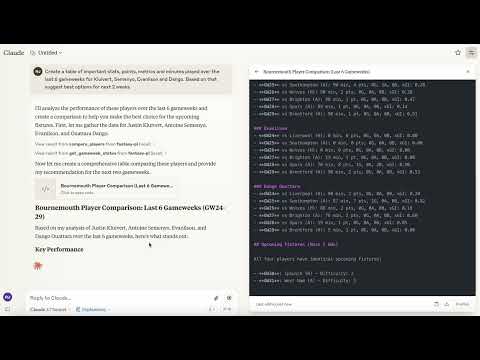
In the chat, type @ followed by the MCP server name and your instructions, e.g., "@Fantasy Premier League MCP Server compare Mohamed Salah and Erling Haaland over the last 5 gameweeks"
That's it! The server will respond to your query, and you can continue using it as needed.
Here is a step-by-step guide with screenshots.


A Model Context Protocol (MCP) server that provides access to Fantasy Premier League (FPL) data and tools. This server allows you to interact with FPL data in Claude for Desktop and other MCP-compatible clients.
Demo of the Fantasy Premier League MCP Server in action
Claude Desktop
Cursor
Windsurf
Other MCP Compatible Desktop LLMs
Mobile is currently not supported.
Related MCP server: beast-baseball
Rich Player Data: Access comprehensive player statistics from the FPL API
Team Information: Get details about Premier League teams
Gameweek Data: View current and past gameweek information
Player Search: Find players by name or team
Player Comparison: Compare detailed statistics between any two players
Python 3.10 or higher
Claude Desktop (for AI integration)
pip install fpl-mcppip install "fpl-mcp[dev]"pip install git+https://github.com/rishijatia/fantasy-pl-mcp.gitgit clone https://github.com/rishijatia/fantasy-pl-mcp.git
cd fantasy-pl-mcp
pip install -e .After installation, you have several options to run the server:
fpl-mcppython -m fpl_mcpConfigure Claude Desktop to use the installed package by editing your claude_desktop_config.json file:
Method 1: Using the Python module directly (most reliable)
{
  "mcpServers": {
    "fantasy-pl": {
      "command": "python",
      "args": ["-m", "fpl_mcp"]
    }
  }
}
Method 2: Using the installed command with full path (if installed with pip)
{
  "mcpServers": {
    "fantasy-pl": {
      "command": "/full/path/to/your/venv/bin/fpl-mcp"
    }
  }
}
Replace /full/path/to/your/venv/bin/fpl-mcp with the actual path to the executable. You can find this by running which fpl-mcp in your terminal after activating your virtual environment.
Note: Using just
"command": "fpl-mcp"may result in aspawn fpl-mcp ENOENTerror since Claude Desktop might not have access to your virtual environment's PATH. Using the full path or the Python module approach helps avoid this issue.
Start Claude for Desktop
You should see FPL tools available via the hammer icon
Example queries:
"Compare Mohamed Salah and Erling Haaland over the last 5 gameweeks"
"Find all Arsenal midfielders"
"What's the current gameweek status?"
"Show me the top 5 forwards by points"
Compare players: "Compare [Player1] and [Player2]"
Find players: "Find players from [Team]" or "Search for [Player Name]"
Fixture difficulty: "Show upcoming fixtures for [Team]"
Captain advice: "Who should I captain between [Player1] and [Player2]?"
Statistical analysis: "Compare underlying stats for [Player1] and [Player2]"
Form check: "Show me players in form right now"
Differential picks: "Suggest differentials under 10% ownership"
Team optimization: "Rate my team and suggest transfers"
Be specific with player names for accurate results
Include positions when searching (FWD, MID, DEF, GK)
For best captain advice, ask about form, fixtures, and underlying stats
Request comparison of specific metrics (xG, shots in box, etc.
For development and testing:
# If you have mcp[cli] installed
mcp dev -m fpl_mcp

# Or use npx
npx @modelcontextprotocol/inspector python -m fpl_mcpfpl://static/players - All player data with comprehensive statistics
fpl://static/players/{name} - Player data by name search
fpl://static/teams - All Premier League teams
fpl://static/teams/{name} - Team data by name search
fpl://gameweeks/current - Current gameweek data
fpl://gameweeks/all - All gameweeks data
fpl://fixtures - All fixtures for the current season
fpl://fixtures/gameweek/{gameweek_id} - Fixtures for a specific gameweek
fpl://fixtures/team/{team_name} - Fixtures for a specific team
fpl://players/{player_name}/fixtures - Upcoming fixtures for a specific player
fpl://gameweeks/blank - Information about upcoming blank gameweeks
fpl://gameweeks/double - Information about upcoming double gameweeks
search_fpl_players - Search for players by name, with optional position and team filters
get_player_information - Get detailed information and gameweek history for a player
analyze_players - Filter and analyze FPL players based on multiple criteria
compare_players - Compare multiple players across various metrics
get_price_changes - Get players whose price rose or fell in the current gameweek
get_gameweek_status - Get precise information about current, previous, and next gameweeks
analyze_player_fixtures - Analyze upcoming fixtures for a player with difficulty ratings
analyze_fixtures - Analyze upcoming fixtures for players, teams, or positions
get_blank_gameweeks - Get information about upcoming blank gameweeks
get_double_gameweeks - Get information about upcoming double gameweeks
get_gameweek_live_scores - Live player points and stats while matches are being played
get_dream_team - The official highest-scoring XI for a gameweek
suggest_captain - Rank your squad by captain score with per-component reasoning
check_fpl_authentication - Check if FPL authentication is working correctly
update_fpl_credentials - Update your stored FPL credentials from within a chat
get_my_team - View your authenticated team (requires authentication)
get_my_current_team - View your current team for the active gameweek (requires authentication)
get_team - View any team with a specific ID (requires authentication)
get_manager - Get manager details for a specific team ID (requires authentication)
get_manager_info - Get manager details (requires authentication)
get_manager_transfer_history - Get a manager's full transfer history
get_league_standings - Get standings for a classic league (requires authentication)
get_league_analytics - Analyze a league's managers, ownership trends, and performance
player_analysis_prompt - Create a prompt for analyzing an FPL player in depth
transfer_advice_prompt - Get advice on player transfers based on budget and position
team_rating_prompt - Create a prompt for rating and analyzing an FPL team
differential_players_prompt - Create a prompt for finding differential players with low ownership
chip_strategy_prompt - Create a prompt for chip strategy advice
To add new features:
Add resource handlers in the appropriate file within fpl_mcp/fpl/resources/
Add tool handlers in the appropriate file within fpl_mcp/fpl/tools/
Update the __main__.py file to register new resources and tools
Test using the MCP Inspector before deploying to Claude for Desktop
FPL migrated its login to PingOne (Ping Identity) OIDC, so authentication now uses an OIDC
refresh token rather than your email and password. The refresh token is exchanged for
short-lived access tokens automatically, and requests are sent with an
X-API-Authorization: Bearer header.
To use features requiring authentication (like accessing your team or private leagues), set up your refresh token:
# Run the credential setup tool
fpl-mcp-config setup
This interactive tool will:
Show you how to copy your OIDC refresh token from the browser
Prompt for the refresh token and your team ID
Save them (encrypted) to ~/.fpl-mcp/credentials.enc
Getting your refresh token:
Log in at https://fantasy.premierleague.com in your browser.
Open the DevTools Console (F12 → Console) and run:
copy(JSON.parse(localStorage.getItem(Object.keys(localStorage).find(k=>k.startsWith('oidc.user:')))).refresh_token)(If Chrome refuses, type allow pasting in the console first.) The refresh
token is now on your clipboard — paste it when prompted.
Alternatively: DevTools → Application → Local storage →
https://fantasy.premierleague.com, copy the whole JSON value of the key
starting with oidc.user: and paste that instead — setup extracts the
refresh_token field automatically.
Run fpl-mcp-config test right after setup: the first exchange claims the token
before your browser session can supersede it, and rotates it so the copy in your
browser is retired — that is expected, and your browser session recovers on its own.
You can test your authentication with:
fpl-mcp-config testAlternatively, you can manually configure authentication:
Create ~/.fpl-mcp/.env file with:
FPL_REFRESH_TOKEN=your_refresh_token
FPL_TEAM_ID=your_team_id
Or create ~/.fpl-mcp/config.json:
{
  "refresh_token": "your_refresh_token",
  "team_id": "your_team_id"
}
Or set environment variables:
export FPL_REFRESH_TOKEN=your_refresh_token
export FPL_TEAM_ID=your_team_id
Note: refresh tokens can be rotated or revoked by FPL. If authentication starts failing, re-run
fpl-mcp-config setupwith a freshly copied token.
If FPL changes its OIDC client or endpoints, you can override the defaults with environment variables (all optional):
Variable | Default |
|
|
|
|
|
|
The FPL API is not officially documented and may change without notice
Only read operations are currently supported
This occurs because Claude Desktop cannot find the fpl-mcp executable in its PATH.
Solution: Use one of these approaches:
Use the full path to the executable in your config file
{
  "mcpServers": {
    "fantasy-pl": {
      "command": "/full/path/to/your/venv/bin/fpl-mcp"
    }
  }
}
Use Python to run the module directly (preferred method)
{
  "mcpServers": {
    "fantasy-pl": {
      "command": "python",
      "args": ["-m", "fpl_mcp"]
    }
  }
}If the server starts but immediately disconnects:
Check logs at ~/Library/Logs/Claude/mcp*.log (macOS) or %APPDATA%\Claude\logs\mcp*.log (Windows)
Ensure all dependencies are installed
Try running the server manually with python -m fpl_mcp to see any errors
If the hammer icon doesn't appear:
Restart Claude Desktop completely
Verify your claude_desktop_config.json has correct JSON syntax
Ensure the path to Python or the executable is absolute, not relative
This project is licensed under the MIT License - see the LICENSE file for details.
Contributions are welcome! Please feel free to submit a Pull Request.
Fork the repository
Create your feature branch (git checkout -b feature/amazing-feature)
Commit your changes (git commit -m 'Add some amazing feature')
Push to the branch (git push origin feature/amazing-feature)
Open a Pull Request
For more details, please refer to the CONTRIBUTING.md file.
Fantasy Premier League API for providing the data
Model Context Protocol for the connectivity standard
Claude for the AI assistant capabilities
If you use this package in your research or project, please consider citing it:
@software{fpl_mcp,
  author = {Jatia, Rishi and Fantasy PL MCP Contributors},
  title = {Fantasy Premier League MCP Server},
  url = {https://github.com/rishijatia/fantasy-pl-mcp},
  version = {0.1.0},
  year = {2025},
}Analyze upcoming fixtures for players, teams, or positions
    Args:
        entity_type: Type of entity to analyze ("player", "team", or "position")
        entity_name: Name of the specific entity
        num_gameweeks: Number of gameweeks to look ahead
        include_blanks: Whether to include blank gameweek info
        include_doubles: Whether to include double gameweek info

    Returns:
        Fixture analysis with difficulty ratings and summary
| Name | Required | Description | Default |
|---|---|---|---|
| entity_name | No | ||
| entity_type | No | player | |
| num_gameweeks | No | ||
| include_blanks | No | ||
| include_doubles | No |
Does the description disclose side effects, auth requirements, rate limits, or destructive behavior?
With no annotations, the description carries the full burden. It only mentions the return includes difficulty ratings and summary, but does not disclose side effects, prerequisites, authentication needs, or limitations. For an analysis tool, this is a significant gap in behavioral transparency.
Agents need to know what a tool does to the world before calling it. Descriptions should go beyond structured annotations to explain consequences.
Is the description appropriately sized, front-loaded, and free of redundancy?
The description is concise and well-structured with a clear first sentence, followed by a readable Args block and Returns line. Every sentence earns its place, conveying necessary information without unnecessary verbosity.
Shorter descriptions cost fewer tokens and are easier for agents to parse. Every sentence should earn its place.
Given the tool's complexity, does the description cover enough for an agent to succeed on first attempt?
The tool has 5 parameters and no output schema, so the description should explain the return format more thoroughly. It gives a vague 'fixture analysis with difficulty ratings and summary' but does not describe edge cases like null entity_name, invalid entity_type, or how the output is structured. It is adequate but missing important context.
Complex tools with many parameters or behaviors need more documentation. Simple tools need less. This dimension scales expectations accordingly.
Does the description clarify parameter syntax, constraints, interactions, or defaults beyond what the schema provides?
The schema has no parameter descriptions (0% coverage), but the description's Args section explains every parameter in detail, including allowed values for entity_type and the meaning of include_blanks and include_doubles. This fully compensates for the schema gap.
Input schemas describe structure but not intent. Descriptions should explain non-obvious parameter relationships and valid value ranges.
Does the description clearly state what the tool does and how it differs from similar tools?
The description clearly states the tool analyzes upcoming fixtures for players, teams, or positions, which is a specific verb+resource+scope. It distinguishes itself from sibling tools like analyze_player_fixtures by explicitly covering three entity types, making the broader scope evident.
Agents choose between tools based on descriptions. A clear purpose with a specific verb and resource helps agents select the right tool.
Does the description explain when to use this tool, when not to, or what alternatives exist?
The description implies usage for fixture analysis but provides no explicit guidance on when to use this tool versus alternatives. It does not mention that analyze_player_fixtures is a more specialized sibling or when to prefer one over the other, leaving the choice to the agent.
Agents often have multiple tools that could apply. Explicit usage guidance like "use X instead of Y when Z" prevents misuse.
Analyze upcoming fixtures for a player and provide a difficulty rating
    Args:
        player_name: Player name to search for
        num_fixtures: Number of upcoming fixtures to analyze (default: 5)

    Returns:
        Analysis of player's upcoming fixtures with difficulty ratings
| Name | Required | Description | Default |
|---|---|---|---|
| player_name | Yes | ||
| num_fixtures | No |
Does the description disclose side effects, auth requirements, rate limits, or destructive behavior?
With no annotations, the description carries full burden for behavioral disclosure. It adds that the tool provides a 'difficulty rating' and returns an analysis, which gives some transparency. However, it does not describe how the rating is computed, whether authentication is required (especially given sibling tools like 'check_fpl_authentication'), or any limitations, leaving room for more disclosure.
Agents need to know what a tool does to the world before calling it. Descriptions should go beyond structured annotations to explain consequences.
Is the description appropriately sized, front-loaded, and free of redundancy?
The description is structured with a clear purpose sentence followed by Args and Returns sections. The Args section somewhat duplicates the schema but adds clarifying phrases, so it earns its place. The overall length is moderate and front-loaded with the main purpose, making it easy to scan.
Shorter descriptions cost fewer tokens and are easier for agents to parse. Every sentence should earn its place.
Given the tool's complexity, does the description cover enough for an agent to succeed on first attempt?
There is no output schema, so the description must explain return values, which it does: 'Analysis of player's upcoming fixtures with difficulty ratings'. It also explains parameters. However, it omits prerequisites such as authentication requirements (suggested by sibling tools) and any error or edge-case behavior, leaving the tool somewhat incomplete for an agent to use fully independently.
Complex tools with many parameters or behaviors need more documentation. Simple tools need less. This dimension scales expectations accordingly.
Does the description clarify parameter syntax, constraints, interactions, or defaults beyond what the schema provides?
The input schema has no property descriptions (0% coverage), so the description must compensate. It does so by explaining 'player_name' as 'Player name to search for' and 'num_fixtures' as 'Number of upcoming fixtures to analyze (default: 5)', adding meaning beyond the bare schema titles. While not deeply detailed, it covers both parameters adequately.
Input schemas describe structure but not intent. Descriptions should explain non-obvious parameter relationships and valid value ranges.
Does the description clearly state what the tool does and how it differs from similar tools?
The description clearly states the tool's function: 'Analyze upcoming fixtures for a player and provide a difficulty rating'. The verb 'Analyze' and resources 'player' and 'fixtures' are specific, and the outcome 'difficulty rating' distinguishes it from siblings like 'analyze_fixtures' (general fixtures) and 'analyze_players' (player-wide analysis).
Agents choose between tools based on descriptions. A clear purpose with a specific verb and resource helps agents select the right tool.
Does the description explain when to use this tool, when not to, or what alternatives exist?
The description implies usage for a single player's fixtures through the phrase 'for a player' and the parameters, but it does not explicitly state when to use this tool versus alternatives or mention any exclusions. It provides clear context but lacks direct comparison to sibling tools.
Agents often have multiple tools that could apply. Explicit usage guidance like "use X instead of Y when Z" prevents misuse.
Filter and analyze FPL players based on multiple criteria
    Args:
        position: Player position (e.g., "midfielders", "defenders")
        team: Team name filter
        min_price: Minimum player price in millions
        max_price: Maximum player price in millions
        min_points: Minimum total points
        min_ownership: Minimum ownership percentage
        max_ownership: Maximum ownership percentage
        form_threshold: Minimum form rating
        include_gameweeks: Whether to include gameweek-by-gameweek data
        num_gameweeks: Number of recent gameweeks to include
        sort_by: Metric to sort results by (default: points; bootstrap
            names like total_points/goals_scored are accepted as aliases)
        sort_order: Sort direction ("asc" or "desc")
        limit: Maximum number of players to return

    Returns:
        Filtered player data with summary statistics
| Name | Required | Description | Default |
|---|---|---|---|
| team | No | ||
| limit | No | ||
| sort_by | No | points | |
| position | No | ||
| max_price | No | ||
| min_price | No | ||
| min_points | No | ||
| sort_order | No | desc | |
| max_ownership | No | ||
| min_ownership | No | ||
| num_gameweeks | No | ||
| form_threshold | No | ||
| include_gameweeks | No |
Does the description disclose side effects, auth requirements, rate limits, or destructive behavior?
With no annotations, the description must disclose behavioral traits. It states that it returns 'Filtered player data with summary statistics' but does not mention whether the operation is read-only, requires authentication, or has side effects. It lacks information about data source, rate limits, or any special behavior beyond the basic function.
Agents need to know what a tool does to the world before calling it. Descriptions should go beyond structured annotations to explain consequences.
Is the description appropriately sized, front-loaded, and free of redundancy?
The description is well-structured: a purpose line, an Args list, and a Returns line. It is longer due to 13 parameters, but every line provides necessary information without fluff. It is appropriately sized for the tool's complexity.
Shorter descriptions cost fewer tokens and are easier for agents to parse. Every sentence should earn its place.
Given the tool's complexity, does the description cover enough for an agent to succeed on first attempt?
Given the tool's complexity (13 params, no output schema, no annotations), the description covers parameter semantics thoroughly but provides only a vague return statement ('Filtered player data with summary statistics'). It doesn't specify return fields, pagination, or data source, leaving some gaps for an agent trying to understand the full output.
Complex tools with many parameters or behaviors need more documentation. Simple tools need less. This dimension scales expectations accordingly.
Does the description clarify parameter syntax, constraints, interactions, or defaults beyond what the schema provides?
The schema has 0% description coverage, but the description's Args section fully explains all 13 parameters, including meaning, defaults, and aliases (e.g., sort_by accepts bootstrap names). This comprehensively compensates for the schema gap and adds significant semantic value.
Input schemas describe structure but not intent. Descriptions should explain non-obvious parameter relationships and valid value ranges.
Does the description clearly state what the tool does and how it differs from similar tools?
The description opens with 'Filter and analyze FPL players based on multiple criteria', which is a specific verb+resource and clearly states the tool's purpose. It doesn't explicitly differentiate from siblings like search_fpl_players or get_player_information, but the emphasis on multi-criteria filtering and analysis makes the purpose unambiguous.
Agents choose between tools based on descriptions. A clear purpose with a specific verb and resource helps agents select the right tool.
Does the description explain when to use this tool, when not to, or what alternatives exist?
The description provides no guidance on when to use this tool versus alternatives like search_fpl_players or analyze_player_fixtures. It does not mention any exclusions, prerequisites, or contextual use cases beyond the action itself.
Agents often have multiple tools that could apply. Explicit usage guidance like "use X instead of Y when Z" prevents misuse.
Check if FPL authentication is working correctly
    Returns:
        Authentication status and basic team information
| Name | Required | Description | Default |
|---|---|---|---|
No parameters | |||
Does the description disclose side effects, auth requirements, rate limits, or destructive behavior?
With no annotations provided, the description carries the full behavioral burden. It discloses that the tool returns authentication status and basic team information but does not state side-effect profile (e.g., read-only), error conditions, or rate limits. The description adds minimal context beyond the name.
Agents need to know what a tool does to the world before calling it. Descriptions should go beyond structured annotations to explain consequences.
Is the description appropriately sized, front-loaded, and free of redundancy?
The description is brief and front-loaded with the purpose, using only one sentence plus a returns statement. No unnecessary words or repetition.
Shorter descriptions cost fewer tokens and are easier for agents to parse. Every sentence should earn its place.
Given the tool's complexity, does the description cover enough for an agent to succeed on first attempt?
Given the absence of an output schema, the description's 'Returns' section is vague, lacking specifics on the format of authentication status or what 'basic team information' entails. However, the tool is simple and zero-parameter, so the description is minimally adequate.
Complex tools with many parameters or behaviors need more documentation. Simple tools need less. This dimension scales expectations accordingly.
Does the description clarify parameter syntax, constraints, interactions, or defaults beyond what the schema provides?
The input schema has zero parameters, so the baseline is 4. The description need not explain parameters; it correctly focuses on the return value.
Input schemas describe structure but not intent. Descriptions should explain non-obvious parameter relationships and valid value ranges.
Does the description clearly state what the tool does and how it differs from similar tools?
The description clearly states the tool checks if FPL authentication is working correctly and returns authentication status plus basic team information. It uses a specific verb ('check') and resource ('FPL authentication'), distinguishing it from sibling tools that focus on team data or credential updates.
Agents choose between tools based on descriptions. A clear purpose with a specific verb and resource helps agents select the right tool.
Does the description explain when to use this tool, when not to, or what alternatives exist?
The description provides no guidance on when to use this tool versus alternatives. It does not mention scenarios, prerequisites, or exclusions, leaving usage solely to inference from the tool's name.
Agents often have multiple tools that could apply. Explicit usage guidance like "use X instead of Y when Z" prevents misuse.
Compare multiple players across various metrics
    Args:
        player_names: List of player names to compare (2-5 players recommended)
        metrics: List of metrics to compare (bootstrap names like
            total_points/goals_scored are accepted as aliases)
        include_gameweeks: Whether to include gameweek-by-gameweek comparison
        num_gameweeks: Number of recent gameweeks to include in comparison
        include_fixture_analysis: Whether to include fixture analysis including blanks and doubles

    Returns:
        Detailed comparison of players across the specified metrics
| Name | Required | Description | Default |
|---|---|---|---|
| metrics | No | ||
| player_names | Yes | ||
| num_gameweeks | No | ||
| include_gameweeks | No | ||
| include_fixture_analysis | No |
Does the description disclose side effects, auth requirements, rate limits, or destructive behavior?
With no annotations provided, the description carries the burden. It discloses useful behavioral details: metric aliases are accepted, gameweek count is configurable, and fixture analysis includes blanks and doubles. However, it does not mention side effects, error handling, rate limits, or data sources, leaving gaps.
Agents need to know what a tool does to the world before calling it. Descriptions should go beyond structured annotations to explain consequences.
Is the description appropriately sized, front-loaded, and free of redundancy?
The docstring is well-structured with Args and Returns, front-loaded with the core purpose. It is concise and every sentence adds value, though 'Detailed comparison of players across the specified metrics' is slightly redundant with the opening line.
Shorter descriptions cost fewer tokens and are easier for agents to parse. Every sentence should earn its place.
Given the tool's complexity, does the description cover enough for an agent to succeed on first attempt?
Without an output schema, the Returns is vague ('Detailed comparison') and does not specify structure. It also omits error scenarios and name-matching behavior. For a tool with five parameters, it covers input well but leaves output and edge cases unspecified.
Complex tools with many parameters or behaviors need more documentation. Simple tools need less. This dimension scales expectations accordingly.
Does the description clarify parameter syntax, constraints, interactions, or defaults beyond what the schema provides?
Schema coverage is 0%, so the description must compensate. It explains all five parameters, including the meaning of metrics (with alias examples), gameweek boundaries, and boolean toggles. This adds significant meaning beyond the bare schema.
Input schemas describe structure but not intent. Descriptions should explain non-obvious parameter relationships and valid value ranges.
Does the description clearly state what the tool does and how it differs from similar tools?
The description starts with 'Compare multiple players across various metrics', a specific verb+resource that clearly distinguishes this from sibling tools like analyze_players or get_player_information. The added detail about gameweeks and fixture analysis further differentiates it.
Agents choose between tools based on descriptions. A clear purpose with a specific verb and resource helps agents select the right tool.
Does the description explain when to use this tool, when not to, or what alternatives exist?
The context is implicitly clear: use when you need to compare multiple players across metrics. However, it does not explicitly state when to prefer this over alternatives like analyze_players or suggest_captain, nor does it mention exclusions or limitations.
Agents often have multiple tools that could apply. Explicit usage guidance like "use X instead of Y when Z" prevents misuse.
Get information about upcoming blank gameweeks where teams don't have fixtures
    Args:
        num_gameweeks: Number of upcoming gameweeks to check (default: 5)

    Returns:
        Information about blank gameweeks and affected teams
| Name | Required | Description | Default |
|---|---|---|---|
| num_gameweeks | No |
Does the description disclose side effects, auth requirements, rate limits, or destructive behavior?
With no annotations, the description carries the full burden. It indicates a read-only 'get' operation and describes the return value (blank gameweeks and affected teams), but does not disclose details such as whether authentication is needed, potential errors, or any side effects. This is acceptable for a simple informational tool but not rich.
Agents need to know what a tool does to the world before calling it. Descriptions should go beyond structured annotations to explain consequences.
Is the description appropriately sized, front-loaded, and free of redundancy?
The description is concise and well-structured, with a clear one-sentence summary followed by an Args/Returns docstring. Every sentence adds value, and the tool name and description align without redundancy.
Shorter descriptions cost fewer tokens and are easier for agents to parse. Every sentence should earn its place.
Given the tool's complexity, does the description cover enough for an agent to succeed on first attempt?
For a simple tool with one parameter and no output schema, the description provides sufficient context: what it does, what input it takes, and what it returns. It lacks specific output format details, but that is not critical given the simplicity and the presence of sibling tools for comparison.
Complex tools with many parameters or behaviors need more documentation. Simple tools need less. This dimension scales expectations accordingly.
Does the description clarify parameter syntax, constraints, interactions, or defaults beyond what the schema provides?
The single parameter num_gameweeks is clearly described in the description as 'Number of upcoming gameweeks to check (default: 5)', adding meaning beyond the schema's type and default. The description compensates for the 0% schema description coverage by explicitly defining the parameter's purpose.
Input schemas describe structure but not intent. Descriptions should explain non-obvious parameter relationships and valid value ranges.
Does the description clearly state what the tool does and how it differs from similar tools?
The description clearly states the tool retrieves information about upcoming blank gameweeks where teams don't have fixtures, distinguishing it from sibling tools like get_double_gameweeks. The verb 'get' and specific resource make the purpose unambiguous.
Agents choose between tools based on descriptions. A clear purpose with a specific verb and resource helps agents select the right tool.
Does the description explain when to use this tool, when not to, or what alternatives exist?
The description implies usage for blank gameweek information, but does not explicitly mention when to use it versus alternatives like get_double_gameweeks or how it fits into a workflow. No exclusions or alternative references are provided.
Agents often have multiple tools that could apply. Explicit usage guidance like "use X instead of Y when Z" prevents misuse.
Get information about upcoming double gameweeks where teams play multiple times
    Args:
        num_gameweeks: Number of upcoming gameweeks to check (default: 5)

    Returns:
        Information about double gameweeks and affected teams
| Name | Required | Description | Default |
|---|---|---|---|
| num_gameweeks | No |
Does the description disclose side effects, auth requirements, rate limits, or destructive behavior?
No annotations are provided, so the description carries the full burden. It discloses the return type ('Information about double gameweeks and affected teams') and that it checks upcoming gameweeks, but does not mention authentication requirements, edge cases (e.g., empty results), or potential side effects. This is adequate but not rich.
Agents need to know what a tool does to the world before calling it. Descriptions should go beyond structured annotations to explain consequences.
Is the description appropriately sized, front-loaded, and free of redundancy?
The description is concise and well-structured, with an introductory sentence followed by clearly labeled Args and Returns sections. Every sentence earns its place with no filler.
Shorter descriptions cost fewer tokens and are easier for agents to parse. Every sentence should earn its place.
Given the tool's complexity, does the description cover enough for an agent to succeed on first attempt?
Given the tool's simplicity (one parameter, no output schema, no annotations), the description is sufficiently complete. It covers the purpose, parameter, and return value. Minor gaps like return format details prevent a perfect score, but nothing critical is missing.
Complex tools with many parameters or behaviors need more documentation. Simple tools need less. This dimension scales expectations accordingly.
Does the description clarify parameter syntax, constraints, interactions, or defaults beyond what the schema provides?
The input schema has zero description coverage, but the description's Args section fully explains the parameter: 'num_gameweeks: Number of upcoming gameweeks to check (default: 5)'. This adds meaning beyond the raw schema, making the parameter's purpose and default clear.
Input schemas describe structure but not intent. Descriptions should explain non-obvious parameter relationships and valid value ranges.
Does the description clearly state what the tool does and how it differs from similar tools?
The description clearly states the tool's function: 'Get information about upcoming double gameweeks where teams play multiple times.' It uses a specific verb ('get') and resource ('double gameweeks'), distinguishing it from sibling tools like get_blank_gameweeks.
Agents choose between tools based on descriptions. A clear purpose with a specific verb and resource helps agents select the right tool.
Does the description explain when to use this tool, when not to, or what alternatives exist?
The description implies usage for checking upcoming double gameweeks, providing clear context. However, it does not explicitly mention alternatives or when not to use the tool, so it misses the exclusionary guidance needed for a 5.
Agents often have multiple tools that could apply. Explicit usage guidance like "use X instead of Y when Z" prevents misuse.
Get the official dream team (highest-scoring XI) for a gameweek
    Args:
        gameweek_id: Gameweek to fetch (defaults to the current gameweek)

    Returns:
        The dream team with player names, teams, positions, and points
| Name | Required | Description | Default |
|---|---|---|---|
| gameweek_id | No |
Does the description disclose side effects, auth requirements, rate limits, or destructive behavior?
With no annotations, the description carries the burden, and it does add some behavioral context: it explains the return format (player names, teams, positions, points) and the default of using the current gameweek. However, it omits any mention of authentication requirements, potential errors, or whether the data is read-only, though 'Get' implies that.
Agents need to know what a tool does to the world before calling it. Descriptions should go beyond structured annotations to explain consequences.
Is the description appropriately sized, front-loaded, and free of redundancy?
The description is concise and well-structured: a single clear purpose sentence followed by Args and Returns sections. Every sentence adds value with no wasted words.
Shorter descriptions cost fewer tokens and are easier for agents to parse. Every sentence should earn its place.
Given the tool's complexity, does the description cover enough for an agent to succeed on first attempt?
Given the tool has only one optional parameter, no annotations, and no output schema, the description adequately covers the return values and default behavior, which is sufficient for basic usage. It lacks details on error handling or authentication, but the simple nature of the tool limits the gap.
Complex tools with many parameters or behaviors need more documentation. Simple tools need less. This dimension scales expectations accordingly.
Does the description clarify parameter syntax, constraints, interactions, or defaults beyond what the schema provides?
The schema provides no descriptions for gameweek_id, so the description's 'Gameweek to fetch (defaults to the current gameweek)' adds clear meaning. It explains the parameter's purpose and its default behavior, fully compensating for the 0% schema coverage.
Input schemas describe structure but not intent. Descriptions should explain non-obvious parameter relationships and valid value ranges.
Does the description clearly state what the tool does and how it differs from similar tools?
The description clearly states the tool's function: fetching the official dream team (highest-scoring XI) for a gameweek. It uses a specific verb+resource and the 'highest-scoring XI' clarification distinguishes it from sibling user-team tools like get_my_current_team.
Agents choose between tools based on descriptions. A clear purpose with a specific verb and resource helps agents select the right tool.
Does the description explain when to use this tool, when not to, or what alternatives exist?
The description provides no explicit guidance on when to use this tool versus alternatives. It doesn't mention which scenarios call for the official dream team compared to user-specific team retrieval, nor does it state any prerequisites or exclusions.
Agents often have multiple tools that could apply. Explicit usage guidance like "use X instead of Y when Z" prevents misuse.
Get live player points and stats for a gameweek while matches are being played
    Args:
        gameweek_id: Gameweek to fetch (defaults to the current gameweek)
        player_ids: Optional list of FPL player IDs to restrict the result to
        limit: Maximum number of players to return when player_ids is not given

    Returns:
        Live scores sorted by points, plus bonus-processing status
| Name | Required | Description | Default |
|---|---|---|---|
| limit | No | ||
| player_ids | No | ||
| gameweek_id | No |
Does the description disclose side effects, auth requirements, rate limits, or destructive behavior?
With no annotations provided, the description must carry the full burden of behavioral disclosure. It does mention the return format (sorted by points, bonus-processing status), but it omits other important behavioral traits such as read-only safety, potential errors for invalid gameweek IDs, rate limits, or how it behaves when no live matches exist. The description does not contradict any annotations (since there are none), but it offers minimal transparency beyond the basic return summary.
Agents need to know what a tool does to the world before calling it. Descriptions should go beyond structured annotations to explain consequences.
Is the description appropriately sized, front-loaded, and free of redundancy?
The description is concise and well-structured: a single-sentence purpose statement, a clean Args list, and a Returns line. It is front-loaded with the main action and avoids any redundant or filler text, making it easy to scan.
Shorter descriptions cost fewer tokens and are easier for agents to parse. Every sentence should earn its place.
Given the tool's complexity, does the description cover enough for an agent to succeed on first attempt?
Given the tool has three optional parameters and no output schema, the description adequately covers parameter semantics and gives a high-level return summary. However, it lacks detail about the exact structure of player stats (e.g., keys, data types) and does not address edge cases like empty gameweeks, invalid player IDs, or the status of bonus processing. It is sufficient for basic invocation but leaves some gaps for an agent needing exact response handling.
Complex tools with many parameters or behaviors need more documentation. Simple tools need less. This dimension scales expectations accordingly.
Does the description clarify parameter syntax, constraints, interactions, or defaults beyond what the schema provides?
The schema itself has zero descriptions on its properties (coverage 0%), but the description thoroughly compensates with an Args block that explains each parameter: gameweek_id defaults to the current gameweek, player_ids optionally restricts to specific FPL IDs, and limit caps the result count when player_ids is not provided. This adds meaningful semantic context beyond the raw schema.
Input schemas describe structure but not intent. Descriptions should explain non-obvious parameter relationships and valid value ranges.
Does the description clearly state what the tool does and how it differs from similar tools?
The description clearly states the tool's primary function: 'Get live player points and stats for a gameweek while matches are being played.' This is a specific verb+resource combination that distinguishes it from sibling tools like get_gameweek_status or get_blank_gameweeks, which focus on scheduling/status rather than live in-play scoring.
Agents choose between tools based on descriptions. A clear purpose with a specific verb and resource helps agents select the right tool.
Does the description explain when to use this tool, when not to, or what alternatives exist?
The phrase 'while matches are being played' implies the intended use case, and the parameter descriptions clarify defaults and optional behavior. However, there is no explicit mention of when NOT to use this tool or direct references to alternative tools (e.g., 'use get_gameweek_status for completed gameweeks'), leaving usage guidance at an implied level rather than explicit.
Agents often have multiple tools that could apply. Explicit usage guidance like "use X instead of Y when Z" prevents misuse.
Get precise information about current, previous, and next gameweeks
    Returns:
        Detailed information about gameweek timing, including exact status
| Name | Required | Description | Default |
|---|---|---|---|
No parameters | |||
Does the description disclose side effects, auth requirements, rate limits, or destructive behavior?
With no annotations provided, the description carries the full burden of disclosing behavioral traits. It mentions 'Returns: Detailed information' but does not describe the exact fields, the meaning of 'precise status', or whether the data is read-only. No details about potential errors or data freshness are given.
Agents need to know what a tool does to the world before calling it. Descriptions should go beyond structured annotations to explain consequences.
Is the description appropriately sized, front-loaded, and free of redundancy?
The description is short but redundant: 'Detailed information about gameweek timing, including exact status' largely restates the first sentence. The Returns section adds minimal new value, making the structure slightly inefficient.
Shorter descriptions cost fewer tokens and are easier for agents to parse. Every sentence should earn its place.
Given the tool's complexity, does the description cover enough for an agent to succeed on first attempt?
There is no output schema, so the description's mention of 'detailed information about gameweek timing, including exact status' is the only clue about return content. This is sufficient for a zero-parameter tool but lacks specifics on date formats, status values, or how it differs from live scores. Given the tool's simplicity, it is minimally adequate.
Complex tools with many parameters or behaviors need more documentation. Simple tools need less. This dimension scales expectations accordingly.
Does the description clarify parameter syntax, constraints, interactions, or defaults beyond what the schema provides?
The tool has zero parameters, so schema coverage is trivially 100%. The description adds no parameter-specific information, but none is required since there are no inputs to document.
Input schemas describe structure but not intent. Descriptions should explain non-obvious parameter relationships and valid value ranges.
Does the description clearly state what the tool does and how it differs from similar tools?
The description uses a specific verb 'Get' and identifies the resource as 'current, previous, and next gameweeks', making the tool's core purpose clear. It does not explicitly distinguish from siblings like get_gameweek_live_scores, but the scope is unambiguous.
Agents choose between tools based on descriptions. A clear purpose with a specific verb and resource helps agents select the right tool.
Does the description explain when to use this tool, when not to, or what alternatives exist?
No guidance is provided on when to use this tool versus alternatives such as get_gameweek_live_scores or get_blank_gameweeks. The description states only what the tool does, leaving the agent to infer usage context from the tool name.
Agents often have multiple tools that could apply. Explicit usage guidance like "use X instead of Y when Z" prevents misuse.
Get rich analytics for a Fantasy Premier League mini-league
    Returns visualization-optimized data for various types of league analysis.

    Args:
        league_id: ID of the league to analyze
        analysis_type: Type of analysis to perform:
            - "overview": General league overview (default)
            - "historical": Historical performance analysis
            - "team_composition": Team composition analysis
            - "decisions": Captain and transfer decision analysis
            - "fixtures": Fixture difficulty comparison
        start_gw: Starting gameweek (defaults to 1 or use "current-N" format)
        end_gw: Ending gameweek (defaults to current)

    Returns:
        Rich analytics data structured for visualization
| Name | Required | Description | Default |
|---|---|---|---|
| end_gw | No | ||
| start_gw | No | ||
| league_id | Yes | ||
| analysis_type | No | overview |
Does the description disclose side effects, auth requirements, rate limits, or destructive behavior?
No annotations are provided, so the description must disclose behavioral traits. It does not mention side effects, authentication needs, rate limits, error handling, or data freshness. Minimal behavioral info beyond the action description.
Agents need to know what a tool does to the world before calling it. Descriptions should go beyond structured annotations to explain consequences.
Is the description appropriately sized, front-loaded, and free of redundancy?
The description is well-structured with Args and Returns sections, but it is somewhat verbose, especially the enumeration of analysis types. Could be more concise without losing clarity.
Shorter descriptions cost fewer tokens and are easier for agents to parse. Every sentence should earn its place.
Given the tool's complexity, does the description cover enough for an agent to succeed on first attempt?
Given the complexity of the tool (multiple analysis types, no output schema, no annotations), the description lacks details about the return structure, error cases, or edge conditions. The phrase 'visualization-optimized data' is vague.
Complex tools with many parameters or behaviors need more documentation. Simple tools need less. This dimension scales expectations accordingly.
Does the description clarify parameter syntax, constraints, interactions, or defaults beyond what the schema provides?
Schema description coverage is 0%, but the description adds significant meaning for each parameter: explains analysis_type values, start_gw format (e.g., 'current-N'), and defaults. This compensates for the lack of schema descriptions.
Input schemas describe structure but not intent. Descriptions should explain non-obvious parameter relationships and valid value ranges.
Does the description clearly state what the tool does and how it differs from similar tools?
The description clearly states it returns rich analytics for an FPL mini-league, with specific analysis types. However, it does not explicitly differentiate from sibling tools like analyze_fixtures or get_league_standings, which also provide league-level data.
Agents choose between tools based on descriptions. A clear purpose with a specific verb and resource helps agents select the right tool.
Does the description explain when to use this tool, when not to, or what alternatives exist?
No guidance on when to use this tool versus alternatives. No prerequisites, restrictions, or decision criteria provided. The description focuses on what the tool does, not when to choose it.
Agents often have multiple tools that could apply. Explicit usage guidance like "use X instead of Y when Z" prevents misuse.
Get standings for a specified FPL league
    Args:
        league_id: ID of the league to fetch

    Returns:
        League information with standings and team details
| Name | Required | Description | Default |
|---|---|---|---|
| league_id | Yes |
Does the description disclose side effects, auth requirements, rate limits, or destructive behavior?
Without annotations, the description carries full burden. It states the return value includes 'league information with standings and team details', which is helpful. No hidden traits are indicated, and the description is transparent about its output.
Agents need to know what a tool does to the world before calling it. Descriptions should go beyond structured annotations to explain consequences.
Is the description appropriately sized, front-loaded, and free of redundancy?
The description is concise with 4 lines, includes an Args section and a Returns section, and provides essential information without redundancy. Every sentence is necessary.
Shorter descriptions cost fewer tokens and are easier for agents to parse. Every sentence should earn its place.
Given the tool's complexity, does the description cover enough for an agent to succeed on first attempt?
Given the tool's simplicity (one required integer parameter, no output schema), the description is complete. It explains what the tool does, what it returns, and the parameter role.
Complex tools with many parameters or behaviors need more documentation. Simple tools need less. This dimension scales expectations accordingly.
Does the description clarify parameter syntax, constraints, interactions, or defaults beyond what the schema provides?
The input schema has 0% description coverage, so the description adds meaning by specifying 'league_id: ID of the league to fetch'. This clarifies the parameter's purpose beyond the schema's title and type.
Input schemas describe structure but not intent. Descriptions should explain non-obvious parameter relationships and valid value ranges.
Does the description clearly state what the tool does and how it differs from similar tools?
The description clearly states 'Get standings for a specified FPL league', which is a specific verb+resource. It distinguishes from sibling tools like 'get_league_analytics' or 'analyze_fixtures' by focusing solely on standings retrieval.
Agents choose between tools based on descriptions. A clear purpose with a specific verb and resource helps agents select the right tool.
Does the description explain when to use this tool, when not to, or what alternatives exist?
The description does not explicitly provide guidance on when to use this tool versus alternatives. It implies usage by describing its function, but lacks context for exclusion or comparison with siblings.
Agents often have multiple tools that could apply. Explicit usage guidance like "use X instead of Y when Z" prevents misuse.
Get detailed information about an FPL manager
    Args:
        team_id: FPL team ID to look up

    Returns:
        Manager information including history, name, team details, and leagues
| Name | Required | Description | Default |
|---|---|---|---|
| team_id | Yes |
Does the description disclose side effects, auth requirements, rate limits, or destructive behavior?
With no annotations, the description carries full responsibility for disclosing behavioral traits. It implies a read-only operation but doesn't mention authentication requirements, potential error conditions, or whether information is limited to the authenticated manager or can be looked up for any team.
Agents need to know what a tool does to the world before calling it. Descriptions should go beyond structured annotations to explain consequences.
Is the description appropriately sized, front-loaded, and free of redundancy?
The description is well-structured with a summary, Args, and Returns sections, and it's appropriately sized for a one-parameter tool. It could be slightly more streamlined by integrating the parameter explanation into prose, but it's still effective.
Shorter descriptions cost fewer tokens and are easier for agents to parse. Every sentence should earn its place.
Given the tool's complexity, does the description cover enough for an agent to succeed on first attempt?
The tool has no output schema, so the description must explain return values; it lists categories like history, name, team details, and leagues, which is helpful but lacks specifics about data structure. It also omits any mention of authentication needs or error handling, which is relevant given the sibling authentication tools, making the description incomplete.
Complex tools with many parameters or behaviors need more documentation. Simple tools need less. This dimension scales expectations accordingly.
Does the description clarify parameter syntax, constraints, interactions, or defaults beyond what the schema provides?
The schema's parameter has no description, but the tool's Args section explains that team_id is the 'FPL team ID to look up,' adding essential semantic meaning beyond the raw integer type. This adequately compensates for the schema's lack of description.
Input schemas describe structure but not intent. Descriptions should explain non-obvious parameter relationships and valid value ranges.
Does the description clearly state what the tool does and how it differs from similar tools?
The description clearly states the tool retrieves detailed FPL manager information, using a specific verb and resource. However, it doesn't explicitly differentiate itself from the sibling tool 'get_manager_info' or mention how it differs from other lookup tools, so it lacks sibling differentiation.
Agents choose between tools based on descriptions. A clear purpose with a specific verb and resource helps agents select the right tool.
Does the description explain when to use this tool, when not to, or what alternatives exist?
The description provides no guidance on when to choose this tool over alternatives like get_manager_info or get_team. It doesn't mention any scenarios, prerequisites, or exclusions, leaving the agent without criteria for appropriate usage.
Agents often have multiple tools that could apply. Explicit usage guidance like "use X instead of Y when Z" prevents misuse.
Get detailed information about an FPL manager
    Args:
        team_id: FPL team ID (defaults to authenticated user)

    Returns:
        Manager info with leagues and performance stats
| Name | Required | Description | Default |
|---|---|---|---|
| team_id | No |
Does the description disclose side effects, auth requirements, rate limits, or destructive behavior?
With no annotations, the description carries full burden. It fails to mention if the operation is read-only, requires authentication, or what happens on invalid team_id. Only states returns are 'Manager info with leagues and performance stats' without behavioral details.
Agents need to know what a tool does to the world before calling it. Descriptions should go beyond structured annotations to explain consequences.
Is the description appropriately sized, front-loaded, and free of redundancy?
Short and structured with Args/Returns sections. Every sentence adds value, though the description could be slightly more concise by removing the argument template repetition.
Shorter descriptions cost fewer tokens and are easier for agents to parse. Every sentence should earn its place.
Given the tool's complexity, does the description cover enough for an agent to succeed on first attempt?
Lacks depth: no output schema, no error handling, no return field details. For a tool returning leagues and stats, the description is incomplete given the absence of schema richness and the presence of sibling tools.
Complex tools with many parameters or behaviors need more documentation. Simple tools need less. This dimension scales expectations accordingly.
Does the description clarify parameter syntax, constraints, interactions, or defaults beyond what the schema provides?
Schema description coverage is 0%, but the description explains the parameter 'team_id' clearly as 'FPL team ID (defaults to authenticated user)', adding meaning beyond the schema's title. Could be improved with more precise format guidance.
Input schemas describe structure but not intent. Descriptions should explain non-obvious parameter relationships and valid value ranges.
Does the description clearly state what the tool does and how it differs from similar tools?
States 'Get detailed information about an FPL manager' with specific mention of 'leagues and performance stats', making the purpose clear. However, it doesn't explicitly differentiate from sibling tools like 'get_manager' or 'get_my_team'.
Agents choose between tools based on descriptions. A clear purpose with a specific verb and resource helps agents select the right tool.
Does the description explain when to use this tool, when not to, or what alternatives exist?
Provides no guidance on when to use this tool versus alternatives. Mentions the default for team_id but offers no exclusions or context for selection among sibling tools.
Agents often have multiple tools that could apply. Explicit usage guidance like "use X instead of Y when Z" prevents misuse.
Get a manager's transfer history with player names and prices
    Args:
        team_id: FPL team ID to look up
        limit: Maximum number of transfers to return (most recent first)

    Returns:
        Transfer history grouped by gameweek
| Name | Required | Description | Default |
|---|---|---|---|
| limit | No | ||
| team_id | Yes |
Does the description disclose side effects, auth requirements, rate limits, or destructive behavior?
With no annotations, the description carries the full burden of behavioral disclosure. It does provide useful context: transfers are returned most recent first and grouped by gameweek. However, it does not mention authentication requirements, error behavior, or whether the tool is read-only (though implied). It adds some behavioral detail but not comprehensive coverage.
Agents need to know what a tool does to the world before calling it. Descriptions should go beyond structured annotations to explain consequences.
Is the description appropriately sized, front-loaded, and free of redundancy?
The description is concise and well-structured, front-loading the main purpose in the first sentence. The Args/Returns format is clear and contains no redundant information. Every sentence earns its place.
Shorter descriptions cost fewer tokens and are easier for agents to parse. Every sentence should earn its place.
Given the tool's complexity, does the description cover enough for an agent to succeed on first attempt?
The tool has moderate complexity with two parameters and no output schema, so the description must explain the return format. It states 'Transfer history grouped by gameweek' but does not describe the structure of the returned data (e.g., fields per transfer, gameweek grouping details). It also omits edge cases like empty history or invalid team_id. While adequate for a basic list tool, it leaves gaps for an agent to interpret results correctly.
Complex tools with many parameters or behaviors need more documentation. Simple tools need less. This dimension scales expectations accordingly.
Does the description clarify parameter syntax, constraints, interactions, or defaults beyond what the schema provides?
Schema description coverage is 0%, so the description must explain the parameters. It does so clearly: team_id is defined as 'FPL team ID to look up' and limit as 'Maximum number of transfers to return (most recent first)'. This adds meaning beyond the raw schema, which only provides types and a default.
Input schemas describe structure but not intent. Descriptions should explain non-obvious parameter relationships and valid value ranges.
Does the description clearly state what the tool does and how it differs from similar tools?
The description uses the specific verb 'get' with a clear resource ('a manager's transfer history'), and specifies that it includes player names and prices. This distinguishes it from sibling tools like get_team or get_manager_info, which serve different purposes. The addition of 'grouped by gameweek' further clarifies the output.
Agents choose between tools based on descriptions. A clear purpose with a specific verb and resource helps agents select the right tool.
Does the description explain when to use this tool, when not to, or what alternatives exist?
The description implies the use case (when you need transfer history) but does not explicitly state when to use this tool versus alternatives, nor does it mention when not to use it. There is no reference to sibling tools or exclusions. The purpose is clear enough for an agent to infer usage, but explicit guidance is missing.
Agents often have multiple tools that could apply. Explicit usage guidance like "use X instead of Y when Z" prevents misuse.
Get your current team as shown on the transfers page, including selling prices, chips, and transfer state (requires authentication)
    Unlike get_my_team, this uses the authenticated my-team endpoint, so
    it reflects pending changes and per-player purchase/selling prices.

    Returns:
        Current squad with prices, available chips, and transfer status
| Name | Required | Description | Default |
|---|---|---|---|
No parameters | |||
Does the description disclose side effects, auth requirements, rate limits, or destructive behavior?
With no annotations, the description carries the full burden and does well by disclosing the authentication requirement and that it reflects pending changes and per-player purchase/selling prices. It doesn't cover failure modes or rate limits, but for a read-only operation this is adequate context.
Agents need to know what a tool does to the world before calling it. Descriptions should go beyond structured annotations to explain consequences.
Is the description appropriately sized, front-loaded, and free of redundancy?
The description is brief and front-loaded with the purpose, and the contrast with get_my_team is valuable. However, the 'Returns' line largely duplicates the first sentence's list of prices, chips, and transfer state, creating minor redundancy that keeps it from a perfect score.
Shorter descriptions cost fewer tokens and are easier for agents to parse. Every sentence should earn its place.
Given the tool's complexity, does the description cover enough for an agent to succeed on first attempt?
For a zero-parameter read tool with no output schema, this description is fully complete: it defines the tool's purpose, explains how it differs from get_my_team, notes the authentication requirement, and lists the key returned elements (squad, prices, chips, transfer status).
Complex tools with many parameters or behaviors need more documentation. Simple tools need less. This dimension scales expectations accordingly.
Does the description clarify parameter syntax, constraints, interactions, or defaults beyond what the schema provides?
The tool has zero parameters, so the baseline is 4. The description doesn't need to explain parameter semantics, and the empty schema is trivially complete, leaving no gap for the description to fill.
Input schemas describe structure but not intent. Descriptions should explain non-obvious parameter relationships and valid value ranges.
Does the description clearly state what the tool does and how it differs from similar tools?
The description clearly states the verb and resource: 'Get your current team as shown on the transfers page'. It explicitly differentiates from the sibling get_my_team by referencing the authenticated my-team endpoint and pending changes, making the purpose unmistakable.
Agents choose between tools based on descriptions. A clear purpose with a specific verb and resource helps agents select the right tool.
Does the description explain when to use this tool, when not to, or what alternatives exist?
It directly contrasts with get_my_team, giving a clear reason to use this tool when you need pending changes and per-player prices from the transfers page. However, it does not explicitly state when NOT to use it or mention other alternatives, so it stops short of full when/when-not guidance.
Agents often have multiple tools that could apply. Explicit usage guidance like "use X instead of Y when Z" prevents misuse.
Get your own FPL team for a specific gameweek
    Args:
        gameweek: Gameweek number (defaults to current gameweek)

    Returns:
        Detailed team information including player details, captain, and value

    Note:
        This uses your authenticated team ID from the FPL credentials.
        To get another team's details, use get_team and provide a team_id.
| Name | Required | Description | Default |
|---|---|---|---|
| gameweek | No |
Does the description disclose side effects, auth requirements, rate limits, or destructive behavior?
No annotations provided, but the description discloses that it uses authenticated credentials and returns detailed team info. It does not mention any destructive actions, which is appropriate for a read operation. Could improve by noting potential error conditions (e.g., invalid gameweek).
Agents need to know what a tool does to the world before calling it. Descriptions should go beyond structured annotations to explain consequences.
Is the description appropriately sized, front-loaded, and free of redundancy?
The description is succinct with clear sections: summary line, Args, Returns, Note. No extraneous information. Each sentence adds value.
Shorter descriptions cost fewer tokens and are easier for agents to parse. Every sentence should earn its place.
Given the tool's complexity, does the description cover enough for an agent to succeed on first attempt?
Given the tool's simplicity (1 optional param, no output schema), the description covers the purpose, parameter, return contents (player details, captain, value), and authentication context. It could mention error handling or rate limits, but overall sufficient for an agent to use correctly.
Complex tools with many parameters or behaviors need more documentation. Simple tools need less. This dimension scales expectations accordingly.
Does the description clarify parameter syntax, constraints, interactions, or defaults beyond what the schema provides?
Only one parameter, 'gameweek', with schema showing integer or null. Description adds meaning: 'Gameweek number (defaults to current gameweek)', which clarifies the default behavior beyond the schema's null default. Schema description coverage is 0%, but the parameter is well-explained.
Input schemas describe structure but not intent. Descriptions should explain non-obvious parameter relationships and valid value ranges.
Does the description clearly state what the tool does and how it differs from similar tools?
The description clearly states the verb 'Get' and resource 'your own FPL team' for a specific gameweek. It distinguishes from the sibling 'get_team' by specifying that this uses authenticated team ID, while 'get_team' requires a manual team_id.
Agents choose between tools based on descriptions. A clear purpose with a specific verb and resource helps agents select the right tool.
Does the description explain when to use this tool, when not to, or what alternatives exist?
Explicitly states when to use this tool (for authenticated user's team) and when to use the alternative (get_team for another team's details). Also mentions default behavior (current gameweek) and authentication dependency.
Agents often have multiple tools that could apply. Explicit usage guidance like "use X instead of Y when Z" prevents misuse.
Get detailed information and statistics for a specific player
    Args:
        player_id: FPL player ID (if provided, takes precedence over player_name)
        player_name: Player name to search for (used if player_id not provided)
        start_gameweek: Starting gameweek for filtering player history
        end_gameweek: Ending gameweek for filtering player history
        include_history: Whether to include gameweek-by-gameweek history
        include_fixtures: Whether to include upcoming fixtures

    Returns:
        Comprehensive player information including stats and history
| Name | Required | Description | Default |
|---|---|---|---|
| player_id | No | ||
| player_name | No | ||
| end_gameweek | No | ||
| start_gameweek | No | ||
| include_history | No | ||
| include_fixtures | No |
Does the description disclose side effects, auth requirements, rate limits, or destructive behavior?
No annotations provided, so description carries full burden. It describes inputs and outputs but lacks details on prerequisites (e.g., authentication), data freshness, or potential errors. The return type is vague ('comprehensive player information').
Agents need to know what a tool does to the world before calling it. Descriptions should go beyond structured annotations to explain consequences.
Is the description appropriately sized, front-loaded, and free of redundancy?
Description is structured with Args/Returns but slightly verbose. The docstring format adds clarity but could be more compact. It front-loads the main purpose.
Shorter descriptions cost fewer tokens and are easier for agents to parse. Every sentence should earn its place.
Given the tool's complexity, does the description cover enough for an agent to succeed on first attempt?
No output schema, so description needs to explain return value. It says 'comprehensive player information including stats and history' which is vague. Missing details like error handling, performance implications, or behavior when both identifiers are provided.
Complex tools with many parameters or behaviors need more documentation. Simple tools need less. This dimension scales expectations accordingly.
Does the description clarify parameter syntax, constraints, interactions, or defaults beyond what the schema provides?
Schema description coverage is 0%, so description must define parameters. All 6 parameters are described with their purpose (player_id, player_name, etc.), adding value. However, constraints like valid gameweek ranges or name format are missing.
Input schemas describe structure but not intent. Descriptions should explain non-obvious parameter relationships and valid value ranges.
Does the description clearly state what the tool does and how it differs from similar tools?
Description clearly states 'Get detailed information and statistics for a specific player', a specific verb+resource. It distinguishes from sibling 'search_fpl_players' which implies searching rather than looking up a specific player.
Agents choose between tools based on descriptions. A clear purpose with a specific verb and resource helps agents select the right tool.
Does the description explain when to use this tool, when not to, or what alternatives exist?
Description does not explicitly state when to use this tool versus alternatives like search_fpl_players or compare_players. It mentions precedence of player_id over player_name but offers no contextual guidance on tool selection.
Agents often have multiple tools that could apply. Explicit usage guidance like "use X instead of Y when Z" prevents misuse.
Get players whose price changed in the current gameweek (risers and fallers)
    Args:
        direction: Optional filter, "risers" or "fallers" (default: both)
        limit: Maximum number of players per direction

    Returns:
        Price risers and fallers with ownership and transfer momentum
| Name | Required | Description | Default |
|---|---|---|---|
| limit | No | ||
| direction | No |
Does the description disclose side effects, auth requirements, rate limits, or destructive behavior?
The description discloses that the result includes risers/fallers with ownership and transfer momentum, and that limit is per direction. However, with no annotations, it does not explicitly state whether authentication is required or how recent the data is, leaving some behavioral ambiguity.
Agents need to know what a tool does to the world before calling it. Descriptions should go beyond structured annotations to explain consequences.
Is the description appropriately sized, front-loaded, and free of redundancy?
The description is compact and well-organized, leading with the primary purpose, then args, then returns. No redundant text.
Shorter descriptions cost fewer tokens and are easier for agents to parse. Every sentence should earn its place.
Given the tool's complexity, does the description cover enough for an agent to succeed on first attempt?
For a simple two-parameter getter, the description covers purpose, parameters, and return content. It lacks explicit edge-case behavior (e.g., empty lists) but is otherwise complete for the tool's complexity.
Complex tools with many parameters or behaviors need more documentation. Simple tools need less. This dimension scales expectations accordingly.
Does the description clarify parameter syntax, constraints, interactions, or defaults beyond what the schema provides?
The Args section explains each parameter beyond the schema: direction accepts 'risers' or 'fallers' with a default of both, and limit caps results per direction. This adds meaningful semantics that are absent from the schema's bare property definitions.
Input schemas describe structure but not intent. Descriptions should explain non-obvious parameter relationships and valid value ranges.
Does the description clearly state what the tool does and how it differs from similar tools?
The description clearly states the tool retrieves players whose price changed in the current gameweek, separating risers and fallers. This specific verb+resource disambiguates it from sibling tools like get_gameweek_live_scores and get_dream_team.
Agents choose between tools based on descriptions. A clear purpose with a specific verb and resource helps agents select the right tool.
Does the description explain when to use this tool, when not to, or what alternatives exist?
It provides clear context for use -- querying current-gameweek price changes -- and optional filters for risers/fallers. It doesn't explicitly contrast with alternatives, but no other sibling tool serves this exact purpose, so the context is sufficient.
Agents often have multiple tools that could apply. Explicit usage guidance like "use X instead of Y when Z" prevents misuse.
Get any team's players, captain, and other details for a specific gameweek
    Args:
        team_id: FPL team ID (required)
        gameweek: Gameweek number (defaults to current gameweek)

    Returns:
        Detailed team information including player details, captain, and value
| Name | Required | Description | Default |
|---|---|---|---|
| team_id | Yes | ||
| gameweek | No |
Does the description disclose side effects, auth requirements, rate limits, or destructive behavior?
No annotations exist, and the description does not mention authentication, rate limits, error handling, or what happens with invalid inputs. For a read operation, it lacks basic behavioral context beyond the return type.
Agents need to know what a tool does to the world before calling it. Descriptions should go beyond structured annotations to explain consequences.
Is the description appropriately sized, front-loaded, and free of redundancy?
Description is relatively short and front-loaded with the action and resource. The docstring format is slightly verbose but overall efficient for the information conveyed.
Shorter descriptions cost fewer tokens and are easier for agents to parse. Every sentence should earn its place.
Given the tool's complexity, does the description cover enough for an agent to succeed on first attempt?
With no output schema, the description states it returns 'detailed team information including player details, captain, and value', but lacks specifics on the structure or fields. Given the tool's moderate complexity (2 params), this is adequate but not comprehensive.
Complex tools with many parameters or behaviors need more documentation. Simple tools need less. This dimension scales expectations accordingly.
Does the description clarify parameter syntax, constraints, interactions, or defaults beyond what the schema provides?
Description adds meaning to both parameters: 'team_id' is labeled 'FPL team ID (required)' and 'gameweek' is 'Gameweek number (defaults to current gameweek)'. This compensates for 0% schema coverage by explaining purpose and default behavior.
Input schemas describe structure but not intent. Descriptions should explain non-obvious parameter relationships and valid value ranges.
Does the description clearly state what the tool does and how it differs from similar tools?
Clear verb ('Get') and resource ('any team's players, captain, and other details') with specific scope (for a gameweek). Distinguishes from siblings like 'get_my_team' (own team) and 'get_manager' (manager info).
Agents choose between tools based on descriptions. A clear purpose with a specific verb and resource helps agents select the right tool.
Does the description explain when to use this tool, when not to, or what alternatives exist?
Describes what the tool does but provides no explicit guidance on when to use it vs alternatives (e.g., 'get_my_team', 'get_manager'). Usage context is implied but not stated.
Agents often have multiple tools that could apply. Explicit usage guidance like "use X instead of Y when Z" prevents misuse.
Search for FPL players by name with optional filtering
    Args:
        query: Player name or partial name to search for
        position: Optional position filter (GKP, DEF, MID, FWD)
        team: Optional team name filter
        limit: Maximum number of results to return

    Returns:
        List of matching players with details
| Name | Required | Description | Default |
|---|---|---|---|
| team | No | ||
| limit | No | ||
| query | Yes | ||
| position | No |
Does the description disclose side effects, auth requirements, rate limits, or destructive behavior?
The description indicates that partial names are supported ('Player name or partial name'), but does not disclose other behavioral traits such as case sensitivity, exact match behavior, pagination, or performance characteristics. Given the absence of annotations, the description adds some context but is not comprehensive.
Agents need to know what a tool does to the world before calling it. Descriptions should go beyond structured annotations to explain consequences.
Is the description appropriately sized, front-loaded, and free of redundancy?
The description is concise, using a structured docstring format with Args and Returns sections. All information is relevant and not extraneous. It could be slightly more streamlined by removing the 'Args' and 'Returns' headers to save space, but overall it is well-organized and front-loaded with the core purpose.
Shorter descriptions cost fewer tokens and are easier for agents to parse. Every sentence should earn its place.
Given the tool's complexity, does the description cover enough for an agent to succeed on first attempt?
The description covers the input parameters well but lacks details about the output format. 'List of matching players with details' is vague – it does not specify what fields are returned, sorting order, or error conditions. Given that there is no output schema, more detail would be needed for full completeness.
Complex tools with many parameters or behaviors need more documentation. Simple tools need less. This dimension scales expectations accordingly.
Does the description clarify parameter syntax, constraints, interactions, or defaults beyond what the schema provides?
The input schema has 0% description coverage, so the description carries the full burden. It provides clear meanings for all 4 parameters: query is 'Player name or partial name', position lists valid values (GKP, DEF, MID, FWD), team is 'team name filter', and limit is 'Maximum number of results'. This adds significant value beyond the schema's titles.
Input schemas describe structure but not intent. Descriptions should explain non-obvious parameter relationships and valid value ranges.
Does the description clearly state what the tool does and how it differs from similar tools?
The description clearly states the tool's function: 'Search for FPL players by name with optional filtering'. It specifies the resource (FPL players) and the action (search), and differentiates from sibling tools like get_player_information by emphasizing name-based search and optional filters.
Agents choose between tools based on descriptions. A clear purpose with a specific verb and resource helps agents select the right tool.
Does the description explain when to use this tool, when not to, or what alternatives exist?
The description provides no guidance on when to use this tool versus alternatives (e.g., compare_players, get_player_information). It does not mention prerequisites, limitations, or scenarios where other tools would be more appropriate. The context is purely functional without decision support.
Agents often have multiple tools that could apply. Explicit usage guidance like "use X instead of Y when Z" prevents misuse.
Suggest who to captain from a team's current squad, ranked with reasoning
    Combines FPL's own expected points (ep_next), form, points per game,
    and upcoming fixture difficulty into a transparent captain score.

    Args:
        team_id: FPL team ID (defaults to your authenticated team)
        gameweek_id: Gameweek whose squad to analyze (defaults to current)

    Returns:
        Squad ranked by captain score with per-component breakdown
| Name | Required | Description | Default |
|---|---|---|---|
| team_id | No | ||
| gameweek_id | No |
Does the description disclose side effects, auth requirements, rate limits, or destructive behavior?
With no annotations, the description carries the burden. It discloses the scoring components (ep_next, form, ppg, fixture difficulty), the 'transparent' nature, and the per-component breakdown in the return. It does not detail error handling or auth failures, but the default-to-authenticated-team implies auth requirements.
Agents need to know what a tool does to the world before calling it. Descriptions should go beyond structured annotations to explain consequences.
Is the description appropriately sized, front-loaded, and free of redundancy?
The description is well-structured with a front-loaded summary, then Args and Returns sections. It is concise and every line adds value.
Shorter descriptions cost fewer tokens and are easier for agents to parse. Every sentence should earn its place.
Given the tool's complexity, does the description cover enough for an agent to succeed on first attempt?
The description fully explains the tool's purpose, methodology, inputs, and return value. However, it lacks explicit error-handling or edge-case behavior (e.g., empty squad, invalid team ID), though this is not critical for a suggestion tool.
Complex tools with many parameters or behaviors need more documentation. Simple tools need less. This dimension scales expectations accordingly.
Does the description clarify parameter syntax, constraints, interactions, or defaults beyond what the schema provides?
The Args section provides clear, meaningful descriptions for both parameters, including types and defaults. This fully compensates for the 0% schema description coverage.
Input schemas describe structure but not intent. Descriptions should explain non-obvious parameter relationships and valid value ranges.
Does the description clearly state what the tool does and how it differs from similar tools?
The description uses a specific verb ('suggest') and resource ('captain from a team's current squad'), clearly distinguishing it from sibling tools like get_my_team or compare_players. The scope is well-defined.
Agents choose between tools based on descriptions. A clear purpose with a specific verb and resource helps agents select the right tool.
Does the description explain when to use this tool, when not to, or what alternatives exist?
It clearly describes the context (analyzing a team's squad for captain selection) and the defaults (authenticated team, current gameweek). It does not explicitly mention alternatives or exclusions, but the use case is clear.
Agents often have multiple tools that could apply. Explicit usage guidance like "use X instead of Y when Z" prevents misuse.
Store a new FPL refresh token when the current one has expired.
    Use this when authenticated FPL tools fail with an invalid/expired refresh
    token error. Ask the user to fetch a fresh token first: log in at
    https://fantasy.premierleague.com, open the DevTools Console (F12), run

        copy(JSON.parse(localStorage.getItem(Object.keys(localStorage).find(k=>k.startsWith('oidc.user:')))).refresh_token)

    (typing 'allow pasting' first if Chrome refuses), and paste the clipboard
    contents here. Copying the whole 'oidc.user:...' JSON value from DevTools ->
    Application -> Local storage works too.

    Args:
        refresh_token: The copied oidc.user JSON value (or just its
            refresh_token field)
        team_id: FPL team ID; omit to keep the currently stored one

    Returns:
        Whether the new token was stored and validated against the FPL API
| Name | Required | Description | Default |
|---|---|---|---|
| team_id | No | ||
| refresh_token | Yes |
Does the description disclose side effects, auth requirements, rate limits, or destructive behavior?
With no annotations, the description carries the full burden. It discloses that the token is stored and validated against the FPL API, explains the optional team_id behavior, and notes the return value indicates whether storage and validation succeeded. It does not explicitly say 'this overwrites the existing token,' but that is implied by 'store a new' and the context of expiration.
Agents need to know what a tool does to the world before calling it. Descriptions should go beyond structured annotations to explain consequences.
Is the description appropriately sized, front-loaded, and free of redundancy?
The description is front-loaded with a clear one-sentence purpose, then provides usage context, detailed token-fetching steps, and parameters. It is long but every part serves a purpose; the DevTools instructions are necessary for the user to obtain the token. Slightly verbose but well-structured.
Shorter descriptions cost fewer tokens and are easier for agents to parse. Every sentence should earn its place.
Given the tool's complexity, does the description cover enough for an agent to succeed on first attempt?
Given there is no output schema, the description fully explains the return value. It covers what, when, how, parameters, and expected outcome. It is complete for a credential-update tool that requires user participation to obtain the token.
Complex tools with many parameters or behaviors need more documentation. Simple tools need less. This dimension scales expectations accordingly.
Does the description clarify parameter syntax, constraints, interactions, or defaults beyond what the schema provides?
Schema coverage is 0%, so the description must compensate, and it does thoroughly. The Args section clarifies that refresh_token can be the entire oidc.user JSON or just its refresh_token field, and team_id can be omitted to keep the current one. This adds meaning far beyond the bare schema.
Input schemas describe structure but not intent. Descriptions should explain non-obvious parameter relationships and valid value ranges.
Does the description clearly state what the tool does and how it differs from similar tools?
The description opens with a specific verb and resource: 'Store a new FPL refresh token when the current one has expired.' This clearly distinguishes it from sibling tools like check_fpl_authentication or get_manager_info, which have different purposes.
Agents choose between tools based on descriptions. A clear purpose with a specific verb and resource helps agents select the right tool.
Does the description explain when to use this tool, when not to, or what alternatives exist?
It explicitly states when to use the tool: 'Use this when authenticated FPL tools fail with an invalid/expired refresh token error.' This gives clear guidance and implies a condition that distinguishes it from alternatives.
Agents often have multiple tools that could apply. Explicit usage guidance like "use X instead of Y when Z" prevents misuse.
Recent tool additions, removals, and schema changes observed during successful MCP inspections.
v0.1.7analyze_players1 field changedInput schema / properties / sort_by / defaultPrevious value: -"total_points"New value: +"points"compare_players1 field changedInput schema / properties / metrics / defaultPrevious value: -[
- "total_points",
- "form",
- "goals_scored",
- "assists",
- "bonus"
-]New value: +[
+ "points",
+ "form",
+ "goals",
+ "assists",
+ "bonus"
+]get_dream_teamget_gameweek_live_scoresget_manager_transfer_historyget_my_current_teamget_price_changessuggest_captainupdate_fpl_credentialsanalyze_fixturesanalyze_player_fixturesanalyze_playerscheck_fpl_authenticationcompare_playersget_blank_gameweeksget_double_gameweeksget_gameweek_statusget_league_analyticsget_league_standingsget_managerget_manager_infoget_my_teamget_player_informationget_teamsearch_fpl_playersScored across 23 tools
Several tool pairs overlap in purpose, such as get_manager_info and get_manager, which both return manager details, and get_my_current_team vs get_my_team, which have subtle differences. Additionally, analyze_fixtures and analyze_player_fixtures both cover player fixture analysis, creating potential misselection. However, descriptions do help clarify most boundaries.
Tool names consistently use snake_case with verb_noun structure (get_, search_, analyze_, compare_, suggest_). Minor deviations exist, such as the duplicate get_manager_info vs get_manager and the similar get_my_current_team vs get_my_team, but the overall pattern is predictable and readable.
With 23 tools, the server is on the high side for a fantasy sports API. While the breadth covers many FPL data types (players, teams, leagues, gameweeks, analytics), a few tools like get_manager_info and get_manager are redundant and could be consolidated, making the count feel slightly bloated.
The tool set covers major FPL domains well: authentication, team management, player search and analysis, league standings and analytics, gameweek status including blanks and doubles, live scores, dream team, and captain suggestions. Minor gaps exist (e.g., no dedicated transfer recommendation tool), but agents can easily work around these with existing data.
A comprehensive Model Context Protocol (MCP) server that enables AI assistants to interact with yo…
An MCP server that provides read access to your cloud storage providers, bank accounts and more.
Driflyte MCP server which lets AI assistants query topic-specific knowledge from web and GitHub.
MCP server that lets your AI assistant build and deploy apps, hosting each one at a live URL.