
A
licenseA
qualityD
maintenanceAn MCP server that enables highly personalized music recommendations from TIDAL based on custom criteria, allowing users to create and manage playlists directly in their TIDAL account.
7
MIT

大多数音乐平台都提供推荐功能——每日发现、热门歌手、新歌推荐等等——但即使是最先进的系统,也常常让人感觉过于“聚合”。我想要一些更个性化、更贴近场景的功能。
使用 TIDAL MCP,您可以提出如下要求:
“根据我最近 10 首最喜欢的歌曲,找到类似的曲目 — — 但仅限最近几年的曲目。”
“为我找到与此播放列表中的曲目类似的曲目,但速度较慢且更具原声效果。”
LLM 使用您的输入过滤和管理结果,通过 TIDAL 的 API 查找类似的曲目,并直接在您的帐户中构建新的播放列表。
🌟音乐推荐:根据您的收听历史和自定义标准获取个性化的曲目推荐。
၊၊||၊播放列表管理:创建、查看和管理您的 TIDAL 播放列表
Related MCP server: Spotify Overload - More Tools (18) | More Functions | More Rocking Out
Python 3.10+
uv (Python 包管理器)
TIDAL 订阅
克隆此存储库:
git clone https://github.com/yuhuacheng/tidal-mcp.git
cd tidal-mcp
使用 uv 创建虚拟环境并安装依赖项:
uv venv
source .venv/bin/activate  # On Windows: .venv\Scripts\activate
从 pyproject.toml 文件安装包含所有依赖项的包:
uv pip install --editable .这将安装 pyproject.toml 文件中定义的所有依赖项并以开发模式设置项目。
要将此 MCP 服务器添加到 Claude Desktop,您需要更新 MCP 配置文件。以下是示例配置:(您可以通过添加可选的env部分,并在其中添加TIDAL_MCP_PORT环境变量来指定端口)
{
  "mcpServers": {
    "TIDAL Integration": {
      "command": "/path/to/your/uv",
      "env": {
        "TIDAL_MCP_PORT": "5100"
      },
      "args": [
        "run",
        "--with",
        "requests",
        "--with",
        "mcp[cli]",
        "--with",
        "flask",
        "--with",
        "tidalapi",
        "mcp",
        "run",
        "/path/to/your/project/tidal-mcp/mcp_server/server.py"
      ]
    }
  }
}
Claude Desktop 中 MCP 配置的示例屏幕截图: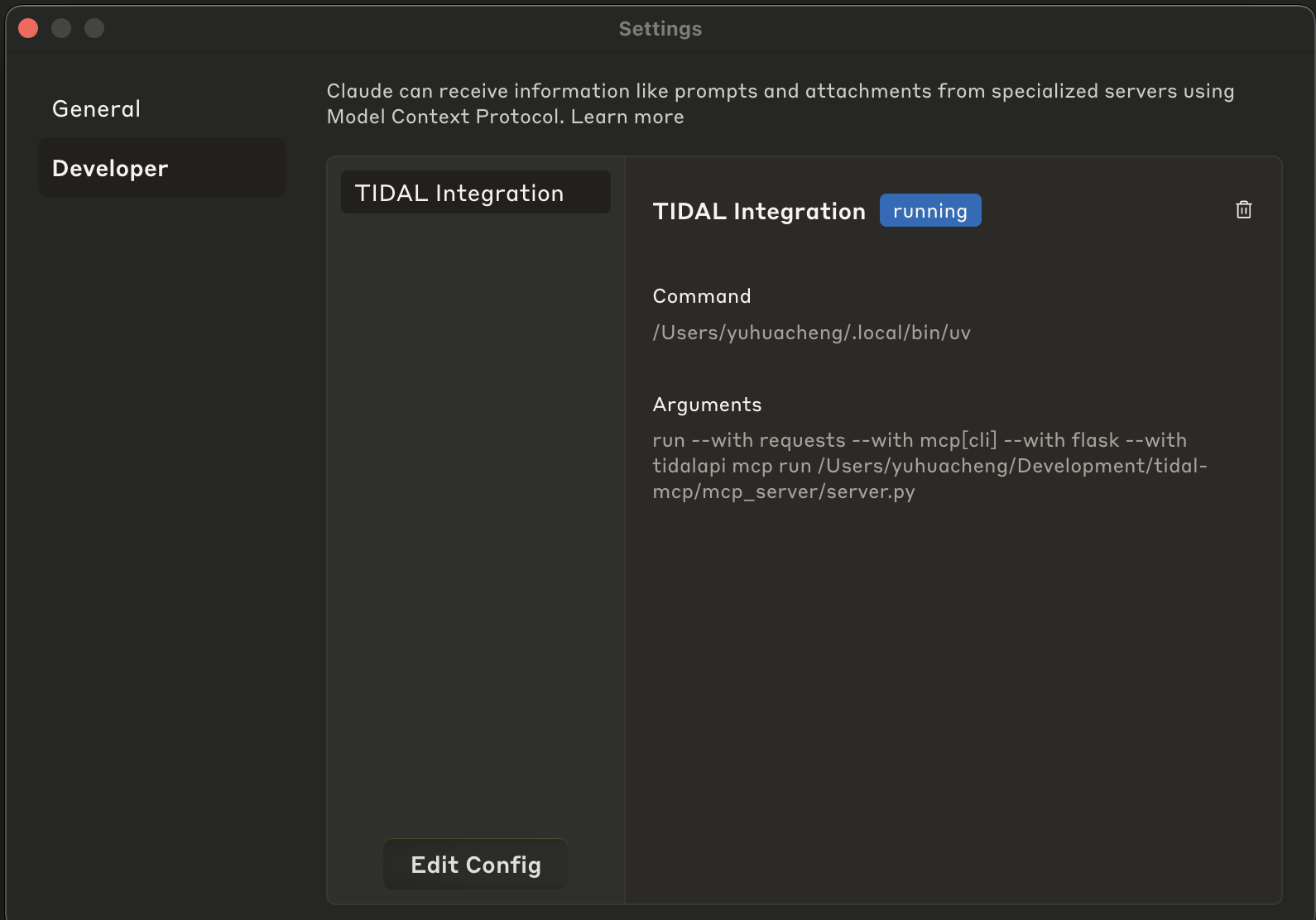
打开 Claude 桌面
前往“设置”>“开发者”
点击“编辑配置”
粘贴修改后的 JSON 配置
保存配置
重启Claude桌面
配置完成后,您可以通过 LLM 与您的 TIDAL 帐户进行交互,询问以下问题:
“推荐类似此播放列表中的歌曲,但速度较慢且更具原声效果。”
“根据我的热门曲目创建一个播放列表,但重点是轻松的深夜氛围。”
“在 XYZ 播放列表中查找类似歌曲,但不是英语。”
💡 您还可以要求模特:
用更多的曲目作为种子,拓宽灵感。
如果您想要更长的播放列表,请返回更多推荐。
或者如果您不喜欢,可以删除播放列表 - 没压力!
TIDAL MCP 集成提供以下工具:
tidal_login :通过浏览器登录流程向 TIDAL 进行身份验证
get_favorite_tracks :从 TIDAL 检索您喜欢的曲目
recommend_tracks :获取个性化音乐推荐
create_tidal_playlist :在您的 TIDAL 帐户中创建一个新的播放列表
get_user_playlists :列出 TIDAL 上的所有播放列表
get_playlist_tracks :从特定播放列表中检索所有曲目
delete_tidal_playlist :从您的 TIDAL 帐户中删除播放列表
Creates a new TIDAL playlist with the specified tracks.

USE THIS TOOL WHENEVER A USER ASKS FOR:
- "Create a playlist with these songs"
- "Make a TIDAL playlist"
- "Save these tracks to a playlist"
- "Create a collection of songs"
- Any request to create a new playlist in their TIDAL account

This function creates a new playlist in the user's TIDAL account and adds the specified tracks to it.
The user must be authenticated with TIDAL first.

NAMING CONVENTION GUIDANCE:
When suggesting or creating a playlist, first check the user's existing playlists using get_user_playlists()
to understand their naming preferences. Some patterns to look for:
- Do they use emoji in playlist names?
- Do they use all caps, title case, or lowercase?
- Do they include dates or seasons in names?
- Do they name by mood, genre, activity, or artist?
- Do they use specific prefixes or formatting (e.g., "Mix: Summer Vibes" or "[Workout] High Energy")

Try to match their style when suggesting new playlist names. If they have no playlists yet or you
can't determine a pattern, use a clear, descriptive name based on the tracks' common themes.

When processing the results of this tool:
1. Confirm the playlist was created successfully
2. Provide the playlist title, number of tracks added, and URL
3. Always include the direct TIDAL URL (https://tidal.com/playlist/{playlist_id})
4. Suggest that the user can now access this playlist in their TIDAL account

Args:
    title: The name of the playlist to create
    track_ids: List of TIDAL track IDs to add to the playlist
    description: Optional description for the playlist (default: "")

Returns:
    A dictionary containing the status of the playlist creation and details about the created playlist
Inputs: title (required), track_ids (required), description.
Deletes a TIDAL playlist by its ID.

USE THIS TOOL WHENEVER A USER ASKS FOR:
- "Delete my playlist"
- "Remove a playlist from my TIDAL account"
- "Get rid of this playlist"
- "Delete the playlist with ID X"
- Any request to delete or remove a TIDAL playlist

This function deletes a specific playlist from the user's TIDAL account.
The user must be authenticated with TIDAL first.

When processing the results of this tool:
1. Confirm the playlist was deleted successfully
2. Provide a clear message about the deletion

Args:
    playlist_id: The TIDAL ID of the playlist to delete (required)

Returns:
    A dictionary containing the status of the playlist deletion
Inputs: playlist_id (required).
Retrieves tracks from the user's TIDAL account favorites.

USE THIS TOOL WHENEVER A USER ASKS FOR:
- "What are my favorite tracks?"
- "Show me my TIDAL favorites"
- "What music do I have saved?"
- "Get my favorite songs"
- Any request to view their saved/favorite tracks

This function retrieves the user's favorite tracks from TIDAL.

Args:
    limit: Maximum number of tracks to retrieve (default: 20, note it should be large enough by default unless specified otherwise).

Returns:
    A dictionary containing track information including track ID, title, artist, album, and duration.
    Returns an error message if not authenticated or if retrieval fails.
Inputs: limit.
Retrieves all tracks from a specified TIDAL playlist.

USE THIS TOOL WHENEVER A USER ASKS FOR:
- "Show me the songs in my playlist"
- "What tracks are in my [playlist name] playlist?"
- "List the songs from my playlist"
- "Get tracks from my playlist"
- "View contents of my TIDAL playlist"
- Any request to see what songs/tracks are in a specific playlist

This function retrieves all tracks from a specific playlist in the user's TIDAL account.
The playlist_id must be provided, which can be obtained from the get_user_playlists() function.

When processing the results of this tool:
1. Present the playlist information (title, description, track count) as context
2. List the tracks in a clear, organized format with track name, artist, and album
3. Include track durations where available
4. Mention the total number of tracks in the playlist
5. If there are many tracks, focus on highlighting interesting patterns or variety

Args:
    playlist_id: The TIDAL ID of the playlist to retrieve (required)
    limit: Maximum number of tracks to retrieve (default: 100)

Returns:
    A dictionary containing the playlist information and all tracks in the playlist
Inputs: playlist_id (required), limit.
Fetches the user's playlists from their TIDAL account.

USE THIS TOOL WHENEVER A USER ASKS FOR:
- "Show me my playlists"
- "List my TIDAL playlists"
- "What playlists do I have?"
- "Get my music collections"
- Any request to view or list their TIDAL playlists

This function retrieves the user's playlists from TIDAL and returns them sorted
by last updated date (most recent first).

When processing the results of this tool:
1. Present the playlists in a clear, organized format
2. Include key information like title, track count, and the TIDAL URL for each playlist
3. Mention when each playlist was last updated if available
4. If the user has many playlists, focus on the most recently updated ones unless specified otherwise

Returns:
    A dictionary containing the user's playlists sorted by last updated date
Inputs: no named parameters.
Recommends music tracks based on specified track IDs or can use the user's TIDAL favorites if no IDs are provided.

USE THIS TOOL WHENEVER A USER ASKS FOR:
- Music recommendations
- Track suggestions
- Music similar to their TIDAL favorites or specific tracks
- "What should I listen to?"
- Any request to recommend songs/tracks/music based on their TIDAL history or specific tracks

This function gets recommendations based on provided track IDs or retrieves the user's
favorite tracks as seeds if no IDs are specified.

When processing the results of this tool:
1. Analyze the seed tracks to understand the music taste or direction
2. Review the recommended tracks from TIDAL
3. IMPORTANT: Do NOT include any tracks from the seed tracks in your recommendations
4. Ensure there are NO DUPLICATES in your recommended tracks list
5. Select and rank the most appropriate tracks based on the seed tracks and filter criteria
6. Group recommendations by similar styles, artists, or moods with descriptive headings
7. For each recommended track, provide:
   - The track name, artist, album
   - Always include the track's URL to make it easy for users to listen to the track
   - A brief explanation of why this track might appeal to the user based on the seed tracks
   - If applicable, how this track matches their specific filter criteria
8. Format your response as a nicely presented list of recommendations with helpful context (remember to include the track's URL!)
9. Begin with a brief introduction explaining your selection strategy
10. Lastly, unless specified otherwise, you should recommend MINIMUM 20 tracks (or more if possible) to give the user a good variety to choose from.

[IMPORTANT NOTE] If you're not familiar with any artists or tracks mentioned, you should use internet search capabilities if available to provide more accurate information.

Args:
    track_ids: Optional list of TIDAL track IDs to use as seeds for recommendations.
              If not provided, will use the user's favorite tracks.
    filter_criteria: Specific preferences for filtering recommendations (e.g., "relaxing music,"
                     "recent releases," "upbeat," "jazz influences")
    limit_per_track: Maximum number of recommendations to get per track (NOTE: default: 20, unless specified otherwise, we'd like to keep the default large enough to have enough candidates to work with)
    limit_from_favorite: Maximum number of favorite tracks to use as seeds (NOTE: default: 20, unless specified otherwise, we'd like to keep the default large enough to have enough candidates to work with)

Returns:
    A dictionary containing both the seed tracks and recommended tracks
Inputs: track_ids, filter_criteria, limit_per_track, limit_from_favorite.
Authenticate with TIDAL through browser login flow.
This will open a browser window for the user to log in to their TIDAL account.

Returns:
    A dictionary containing authentication status and user information if successful
Inputs: no named parameters.
Recent tool additions, removals, and schema changes observed during successful MCP inspections.
Loading tool schema changelog…
Scored across 7 tools
Each tool has a distinct purpose with no overlap: create/delete playlists, get favorites, get playlist tracks, get user playlists, recommend tracks, and login. The descriptions clearly differentiate them, and an agent can easily select the correct tool for any TIDAL-related request without confusion.
All tool names follow a consistent verb_noun pattern with 'tidal' prefix (e.g., create_tidal_playlist, get_favorite_tracks, recommend_tracks). The naming is uniform and predictable, making it easy for agents to understand and use the toolset.
With 7 tools, this server is well-scoped for managing TIDAL playlists and recommendations. It covers essential operations (CRUD for playlists, fetching tracks, login) without being too sparse or bloated, making each tool valuable and necessary for the domain.
The toolset provides strong coverage for playlist management (create, delete, list, view tracks) and recommendations, with a login tool for authentication. A minor gap is the lack of an update_playlist tool for modifying existing playlists, but agents can work around this by deleting and recreating. Overall, it supports core TIDAL workflows effectively.
AI playlist engine that turns music prompts into real YouTube playlists and filters bad versions.
Find independent music by how it sounds: similar tracks and playlists from a track link.
Turn music ideas, articles and tracklists into playable mixes, cited stories and narrated clips.
MCP server for Producer/Riffusion AI music generation