
A
licenseA
qualityD
maintenanceAn MCP server that enables highly personalized music recommendations from TIDAL based on custom criteria, allowing users to create and manage playlists directly in their TIDAL account.
7
MIT

대부분의 음악 플랫폼은 일일 검색, 인기 아티스트, 신곡 추천 등 다양한 추천 기능을 제공하지만, 최첨단 시스템임에도 불구하고 너무 "집계된" 느낌이 드는 경우가 많습니다. 저는 좀 더 개인 맞춤형이고 상황에 맞는 추천 기능을 원했습니다.
TIDAL MCP를 사용하면 다음과 같은 작업을 요청할 수 있습니다.
"제가 가장 좋아하는 곡 10개를 기준으로 비슷한 곡을 찾아주세요. 하지만 최근 몇 년의 곡만 찾아주세요."
"이 플레이리스트에 있는 것과 비슷한 트랙을 찾아주세요. 하지만 더 느리고 어쿠스틱한 트랙이에요."
LLM은 사용자의 입력을 바탕으로 결과를 필터링하고 큐레이션하며, TIDAL API를 통해 유사한 트랙을 찾고, 사용자 계정에 직접 새로운 재생 목록을 구축합니다.
🌟 음악 추천 : 청취 기록 과 사용자 지정 기준 에 따라 개인화된 트랙 추천을 받으세요.
၊၊||၊ 재생 목록 관리 : TIDAL 재생 목록을 만들고, 보고, 관리하세요
Related MCP server: Spotify Overload - More Tools (18) | More Functions | More Rocking Out
파이썬 3.10+
uv (Python 패키지 관리자)
TIDAL 구독
이 저장소를 복제하세요:
지엑스피1
uv를 사용하여 가상 환경을 만들고 종속성을 설치합니다.
uv venv
source .venv/bin/activate  # On Windows: .venv\Scripts\activate
pyproject.toml 파일에서 모든 종속성을 포함한 패키지를 설치합니다.
uv pip install --editable .이렇게 하면 pyproject.toml 파일에 정의된 모든 종속성이 설치되고 프로젝트가 개발 모드로 설정됩니다.
이 MCP 서버를 Claude Desktop에 추가하려면 MCP 구성 파일을 업데이트해야 합니다. 다음은 구성 예시입니다. (선택 사항인 env 섹션을 TIDAL_MCP_PORT 환경 변수에 추가하여 포트를 지정할 수 있습니다.)
{
  "mcpServers": {
    "TIDAL Integration": {
      "command": "/path/to/your/uv",
      "env": {
        "TIDAL_MCP_PORT": "5100"
      },
      "args": [
        "run",
        "--with",
        "requests",
        "--with",
        "mcp[cli]",
        "--with",
        "flask",
        "--with",
        "tidalapi",
        "mcp",
        "run",
        "/path/to/your/project/tidal-mcp/mcp_server/server.py"
      ]
    }
  }
}
Claude Desktop의 MCP 구성에 대한 예시 스크린샷: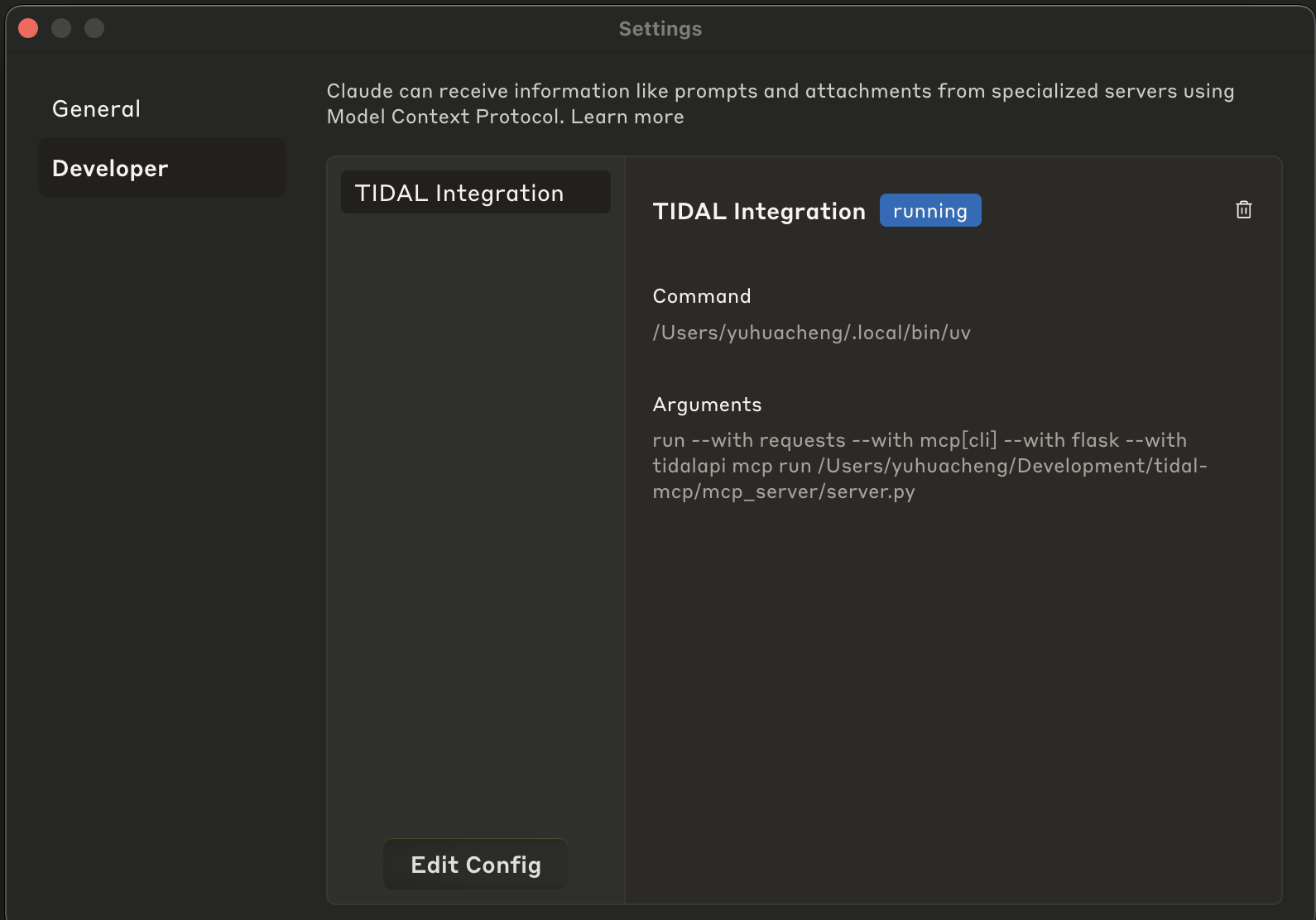
클로드 데스크톱 열기
설정 > 개발자로 이동하세요
"구성 편집"을 클릭하세요
수정된 JSON 구성을 붙여넣습니다.
구성을 저장합니다
Claude Desktop을 다시 시작하세요
구성이 완료되면 다음과 같은 질문을 통해 LLM을 통해 TIDAL 계정과 상호 작용할 수 있습니다.
"이 플레이리스트에 있는 노래와 비슷하지만, 더 느리고 어쿠스틱한 노래를 추천해 주세요."
"제가 가장 좋아하는 트랙을 기반으로, 느긋하고 늦은 밤 분위기에 맞는 플레이리스트를 만들어요."
"XYZ 플레이리스트에서 영어가 아닌 다른 언어로 된 이런 노래를 찾아보세요."
💡 모델에게 다음을 요청할 수도 있습니다.
더 많은 트랙을 씨앗으로 삼아 영감을 확대하세요.
더 긴 재생목록을 원하시면 더 많은 추천을 받아보세요.
아니면, 마음에 들지 않으면 재생목록을 삭제해도 됩니다. 부담 갖지 마세요!
TIDAL MCP 통합은 다음과 같은 도구를 제공합니다.
tidal_login : 브라우저 로그인 흐름을 통해 TIDAL에 인증합니다.
get_favorite_tracks : TIDAL에서 좋아하는 트랙을 검색합니다.
recommend_tracks : 개인화된 음악 추천을 받으세요
create_tidal_playlist : TIDAL 계정에서 새 재생 목록을 만듭니다.
get_user_playlists : TIDAL의 모든 재생 목록을 나열합니다.
get_playlist_tracks : 특정 재생 목록에서 모든 트랙을 검색합니다.
delete_tidal_playlist : TIDAL 계정에서 재생 목록을 삭제합니다.
Creates a new TIDAL playlist with the specified tracks.

USE THIS TOOL WHENEVER A USER ASKS FOR:
- "Create a playlist with these songs"
- "Make a TIDAL playlist"
- "Save these tracks to a playlist"
- "Create a collection of songs"
- Any request to create a new playlist in their TIDAL account

This function creates a new playlist in the user's TIDAL account and adds the specified tracks to it.
The user must be authenticated with TIDAL first.

NAMING CONVENTION GUIDANCE:
When suggesting or creating a playlist, first check the user's existing playlists using get_user_playlists()
to understand their naming preferences. Some patterns to look for:
- Do they use emoji in playlist names?
- Do they use all caps, title case, or lowercase?
- Do they include dates or seasons in names?
- Do they name by mood, genre, activity, or artist?
- Do they use specific prefixes or formatting (e.g., "Mix: Summer Vibes" or "[Workout] High Energy")

Try to match their style when suggesting new playlist names. If they have no playlists yet or you
can't determine a pattern, use a clear, descriptive name based on the tracks' common themes.

When processing the results of this tool:
1. Confirm the playlist was created successfully
2. Provide the playlist title, number of tracks added, and URL
3. Always include the direct TIDAL URL (https://tidal.com/playlist/{playlist_id})
4. Suggest that the user can now access this playlist in their TIDAL account

Args:
    title: The name of the playlist to create
    track_ids: List of TIDAL track IDs to add to the playlist
    description: Optional description for the playlist (default: "")

Returns:
    A dictionary containing the status of the playlist creation and details about the created playlist
Inputs: title (required), track_ids (required), description.
Deletes a TIDAL playlist by its ID.

USE THIS TOOL WHENEVER A USER ASKS FOR:
- "Delete my playlist"
- "Remove a playlist from my TIDAL account"
- "Get rid of this playlist"
- "Delete the playlist with ID X"
- Any request to delete or remove a TIDAL playlist

This function deletes a specific playlist from the user's TIDAL account.
The user must be authenticated with TIDAL first.

When processing the results of this tool:
1. Confirm the playlist was deleted successfully
2. Provide a clear message about the deletion

Args:
    playlist_id: The TIDAL ID of the playlist to delete (required)

Returns:
    A dictionary containing the status of the playlist deletion
Inputs: playlist_id (required).
Retrieves tracks from the user's TIDAL account favorites.

USE THIS TOOL WHENEVER A USER ASKS FOR:
- "What are my favorite tracks?"
- "Show me my TIDAL favorites"
- "What music do I have saved?"
- "Get my favorite songs"
- Any request to view their saved/favorite tracks

This function retrieves the user's favorite tracks from TIDAL.

Args:
    limit: Maximum number of tracks to retrieve (default: 20, note it should be large enough by default unless specified otherwise).

Returns:
    A dictionary containing track information including track ID, title, artist, album, and duration.
    Returns an error message if not authenticated or if retrieval fails.
Inputs: limit.
Retrieves all tracks from a specified TIDAL playlist.

USE THIS TOOL WHENEVER A USER ASKS FOR:
- "Show me the songs in my playlist"
- "What tracks are in my [playlist name] playlist?"
- "List the songs from my playlist"
- "Get tracks from my playlist"
- "View contents of my TIDAL playlist"
- Any request to see what songs/tracks are in a specific playlist

This function retrieves all tracks from a specific playlist in the user's TIDAL account.
The playlist_id must be provided, which can be obtained from the get_user_playlists() function.

When processing the results of this tool:
1. Present the playlist information (title, description, track count) as context
2. List the tracks in a clear, organized format with track name, artist, and album
3. Include track durations where available
4. Mention the total number of tracks in the playlist
5. If there are many tracks, focus on highlighting interesting patterns or variety

Args:
    playlist_id: The TIDAL ID of the playlist to retrieve (required)
    limit: Maximum number of tracks to retrieve (default: 100)

Returns:
    A dictionary containing the playlist information and all tracks in the playlist
Inputs: playlist_id (required), limit.
Fetches the user's playlists from their TIDAL account.

USE THIS TOOL WHENEVER A USER ASKS FOR:
- "Show me my playlists"
- "List my TIDAL playlists"
- "What playlists do I have?"
- "Get my music collections"
- Any request to view or list their TIDAL playlists

This function retrieves the user's playlists from TIDAL and returns them sorted
by last updated date (most recent first).

When processing the results of this tool:
1. Present the playlists in a clear, organized format
2. Include key information like title, track count, and the TIDAL URL for each playlist
3. Mention when each playlist was last updated if available
4. If the user has many playlists, focus on the most recently updated ones unless specified otherwise

Returns:
    A dictionary containing the user's playlists sorted by last updated date
Inputs: no named parameters.
Recommends music tracks based on specified track IDs or can use the user's TIDAL favorites if no IDs are provided.

USE THIS TOOL WHENEVER A USER ASKS FOR:
- Music recommendations
- Track suggestions
- Music similar to their TIDAL favorites or specific tracks
- "What should I listen to?"
- Any request to recommend songs/tracks/music based on their TIDAL history or specific tracks

This function gets recommendations based on provided track IDs or retrieves the user's
favorite tracks as seeds if no IDs are specified.

When processing the results of this tool:
1. Analyze the seed tracks to understand the music taste or direction
2. Review the recommended tracks from TIDAL
3. IMPORTANT: Do NOT include any tracks from the seed tracks in your recommendations
4. Ensure there are NO DUPLICATES in your recommended tracks list
5. Select and rank the most appropriate tracks based on the seed tracks and filter criteria
6. Group recommendations by similar styles, artists, or moods with descriptive headings
7. For each recommended track, provide:
   - The track name, artist, album
   - Always include the track's URL to make it easy for users to listen to the track
   - A brief explanation of why this track might appeal to the user based on the seed tracks
   - If applicable, how this track matches their specific filter criteria
8. Format your response as a nicely presented list of recommendations with helpful context (remember to include the track's URL!)
9. Begin with a brief introduction explaining your selection strategy
10. Lastly, unless specified otherwise, you should recommend MINIMUM 20 tracks (or more if possible) to give the user a good variety to choose from.

[IMPORTANT NOTE] If you're not familiar with any artists or tracks mentioned, you should use internet search capabilities if available to provide more accurate information.

Args:
    track_ids: Optional list of TIDAL track IDs to use as seeds for recommendations.
              If not provided, will use the user's favorite tracks.
    filter_criteria: Specific preferences for filtering recommendations (e.g., "relaxing music,"
                     "recent releases," "upbeat," "jazz influences")
    limit_per_track: Maximum number of recommendations to get per track (NOTE: default: 20, unless specified otherwise, we'd like to keep the default large enough to have enough candidates to work with)
    limit_from_favorite: Maximum number of favorite tracks to use as seeds (NOTE: default: 20, unless specified otherwise, we'd like to keep the default large enough to have enough candidates to work with)

Returns:
    A dictionary containing both the seed tracks and recommended tracks
Inputs: track_ids, filter_criteria, limit_per_track, limit_from_favorite.
Authenticate with TIDAL through browser login flow.
This will open a browser window for the user to log in to their TIDAL account.

Returns:
    A dictionary containing authentication status and user information if successful
Inputs: no named parameters.
Recent tool additions, removals, and schema changes observed during successful MCP inspections.
Loading tool schema changelog…
Scored across 7 tools
Each tool has a distinct purpose with no overlap: create/delete playlists, get favorites, get playlist tracks, get user playlists, recommend tracks, and login. The descriptions clearly differentiate them, and an agent can easily select the correct tool for any TIDAL-related request without confusion.
All tool names follow a consistent verb_noun pattern with 'tidal' prefix (e.g., create_tidal_playlist, get_favorite_tracks, recommend_tracks). The naming is uniform and predictable, making it easy for agents to understand and use the toolset.
With 7 tools, this server is well-scoped for managing TIDAL playlists and recommendations. It covers essential operations (CRUD for playlists, fetching tracks, login) without being too sparse or bloated, making each tool valuable and necessary for the domain.
The toolset provides strong coverage for playlist management (create, delete, list, view tracks) and recommendations, with a login tool for authentication. A minor gap is the lack of an update_playlist tool for modifying existing playlists, but agents can work around this by deleting and recreating. Overall, it supports core TIDAL workflows effectively.
AI playlist engine that turns music prompts into real YouTube playlists and filters bad versions.
Find independent music by how it sounds: similar tracks and playlists from a track link.
Turn music ideas, articles and tracklists into playable mixes, cited stories and narrated clips.
MCP server for Producer/Riffusion AI music generation