
A
licenseA
qualityD
maintenanceAn MCP server that enables highly personalized music recommendations from TIDAL based on custom criteria, allowing users to create and manage playlists directly in their TIDAL account.
7
MIT

La mayoría de las plataformas musicales ofrecen recomendaciones (Descubrimiento diario, Artistas destacados, Novedades, etc.), pero incluso con el sistema de vanguardia, suelen parecer demasiado "agregadas". Quería algo más personalizado y contextual.
Con TIDAL MCP, puedes solicitar cosas como:
"Basándome en mis últimos 10 favoritos, busca canciones similares, pero solo de los últimos años".
"Encuéntrame pistas como las de esta lista de reproducción, pero más lentas y acústicas".
LLM filtra y selecciona los resultados usando tu información, encuentra pistas similares a través de la API de TIDAL y crea nuevas listas de reproducción directamente en tu cuenta.
🌟 Recomendaciones musicales : obtén recomendaciones de pistas personalizadas según tu historial de escucha y tus criterios personalizados .
Gestión de listas de reproducción : crea, visualiza y gestiona tus listas de reproducción de TIDAL
Related MCP server: Spotify Overload - More Tools (18) | More Functions | More Rocking Out
Python 3.10+
uv (administrador de paquetes de Python)
Suscripción a TIDAL
Clonar este repositorio:
git clone https://github.com/yuhuacheng/tidal-mcp.git
cd tidal-mcp
Cree un entorno virtual e instale dependencias usando uv:
uv venv
source .venv/bin/activate  # On Windows: .venv\Scripts\activate
Instale el paquete con todas las dependencias del archivo pyproject.toml:
uv pip install --editable .Esto instalará todas las dependencias definidas en el archivo pyproject.toml y configurará el proyecto en modo de desarrollo.
Para agregar este servidor MCP a Claude Desktop, debe actualizar el archivo de configuración de MCP. A continuación, se muestra un ejemplo de configuración: (puede especificar el puerto agregando una sección env opcional con la variable de entorno TIDAL_MCP_PORT )
{
  "mcpServers": {
    "TIDAL Integration": {
      "command": "/path/to/your/uv",
      "env": {
        "TIDAL_MCP_PORT": "5100"
      },
      "args": [
        "run",
        "--with",
        "requests",
        "--with",
        "mcp[cli]",
        "--with",
        "flask",
        "--with",
        "tidalapi",
        "mcp",
        "run",
        "/path/to/your/project/tidal-mcp/mcp_server/server.py"
      ]
    }
  }
}
Ejemplo de captura de pantalla de la configuración de MCP en Claude Desktop: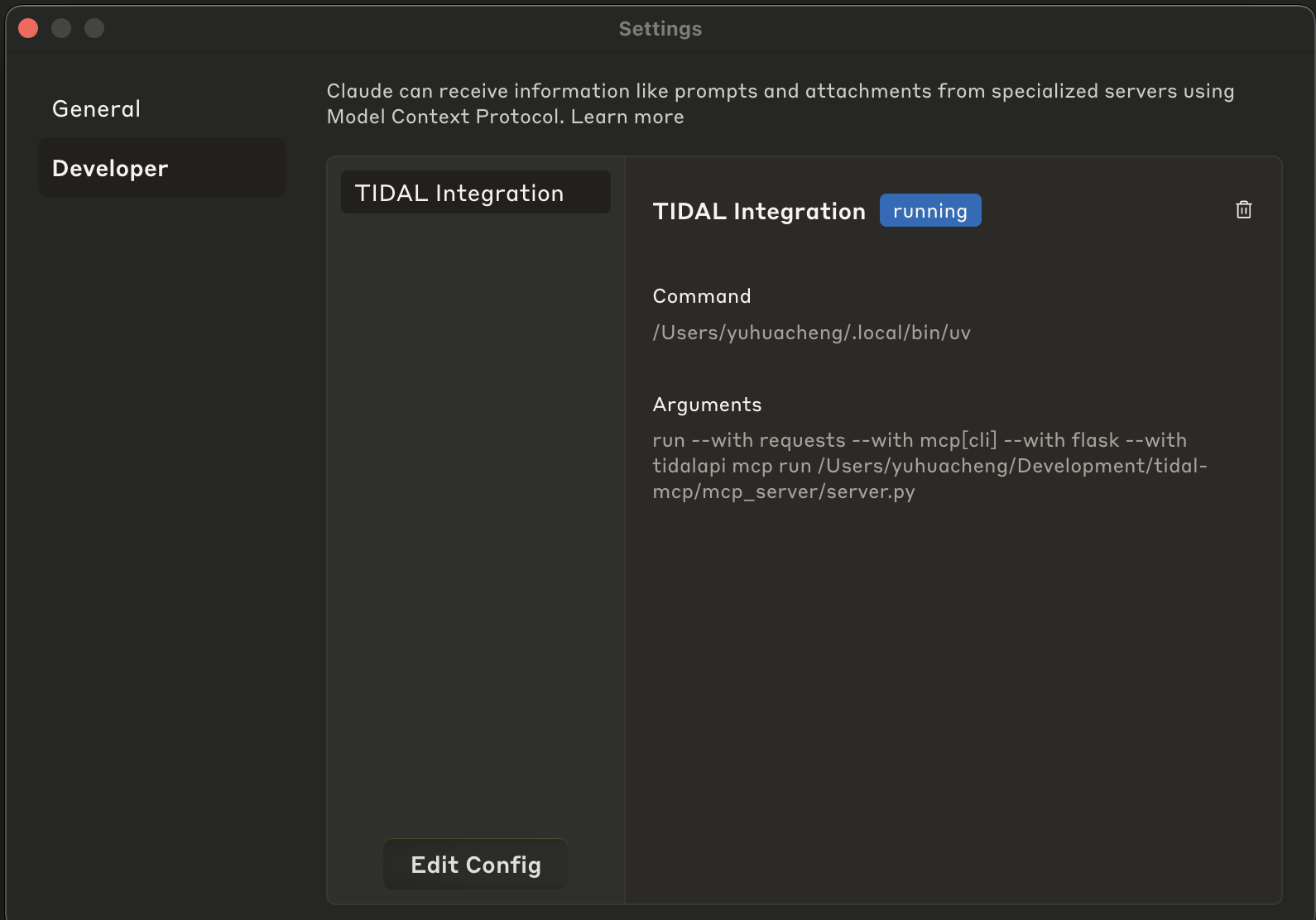
Abra Claude Desktop
Vaya a Configuración > Desarrollador
Haga clic en "Editar configuración"
Pegue la configuración JSON modificada
Guardar la configuración
Reiniciar Claude Desktop
Una vez configurado, podrás interactuar con tu cuenta TIDAL a través de un LLM haciendo preguntas como:
“Recomiendo canciones como las de esta lista de reproducción, pero más lentas y acústicas”.
“Crea una lista de reproducción basada en mis canciones favoritas, pero centrada en un ambiente relajado y nocturno”.
“Encuentra canciones como estas en la lista de reproducción XYZ, pero en idiomas distintos del inglés”.
💡También puedes pedirle a la modelo que:
Utilice más pistas como semillas para ampliar la inspiración.
Devuelve más recomendaciones si deseas una lista de reproducción más larga.
O elimina una lista de reproducción si no te gusta: ¡sin presión!
La integración de TIDAL MCP proporciona las siguientes herramientas:
tidal_login : Autenticarse con TIDAL a través del flujo de inicio de sesión del navegador
get_favorite_tracks : recupera tus pistas favoritas de TIDAL
recommend_tracks : Obtén recomendaciones musicales personalizadas
create_tidal_playlist : Crea una nueva lista de reproducción en tu cuenta TIDAL
get_user_playlists : enumera todas tus listas de reproducción en TIDAL
get_playlist_tracks : recupera todas las pistas de una lista de reproducción específica
delete_tidal_playlist : Elimina una lista de reproducción de tu cuenta TIDAL
Creates a new TIDAL playlist with the specified tracks.

USE THIS TOOL WHENEVER A USER ASKS FOR:
- "Create a playlist with these songs"
- "Make a TIDAL playlist"
- "Save these tracks to a playlist"
- "Create a collection of songs"
- Any request to create a new playlist in their TIDAL account

This function creates a new playlist in the user's TIDAL account and adds the specified tracks to it.
The user must be authenticated with TIDAL first.

NAMING CONVENTION GUIDANCE:
When suggesting or creating a playlist, first check the user's existing playlists using get_user_playlists()
to understand their naming preferences. Some patterns to look for:
- Do they use emoji in playlist names?
- Do they use all caps, title case, or lowercase?
- Do they include dates or seasons in names?
- Do they name by mood, genre, activity, or artist?
- Do they use specific prefixes or formatting (e.g., "Mix: Summer Vibes" or "[Workout] High Energy")

Try to match their style when suggesting new playlist names. If they have no playlists yet or you
can't determine a pattern, use a clear, descriptive name based on the tracks' common themes.

When processing the results of this tool:
1. Confirm the playlist was created successfully
2. Provide the playlist title, number of tracks added, and URL
3. Always include the direct TIDAL URL (https://tidal.com/playlist/{playlist_id})
4. Suggest that the user can now access this playlist in their TIDAL account

Args:
    title: The name of the playlist to create
    track_ids: List of TIDAL track IDs to add to the playlist
    description: Optional description for the playlist (default: "")

Returns:
    A dictionary containing the status of the playlist creation and details about the created playlist
Inputs: title (required), track_ids (required), description.
Deletes a TIDAL playlist by its ID.

USE THIS TOOL WHENEVER A USER ASKS FOR:
- "Delete my playlist"
- "Remove a playlist from my TIDAL account"
- "Get rid of this playlist"
- "Delete the playlist with ID X"
- Any request to delete or remove a TIDAL playlist

This function deletes a specific playlist from the user's TIDAL account.
The user must be authenticated with TIDAL first.

When processing the results of this tool:
1. Confirm the playlist was deleted successfully
2. Provide a clear message about the deletion

Args:
    playlist_id: The TIDAL ID of the playlist to delete (required)

Returns:
    A dictionary containing the status of the playlist deletion
Inputs: playlist_id (required).
Retrieves tracks from the user's TIDAL account favorites.

USE THIS TOOL WHENEVER A USER ASKS FOR:
- "What are my favorite tracks?"
- "Show me my TIDAL favorites"
- "What music do I have saved?"
- "Get my favorite songs"
- Any request to view their saved/favorite tracks

This function retrieves the user's favorite tracks from TIDAL.

Args:
    limit: Maximum number of tracks to retrieve (default: 20, note it should be large enough by default unless specified otherwise).

Returns:
    A dictionary containing track information including track ID, title, artist, album, and duration.
    Returns an error message if not authenticated or if retrieval fails.
Inputs: limit.
Retrieves all tracks from a specified TIDAL playlist.

USE THIS TOOL WHENEVER A USER ASKS FOR:
- "Show me the songs in my playlist"
- "What tracks are in my [playlist name] playlist?"
- "List the songs from my playlist"
- "Get tracks from my playlist"
- "View contents of my TIDAL playlist"
- Any request to see what songs/tracks are in a specific playlist

This function retrieves all tracks from a specific playlist in the user's TIDAL account.
The playlist_id must be provided, which can be obtained from the get_user_playlists() function.

When processing the results of this tool:
1. Present the playlist information (title, description, track count) as context
2. List the tracks in a clear, organized format with track name, artist, and album
3. Include track durations where available
4. Mention the total number of tracks in the playlist
5. If there are many tracks, focus on highlighting interesting patterns or variety

Args:
    playlist_id: The TIDAL ID of the playlist to retrieve (required)
    limit: Maximum number of tracks to retrieve (default: 100)

Returns:
    A dictionary containing the playlist information and all tracks in the playlist
Inputs: playlist_id (required), limit.
Fetches the user's playlists from their TIDAL account.

USE THIS TOOL WHENEVER A USER ASKS FOR:
- "Show me my playlists"
- "List my TIDAL playlists"
- "What playlists do I have?"
- "Get my music collections"
- Any request to view or list their TIDAL playlists

This function retrieves the user's playlists from TIDAL and returns them sorted
by last updated date (most recent first).

When processing the results of this tool:
1. Present the playlists in a clear, organized format
2. Include key information like title, track count, and the TIDAL URL for each playlist
3. Mention when each playlist was last updated if available
4. If the user has many playlists, focus on the most recently updated ones unless specified otherwise

Returns:
    A dictionary containing the user's playlists sorted by last updated date
Inputs: no named parameters.
Recommends music tracks based on specified track IDs or can use the user's TIDAL favorites if no IDs are provided.

USE THIS TOOL WHENEVER A USER ASKS FOR:
- Music recommendations
- Track suggestions
- Music similar to their TIDAL favorites or specific tracks
- "What should I listen to?"
- Any request to recommend songs/tracks/music based on their TIDAL history or specific tracks

This function gets recommendations based on provided track IDs or retrieves the user's
favorite tracks as seeds if no IDs are specified.

When processing the results of this tool:
1. Analyze the seed tracks to understand the music taste or direction
2. Review the recommended tracks from TIDAL
3. IMPORTANT: Do NOT include any tracks from the seed tracks in your recommendations
4. Ensure there are NO DUPLICATES in your recommended tracks list
5. Select and rank the most appropriate tracks based on the seed tracks and filter criteria
6. Group recommendations by similar styles, artists, or moods with descriptive headings
7. For each recommended track, provide:
   - The track name, artist, album
   - Always include the track's URL to make it easy for users to listen to the track
   - A brief explanation of why this track might appeal to the user based on the seed tracks
   - If applicable, how this track matches their specific filter criteria
8. Format your response as a nicely presented list of recommendations with helpful context (remember to include the track's URL!)
9. Begin with a brief introduction explaining your selection strategy
10. Lastly, unless specified otherwise, you should recommend MINIMUM 20 tracks (or more if possible) to give the user a good variety to choose from.

[IMPORTANT NOTE] If you're not familiar with any artists or tracks mentioned, you should use internet search capabilities if available to provide more accurate information.

Args:
    track_ids: Optional list of TIDAL track IDs to use as seeds for recommendations.
              If not provided, will use the user's favorite tracks.
    filter_criteria: Specific preferences for filtering recommendations (e.g., "relaxing music,"
                     "recent releases," "upbeat," "jazz influences")
    limit_per_track: Maximum number of recommendations to get per track (NOTE: default: 20, unless specified otherwise, we'd like to keep the default large enough to have enough candidates to work with)
    limit_from_favorite: Maximum number of favorite tracks to use as seeds (NOTE: default: 20, unless specified otherwise, we'd like to keep the default large enough to have enough candidates to work with)

Returns:
    A dictionary containing both the seed tracks and recommended tracks
Inputs: track_ids, filter_criteria, limit_per_track, limit_from_favorite.
Authenticate with TIDAL through browser login flow.
This will open a browser window for the user to log in to their TIDAL account.

Returns:
    A dictionary containing authentication status and user information if successful
Inputs: no named parameters.
Recent tool additions, removals, and schema changes observed during successful MCP inspections.
Loading tool schema changelog…
Scored across 7 tools
Each tool has a distinct purpose with no overlap: create/delete playlists, get favorites, get playlist tracks, get user playlists, recommend tracks, and login. The descriptions clearly differentiate them, and an agent can easily select the correct tool for any TIDAL-related request without confusion.
All tool names follow a consistent verb_noun pattern with 'tidal' prefix (e.g., create_tidal_playlist, get_favorite_tracks, recommend_tracks). The naming is uniform and predictable, making it easy for agents to understand and use the toolset.
With 7 tools, this server is well-scoped for managing TIDAL playlists and recommendations. It covers essential operations (CRUD for playlists, fetching tracks, login) without being too sparse or bloated, making each tool valuable and necessary for the domain.
The toolset provides strong coverage for playlist management (create, delete, list, view tracks) and recommendations, with a login tool for authentication. A minor gap is the lack of an update_playlist tool for modifying existing playlists, but agents can work around this by deleting and recreating. Overall, it supports core TIDAL workflows effectively.
AI playlist engine that turns music prompts into real YouTube playlists and filters bad versions.
Find independent music by how it sounds: similar tracks and playlists from a track link.
Turn music ideas, articles and tracklists into playable mixes, cited stories and narrated clips.
MCP server for Producer/Riffusion AI music generation