

F
licenseNot graded
qualityF
maintenanceAn MCP server that enables Claude to generate and execute AWS CLI commands, allowing users to manage AWS resources through natural language conversations.
2
-

这是一个模型上下文协议服务器,允许 MCP 客户端代理玩扫雷游戏。它旨在与扫雷游戏服务器一起运行。
 观看完整视频演示,请访问https://youtu.be/CXXMafVtlEQ (加速 16 倍)。
按照游戏服务器的指示在本地启动它。
构建 MCP 服务器:
npm install
npm run build
配置你的 MCP 客户端以添加该工具。例如,假设你将仓库克隆到C:\path\to\repo\minesweeper-mcp-server ,以下是如何将该工具添加到 Windows 系统 Claude Desktop 的claude_desktop_config.json ( 找到该文件)中:
{
  "mcpServers": {
    "mcp-server": {
      "command": "node",
      "args": ["C:\\path\\to\\repo\\minesweeper-mcp-server\\build\\index.js"],
      "env": {
        "DEBUG": "*"
      }
    }
  }
}
Claude Desktop:重新启动 Claude Desktop 以使其获取工具。请务必从托盘菜单图标退出,而不是从应用程序退出(应用程序只会隐藏窗口)。点击“工具”图标,应该会显示新的工具:


Related MCP server: codex-cli-mcp-tool
Start a new game of Minesweeper. Try your best to keep playing until you have flagged all mines. Remember that the coordinates are 0-indexed.实际对话很长。以下是一些片段:
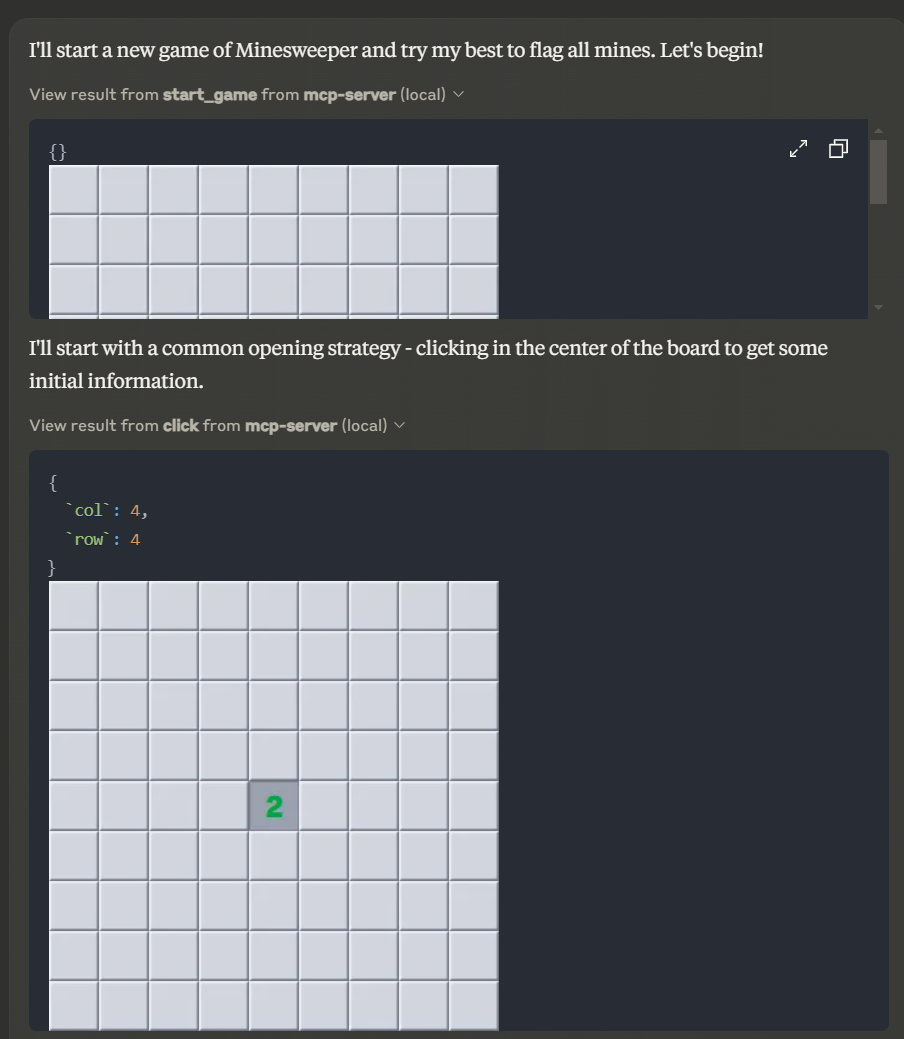
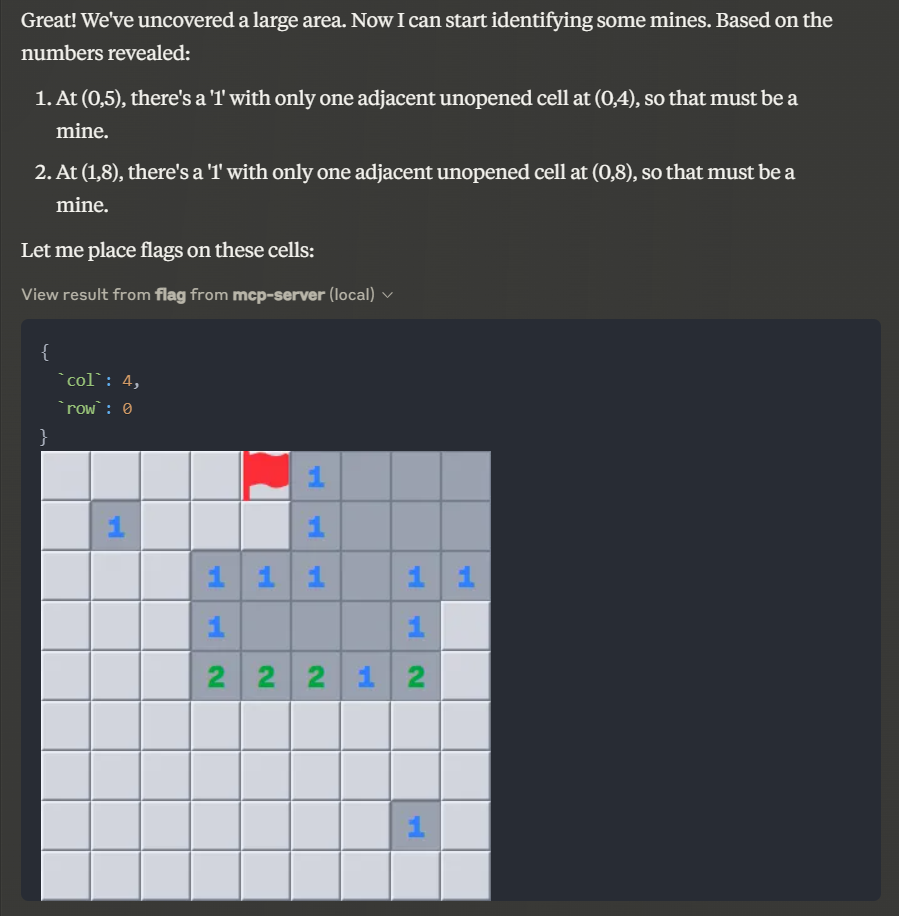
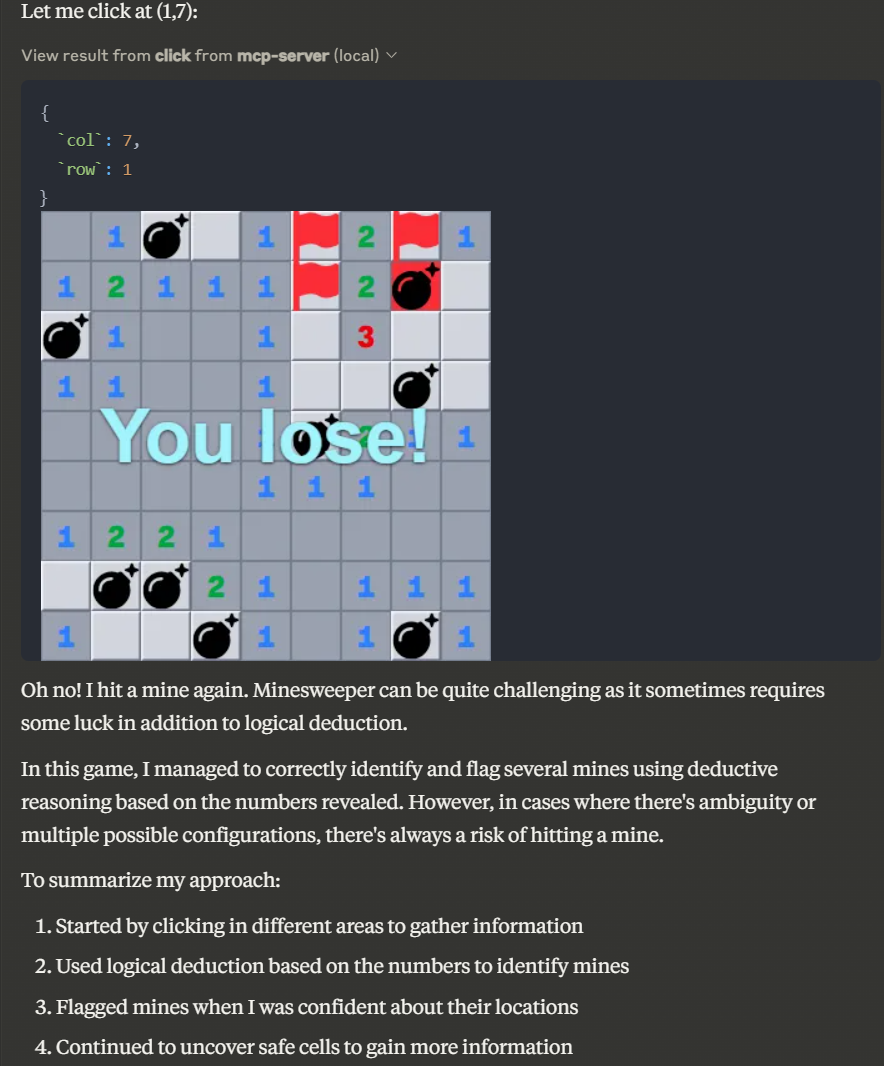
Click at a cell on the Minesweeper board
| Name | Required | Description | Default |
|---|---|---|---|
| col | Yes | ||
| row | Yes |
Does the description disclose side effects, auth requirements, rate limits, or destructive behavior?
With no annotations provided, the description carries full burden but only states the action without disclosing behavioral traits. It doesn't explain what happens when clicking (e.g., reveals cell, may trigger mine, game state changes), safety implications, or error conditions, leaving significant gaps for a mutation tool.
Agents need to know what a tool does to the world before calling it. Descriptions should go beyond structured annotations to explain consequences.
Is the description appropriately sized, front-loaded, and free of redundancy?
The description is a single, efficient sentence with zero wasted words, front-loading the core action. It's appropriately sized for a simple tool, though brevity contributes to gaps in other dimensions.
Shorter descriptions cost fewer tokens and are easier for agents to parse. Every sentence should earn its place.
Given the tool's complexity, does the description cover enough for an agent to succeed on first attempt?
For a mutation tool with no annotations, 0% schema coverage, and no output schema, the description is incomplete. It lacks details on behavior, parameters, outcomes, and integration with sibling tools, making it inadequate for safe and effective use by an AI agent.
Complex tools with many parameters or behaviors need more documentation. Simple tools need less. This dimension scales expectations accordingly.
Does the description clarify parameter syntax, constraints, interactions, or defaults beyond what the schema provides?
Schema description coverage is 0%, so the description must compensate but adds no parameter meaning beyond what the schema provides. It mentions 'cell' which relates to 'row' and 'col', but doesn't explain coordinate systems, valid ranges, or board boundaries, failing to address the coverage gap.
Input schemas describe structure but not intent. Descriptions should explain non-obvious parameter relationships and valid value ranges.
Does the description clearly state what the tool does and how it differs from similar tools?
The description clearly states the action ('click') and target ('at a cell on the Minesweeper board'), providing specific verb+resource. However, it doesn't explicitly differentiate from sibling tools like 'flag' or 'unflag' which also operate on board cells, missing full sibling distinction.
Agents choose between tools based on descriptions. A clear purpose with a specific verb and resource helps agents select the right tool.
Does the description explain when to use this tool, when not to, or what alternatives exist?
No guidance is provided on when to use this tool versus alternatives like 'flag' or 'unflag', nor does it mention prerequisites such as requiring an active game started via 'start_game'. The description implies usage context but lacks explicit when/when-not instructions.
Agents often have multiple tools that could apply. Explicit usage guidance like "use X instead of Y when Z" prevents misuse.
Place a flag at a cell on the Minesweeper board
| Name | Required | Description | Default |
|---|---|---|---|
| col | Yes | ||
| row | Yes |
Does the description disclose side effects, auth requirements, rate limits, or destructive behavior?
With no annotations provided, the description carries full burden but lacks behavioral details. It doesn't disclose if this action is reversible (e.g., via 'unflag'), has side effects like ending the game if incorrect, or requires specific game states. It only describes the basic action without operational context.
Agents need to know what a tool does to the world before calling it. Descriptions should go beyond structured annotations to explain consequences.
Is the description appropriately sized, front-loaded, and free of redundancy?
The description is a single, efficient sentence with zero waste, front-loading the core action. It's appropriately sized for a simple tool, making it easy to parse quickly.
Shorter descriptions cost fewer tokens and are easier for agents to parse. Every sentence should earn its place.
Given the tool's complexity, does the description cover enough for an agent to succeed on first attempt?
Given the tool's complexity (a game action with potential side effects), lack of annotations, no output schema, and low schema coverage, the description is incomplete. It doesn't cover behavioral aspects, parameter meanings, or usage context, leaving significant gaps for an AI agent.
Complex tools with many parameters or behaviors need more documentation. Simple tools need less. This dimension scales expectations accordingly.
Does the description clarify parameter syntax, constraints, interactions, or defaults beyond what the schema provides?
The input schema has 0% description coverage, so the description must compensate but fails to do so. It mentions 'cell' but doesn't explain what 'row' and 'col' parameters represent (e.g., zero-indexed coordinates, board limits), leaving their semantics unclear beyond the schema's basic types.
Input schemas describe structure but not intent. Descriptions should explain non-obvious parameter relationships and valid value ranges.
Does the description clearly state what the tool does and how it differs from similar tools?
The description clearly states the action ('place a flag') and target ('at a cell on the Minesweeper board'), providing specific verb+resource. However, it doesn't explicitly differentiate from sibling tools like 'unflag' or 'click', which would require mentioning it's for marking suspected mines versus revealing cells.
Agents choose between tools based on descriptions. A clear purpose with a specific verb and resource helps agents select the right tool.
Does the description explain when to use this tool, when not to, or what alternatives exist?
The description provides no guidance on when to use this tool versus alternatives like 'click' or 'unflag', nor does it mention prerequisites such as requiring an active game. It only states what the tool does, not the context for its use.
Agents often have multiple tools that could apply. Explicit usage guidance like "use X instead of Y when Z" prevents misuse.
Start a new game of Minesweeper
| Name | Required | Description | Default |
|---|---|---|---|
No parameters | |||
Does the description disclose side effects, auth requirements, rate limits, or destructive behavior?
No annotations are provided, so the description carries the full burden of behavioral disclosure. It states the action ('Start a new game') but doesn't describe what happens: e.g., does it reset an existing game, generate a random board, return a game state, or have any side effects? For a tool with zero annotation coverage, this leaves significant gaps in understanding its behavior.
Agents need to know what a tool does to the world before calling it. Descriptions should go beyond structured annotations to explain consequences.
Is the description appropriately sized, front-loaded, and free of redundancy?
The description is a single, clear sentence with no wasted words. It's front-loaded with the essential action and resource, making it highly efficient and easy to parse. Every word earns its place in conveying the tool's purpose.
Shorter descriptions cost fewer tokens and are easier for agents to parse. Every sentence should earn its place.
Given the tool's complexity, does the description cover enough for an agent to succeed on first attempt?
Given the complexity (a game-starting tool with no annotations and no output schema), the description is incomplete. It doesn't explain what the tool returns (e.g., a game ID, board state, or success message) or any behavioral details like whether it's idempotent or has side effects. For a tool in this context, more information is needed to be fully helpful to an agent.
Complex tools with many parameters or behaviors need more documentation. Simple tools need less. This dimension scales expectations accordingly.
Does the description clarify parameter syntax, constraints, interactions, or defaults beyond what the schema provides?
The input schema has 0 parameters with 100% coverage, so no parameter documentation is needed. The description appropriately doesn't mention parameters, which is correct for a zero-parameter tool. It adds no semantic value beyond the schema, but that's acceptable here, meeting the baseline for this case.
Input schemas describe structure but not intent. Descriptions should explain non-obvious parameter relationships and valid value ranges.
Does the description clearly state what the tool does and how it differs from similar tools?
The description clearly states the action ('Start') and resource ('a new game of Minesweeper'), making the purpose immediately understandable. It doesn't explicitly differentiate from sibling tools (click, flag, unflag), but since those are clearly different actions in the Minesweeper context, the distinction is implicit rather than explicit.
Agents choose between tools based on descriptions. A clear purpose with a specific verb and resource helps agents select the right tool.
Does the description explain when to use this tool, when not to, or what alternatives exist?
The description provides no guidance on when to use this tool versus alternatives. It doesn't mention prerequisites (e.g., whether a game must be started before using click/flag/unflag), nor does it specify when this tool should be called in relation to sibling tools. The context is clear from the tool name and siblings, but no explicit usage instructions are given.
Agents often have multiple tools that could apply. Explicit usage guidance like "use X instead of Y when Z" prevents misuse.
Remove the flag at a cell on the Minesweeper board
| Name | Required | Description | Default |
|---|---|---|---|
| col | Yes | ||
| row | Yes |
Does the description disclose side effects, auth requirements, rate limits, or destructive behavior?
With no annotations provided, the description carries the full burden of behavioral disclosure. It states the tool removes a flag, implying a mutation, but doesn't cover critical aspects like whether this requires a game in progress, what happens if no flag exists at the cell, error conditions, or side effects. This leaves significant gaps in understanding the tool's behavior.
Agents need to know what a tool does to the world before calling it. Descriptions should go beyond structured annotations to explain consequences.
Is the description appropriately sized, front-loaded, and free of redundancy?
The description is a single, clear sentence that directly states the tool's purpose without any unnecessary words. It is front-loaded and efficiently conveys the core action, making it easy to parse and understand quickly.
Shorter descriptions cost fewer tokens and are easier for agents to parse. Every sentence should earn its place.
Given the tool's complexity, does the description cover enough for an agent to succeed on first attempt?
Given the complexity of a game interaction tool with no annotations, no output schema, and low schema coverage, the description is incomplete. It doesn't address key contextual elements like game state requirements, error handling, or what happens after flag removal, making it inadequate for safe and effective use by an agent.
Complex tools with many parameters or behaviors need more documentation. Simple tools need less. This dimension scales expectations accordingly.
Does the description clarify parameter syntax, constraints, interactions, or defaults beyond what the schema provides?
The input schema has 0% description coverage, with parameters 'row' and 'col' undocumented. The description mentions 'a cell' but doesn't explain what 'row' and 'col' represent (e.g., zero-indexed coordinates, board boundaries), failing to compensate for the schema's lack of detail and leaving parameters ambiguous.
Input schemas describe structure but not intent. Descriptions should explain non-obvious parameter relationships and valid value ranges.
Does the description clearly state what the tool does and how it differs from similar tools?
The description clearly states the action ('Remove the flag') and the target ('at a cell on the Minesweeper board'), providing a specific verb+resource combination. However, it doesn't explicitly differentiate from sibling tools like 'flag' (which presumably adds flags) or 'click' (which interacts with cells differently), keeping it from a perfect score.
Agents choose between tools based on descriptions. A clear purpose with a specific verb and resource helps agents select the right tool.
Does the description explain when to use this tool, when not to, or what alternatives exist?
The description implies usage when a flag needs to be removed from a cell, but it offers no guidance on when to use this tool versus alternatives like 'click' or 'flag', nor does it mention prerequisites such as needing an active game or valid coordinates. This lack of explicit context limits its helpfulness.
Agents often have multiple tools that could apply. Explicit usage guidance like "use X instead of Y when Z" prevents misuse.
Recent tool additions, removals, and schema changes observed during successful MCP inspections.
v1.0.0clickflagstart_gameunflagScored across 4 tools
Each tool has a clearly distinct purpose: click interacts with cells, flag marks them, unflag removes marks, and start_game initiates play. There is no overlap or ambiguity between these actions in the Minesweeper context.
All tool names follow a consistent verb-based pattern (click, flag, start_game, unflag) with clear, descriptive actions. The naming is uniform and predictable throughout the set.
Four tools are well-scoped for a Minesweeper server, covering essential gameplay actions (click, flag, unflag) and game initialization (start_game). This count is appropriate and each tool earns its place without being excessive or insufficient.
The tool set provides complete coverage for basic Minesweeper operations: starting a game, interacting with cells (clicking and flagging), and managing flags (unflagging). There are no obvious gaps for the core gameplay loop.
Hosted MCP server connecting claude.ai, ChatGPT and other AI apps to your own computer
An MCP server that integrates with Discord to provide AI-powered features.
Official MCP server for Agentwork — delegate tasks to AI agents with human-in-the-loop
MCP server for AI dialogue using various LLM models via AceDataCloud