MCP 툴 체이너

다른 MCP 도구에 대한 호출을 체인 방식으로 연결하는 MCP(Model Context Protocol) 서버로, 결과 전달을 통해 순차적인 도구 실행을 허용하여 토큰 사용량을 줄입니다. https://github.com/modelcontextprotocol/specification/issues/215 문제 해결을 위해 설계되었습니다.
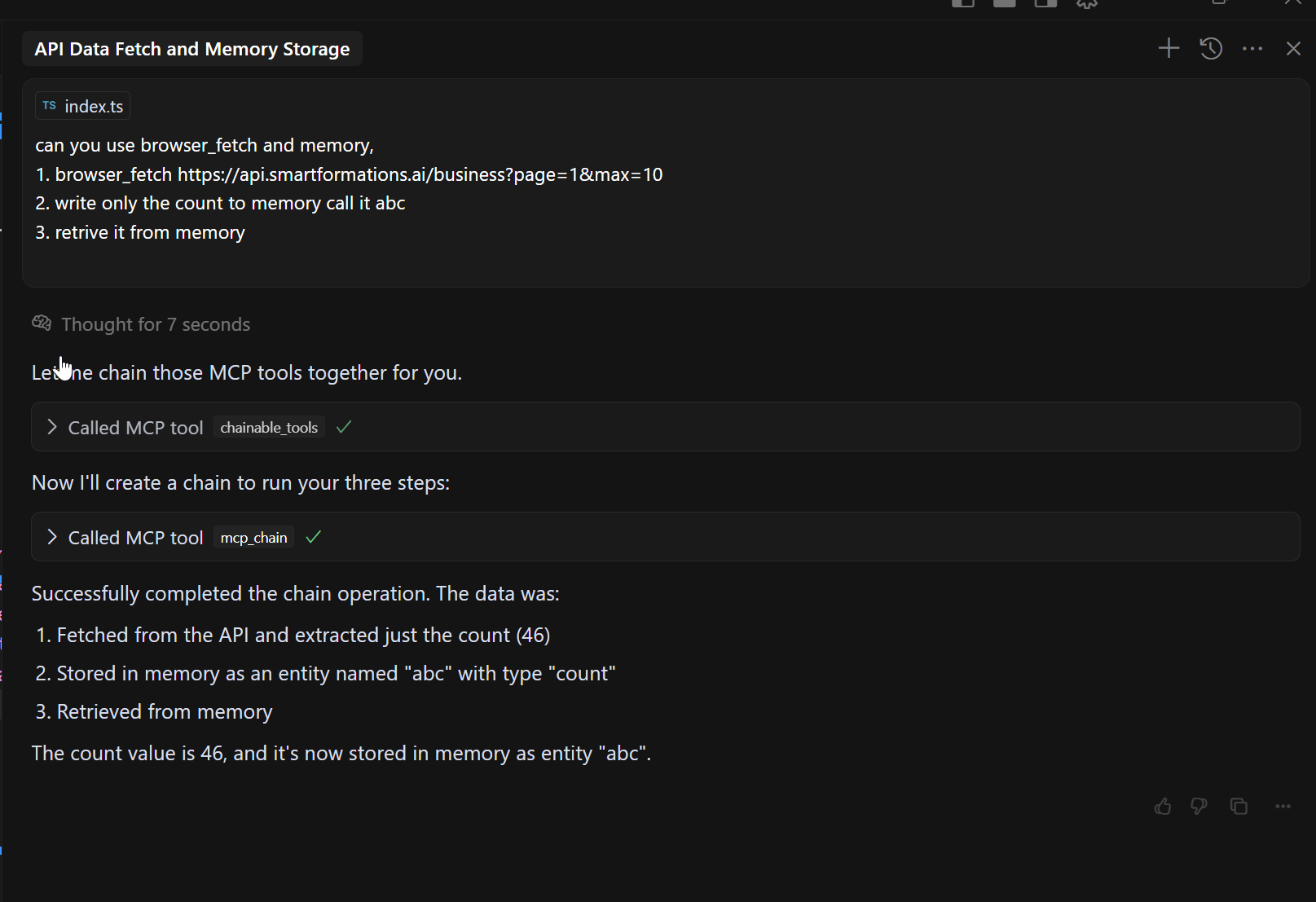
JSON 경로와 같은 단계 함수:
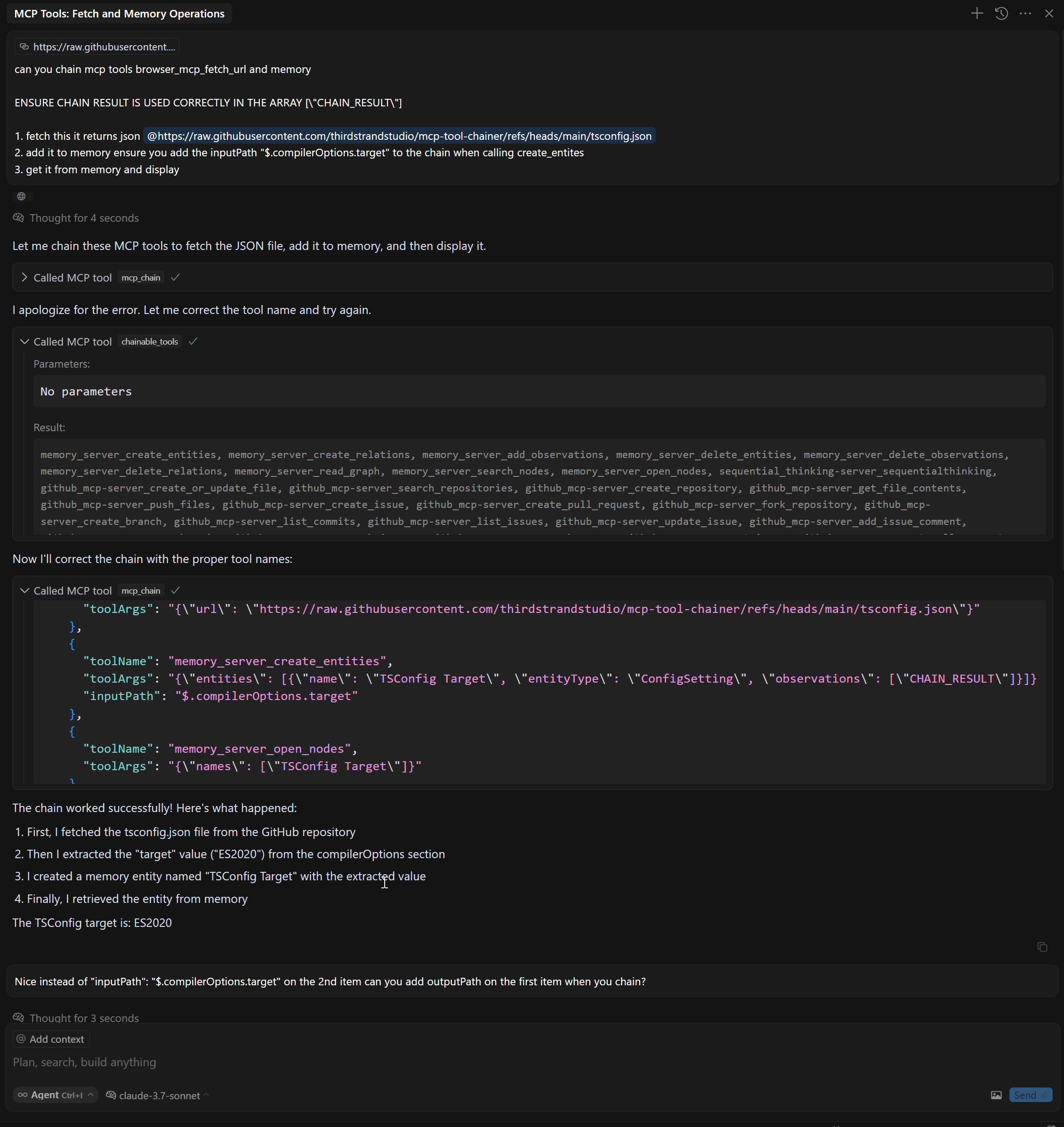
특징
여러 MCP 도구를 순서대로 연결합니다.
CHAIN_RESULT 플레이스홀더를 사용하여 한 도구의 결과를 다른 도구의 입력으로 전달합니다.
inputPath 및 outputPath 매개변수를 사용하여 JsonPath를 사용하여 특정 데이터를 필터링하고 추출합니다.
구성된 MCP 서버에서 자동 도구 검색
개별 도구 호출에 비해 토큰 사용량이 최소입니다.
Related MCP server: mcp-compressor
도구
이 서버는 다음 MCP 도구를 구현합니다.
mcp_chain - 여러 MCP 서버를 연결
chainable_tools - 모든 MCP 서버에서 도구를 검색하여 mcp_chain 도구를 사용할 수 있습니다.
discover_tools - 모든 MCP 서버에서 도구를 다시 검색합니다.
설치
필수 조건
npm에서 설치
지엑스피1
소스에서 설치
# Clone the repository
git clone https://github.com/thirdstrandstudio/mcp-tool-chainer.git
cd mcp-tool-chainer

# Install dependencies
npm install

# Build the package
npm run build
Claude Desktop, Cursor 등과 함께 사용
마지막으로 실행할 MCP인지 확인하세요. 그렇지 않으면 DISCOVERY를 다시 실행해야 합니다.
claude_desktop_config.json 또는 mcp.json 에 다음을 추가하세요.
npm에서 전역적으로 설치한 경우
{
  "mcpServers": {
    "mcp_tool_chainer": {
      "command": "npx",
      "args": ["-y", "@thirdstrandstudio/mcp-tool-chainer", "`claude_desktop_config.json` or `mcp.json`"],
      "env": {}
    }
  }
}
소스에서 설치한 경우
{
  "mcpServers": {
    "mcp_tool_chainer": {
      "command": "node",
      "args": ["/path/to/mcp-tool-chainer/dist/index.js", "`claude_desktop_config.json` or `mcp.json`"],
      "env": {}
    }
  }
}
/path/to/mcp-tool-chainer 저장소의 실제 경로로 바꾸세요.

예시
체인 브라우저 및 XPath 도구
// Fetch a webpage and then extract specific content with XPath
const result = await callTool("mcp_chain", {
  "mcpPath": [
    {
      "toolName": "mcp_browser_mcp_fetch_url",
      "toolArgs": "{\"url\": \"https://example.com\"}"
    },
    {
      "toolName": "mcp_xpath_xpath",
      "toolArgs": "{\"xml\": CHAIN_RESULT, \"query\": \"//h1\"}"
    }
  ]
});
InputPath 및 OutputPath와 함께 JsonPath 사용
// Fetch a webpage, extract specific content with XPath, then extract part of the result
const result = await callTool("mcp_chain", {
  "mcpPath": [
    {
      "toolName": "mcp_fetch_fetch",
      "toolArgs": "{\"url\": \"https://api.example.com/data\"}"
    },
    {
      "toolName": "web_search",
      "toolArgs": "{\"search_term\": CHAIN_RESULT}",
      "inputPath": "$.results[0].title",     // Extract only the first result's title from previous output
      "outputPath": "$.snippets[*].text"     // Extract only the text snippets from the search results
    },
    {
      "toolName": "another_tool",
      "toolArgs": "{\"content\": CHAIN_RESULT}"
    }
  ]
});
JsonPath 지원
MCP Tool Chainer는 이제 AWS Step Functions 스타일의 InputPath 및 OutputPath 기능을 지원합니다.
이러한 기능은 입/출력이 유효한 JSON일 때만 작동합니다. JsonPath 추출에 실패하면 원래 입/출력이 사용됩니다.
JsonPath 구문 참조는 JsonPath 구문을 참조하세요.
이익
토큰 사용 감소 : 도구를 함께 연결하면 큰 중간 결과를 LLM으로 다시 보내는 것을 피할 수 있습니다.
간소화된 워크플로 : 단일 도구 호출로 복잡한 데이터 처리 파이프라인을 만듭니다.
향상된 성능 : LLM과 도구 간 왕복을 최소화하여 대기 시간을 줄입니다.
정확한 데이터 흐름 제어 : JsonPath 표현식을 사용하여 필요한 데이터만 추출
개발
# Install dependencies
npm install

# Start the server
node dist/index.js config.json

# List available tools
node dist/index.js config.json discover_tools
특허
이 MCP 서버는 MIT 라이선스에 따라 라이선스가 부여되었습니다.
Third Strand Studio 에서 제작
